Azure DevOps Services |Azure DevOps Server 2022 - Azure DevOps Server 2019
可以使用 Azure DevOps 管道自动化机器学习的生命周期。 可以自动执行的操作包括:
- 数据准备(提取、转换、加载作)。
- 使用按需横向扩展和纵向扩展来训练机器学习模型。
- 将机器学习模型部署为公共或专用 Web 服务。
- 监视已部署的机器学习模型(例如性能或数据漂移分析)。
本文介绍如何创建生成machine learning模型的Azure管道并将其部署到 Azure 机器学习。
本教程使用 Azure 机器学习 Python SDK v2 和 Azure CLI ML 扩展 v2。
先决条件
- 完成创建资源以开始的教程。
- 创建工作区。
- 创建用于训练模型的基于云的计算群集 。
- 已安装用于在本地运行 Azure ML SDK v2 脚本的 Python 3.10 或更高版本。
- 安装用于Azure Pipelines的 Azure 机器学习 扩展。 可以从 Visual Studio 市场安装此扩展。
步骤 1:获取代码
从GitHub分叉以下存储库:
https://github.com/azure/azureml-examples
步骤 2:创建项目
登录到Azure。 搜索并选择 Azure DevOps 组织。 选择“ 查看我的组织”。 选择要使用的组织。
在所选组织中,创建 project。 如果您的组织中没有任何项目,您将会看到创建项目以开始的屏幕。 否则,请选择仪表板右上角的“新建Project”按钮。
步骤 3:创建服务连接
可使用现有的服务连接。
需要一个Azure 资源管理器连接才能使用Azure portal进行身份验证。
在 Azure DevOps 中,选择 Project 设置,然后选择 Service connections。
选择创建服务连接,选择Azure 资源管理器,然后选择Next。
使用标识类型和凭据的默认值。
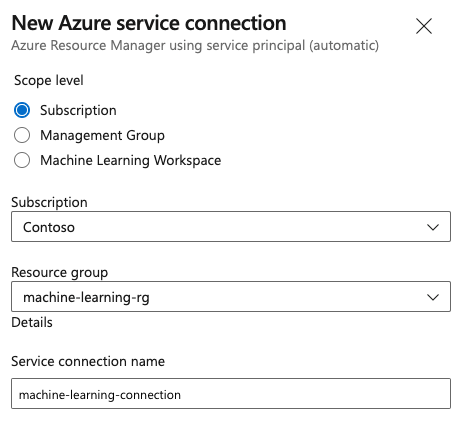
创建服务连接。 设置首选范围级别、订阅、资源组和连接名称。
步骤 4:创建管道
转到 Pipelines,然后选择 Create Pipeline。
选择 GitHub 作为源代码的位置。
可能会重定向到GitHub登录。 如果是,请输入GitHub凭据。
看到存储库列表时,请选择你的存储库。
你可能会重定向到GitHub来安装Azure Pipelines应用。 如果是,请选择“ 批准并安装”。
选择“初始管道”。 您更新了初学者管道模板。
步骤 5:创建 YAML 管道以提交Azure 机器学习作业
删除初始管道,并将其替换为以下 YAML 代码。 在此流程中,您将:
- 使用 Python 版本任务设置 Python 3.10 并安装 SDK 要求。
- 使用 Bash 任务为 Azure 机器学习 SDK 和 CLI 运行 bash 脚本。
- 使用Azure CLI任务提交Azure 机器学习作业。
选择以下选项卡之一,具体取决于使用的是Azure 资源管理器服务连接还是通用服务连接。 在管道 YAML 中,将变量的值替换为与资源对应的值。
name: submit-azure-machine-learning-job

trigger:
- none

variables:
  service-connection: 'machine-learning-connection' # replace with your service connection name
  resource-group: 'machinelearning-rg' # replace with your resource group name
  workspace: 'docs-ws' # replace with your workspace name

jobs:
- job: SubmitAzureMLJob
  displayName: Submit AzureML Job
  timeoutInMinutes: 300
  pool:
    vmImage: ubuntu-latest
  steps:
  - task: UsePythonVersion@0
    displayName: Use Python >=3.10
    inputs:
      versionSpec: '>=3.10'

  - bash: |
      set -ex

      az version
      az extension add -n ml
    displayName: 'Add AzureML Extension'

  - task: AzureCLI@2
    name: submit_azureml_job_task
    displayName: Submit AzureML Job Task
    inputs:
      azureSubscription: $(service-connection)
      workingDirectory: 'cli/jobs/pipelines-with-components/nyc_taxi_data_regression'
      scriptLocation: inlineScript
      scriptType: bash
      inlineScript: |

        # submit component job and get the run name
        job_name=$(az ml job create --file single-job-pipeline.yml -g $(resource-group) -w $(workspace) --query name --output tsv)

        # set output variable for next task
        echo "##vso[task.setvariable variable=JOB_NAME;isOutput=true;]$job_name"
步骤 6:等待Azure 机器学习作业完成
在步骤 5 中,你添加了一个作业来提交 Azure 机器学习任务。 在此步骤中,添加另一个等待Azure 机器学习作业完成的作业。
重要
此步骤中的两种等待机制(Azure 资源管理器 选项卡上的 AzureMLJobWaitTask@1 任务和泛型选项卡上的 InvokeRESTAPI@1 webhook 注册)取决于Azure 机器学习在作业完成时将 RunTerminated 通知发送回Azure DevOps。 此通知路径当前正在接受调查,可能无法按预期完成,导致 WaitFor* 服务器作业超时,无法反映 Azure 机器学习 作业状态。 如果遇到此行为,请使用 az ml job show --query status 轮询代理作业的状态,直到返回终端状态(Completed、Failed或Canceled),并以匹配的状态退出任务。
如果使用资源管理器服务连接,可以使用机器学习扩展。 可以在 Azure DevOps extensions Marketplace 中搜索此扩展或直接转到 extension 页面。 安装机器学习扩展。
重要
不要安装 机器学习 (经典) 扩展。 它是一个不提供相同功能的较旧扩展。
在“管道评审”窗口中,添加服务器任务。 在作业的步骤部分中,选择“ 显示助手”,然后搜索 AzureML。 选择AzureML Job Wait任务,然后输入作业相关的信息。
该任务有四个输入:Service Connection、Azure Resource Group Name、AzureML Workspace Name 和 AzureML Job Name。 提供这些输入。 这些步骤生成的 YAML 类似于以下示例:
注意事项
- Azure 机器学习作业等待任务在服务器作业上运行,该作业不使用昂贵的代理池资源,无需额外付费。 服务器任务(由
pool: server指示)与你的管道运行在同一台计算机上。 有关详细信息,请参阅 服务器任务。 - 一个 Azure 机器学习 作业等待任务只能等待一个作业。 需要为每个需要等待的作业设置单独的任务。
- Azure 机器学习作业等待任务最多可以等待两天。 此限制是由 Azure DevOps pipelines设置的硬性限制。
- job: WaitForAzureMLJobCompletion
  displayName: Wait for AzureML Job Completion
  pool: server
  timeoutInMinutes: 0
  dependsOn: SubmitAzureMLJob
  variables:
    # Save the name of the azureMl job submitted in the previous step to a variable. It will be used as an input to the AzureML Job Wait task.
    azureml_job_name_from_submit_job: $[ dependencies.SubmitAzureMLJob.outputs['submit_azureml_job_task.JOB_NAME'] ]
  steps:
  - task: AzureMLJobWaitTask@1
    inputs:
      serviceConnection: $(service-connection)
      resourceGroupName: $(resource-group)
      azureMLWorkspaceName: $(workspace)
      azureMLJobName: $(azureml_job_name_from_submit_job)
步骤 7:提交管道并验证管道的运行
选择“保存并运行”。 当步骤 6 中的等待机制按设计工作时,管道将等待Azure 机器学习作业完成并结束WaitForJobCompletion下的任务,其状态与Azure 机器学习作业相同。 例如:
Azure 机器学习作业
Succeeded==WaitForJobCompletion作业下的 Azure DevOps 任务SucceededAzure 机器学习作业
Failed==WaitForJobCompletion作业下的 Azure DevOps 任务FailedAzure 机器学习作业
Cancelled==WaitForJobCompletion作业下的 Azure DevOps 任务Cancelled
注意事项
由于步骤 6 中指出的问题,WaitFor* 作业可能会超时,导致无法反映 Azure 机器学习 作业的状态。 使用Azure 机器学习工作室确认实际作业结果,直到通知路径还原。
提示
可以在 Azure 机器学习工作室 中查看完整的Azure 机器学习作业。
清理资源
如果不打算继续使用管道,请删除 Azure DevOps 项目。 在Azure portal中删除资源组和Azure 机器学习实例。