Azure Site Recovery 使用每月发布的节奏来修复任何问题并增强现有功能或添加新功能。 要使服务保持最新,必须每月规划补丁部署。 为了避免每次升级关联的开销,可以允许 Site Recovery 管理组件更新。
如 Azure 到 Azure 的灾难恢复体系结构中所述,移动服务安装在所有已启用从一个 Azure 区域到另一个 Azure 区域复制的 Azure 虚拟机 (VM) 上。 使用自动更新时,每个新版本会更新出行服务扩展。
注释
建议使用 Azure Az PowerShell 模块与 Azure 交互。 若要开始,请参阅安装 Azure PowerShell。 若要了解如何迁移到 Az PowerShell 模块,请参阅 将 Azure PowerShell 从 AzureRM 迁移到 Az。
自动更新的工作方式
使用 Site Recovery 管理更新时,它会通过在与保管库相同订阅中创建的自动化帐户部署一个供 Azure 服务使用的全局 runbook。 每个保管库使用一个自动化帐户。 对于保管库中的每个 VM,运行手册都会检查是否启用了自动更新。 如果有较新版本的出行服务扩展可用,则会安装更新。
默认运行手册计划每天在复制 VM 所在地理区域的时区凌晨 12:00 执行。 您还可以通过自动化帐户更改运行簿计划。
注释
从更新汇总 35 开始,可以选择要用于更新的现有自动化帐户。 在更新汇总 35 之前,默认情况下 Site Recovery 创建自动化帐户。 仅当为 VM 启用复制时,才能选择该选项。 该选项不适用于已启用复制的虚拟机。 选择的设置适用于在同一保管库中受保护的所有 Azure VM。
启用自动更新不需要重新启动 Azure VM,也不会影响正在进行的复制。
自动化帐户中的作业计费是基于每月使用的作业运行时分钟数。 作业每天执行一次,耗时几秒到约一分钟,并计入免费额度。 默认情况下,自动化账户包含 500 分钟的免费额度,如下表所示:
| 包含的免费单元(每个月) | 价格 |
|---|---|
| 作业运行时 500 分钟 | ₹0.14/分钟 |
启用自动更新
Site Recovery 可以通过多种方式来管理扩展更新:
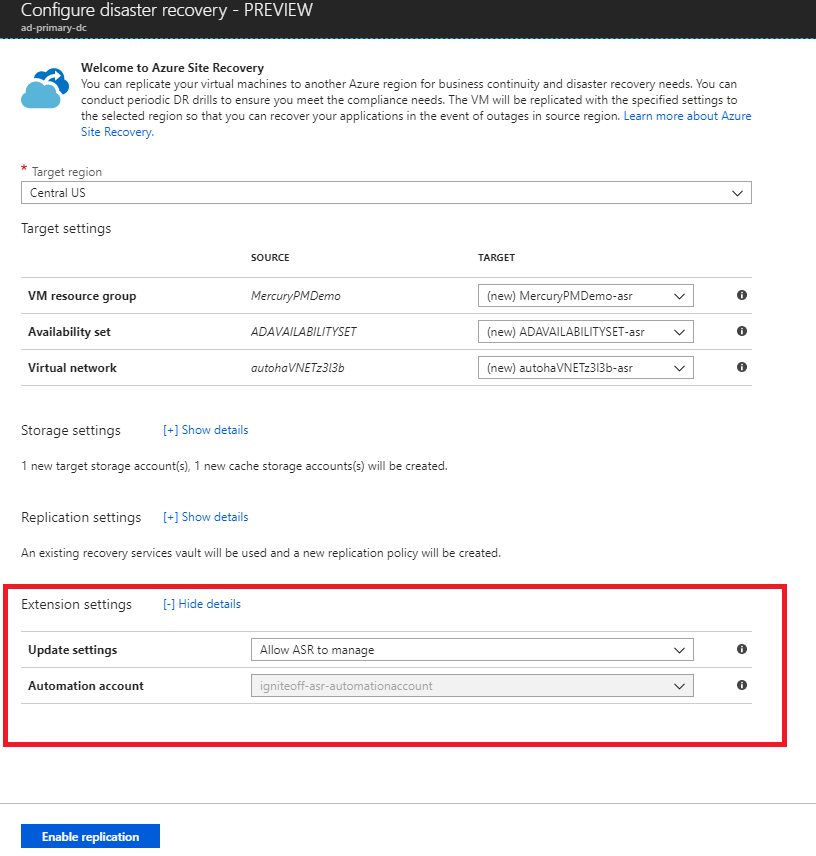
在启用复制步骤的过程中进行管理
从 VM 视图或从恢复服务保管库开始为 VM 启用复制时,可以允许 Site Recovery 管理 Site Recovery 扩展的更新,也可以手动对其进行管理。
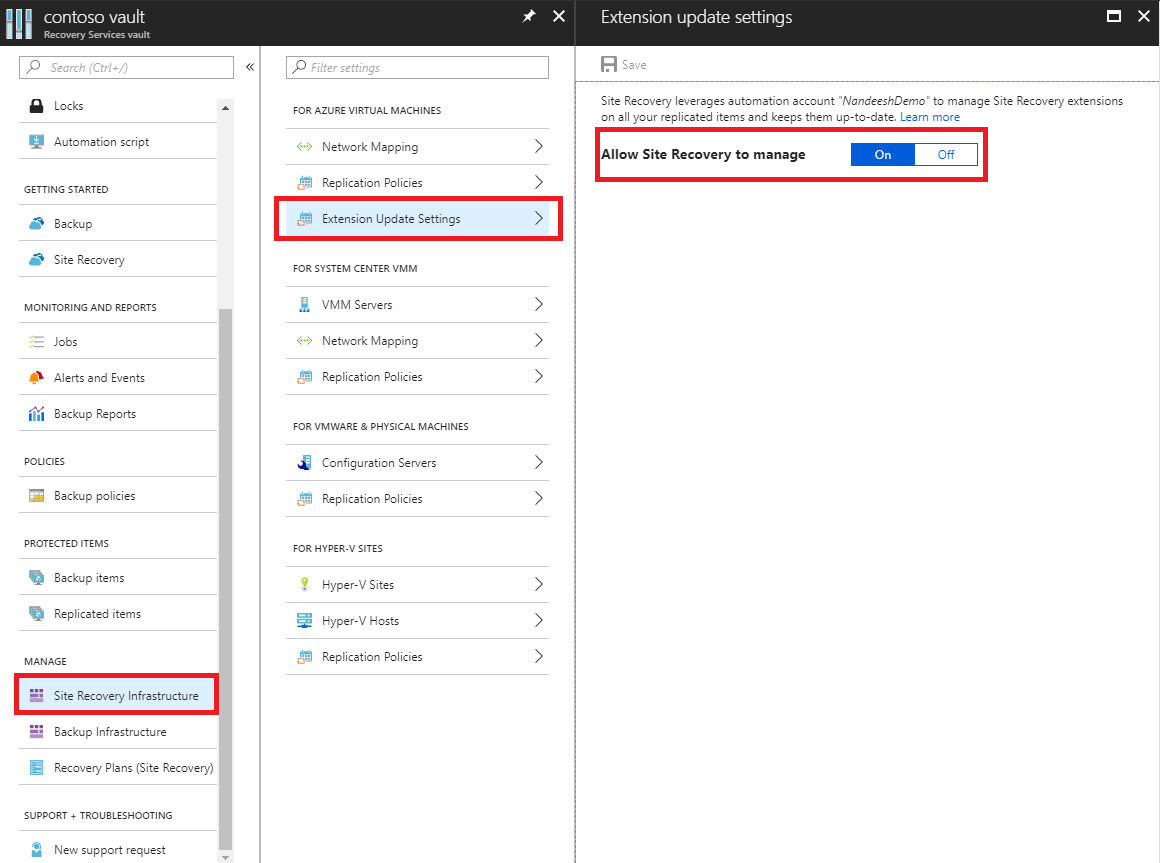
在保管库内切换扩展更新设置
从恢复服务保管库中,转到 管理Site Recovery 基础结构。
在 针对 Azure 虚拟机>扩展更新设置允许 Site Recovery 管理 下,选择 开。
要手动管理扩展,请选择“关闭”。
Important
选择“允许 Site Recovery 进行管理”时,此设置将应用于保管库中的所有 VM。
选择“保存”。
注释
任一选项都会告知你用于管理更新的自动化账户。 如果是首次在保管库中使用此功能,则默认情况下会创建一个新的自动化帐户。 或者,可以自定义设置,并选择现有的自动化帐户。 一旦定义后,用于在同一保管库中启用复制的所有后续操作都将使用该选定自动化帐户。 目前,下拉菜单将仅列出与保管库位于同一资源组中的自动化帐户。
对于自定义自动化帐户,请使用以下脚本:
Important
在自动化帐户的上下文中运行以下脚本。 此脚本利用系统分配的托管标识作为其身份验证类型。
param(
    [Parameter(Mandatory=$true)]
    [String] $VaultResourceId,
    [Parameter(Mandatory=$true)]
    [ValidateSet("Enabled",'Disabled')]
    [Alias("Enabled or Disabled")]
    [String] $AutoUpdateAction,
    [Parameter(Mandatory=$false)]
    [String] $AutomationAccountArmId
)
$SiteRecoveryRunbookName = "Modify-AutoUpdateForVaultForPartner"
$TaskId = [guid]::NewGuid().ToString()
$SubscriptionId = "aaaa0a0a-bb1b-cc2c-dd3d-eeeeee4e4e4e"
$AsrApiVersion = "2021-12-01"
$ArmEndPoint = "https://management.chinacloudapi.cn"
$AadAuthority = "https://login.chinacloudapi.cn/"
$AadAudience = "https://management.core.chinacloudapi.cn/"
$AzureEnvironment = "AzureChinaCloud"
$Timeout = "160"
$AuthenticationType = "SystemAssignedIdentity"
function Throw-TerminatingErrorMessage
{
        Param
    (
        [Parameter(Mandatory=$true)]
        [String]
        $Message
        )
    throw ("Message: {0}, TaskId: {1}.") -f $Message, $TaskId
}
function Write-Tracing
{
        Param
    (
        [Parameter(Mandatory=$true)]
        [ValidateSet("Informational", "Warning", "ErrorLevel", "Succeeded", IgnoreCase = $true)]
                [String]
        $Level,
        [Parameter(Mandatory=$true)]
        [String]
        $Message,
            [Switch]
        $DisplayMessageToUser
        )
    Write-Output $Message
}
function Write-InformationTracing
{
        Param
    (
        [Parameter(Mandatory=$true)]
        [String]
        $Message
        )
    Write-Tracing -Message $Message -Level Informational -DisplayMessageToUser
}
function ValidateInput()
{
    try
    {
        if(!$VaultResourceId.StartsWith("/subscriptions", [System.StringComparison]::OrdinalIgnoreCase))
        {
            $ErrorMessage = "The vault resource id should start with /subscriptions."
            throw $ErrorMessage
        }
        $Tokens = $VaultResourceId.SubString(1).Split("/")
        if(!($Tokens.Count % 2 -eq 0))
        {
            $ErrorMessage = ("Odd Number of tokens: {0}." -f $Tokens.Count)
            throw $ErrorMessage
        }
        if(!($Tokens.Count/2 -eq 4))
        {
            $ErrorMessage = ("Invalid number of resource in vault ARM id expected:4, actual:{0}." -f ($Tokens.Count/2))
            throw $ErrorMessage
        }
        if($AutoUpdateAction -ieq "Enabled" -and [string]::IsNullOrEmpty($AutomationAccountArmId))
        {
            $ErrorMessage = ("The automation account ARM id should not be null or empty when AutoUpdateAction is enabled.")
            throw $ErrorMessage
        }
    }
    catch
    {
        $ErrorMessage = ("ValidateInput failed with [Exception: {0}]." -f $_.Exception)
        Write-Tracing -Level ErrorLevel -Message $ErrorMessage -DisplayMessageToUser
        Throw-TerminatingErrorMessage -Message $ErrorMessage
    }
}
function Initialize-SubscriptionId()
{
    try
    {
        $Tokens = $VaultResourceId.SubString(1).Split("/")
        $Count = 0
                $ArmResources = @{}
        while($Count -lt $Tokens.Count)
        {
            $ArmResources[$Tokens[$Count]] = $Tokens[$Count+1]
            $Count = $Count + 2
        }
                return $ArmResources["subscriptions"]
    }
    catch
    {
        Write-Tracing -Level ErrorLevel -Message ("Initialize-SubscriptionId: failed with [Exception: {0}]." -f $_.Exception) -DisplayMessageToUser
        throw
    }
}
function Invoke-InternalRestMethod($Uri, $Headers, [ref]$Result)
{
    $RetryCount = 0
    $MaxRetry = 3
    do
    {
        try
        {
            $ResultObject = Invoke-RestMethod -Uri $Uri -Headers $Headers
            ($Result.Value) += ($ResultObject)
            break
        }
        catch
        {
            Write-InformationTracing ("Retry Count: {0}, Exception: {1}." -f $RetryCount, $_.Exception)
            $RetryCount++
            if(!($RetryCount -le $MaxRetry))
            {
                throw
            }
            Start-Sleep -Milliseconds 2000
        }
    }while($true)
}
function Invoke-InternalWebRequest($Uri, $Headers, $Method, $Body, $ContentType, [ref]$Result)
{
    $RetryCount = 0
    $MaxRetry = 3
    do
    {
        try
        {
            $ResultObject = Invoke-WebRequest -Uri $UpdateUrl -Headers $Header -Method 'PATCH' `
                -Body $InputJson  -ContentType "application/json" -UseBasicParsing
            ($Result.Value) += ($ResultObject)
            break
        }
        catch
        {
            Write-InformationTracing ("Retry Count: {0}, Exception: {1}." -f $RetryCount, $_.Exception)
            $RetryCount++
            if(!($RetryCount -le $MaxRetry))
            {
                throw
            }
            Start-Sleep -Milliseconds 2000
        }
    }while($true)
}
function Get-Header([ref]$Header, $AadAudience){
    try
    {
        $Header.Value['Content-Type'] = 'application\json'
        Write-InformationTracing ("The Authentication Type is system Assigned Identity based.")
        $endpoint = $env:IDENTITY_ENDPOINT
        $endpoint
        $Headers = New-Object "System.Collections.Generic.Dictionary[[String],[String]]"
        $Headers.Add("X-IDENTITY-HEADER", $env:IDENTITY_HEADER)
        $Headers.Add("Metadata", "True")
        $authenticationResult = Invoke-RestMethod -Method Get -Headers $Headers -Uri ($endpoint +'?resource=' +$AadAudience)
        $accessToken = $authenticationResult.access_token
        $Header.Value['Authorization'] = "Bearer " + $accessToken
        $Header.Value["x-ms-client-request-id"] = $TaskId + "/" + (New-Guid).ToString() + "-" + (Get-Date).ToString("u")
    }
    catch
    {
        $ErrorMessage = ("Get-BearerToken: failed with [Exception: {0}]." -f $_.Exception)
        Write-Tracing -Level ErrorLevel -Message $ErrorMessage -DisplayMessageToUser
        Throw-TerminatingErrorMessage -Message $ErrorMessage
    }
}
function Get-ProtectionContainerToBeModified([ref] $ContainerMappingList)
{
    try
    {
        Write-InformationTracing ("Get protection container mappings : {0}." -f $VaultResourceId)
        $ContainerMappingListUrl = $ArmEndPoint + $VaultResourceId + "/replicationProtectionContainerMappings" + "?api-version=" + $AsrApiVersion
        Write-InformationTracing ("Getting the bearer token and the header.")
        Get-Header ([ref]$Header) $AadAudience
        $Result = @()
        Invoke-InternalRestMethod -Uri $ContainerMappingListUrl -Headers $header -Result ([ref]$Result)
        $ContainerMappings = $Result[0]
        Write-InformationTracing ("Total retrieved container mappings: {0}." -f $ContainerMappings.Value.Count)
        foreach($Mapping in $ContainerMappings.Value)
        {
            if(($Mapping.properties.providerSpecificDetails -eq $null) -or ($Mapping.properties.providerSpecificDetails.instanceType -ine "A2A"))
            {
                Write-InformationTracing ("Mapping properties: {0}." -f ($Mapping.properties))
                Write-InformationTracing ("Ignoring container mapping: {0} as the provider does not match." -f ($Mapping.Id))
                continue;
            }
            if($Mapping.Properties.State -ine "Paired")
            {
                Write-InformationTracing ("Ignoring container mapping: {0} as the state is not paired." -f ($Mapping.Id))
                continue;
            }
            Write-InformationTracing ("Provider specific details {0}." -f ($Mapping.properties.providerSpecificDetails))
            $MappingAutoUpdateStatus = $Mapping.properties.providerSpecificDetails.agentAutoUpdateStatus
            $MappingAutomationAccountArmId = $Mapping.properties.providerSpecificDetails.automationAccountArmId
            $MappingHealthErrorCount = $Mapping.properties.HealthErrorDetails.Count
            if($AutoUpdateAction -ieq "Enabled" -and
                ($MappingAutoUpdateStatus -ieq "Enabled") -and
                ($MappingAutomationAccountArmId -ieq $AutomationAccountArmId) -and
                ($MappingHealthErrorCount -eq 0))
            {
                Write-InformationTracing ("Provider specific details {0}." -f ($Mapping.properties))
                Write-InformationTracing ("Ignoring container mapping: {0} as the auto update is already enabled and is healthy." -f ($Mapping.Id))
                continue;
            }
            ($ContainerMappingList.Value).Add($Mapping.id)
        }
    }
    catch
    {
        $ErrorMessage = ("Get-ProtectionContainerToBeModified: failed with [Exception: {0}]." -f $_.Exception)
        Write-Tracing -Level ErrorLevel -Message $ErrorMessage -DisplayMessageToUser
        Throw-TerminatingErrorMessage -Message $ErrorMessage
    }
}
$OperationStartTime = Get-Date
$ContainerMappingList = New-Object System.Collections.Generic.List[System.String]
$JobsInProgressList = @()
$JobsCompletedSuccessList = @()
$JobsCompletedFailedList = @()
$JobsFailedToStart = 0
$JobsTimedOut = 0
$Header = @{}
$AzureRMProfile = Get-Module -ListAvailable -Name AzureRM.Profile | Select Name, Version, Path
$AzureRmProfileModulePath = Split-Path -Parent $AzureRMProfile.Path
Add-Type -Path (Join-Path $AzureRmProfileModulePath "Microsoft.IdentityModel.Clients.ActiveDirectory.dll")
$Inputs = ("Tracing inputs VaultResourceId: {0}, Timeout: {1}, AutoUpdateAction: {2}, AutomationAccountArmId: {3}." -f $VaultResourceId, $Timeout, $AutoUpdateAction, $AutomationAccountArmId)
Write-Tracing -Message $Inputs -Level Informational -DisplayMessageToUser
$CloudConfig = ("Tracing cloud configuration ArmEndPoint: {0}, AadAuthority: {1}, AadAudience: {2}." -f $ArmEndPoint, $AadAuthority, $AadAudience)
Write-Tracing -Message $CloudConfig -Level Informational -DisplayMessageToUser
ValidateInput
$SubscriptionId = Initialize-SubscriptionId
Get-ProtectionContainerToBeModified ([ref]$ContainerMappingList)
$Input = @{
  "properties"= @{
    "providerSpecificInput"= @{
        "instanceType" = "A2A"
        "agentAutoUpdateStatus" = $AutoUpdateAction
        "automationAccountArmId" = $AutomationAccountArmId
        "automationAccountAuthenticationType" = $AuthenticationType
    }
  }
}
$InputJson = $Input |  ConvertTo-Json
if ($ContainerMappingList.Count -eq 0)
{
    Write-Tracing -Level Succeeded -Message ("Exiting as there are no container mappings to be modified.") -DisplayMessageToUser
    exit
}
Write-InformationTracing ("Container mappings to be updated has been retrieved with count: {0}." -f $ContainerMappingList.Count)
try
{
    Write-InformationTracing ("Start the modify container mapping jobs.")
    ForEach($Mapping in $ContainerMappingList)
    {
    try {
            $UpdateUrl = $ArmEndPoint + $Mapping + "?api-version=" + $AsrApiVersion
            Get-Header ([ref]$Header) $AadAudience
            $Result = @()
            Invoke-InternalWebRequest -Uri $UpdateUrl -Headers $Header -Method 'PATCH' `
                -Body $InputJson  -ContentType "application/json" -Result ([ref]$Result)
            $Result = $Result[0]
            $JobAsyncUrl = $Result.Headers['Azure-AsyncOperation']
            Write-InformationTracing ("The modify container mapping job invoked with async url: {0}." -f $JobAsyncUrl)
            $JobsInProgressList += $JobAsyncUrl;
            # Rate controlling the set calls to maximum 60 calls per minute.
            # ASR throttling for set calls is 200 in 1 minute.
            Start-Sleep -Milliseconds 1000
        }
        catch{
            Write-InformationTracing ("The modify container mappings job creation failed for: {0}." -f $Ru)
            Write-InformationTracing $_
            $JobsFailedToStart++
        }
    }
    Write-InformationTracing ("Total modify container mappings has been initiated: {0}." -f $JobsInProgressList.Count)
}
catch
{
    $ErrorMessage = ("Modify container mapping jobs failed with [Exception: {0}]." -f $_.Exception)
    Write-Tracing -Level ErrorLevel -Message $ErrorMessage -DisplayMessageToUser
    Throw-TerminatingErrorMessage -Message $ErrorMessage
}
try
{
    while($JobsInProgressList.Count -ne 0)
    {
        Sleep -Seconds 30
        $JobsInProgressListInternal = @()
        ForEach($JobAsyncUrl in $JobsInProgressList)
        {
            try
            {
                Get-Header ([ref]$Header) $AadAudience
                $Result = Invoke-RestMethod -Uri $JobAsyncUrl -Headers $header
                $JobState = $Result.Status
                if($JobState -ieq "InProgress")
                {
                    $JobsInProgressListInternal += $JobAsyncUrl
                }
                elseif($JobState -ieq "Succeeded" -or `
                    $JobState -ieq "PartiallySucceeded" -or `
                    $JobState -ieq "CompletedWithInformation")
                {
                    Write-InformationTracing ("Jobs succeeded with state: {0}." -f $JobState)
                    $JobsCompletedSuccessList += $JobAsyncUrl
                }
                else
                {
                    Write-InformationTracing ("Jobs failed with state: {0}." -f $JobState)
                    $JobsCompletedFailedList += $JobAsyncUrl
                }
            }
            catch
            {
                Write-InformationTracing ("The get job failed with: {0}. Ignoring the exception and retrying the next job." -f $_.Exception)
                # The job on which the tracking failed, will be considered in progress and tried again later.
                $JobsInProgressListInternal += $JobAsyncUrl
            }
            # Rate controlling the get calls to maximum 120 calls each minute.
            # ASR throttling for get calls is 10000 in 60 minutes.
            Start-Sleep -Milliseconds 500
        }
        Write-InformationTracing ("Jobs remaining {0}." -f $JobsInProgressListInternal.Count)
        $CurrentTime = Get-Date
        if($CurrentTime -gt $OperationStartTime.AddMinutes($Timeout))
        {
            Write-InformationTracing ("Tracing modify cloud pairing jobs has timed out.")
            $JobsTimedOut = $JobsInProgressListInternal.Count
            $JobsInProgressListInternal = @()
        }
        $JobsInProgressList = $JobsInProgressListInternal
    }
}
catch
{
    $ErrorMessage = ("Tracking modify cloud pairing jobs failed with [Exception: {0}]." -f $_.Exception)
    Write-Tracing -Level ErrorLevel -Message $ErrorMessage  -DisplayMessageToUser
    Throw-TerminatingErrorMessage -Message $ErrorMessage
}
Write-InformationTracing ("Tracking modify cloud pairing jobs completed.")
Write-InformationTracing ("Modify cloud pairing jobs success: {0}." -f $JobsCompletedSuccessList.Count)
Write-InformationTracing ("Modify cloud pairing jobs failed: {0}." -f $JobsCompletedFailedList.Count)
Write-InformationTracing ("Modify cloud pairing jobs failed to start: {0}." -f $JobsFailedToStart)
Write-InformationTracing ("Modify cloud pairing jobs timedout: {0}." -f $JobsTimedOut)
if($JobsTimedOut -gt  0)
{
    $ErrorMessage = "One or more modify cloud pairing jobs has timedout."
    Write-Tracing -Level ErrorLevel -Message ($ErrorMessage)
    Throw-TerminatingErrorMessage -Message $ErrorMessage
}
elseif($JobsCompletedSuccessList.Count -ne $ContainerMappingList.Count)
{
    $ErrorMessage = "One or more modify cloud pairing jobs failed."
    Write-Tracing -Level ErrorLevel -Message ($ErrorMessage)
    Throw-TerminatingErrorMessage -Message $ErrorMessage
}
Write-Tracing -Level Succeeded -Message ("Modify cloud pairing completed.") -DisplayMessageToUser
手动管理更新
如果在你的 VM 上安装的移动服务有新的更新,你将看到以下通知:有新的 Site Recovery 复制代理更新可用。单击进行安装。
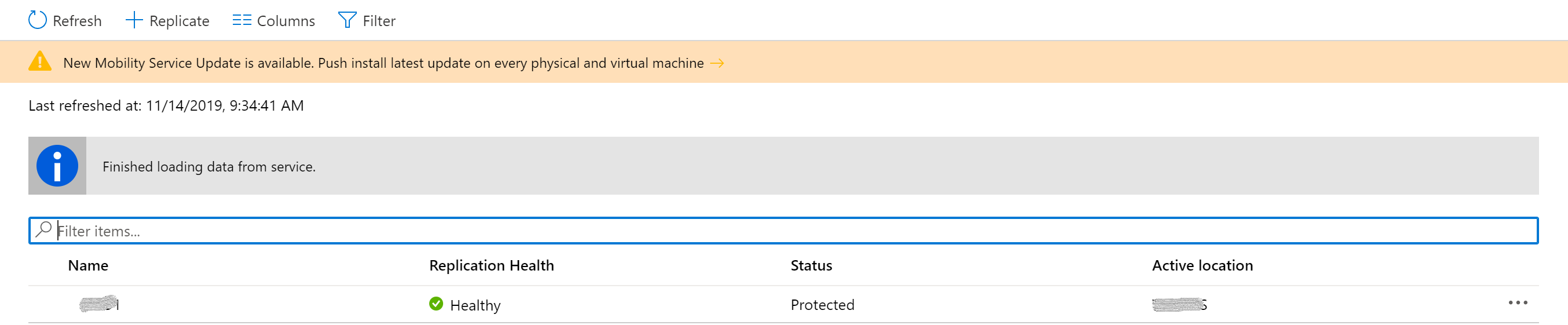
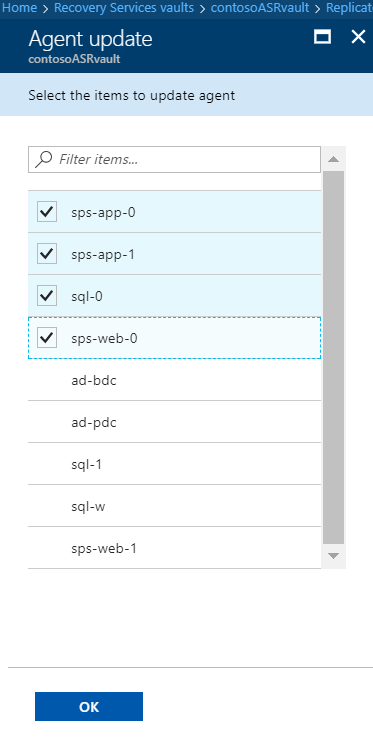
选择通知以打开 VM 选择页面。
选择要升级的 VM,然后选择“确定”。 将为每个选定的虚拟机启动更新迁移服务。
常见问题和故障排除
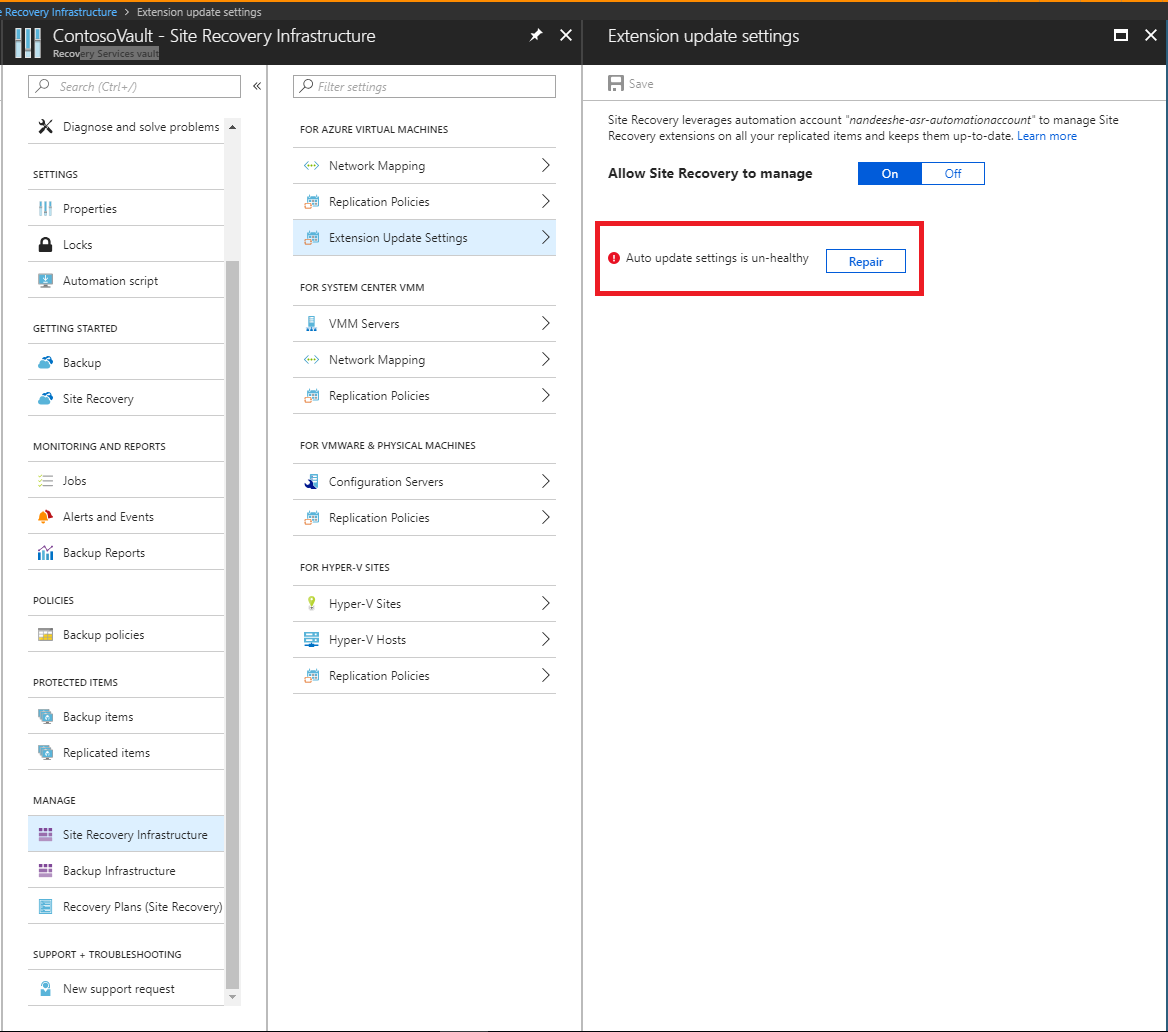
如果自动更新出现问题,将会在保管库仪表板的“配置问题”下看到一条错误通知。
Azure 自动化 Run As账户于2023年9月30日退休。 自动更新必须使用带有管理身份的自动化账户。
如果现有保管库仍然报告“Run As 帐户”、服务主体或证书错误,请将自动化帐户迁移到托管身份。 然后确认托管身份有恢复服务金库的访问权限,并在扩展更新设置中选择修复。
后续步骤
详细了解如何将自动化帐户的身份验证类型迁移到托管标识。