通过 VM 应用程序使用 Azure Policy,客户和管理团队可以:
- 监视虚拟机和虚拟机规模集中所需虚拟机应用程序的存在。
- 在所有虚拟机和虚拟机规模设置中注入所需的 VM 应用程序。
- 在所有Virtual Machines和Virtual Machine Scale Sets中强制实施一致的配置和最佳做法,以提高可靠性和安全性。
本指南演示如何:
- 控制所需的 VM 应用程序,以便进行合规性监视。
- 强制实施所需的 VM 应用程序,以推动一致性和安全性。
先决条件
一个Azure计算库,其中包含要强制执行的已发布 VM 应用程序和版本。 请参阅 创建和管理 VM 应用程序。
- 确保版本复制到需要应用程序存在的所有区域。
- 确保资源库共享到所有需要访问 VM 应用程序的订阅。
权限:
- 用于创建或分配策略的策略贡献者。 请参阅 策略定义结构和分配。
设置符合性监视器以控制所需的 VM 应用程序
具有 audit 效果的 Azure 策略可用于监视 Azure 虚拟机和虚拟机规模集中的特定 VM 应用程序的存在。 管理员团队可以使用此策略
- 为 VM 应用配置符合性监视器(查看符合要求与不符合要求的虚拟机和虚拟机规模集)
- 测量打包为 VM 应用程序的软件包的推出进度。
1. 创建自定义策略定义
使用以下定义创建新的自定义策略。 此策略检查特定 VM 应用程序是否存在于Virtual Machines和Virtual Machine Scale Sets上,并报告符合性状态。
此策略监视所有 Linux 和 Windows 系统中虚拟机及虚拟机规模集的合规性。 Windows VM 上的 Linux 应用和 Linux VM 上的 Windows 应用被视为合规资源。
{
    "mode": "Indexed",
    "policyRule": {
        "if": {
            "anyOf": [
                {
                    "allOf": [
                        { "field": "type", "equals": "Microsoft.Compute/virtualMachines" },
                        {"field": "Microsoft.Compute/virtualMachines/storageProfile.osDisk.osType", "equals": "[parameters('osType')]" },
                        {
                            "count": {
                                "field": "Microsoft.Compute/virtualMachines/applicationProfile.galleryApplications[*]",
                                "where": {
                                    "allOf": [
                                        {
                                            "field": "Microsoft.Compute/virtualMachines/applicationProfile.galleryApplications[*].packageReferenceId",
                                            "contains": "[concat('/galleries/', parameters('galleryName'), '/applications/', parameters('applicationName'), '/')]"
                                        }
                                    ]
                                }
                            },
                            "equals": 0
                        }
                    ]
                },
                {
                    "allOf": [
                        { "field": "type", "equals": "Microsoft.Compute/virtualMachineScaleSets" },
                        {"field": "Microsoft.Compute/virtualMachineScaleSets/virtualMachineProfile.storageProfile.osDisk.osType", "equals": "[parameters('osType')]" },
                        {
                            "count": {
                                "field": "Microsoft.Compute/virtualMachineScaleSets/virtualMachineProfile.applicationProfile.galleryApplications[*]",
                                "where": {
                                    "allOf": [
                                        {
                                            "field": "Microsoft.Compute/virtualMachineScaleSets/virtualMachineProfile.applicationProfile.galleryApplications[*].packageReferenceId",
                                            "contains": "[concat('/galleries/', parameters('galleryName'), '/applications/', parameters('applicationName'), '/')]"
                                        }
                                    ]
                                }
                            },
                            "equals": 0
                        }
                    ]
                }
            ]
        },
        "then": { "effect": "audit" }
    },
    "parameters": {
        "galleryName": {
            "type": "String",
            "metadata": { "description": "Name of the Azure Compute Gallery containing the VM Application." }
        },
        "applicationName": {
            "type": "String",
            "metadata": { "description": "Name of the VM Application to audit for presence." }
        },
        "osType": {
            "type": "String",
            "allowedValues": [ "Windows", "Linux" ],
            "metadata": { "description": "OS type of the VM Application (Windows or Linux)." }
        }
    }
}
2.分配策略并查看符合性
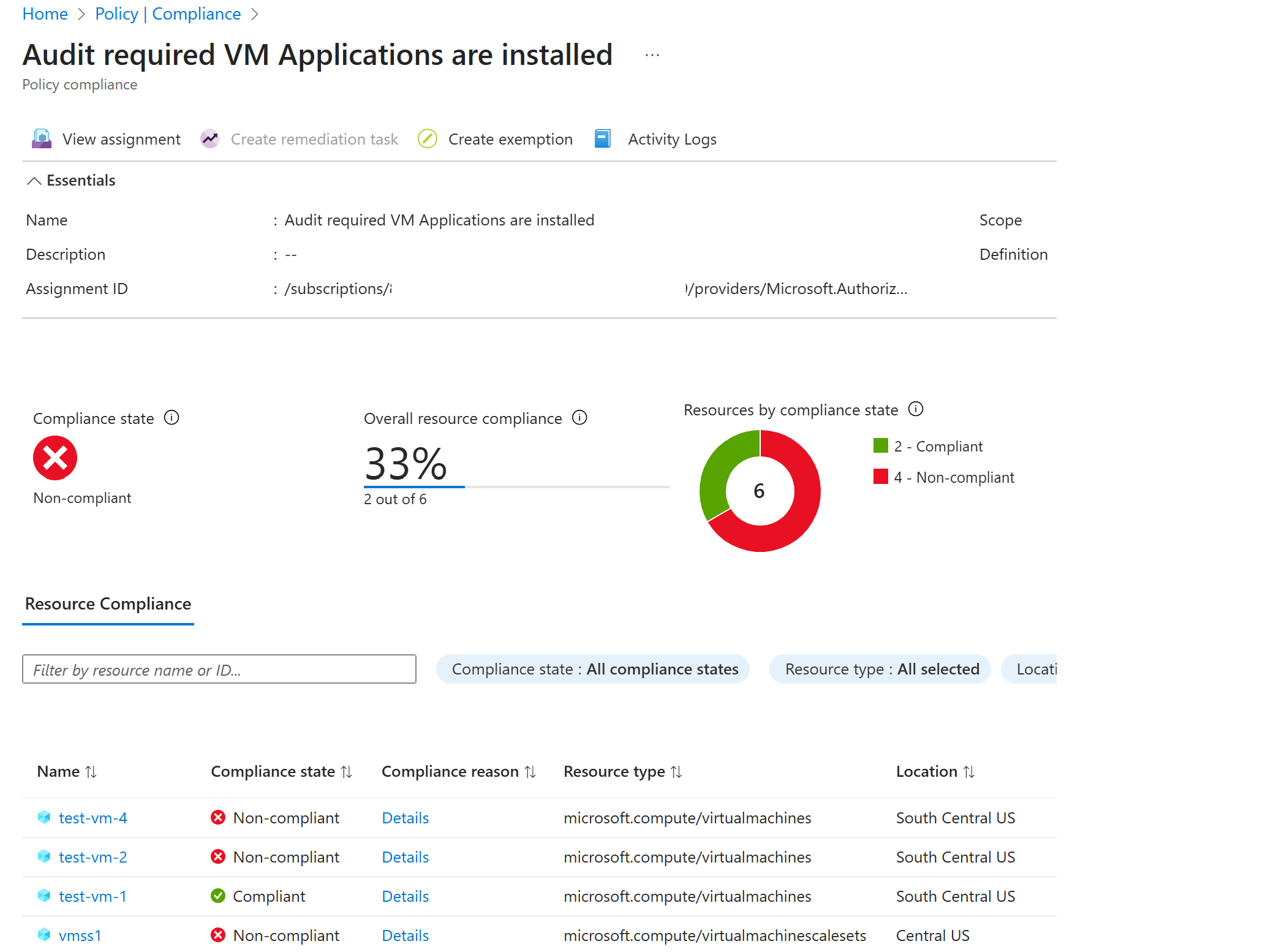
分配新创建的策略 以开始监视 VM 应用程序并生成合规性分数。 将在指定范围内监视所有虚拟机和虚拟机规模集,以确保合规性。
为每个 VM 应用程序创建单独的分配,以便进行精细和准确的监视。
分配策略后,所有现有资源都会 在符合性监视器上进行评估并显示。 策略中定义的虚拟机 (VM) 应用程序在不合规的资源中缺失。 没有 applicationProfile 的资源也算作不合规。 新创建或更新的资源可能需要几分钟才能出现在评估周期中。
常见调整
审核多个必需的应用程序:创建单独的策略(每个应用程序一个),或通过在参数下
allOf添加其他应用程序来更新策略。阻止创建没有所需应用程序的虚拟机:将其效果更改为
deny,以防止不合规的创建。将策略范围限制为 Virtual Machines 或 Virtual Machine Scale Sets:从
anyOf中的policyRule删除未使用的分支。按操作系统类型限制策略范围:在
policyRule中检查osTypestorageProfile,以基于 Windows/Linux 操作系统进行过滤。{ "field": "Microsoft.Compute/virtualMachines/storageProfile.osDisk.osType", "equals": "[parameters('osType')]" }按 OS 映像限制策略范围:检查
policyRule中offer和sku,根据映像进行筛选:{ "field": "Microsoft.Compute/virtualMachines/storageProfile.imageReference.offer", "equals": "[parameters('imageOffer')]" }, { "field": "Microsoft.Compute/virtualMachines/storageProfile.imageReference.sku", "equals": "[parameters('imageSku')]" }
在虚拟机和虚拟机规模集上注入 VM 应用程序
具有 modify 效果的Azure Policy 在创建新虚拟机和虚拟机规模集时会注入 VM 应用程序。 修正任务可用于修改现有资源并注入 VM 应用程序。
先决条件
- 在策略分配中使用 虚拟机参与者 角色的托管标识,从而可以修正和修改资源。 请参阅 修正标识要求。
1. 创建自定义策略定义
使用策略定义创建新的自定义策略。 此策略在创建Virtual Machines或Virtual Machine Scale Sets时检查 VM 应用程序是否存在,并在 VM 应用程序不存在时追加 VM 应用程序。 若要修改多个资源类型(虚拟机和Virtual Machine Scale Sets),建议为每个资源类型创建不同的策略。
{
"displayName": "Inject VM Application into single instance VMs",
"policyType": "Custom",
"mode": "Indexed",
"description": "Appends a VM Application reference to applicationProfile for single instance VMs if the application is not already present. Filters by OS type to prevent cross-platform injection.",
"parameters": {
"subscriptionId": {
"type": "String",
"metadata": {
"description": "Subscription ID where the Compute Gallery resides."
}
},
"resourceGroup": {
"type": "String",
"metadata": {
"description": "Resource group of the Compute Gallery."
}
},
"galleryName": {
"type": "String",
"metadata": {
"description": "Name of the Compute Gallery."
}
},
"applicationName": {
"type": "String",
"metadata": {
"description": "VM Application name."
}
},
"applicationVersion": {
"type": "String",
"defaultValue": "latest",
"metadata": {
"description": "VM Application version. Defaults to latest."
}
},
"osType": {
"type": "String",
"allowedValues": [
"Windows",
"Linux"
],
"metadata": {
"description": "Target OS type. Ensures the application is only injected onto VMs with a matching OS."
}
}
},
"policyRule": {
"if": {
"allOf": [
{
"field": "type",
"equals": "Microsoft.Compute/virtualMachines"
},
{
"field": "Microsoft.Compute/virtualMachines/storageProfile.osDisk.osType",
"equals": "[parameters('osType')]"
},
{
"count": {
"field": "Microsoft.Compute/virtualMachines/applicationProfile.galleryApplications[*]",
"where": {
"field": "Microsoft.Compute/virtualMachines/applicationProfile.galleryApplications[*].packageReferenceId",
"contains": "[concat('/galleries/', parameters('galleryName'), '/applications/', parameters('applicationName'), '/')]"
}
},
"equals": 0
}
]
},
"then": {
"effect": "modify",
"details": {
"roleDefinitionIds": [
"/providers/Microsoft.Authorization/roleDefinitions/9980e02c-c2be-4d73-94e8-173b1dc7cf3c"
],
"operations": [
{
"operation": "add",
"field": "Microsoft.Compute/virtualMachines/applicationProfile.galleryApplications",
"value": {
"packageReferenceId": "[concat('/subscriptions/', parameters('subscriptionId'), '/resourceGroups/', parameters('resourceGroup'), '/providers/Microsoft.Compute/galleries/', parameters('galleryName'), '/applications/', parameters('applicationName'), '/versions/', parameters('applicationVersion'))]",
"order": 1,
"treatFailureAsDeploymentFailure": true
}
}
]
}
}
}
}
2. 指定策略
分配新创建的策略 以开始生成合规性分数。 将在指定范围内监视所有虚拟机和虚拟机规模集,以确保合规性。 分配策略后,所有现有资源都会 在符合性监视器上进行评估并显示。
创建新的 Virtual Machines 和 Virtual Machine Scale Sets 资源会触发此策略,并修改资源的 applicationProfile,以注入应用程序。
3.创建修正任务并修改现有资源
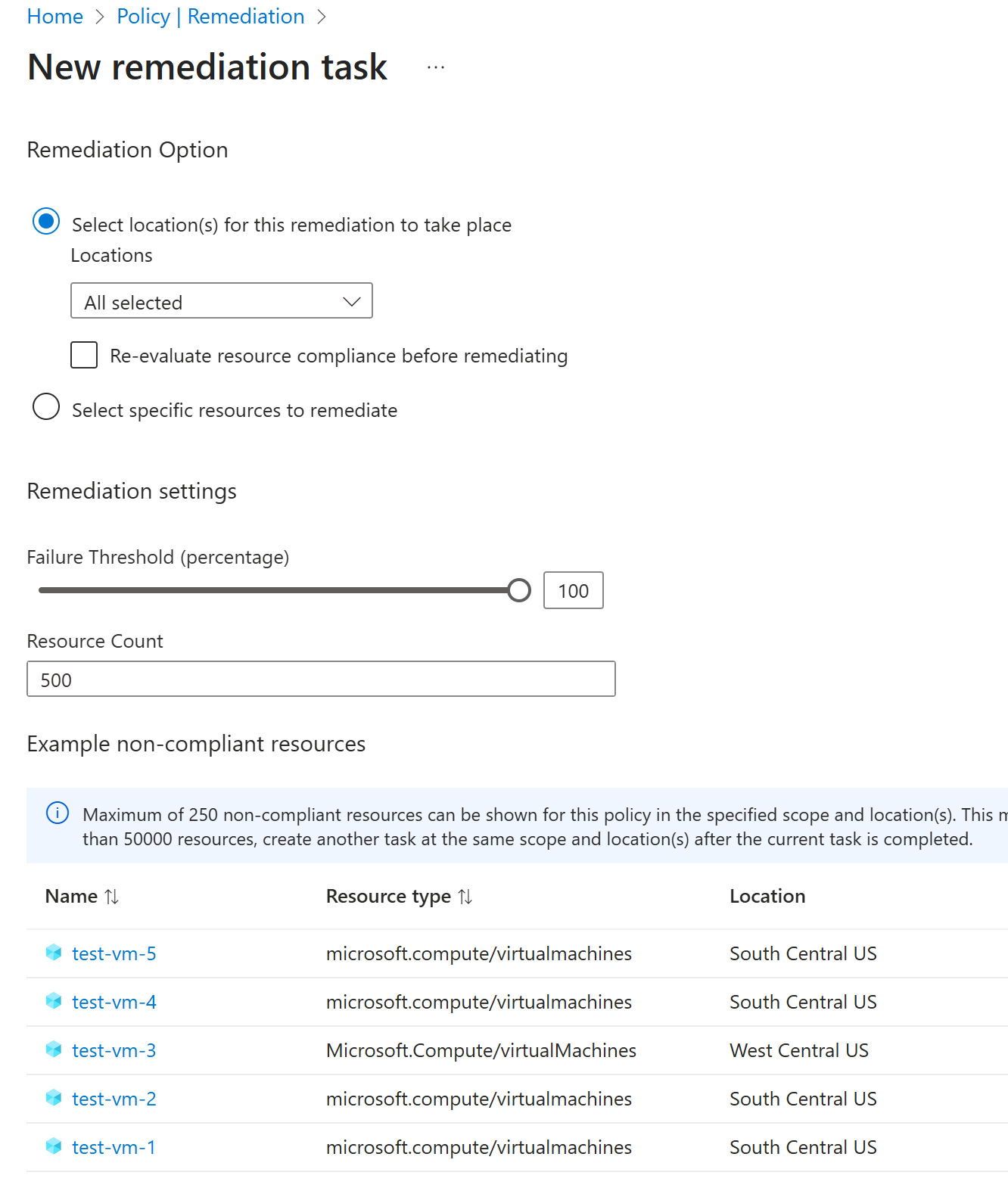
若要修改现有资源,请创建新的 修正任务。
注释
逐步修正不符合资源以实现更高的可用性和故障复原能力。 创建多个修正任务,每个任务的范围都限定为一个或多个区域。
常见调整
以下示例显示了可以添加到 allOf 块中的 policyRule 更多条件,以缩小策略范围。
按 OS 映像限制策略范围:根据特定映像套餐和 SKU 进行筛选:
{ "field": "Microsoft.Compute/virtualMachines/storageProfile.imageReference.offer", "equals": "[parameters('imageOffer')]" }, { "field": "Microsoft.Compute/virtualMachines/storageProfile.imageReference.sku", "equals": "[parameters('imageSku')]" }按区域划分的Limit 策略范围:目标特定的Azure区域:
{ "field": "location", "in": "[parameters('allowedLocations')]" }按资源组或订阅限制策略范围:若要减少修正范围,请将策略分配给特定资源组或订阅。 分配策略时使用 分配范围 ,而不是修改策略定义。 若要进行更精细的控制,请使用 排除 项从分配中省略特定资源组。
后续步骤
- 详细了解 Azure VM 应用程序。
- 了解如何创建和部署 VM 应用程序包。
- 了解如何管理并删除Azure VM 应用程序。
- 了解如何 为 VM 应用程序创建应用程序包