本文介绍使用Azure 资源管理器模板(ARM 模板)或Bicep文件部署资源时可能发生的资源配额错误。
症状
如果模板创建的资源超过Azure配额,则可能会出现以下错误:
Code=OperationNotAllowed
Message=Operation results in exceeding quota limits of Core.
Maximum allowed: 4, Current in use: 4, Additional requested: 2.
或者,你可能会看到此错误:
Code=ResourceQuotaExceeded
Message=Creating the resource of type <resource-type> would exceed the quota of <number>
resources of type <resource-type> per resource group. The current resource count is <number>,
please delete some resources of this type before creating a new one.
原因
配额按资源组、订阅、帐户和其他范围应用。 例如,可以将订阅配置为限制区域的 vCPU 数。 如果您尝试部署的虚拟机所含 vCPU 数量超过允许的数量,您会收到“已超出配额”的错误。
有关配额信息,请参阅Azure订阅和服务限制、配额和约束。
对于Azure CLI,请使用 az vm list-usage 命令查找虚拟机配额。
az vm list-usage --location "China East 2" --output table
Name                                      CurrentValue    Limit
----------------------------------------  --------------  -------
Availability Sets                         0               2500
Total Regional vCPUs                      0               100
Virtual Machines                          0               25000
Virtual Machine Scale Sets                0               2500
Dedicated vCPUs                           0               3000
Cloud Services                            0               2500
Total Regional Low-priority vCPUs         0               100
Standard BS Family vCPUs                  0               100
...
解决方案
若要请求增加配额,请转到门户并提交支持问题。 在支持问题中,请求增加要部署到的区域的配额。
Note
请记住,对于资源组,配额适用于每个单个区域,而不是针对整个订阅。 如果你需要在中国北部 2 部署 30 个内核,则必须在中国北部 2 申请 30 个资源管理器内核。 如果需要在有权访问的任何区域中部署 30 个核心,则应在所有区域中请求 30 个资源管理器核心。
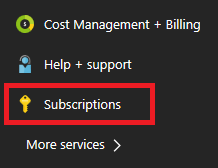
选择 订阅。
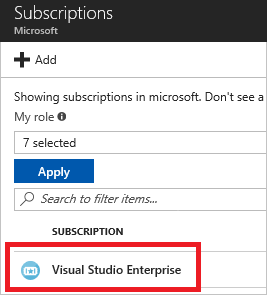
选择需要增加配额的订阅。
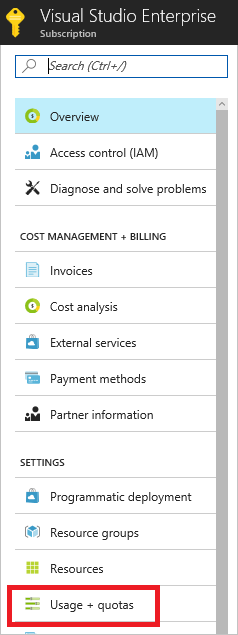
选择“使用情况 + 配额”
在右上角,选择“ 请求增加”。
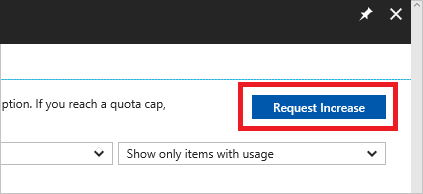
填写完成“常规信息和问题”部分后需要增加的配额类型的表单。