SignalR 服务 SDK 支持对 SignalR 服务实例使用多个终结点。 可以使用此功能来扩展并发连接,或将其用于跨区域的消息传送。
重要
本文中出现的原始连接字符串仅用于演示目的。
连接字符串包括应用程序访问 Azure SignalR 服务所需的授权信息。 连接字符串中的访问密钥类似于服务的根密码。 在生产环境中,请始终保护访问密钥。 使用 Azure 密钥保管库安全地管理和轮换密钥,使用 Microsoft Entra ID 保护连接字符串,并使用 Microsoft Entra ID 授权访问。
避免将访问密钥分发给其他用户、对其进行硬编码或将其以纯文本形式保存在其他人可以访问的任何位置。 如果你认为访问密钥可能已泄露,请轮换密钥。
适用于 ASP.NET Core
从配置中添加多个端点
本文中出现的原始连接字符串仅用于演示目的。 在生产环境中,请始终保护访问密钥。 使用 Azure 密钥保管库安全地管理和轮换密钥,使用 Microsoft Entra ID 保护连接字符串,并使用 Microsoft Entra ID 授权访问。
使用 SignalR 服务连接字符串的密钥 Azure:SignalR:ConnectionString 或 Azure:SignalR:ConnectionString: 进行配置。
如果密钥以 Azure:SignalR:ConnectionString:开头,则它应采用 Azure:SignalR:ConnectionString:{Name}:{EndpointType} 格式,其中,Name 和 EndpointType 是 ServiceEndpoint 对象的属性(可从代码访问)。
可以使用以下 dotnet 命令添加多个实例连接字符串:
dotnet user-secrets set Azure:SignalR:ConnectionString:east-region-a <ConnectionString1>
dotnet user-secrets set Azure:SignalR:ConnectionString:east-region-b:primary <ConnectionString2>
dotnet user-secrets set Azure:SignalR:ConnectionString:backup:secondary <ConnectionString3>
在代码中添加多个端点
ServiceEndpoint 类描述 Azure SignalR 服务终结点的属性。
使用 Azure SignalR 服务 SDK 时,可通过以下代码配置多个实例终结点:
services.AddSignalR()
        .AddAzureSignalR(options =>
        {
            options.Endpoints = new ServiceEndpoint[]
            {
                // Note: this is just a demonstration of how to set options.Endpoints
                // Having ConnectionStrings explicitly set inside the code is not encouraged
                // You can fetch it from a safe place such as Azure KeyVault
                new ServiceEndpoint("<ConnectionString0>"),
                new ServiceEndpoint("<ConnectionString1>", type: EndpointType.Primary, name: "east-region-a"),
                new ServiceEndpoint("<ConnectionString2>", type: EndpointType.Primary, name: "east-region-b"),
                new ServiceEndpoint("<ConnectionString3>", type: EndpointType.Secondary, name: "backup"),
            };
        });
自定义端点路由
默认情况下,SDK 使用 DefaultEndpointRouter 来选取终结点。
默认行为
客户端请求路由:
当客户端通过
/negotiate与应用服务器进行协商时, SDK 默认会从可用服务终结点集内随机选择一个终结点。服务器消息路由:
向特定的连接发送消息时,如果目标连接路由到当前服务器,则消息将直接转到这个已连接的终结点。 否则,这些消息将广播给每个 Azure SignalR 终结点。
自定义路由算法
如果你具备专业的知识,可以识别消息会转到哪些终结点,则可以创建自己的路由器。
以下示例定义一个自定义路由器,该路由器使用一个以 east- 开头的组将消息路由到名为 east 的终结点:
private class CustomRouter : EndpointRouterDecorator
{
    public override IEnumerable<ServiceEndpoint> GetEndpointsForGroup(string groupName, IEnumerable<ServiceEndpoint> endpoints)
    {
        // Override the group broadcast behavior, if the group name starts with "east-", only send messages to endpoints inside east
        if (groupName.StartsWith("east-"))
        {
            return endpoints.Where(e => e.Name.StartsWith("east-"));
        }

        return base.GetEndpointsForGroup(groupName, endpoints);
    }
}
以下示例替代默认协商行为,并根据应用服务器的位置选择终结点。
private class CustomRouter : EndpointRouterDecorator
{    public override ServiceEndpoint GetNegotiateEndpoint(HttpContext context, IEnumerable<ServiceEndpoint> endpoints)
    {
          // Sample code showing how to choose endpoints based on the incoming request endpoint query
          var endpointName = context.Request.Query["endpoint"].FirstOrDefault() ?? "";
          // Select from the available endpoints, don't construct a new ServiceEndpoint object here
          return endpoints.FirstOrDefault(s => s.Name == endpointName && s.Online) // Get the endpoint with name matching the incoming request
               ?? base.GetNegotiateEndpoint(context, endpoints); // Or fallback to the default behavior to randomly select one from primary endpoints, or fallback to secondary when no primary ones are online
    }
}
请不要忘记使用以下代码将路由器注册到 DI 容器:
services.AddSingleton(typeof(IEndpointRouter), typeof(CustomRouter));
services.AddSignalR()
        .AddAzureSignalR(
            options =>
            {
                options.Endpoints = new ServiceEndpoint[]
                {
                    new ServiceEndpoint(name: "east", connectionString: "<connectionString1>"),
                    new ServiceEndpoint(name: "north", connectionString: "<connectionString2>"),
                    new ServiceEndpoint("<connectionString3>")
                };
            });
ServiceOptions.Endpoints 还支持热重载。 以下示例代码演示了如何从一个配置部分加载连接字符串,以及如何从另一个配置部分加载反向代理公开的公共 URL。只要配置支持热重载,终结点就可以即时更新。
services.Configure<ServiceOptions>(o =>
{
        o.Endpoints = [
            new ServiceEndpoint(Configuration["ConnectionStrings:AzureSignalR:East"], name: "east")
            {
                ClientEndpoint = new Uri(Configuration.GetValue<string>("PublicClientEndpoints:East"))
            },
            new ServiceEndpoint(Configuration["ConnectionStrings:AzureSignalR:North"], name: "north")
            {
                ClientEndpoint = new Uri(Configuration.GetValue<string>("PublicClientEndpoints:North"))
            },
        ];
});
适用于 ASP.NET
从配置中添加多个端点
使用 SignalR 服务连接字符串的密钥 Azure:SignalR:ConnectionString 或 Azure:SignalR:ConnectionString: 进行配置。
如果密钥以 Azure:SignalR:ConnectionString:开头,则它应采用 Azure:SignalR:ConnectionString:{Name}:{EndpointType} 格式,其中,Name 和 EndpointType 是 ServiceEndpoint 对象的属性(可从代码访问)。
可将多个实例连接字符串添加到 web.config:
<?xml version="1.0" encoding="utf-8" ?>
<configuration>
  <connectionStrings>
    <add name="Azure:SignalR:ConnectionString" connectionString="<ConnectionString1>"/>
    <add name="Azure:SignalR:ConnectionString:en-us" connectionString="<ConnectionString2>"/>
    <add name="Azure:SignalR:ConnectionString:zh-cn:secondary" connectionString="<ConnectionString3>"/>
    <add name="Azure:SignalR:ConnectionString:Backup:secondary" connectionString="<ConnectionString4>"/>
  </connectionStrings>
  ...
</configuration>
在代码中添加多个端点
ServiceEndpoint 类描述 Azure SignalR 服务终结点的属性。
使用 Azure SignalR 服务 SDK 时,可通过以下代码配置多个实例终结点:
app.MapAzureSignalR(
    this.GetType().FullName,
    options => {
            options.Endpoints = new ServiceEndpoint[]
            {
                // Note: this is just a demonstration of how to set options. Endpoints
                // Having ConnectionStrings explicitly set inside the code is not encouraged.
                // You can fetch it from a safe place such as Azure KeyVault
                new ServiceEndpoint("<ConnectionString1>"),
                new ServiceEndpoint("<ConnectionString2>"),
                new ServiceEndpoint("<ConnectionString3>"),
            }
        });
自定义路由器
ASP.NET SignalR 与 ASP.NET Core SignalR 之间的唯一差别在于 GetNegotiateEndpoint 的 HTTP 上下文类型。 ASP.NET SignalR 的 HTTP 上下文类型为 IOwinContext。
以下代码是 ASP.NET SignalR 的自定义协商示例:
private class CustomRouter : EndpointRouterDecorator
{
    public override ServiceEndpoint GetNegotiateEndpoint(IOwinContext context, IEnumerable<ServiceEndpoint> endpoints)
    {
        // Sample code showing how to choose endpoints based on the incoming request endpoint query
        var endpointName = context.Request.Query["endpoint"] ?? "";
        // Select from the available endpoints, don't construct a new ServiceEndpoint object here
        return endpoints.FirstOrDefault(s => s.Name == endpointName && s.Online) // Get the endpoint with name matching the incoming request
               ?? base.GetNegotiateEndpoint(context, endpoints); // Or fallback to the default behavior to randomly select one from primary endpoints, or fallback to secondary when no primary ones are online
    }
}
请不要忘记使用以下代码将路由器注册到 DI 容器:
var hub = new HubConfiguration();
var router = new CustomRouter();
hub.Resolver.Register(typeof(IEndpointRouter), () => router);
app.MapAzureSignalR(GetType().FullName, hub, options => {
    options.Endpoints = new ServiceEndpoint[]
                {
                    new ServiceEndpoint(name: "east", connectionString: "<connectionString1>"),
                    new ServiceEndpoint(name: "north", connectionString: "<connectionString2>"),
                    new ServiceEndpoint("<connectionString3>")
                };
});
服务终结点指标
为了启用高级路由器,SignalR 服务器 SDK 提供了多个指标来帮助服务器做出明智的决策。 属性位于 ServiceEndpoint.EndpointMetrics 下。
| 指标名称 | 说明 |
|---|---|
ClientConnectionCount |
服务终结点的所有中心上的并发客户端连接总数 |
ServerConnectionCount |
服务终结点的所有中心上的并发服务器连接总数 |
ConnectionCapacity |
服务终结点的连接数总配额,包括客户端和服务器连接数 |
以下代码是根据 ClientConnectionCount 自定义路由器的示例。
private class CustomRouter : EndpointRouterDecorator
{
    public override ServiceEndpoint GetNegotiateEndpoint(HttpContext context, IEnumerable<ServiceEndpoint> endpoints)
    {
        return endpoints.OrderBy(x => x.EndpointMetrics.ClientConnectionCount).FirstOrDefault(x => x.Online) // Get the available endpoint with minimal clients load
               ?? base.GetNegotiateEndpoint(context, endpoints); // Or fallback to the default behavior to randomly select one from primary endpoints, or fallback to secondary when no primary ones are online
    }
}
动态缩放服务终结点
从 SDK 版本 1.5.0 开始,我们首先为 ASP.NET Core 版本启用动态缩放 ServiceEndpoint。 因此,当你需要添加/删除 ServiceEndpoint 时,不必要重启应用服务器。 由于 ASP.NET Core 默认支持像 appsettings.json 搭配 reloadOnChange: true 这样的配置,因此你无需更改代码,并且这是开箱即用就受支持的。 若要添加某种自定义配置并使用热重载,请参阅 ASP.NET Core 中的配置。
注意
考虑到在服务器/服务与客户端/服务之间设置连接所需的时间可能不同,为了确保在缩放过程中不丢失消息,我们将提供一段过渡期,以便等待服务器连接准备就绪,然后向客户端开放新的 ServiceEndpoint。 此过程通常只需几秒钟即可完成,完成后你可以看到类似于 Succeed in adding endpoint: '{endpoint}' 的日志消息。
在某些预期情况下(例如跨区域网络问题,或者不同应用服务器上出现配置不一致情况),过渡期的操作无法正常完成。 在这种情况下,如果你发现缩放过程无法正常进行,建议重启应用服务器。
扩缩容操作的默认超时时间为 5 分钟,并且可以通过更改 ServiceOptions.ServiceScaleTimeout 中的值进行自定义。 如果你有大量的应用服务器,建议将该值稍微增大一点。
注意
目前,仅 Persistent 传输类型支持多终结点功能。
用于 SignalR Functions 的扩展
配置
要启用多个 SignalR 服务实例,你应:
使用
Persistent传输类型。默认传输类型为
Transient模式。 应将以下条目添加到local.settings.json文件或 Azure 上的应用程序设置。{ "AzureSignalRServiceTransportType":"Persistent" }注意
从
Transient模式切换到Persistent模式后,可能会发生 JSON 序列化行为更改,因为在Transient模式下,Newtonsoft.Json库用于序列化中心方法的参数,但在模式Persistent下,System.Text.Json库将用作默认值。System.Text.Json在默认行为方面与Newtonsoft.Json存在一些关键差异。 如果要在Newtonsoft.Json模式下使用Persistent,可以在"Azure:SignalR:HubProtocol":"NewtonsoftJson"文件或 Azure 门户上的local.settings.json中添加配置项Azure__SignalR__HubProtocol=NewtonsoftJson。在配置中设置多个 SignalR 服务终结点条目。
我们使用
ServiceEndpoint对象来表示 SignalR 服务实例。 您可以定义一个服务终结点:在条目键中包含其<EndpointName>和<EndpointType>,并在条目值中包含连接字符串。 键采用以下格式:Azure:SignalR:Endpoints:<EndpointName>:<EndpointType><EndpointType>是可选的,默认值为primary。 请参阅以下示例:{ "Azure:SignalR:Endpoints:ChinaNorth3":"<ConnectionString>", "Azure:SignalR:Endpoints:ChinaEast2:Secondary":"<ConnectionString>", "Azure:SignalR:Endpoints:ChinaNorth2:Primary":"<ConnectionString>" }
路由
默认行为
默认情况下,函数绑定使用 DefaultEndpointRouter 来选取终结点。
客户端路由:从主联机终结点中随机选择一个终结点。 如果所有主终结点都处于脱机状态,则随机选择一个辅助联机终结点。 如果再次选择失败,则将抛出异常。
服务器消息路由:返回所有服务终结点。
自定义
C# 进程内模型
步骤如下:
实现自定义路由器。 可以利用
ServiceEndpoint中提供的信息做出路由决策。 请参阅此处的指南:customize-route-algorithm。HttpContext请注意,如果在自定义协商方法中需要使用 ,则协商函数中需要使用 HTTP 触发器。将路由器注册到 DI 容器。
using Microsoft.Azure.Functions.Extensions.DependencyInjection;
using Microsoft.Azure.SignalR;
using Microsoft.Extensions.DependencyInjection;

[assembly: FunctionsStartup(typeof(SimpleChatV3.Startup))]
namespace SimpleChatV3
{
    public class Startup : FunctionsStartup
    {
        public override void Configure(IFunctionsHostBuilder builder)
        {
            builder.Services.AddSingleton<IEndpointRouter, CustomizedRouter>();
        }
    }
}
独立进程模型
对于在独立进程模型上运行的函数,我们支持在每个请求中指定目标终结点。 你将使用新的绑定类型来获取终结点信息。
客户端路由
SignalRConnectionInfo 绑定会根据默认传递规则选择一个终结点。 如果要自定义传递规则,则应使用 SignalRNegotiation 绑定而不是 SignalRConnectionInfo 绑定。
SignalRNegotiation 绑定配置属性与 SignalRConnectionInfo 相同。 下面是 function.json 文件示例:
{
    "type": "signalRNegotiation",
    "name": "negotiationContext",
    "hubName": "<HubName>",
    "direction": "in"
}
还可以添加其他绑定数据,例如 userId、idToken 和 claimTypeList,就像 SignalRConnectionInfo 一样。
从 SignalRNegotiation 绑定中获取的对象采用以下格式:
{
    "endpoints": [
        {
            "endpointType": "Primary",
            "name": "<EndpointName>",
            "endpoint": "https://****.service.signalr.azure.cn",
            "online": true,
            "connectionInfo": {
                "url": "<client-access-url>",
                "accessToken": "<client-access-token>"
            }
        },
        {
            "...": "..."
        }
    ]
}
下面是 SignalRNegotiation 绑定的 JavaScript 用法示例:
module.exports = function (context, req, negotiationContext) {
    var userId = req.query.userId;
    if (userId.startsWith("east-")) {
        //return the first endpoint whose name starts with "east-" and status is online.
        context.res.body = negotiationContext.endpoints.find(endpoint => endpoint.name.startsWith("east-") && endpoint.online).connectionInfo;
    }
    else {
        //return the first online endpoint
        context.res.body = negotiationContext.endpoints.filter(endpoint => endpoint.online)[0].connectionInfo;
    }
}
消息路由
消息或操作路由需要两种绑定类型进行合作。 一般情况下,首先需要使用一个新的输入绑定类型 SignalREndpoints 来获取所有可用的终结点信息。 然后,筛选终结点,并获取包含要发送到的所有终结点的数组。 最后,在 SignalR 输出绑定中指定目标终结点。
下面是 SignalREndpoints 文件中的 functions.json 绑定配置属性:
{
      "type": "signalREndpoints",
      "direction": "in",
      "name": "endpoints",
      "hubName": "<HubName>"
}
从 SignalREndpoints 获取的对象是终结点数组,其中每个终结点都表示为具有以下架构的 JSON 对象:
{
    "endpointType": "<EndpointType>",
    "name": "<EndpointName>",
    "endpoint": "https://****.service.signalr.azure.cn",
    "online": true
}
获取目标终结点数组后,请将 endpoints 属性添加到输出绑定对象。 这是一个 JavaScript 示例:
module.exports = function (context, req, endpoints) {
    var targetEndpoints = endpoints.filter(endpoint => endpoint.name.startsWith("east-"));
    context.bindings.signalRMessages = [{
        "target": "chat",
        "arguments": ["hello-world"],
        "endpoints": targetEndpoints,
    }];
    context.done();
}
适用于管理 SDK
从配置中添加多个端点
使用键 Azure:SignalR:Endpoints 配置 SignalR 服务连接字符串。 该键应采用格式 Azure:SignalR:Endpoints:{Name}:{EndpointType},其中 Name 和 EndpointType 是 ServiceEndpoint 对象的属性,并且可以从代码访问。
可以使用以下 dotnet 命令添加多个实例连接字符串:
dotnet user-secrets set Azure:SignalR:Endpoints:east-region-a <ConnectionString1>
dotnet user-secrets set Azure:SignalR:Endpoints:east-region-b:primary <ConnectionString2>
dotnet user-secrets set Azure:SignalR:Endpoints:backup:secondary <ConnectionString3>
在代码中添加多个端点
ServiceEndpoint 类描述 Azure SignalR 服务终结点的属性。
使用 Azure SignalR 管理 SDK 时,可通过以下方式配置多个实例终结点:
var serviceManager = new ServiceManagerBuilder()
                    .WithOptions(option =>
                    {
                        options.Endpoints = new ServiceEndpoint[]
                        {
                            // Note: this is just a demonstration of how to set options.Endpoints
                            // Having ConnectionStrings explicitly set inside the code is not encouraged
                            // You can fetch it from a safe place such as Azure KeyVault
                            new ServiceEndpoint("<ConnectionString0>"),
                            new ServiceEndpoint("<ConnectionString1>", type: EndpointType.Primary, name: "east-region-a"),
                            new ServiceEndpoint("<ConnectionString2>", type: EndpointType.Primary, name: "east-region-b"),
                            new ServiceEndpoint("<ConnectionString3>", type: EndpointType.Secondary, name: "backup"),
                        };
                    })
                    .BuildServiceManager();
自定义端点路由
默认情况下,SDK 使用 DefaultEndpointRouter 来选取终结点。
默认行为
客户端请求路由:
当客户端通过
/negotiate与应用服务器进行协商时, SDK 默认会从可用服务终结点集内随机选择一个终结点。服务器消息路由:
向特定的连接发送消息时,如果目标连接路由到当前服务器,则消息将直接转到这个已连接的终结点。 否则,这些消息将广播给每个 Azure SignalR 终结点。
自定义路由算法
如果你具备专业的知识,可以识别消息会转到哪些终结点,则可以创建自己的路由器。
以下示例定义一个自定义路由器,该路由器使用一个以 east- 开头的组将消息路由到名为 east 的终结点:
private class CustomRouter : EndpointRouterDecorator
{
    public override IEnumerable<ServiceEndpoint> GetEndpointsForGroup(string groupName, IEnumerable<ServiceEndpoint> endpoints)
    {
        // Override the group broadcast behavior, if the group name starts with "east-", only send messages to endpoints inside east
        if (groupName.StartsWith("east-"))
        {
            return endpoints.Where(e => e.Name.StartsWith("east-"));
        }

        return base.GetEndpointsForGroup(groupName, endpoints);
    }
}
以下示例替代默认协商行为,并根据应用服务器的位置选择终结点。
private class CustomRouter : EndpointRouterDecorator
{    public override ServiceEndpoint GetNegotiateEndpoint(HttpContext context, IEnumerable<ServiceEndpoint> endpoints)
    {
        // Override the negotiate behavior to get the endpoint from query string
        var endpointName = context.Request.Query["endpoint"];
        if (endpointName.Count == 0)
        {
            context.Response.StatusCode = 400;
            var response = Encoding.UTF8.GetBytes("Invalid request");
            context.Response.Body.Write(response, 0, response.Length);
            return null;
        }

        return endpoints.FirstOrDefault(s => s.Name == endpointName && s.Online) // Get the endpoint with name matching the incoming request
               ?? base.GetNegotiateEndpoint(context, endpoints); // Or fallback to the default behavior to randomly select one from primary endpoints, or fallback to secondary when no primary ones are online
    }
}
请不要忘记使用以下代码将路由器注册到 DI 容器:
var serviceManager = new ServiceManagerBuilder()
                    .WithOptions(option =>
                    {
                        options.Endpoints = new ServiceEndpoint[]
                        {
                            // Note: this is just a demonstration of how to set options.Endpoints
                            // Having ConnectionStrings explicitly set inside the code is not encouraged
                            // You can fetch it from a safe place such as Azure KeyVault
                            new ServiceEndpoint("<ConnectionString0>"),
                            new ServiceEndpoint("<ConnectionString1>", type: EndpointType.Primary, name: "east-region-a"),
                            new ServiceEndpoint("<ConnectionString2>", type: EndpointType.Primary, name: "east-region-b"),
                            new ServiceEndpoint("<ConnectionString3>", type: EndpointType.Secondary, name: "backup"),
                        };
                    })
                    .WithRouter(new CustomRouter())
                    .BuildServiceManager();
跨区域场景中的配置
ServiceEndpoint 对象包含值为 EndpointType 或 primary 的 secondary 属性。
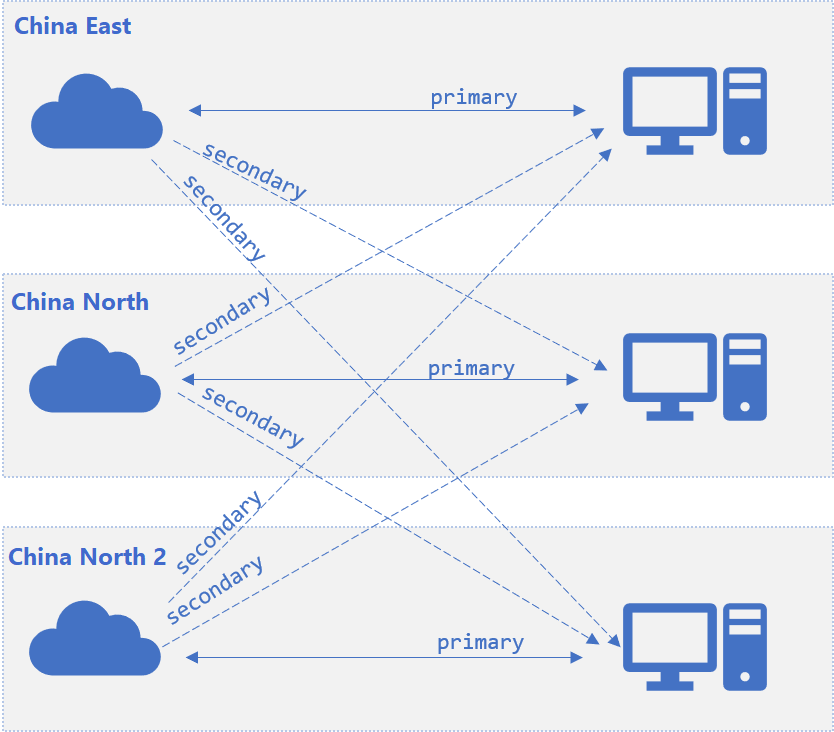
主要终结点是接收客户端流量的首选终结点,因为它们的网络连接更可靠。 辅助终结点的网络连接不太可靠,仅用于处理服务器到客户端的流量。 例如,辅助终结点用于广播消息,而不用于处理客户端到服务器的流量。
在跨区域案例中,网络可能不稳定。 对于位于中国东部 2的应用服务器,位于同一中国东部 2区域的 SignalR 服务 终结点为primary,而其他区域的终结点标记为secondary。 在此配置中,其他区域中的服务终结点可以 接收 来自此 中国东部 2 应用服务器的消息,但不会将 跨区域 客户端路由到此应用服务器。 下图说明了此体系结构:
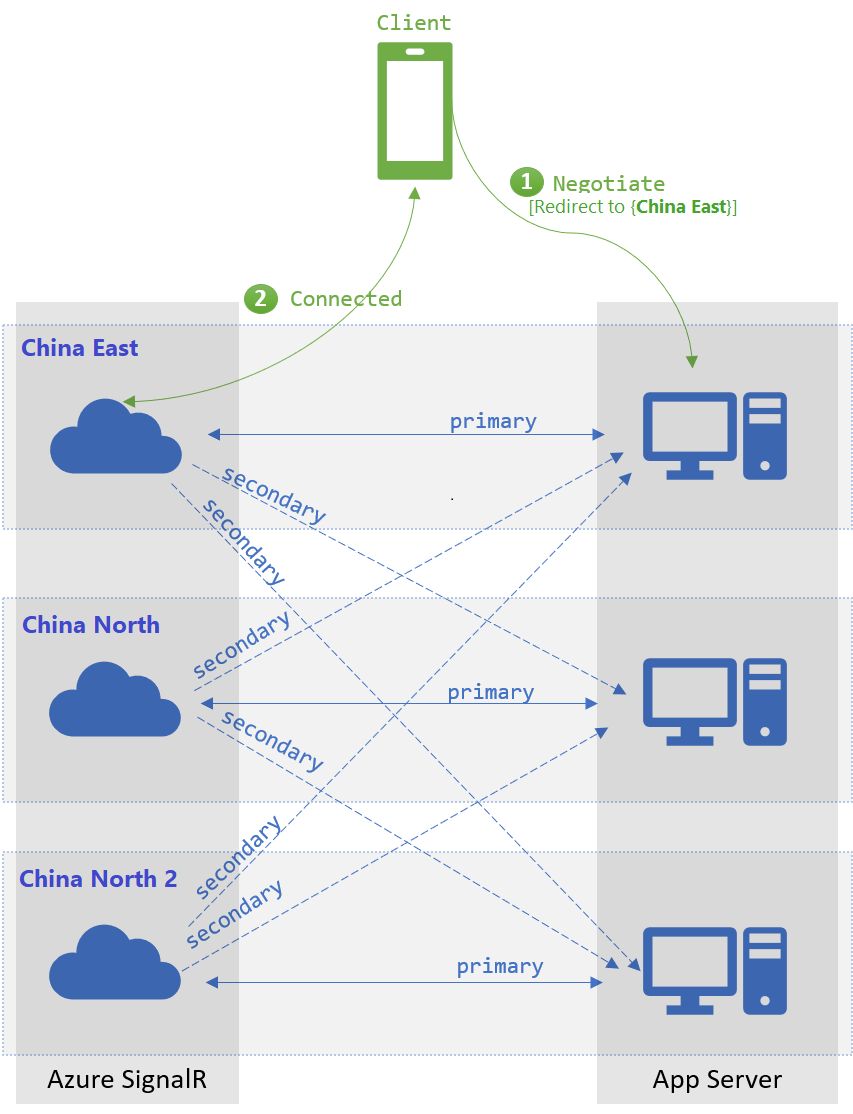
当客户端在使用默认路由器与应用服务器尝试 /negotiate 时,SDK 会从一组可用的 primary 端点中 随机选择 一个端点。 当主要终结点不可用时,SDK 会从所有可用的 终结点中随机选择。 当服务器与服务终结点之间的连接处于活动状态时,终结点将标记为可用。
在跨区域场景中,当客户端尝试通过托管在 中国东部 2 的应用服务器执行 /negotiate 时,默认情况下,它始终返回位于同一区域的 primary 终结点。 当所有 中国东部 2 终结点都不可用时,路由器会将客户端重定向到其他区域中的终结点。 下文的故障转移部分将详细介绍该场景。
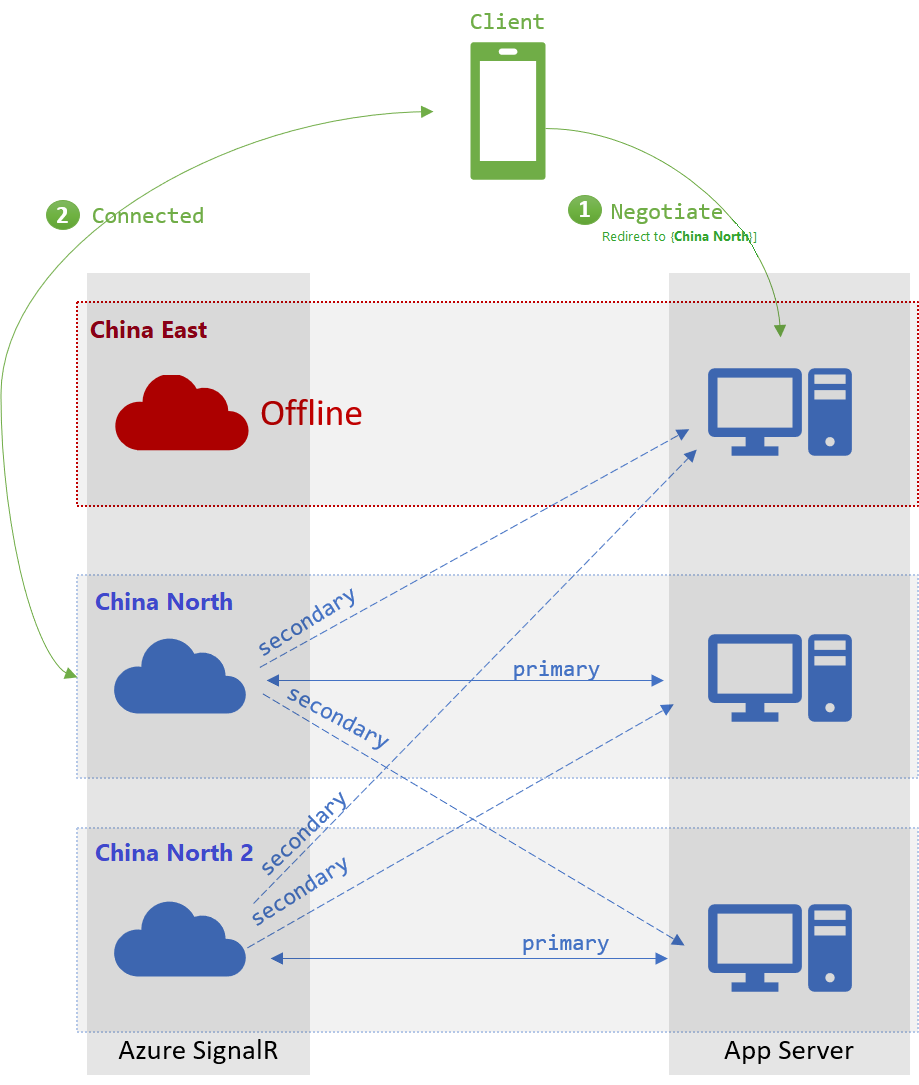
故障转移
当没有可用的 primary 终结点时,客户端的 /negotiate 将从可用的 secondary 终结点中进行选择。 此故障转移机制要求每个终结点充当至少一个应用服务器的 primary 终结点。
后续步骤
可以在高可用性和灾难恢复方案中使用多个终结点。