本文介绍订阅 Azure 资源通知 - AKS 资源发布的事件所需的步骤。 有关这些事件的详细信息,请参阅 Azure 资源通知 - AKS 资源事件。
创建 AKS 资源系统主题
请将帐户设置为 Azure 订阅,然后在该订阅下创建系统主题。
az account set -s AZURESUBSCRIPTIONID
使用microsoft.resourcenotifications.AKSResources命令创建类型az eventgrid system-topic create的系统主题。
az eventgrid system-topic create \
    --name SYSTEMTOPICNAME \
    --resource-group RESOURCEGROUPNAME \
    --source /subscriptions/AZURESUBSCRIPTIONID \
    --topic-type microsoft.resourcenotifications.AKSResources\
    --location Global
请将帐户设置为 Azure 订阅,然后在该订阅下创建系统主题。
Set-AzContext -Subscription AZURESUBSCRIPTIONID
使用 microsoft.resourcenotifications.AKSResources 命令创建类型系统主题。
New-AzEventGridSystemTopic`
  -name SYSTEMTOPICNAME`
  -resourcegroup RESOURCEGROUPNAME`
  -source /subscriptions/AZURESUBSCRIPTIONID -topictype microsoft.resourcenotifications.AKSResources`
  -location global
登录到 Azure 门户。
在搜索栏中,键入 事件网格系统主题,然后从下拉列表中选择它。
在 “事件网格系统主题 ”页上,选择工具栏上的 “+ 创建 ”。
在创建事件网格系统主题页上,选择主题类型为Azure 资源通知 - AKS 资源事件。
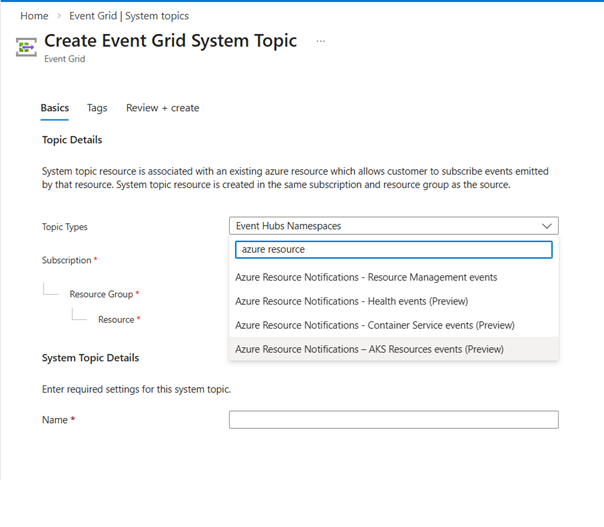
选择要在其中创建系统主题的 资源组 。
输入系统主题 的名称 。
选择“ 查看 + 创建”
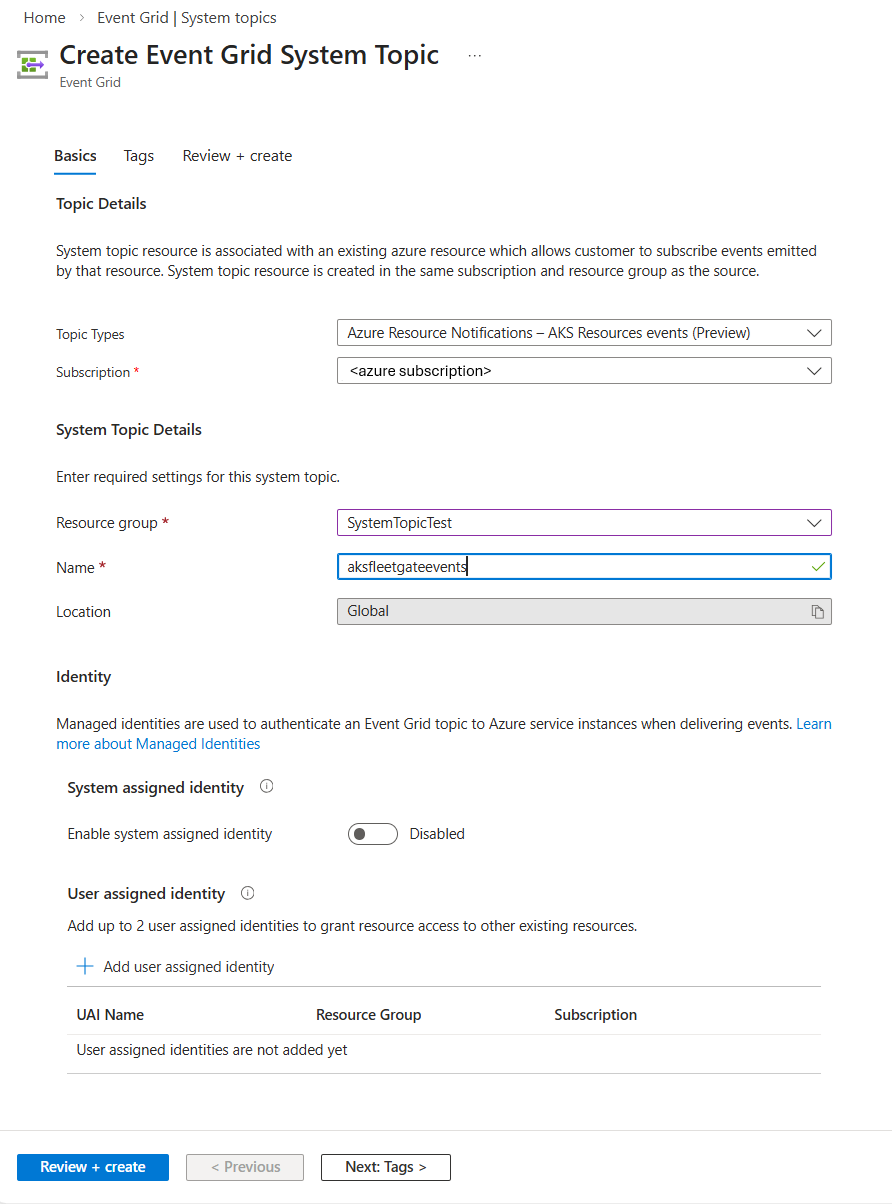
在“查看 + 创建”页面上,选择“创建”。
在成功的部署页上,选择转到资源页面以进入系统主题页面。 你将在此页上看到有关系统主题的详细信息。
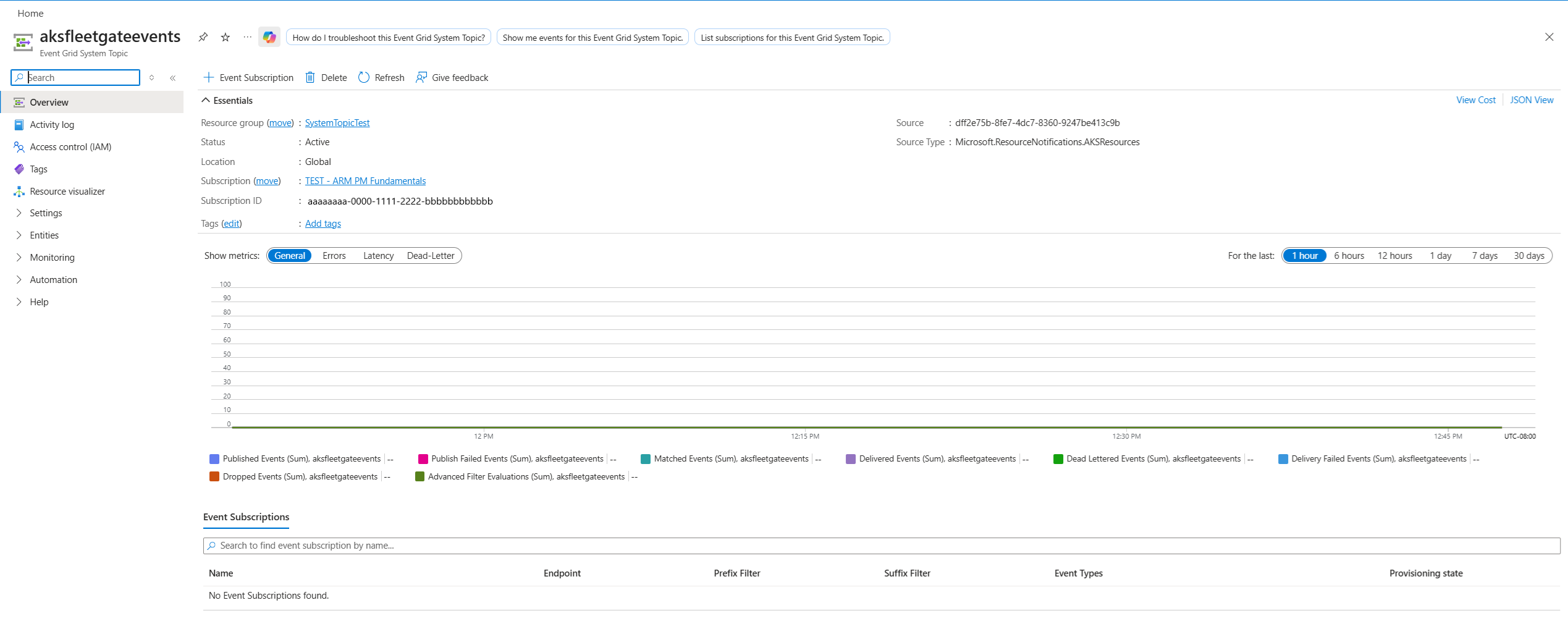
订阅事件
使用 az eventgrid system-topic event-subscription create 命令为上述主题创建事件订阅。
以下示例命令为 FleetGateCreated 事件创建事件订阅。
az eventgrid system-topic event-subscription create \
  --name stes-fleet-gates-sales-before-dev \
  --resource-group $GROUP \
  --system-topic-name stpc-aks-resource-notifications \
  --included-event-types Microsoft.ResourceNotifications.AKSResources.FleetGateCreated \
  --advanced-filter data.resourceInfo.properties.target.id StringContains "fleets/flt-mgr-approvals-01" \
  --advanced-filter data.resourceInfo.properties.gateType StringIn Approval \
  --advanced-filter data.resourceInfo.properties.state StringIn Pending \
  --advanced-filter data.resourceInfo.properties.displayName StringContains "Check with sales teams" \
  --advanced-filter data.resourceInfo.properties.target.updateRunProperties.timing StringIn Before \
  --advanced-filter data.resourceInfo.properties.target.updateRunProperties.stage StringIn Dev \
  --endpoint-type azurefunction \
  --endpoint /subscriptions/$SUBSCRIPTION_ID/resourceGroups/$GROUP/providers/Microsoft.Web/sites/fap-process-fleet-events/functions/fa-handle-pre-dev-events \
  --max-delivery-attempts 10 \
  --event-ttl 120
如果未指定 included-event-types,则默认包含所有事件类型。
若要从特定资源 筛选事件 ,请使用 --subject-begins-with 参数。 示例展示如何订阅指定资源组中资源的 FleetGateUpdated 事件。
az eventgrid system-topic event-subscription create \
  --name EVENTSUBSCRIPTIONNAME \
  --resource-group RESOURCEGROUPNAME \
  --system-topic-name SYSTEMTOPICNAME \
  --included-event-types Microsoft.ResourceNotifications.AKSResources.FleetGateUpdated \
  --advanced-filter data.resourceInfo.properties.target.id StringContains "fleets/flt-mgr-approvals-01" \
  --endpoint /subscriptions/$SUBSCRIPTION_ID/resourceGroups/$GROUP/providers/Microsoft.Web/sites/fap-process-fleet-events/functions/fa-handle-pre-dev-events \
  --endpoint-type azurefunction \
  --subject-begins-with /subscriptions/AZURESUBSCRIPTIONID/resourceGroups/RESOURCEGROUPNAME/
使用 New-AzEventGridSystemTopicEventSubscription 命令为上述主题创建事件订阅。
以下示例命令为 FleetGateCreated 事件创建事件订阅。
New-AzEventGridSubscription `
  -EventSubscriptionName "stes-fleet-gates-sales-before-dev" `
  -Scope "/subscriptions/$SUBSCRIPTION_ID/resourceGroups/$GROUP/providers/Microsoft.EventGrid/systemTopics/stpc-aks-resource-notifications" `
  -IncludedEventType @("Microsoft.ResourceNotifications.AKSResources.FleetGateCreated") `
  -AdvancedFilter @(
    (New-AzEventGridAdvancedFilterObject -StringContainsAdvancedFilter -Key "data.resourceInfo.properties.target.id" -Value @("fleets/flt-mgr-approvals-01")),
    (New-AzEventGridAdvancedFilterObject -StringInAdvancedFilter -Key "data.resourceInfo.properties.gateType" -Value @("Approval")),
    (New-AzEventGridAdvancedFilterObject -StringInAdvancedFilter -Key "data.resourceInfo.properties.state" -Value @("Pending")),
    (New-AzEventGridAdvancedFilterObject -StringContainsAdvancedFilter -Key "data.resourceInfo.properties.displayName" -Value @("Check with sales teams")),
    (New-AzEventGridAdvancedFilterObject -StringInAdvancedFilter -Key "data.resourceInfo.properties.target.updateRunProperties.timing" -Value @("Before")),
    (New-AzEventGridAdvancedFilterObject -StringInAdvancedFilter -Key "data.resourceInfo.properties.target.updateRunProperties.stage" -Value @("Dev"))
  ) `
  -EndpointType AzureFunction `
  -Endpoint "/subscriptions/$SUBSCRIPTION_ID/resourceGroups/$GROUP/providers/Microsoft.Web/sites/fap-process-fleet-events/functions/fa-handle-pre-dev-events" `
  -MaxDeliveryAttempt 10
如果未指定 -IncludedEventType,则默认包含所有事件类型
若要从特定资源 筛选事件 ,请使用 -SubjectBeginsWith 参数。 示例展示如何订阅指定资源组中资源的 FleetGateUpdated 事件。
New-AzEventGridSubscription `
  -EventSubscriptionName "EVENTSUBSCRIPTIONNAME" `
  -Scope "/subscriptions/AZURESUBSCRIPTIONID/resourceGroups/RESOURCEGROUPNAME/providers/Microsoft.EventGrid/systemTopics/SYSTEMTOPICNAME" `
  -IncludedEventType @("Microsoft.ResourceNotifications.AKSResources.FleetGateUpdated") `
  -AdvancedFilter @(
    (New-AzEventGridAdvancedFilterObject -StringContainsAdvancedFilter -Key "data.resourceInfo.properties.target.id" -Value @("fleets/flt-mgr-approvals-01"))
  ) `
  -EndpointType AzureFunction `
  -Endpoint "/subscriptions/$SUBSCRIPTION_ID/resourceGroups/$GROUP/providers/Microsoft.Web/sites/fap-process-fleet-events/functions/fa-handle-pre-dev-events" `
  -SubjectBeginsWith "/subscriptions/AZURESUBSCRIPTIONID/resourceGroups/RESOURCEGROUPNAME/"
在 “事件网格系统主题 ”页上,选择工具栏上的 “+ 事件订阅 ”。
确认会自动填充主题类型、源资源和主题名称。
输入事件订阅的名称。
对于 “筛选到事件类型”,请选择事件,例如 FleetGateCreated。
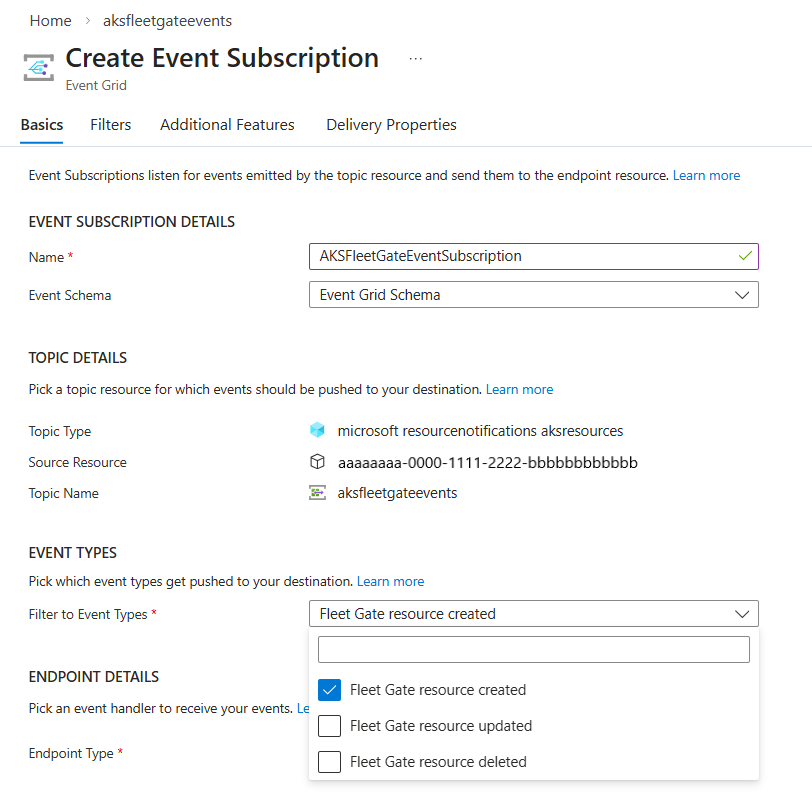
选择 终结点类型。
根据所选的终结点类型配置事件处理程序。 在以下示例中,已选择 Azure 事件中心。
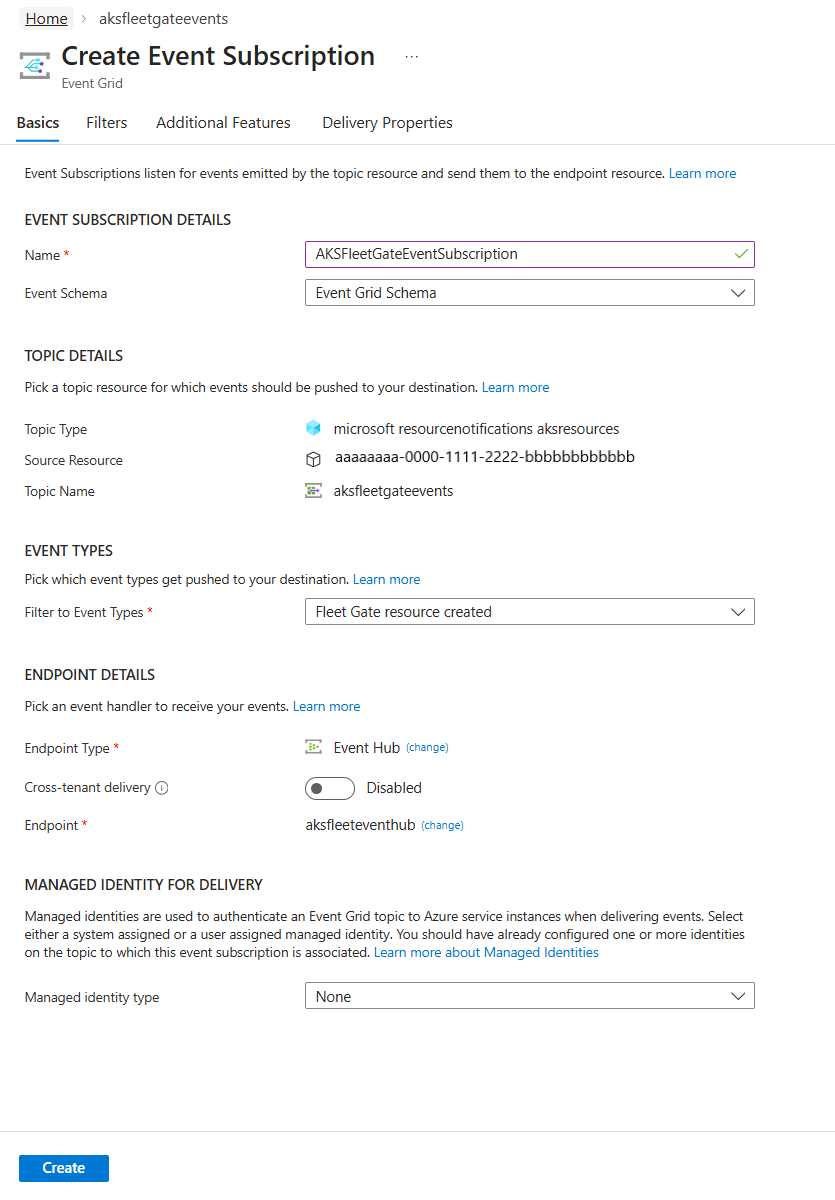
选择“ 筛选器 ”选项卡以提供主题筛选和高级筛选。 例如,若要筛选特定资源组中资源的事件,请执行以下步骤:
选择“ 启用主题筛选”。
在“主题筛选器”部分中,对于“主题开头为”的条件,请以以下格式提供资源组的值:/subscriptions/{subscription-id}/resourceGroups/{resourceGroup-id}。
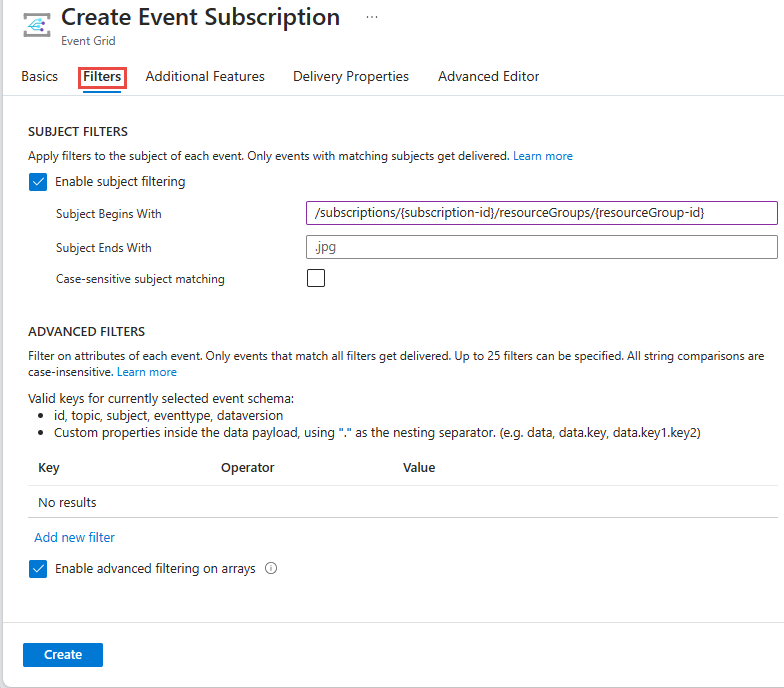
然后选择“ 创建 ”以创建事件订阅。
删除事件订阅和系统主题
若要删除事件订阅,请使用 Remove-AzEventGridSystemTopicEventSubscription 命令。 下面是一个示例:
Remove-AzEventGridSystemTopicEventSubscription`
       -EventSubscriptionName EVENTSUBSCRIPTIONNAME`
       -ResourceGroupName RESOURCEGROUPNAME`
       -SystemTopicName SYSTEMTOPICNAME
若要删除系统主题,请使用 Remove-AzEventGridSystemTopic 命令。 下面是一个示例:
Remove-AzEventGridSystemTopic -ResourceGroupName RESOURCEGROUPNAME -Name SYSTEMTOPICNAME
- 登录到 Azure 门户。
- 在搜索栏中,键入 事件网格系统主题,然后按 Enter。
- 选择系统主题。
- 在 “事件网格系统主题 ”页上,选择工具栏上的 “删除 ”。
筛选示例
订阅 Gate 创建事件,以便接收待审批通知。
你可能希望将审批路由到不同的人员或团队。 为此,可以设置事件网格系统主题的多个订阅,并为每个订阅设置不同的筛选器。 例如,如果团队的群集位于单个更新运行组中,则可以筛选该组,并将终结点设置为其 Azure 函数,该函数运行更新后运行状况检查:
az eventgrid system-topic event-subscription create \
  --name fleet-approvals-group-subscription \
  --resource-group <resource-group> \
  --system-topic-name system-topic-aksresources \
  --included-event-types Microsoft.ResourceNotifications.AKSResources.FleetGateCreated \
  --advanced-filter data.resourceInfo.properties.gateType StringIn Approval \
  --advanced-filter data.resourceInfo.properties.state StringIn Pending \
  --advanced-filter data.resourceInfo.properties.target.updateRunProperties.timing StringIn After \
  --advanced-filter data.resourceInfo.properties.target.updateRunProperties.group StringIn teamName-group \
  --endpoint-type azurefunction \
  --endpoint /subscriptions/$SUBSCRIPTION_ID/resourceGroups/$RESOURCEGROUP/providers/Microsoft.Web/sites/teamname/functions/health-check
还可以将 gate displayName 用作事件的筛选器:
az eventgrid system-topic event-subscription create \
  --name fleet-approvals-group-subscription \
  --resource-group <resource-group> \
  --system-topic-name system-topic-aksresources \
  --included-event-types Microsoft.ResourceNotifications.AKSResources.FleetGateCreated \
  --advanced-filter data.resourceInfo.properties.gateType StringIn Approval \
  --advanced-filter data.resourceInfo.properties.state StringIn Pending \
  --advanced-filter data.resourceInfo.properties.displayName StringContains "Check with sales teams" \
  --endpoint-type eventhub \
  --endpoint /subscriptions/$SUBSCRIPTION_ID/resourceGroups/$RESOURCEGROUP/providers/Microsoft.EventHub/namespaces/EVENTHUBNAMESPACE/eventhubs/EVENTHUBNAME
New-AzEventGridSubscription `
  -EventSubscriptionName "fleet-approvals-group-subscription" `
  -Scope "/subscriptions/<subscription-id>/resourceGroups/<resource-group>/providers/Microsoft.EventGrid/systemTopics/system-topic-aksresources" `
  -IncludedEventType @("Microsoft.ResourceNotifications.AKSResources.FleetGateCreated") `
  -AdvancedFilter @(
    (New-AzEventGridAdvancedFilterObject -StringInAdvancedFilter `
        -Key   "data.resourceInfo.properties.gateType" `
        -Value @("Approval")
    ),
    (New-AzEventGridAdvancedFilterObject -StringInAdvancedFilter `
        -Key   "data.resourceInfo.properties.state" `
        -Value @("Pending")
    ),
    (New-AzEventGridAdvancedFilterObject -StringInAdvancedFilter `
        -Key   "data.resourceInfo.properties.target.updateRunProperties.timing" `
        -Value @("After")
    ),
    (New-AzEventGridAdvancedFilterObject -StringInAdvancedFilter `
        -Key   "data.resourceInfo.properties.target.updateRunProperties.group" `
        -Value @("teamName-group")
    )
  ) `
  -EndpointType AzureFunction `
  -Endpoint "/subscriptions/<subscription-id>/resourceGroups/<resource-group>/providers/Microsoft.Web/sites/teamname/functions/health-check"
还可以将 gate displayName 用作事件的筛选器:
New-AzEventGridSubscription `
  -EventSubscriptionName "fleet-approvals-group-subscription" `
  -Scope "/subscriptions/<subscription-id>/resourceGroups/<resource-group>/providers/Microsoft.EventGrid/systemTopics/system-topic-aksresources" `
  -IncludedEventType @("Microsoft.ResourceNotifications.AKSResources.FleetGateCreated") `
  -AdvancedFilter @(
    (New-AzEventGridAdvancedFilterObject -StringInAdvancedFilter `
        -Key   "data.resourceInfo.properties.gateType" `
        -Value @("Approval")
    ),
    (New-AzEventGridAdvancedFilterObject -StringInAdvancedFilter `
        -Key   "data.resourceInfo.properties.state" `
        -Value @("Pending")
    ),
    (New-AzEventGridAdvancedFilterObject -StringContainsAdvancedFilter `
        -Key   "data.resourceInfo.properties.displayName" `
        -Value @("Check with sales teams")
    )
  ) `
  -EndpointType EventHub `
选择 FleetGateCreated 作为事件类型。
在事件订阅的 “筛选器 ”选项卡中,选择以下高级筛选器。
Key = data.resourceInfo.properties.gateType
Operator = String contains
Value = Approval

        AND

Key = data.resourceInfo.properties.state
Operator = String contains
Value = Pending

        AND

Key = data.resourceInfo.properties.displayName
Operator = String contains
Value = Check with sales teams
如果对此功能有任何疑问或反馈,请毫不犹豫地通过此 stackoverflow 链接联系我们
为了更好地帮助你提供有关特定事件的特定反馈,请提供以下信息:
对于缺少的事件:
- 系统主题类型名称
- 执行操作时的近似时间戳(UTC)
- 生成通知的基准资源 ID
- 导航到 Azure 门户中的资源,然后选择最右侧的 JSON 视图。 资源 ID 是 JSON 视图页上的第一个字段。
- 预期事件类型
- 已执行的操作(例如:VM 已启动或停止、创建了存储帐户等)
- 遇到问题的说明(例如,VM 已启动且未生成 Microsoft.ResourceNotifications.HealthResources.AvailabilityStatusChanged 事件)
- 如果可能,请提供所执行操作的相关 ID。
对于延迟或包含意外内容的事件
- 系统主题类型名称
- 整个通知内容(不包括 data.resourceInfo.properties)
- 遇到问题的说明和受影响的字段值
请确保在共享此数据时未提供任何最终用户身份信息。
后续步骤
有关这些事件的详细信息,请参阅 Azure 资源通知 - AKS 资源事件。
