适用于: ✔️具有中心群集的 Fleet Manager
Azure Kubernetes Fleet Manager 中的放置分阶段发布运行提供了一种受控方法,可通过分阶段的方式将 Kubernetes 工作负荷部署到多个成员群集中。 为了最大程度地降低风险,此方法按顺序部署到目标群集,并在阶段之间提供可选的等待时间和审批入口。
本文介绍如何创建和执行暂存更新运行,以逐步部署工作负载,并在需要时回滚到以前的版本。
Azure Kubernetes Fleet Manager 支持两个分阶段更新的范围:
-
群集范围:
ClusterStagedUpdateRun和ClusterResourcePlacement用于管理基础设施级更改的集群管理员。 -
命名空间范围:用于
StagedUpdateRunResourcePlacement管理其特定命名空间内推出的应用程序团队。
本文中的示例演示了如何使用带有集群范围资源的 rollout 运行。 命名空间范围内的行为与命名空间内资源的行为完全相同。
在您开始之前
-
如果您没有 Azure 试用订阅,请在开始之前创建 试用订阅。
若要了解本文中使用的概念和术语,请阅读 分阶段推出策略的概念概述。
设置以下环境变量:
export SUBSCRIPTION_ID=<subscription>
export GROUP=<resource-group>
export FLEET=<fleet-name>
export MEMBER_CLUSTER_1=aks-member-1
export MEMBER_CLUSTER_2=aks-member-2
需要安装Azure CLI才能完成本文。 若要安装或升级,请参阅 安装 Azure CLI。
你需要
fleetAzure CLI 扩展。 可以通过运行以下命令来安装它:az extension add --name fleet运行命令
az extension update以更新到最新版本的扩展:az extension update --name fleet如果还没有 Kubernetes CLI (kubectl),可以使用以下命令安装它:
az aks install-cli
配置环境
本文使用了一个包含一个中心集群和两个成员集群的 Fleet Manager。 如果您还没有 Fleet Manager,请按照 快速入门 创建一个带有中心集群的 Fleet Manager。 然后,以成员身份加入Azure Kubernetes 服务 (AKS)或启用Azure Arc的 Kubernetes 群集。
确保成员群集具有以下标签,以便推出的每个阶段都有一个群集。
| 成员名称 | 标签 |
|---|---|
| aks-member-1 | 环境=金丝雀 |
| aks-member-2 | environment=staging |
使用以下命令将标签应用于成员群集。
az fleet member update \
    --resource-group ${GROUP} \
    --fleet-name ${FLEET} \
    --name ${MEMBER_CLUSTER_1} \
    --labels environment=canary
az fleet member update \
    --resource-group ${GROUP} \
    --fleet-name ${FLEET} \
    --name ${MEMBER_CLUSTER_2} \
    --labels environment=staging
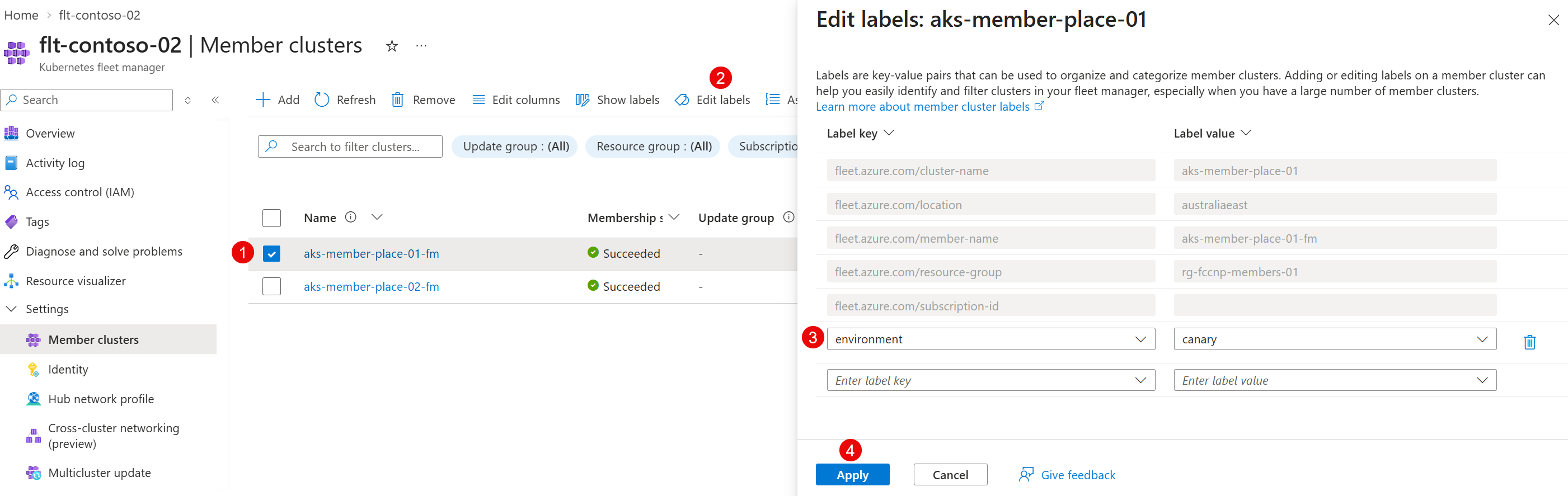
在 Azure 门户中,转到你的车队管理器。
在服务菜单上的 “设置”下,选择“ 成员群集”。
在成员群集列表中,选择一个群集。 然后,在操作菜单中选择 “编辑标签 ”。
将相应的标签添加到成员群集,然后选择“ 应用”。
对每个成员群集重复此操作。
为放置准备 Kubernetes 工作负载
在此步骤中,你将在 Fleet Manager 中心群集上暂存 Kubernetes 工作负荷,以便可以通过分阶段推出将其分发到成员群集上。
使用
az fleet get-credentials命令获取 Kubernetes 舰队中心群集的 kubeconfig 文件:az fleet get-credentials \ --resource-group ${GROUP} \ --name ${FLEET}输出应如下所示。
Merged "hub" as current context in /home/fleet/.kube/config注释
如果您收到类型为
InvalidHubOperation的错误,且错误消息提示该 fleet 没有 hub,请添加一个 hub 集群。 有关详细信息,请参阅 升级中心群集类型。在 Fleet Manager 中心群集上创建命名空间。
kubectl create namespace test-app将以下 YAML 另存为
test-workload.yaml。apiVersion: apps/v1 kind: Deployment metadata: name: nginx-deployment namespace: test-app spec: selector: matchLabels: app: nginx replicas: 2 template: metadata: labels: app: nginx spec: containers: - name: nginx image: mcr.microsoft.com/azurelinux/base/nginx:1.28@sha256:3352a36cbcab4708883a3e77b64f64159e11e1aab358c010e1c4e465dbfb4f57 ports: - containerPort: 80 --- apiVersion: v1 kind: Service metadata: name: nginx-service namespace: test-app spec: selector: app: nginx ports: - protocol: TCP port: 80 targetPort: 80 type: LoadBalancer使用
kubectl将测试工作负荷暂存到 Fleet Manager 中心群集上。kubectl apply -f test-workload.yaml
在 Azure 门户中,转到你的车队管理器。
在服务菜单上的 “机群资源”下,选择“ 命名空间>+ 创建”。
注释
如果未看到 “舰队资源”,则群管理器没有中心群集。 有关如何添加群集的详细信息,请参阅 升级中心群集类型。
在菜单中,选择 命名空间,输入 名称,然后选择“ 创建”。
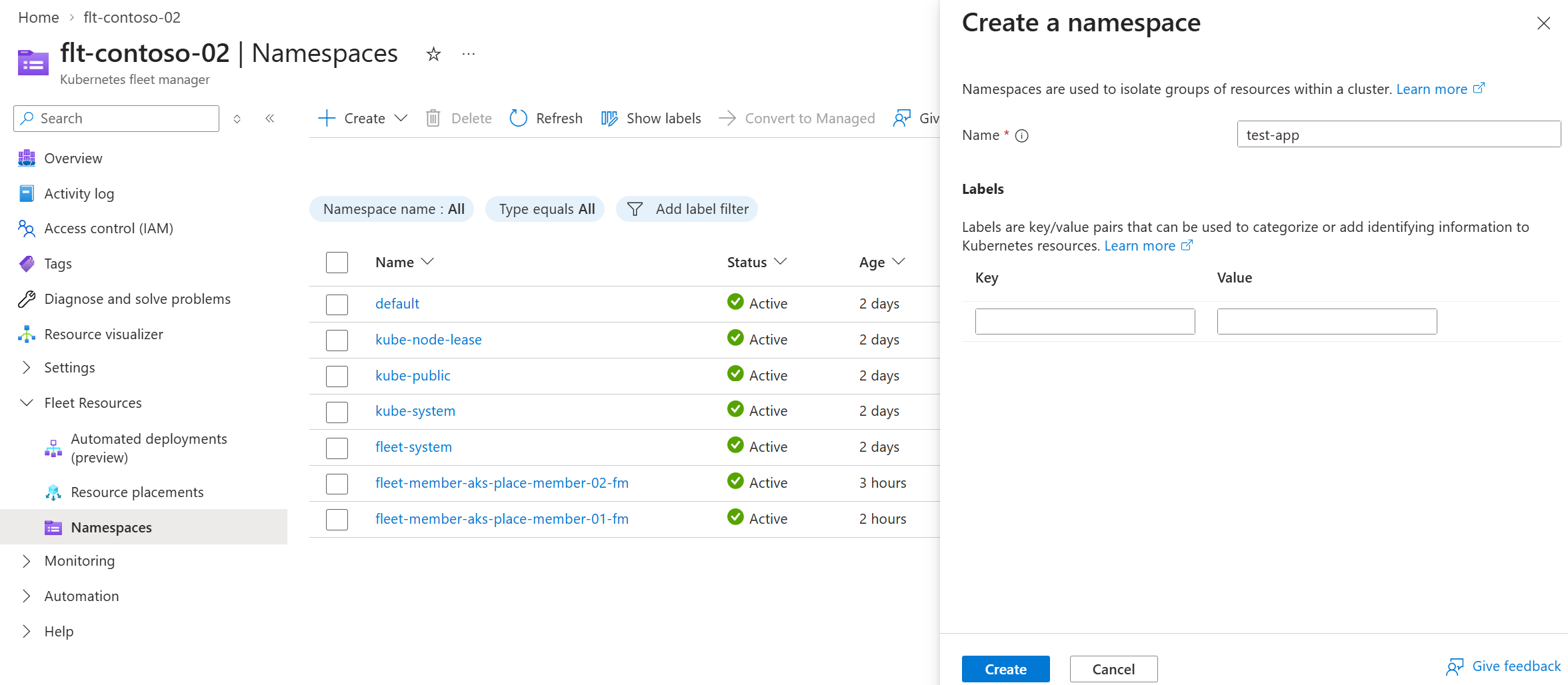
片刻之后,页面将刷新,命名空间显示在 Fleet Manager 中心群集的命名空间列表中。 现在它已准备就绪,可以托管你想要分发到各个成员集群的任何资源。
在命名空间列表顶部,选择“ + 创建>应用 YAML”,并使用以下示例。
apiVersion: apps/v1
kind: Deployment
metadata:
  name: nginx-deployment
  namespace: test-app
spec:
  selector:
    matchLabels:
      app: nginx
  replicas: 2
  template:
    metadata:
      labels:
        app: nginx
    spec:
      containers:
      - name: nginx
        image: mcr.microsoft.com/azurelinux/base/nginx:1.28@sha256:3352a36cbcab4708883a3e77b64f64159e11e1aab358c010e1c4e465dbfb4f57
        ports:
        - containerPort: 80
apiVersion: v1 kind: Service metadata: name: nginx-service namespace: test-app spec: selector: app: nginx ports: - protocol: TCP port: 80 targetPort: 80 type: LoadBalancer复制并粘贴这些示例,然后按照下图所示逐个应用。
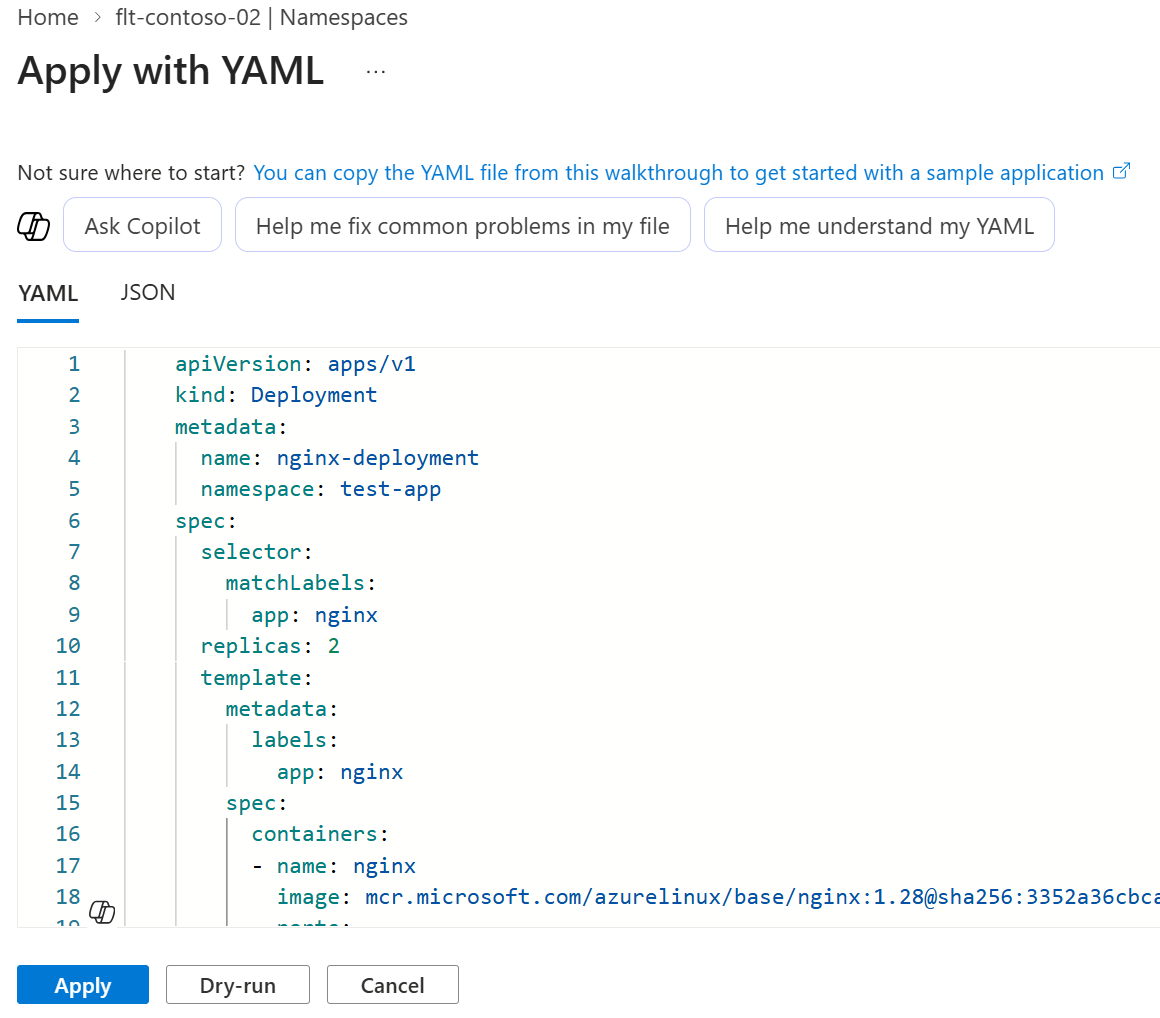
命名空间及其工作负载现已准备好分发到成员群集。 部署和服务未在 Fleet Manager 中心群集上计划。
使用推出策略定义群集排序
创建推出策略以定义群集接收资源的顺序。 还可以在每个阶段之前或之后添加更多控件,例如浸泡时间和审批。 有关详细信息,请参阅定义可重用Azure Kubernetes Fleet Manager 资源放置部署策略。
将以下 YAML 另存为
crp-two-stages-strategy.yaml。apiVersion: placement.kubernetes-fleet.io/v1 kind: ClusterStagedUpdateStrategy metadata: name: two-stages-strategy spec: stages: - name: staging labelSelector: matchLabels: environment: staging afterStageTasks: - type: TimedWait waitTime: 4m - name: canary labelSelector: matchLabels: environment: canary beforeStageTasks: - type: Approval将策略清单应用到 Fleet Manager 中心群集。
kubectl apply -f crp-two-stages-strategy.yaml检查策略资源的状态。
kubectl get clusterstagedupdatestrategy two-stages-strategy输出应如下所示。
NAME                  AGE
two-stages-strategy   47m
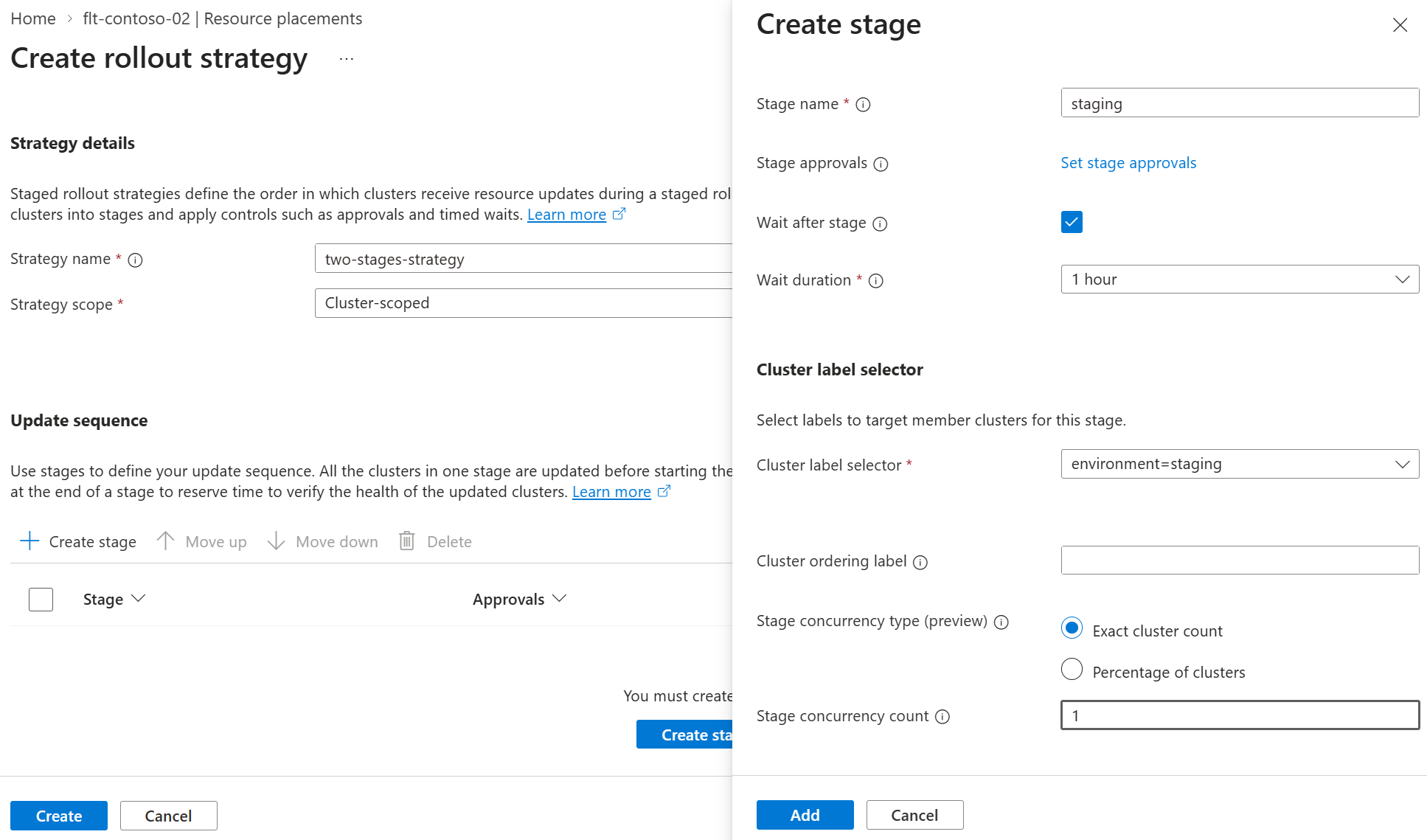
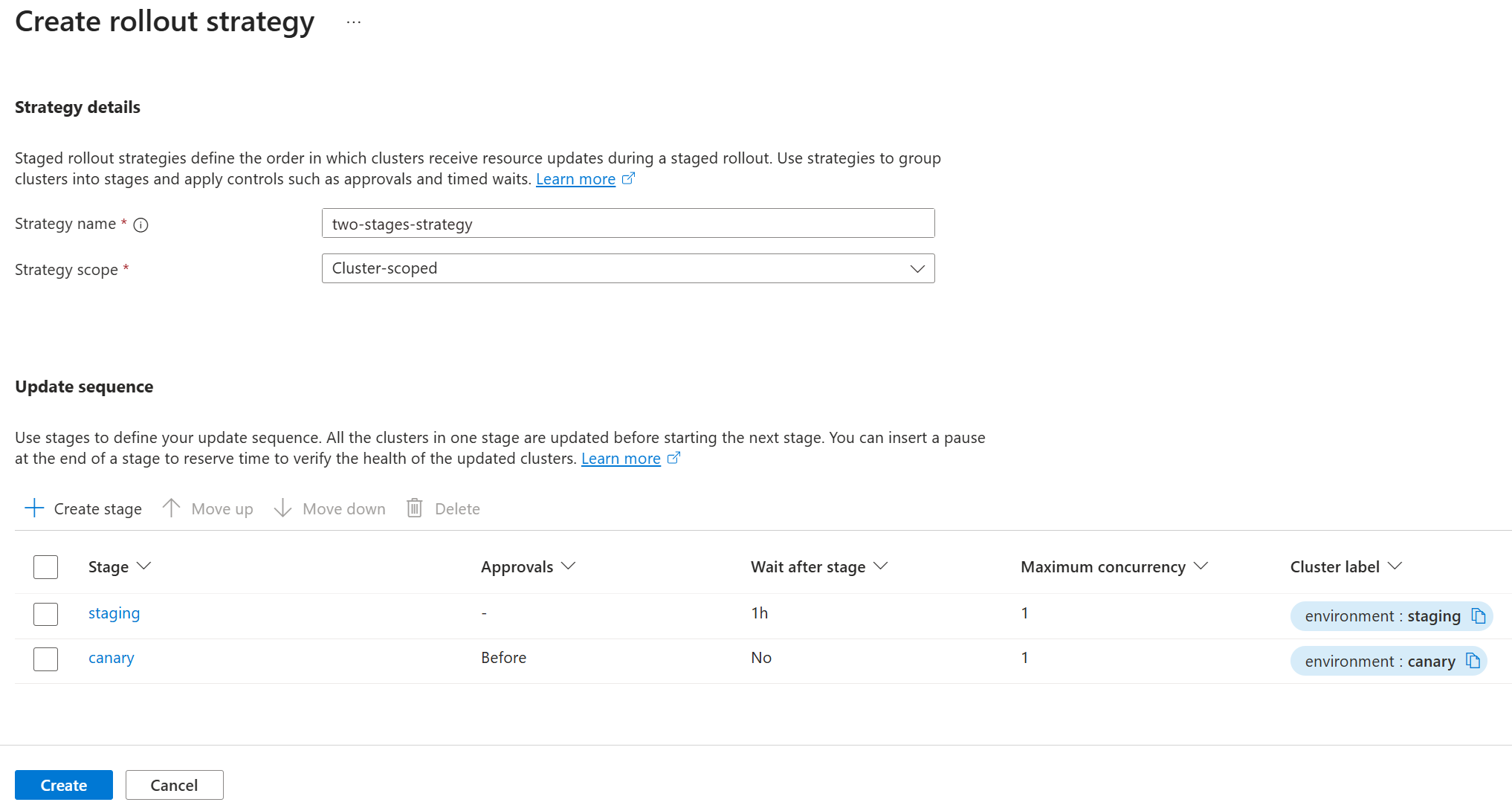
使用以下流程创建一个策略,其中包含两个阶段 Staging 和 Canary,等待时间为 4 分钟,并为 Canary 阶段设置阶段前审批。
在 Azure 门户中,转到你的车队管理器。
在服务菜单上的 “机群资源”下,选择 “资源放置>分阶段推出策略”,然后选择 “创建”。
输入策略的名称。
选择 策略范围,选择 群集范围 或 命名空间范围。
- 对于 命名空间作用域,请选择 Fleet Manager 中心群集上现有的 命名空间,该命名空间中已暂存要分发的 Kubernetes 资源。
选择“创建阶段”并输入以下内容:
- 阶段名称 - 命名阶段 - 它在策略中的所有阶段名称中必须是唯一的。
- (可选) 阶段审批 - 如果要在此阶段开始之前或完成后等待审批,请选择此选项。
- (可选) 在阶段后等待 - 如果要在移动到下一阶段之前定义暂停,请选择此选项。
- (可选) 等待持续时间 - 选择预定义持续时间,或输入自定义值(以秒为单位)。
- 群集标签选择器 - 选择用于为此阶段选择群集的现有成员群集标签。
- (可选) 分类排序标签 - 选择用于在阶段中对群集进行排序的现有成员群集标签。
- (可选) 阶段并发 - 设置当前阶段中应并发更新的群集数。
注释
每个策略中的最大阶段数为 31。
重复,直到将所有阶段添加到策略。 选择“ 创建” 以创建策略。
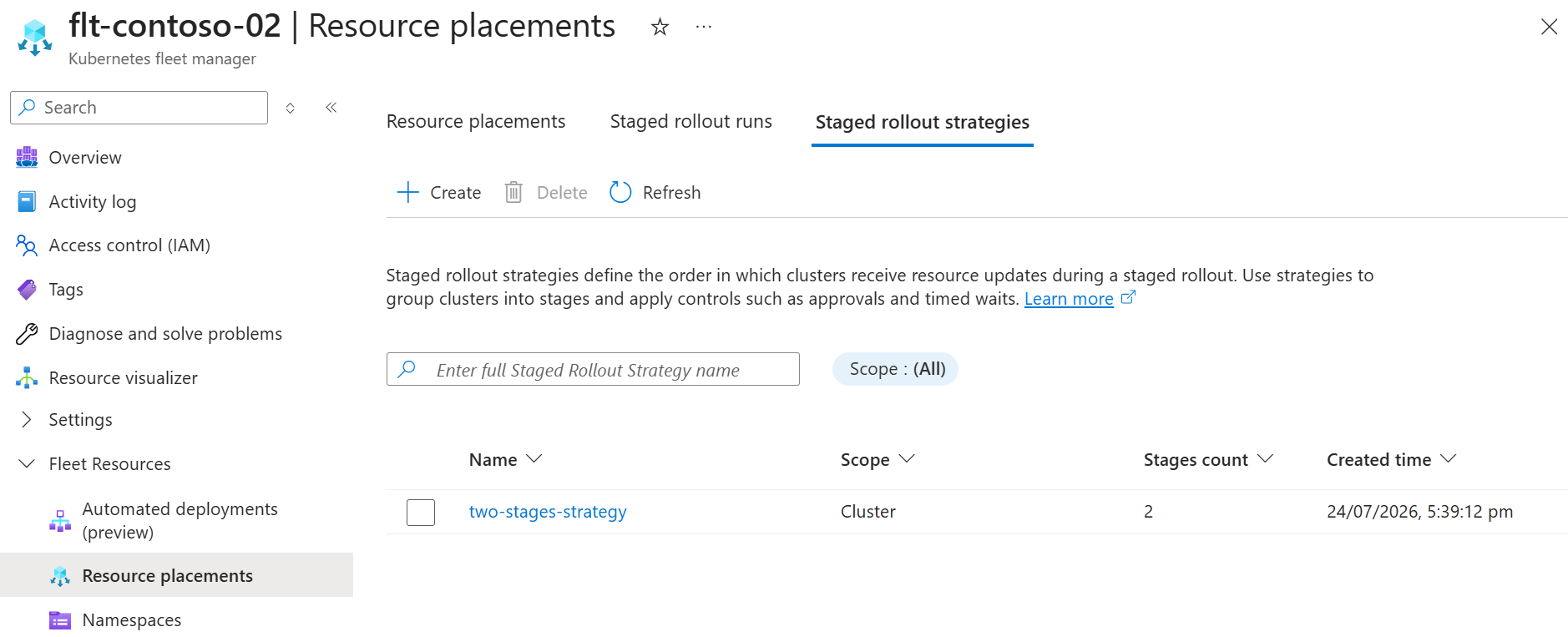
页面将刷新,列表会显示新创建的策略。
使用资源放置选取群集
使用资源放置来选择要分发的资源,并定义策略以选择要接收资源的群集。
若要使用分阶段推出,请将推出 strategy 类型设置为 External 这样,以便可以通过稍后定义的分阶段推出来控制资源分布。
将以下 YAML 另存为
crp-distribute-workload-ext.yaml。apiVersion: placement.kubernetes-fleet.io/v1 kind: ClusterResourcePlacement metadata: name: distribute-test-app spec: resourceSelectors: - group: "" kind: Namespace version: v1 name: test-app policy: placementType: PickAll strategy: type: External重要
如果您未将
strategy类型设置为External,则在使用RollingUpdate策略应用清单后,资源部署会立即开始。将部署位置清单应用到 Fleet Manager 中心集群。
kubectl apply -f crp-distribute-workload-ext.yaml检查资源放置的状态。
kubectl get clusterresourceplacement distribute-test-app输出应如下所示。
NAME                  GEN   SCHEDULED   SCHEDULED-GEN   AVAILABLE   AVAILABLE-GEN   AGE
distribute-test-app   1     True        1                                           60s
在 Azure 门户中,转到你的车队管理器。
在服务菜单上的 “机群资源”下,选择 “资源位置>+ 创建”。
在“基本信息”选项卡上,配置以下选项:
在 “投放详情”中,输入投放名称。
在 “资源详细信息”下,将 范围 保留为 群集范围 ,并输入要分发的资源的组版本类型(GVK)和名称。 在此示例中,使用以下值。
group: ""
kind: Namespace
version: v1
name: test-app
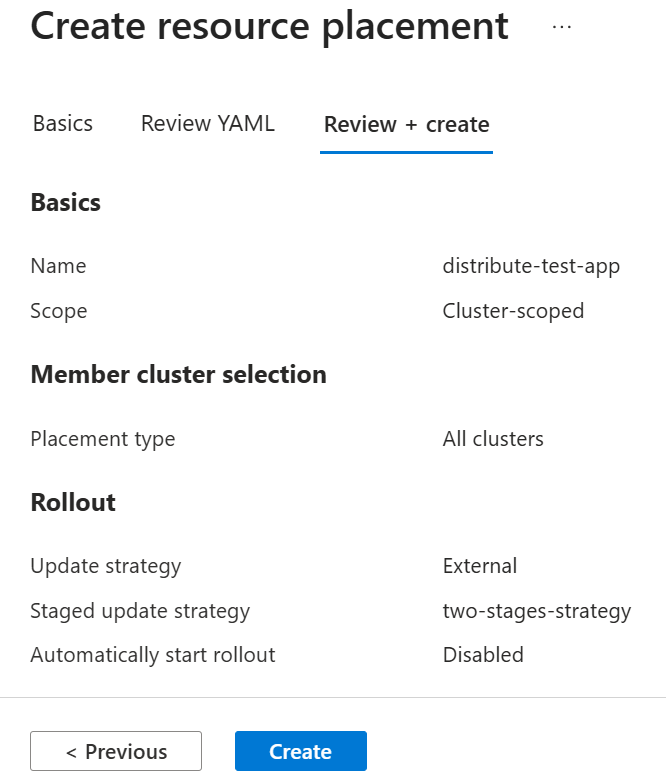
在 “成员集群选择” 中,将 “放置类型” 选择为 “所有集群”。
对于 Rollout,请选择外部。 使用 分阶段更新策略 选择之前创建的推出策略。
将 “自动开始推出 ”框保留为未选中状态。
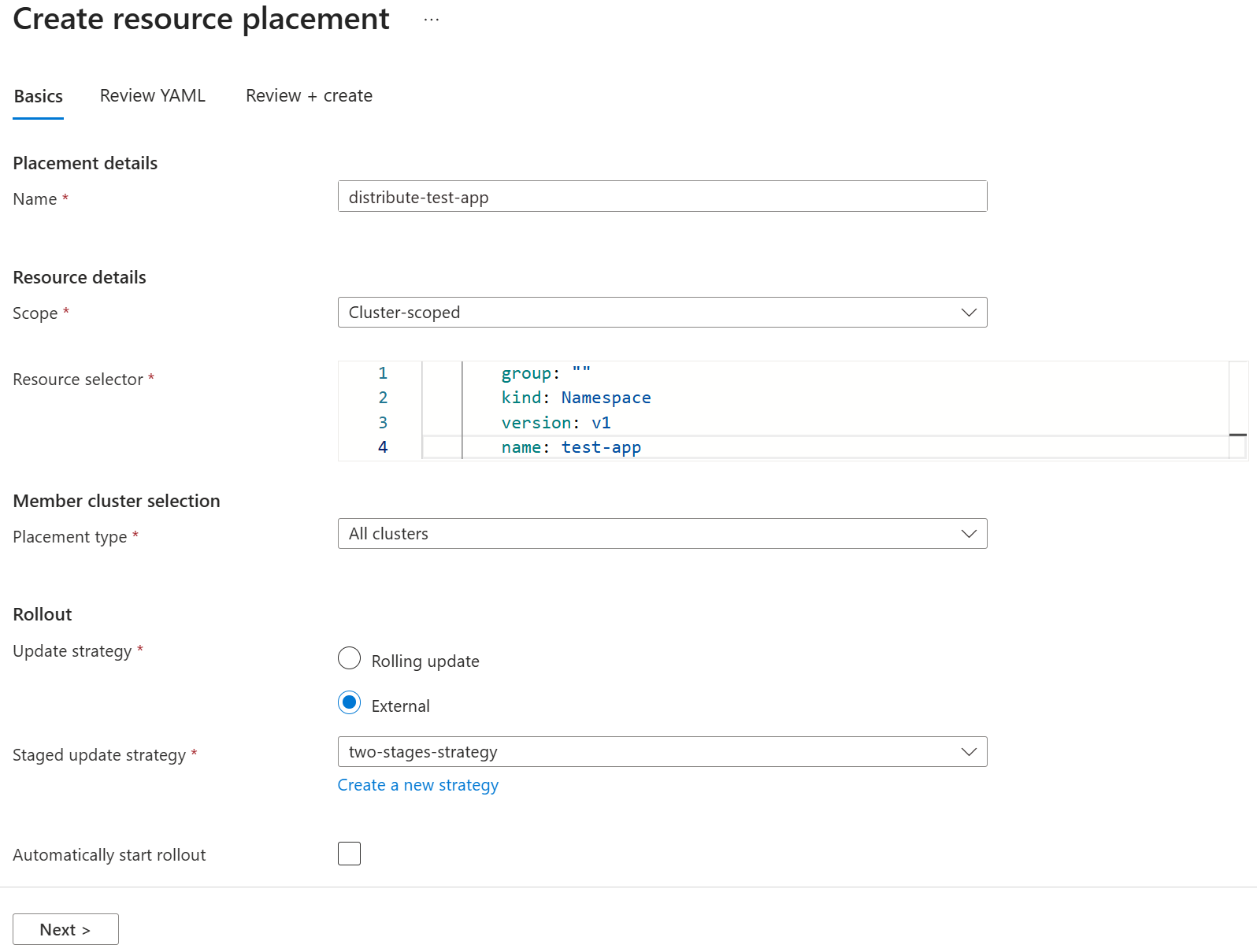
选择 “下一步 ”以查看生成的
ClusterResourcePlacement清单。 如果需要,可以修改清单,使用 “验证”(试运行) 选项进行验证,或选择“ 查看 + 创建 ”以继续进行最终确认。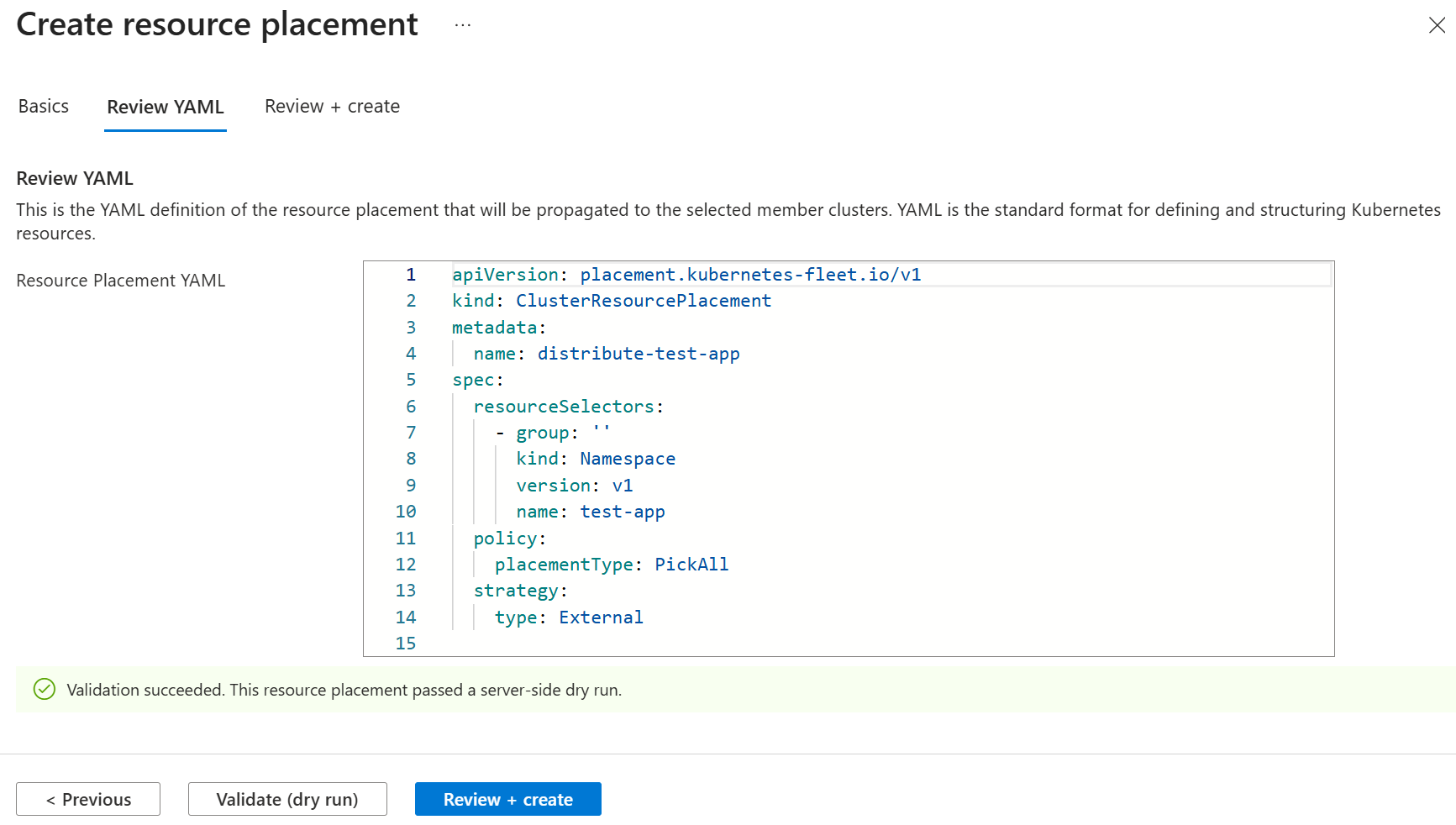
选择 “创建” 以创建发布运行,但不启动该运行。
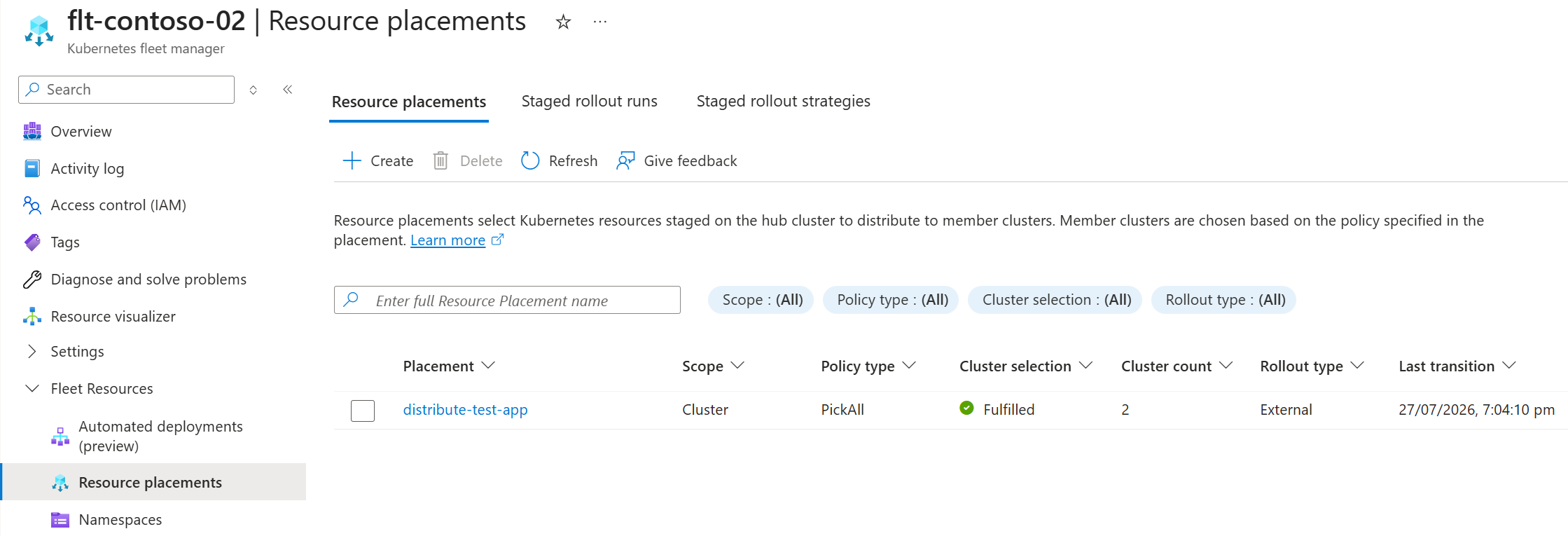
页面刷新后,资源放置位置列表中会显示新创建的放置位置。 它显示所选集群的数量,以及舰队调度器是否可以满足放置策略要求。 请注意,发布类型设置为外部。
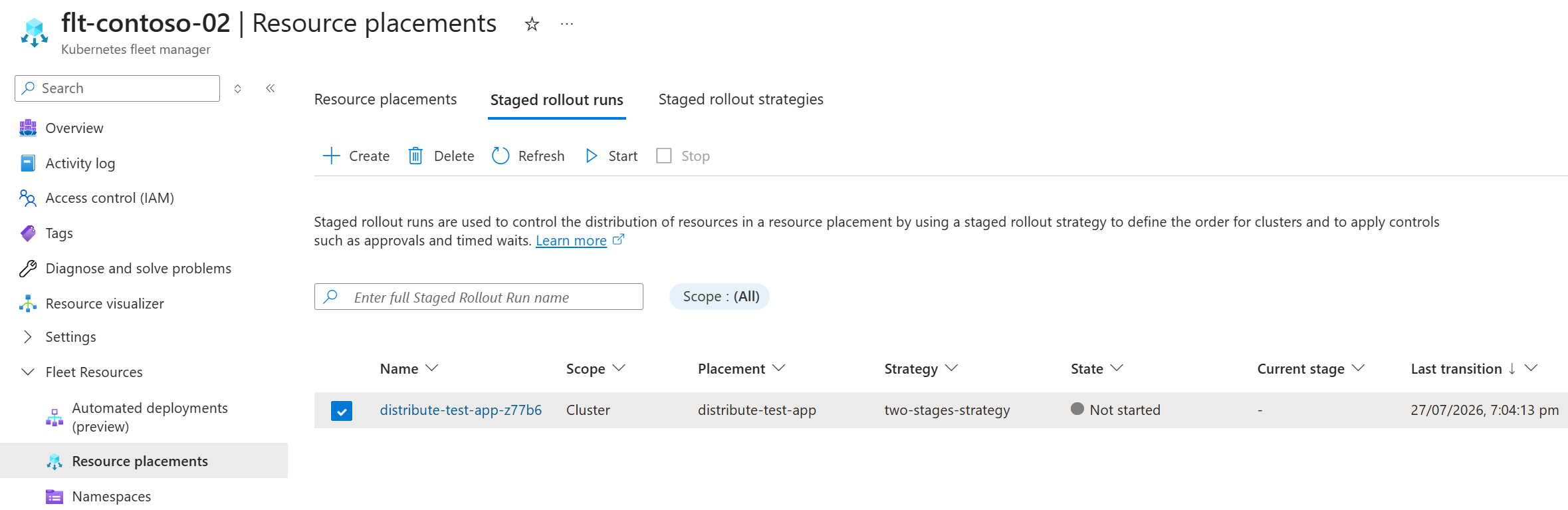
当你使用 Azure 门户创建采用推出策略的部署时,系统会自动为你创建一个分阶段推出运行实例。
使用分阶段发布来控制分发范围
在本文中,你将创建一个分阶段发布,并使用 state 的 Initialize,这样你就可以在需要时再开始发布,而不是在应用清单文件后立即开始运行。 将状态改为 Run,即可立即启动。
将以下 YAML 另存为
staged-rollout-test-app.yaml。apiVersion: placement.kubernetes-fleet.io/v1 kind: ClusterStagedUpdateRun metadata: name: staged-rollout-test-app spec: placementName: distribute-test-app stagedRolloutStrategyName: two-stages-strategy state: Initialize注释
如果您未将
strategy类型设置为External,则在使用RollingUpdate策略应用清单后,资源部署会立即开始。将分阶段推出清单应用到 Fleet Manager 中心群集。
kubectl apply -f staged-rollout-test-app.yaml检查推出运行资源的状态。 它已初始化,但没有进展。
kubectl get clusterstagedupdaterun staged-rollout-test-app输出应如下所示。
NAME                      PLACEMENT             RESOURCE-SNAPSHOT-INDEX   POLICY-SNAPSHOT-INDEX   INITIALIZED   PROGRESSING   SUCCEEDED   AGE
staged-rollout-test-app   distribute-test-app                             0                       True                                    101s
管理分阶段推出进度
准备好所有资源后,现在可以控制跨成员群集的资源推出。
开始分阶段发布
若要开始分阶段发布,请将 spec 中的 state 字段修改为 Run。
kubectl patch clusterstagedupdaterun staged-rollout-test-app --type merge -p '{"spec":{"state":"Run"}}'
检查推出运行资源的状态。 它已初始化,但没有进展。
kubectl get clusterstagedupdaterun staged-rollout-test-app
输出应与以下内容类似,请注意,当前进度为 True。
NAME                      PLACEMENT             RESOURCE-SNAPSHOT-INDEX   POLICY-SNAPSHOT-INDEX   INITIALIZED   PROGRESSING   SUCCEEDED   AGE
staged-rollout-test-app   distribute-test-app                             0                       True          True                      36m
注释
当发布进行到 TimedWait 或 Approval 任务时,进度状态会变为 False。 使用 describe 来确定暂停的原因。
通过描述 ClusterStagedUpdateRun 查看发布的详细状态。
kubectl describe clusterstagedupdaterun staged-rollout-test-app
在响应中,查看StatusConditionsStages Status并了解当前正在处理哪个阶段和群集,或者某个TimedWait或Approval任务当前处于活动状态。
Name:         staged-rollout-test-app
Namespace:
Labels:       <none>
Annotations:  <none>
API Version:  placement.kubernetes-fleet.io/v1
Kind:         ClusterStagedUpdateRun
Metadata:
  Creation Timestamp:  2026-07-27T04:25:14Z
  Finalizers:
    kubernetes-fleet.io/stagedupdaterun-finalizer
  Generation:        3
  Resource Version:  2684410
  UID:               5e20d0a1-515a-4f1c-b566-89676100a968
Spec:
  Placement Name:                distribute-test-app
  Resource Snapshot Index:
  Staged Rollout Strategy Name:  two-stages-strategy
  State:                         Run
Status:
  Applied Strategy:
    Comparison Option:  PartialComparison
    Type:               ClientSideApply
    When To Apply:      Always
    When To Take Over:  Always
  Conditions:
    Last Transition Time:  2026-07-27T04:25:14Z
    Message:               The UpdateRun initialized successfully
    Observed Generation:   3
    Reason:                UpdateRunInitializedSuccessfully
    Status:                True
    Type:                  Initialized
    Last Transition Time:  2026-07-27T05:01:56Z
    Message:               The update run is making progress
    Observed Generation:   3
    Reason:                UpdateRunProgressing
    Status:                True
    Type:                  Progressing
  Deletion Stage Status:
    Clusters:
    Stage Name:                   kubernetes-fleet.io/deleteStage
  Policy Observed Cluster Count:  2
  Policy Snapshot Index Used:     0
  Resource Snapshot Index Used:   0
  Staged Update Strategy Snapshot:
    Stages:
      After Stage Tasks:
        Type:       TimedWait
        Wait Time:  1h0m0s
      Label Selector:
        Match Labels:
          Environment:  staging
      Max Concurrency:  1
      Name:             staging
      Before Stage Tasks:
        Type:  Approval
      Label Selector:
        Match Labels:
          Environment:  canary
      Max Concurrency:  1
      Name:             canary
  Stages Status:
    After Stage Task Status:
      Type:  TimedWait
    Clusters:
      Cluster Name:  aks-place-member-02-fm
      Conditions:
        Last Transition Time:  2026-07-27T05:01:56Z
        Message:               Cluster update started
        Observed Generation:   3
        Reason:                ClusterUpdatingStarted
        Status:                True
        Type:                  Started
    Conditions:
      Last Transition Time:  2026-07-27T05:01:56Z
      Message:               Clusters in the stage started updating
      Observed Generation:   3
      Reason:                StageUpdatingStarted
      Status:                True
      Type:                  Progressing
    Stage Name:              staging
    Start Time:              2026-07-27T05:01:56Z
    Before Stage Task Status:
      Approval Request Name:  staged-rollout-test-app-before-canary
      Type:                   Approval
    Clusters:
      Cluster Name:  aks-place-member-01-fm
    Stage Name:      canary
Events:              <none>
在 Azure 门户中,转到你的车队管理器。
在“服务”菜单中,在 “舰队资源” 下,选择 “分阶段发布运行”。
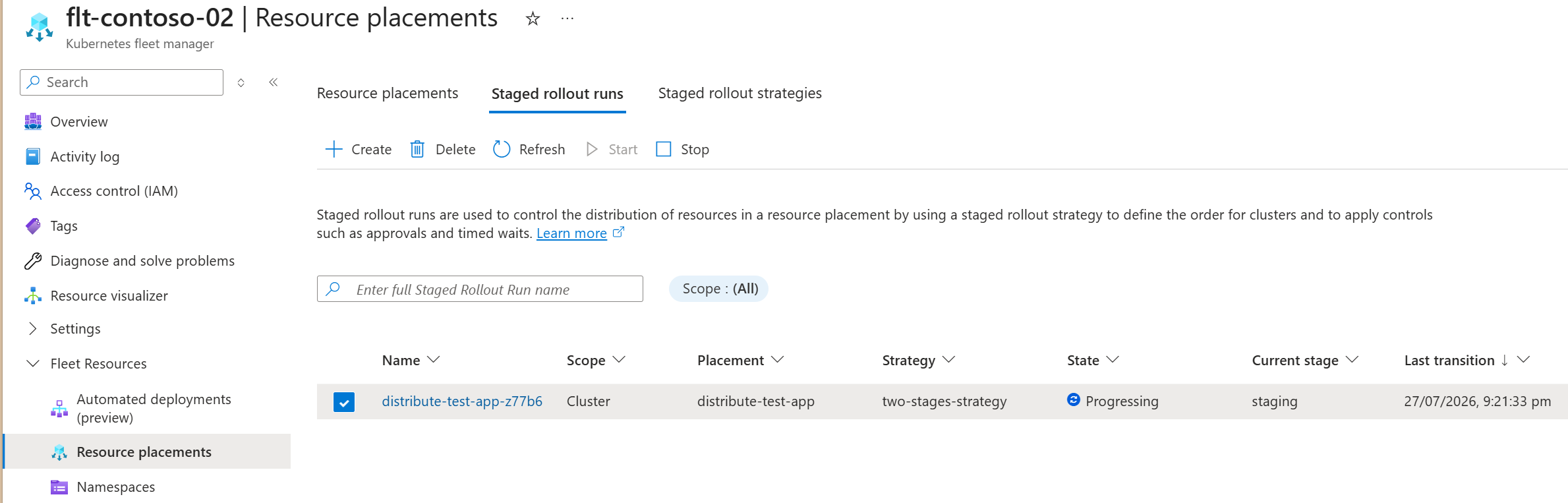
在列表中,选择上一步自动创建的分阶段推出运行,然后在操作菜单中选择开始。
页面会刷新,分阶段发布运行列表中会显示该分阶段发布运行,其状态为进行中,并显示当前正在运行的阶段。
当部署达到
TimedWait时,状态将变为 Waiting。 可以将鼠标悬停在信息图标上,以确认此状态是由TimedWait导致的。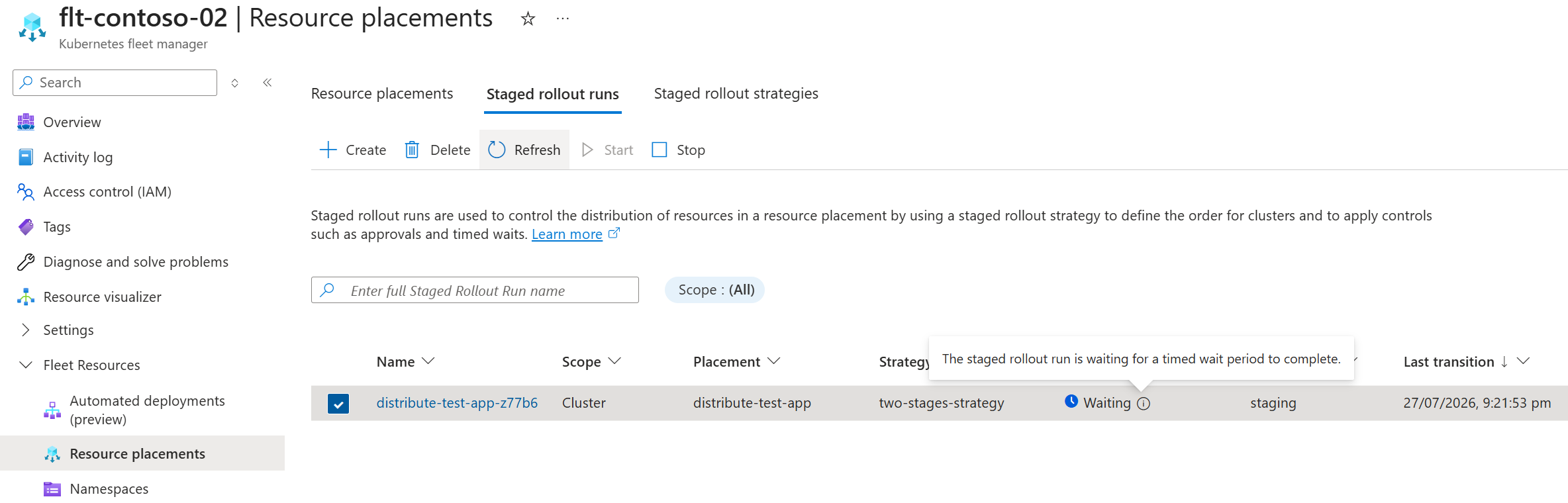
停止分阶段推出
若要停止正在进行的分阶段发布,请将 spec 中的 state 字段修补为 Stop。 此操作会平稳停止分阶段推出运行过程,从而使正在进行中的集群在该过程停止之前完成更新。
kubectl patch clusterstagedupdaterun staged-rollout-test-app --type merge -p '{"spec":{"state":"Stop"}}'
分阶段更新运行已初始化,但当前已不再运行。
kubectl get clusterstagedupdaterun staged-rollout-test-app
你的输出应与以下内容类似,请注意,progressing 现已变为 False。
NAME                      PLACEMENT             RESOURCE-SNAPSHOT-INDEX   POLICY-SNAPSHOT-INDEX   INITIALIZED   PROGRESSING   SUCCEEDED   AGE
staged-rollout-test-app   distribute-test-app                             0                       True          False                     46m
若要停止正在进行的分阶段发布,请按以下步骤操作。 此操作会平稳停止分阶段推出,这样正在进行中的集群会在该过程停止前完成更新。
在 Azure 门户中,转到你的车队管理器。
在“服务”菜单中,在 “舰队资源” 下,选择 “分阶段发布运行”。
在列表中,选择要停止的分阶段发布运行。 然后,从操作菜单中选择 “停止 ”。
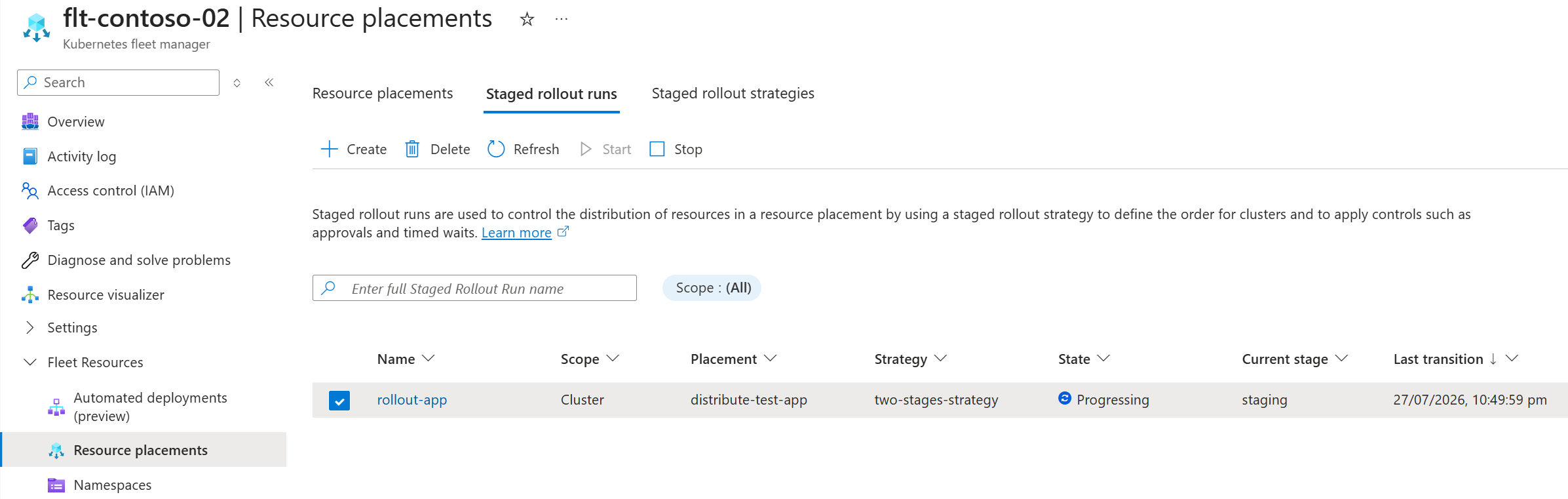
页面刷新,分阶段发布运行列表中显示该分阶段发布运行,其状态为已停止。
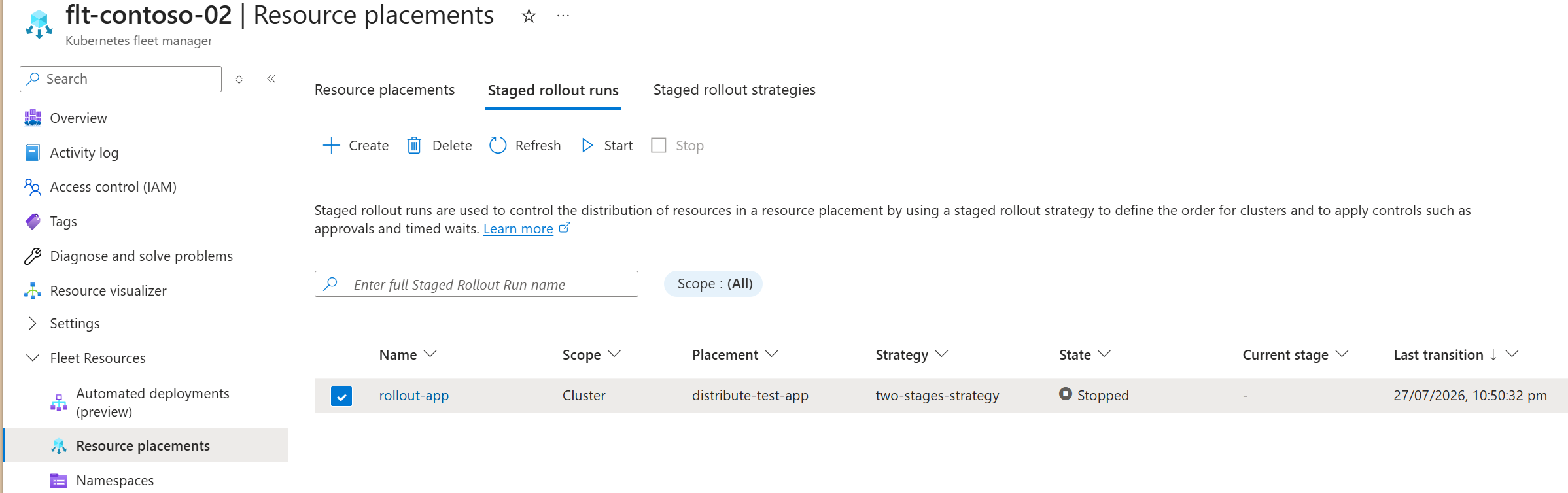
可以按照 “开始分阶段推出”中的说明重启推出。
注释
可以随时停止推出。 进行中的群集将继续运行直至完成。 待审批项不受影响。
清除待处理的阶段审批
在阶段之前或之后添加审批任务。 这些任务需要执行明确的操作才能清除。
当分阶段发布运行进入审批阶段时,它会创建审批请求(ClusterApprovalRequest 或 ApprovalRequest)。 你必须修正此请求。 打好补丁后,发布流程将继续进行。
使用以下命令检查是否有待处理的审批。
kubectl get clusterapprovalrequest
检查处于挂起状态的 ApprovalRequest 资源时,请确保指定资源所在的命名空间。
kubectl get clusterapprovalrequest -n test-app
如果您收到 No resources found 响应,则当前没有待处理的集群范围审批。
如果存在待审批项,响应应与以下示例类似。
NAME                                    UPDATE-RUN                STAGE    APPROVED   AGE
staged-rollout-test-app-before-canary   staged-rollout-test-app   canary              4m13s
注释
系统使用格式 {update-run-name}-{before|after}-{stage-name} 生成审批请求资源名称。
您可以通过创建 JSON 补丁文件并应用该文件来批准 ClusterApprovalRequest。
cat << EOF > approval.json
"status": {
    "conditions": [
        {
            "lastTransitionTime": "$(date -u +%Y-%m-%dT%H:%M:%SZ)",
            "message": "lgtm",
            "observedGeneration": 1,
            "reason": "testPassed",
            "status": "True",
            "type": "Approved"
        }
    ]
}
EOF
注释
请确保 observedGeneration 与审批对象的代相匹配。 此值通常是 1。
使用您创建的 JSON 文件提交 PATCH 请求,以批准该请求。
kubectl patch clusterapprovalrequests staged-rollout-test-app-before-canary --type='merge' --subresource=status --patch-file approval.json
确认该请求已获得批准。
kubectl get clusterapprovalrequest staged-rollout-test-app-before-canary
输出应如下所示。 请注意, APPROVED 设置为 True.
NAME                                    UPDATE-RUN                STAGE    APPROVED   AGE
staged-rollout-test-app-before-canary   staged-rollout-test-app   canary   True       6m
发布工作仍在继续。
kubectl get clusterstagedupdaterun staged-rollout-test-app
您的输出应与以下内容类似,其中显示了一次已完成的运行,并且 SUCCEEDED 被设置为 True。
NAME                      PLACEMENT             RESOURCE-SNAPSHOT-INDEX   POLICY-SNAPSHOT-INDEX   INITIALIZED   PROGRESSING   SUCCEEDED   AGE
staged-rollout-test-app   distribute-test-app                             0                       True          False         True        9m
当分阶段发布运行到达审批环节时,请使用以下流程清除此审批,以使运行继续进行。
在 Azure 门户中,转到你的车队管理器。
在“服务”菜单中,在 “舰队资源” 下,选择 “分阶段发布运行”。
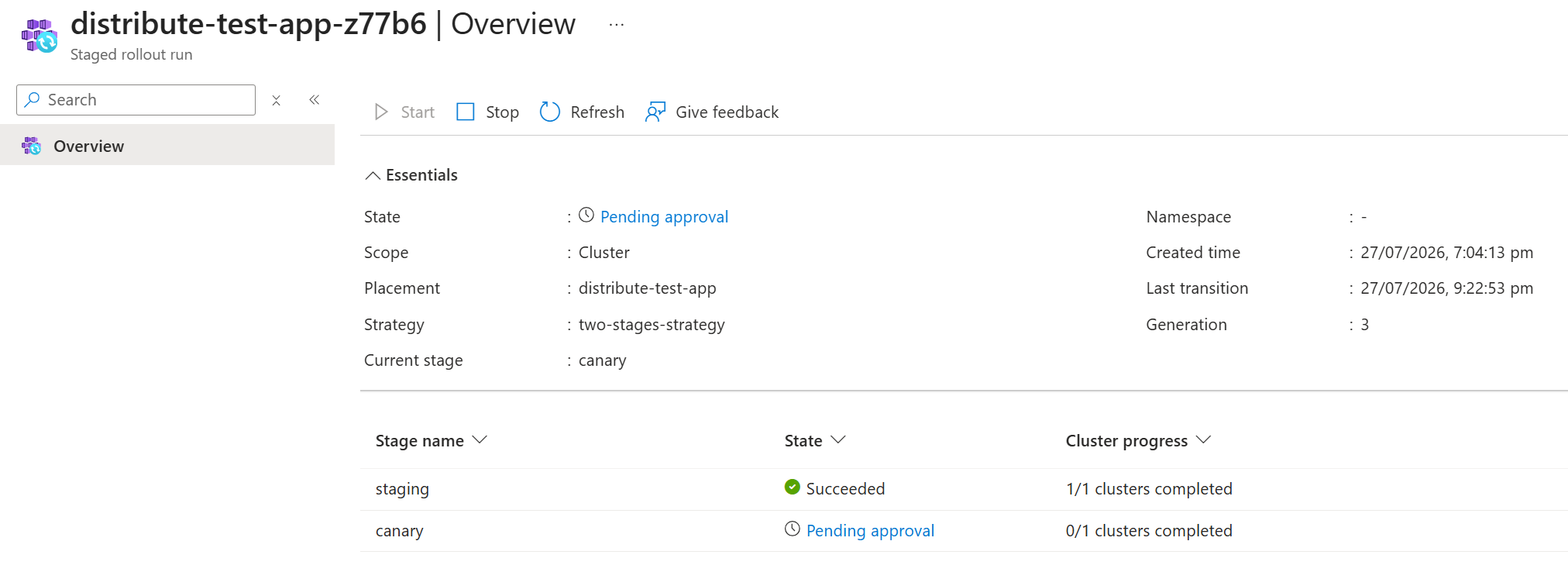
在列表中,找到状态为 待批准 的分阶段发布运行。
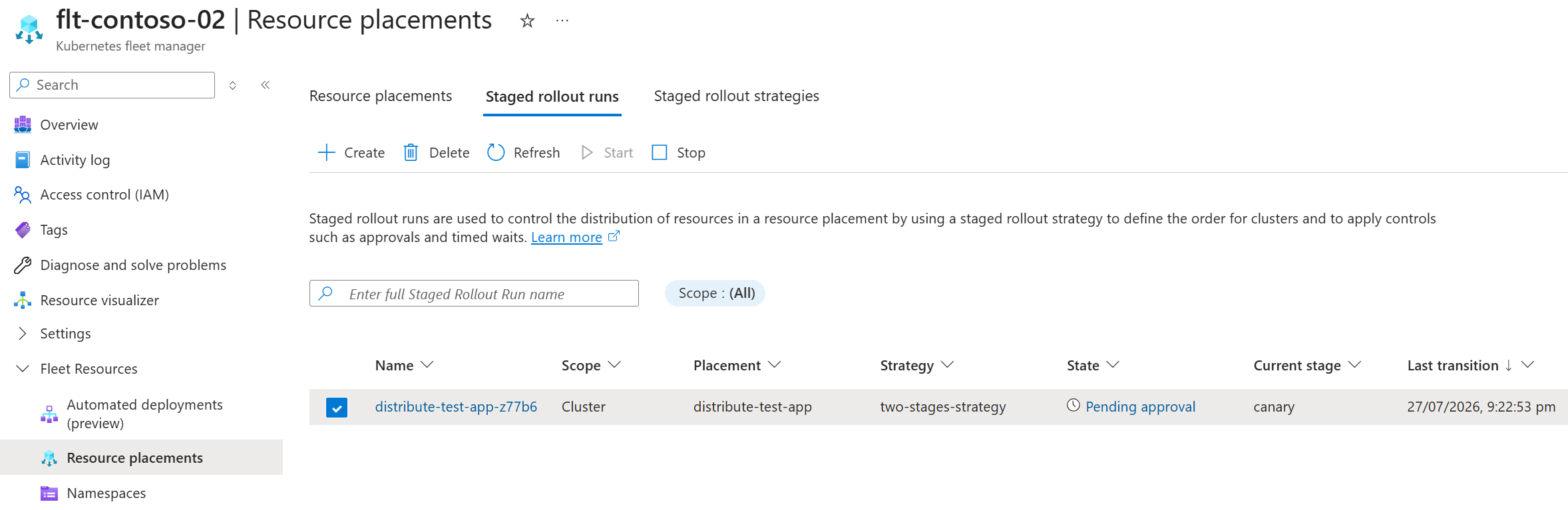
可以从以下三个位置中的任何一个打开审批对话框:
- 在分阶段发布的运行列表视图中以内联方式显示(如前所示)。
- 从分阶段推出运行的详细信息视图中:
- 在“基本信息”部分的状态字段中。
- 在阶段视图中内联显示。
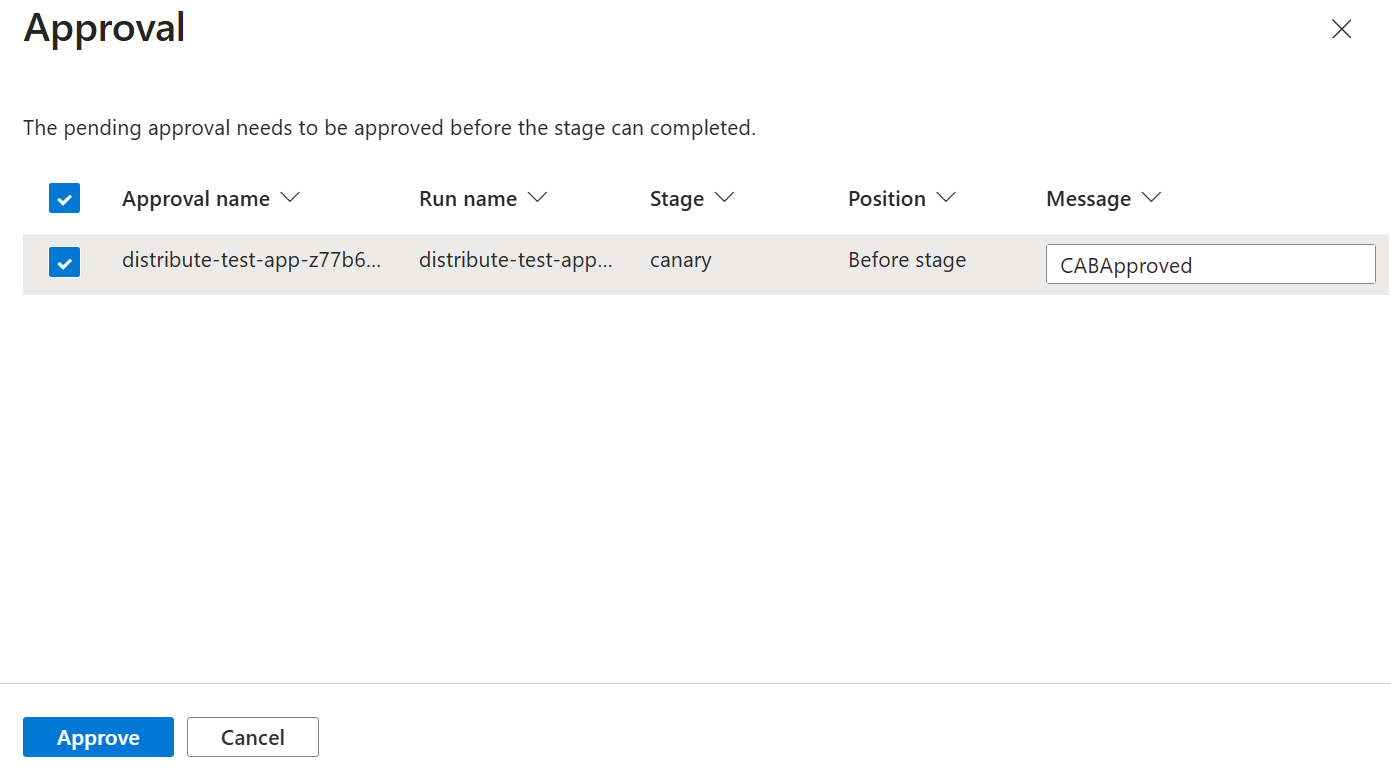
选择一个选项以打开 “审批 ”对话框。 输入可选 消息 ,然后选择 “批准”。
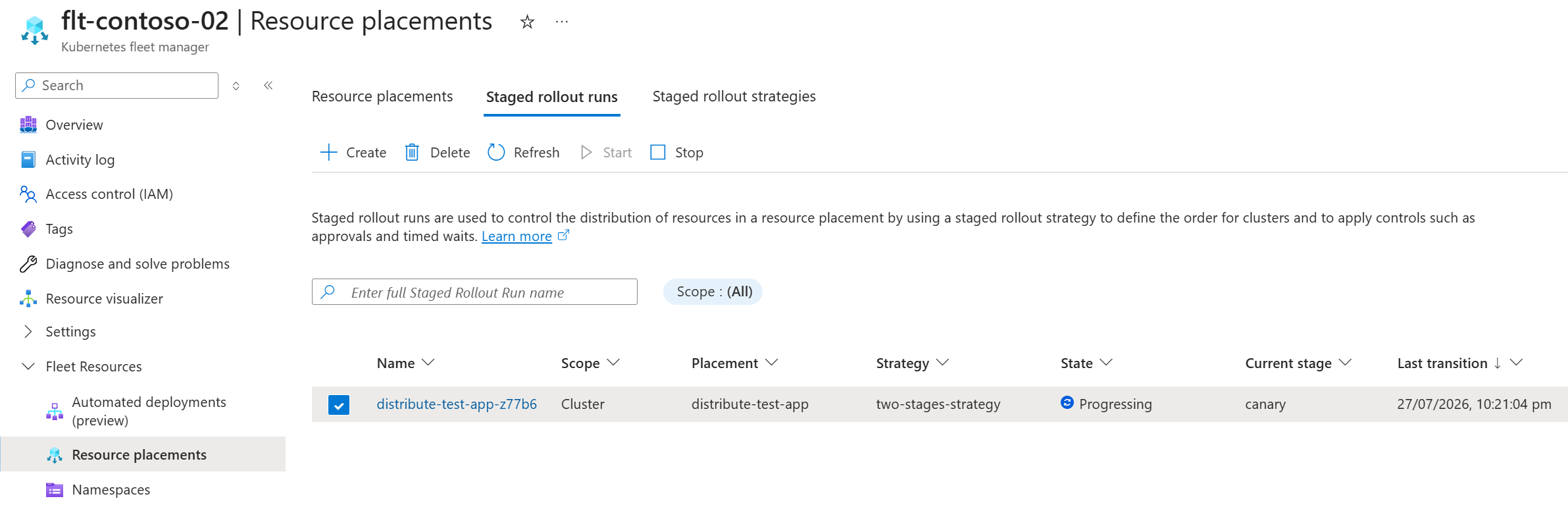
页面刷新后,分阶段发布运行列表中会显示该分阶段发布运行,其状态为进行中。
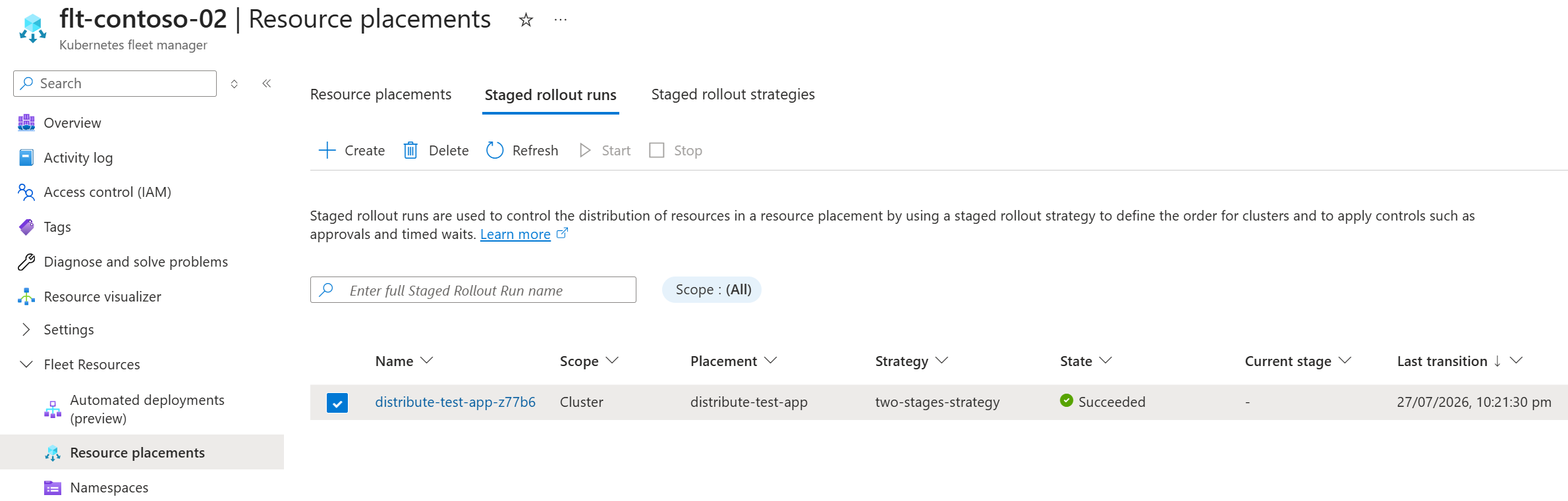
分阶段推出运行将持续进行,直到完成,分阶段推出运行列表中会显示该分阶段推出运行的状态为成功。
删除发布运行
通过删除 Fleet Manager 中心集群上的 Kubernetes 资源,删除一次分阶段发布运行。
kubectl delete clusterstagedupdaterun staged-rollout-test-app
在 Azure 门户中,转到你的车队管理器。
在“服务”菜单中,在 “舰队资源” 下,选择 “分阶段发布运行”。
在列表中,选择要删除的分阶段推出运行,然后从操作菜单中选择Delete。
在 “删除 ”对话框中,确认资源正确,然后选择“ 确认删除”。 最后,选择 “删除”。
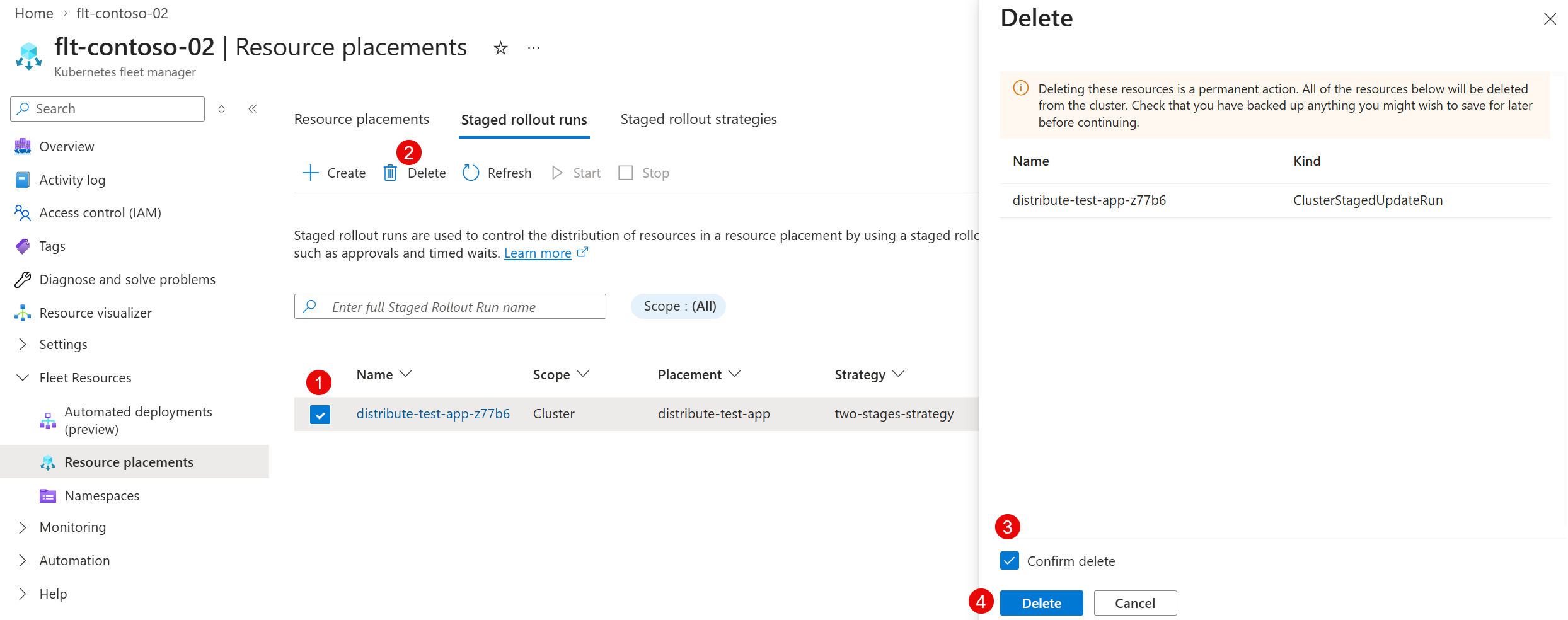
页面会刷新,已删除的分阶段发布运行记录将不再显示。
注释
删除已完成的分阶段发布运行不会移除已部署的资源。 若要移除已放置的资源,必须删除资源放置。
后续步骤
本文介绍了如何使用分阶段发布运行,通过资源放置来控制资源在成员群集之间的分布。
若要详细了解分阶段推出运行和相关概念,请参阅以下资源:
- 为 Fleet Manager 资源部署定义一个策略
- 了解 Fleet Manager 资源放置的状态字段和条件
- 在 Azure Kubernetes Fleet Manager 中查看代理日志