适用于: ✔️具有中心群集的 Fleet Manager
Azure Kubernetes Fleet Manager ResourcePlacement 使你能够在车队中跨特定群集分布和同步单个命名空间范围的资源(例如 ConfigMaps、部署和服务),而无需传播整个命名空间。 使用此方法可以精细控制部署的位置,简化多群集配置管理并减少手动开销。 本文介绍如何使用 ResourcePlacement 将命名空间作用域资源分发到成员集群。
若要分发群集范围资源,或分发某个命名空间及其所有子资源,请参阅 使用 Azure Kubernetes Fleet Manager 的资源放置功能跨多个群集部署群集范围资源。
可以使用Azure门户或Azure CLI完成本文中的步骤。
注释
可以将 Fleet Manager 的资源放置功能与 AKS 和已启用 Azure Arc 的 Kubernetes 群集配合使用。
在您开始之前
- 如果没有Azure帐户,请在开始前创建一个试用帐户。
- 阅读 命名空间范围资源放置的概念概述 ,了解本文中使用的概念和术语。
- 需要包含一个中心群集和多个成员群集的舰队管理器。 如果没有,请参阅使用 Azure CLI 创建 Azure Kubernetes 舰队管理器资源并加入成员群集。
- 需要访问中心群集的 Kubernetes API。 如果没有访问权限,请参阅访问 Azure Kubernetes 舰队管理器中心群集的 Kubernetes API。
跨成员群集建立命名空间
在可用于 ResourcePlacement 部署命名空间范围的资源之前,目标命名空间必须存在于成员群集上。
让我们了解如何在 Fleet Manager 中心群集上创建命名空间,并使用 a ClusterResourcePlacement将其分发到成员群集。 通过将 selectionScope: NamespaceOnly 添加到 resourceSelector,确保仅分发该命名空间。
为订阅 ID、资源组和 Kubernetes 舰队资源设置以下环境变量:
export SUBSCRIPTION_ID=<subscription-id>
export GROUP=<resource-group-name>
export FLEET=<fleet-name>
使用
az account set命令设置默认Azure订阅:az account set \ --subscription ${SUBSCRIPTION_ID}使用
az fleet get-credentials命令获取 Kubernetes 舰队中心群集的 kubeconfig 文件:az fleet get-credentials \ --resource-group ${GROUP} \ --name ${FLEET}输出应如下所示。
Merged "hub" as current context in /home/fleet/.kube/config注释
如果您收到类型为
InvalidHubOperation的错误,且错误消息提示该 fleet 没有 hub,请添加一个 hub 集群。 有关详细信息,请参阅 升级中心群集类型。在中心群集上创建命名空间:
kubectl create namespace test-app将以下 YAML 另存为
crp-distribute-namespace-only.yaml。apiVersion: placement.kubernetes-fleet.io/v1 kind: ClusterResourcePlacement metadata: name: distribute-test-app-namespace spec: resourceSelectors: - group: "" kind: Namespace name: test-app version: v1 selectionScope: NamespaceOnly policy: placementType: PickAll将部署位置清单应用到 Fleet Manager 中心集群。
kubectl apply -f crp-distribute-namespace-only.yaml注释
使用隐式
RollingUpdate策略应用资源放置时,命名空间部署会立即开始。 若要了解如何进一步控制部署,请参阅 定义资源放置的部署策略。验证命名空间是否已成功分发:
kubectl get clusterresourceplacement distribute-test-app-namespace输出应类似于以下示例:
NAME                            GEN   SCHEDULED   SCHEDULED-GEN   AVAILABLE   AVAILABLE-GEN   AGE
distribute-test-app-namespace   1     True        1               True        1               2m45s
在 Azure 门户中,转到你的车队管理器。
在服务菜单上的 “机群资源”下,选择“ 命名空间>+ 创建”。
注释
如果未看到 “舰队资源”,则群管理器没有中心群集。 有关如何添加群集的详细信息,请参阅 升级中心群集类型。
在菜单中,选择 命名空间,输入 名称,然后选择“ 创建”。
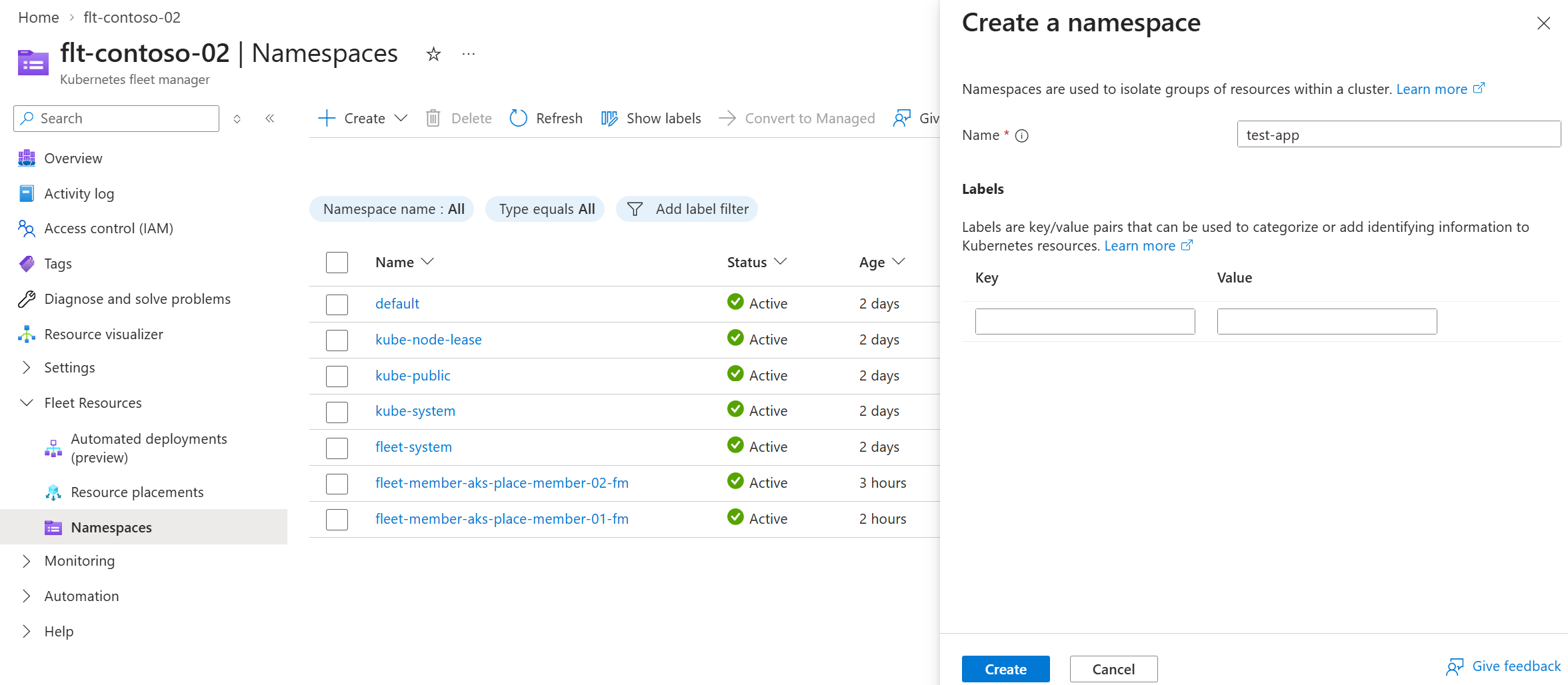
片刻之后,页面将刷新,命名空间显示在 Fleet Manager 中心群集的命名空间列表中。 现在它已准备就绪,可以托管你想要分发到各个成员集群的任何资源。
在服务菜单上的 “机群资源”下,选择 “资源位置>+ 创建”。
在“基本信息”选项卡上,配置以下选项:
在 “投放详情”中,输入投放名称。
在 “资源详细信息”下,输入要分发的资源的组版本类型(GVK)和名称。 在此示例中,使用以下值。
group: ""
kind: Namespace
version: v1
name: test-app
selectionScope: NamespaceOnly
在 “成员群集”选择中,选择 “所有群集”。
对于 Rollout,请保持 滚动更新 策略为选中状态。
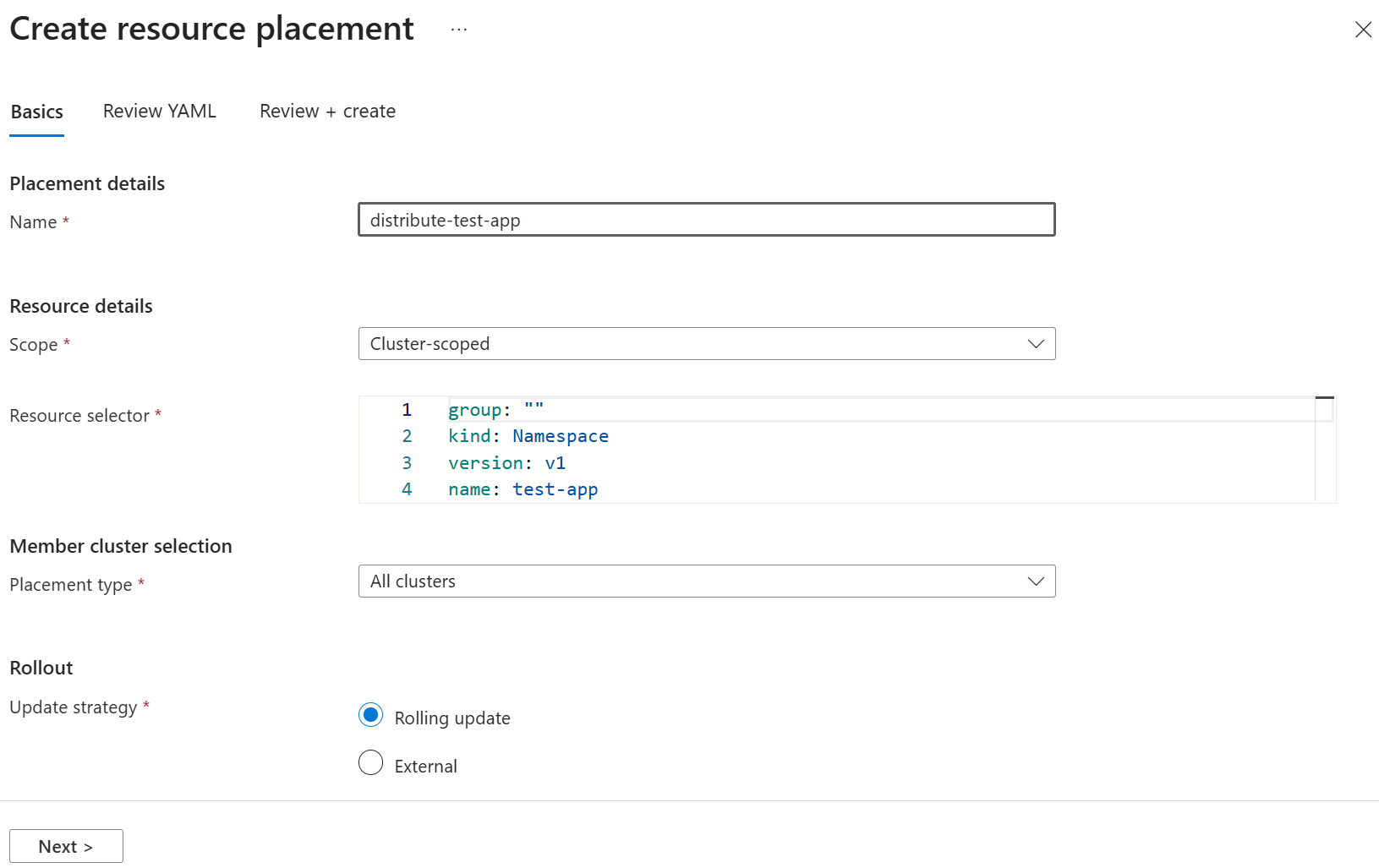
选择 “下一步 ”以查看生成的
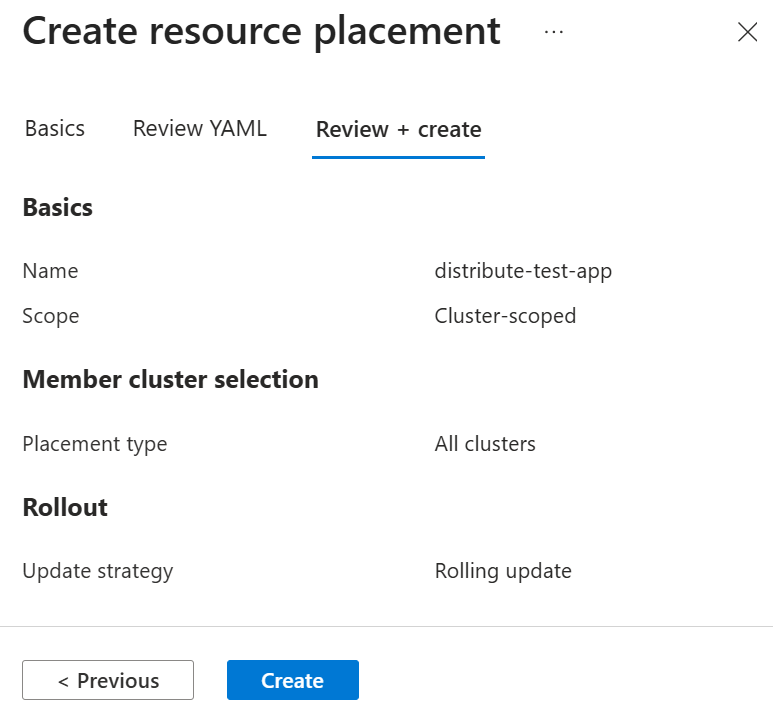
ClusterResourcePlacement清单。 如果需要,可以修改清单,使用 “验证”(试运行) 选项进行验证,或选择“ 查看 + 创建 ”以继续进行最终确认。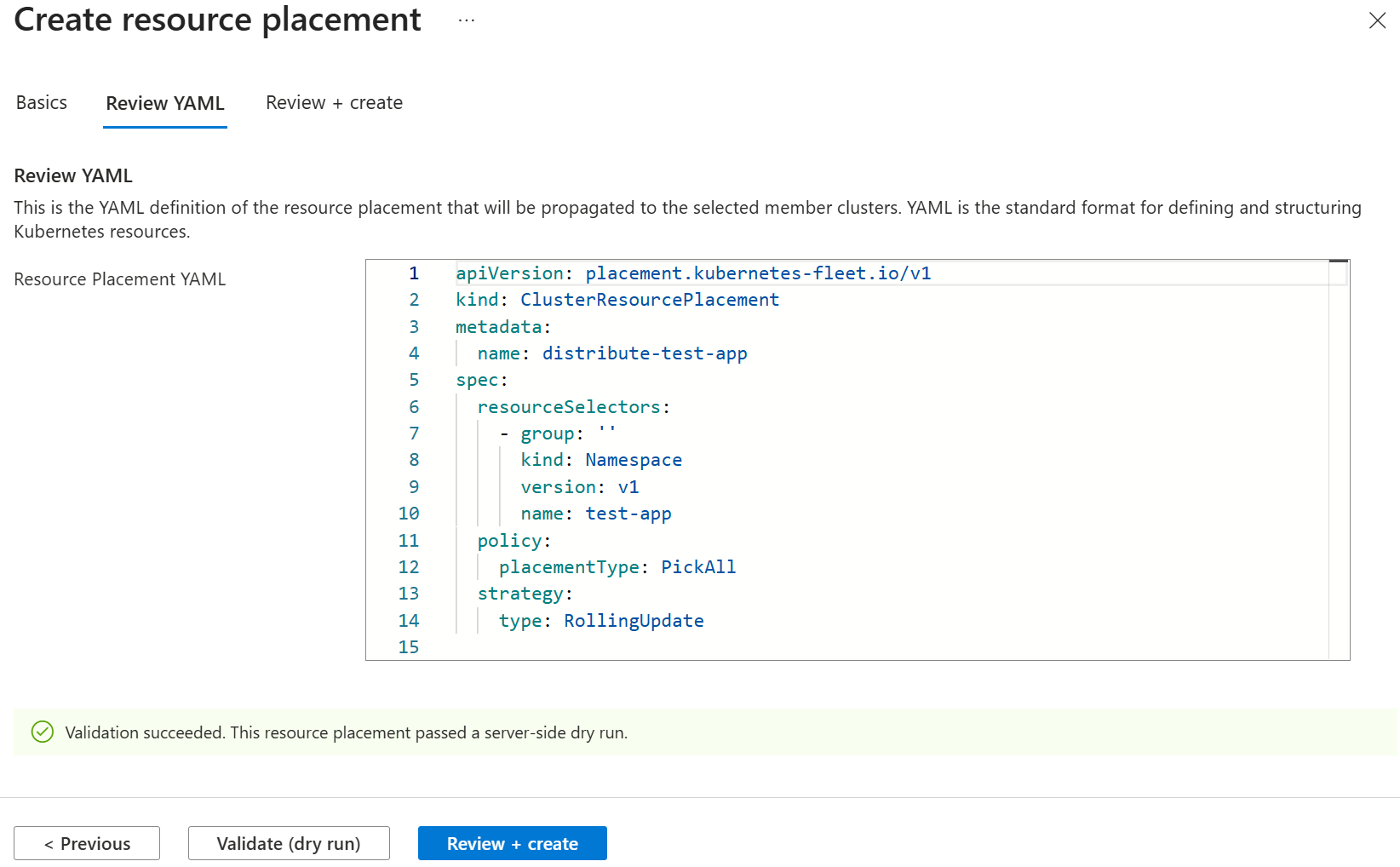
选择 “创建 ”以立即开始分发命名空间。
注释
使用所选的
RollingUpdate策略应用资源放置配置后,命名空间资源的部署会立即开始。 有关如何控制发布过程的详细信息,请参阅 定义资源放置的发布策略。页面刷新后,资源放置位置列表中会显示新创建的放置位置。 它显示所选集群的数量,以及舰队调度器是否可以满足放置策略要求。
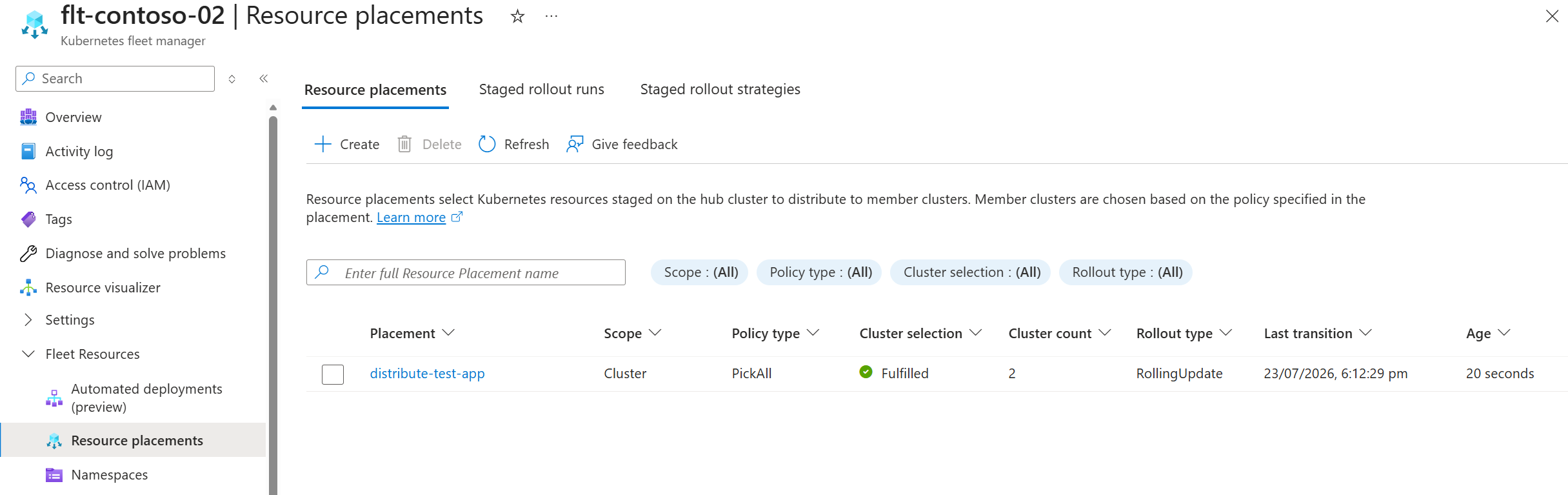
在列表中选择相应的投放位置名称,即可查看其投放状态。 选择单个群集以查看该群集上的资源部署情况。
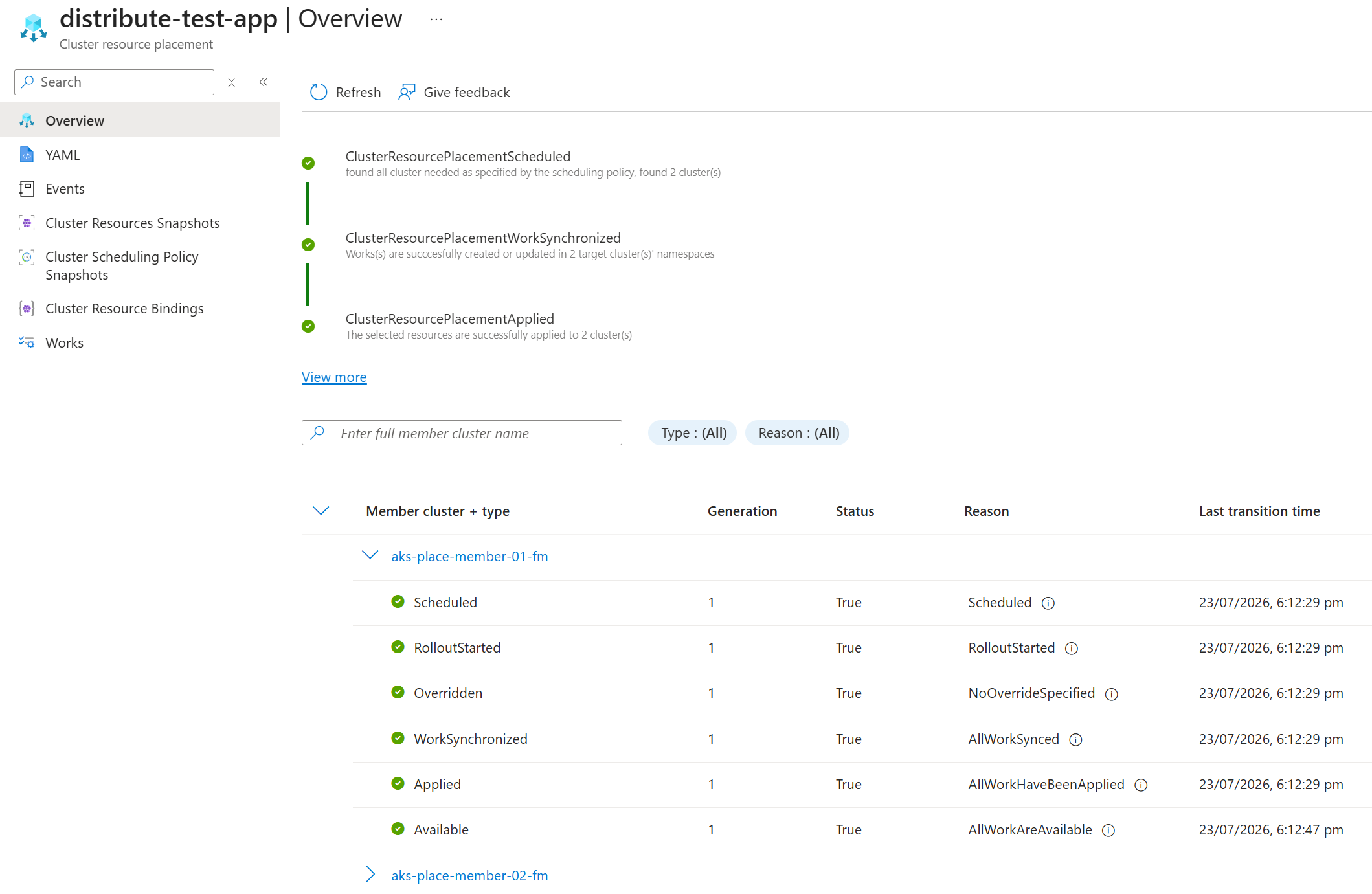
在选定的 Kubernetes 群集上,可以找到已部署的命名空间。
将命名空间范围内的资源分发到成员群集
使用这个简单场景:在 fleet 中选定的多个集群上部署两个 ConfigMap 资源。 你必须在该命名空间中创建 ResourcePlacement,作为要分发的资源。
在中心群集的命名空间中创建两
ConfigMap个资源。kubectl create configmap app-config \ --from-literal=environment=production \ --from-literal=log-level=info \ -n test-app kubectl create configmap feature-flags \ --from-literal=new-ui=enabled \ --from-literal=api-v2=disabled \ -n test-app创建一个
ResourcePlacement,以分发 ConfigMap。 将以下 YAML 保存到名为app-configs-rp.yaml的文件:apiVersion: placement.kubernetes-fleet.io/v1beta1 kind: ResourcePlacement metadata: name: distribute-app-configs namespace: test-app spec: resourceSelectors: - group: "" kind: ConfigMap version: v1 name: app-config - group: "" kind: ConfigMap version: v1 name: feature-flags policy: placementType: PickFixed clusterNames: - membercluster1 - membercluster2注释
将
membercluster1和membercluster2替换为您成员群集的实际名称。 用于kubectl get memberclusters列出可用的成员群集。将
ResourcePlacement应用于中心集群。kubectl apply -f app-configs-rp.yaml检查资源传播的进度:
kubectl get resourceplacement distribute-app-configs -n test-app输出应如下所示。
NAME                     GEN   SCHEDULED   SCHEDULED-GEN   AVAILABLE   AVAILABLE-GEN   AGE
distribute-app-configs   1     True        1               True        1               3m14s
查看投放详情。
kubectl describe resourceplacement distribute-app-configs -n test-app输出应如下所示。
Name:         distribute-app-configs
Namespace:    test-app
Labels:       <none>
Annotations:  <none>
API Version:  placement.kubernetes-fleet.io/v1
Kind:         ResourcePlacement
Metadata:
  Creation Timestamp:  2026-07-24T05:18:56Z
  Finalizers:
    kubernetes-fleet.io/crp-cleanup
    kubernetes-fleet.io/scheduler-cleanup
  Generation:        1
  Resource Version:  1306099
  UID:               3a7b7f54-9ef0-4a2d-b8a6-62258ed63f78
Spec:
  Policy:
    Cluster Names:
      aks-place-member-01-fm
      aks-place-member-02-fm
    Placement Type:  PickFixed
  Resource Selectors:
    Group:
    Kind:                  ConfigMap
    Name:                  app-config
    Selection Scope:       NamespaceWithResources
    Version:               v1
    Group:
    Kind:                  ConfigMap
    Name:                  feature-flags
    Selection Scope:       NamespaceWithResources
    Version:               v1
  Revision History Limit:  10
  Status Reporting Scope:  ClusterScopeOnly
  Strategy:
    Type:  RollingUpdate
Status:
  Conditions:
    Last Transition Time:   2026-07-24T05:18:56Z
    Message:                found all cluster needed as specified by the scheduling policy, found 2 cluster(s)
    Observed Generation:    1
    Reason:                 SchedulingPolicyFulfilled
    Status:                 True
    Type:                   ResourcePlacementScheduled
    Last Transition Time:   2026-07-24T05:18:56Z
    Message:                All 2 cluster(s) start rolling out the latest resource
    Observed Generation:    1
    Reason:                 RolloutStarted
    Status:                 True
    Type:                   ResourcePlacementRolloutStarted
    Last Transition Time:   2026-07-24T05:18:56Z
    Message:                No override rules are configured for the selected resources
    Observed Generation:    1
    Reason:                 NoOverrideSpecified
    Status:                 True
    Type:                   ResourcePlacementOverridden
    Last Transition Time:   2026-07-24T05:18:56Z
    Message:                Works(s) are successfully created or updated in 2 target cluster(s)' namespaces
    Observed Generation:    1
    Reason:                 WorkSynchronized
    Status:                 True
    Type:                   ResourcePlacementWorkSynchronized
    Last Transition Time:   2026-07-24T05:18:56Z
    Message:                The selected resources are successfully applied to 2 cluster(s)
    Observed Generation:    1
    Reason:                 ApplySucceeded
    Status:                 True
    Type:                   ResourcePlacementApplied
    Last Transition Time:   2026-07-24T05:18:56Z
    Message:                The selected resources in 2 cluster(s) are available now
    Observed Generation:    1
    Reason:                 ResourceAvailable
    Status:                 True
    Type:                   ResourcePlacementAvailable
  Observed Resource Index:  0
  Placement Statuses:
    Cluster Name:  aks-place-member-01-fm
    Conditions:
      Last Transition Time:   2026-07-24T05:18:56Z
      Message:                Successfully scheduled resources for placement in "aks-place-member-01-fm": picked by scheduling policy
      Observed Generation:    1
      Reason:                 Scheduled
      Status:                 True
      Type:                   Scheduled
      Last Transition Time:   2026-07-24T05:18:56Z
      Message:                Detected the new changes on the resources and started the rollout process
      Observed Generation:    1
      Reason:                 RolloutStarted
      Status:                 True
      Type:                   RolloutStarted
      Last Transition Time:   2026-07-24T05:18:56Z
      Message:                No override rules are configured for the selected resources
      Observed Generation:    1
      Reason:                 NoOverrideSpecified
      Status:                 True
      Type:                   Overridden
      Last Transition Time:   2026-07-24T05:18:56Z
      Message:                All of the works are synchronized to the latest
      Observed Generation:    1
      Reason:                 AllWorkSynced
      Status:                 True
      Type:                   WorkSynchronized
      Last Transition Time:   2026-07-24T05:18:56Z
      Message:                All corresponding work objects are applied
      Observed Generation:    1
      Reason:                 AllWorkHaveBeenApplied
      Status:                 True
      Type:                   Applied
      Last Transition Time:   2026-07-24T05:18:56Z
      Message:                All corresponding work objects are available
      Observed Generation:    1
      Reason:                 AllWorkAreAvailable
      Status:                 True
      Type:                   Available
    Observed Resource Index:  0
    Cluster Name:             aks-place-member-02-fm
    Conditions:
      Last Transition Time:   2026-07-24T05:18:56Z
      Message:                Successfully scheduled resources for placement in "aks-place-member-02-fm": picked by scheduling policy
      Observed Generation:    1
      Reason:                 Scheduled
      Status:                 True
      Type:                   Scheduled
      Last Transition Time:   2026-07-24T05:18:56Z
      Message:                Detected the new changes on the resources and started the rollout process
      Observed Generation:    1
      Reason:                 RolloutStarted
      Status:                 True
      Type:                   RolloutStarted
      Last Transition Time:   2026-07-24T05:18:56Z
      Message:                No override rules are configured for the selected resources
      Observed Generation:    1
      Reason:                 NoOverrideSpecified
      Status:                 True
      Type:                   Overridden
      Last Transition Time:   2026-07-24T05:18:56Z
      Message:                All of the works are synchronized to the latest
      Observed Generation:    1
      Reason:                 AllWorkSynced
      Status:                 True
      Type:                   WorkSynchronized
      Last Transition Time:   2026-07-24T05:18:56Z
      Message:                All corresponding work objects are applied
      Observed Generation:    1
      Reason:                 AllWorkHaveBeenApplied
      Status:                 True
      Type:                   Applied
      Last Transition Time:   2026-07-24T05:18:56Z
      Message:                All corresponding work objects are available
      Observed Generation:    1
      Reason:                 AllWorkAreAvailable
      Status:                 True
      Type:                   Available
    Observed Resource Index:  0
  Selected Resources:
    Kind:       ConfigMap
    Name:       app-config
    Namespace:  test-app
    Version:    v1
    Kind:       ConfigMap
    Name:       feature-flags
    Namespace:  test-app
    Version:    v1
Events:
  Type    Reason                        Age   From                  Message
  ----    ------                        ----  ----                  -------
  Normal  PlacementRolloutStarted       4m3s  placement-controller  Started rolling out the latest resources
  Normal  PlacementOverriddenSucceeded  4m3s  placement-controller  Placement has been successfully overridden
  Normal  PlacementWorkSynchronized     4m3s  placement-controller  Work(s) have been created or updated successfully for the selected cluster(s)
  Normal  PlacementApplied              4m3s  placement-controller  Resources have been applied to the selected cluster(s)
  Normal  PlacementAvailable            4m3s  placement-controller  Resources are available on the selected cluster(s)
  Normal  PlacementRolloutCompleted     4m3s  placement-controller  Placement has finished the rollout process and reached the desired status
在 Azure 门户中,转到你的车队管理器。
在服务菜单上的 “机群资源”下,选择 “命名空间”。
注释
如果未看到 “舰队资源”,则群管理器没有中心群集。 有关如何添加群集的详细信息,请参阅 升级中心群集类型。
在命名空间列表顶部,选择“ + 创建>应用 YAML”,并使用以下示例。
apiVersion: v1
kind: ConfigMap
metadata:
  name: app-config
  namespace: test-app
data:
  environment: production
  log-level: info
apiVersion: v1 kind: ConfigMap metadata: name: feature-flags namespace: test-app data: new-ui: enabled api-v2: disabled复制并粘贴这些示例,然后按照下图所示逐个应用。
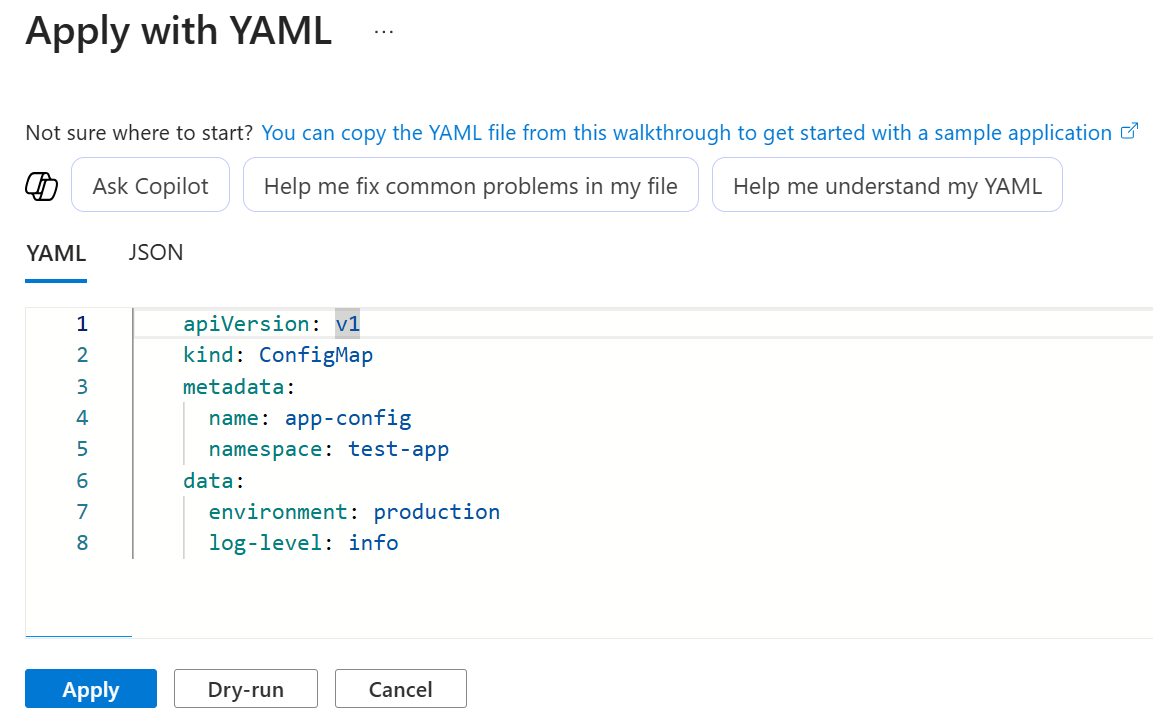
现在,这两个 ConfigMap 资源已可通过
ResourcePlacement分发到成员集群。在服务菜单上的 “机群资源”下,选择 “资源位置>+ 创建”。
在“基本信息”选项卡上,配置以下选项:
在 “投放详情”中,输入投放名称。
在 “资源详细信息”下:
将 范围 设置为 命名空间范围。
对于 命名空间,请选择
test-app命名空间。输入要分发的资源的组版本类型(GVK)和名称。 在此示例中,使用以下值。
group: ""
kind: ConfigMap
version: v1
name: app-config
在 “成员群集选择”中,对于 “放置类型”,请选择 “选择特定群集”。
选择 “选择成员群集”,选择接收资源的成员群集,然后选择“ 选择”。
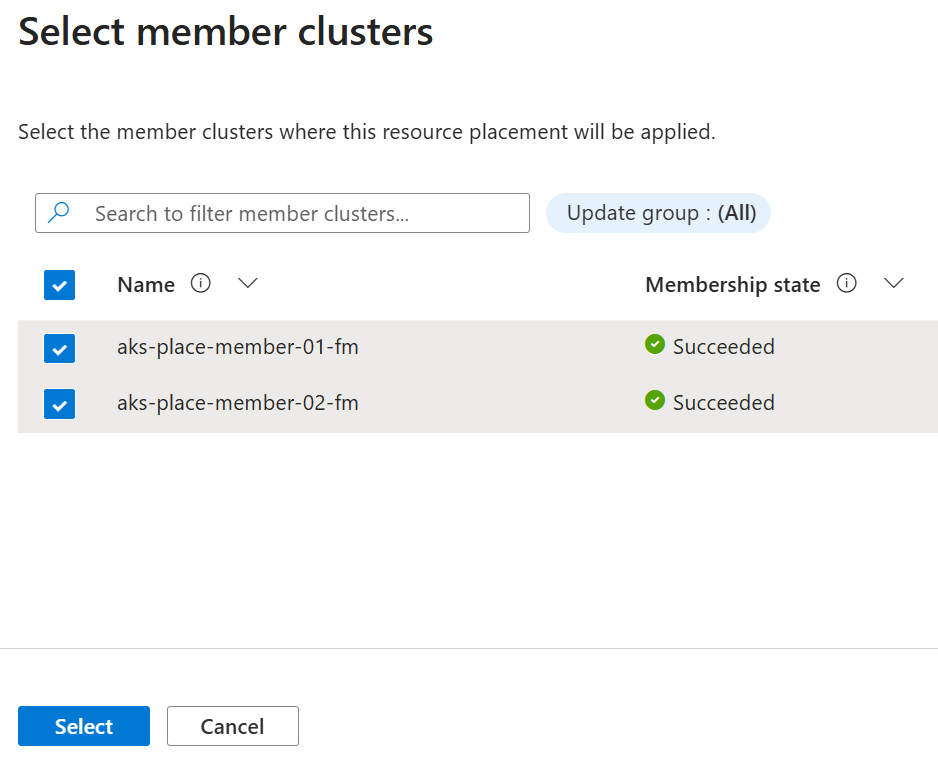
- 对于 Rollout,请保持 滚动更新 策略为选中状态。
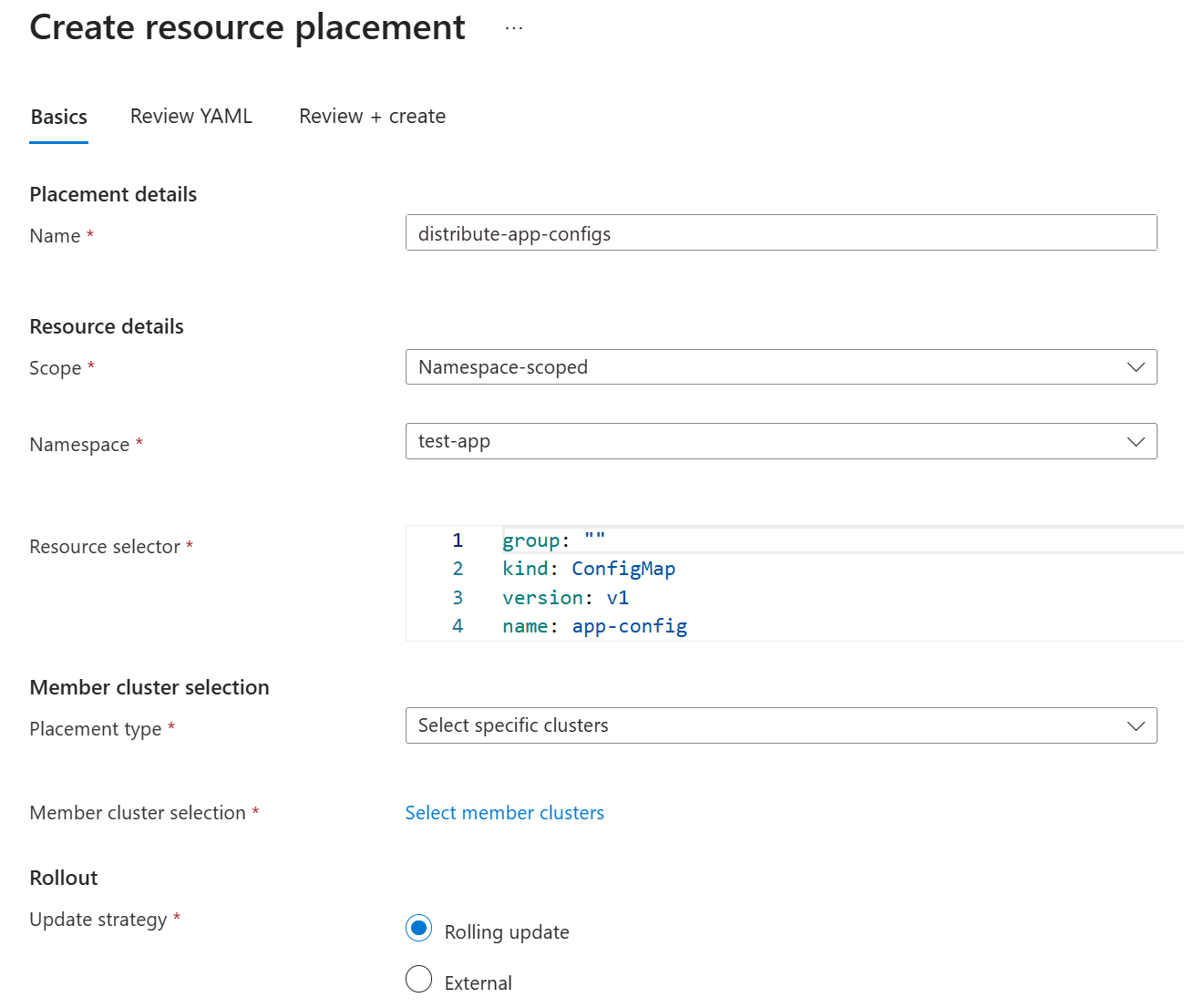
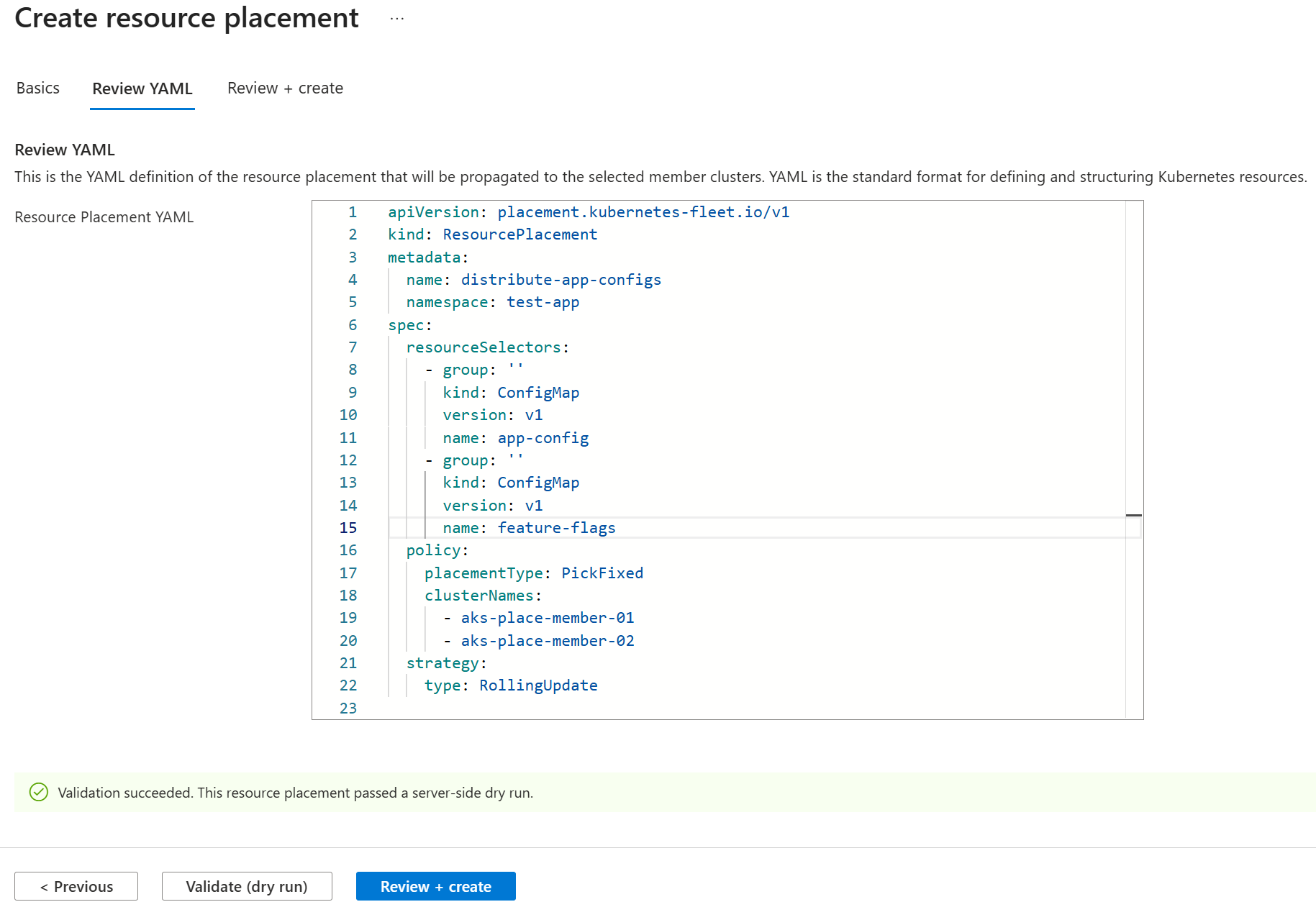
选择 “下一步 ”以查看生成的
ResourcePlacement清单。将第二个 ConfigMap 添加到 YAML 对话框中的
resourceSelectors部分以进行分发。group: "" kind: ConfigMap version: v1 name: feature-flags在继续操作之前,请使用 “验证”(试运行)选项验证 修改后的 YAML。 选择 “查看 + 创建 ”以继续进行最终确认。
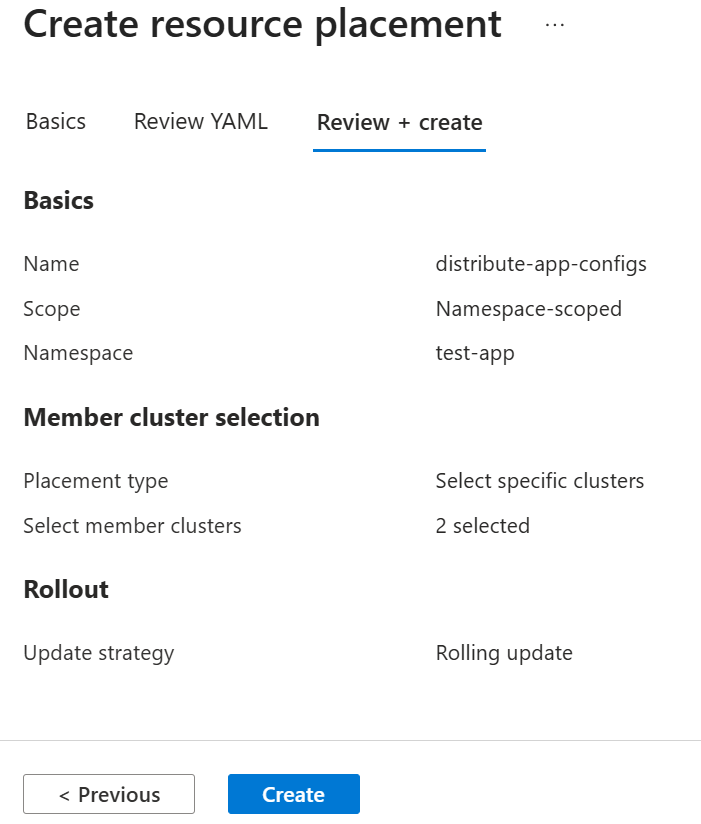
选择 “创建 ”以立即开始分发命名空间。
注释
使用所选的
RollingUpdate策略应用资源放置后,资源部署会立即开始。 若要了解如何进一步控制部署,请参阅 定义资源放置的部署策略。页面刷新后,资源放置位置列表中会显示新创建的放置位置。 它显示所选集群的数量,以及舰队调度器是否可以满足放置策略要求。
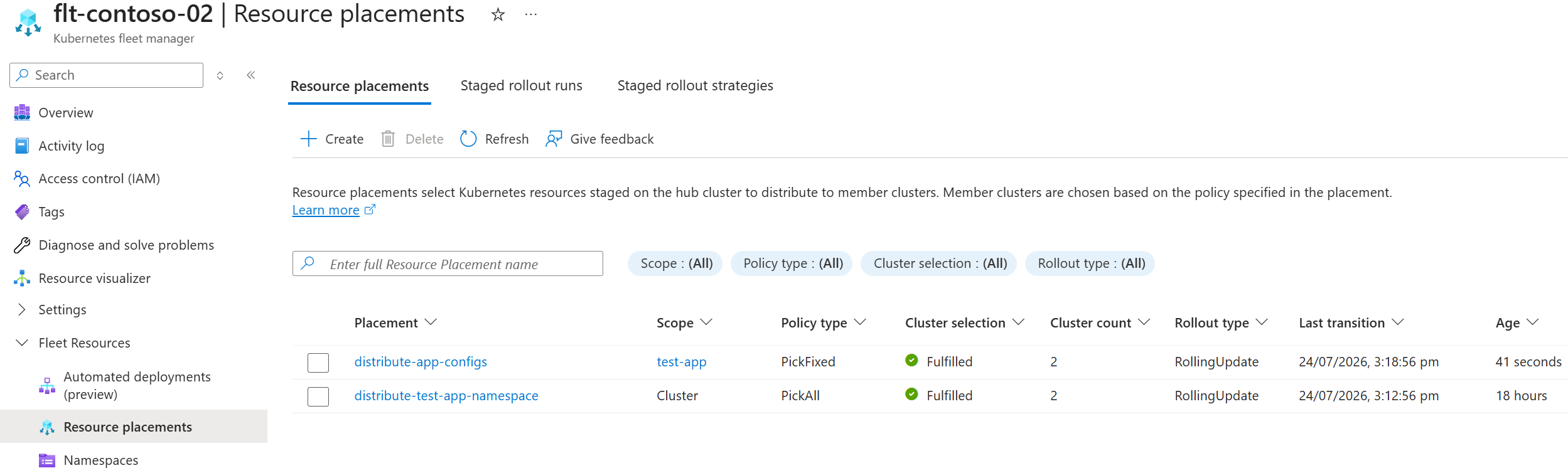
在列表中选择相应的投放位置名称,即可查看其投放状态。 选择单个群集以查看该群集上的资源部署情况。
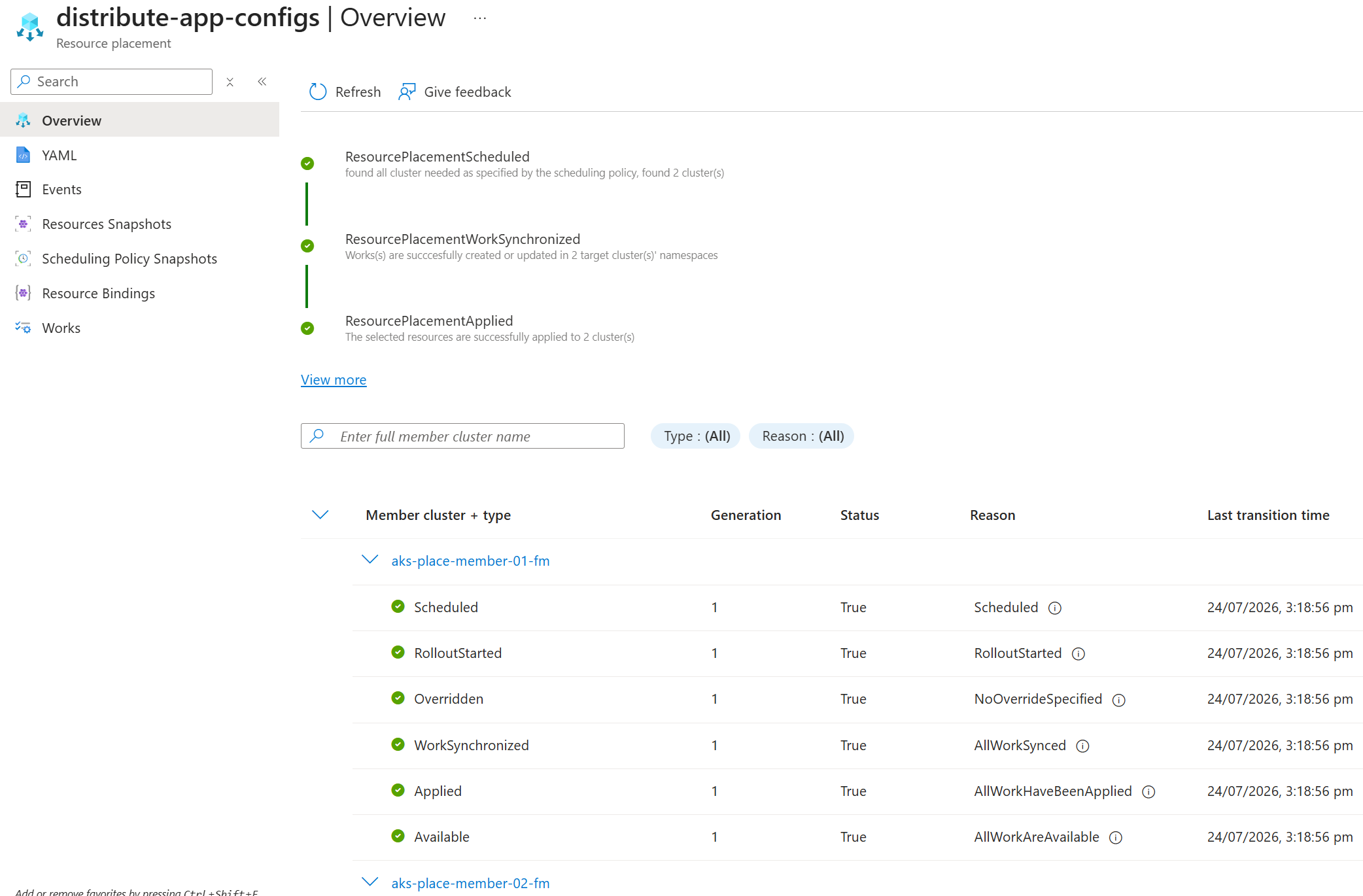
可以通过直接连接到成员群集并检查 test-app 命名空间来查看这两 ConfigMap 个资源,来确认成员群集上是否存在分布式资源。
删除该部署以移除资源
删除 Fleet Manager 中心群集上的资源位置时,将从所选成员群集中删除分布式资源。
若要删除 ConfigMap 资源,请删除 Fleet Manager Hub 集群上的
ResourcePlacement。kubectl delete resourceplacement distribute-app-configs若要从成员群集中移除该命名空间,请删除
ClusterResourcePlacement。kubectl delete clusterresourceplacement distribute-test-app-namespace
在服务菜单中的舰队资源下,选择资源位置。
在资源放置列表中,选择相应的放置项,然后选择删除。
在 “删除”上,验证是否选择了正确的位置。 准备就绪后,选择“确认删除”“删除”。>
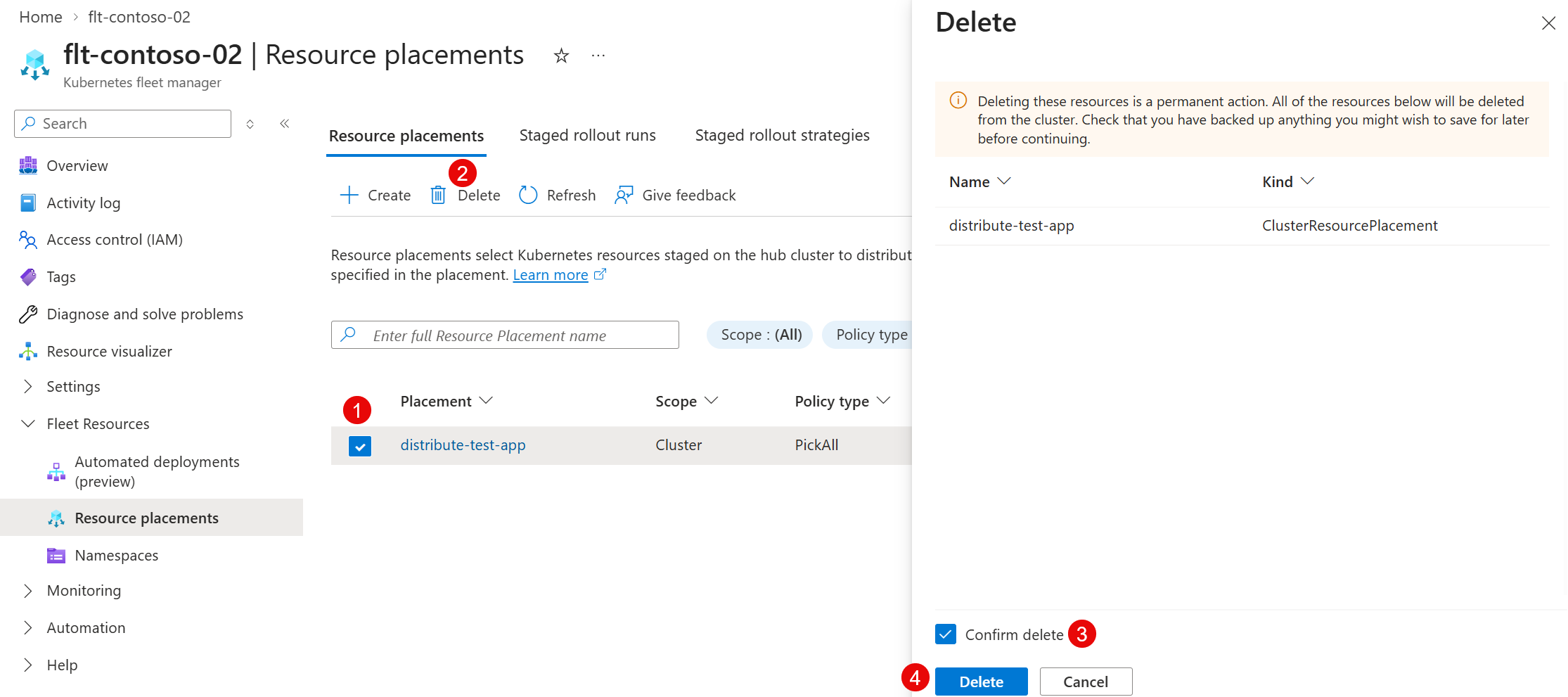
页面将刷新,位置不再显示在列表中。 将从成员群集中删除资源。
重复此过程以删除作为第一步放置的命名空间。
相关内容
若要了解有关资源放置的详细信息,请参阅以下资源: