适用于: Azure Machine Learning SDK v1 for Python
重要
本文提供有关使用 Azure Machine Learning SDK v1 的信息。 SDK v1 自 2025 年 3 月 31 日起弃用。 对它的支持将于 2026 年 6 月 30 日结束。 可以在该日期之前安装和使用 SDK v1。 使用 SDK v1 的现有工作流将在支持结束日期后继续运行。 但是,在产品发生体系结构更改时,可能会面临安全风险或中断性变更。
建议在 2026 年 6 月 30 日之前过渡到 SDK v2。 有关 SDK v2 的详细信息,请参阅 什么是 Azure Machine Learning CLI 和 Python SDK v2? 和 SDK v2 参考。
用于 Python v1 的 Azure Machine Learning SDK 和 机器学习 CLI 提供了各种方法来监控、组织和跟踪您的训练和实验运行。 ML 运行历史记录是可解释和可重复的 ML 开发过程的重要部分。
本文演示如何完成以下任务:
- 监视运行性能。
- 标记和查找运行记录。
- 在运行历史记录中进行搜索。
- 取消或终止运行。
- 创建子运行。
- 通过电子邮件通知监视运行状态。
提示
有关监视Azure Machine Learning服务和关联的Azure服务的信息,请参阅如何监视 Azure Machine Learning。 有关部署为 Web 服务的监视模型的信息,请参阅 使用 Application Insights 进行监视。
先决条件
需要准备好以下各项:
一个 Azure 订阅。 如果没有Azure订阅,请在开始前创建试用版。 立即试用 free 或付费版本的 Azure Machine Learning。
Python 3.9 或更高版本。
适用于 Python v1(最新版本)的 Azure Machine Learning SDK。 若要安装或更新到最新版本的 SDK,请参阅安装或更新 SDK。
若要检查Azure Machine Learning SDK 的版本,请使用以下代码:
print(azureml.core.VERSION)Azure CLI 和 适用于 Azure Machine Learning 的 CLI 扩展。
重要
本文中的某些Azure CLI命令使用 Azure Machine Learning
azure-cli-ml或 v1 扩展。 对 CLI v1 的支持于 2025 年 9 月 30 日结束。 Microsoft将不再为此服务提供技术支持或更新。 使用 CLI v1 的现有工作流将继续在支持终止日期后运行。 但是,在产品发生体系结构更改时,可能会面临安全风险或中断性变更。建议尽快过渡到
mlv2 扩展。 有关 v2 扩展的详细信息,请参阅 Azure Machine Learning CLI 扩展和 Python SDK v2。
监视运行性能
启动运行和日志记录过程
适用于:
Azure Machine Learning SDK v1 for Python通过从 azureml.core 包导入 Workspace、Experiment、Run 和 ScriptRunConfig 类来设置试验。
import azureml.core
from azureml.core import Workspace, Experiment, Run
from azureml.core import ScriptRunConfig

ws = Workspace.from_config()
exp = Experiment(workspace=ws, name="explore-runs")
使用
start_logging()方法来启动运行以及日志记录过程。notebook_run = exp.start_logging() notebook_run.log(name="message", value="Hello from run!")
监视运行的状态
适用于:
Azure Machine Learning SDK v1 for Python使用该方法
get_status()获取运行状态。print(notebook_run.get_status())使用该方法
get_details()获取运行 ID、执行时间和其他有关运行的详细信息。print(notebook_run.get_details())成功完成运行后,使用
complete()方法将其标记为已完成。notebook_run.complete() print(notebook_run.get_status())如果使用 Python 的
with...as设计模式,那么当运行超出范围时,它会自动标记为已完成。 无需手动将它标记为已完成。with exp.start_logging() as notebook_run: notebook_run.log(name="message", value="Hello from run!") print(notebook_run.get_status()) print(notebook_run.get_status())
标记和查找运行
在Azure Machine Learning中,使用属性和标记来帮助组织和查询运行以获取重要信息。
添加属性和标记
适用于:
Azure Machine Learning SDK v1 for Python若要将具可搜索性的元数据添加到运行记录,请使用
add_properties()方法。 例如,以下代码将"author"属性添加到运行:local_run.add_properties({"author":"azureml-user"}) print(local_run.get_properties())属性是不可变的,因此它们将创建一条永久记录用于审核目的。 下面的代码示例导致错误,因为你已添加
"azureml-user"为"author"上述代码中的属性值:try: local_run.add_properties({"author":"different-user"}) except Exception as e: print(e)与属性不同,标记是可变的。 若要为试验的使用者添加可搜索且有意义的信息,请使用
tag()方法。local_run.tag("quality", "great run") print(local_run.get_tags()) local_run.tag("quality", "fantastic run") print(local_run.get_tags())还可以添加简单的字符串标记。 当这些标记作为键出现在标记字典中时,它们的值为
None。local_run.tag("worth another look") print(local_run.get_tags())查询属性和标记
可以查询试验中的运行,以返回与特定属性和标记匹配的运行列表。
适用于:
Azure Machine Learning SDK v1 for Pythonlist(exp.get_runs(properties={"author":"azureml-user"},tags={"quality":"fantastic run"})) list(exp.get_runs(properties={"author":"azureml-user"},tags="worth another look"))
取消运行或使其失败
如果您发现错误,或者运行耗时过长以至无法完成,您可以取消运行。
适用于:Azure Machine Learning SDK v1 for Python
若要使用 SDK 取消运行,请使用 cancel() 以下方法:
src = ScriptRunConfig(source_directory='.', script='hello_with_delay.py')
local_run = exp.submit(src)
print(local_run.get_status())

local_run.cancel()
print(local_run.get_status())
如果运行完成但包含错误(例如,你使用了不正确的训练脚本),请使用 fail() 该方法将其标记为失败。
local_run = exp.submit(src)
local_run.fail()
print(local_run.get_status())
创建子运行
适用于:Azure Machine Learning SDK v1 for Python
创建子运行可将相关的运行组合到一起,例如,以完成不同的超参数优化迭代。
注意
只能使用 SDK 创建子运行。
此代码示例使用 hello_with_children.py 脚本,通过 child_run() 方法从已提交的运行内部创建包含五个子运行的批:
!more hello_with_children.py
src = ScriptRunConfig(source_directory='.', script='hello_with_children.py')

local_run = exp.submit(src)
local_run.wait_for_completion(show_output=True)
print(local_run.get_status())

with exp.start_logging() as parent_run:
    for c,count in enumerate(range(5)):
        with parent_run.child_run() as child:
            child.log(name="Hello from child run", value=c)
注意
当子运行超出子运行的范围时,会自动标记为已完成。
若要有效地创建多个子运行,请使用 create_children() 该方法。 由于每次创建操作都会造成网络调用,因此,创建一批运行比逐个创建更为高效。
提交子运行
可以从父运行提交子运行。 使用此方法可以创建父运行和子运行的层次结构。 无法创建无父子运行:即使父运行仅启动子运行,层次结构仍是必需的。 所有运行的状态都是独立的:即使一个或多个子运行已被取消或失败,父运行仍可以处于"Completed"成功状态。
你可能希望子运行使用与父运行不同的运行配置。 例如,可以为父级使用性能较弱的基于 CPU 的配置,而对子级使用基于 GPU 的配置。 另一个常见需求是传递每个子级不同的参数和数据。 若要自定义子运行,请为该子运行创建一个 ScriptRunConfig 对象。
重要
若要从远程计算上的父运行提交子运行,必须先登录到父运行代码中的工作区。 默认情况下,远程运行中的运行上下文对象没有用于提交子运行的凭据。 使用服务主体或托管标识凭据进行登录。 有关身份验证的详细信息,请参阅设置身份验证。
下面的代码:
- 从工作区
gpu-cluster中检索名为ws的计算资源 - 遍历不同的参数值以传递给子
ScriptRunConfig对象 - 使用自定义计算资源和参数创建并提交新的子运行
- 阻塞直到所有子进程运行完成
# parent.py
# This script controls the launching of child scripts
from azureml.core import Run, ScriptRunConfig

compute_target = ws.compute_targets["gpu-cluster"]

run = Run.get_context()

child_args = ['Apple', 'Banana', 'Orange']
for arg in child_args:
    run.log('Status', f'Launching {arg}')
    child_config = ScriptRunConfig(source_directory=".", script='child.py', arguments=['--fruit', arg], compute_target=compute_target)
    # Starts the run asynchronously
    run.submit_child(child_config)

# Experiment will "complete" successfully at this point.
# Instead of returning immediately, block until child runs complete

for child in run.get_children():
    child.wait_for_completion()
若要有效地创建具有相同配置、参数和输入的多个子运行,请使用该方法 create_children() 。 由于每次创建操作都会造成网络调用,因此,创建一批运行比逐个创建更为高效。
在子进程中,您可以查看父进程 ID:
## In child run script
child_run = Run.get_context()
child_run.parent.id
查询子运行
若要查询特定父级的子运行,请使用 get_children() 方法。
使用 recursive=True 参数可以查询子级和孙级的嵌套树。
print(parent_run.get_children())
记录到父运行或根运行
使用 Run.parent 字段来访问启动当前子进程的运行。 常见的用例 Run.parent 是将日志结果合并到一个位置。 子运行异步执行,除了父运行可以等待其子运行完成之外,不保证顺序或同步性。
# in child (or even grandchild) run

def root_run(self : Run) -> Run :
    if self.parent is None :
        return self
    return root_run(self.parent)

current_child_run = Run.get_context()
root_run(current_child_run).log("MyMetric", f"Data from child run {current_child_run.id}")
使用电子邮件通知监视运行状态
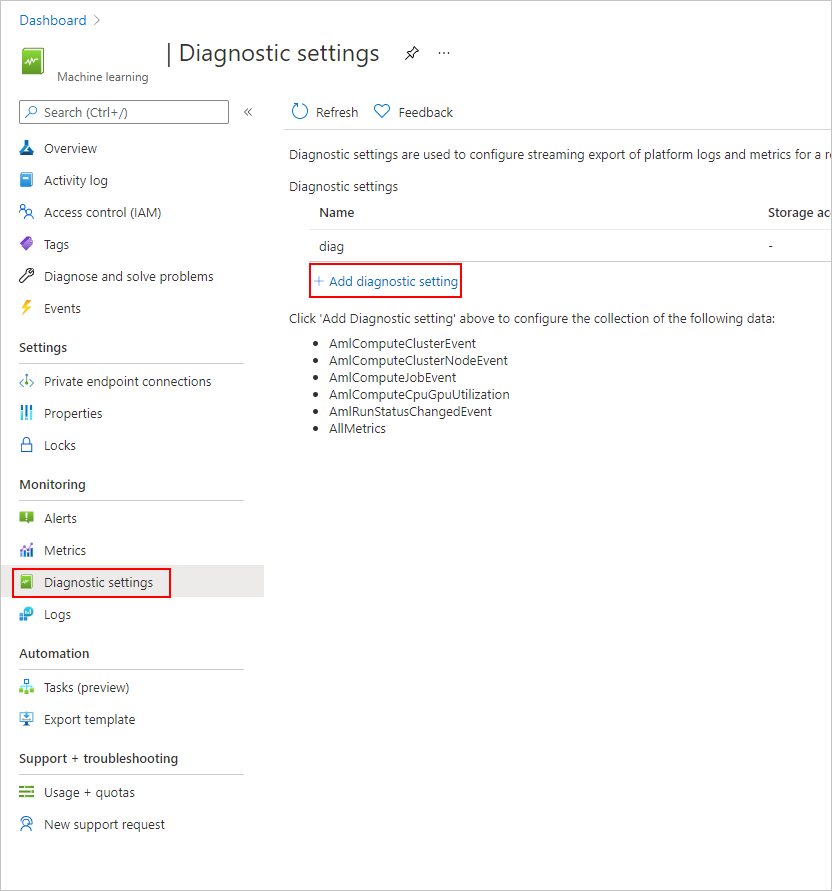
在 Azure 门户中,选择左窗格中的 Monitor 选项卡。
选择“诊断设置”,然后选择“+ 添加诊断设置。
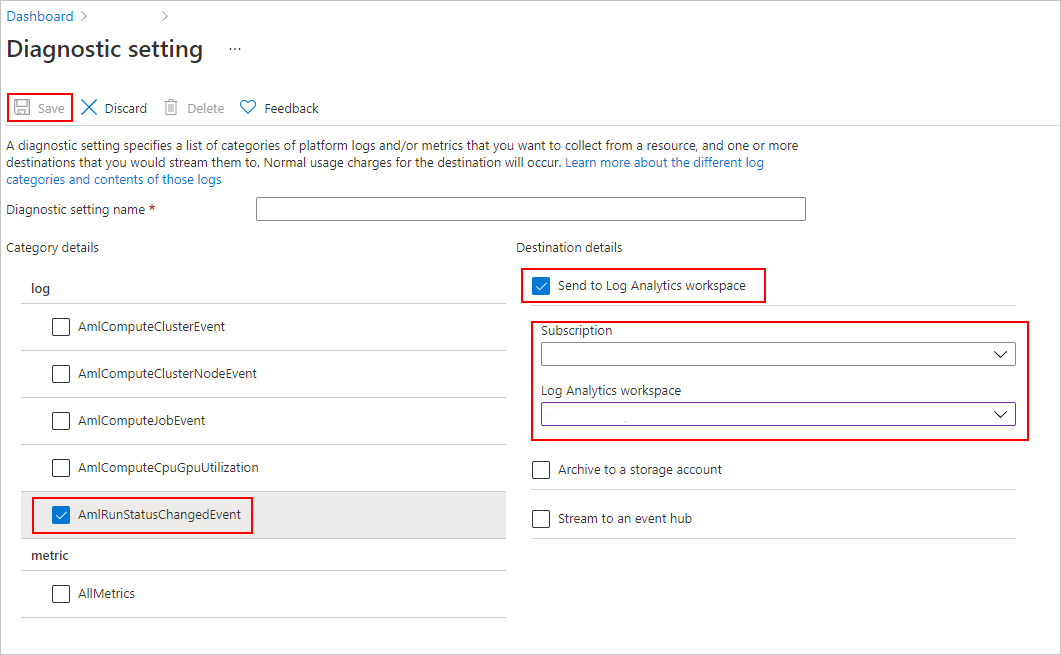
在 诊断设置中,
- 在 “类别详细信息”下,选择 AmlRunStatusChangedEvent。
- 在 Destination 详细信息中,选择发送到 Log Analytics 工作区并指定Subscription和Log Analytics 工作区。
注意
Azure Log Analytics 工作区 是一种不同于 Azure 机器学习工作区 的 Azure 资源类型。 如果该列表中没有选项,则可以创建Log Analytics工作区。
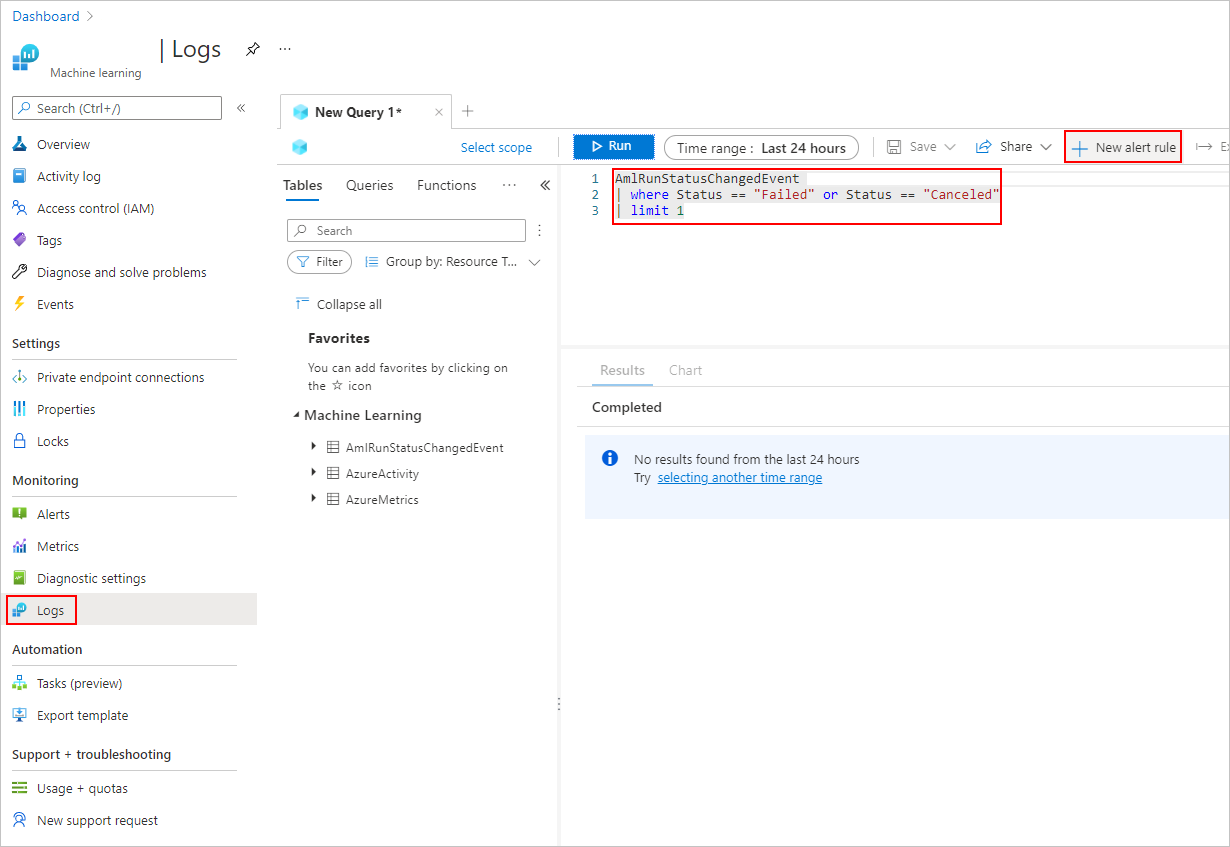
在“日志”选项卡中,添加“新的警报规则”。
若要了解详细信息,请参阅
如何使用 Azure Monitor 。
示例笔记本
以下笔记本演示了本文中的概念:
若要了解有关日志记录 API 的详细信息,请参阅 记录 API 笔记本。
有关使用 Azure Machine Learning SDK 管理运行的详细信息,请参阅 manage 运行笔记本。
后续步骤
- 若要了解如何记录试验的指标,请参阅在训练运行期间记录指标。
- 若要了解如何监视Azure Machine Learning中的资源和查看日志,请参阅 Monitoring Azure Machine Learning。