Note
Access to this page requires authorization. You can try signing in or changing directories.
Access to this page requires authorization. You can try changing directories.
Projects are the primary units for managing applications in AKS desktop. Projects group related Kubernetes resources, such as deployments, services, and configuration, into a single logical unit. This article provides an overview of Projects in AKS desktop, including their benefits, features, and how they compare to traditional Kubernetes namespaces.
Why use Projects in AKS desktop?
Projects make it easier to:
- Understand application boundaries.
- Manage access using RBAC.
- View all resources in one place.
- Attribute ownership of Kubernetes and Azure resources and manage costs.
Namespace labeling and access for Projects
When you create a Project in AKS desktop, it is associated with a Kubernetes namespace. AKS desktop uses Kubernetes labels on namespaces to determine which ones are shown as Projects in the UI. Any user with access to the associated namespace can view the Project, so namespace access and labeling determine which users can see each Project.
You can create a Project in AKS desktop using one of the following options:
- Use an existing namespace: This option allows you to import an existing Kubernetes namespace into AKS desktop as a Project. This is useful if you already have applications deployed and want to manage them through AKS desktop without disruption. When you import a namespace, AKS desktop adds Kubernetes labels to it and shows it as a Project.
- Create a new namespace: This option creates a new standard Kubernetes namespace, which provides basic functionality for managing application resources, their properties, and maps. This option is also supported by Headlamp projects.
- Create a new AKS managed namespace: This enhanced Project type is directly linked by default to an AKS managed namespace, which is a way to logically isolate workloads and teams within a cluster. This feature enables administrators to enforce resource quotas, apply network policies, and manage access control at the namespace level. A Managed Namespace groups Azure resources and Kubernetes resources together, which is useful for ownership attribution, cost management, and identifying everything that belongs to your application. A Project can consist of one or more applications, note in most examples we only show one app to keep it simple.
AKS desktop shows whether each namespace is already part of a Project. When you import a namespace, AKS desktop adds Kubernetes labels to it and shows it as a Project.
Project Overview screen
Once you deploy an application to a Project through AKS desktop, you gain access to the Project Overview screen. The Project Overview screen is your centralized control hub, giving you visibility, insights, and direct actions to manage, monitor, and optimize your application.
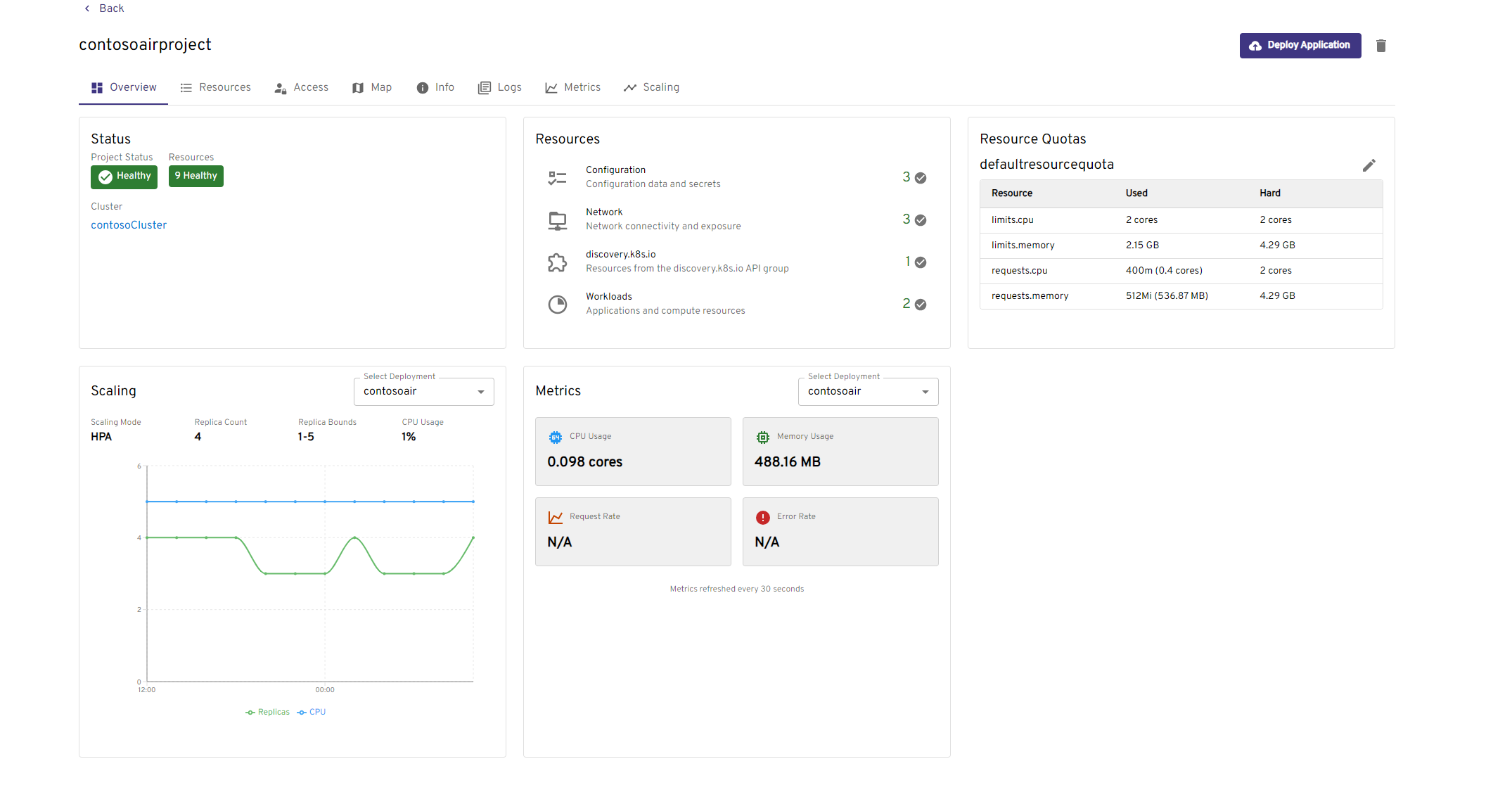
The following table describes the key features available in the Project Overview screen:
| Feature | Description |
|---|---|
| Resources | View all Kubernetes resources deployed in your Project, including workloads and network configuration. |
| Access | Grant or remove access to your Project. |
| Map | Visualize how Kubernetes resources in your Project interact, showing data flow between deployments and services. |
| Info | View and edit project resource quota, network policies. |
| Deploy | See pipelines created by GitHub Pipelines preview. |
| Logs | Access streaming logs for your application. |
| Metrics | View detailed metrics such as CPU, memory, and resource usage for your application. |
| Scaling | Configure application scaling using Horizontal Pod Autoscaler (HPA) or manual settings. |
| Insights | Run eBPF-based diagnostics (Processes, Trace Transmission Control Protocol (TCP), Trace DNS) to troubleshoot application issues without code changes or pod restarts. See Troubleshoot an application using Insights. |
Projects vs. Kubernetes Namespaces
The following table compares Projects in AKS desktop to Kubernetes Namespaces, which are a more traditional way to group resources in Kubernetes:
| Concept | AKS desktop Project | Kubernetes Namespace |
|---|---|---|
| Purpose | Application-level grouping | Resource isolation |
| Abstraction level | High (developer-friendly) | Low (infrastructure-focused) |
| Mapping | Typically 1:1 | Native Kubernetes concept |