Note
Access to this page requires authorization. You can try signing in or changing directories.
Access to this page requires authorization. You can try changing directories.
Confidential containers provide a set of features and capabilities to further secure your standard container workloads to achieve higher data security, data privacy, and runtime code integrity goals. Azure Kubernetes Service (AKS) includes Confidential containers (CoCo) (preview) on AKS.
Confidential containers builds on Kata Confidential containers and hardware-based encryption to encrypt container memory. Confidential containers on AKS use AMD SEV-SNP and currently support Azure Linux only. It establishes a new level of data confidentiality by preventing data in memory during computation from being in clear text, readable format. Trust is earned in the container through hardware attestation, allowing access to the encrypted data by trusted entities.
AKS supports two features built on Kata Containers: Confidential containers and Pod sandboxing. While Pod Sandboxing secures the pod from running on a shared kernel, it does not secure the pod from the admin level attacks. Confidential containers provides an additional layer of hardening.
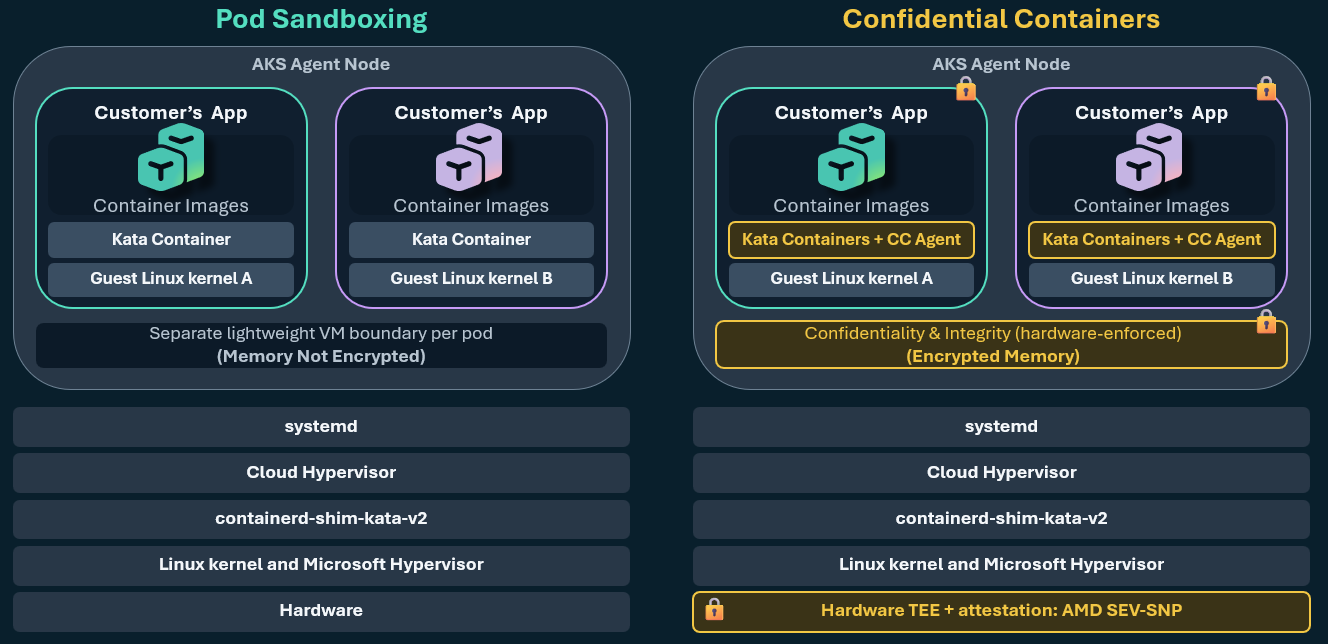
What makes a container confidential:
- Transparency: You can see and verify that the confidential container environment running your sensitive application is safe. Microsoft open sources all components of the Trusted Computing Base (TCB).
- Auditability: You can verify and see what version of the CoCo environment package, including Linux Guest OS and all the components, are current. Microsoft signs the guest OS and container runtime environment so you can verify them through attestation. Microsoft also publishes a secure hash algorithm (SHA) of guest OS builds to provide a strong auditability and control story.
- Full attestation: The CPU fully measures anything that is part of the TEE with the ability to verify remotely. The hardware report from the AMD SEV-SNP processor reflects container layers and container runtime configuration hash through the attestation claims. The application can fetch the hardware report locally, including the report that reflects Guest OS image and container runtime.
- Code integrity: Runtime enforcement is always available through customer-defined policies for containers and container configuration, such as immutable policies and container signing.
- Isolation from operator: Security designs that assume least privilege and highest isolation shielding from all untrusted parties, including customer and tenant admins. It includes hardening existing Kubernetes control plane access (kubelet) to confidential pods.
By using these capabilities with other security measures or data protection controls as part of your overall architecture, you can help meet regulatory, industry, or governance compliance requirements for securing sensitive information.
This article helps you understand the Confidential containers feature, and how to implement and configure the following tasks:
- Deploy or upgrade an AKS cluster using the Azure CLI.
- Add an annotation to your pod YAML to mark the pod as being run as a confidential container.
- Deploy your application in confidential computing.
Supported scenarios
Confidential containers (preview) are appropriate for deployment scenarios that involve sensitive data. For example, personally identifiable information (PII) or any data with strong security needed for regulatory compliance. Some common scenarios with containers are:
- Run big data analytics using Apache Spark for fraud pattern recognition in the financial sector.
- Running self-hosted GitHub runners to securely sign code as part of Continuous Integration and Continuous Deployment (CI/CD) DevOps practices.
- Machine Learning inferencing and training of ML models using an encrypted data set from a trusted source. It only decrypts inside a confidential container environment to preserve privacy.
- Building big data clean rooms for ID matching as part of multi-party computation in industries like retail with digital advertising.
- Building confidential computing Zero Trust landing zones to meet privacy regulations for application migrations to cloud.
Limitations
- Confidential containers (the
KataCcIsolationworkload runtime) currently only supports Azure Linux 2.0. - You can't use Confidential containers in the same node pool as the following:
- Pod sandboxing (
KataVmIsolation) - Trusted Launch
- FIPS
- Pod sandboxing (
- Confidential containers isn't supported with the following:
- Windows node pools
- Node auto-provisioning (NAP)
- Virtual nodes
Considerations
- Pod startup time increases compared to runc pods and kernel-isolated pods.
- Container images that use the Docker image manifest version 1 (v1) schema aren't supported.
- To use ephemeral containers and other troubleshooting methods, like
execinto a container, container log output, andstdio, you need to modify the policy and redeploy it to enableExecProcessRequest,ReadStreamRequest,WriteStreamRequest, andCloseStdinRequest. - Because the security policy encodes container image layer measurements, don't use the
latesttag when you specify containers. - Services, load balancers, and EndpointSlices support only the TCP protocol.
- The policy generator supports only pods that use IPv4 addresses.
- You can't change pod environment variables based on ConfigMaps and Secrets after the pod is deployed.
- Resource
requestsin pod manifests aren't supported. Use resourcelimitsinstead, because containerd doesn't pass requests to the Kata shim. - Pod termination logs aren't supported. Although pods write termination logs to
/dev/termination-log(or a custom location set in the pod manifest), the host and kubelet can't read those logs, and changes the pod makes to that file aren't reflected on the host. - Host-network access isn't supported. You can't directly access the host networking configuration from within the pod VM.
- Microsoft Defender for Containers doesn't assess Kata runtime pods.
- Kata containers might not reach the IOPS performance limits that traditional containers reach on Azure Files and high-performance local SSD.
Resource allocation overview
It's important you understand the memory and processor resource allocation behavior in this release.
- CPU: The shim assigns one vCPU to the base OS inside the pod. If you don't specify resource
limits, the workloads don't have separate CPU shares assigned, and the vCPU is shared with that workload. If you specify CPU limits, the system explicitly allocates CPU shares for workloads. - Memory, Kata-CC handler: The handler allocates 2 GB of memory to the utility virtual machine (UVM) OS plus memory equal to the resource
limitsspecified in the YAML manifest. If you don't specify a limit, the handler creates a 2-GB VM with no implicit memory for containers. - Memory, Kata handler: The handler allocates 256 MB of base memory to the UVM OS plus memory equal to the resource
limitsspecified in the YAML manifest. If you don't specify a limit, the handler adds an implicit limit of 1,792 MB, resulting in a 2-GB VM with 1,792 MB of implicit memory for containers.
In this release, specifying resource requests in the pod manifests isn't supported. containerd doesn't pass the requests to the Kata Shim, and as a result, reserving resources based on the pod manifest resource requests is not implemented. Use resource limits instead of resource requests to allocate memory or CPU resources for workloads or containers.
With the local container filesystem backed by VM memory, writing to the container filesystem (including logging) can fill up the available memory provided to the pod. This condition can result in potential pod crashes.
Next steps
- Deploy Confidential containers on AKS with an automatically generated security policy.
- Learn more about Azure Dedicated hosts for nodes with your AKS cluster to use hardware isolation and control over Azure platform maintenance events.