Note
Access to this page requires authorization. You can try signing in or changing directories.
Access to this page requires authorization. You can try changing directories.
APPLIES TO: All API Management tiers
Effective 15 March 2026, Azure API Management is retiring trusted service connectivity by the API Management gateway to supported Azure services - Azure Storage, Key Vault, Service Bus, Event Hub, and Container Registry. If your API Management gateway relies on this feature to communicate with these services after 15 March 2026, the communication will fail. Use alternative networking options to securely connect to those services.
The gateway in API Management services created on or after 1 December 2025 no longer supports trusted service connectivity. Contact Azure support if you need to enable trusted service connectivity in those services until the retirement date.
Is my service affected by this change?
The retirement of trusted service connectivity affects scenarios where the API Management gateway depends on this feature and managed identity to communicate with Azure services — such as Storage, Key Vault, Key Vault Managed HSM, Service Bus, Event Hubs, or Container Registry. This applies when these services are configured as backends or accessed through policies like send-request or send-one-way-request.
First, check for an Azure Advisor recommendation:
- In the Azure portal, go to Advisor.
- Select the Recommendations > Operational excellence category.
- Search for "Disable trusted service connectivity in API Management".
If you don't see a recommendation, your API Management gateway isn't affected by the change.
If you see a recommendation, your API Management gateway has previously sent traffic to the listed Azure services. Because of this, it is considered affected by the breaking change and you need to take action:
- Determine if your API Management gateway relies on trusted service connectivity to Azure services.
- If it does, update the networking configuration to eliminate the dependency on trusted service connectivity. If it doesn’t, proceed to the next step.
- Disable trusted service connectivity in your API Management gateway.
Note
Azure Advisor recommendation shows the Azure backend services your API Management instance has sent outbound requests to in the past 24 hours, regardless of the authentication method used. Use this to identify the backends your API Management instance depends on and validate their configuration.
If no traffic is reported, continue monitoring for a few days and disable the feature if results are consistent.
Scenarios that are not affected by the breaking change
All scenarios involving control plane operations that use trusted service connectivity remain supported and aren't affected by the breaking change, including accessing:
- Azure Key Vault for named values, client certificates, and custom hostname certificates
- Azure Storage for backup and restore
If your API Management service has an established networking line of sight to the key vault used for named values and client certificates, you can but don't have to remove trusted connectivity configuration on the key vault.
For backup and restore and custom hostname certificates, you need to ensure the target key vault or storage account is publicly accessible or you need to preserve its trusted connectivity setting to allow traffic from API Management resources, even if your API Management service has a networking line of sight established with it.
APIs in workspaces aren't affect by this change, since they do not support managed identity.
Step 1: Does my API Management gateway rely on trusted service connectivity?
Your API Management gateway should no longer rely on trusted service connectivity to Azure services. Instead, it should establish a networking line of sight.
Tip
You can get a detailed overview through "Diagnose and solve problems > Availability and Performance" in the Azure Portal on your API Management instance to learn about outbound requests, Entra ID tokens required and if further action is required.
To verify if yourAPI Management gateway relies on trusted connectivity to Azure services, check the networking configuration of all Azure Storage, Key Vault, Service Bus, Event Hub, and Container Registry resources that your API Management gateway connects to:
For Storage accounts
- Go to Networking under Security + networking.
- Select Manage in the Public network access tab.
- API Management may rely on trusted service connectivity if Allow trusted Microsoft services to access this resource is selected if:
- Public network access is set to Disable, or
- Public network access is set to Enable and Public network access scope is set to Enable from selected networks.
- API Management may rely on trusted service connectivity if API Management is configured under Resource instances, if Public network access is set to Enable and Public network access scope is set to Enable from selected networks.
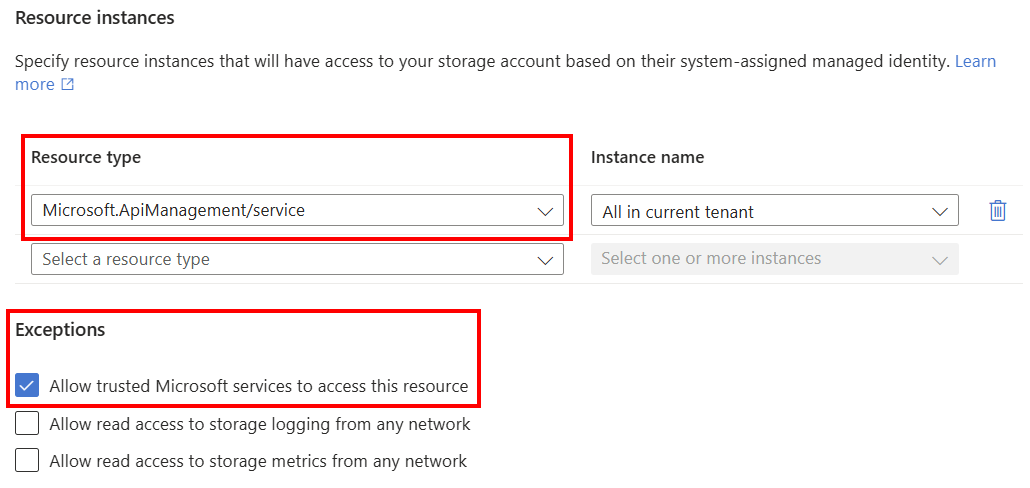
For Service Bus (Premium only) and Key Vault
- Go to Networking under Settings.
- API Management may rely on trusted service connectivity if Allow trusted Microsoft services to bypass this firewall is selected if you're using the Allow public access from specific virtual networks and IP addresses or Disable public access options.
For Container Registry (Premium pricing plan only)
- Go to Networking under Settings.
- API Management may rely on trusted service connectivity if Allow trusted Microsoft services to access this container registry is checked under Firewall exception if Public network access is set to Selected networks or Disabled.
Step 2: Eliminate dependency on trusted service connectivity
If you verified that your API Management gateway relies on trusted connectivity to Azure resources, you need to eliminate this dependency by establishing a networking line of sight for communication from API Management to the listed services.
You can configure the networking of target resources to one of the following options:
Enable public connectivity from all networks.
Set a network security rule to allow API Management traffic based on the IP address or virtual network connectivity.
Secure traffic from API Management with Private Link connectivity.
Use Network Security Perimeter to secure your Azure backends and allow traffic from API Management, if supported (for example, for Azure Storage). Learn more about Network Security Perimeter:
Important
Customers can continue using trusted services on the target Azure service for non-Azure API Management scenarios. However, Azure API Management will no longer support it so the gateway needs alternative ways to communicate and have network line-of-sight.
For example, you can enable trusted service connectivity for an Azure Storage resource and use Network Security Perimeter to access it from API Management's gateway.
Step 3: Disable trusted service connectivity in API Management gateway
After ensuring that your API Management gateway doesn't access other Azure services using trusted service connectivity, you must explicitly disable trusted connectivity in your gateway to acknowledge you have verified that the service no longer depends on trusted connectivity.
To do so, set a custom property Microsoft.WindowsAzure.ApiManagement.Gateway.ManagedIdentity.DisableOverPrivilegedAccess to "True" on the API Management service. For example:
{
  "type": "Microsoft.ApiManagement/service",
  "apiVersion": "2025-03-01-preview",
  "name": "string",
  "identity": {
    "type": "SystemAssigned"
  },
  "location": "string",
  "properties": {
    "customProperties": {
      // Existing custom properties defined on the service
      "Microsoft.WindowsAzure.ApiManagement.Gateway.ManagedIdentity.DisableOverPrivilegedAccess": "True"
    }
  },
  "sku": {
    "capacity": "1",
    "name": "Developer"
  }
}
Note
Existing custom properties, such as ciphers, must be added to the PATCH call as they would otherwise be removed from the service.
The Azure Advisor recommendation should disappear within a day or two of disabling the trusted connectivity on the API Management gateway.
What is the deadline for the change?
After 15 March 2026, the trusted connectivity from the API Management gateway to supported Azure services - Azure Storage, Key Vault, Service Bus, Event Hubs, and Container Registry - is retired. If your API Management gateway relies on this feature to establish communication with these services, the communication will start failing after that date.
Help and support
If you have questions, get answers from community experts in Microsoft Q&A. If you have a support plan and you need technical help, create a support request.
- Under Issue type, select Technical.
- Under Subscription, select your subscription.
- Under Service, select My services, then select API Management Service.
- Under Resource, select the Azure resource that you're creating a support request for.
- For Summary, type a description of your issue, for example, "Trusted service connectivity".