Note
Access to this page requires authorization. You can try signing in or changing directories.
Access to this page requires authorization. You can try changing directories.
Developing modern cloud-native applications often includes building, deploying, configuring, and promoting workloads across a group of Kubernetes clusters. With the increasing diversity of Kubernetes cluster types, and the variety of applications and services, the process can become complex and unscalable. Enterprise organizations can be more successful in these efforts by having a well defined structure that organizes people and their activities, and by using automated tools.
This article walks you through a typical business scenario, outlining the involved personas and major challenges that organizations often face while managing cloud-native workloads in a multicluster environment. It also suggests an architectural pattern that can make this complex process simpler, observable, and more scalable.
Scenario overview
This article describes an organization that develops cloud-native applications. Any application needs a compute resource to work on. In the cloud-native world, this compute resource is a Kubernetes cluster. An organization might have a single cluster or, more commonly, multiple clusters. So the organization must decide which applications should work on which clusters. In other words, they must schedule the applications across clusters. The result of this decision, or scheduling, is a model of the desired state of the clusters in their environment. When they have that model, they need to deliver applications to the assigned clusters so that they can turn the desired state into reality, or, in other words, reconcile it.
Every application goes through a software development lifecycle that promotes it to the production environment. For example, an application is built, deployed to a Dev environment, tested and promoted to a Stage environment, tested, and finally delivered to production. For a cloud-native application, the application requires and targets different Kubernetes cluster resources throughout its lifecycle. In addition, applications normally require clusters to provide some platform services, such as Prometheus and Fluentbit, and infrastructure configurations, such as networking policy.
Depending on the application, there might be a great diversity of cluster types to which the application is deployed. The same application with different configurations could be hosted on a managed cluster in the cloud, on a connected cluster in an on-premises environment, on a group of clusters on semi-connected edge devices on factory lines or military drones, and on an air-gapped cluster on a starship. Another complexity is that developers normally manage clusters in early lifecycle stages such as Dev and QA, while the organization's customers might manage reconciliation to actual production clusters. In the latter case, the developer might be responsible only for promoting and scheduling the application across different rings.
Challenges at scale
In a small organization with a single application and only a few operations, you can handle most of these processes manually by using a handful of scripts and pipelines. But for enterprise organizations operating on a larger scale, it can be a real challenge. These organizations often produce hundreds of applications that target hundreds of cluster types, backed up by thousands of physical clusters. In these cases, handling such operations manually by using scripts isn't feasible.
To perform this type of workload management at scale in a multicluster environment, you need the following capabilities:
- Separation of concerns on scheduling and reconciling
- Promotion of the multicluster state through a chain of environments
- Sophisticated, extensible, and replaceable scheduler
- Flexibility to use different reconcilers for different cluster types depending on their nature and connectivity
- Platform configuration management at scale
Scenario personas
Before we describe the scenario, let's clarify which personas are involved, what responsibilities they have, and how they interact with each other.
Platform team
The platform team manages the clusters that host applications produced by application teams.
Key responsibilities of the platform team include:
- Defining staging environments (Dev, QA, UAT, Prod).
- Defining cluster types and their distribution across environments.
- Provisioning new clusters.
- Managing infrastructure configurations across the clusters.
- Maintaining platform services used by applications.
- Scheduling applications and platform services on the clusters.
Application team
The application team manages the software development lifecycle (SDLC) of their applications. They provide Kubernetes manifests that describe how to deploy the application to different targets. They're responsible for owning CI/CD pipelines that create container images and Kubernetes manifests and promote deployment artifacts across environment stages.
Typically, the application team has no knowledge of the clusters that they're deploying to. They aren't aware of the structure of the multicluster environment, global configurations, or tasks performed by other teams. The application team primarily understands the success of their application rollout as defined by the success of the pipeline stages.
Key responsibilities of the application team include:
- Developing, building, deploying, testing, promoting, releasing, and supporting their applications.
- Maintaining and contributing to source and manifests repositories of their applications.
- Defining and configuring application deployment targets.
- Communicating to the platform team, requesting desired compute resources for successful SDLC operations.
High level flow
This diagram shows how the platform and application team personas interact with each other while performing their regular activities.

The primary concept of this whole process is separation of concerns. There are workloads, such as applications and platform services, and there is a platform where these workloads run. The application team takes care of the workloads (what), while the platform team is focused on the platform (where).
The application team runs SDLC operations on their applications and promotes changes across environments. They don't know which clusters their application is deployed on in each environment. Instead, the application team operates with the concept of deployment target, which is simply a named abstraction within an environment. For example, deployment targets could be integration on Dev, functional tests and performance tests on QA, early adopters, external users on Prod, and so on.
The application team defines deployment targets for each rollout environment, and they know how to configure their application and how to generate manifests for each deployment target. This process is automated and exists in the application repositories space. It results in generated manifests for each deployment target, stored in a manifests storage such as a Git repository, Helm Repository, or OCI storage.
The platform team has limited knowledge about the applications, so they're not involved in the application configuration and deployment process. The platform team is in charge of platform clusters, grouped in cluster types. They describe cluster types with configuration values such as DNS names, endpoints of external services, and so on. The platform team assigns or schedules application deployment targets to various cluster types. By using this approach, application behavior on a physical cluster is determined by the combination of the deployment target configuration values and cluster type configuration values.
The platform team uses a separate platform repository that contains manifests for each cluster type. These manifests define the workloads that should run on each cluster type and which platform configuration values should be applied. Clusters can fetch that information from the platform repository by using their preferred reconciler and then apply the manifests.
Clusters report their compliance state with the platform and application repositories to the Deployment Observability Hub. The platform and application teams can query this information to analyze historical workload deployment across clusters. This information can be used in the dashboards, alerts, and in the deployment pipelines to implement progressive rollout.
Solution architecture
Let's look at the high level solution architecture and understand its primary components.

Control plane
The platform team models the multicluster environment in the control plane, which is designed to be human-oriented and easy to understand, update, and review. The control plane operates with abstractions such as cluster types, environments, workloads, scheduling policies, configs, and templates. An automated process handles these abstractions by assigning deployment targets and configuration values to the cluster types, then saving the result to the platform GitOps repository. Although there might be thousands of physical clusters, the platform repository operates at a higher level, grouping the clusters into cluster types.
The main requirement for the control plane storage is to provide reliable and secure transaction processing functionality, rather than handling complex queries against a large amount of data. You can use various technologies to store the control plane data.
This architecture design suggests using a Git repository with a set of pipelines to store and promote platform abstractions across environments. This design provides several benefits:
- All advantages of GitOps principles, such as version control, change approvals, automation, and pull-based reconciliation.
- Git repositories such as GitHub provide out-of-the-box branching, security, and PR review functionality.
- Easy implementation of the promotional flows with GitHub Actions Workflows or similar orchestrators.
- No need to maintain and expose a separate control plane service.
Promotion and scheduling
The control plane repository contains two types of data:
- Data that gets promoted across environments, such as a list of onboarded workloads and various templates.
- Environment-specific configurations, such as included environment cluster types, config values, and scheduling policies. This data isn't promoted, as it's specific to each environment.
Data to be promoted is stored in the main branch. Environment-specific data is stored in the corresponding environment branches such as dev, qa, and prod. Transforming data from the control plane to the GitOps repo combines the promotion and scheduling flows. The promotion flow moves the change across the environments horizontally. The scheduling flow does the scheduling and generates manifests vertically for each environment.

A commit to the main branch starts the promotion flow that triggers the scheduling flow for each environment one by one. The scheduling flow takes the base manifests from main, applies config values from the corresponding environment branch, and creates a PR with the resulting manifests to the platform GitOps repository. Once the rollout on this environment is complete and successful, the promotion flow goes ahead and performs the same procedure on the next environment. On each environment, the flow promotes the same commit ID of the main branch, making sure that the content from main goes to the next environment only after successful deployment to the previous environment.
A commit to the environment branch in the control plane repository starts the scheduling flow for this environment. For example, you might configure a cosmo-db endpoint in the QA environment. You only want to update the QA branch of the platform GitOps repository, without touching anything else. The scheduling takes the main content, corresponding to the latest commit ID promoted to this environment, applies configurations, and promotes the resulting manifests to the platform GitOps branch.
Workload assignment
In the platform GitOps repository, each workload assignment to a cluster type is represented by a folder that contains the following items:
- A dedicated namespace for this workload in this environment on a cluster of this type.
- Platform policies restricting workload permissions.
- Consolidated platform config maps with the values that the workload can use.
- Reconciler resources, pointing to a Workload Manifests Storage where the actual workload manifests or Helm charts are stored. For example, Flux GitRepository and Flux Kustomization, Argo CD Application, Zarf descriptors, and so on.
Cluster types and reconcilers
Every cluster type can use a different reconciler (such as Flux, Argo CD, Zarf, Rancher Fleet, and so on) to deliver manifests from the Workload Manifests Storages. Cluster type definition refers to a reconciler, which defines a collection of manifest templates. The scheduler uses these templates to produce reconciler resources, such as Flux GitRepository and Flux Kustomization, Argo CD Application, Zarf descriptors, and so on. The same workload might be scheduled to cluster types managed by different reconcilers, such as Flux and Argo CD. The scheduler generates Flux GitRepository and Flux Kustomization for one cluster and Argo CD Application for another cluster, but both of them point to the same Workload Manifests Storage containing the workload manifests.
Platform services
Platform services are workloads (such as Prometheus, NGINX, Fluentbit, and so on) that the platform team maintains. Just like any workloads, they have their source repositories and manifests storage. The source repositories might contain pointers to external Helm charts. CI/CD pipelines pull the charts with containers and perform necessary security scans before submitting them to the manifests storage, from where they're reconciled to the clusters.
Deployment Observability Hub
Deployment Observability Hub is a central storage that's easy to query with complex queries against a large amount of data. It contains deployment data with historical information on workload versions and their deployment state across clusters. Clusters register themselves in the storage and update their compliance status with the GitOps repositories. Clusters operate at the level of Git commits only. The system transfers high-level information, such as application versions, environments, and cluster type data, to the central storage from the GitOps repositories. This high-level information gets correlated in the central storage with the commit compliance data sent from the clusters.
Platform configuration concepts
Separation of concerns
Application behavior on a deployment target is determined by configuration values. However, configuration values aren't all the same. Different personas provide these values at different points in the application lifecycle, and they have different scopes. Generally, there are application and platform configurations.
Application configurations
Application configurations provided by the application developers are abstracted away from deployment target details. Typically, application developers aren't aware of host-specific details, such as which hosts the application runs on or how many hosts there are. But they do know the chain of environments and rings that the application goes through on its way to production.
An application might be deployed multiple times in each environment to play different roles. For example, the same application can serve as a dispatcher and as an exporter. Application developers might want to configure the application differently for various use cases. For example, if the application is running as a dispatcher in a QA environment, it should be configured in this way regardless of the actual host. Developers provide this type of configuration at development time when they create deployment descriptors or manifests for various environments, rings, and application roles.
Platform configurations
Besides development time configurations, an application often needs platform-specific configuration values such as endpoints, tags, or secrets. These values might differ on every single host where the application is deployed. The deployment descriptors or manifests that application developers create refer to configuration objects containing these values, such as config maps or secrets. Application developers expect these configuration objects to be present on the host and available for the application to consume. Commonly, a platform team provides these objects and their values. Depending on the organization, different departments or people might back up the platform team persona, such as IT Global, Site IT, or equipment owners.
The concerns of application developers and the platform team are totally separate. Application developers focus on the application; they own and configure it. Similarly, the platform team owns and configures the platform. The key point is that the platform team doesn't configure applications; they configure environments for applications. Essentially, they provide environment variable values for the applications to use.
Platform configurations often consist of common configurations that are irrelevant to the applications consuming them, and application-specific configurations that might be unique for every application.

Configuration schema
Although the platform team might have limited knowledge about the applications and how they work, they know what platform configuration is required to be present on the target host. Application developers provide this information. They specify what configuration values their application needs, along with their types and constraints. One way to define this contract is to use a JSON schema. For example:
{
    "$schema": "http://json-schema.org/draft-07/schema#",
    "title": "patch-to-core Platform Config Schema",
    "description": "Schema for platform config",
    "type": "object",
    "properties": {
      "ENVIRONMENT": {
      "type": "string",
      "description": "Environment Name"
      },
      "TimeWindowShift": {
      "type": "integer",
      "description": "Time Window Shift"
      },
      "QueryIntervalSec": {
      "type": "integer",
      "description": "Query Interval Sec"
      },
      "module": {
      "type": "object",
      "description": "module",
      "properties": {
        "drop-threshold": { "type": "number" }
      },
      "required": ["drop-threshold"]
      }
    },
      "required": [
        "ENVIRONMENT",
        "module"
      ]
    }
This approach is well known in the developer community, as Helm uses the JSON schema to define the possible values for a Helm chart.
A formal contract also allows for automation. The platform team uses the control plane to provide the configuration values. The control plane analyzes what applications are supposed to be deployed on a host. It uses configuration schemas to advise what values the platform team should provide. The control plane composes configuration values for every application instance and validates them against the schema to see if all the values are in place.
The control plane might perform validation in multiple stages at different points in time. For example, the control plane validates a configuration value when the platform team provides it to check its type, format, and basic constraints. The final and most important validation happens when the control plane composes all available configuration values for the application in the configuration snapshot. Only at this point can it check for required configuration values and check integrity constraints that involve multiple values coming from different sources.
Configuration graph model
The control plane creates configuration value snapshots for application instances on deployment targets. It pulls the values from different configuration containers. The relationship of these containers can be a hierarchy or a graph. The control plane follows rules to identify which configuration values from which containers to include in the application configuration snapshot. The platform team defines the configuration containers and sets the hydration rules. Application developers don't need to know about this structure. They only need to know the configuration values to provide, not where the values come from.
Label matching approach
A simple and flexible way to implement configuration composition is the label matching approach.
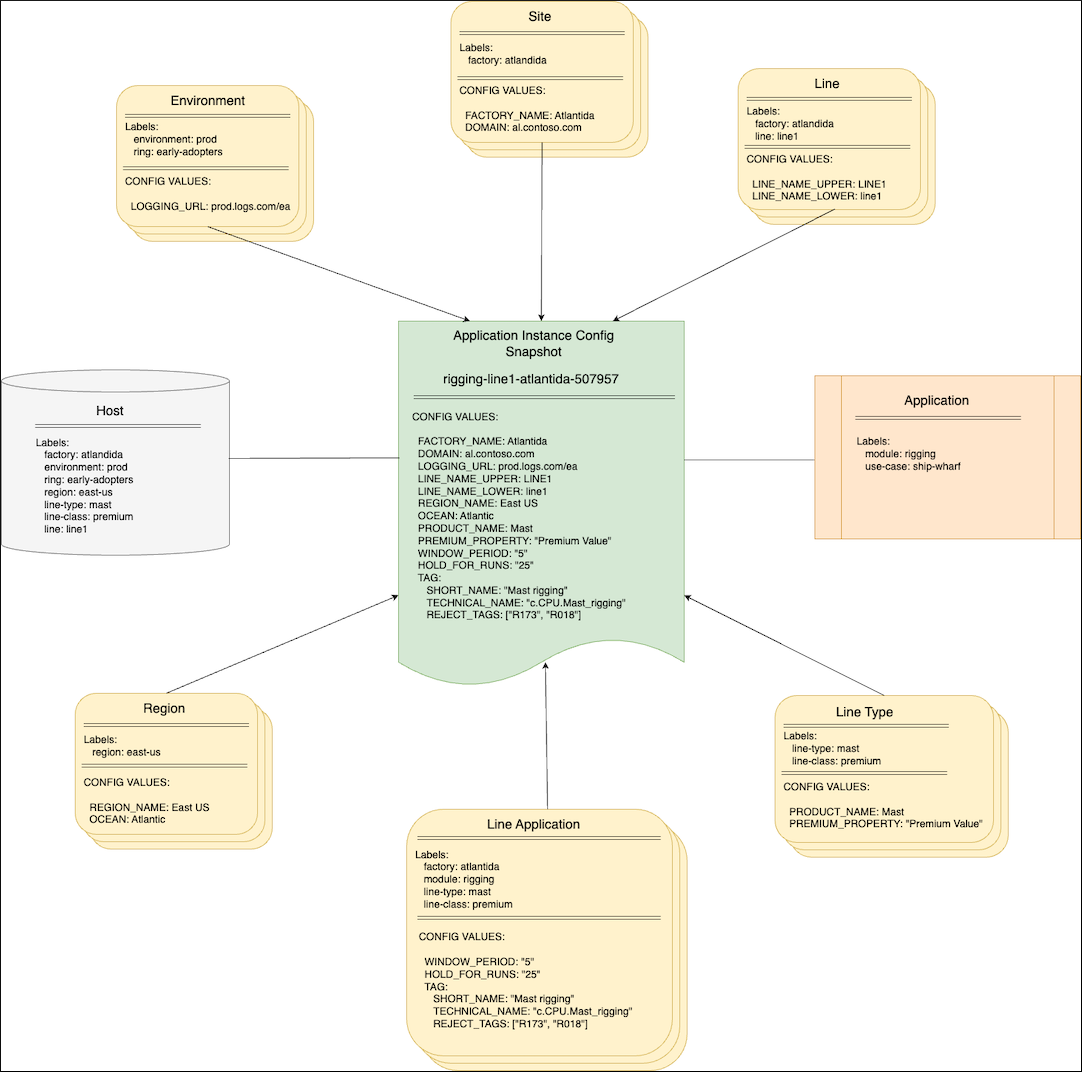
In this diagram, configuration containers group configuration values at different levels such as Site, Line, Environment, and Region. Depending on the organization, different personas provide the values in these containers, such as IT Global, Site IT, Equipment owners, or just the Platform team. Each container is marked with a set of labels that define where values from this container are applicable. Besides the configuration containers, there are abstractions representing an application and a host where the application is to be deployed. Both of them are marked with labels as well. The combination of the application's and host's labels composes the instance's labels set. This set determines which values from configuration containers to include in the application configuration snapshot. This snapshot is delivered to the host and fed to the application instance. The control plane iterates over the containers and evaluates if the container's labels match the instance's labels set. If they match, the control plane includes the container's values in the final snapshot. If they don't match, the control plane skips the container. You can configure the control plane with different strategies of overriding and merging for complex objects and arrays.
One of the biggest advantages of this approach is scalability. The structure of configuration containers is abstracted away from the application instance, so the application instance doesn't need to know where the values come from. This abstraction lets the platform team easily manipulate the configuration containers and introduce new levels and configuration groups without reconfiguring hundreds of application instances.
Templating
The control plane creates configuration snapshots for every application instance on every host. The variety of applications, hosts, underlying technologies, and deployment methods can be very wide. Furthermore, the same application can be deployed completely differently on its way from dev to production environments. The control plane manages configurations, not deployments. It should be agnostic to the underlying application and host technologies. It should generate configuration snapshots in a suitable format for each case, such as a Kubernetes config map, properties file, Symphony catalog, or other format.
One option is to assign different templates to different host types. The control plane uses these templates when it generates configuration snapshots for the applications to deploy on the host. It's beneficial to apply a standard templating approach that's well known in the developer community. For example, you can define the following templates by using Go Templates, which are widely used across the industry:
# Standard Kubernetes config map
apiVersion: v1
kind: ConfigMap
metadata:
  name: platform-config
  namespace: {{ .Namespace}}
data:
{{ toYaml .ConfigData | indent 2}}
# Symphony catalog object
apiVersion: federation.symphony/v1
kind: Catalog
metadata:
  name: platform-config
  namespace: {{ .Namespace}}
spec:
  type: config
  name: platform-config
  properties:
{{ toYaml .ConfigData | indent 4}}
# JSON file
{{ toJson .ConfigData}}
Then assign these templates to hosts A, B, and C respectively. Assuming an application with the same configuration values is deployed to all three hosts, the control plane generates three different configuration snapshots for each instance:
# Standard Kubernetes config map
apiVersion: v1
kind: ConfigMap
metadata:
  name: platform-config
  namespace: line1
data:
  FACTORY_NAME: Atlantida
  LINE_NAME_LOWER: line1
  LINE_NAME_UPPER: LINE1
  QueryIntervalSec: "911"
# Symphony catalog object
apiVersion: federation.symphony/v1
kind: Catalog
metadata:
  name: platform-config
  namespace: line1
spec:
  type: config
  name: platform-config
  properties:
    FACTORY_NAME: Atlantida
    LINE_NAME_LOWER: line1
    LINE_NAME_UPPER: LINE1
    QueryIntervalSec: "911"
{
 "FACTORY_NAME" : "Atlantida",
 "LINE_NAME_LOWER" : "line1",
 "LINE_NAME_UPPER": "LINE1",
 "QueryIntervalSec": "911"
}
Configuration storage
The control plane works with configuration containers that group configuration values at different levels in a hierarchy or a graph. Using a database to store containers provides the most flexible and robust experience. Whether you use an etcd, relational, hierarchical, or graph database, you retain the ability to granularly track and handle configuration values at the level of each individual configuration container.
Besides the main features such as storage and the ability to query and manipulate the configuration objects effectively, there should be functionality related to change tracking, approvals, promotions, rollbacks, version comparisons, and so on. The control plane can implement all that on top of a database and encapsulate everything in a monolithic managed service.
Alternatively, you can delegate this functionality to Git to follow the "configuration as code" concept. For example, Kalypso, being a Kubernetes operator, treats configuration containers as custom Kubernetes resources that are essentially stored in an etcd database. Even though the control plane doesn't dictate that, it's a common practice to originate configuration values in a Git repository, applying all the benefits that it gives out of the box. Then, deliver the configuration values to a Kubernetes etcd storage by using a GitOps operator where the control plane can work with them to do the compositions.
Git repositories hierarchy
You don't need to have a single Git repository with configuration values for the entire organization. Such a repository might become a bottleneck at scale, given the variety of the "platform team" personas, their responsibilities, and their access levels. Instead, use GitOps operator references, such as Flux GitRepository and Flux Kustomization, to build a repository hierarchy and eliminate the friction points:

Configuration versioning
Whenever application developers introduce a change in the application, they produce a new application version. Similarly, a new platform configuration value leads to a new version of the configuration snapshot. Versioning allows you to track changes, explicit rollouts, and rollbacks.
Application configuration snapshots are versioned independently from each other. A single configuration value change at the global or site level doesn't necessarily produce new versions of all application configuration snapshots. The change impacts only those snapshots where this value is hydrated. A simple and effective way to track it is to use a hash of the snapshot content as its version. In this way, if the snapshot content changes because something changed in the global configurations, there's a new version. You can apply this new version either manually or automatically. In any case, this change is a trackable event that you can roll back if needed.
Next steps
- Walk through a sample implementation to explore workload management in a multi-cluster environment with GitOps.
- Explore a multi-cluster workload management sample repository.
- Concept: CD process with GitOps.
- Sample implementation: Explore CI/CD flow with GitOps.