Note
Access to this page requires authorization. You can try signing in or changing directories.
Access to this page requires authorization. You can try changing directories.
Azure Functions provides two ways of hosting remote MCP servers:
- MCP servers created with the Functions MCP extension
- MCP servers built with the official MCP SDKs
With the first approach, you can use the Azure Functions programming model with triggers and bindings to build the MCP server. Then, you can host the server remotely by deploying it to a Function app.
If you already have an MCP server created with the official MCP SDKs and just want to host it remotely, the second approach likely suits your needs. You don't need to make any code changes to the server to host it on Azure Functions. Instead, you can add the required Functions artifacts, and the server is ready to be deployed. As such, these servers are referred to as self-hosted MCP servers.
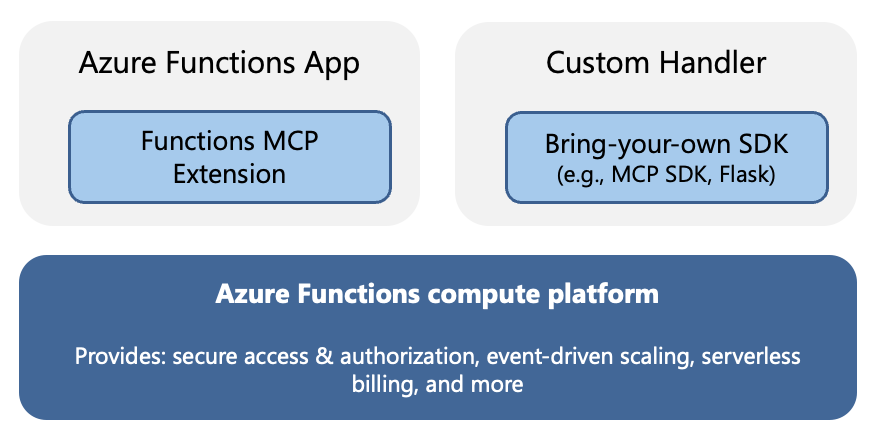
This article provides an overview of self-hosted MCP servers and links to relevant articles and samples.
Custom handlers
Self-hosted MCP servers deploy to the Azure Functions platform as custom handlers. Custom handlers are lightweight web servers that receive events from the Functions host. They provide a way to run on the Functions platform applications built with frameworks different from the Functions programming model or in languages not supported out-of-the-box. For more information, see Azure Functions custom handlers.
When you deploy an MCP SDK based server to Azure Functions, you must include a host.json in your project. The minimal host.json looks like this:
{
   "version": "2.0",
    "configurationProfile": "mcp-custom-handler",
    "customHandler": {
        "description": {
            "defaultExecutablePath": "python",
            "arguments": ["Path to main script file, e.g. hello_world.py"]
        },
        "port": "<MCP server port>"
    }
}
{
   "version": "2.0",
    "configurationProfile": "mcp-custom-handler",
    "customHandler": {
        "description": {
            "defaultExecutablePath": "npm",
            "arguments": ["run", "start"]
        },
        "port": "<MCP server port>"
    }
}
{
   "version": "2.0",
    "configurationProfile": "mcp-custom-handler",
    "customHandler": {
        "description": {
            "defaultExecutablePath": "dotnet",
            "arguments": ["Path to the compiled DLL, e.g. HelloWorld.dll"]
        },
        "port": "<MCP server port>"
    }
}
Note
Because the payload deployed to Azure Functions is the content of the bin/output directory, the path to the compiled DLL is relative to that directory, not to the project root.
Example not yet available.
Using a configuration Profile value of mcp-custom-handler automatically configures these Functions host settings, which are required for running your MCP server in Azure Functions:
http.enableProxyingtotruehttp.routesto[{ "route": "{*route}" }]extensions.http.routePrefixto""
This example shows a host.json file with extra custom handler properties set equivalent to using the mcp-custom-handler profile:
{
    "version": "2.0",
    "extensions": {
        "http": {
            "routePrefix": ""
        }
    },
    "customHandler": {
        "description": {
            "defaultExecutablePath": "",
            "arguments": [""]
        },
        "http": {
            "enableProxying": true,
            "defaultAuthorizationLevel": "anonymous",
            "routes": [
                {
                    "route": "{*route}",
                    // Default authorization level is `defaultAuthorizationLevel`
                },
                {
                    "route": "admin/{*route}",
                    "authorizationLevel": "admin"
                }
            ]
        }
    }
}
This table explains the properties of customHandler.http, along with default values:
| Property | What it does | Default value |
|---|---|---|
enableProxying |
Controls how the Azure Functions host handles HTTP requests to custom handlers. When enableProxying is set to true, the Functions host acts as a reverse proxy and forwards the entire HTTP request (including headers, body, query parameters) directly to the custom handler. This setting gives the custom handler full access to the original HTTP request details. When enableProxying is false, the Functions host processes the request first and transforms it into the Azure Functions request/response format before passing it to the custom handler. |
false |
defaultAuthorizationLevel |
Controls the authentication requirement for accessing custom handler endpoints. For example, function requires a function-specific API key to access. For more information, see authorization levels. |
function |
route |
Specifies the URL path pattern that the custom handler responds to. {*route} matches any URL path (such as /, /mcp, /api/tools, or /anything/nested/path) and forwards the request to the custom handler. |
{*route} |
Built-in server authentication
OAuth-based authentication and authorization provided by the App Service platform implements the requirements of the MCP authorization specification, such as issuing 401 challenge and exposing the Protected Resource Metadata (PRM) document. When you enable built-in authentication, clients attempting to access the server are redirected to identity providers like Microsoft Entra ID for authentication before connecting.
For more information, see Configure built-in server authorization (preview).
Public preview support
The ability to host your own SDK-based MCP servers in Functions is currently in preview and supports these features:
- Stateless servers that use the streamable-http transport. If you need your server to be stateful, consider using the Functions MCP extension.
- Servers implemented with the Python, TypeScript, C#, or Java MCP SDKs.
- When running the project locally, you must use the Azure Functions Core Tools (
func startcommand). You can't currently useF5to start running with the debugger.