Note
Access to this page requires authorization. You can try signing in or changing directories.
Access to this page requires authorization. You can try changing directories.
Azure Functions executes your app code by using language-specific handlers. These language-specific handlers allow Functions to support most key languages by default. However, you might need to run code in another language or package.
Custom handlers are lightweight web servers that receive events from the Azure Functions host process. You can use custom handlers to deploy to Azure Functions any code project that supports HTTP primitives.
Custom handlers are best suited for situations where you want to:
- Implement a function app in a language that's not currently offered out-of-the-box, such as Rust.
- Implement a function app in a runtime that's not currently featured by default, such as Deno.
- Deploy a server built with the standard MCP SDKs to Azure Functions.
With custom handlers, you can use triggers and input and output bindings via extension bundles.
Get started with Azure Functions custom handlers with quickstarts in Rust.
Overview
The following diagram shows the relationship between the Functions host and a web server implemented as a custom handler.
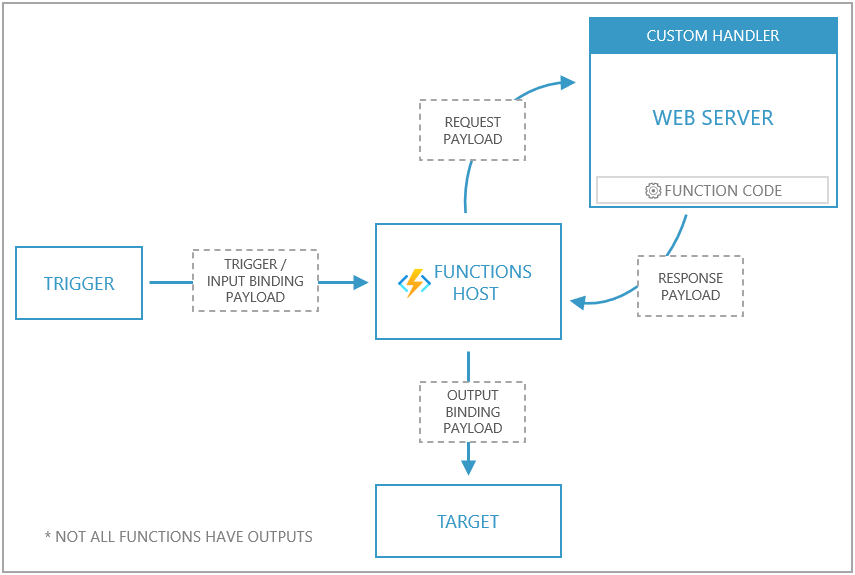
- Each event triggers a request sent to the Functions host. An event is any trigger that Azure Functions supports.
- The Functions host then issues a request payload to the web server. The payload holds trigger and input binding data and other metadata for the function.
- The web server executes the individual function, and returns a response payload to the Functions host.
- The Functions host passes data from the response to the function's output bindings for processing.
An Azure Functions app implemented as a custom handler must configure the host.json, local.settings.json, and function.json files according to a few conventions.
Deploy self-hosted MCP servers
Custom handlers also enables you to host MCP servers that you build by using official MCP SDKs in Azure Functions. Custom handlers provides a simple and streamlined experience for hosting your MCP servers in Azure. For more information, see Self-hosted remote MCP server on Azure Functions.
Note
The ability to have Azure Functions host MCP servers you create using official MCP SDKs is currently in preview.
Application structure
To implement a custom handler, your application needs the following aspects:
- A host.json file at the root of your app
- A local.settings.json file at the root of your app
- A function.json file for each function (inside a folder that matches the function name)
- A command, script, or executable that runs a web server
The following diagram shows how these files look on the file system for a function named "MyQueueFunction" and a custom handler executable named handler.exe.
| /MyQueueFunction
|   function.json
|
| host.json
| local.settings.json
| handler.exe
Configuration
You configure the application through the host.json and local.settings.json files.
host.json
host.json directs the Functions host where to send requests by pointing to a web server that can process HTTP events.
Define a custom handler by configuring the host.json file with details on how to run the web server through the customHandler section.
{
  "version": "2.0",
  "customHandler": {
    "description": {
      "defaultExecutablePath": "handler.exe"
    }
  }
}
The customHandler section points to a target as defined by the defaultExecutablePath. The execution target can be a command, executable, or file where the web server is implemented.
Use the arguments array to pass any arguments to the executable. Arguments support expansion of environment variables (application settings) by using %% notation.
You can also change the working directory used by the executable with workingDirectory.
{
  "version": "2.0",
  "customHandler": {
    "description": {
      "defaultExecutablePath": "app/handler.exe",
      "arguments": [
        "--database-connection-string",
        "%DATABASE_CONNECTION_STRING%"
      ],
      "workingDirectory": "app"
    }
  }
}
Bindings support
Standard triggers along with input and output bindings are available by referencing extension bundles in your host.json file.
local.settings.json
local.settings.json defines application settings used when running the function app locally. Because it might contain secrets, exclude local.settings.json from source control. In Azure, use application settings instead.
For custom handlers, set FUNCTIONS_WORKER_RUNTIME to Custom in local.settings.json.
{
  "IsEncrypted": false,
  "Values": {
    "FUNCTIONS_WORKER_RUNTIME": "Custom"
  }
}
Function metadata
When you use a custom handler, the function.json contents are the same as when you define a function in any other context. The only requirement is that you must place function.json files in a folder named to match the function name.
The following function.json configures a function that has a queue trigger and a queue output binding. Because it's in a folder named MyQueueFunction, it defines a function named MyQueueFunction.
MyQueueFunction/function.json
{
  "bindings": [
    {
      "name": "myQueueItem",
      "type": "queueTrigger",
      "direction": "in",
      "queueName": "messages-incoming",
      "connection": "AzureWebJobsStorage"
    },
    {
      "name": "$return",
      "type": "queue",
      "direction": "out",
      "queueName": "messages-outgoing",
      "connection": "AzureWebJobsStorage"
    }
  ]
}
Request payload
When the Functions host receives a queue message, it sends an HTTP post request to the custom handler with a payload in the body.
The following code shows a sample request payload. The payload includes a JSON structure with two members: Data and Metadata.
The Data member includes keys that match input and trigger names as defined in the bindings array in the function.json file.
The Metadata member includes metadata generated from the event source.
{
  "Data": {
    "myQueueItem": "{ message: \"Message sent\" }"
  },
  "Metadata": {
    "DequeueCount": 1,
    "ExpirationTime": "2019-10-16T17:58:31+00:00",
    "Id": "800ae4b3-bdd2-4c08-badd-f08e5a34b865",
    "InsertionTime": "2019-10-09T17:58:31+00:00",
    "NextVisibleTime": "2019-10-09T18:08:32+00:00",
    "PopReceipt": "AgAAAAMAAAAAAAAAAgtnj8x+1QE=",
    "sys": {
      "MethodName": "QueueTrigger",
      "UtcNow": "2019-10-09T17:58:32.2205399Z",
      "RandGuid": "24ad4c06-24ad-4e5b-8294-3da9714877e9"
    }
  }
}
Response payload
By convention, function responses are formatted as key/value pairs. Supported keys include:
| Data type | Remarks | |
|---|---|---|
Outputs |
object | Holds response values as defined by the bindings array in function.json.For instance, if a function is configured with a queue output binding named "myQueueOutput", then Outputs contains a key named myQueueOutput, which the custom handler sets to the messages that it sends to the queue. |
Logs |
array | Messages that appear in the Functions invocation logs. When running in Azure, messages appear in Application Insights. |
ReturnValue |
string | Used to provide a response when an output is configured as $return in the function.json file. |
This table shows an example of a response payload.
{
  "Outputs": {
    "res": {
      "body": "Message enqueued"
    },
    "myQueueOutput": [
      "queue message 1",
      "queue message 2"
    ]
  },
  "Logs": [
    "Log message 1",
    "Log message 2"
  ],
  "ReturnValue": "{\"hello\":\"world\"}"
}
Function with bindings
This example shows a function named order that accepts a POST request with a payload representing a product order. When you post an order to the function, it creates a Queue Storage message and returns an HTTP response.
Implementation
In a folder named order, the function.json file configures the HTTP-triggered function.
order/function.json
{
  "bindings": [
    {
      "type": "httpTrigger",
      "direction": "in",
      "name": "req",
      "methods": ["post"]
    },
    {
      "type": "http",
      "direction": "out",
      "name": "res"
    },
    {
      "type": "queue",
      "name": "message",
      "direction": "out",
      "queueName": "orders",
      "connection": "AzureWebJobsStorage"
    }
  ]
}
This function is defined as an HTTP triggered function that returns an HTTP response and outputs a Queue storage message.
At the root of the app, the host.json file is configured to run an executable file named handler.exe (handler in Linux or macOS).
{
  "version": "2.0",
  "customHandler": {
    "description": {
      "defaultExecutablePath": "handler.exe"
    }
  },
  "extensionBundle": {
    "id": "Microsoft.Azure.Functions.ExtensionBundle",
    "version": "[4.*, 5.0.0)"
  }
}
This is the HTTP request sent to the Functions runtime.
POST http://127.0.0.1:7071/api/order HTTP/1.1
Content-Type: application/json

{
  "id": 1005,
  "quantity": 2,
  "color": "black"
}
The Functions runtime sends the following HTTP request to the custom handler:
POST http://127.0.0.1:<FUNCTIONS_CUSTOMHANDLER_PORT>/order HTTP/1.1
Content-Type: application/json

{
  "Data": {
    "req": {
      "Url": "http://localhost:7071/api/order",
      "Method": "POST",
      "Query": "{}",
      "Headers": {
        "Content-Type": [
          "application/json"
        ]
      },
      "Params": {},
      "Body": "{\"id\":1005,\"quantity\":2,\"color\":\"black\"}"
    }
  },
  "Metadata": {
  }
}
Note
Some portions of the payload were removed for brevity.
handler.exe is the compiled Go custom handler program that runs a web server and responds to function invocation requests from the Functions host.
package main

import (
	"encoding/json"
	"fmt"
	"log"
	"net/http"
	"os"
)

type InvokeRequest struct {
	Data     map[string]json.RawMessage
	Metadata map[string]interface{}
}

type InvokeResponse struct {
	Outputs     map[string]interface{}
	Logs        []string
	ReturnValue interface{}
}

func orderHandler(w http.ResponseWriter, r *http.Request) {
	var invokeRequest InvokeRequest

	d := json.NewDecoder(r.Body)
	d.Decode(&invokeRequest)

	var reqData map[string]interface{}
	json.Unmarshal(invokeRequest.Data["req"], &reqData)

	outputs := make(map[string]interface{})
	outputs["message"] = reqData["Body"]

	resData := make(map[string]interface{})
	resData["body"] = "Order enqueued"
	outputs["res"] = resData
	invokeResponse := InvokeResponse{outputs, nil, nil}

	responseJson, _ := json.Marshal(invokeResponse)

	w.Header().Set("Content-Type", "application/json")
	w.Write(responseJson)
}

func main() {
	customHandlerPort, exists := os.LookupEnv("FUNCTIONS_CUSTOMHANDLER_PORT")
	if !exists {
		customHandlerPort = "8080"
	}
	mux := http.NewServeMux()
	mux.HandleFunc("/order", orderHandler)
	fmt.Println("Go server Listening on: ", customHandlerPort)
	log.Fatal(http.ListenAndServe(":"+customHandlerPort, mux))
}
In this example, the custom handler runs a web server to handle HTTP events and listens for requests via the FUNCTIONS_CUSTOMHANDLER_PORT.
Even though the Functions host receives the original HTTP request at /api/order, it invokes the custom handler by using the function name (its folder name). In this example, the function is defined at the path of /order. The host sends the custom handler an HTTP request at the path of /order.
When you send POST requests to this function, the trigger data and function metadata are available via the HTTP request body. You can access the original HTTP request body in the payload's Data.req.Body.
The function's response is formatted into key/value pairs where the Outputs member holds a JSON value where the keys match the outputs as defined in the function.json file.
This is an example payload that this handler returns to the Functions host.
{
  "Outputs": {
    "message": "{\"id\":1005,\"quantity\":2,\"color\":\"black\"}",
    "res": {
      "body": "Order enqueued"
    }
  },
  "Logs": null,
  "ReturnValue": null
}
By setting the message output equal to the order data that came in from the request, the function outputs that order data to the configured queue. The Functions host also returns the HTTP response configured in res to the caller.
HTTP-only function
For HTTP-triggered functions with no additional bindings or outputs, you might want your handler to work directly with the HTTP request and response instead of the custom handler request and response payloads. You can configure this behavior in host.json by using the enableProxyingHttpRequest setting, which supports response streaming.
Important
The primary purpose of the custom handlers feature is to enable languages and runtimes that don't currently have first-class support on Azure Functions. While you might be able to run web applications by using custom handlers, Azure Functions isn't a standard reverse proxy. Some components of the HTTP request, such as certain headers and routes, might be restricted. Your application might also experience excessive cold start.
To address these circumstances, consider running your web apps on Azure Container Apps or Azure App Service.
The following example demonstrates how to configure an HTTP-triggered function with no additional bindings or outputs. The scenario implemented in this example features a function named hello that accepts a GET or POST .
Implementation
In a folder named hello, the function.json file configures the HTTP-triggered function.
hello/function.json
{
  "bindings": [
    {
      "type": "httpTrigger",
      "authLevel": "function",
      "direction": "in",
      "name": "req",
      "methods": ["get", "post"]
    },
    {
      "type": "http",
      "direction": "out",
      "name": "res"
    }
  ]
}
The function is configured to accept both GET and POST requests, and the result value is provided through an argument named res.
At the root of the app, the host.json file is configured to run handler.exe and enableProxyingHttpRequest is set to true.
{
  "version": "2.0",
  "customHandler": {
    "description": {
      "defaultExecutablePath": "handler.exe"
    },
    "enableProxyingHttpRequest": true
  }
}
The following is a POST request to the Functions host. The Functions host then sends the request to the custom handler.
POST http://127.0.0.1:7071/api/hello HTTP/1.1
Content-Type: application/json

{
  "message": "Hello World!"
}
The handler.go file implements a web server and HTTP function.
package main

import (
	"fmt"
	"io/ioutil"
	"log"
	"net/http"
	"os"
)

func helloHandler(w http.ResponseWriter, r *http.Request) {
	w.Header().Set("Content-Type", "application/json")
	if r.Method == "GET" {
		w.Write([]byte("hello world"))
	} else {
		body, _ := ioutil.ReadAll(r.Body)
		w.Write(body)
	}
}

func main() {
	customHandlerPort, exists := os.LookupEnv("FUNCTIONS_CUSTOMHANDLER_PORT")
	if !exists {
		customHandlerPort = "8080"
	}
	mux := http.NewServeMux()
	mux.HandleFunc("/api/hello", helloHandler)
	fmt.Println("Go server Listening on: ", customHandlerPort)
	log.Fatal(http.ListenAndServe(":"+customHandlerPort, mux))
}
In this example, the custom handler creates a web server to handle HTTP events and listens for requests via the FUNCTIONS_CUSTOMHANDLER_PORT.
GET requests are handled by returning a string, and POST requests have access to the request body.
The route for the order function here is /api/hello, same as the original request.
Note
The FUNCTIONS_CUSTOMHANDLER_PORT isn't the public facing port used to call the function. The Functions host uses this port to call the custom handler.
Deploying
You can deploy a custom handler to every Azure Functions hosting option. If your handler requires operating system or platform dependencies (such as a language runtime), you might need to use a custom container.
When you create a function app in Azure for custom handlers, select .NET Core as the stack.
To deploy a custom handler app by using Azure Functions Core Tools, run the following command.
func azure functionapp publish $functionAppName
Note
Ensure all files required to run your custom handler are in the folder and included in the deployment. If your custom handler is a binary executable or has platform-specific dependencies, ensure these files match the target deployment platform.
Restrictions
- The custom handler web server needs to start within 60 seconds.
Samples
For examples of how to implement functions in a variety of different languages, see the custom handler samples GitHub repo.
Troubleshooting and support
Trace logging
If your custom handler process fails to start or if it has problems communicating with the Functions host, increase the function app's log level to Trace to see more diagnostic messages from the host.
To change the function app's default log level, configure the logLevel setting in the logging section of host.json.
{
  "version": "2.0",
  "customHandler": {
    "description": {
      "defaultExecutablePath": "handler.exe"
    }
  },
  "logging": {
    "logLevel": {
      "default": "Trace"
    }
  }
}
The Functions host outputs extra log messages, including information related to the custom handler process. Use the logs to investigate problems starting your custom handler process or invoking functions in your custom handler.
Locally, logs are printed to the console.
In Azure, query Application Insights traces to view the log messages. If your app produces a high volume of logs, only a subset of log messages are sent to Application Insights. Disable sampling to ensure all messages are logged.
Test custom handler in isolation
Custom handler apps are web server processes, so it might be helpful to start them on their own and test function invocations by sending mock HTTP requests. For sending HTTP requests with payloads, make sure to choose a tool that keeps your data secure. For more information, see HTTP test tools.
You can also use this strategy in your CI/CD pipelines to run automated tests on your custom handler.
Execution environment
Custom handlers run in the same environment as a typical Azure Functions app. Test your handler to ensure the environment contains all the dependencies it needs to run. For apps that require additional dependencies, you might need to run them by using a custom container image hosted on Azure Functions Premium plan.
Get support
If you need help on a function app with custom handlers, you can submit a request through regular support channels. However, due to the wide variety of possible languages used to build custom handlers apps, support isn't unlimited.
Support is available if the Functions host has problems starting or communicating with the custom handler process. For problems specific to the inner workings of your custom handler process, such as issues with the chosen language or framework, our Support Team can't provide assistance in this context.
Next steps
Get started building an Azure Functions app in Rust with the custom handlers quickstart.