Note
Access to this page requires authorization. You can try signing in or changing directories.
Access to this page requires authorization. You can try changing directories.
Caution
This article references CentOS, a Linux distribution that reached end of life (EOL). Consider your use and planning accordingly. For more information, see the CentOS End Of Life guidance.
The Azure Monitor Agent (AMA) Troubleshooter helps identify agent issues and performs general health assessments. It checks that the agent is installed and connected properly, and gathers AMA-related logs from the diagnosed machine.
Note
The AMA Troubleshooter is an executable shipped with the agent for all versions newer than 1.25.1 for Linux.
Prerequisites
Public Endpoint requirement
The Linux AMA Troubleshooter requires access to the following public endpoint to function correctly: /azure-monitor/agents/azure-monitor-agent-extension-versions
The tool uses this URL to retrieve the latest Azure Monitor Agent (AMA) version information. Ensure that outbound connectivity to this endpoint is allowed from the environment where the tool runs. Lack of access may cause timeouts or failures during troubleshooting.
Python requirement
The Linux AMA Troubleshooter requires Python 2.6+ or any Python 3 version installed on the machine.
To check if python is installed on your machine, copy the following command and run in Bash as root:
sudo python -V
sudo python3 -V
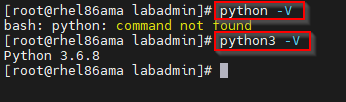
Multiple versions of Python can be installed and aliased - if multiple versions are installed, use:
ls -ls /usr/bin/python*

If your virtual machine is using a distro that doesn't include Python 3 by default, then you must install it. The following sample commands install Python 3 on different distros:
sudo yum install -y python3
In addition, the following Python packages are required to run (all should be present on a default install of Python 2 or Python 3):
| Python Package | Required for Python 2? | Required for Python 3? |
|---|---|---|
| copy | yes | yes |
| datetime | yes | yes |
| json | yes | yes |
| os | yes | yes |
| platform | yes | yes |
| re | yes | yes |
| requests | no | yes |
| shutil | yes | yes |
| subprocess | yes | yes |
| url lib | yes | no |
| xml.dom.minidom | yes | yes |
Troubleshooter existence check
Check for the existence of the AMA Agent Troubleshooter directory on the machine to be diagnosed to confirm the installation of the agent troubleshooter:
/var/lib/waagent/Microsoft.Azure.Monitor.AzureMonitorLinuxAgent-{version}
To verify the Azure Monitor Agent Troubleshooter is present, copy the following command and run in Bash as root:
ls -ltr /var/lib/waagent | grep "Microsoft.Azure.Monitor.AzureMonitorLinuxAgent-*"

If directory doesn't exist or the installation is failed, follow Basic troubleshooting steps.
If the directory exists, proceed to Run the Troubleshooter.
Run the Troubleshooter
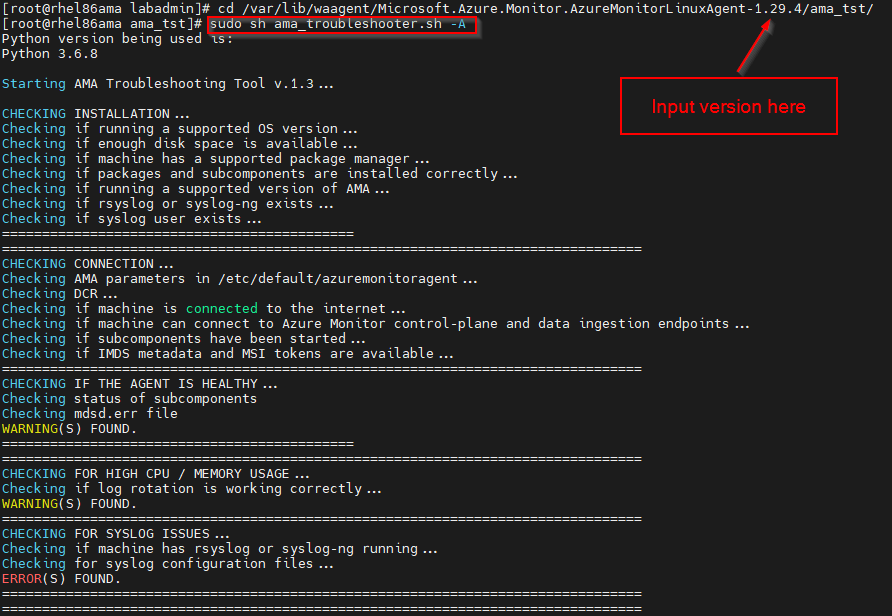
On the machine to be diagnosed, run the Agent Troubleshooter.
Log Mode enables the collection of logs, which can then be compressed into .tgz format for export or review. Interactive Mode allows users to actively engage in troubleshooting scenarios and view the output directly within the shell.
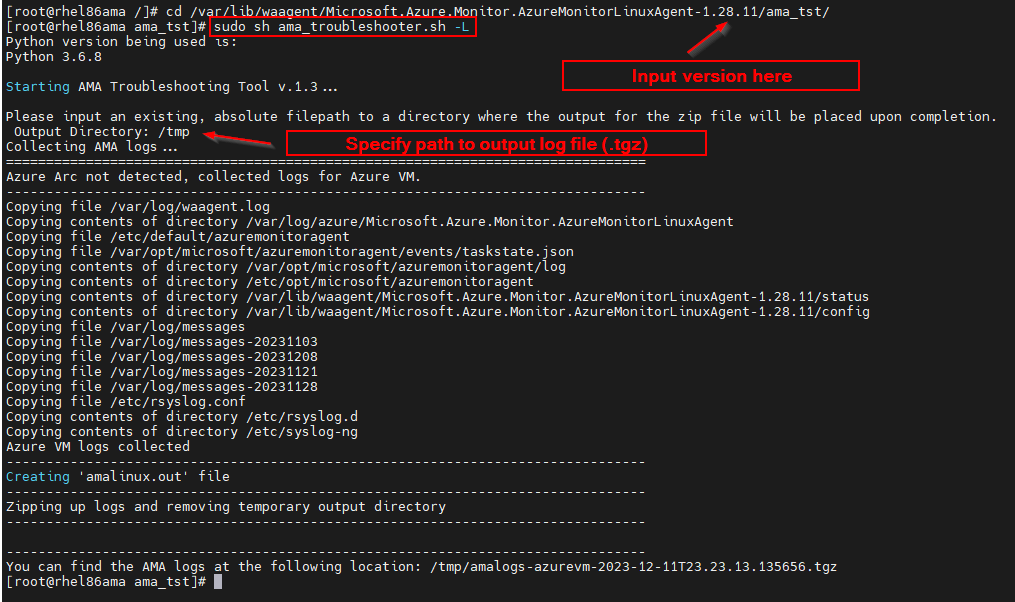
To start the Agent Troubleshooter in log mode, copy the following command and run in Bash as root:
Note
You'll need to update the {version} to match your installed version number. In the following example, the version is 1.28.11.
cd /var/lib/waagent/Microsoft.Azure.Monitor.AzureMonitorLinuxAgent-{version}/ama_tst/
sudo sh ama_troubleshooter.sh -L
Enter a path to output logs to. For instance, you might use /tmp.
It runs a series of activities and outputs a .tgz file to the Output Directory you specified. Be patient until this process completes.
Frequently Asked Questions
Can I copy the Troubleshooter from a newer agent to an older agent and run it on the older agent to diagnose issues with the older agent?
You can't use the Troubleshooter to diagnose an older agent version by copying it. The agent must be up to date for the Troubleshooter to work properly.
Next Steps
- Troubleshooting guidance for the Azure Monitor agent on Linux virtual machines and scale sets
- Syslog troubleshooting guide for Azure Monitor Agent for Linux