Note
Access to this page requires authorization. You can try signing in or changing directories.
Access to this page requires authorization. You can try changing directories.
Switch services using the Version drop-down list. Learn more about navigation.
Applies to: ✅ Azure Data Explorer
To run GQL or openCypher queries, you need to create a graph, which can be either persistent or transient.
Create graph
- For a transient graph, create a function that ends with a make-graph operator. Set labels if needed. Label data can be either a string column or an array column.
The following example creates a movies graph of relationships between movies and people.
.create-or-alter function G()
 {
     let Movies = datatable (Title: string, Description: string, Year: int, Label2: dynamic)
     [
         'T1', 'A movie about space', 1995, dynamic(["Movie","Survival","Adventure","Drama","History"]),
         'T2', 'Romantic comedy',     2011, dynamic(["Movie","Comedy","Drama","Romance"]),
         'T3', 'War film',            2020, dynamic(["Movie","Drama","History","War"]),
     ]
     | extend Label = 'Movie';
     let People = datatable (Name: string, Born: int, Label2: dynamic)
     [
         'Tom',   1956, dynamic(["Person","Male","BestActorAward"]),
         'Kevin', 1958, dynamic(["Person","Male"]),
         'Ron',   1954, dynamic(["Person","Male","BestDirectorAward"]),
         'Julia', 1967, dynamic(["Person","Female","BestActressAward"]),
     ]
     | extend Label = 'Person';
     let Actions = datatable(Name: string, Movie: string, Label: string, Label2: dynamic, Role: string)
     [
         'Tom',   'T1', 'ACTED_IN', dynamic(["ACTED_IN"]), 'Role1',
         'Kevin', 'T1', 'ACTED_IN', dynamic(["ACTED_IN"]), 'Role2',
         'Ron',   'T1', 'DIRECTED', dynamic(["DIRECTED"]), 'Director',
         'Tom',   'T2', 'ACTED_IN', dynamic(["ACTED_IN"]), 'Role3',
         'Tom',   'T2', 'DIRECTED', dynamic(["DIRECTED"]), 'Director',
         'Tom',   'T3', 'ACTED_IN', dynamic(["ACTED_IN"]), 'Role4',
     ];
     Actions
    | make-graph Name --> Movie with People on Name, Movies on Title
 }
In the above example, entity label data can be either the Label column (single string) or the Label2 column (string array).
- For a persistent graph, create a graph model and a snapshot.
Tip
For production scenarios, it is recommended to use graph model snapshots.
Example:
.create-or-alter graph_model MyGraphModel1 ```
 {
  "Schema": {
    "Nodes": {
      "Person": { "Name":"string", "Born":"int" },
      "Movie": { "Title":"string", "Description":"string", "Year":"int" }
    },
    "Edges": {
      "ACTED_IN": { "Name":"string", "Movie":"string", "Role":"string" },
      "DIRECTED": { "Name":"string", "Movie":"string", "Role":"string" }
    }
  },
  "Definition": {
    "Steps": [
      {
        "Query": "datatable(Name:string, Born:int, Label2:dynamic)
                    [
                        'Tom',   1956, dynamic(['Male', 'BestActorAward']),
                        'Kevin', 1958, dynamic(['Male']),
                        'Ron',   1954, dynamic(['Male', 'BestDirectorAward']),
                        'Julia', 1967, dynamic(['Female', 'BestActressAward']),
                    ]",
        "NodeIdColumn": "Name",
        "Kind": "AddNodes",
        "Labels": ["Person"],
        "LabelsColumn" :"Label2",
      },
      {
        "Query": "datatable(Title:string, Description:string, Year:int, Label2:dynamic)
                    [
                        'T1', 'A movie about space', 1995, dynamic(['Survival', 'Adventure', 'Drama', 'History']),
                        'T2', 'Romantic comedy', 2011, dynamic(['Comedy', 'Drama', 'Romance']),
                        'T3', 'War film', 2020, dynamic(['Drama', 'History', 'War']),
                    ]",
        "NodeIdColumn": "Title",
        "Kind": "AddNodes",
        "Labels": ["Movie"],
        "LabelsColumn" :"Label2",
      },
      {
        "Query": "datatable(Name:string, Movie:string, Role:string, Label2:string)
                    [
                         'Tom',   'T1', 'Role1',    'ACTED_IN',
                         'Kevin', 'T1', 'Role2',    'ACTED_IN',
                         'Tom',   'T2', 'Role3',    'ACTED_IN',
                         'Tom',   'T3', 'Role4',    'ACTED_IN',
                         'Ron',   'T1', 'Director', 'DIRECTED',
                         'Tom',   'T2', 'Director', 'DIRECTED',
                    ]",
        "SourceColumn": "Name",
        "TargetColumn": "Movie",
        "Kind": "AddEdges",
        "LabelsColumn" :"Label2",
      }
    ]
  }
}```
Create a snapshot for the model:
.make graph_snapshot MySnapshot1 from MyGraphModel1
Query graph
You can query the graph through the SDK, API, or directly in Kusto Explorer or the Azure Data Explorer web UI.
Set the directives described below as needed, then run either GQL or openCypher queries.
- Set query language (run the following directive):
#crp query_language=gql // or #crp query_language=opencypher
- Set the graph reference (run the following directive):
#crp query_graph_reference=G
If the graph is a model and the client is the web UI (run the following directive):
#crp query_graph_reference = graph("MyGraphModel1","MySnapshot1")
If the graph is a model and the client is Kusto Explorer desktop application (run the following directive):
#crp query_graph_reference = 'graph("MyGraphModel1", "MySnapshot1")'
- If the graph is transient, set the label column name (default:
Label). Run the following directive:
#crp query_graph_label_name = Label2
Important
Run each directive separately before you run your query.
The following screenshot shows an example of three client request properties that have been set:
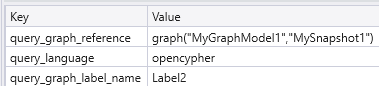
Querying a graph via Desktop UI
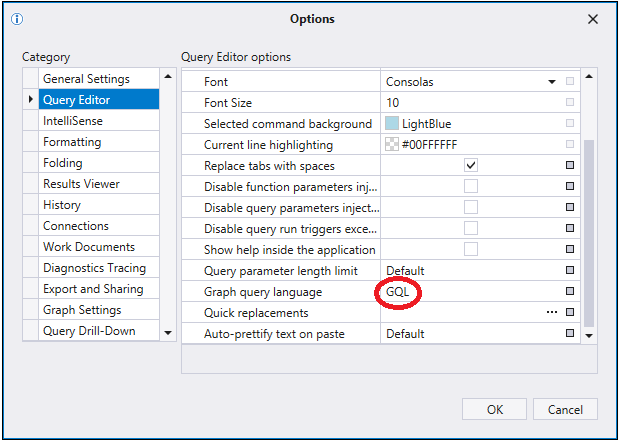
Instead of using directive, it's possible to set query language via UI (Default: GQL): In Kusto Explorer, you can select the language via Tools > Options > Query editor > Graph query language:
Querying a graph via SDK or API
Set the following client request properties:
query_language: Set to"opencypher"or"gql".query_graph_reference: Set to your graph function name (for example,"G").query_graph_label_name: Set to your label column name (for example,"Label2").
For more information, see client request properties here.