Note
Access to this page requires authorization. You can try signing in or changing directories.
Access to this page requires authorization. You can try changing directories.
Overview dashboard in the Azure portal
Microsoft Defender for Cloud gives a unified view of the security posture of hybrid cloud workloads with the interactive Overview dashboard. Select any element on the dashboard to get more information.
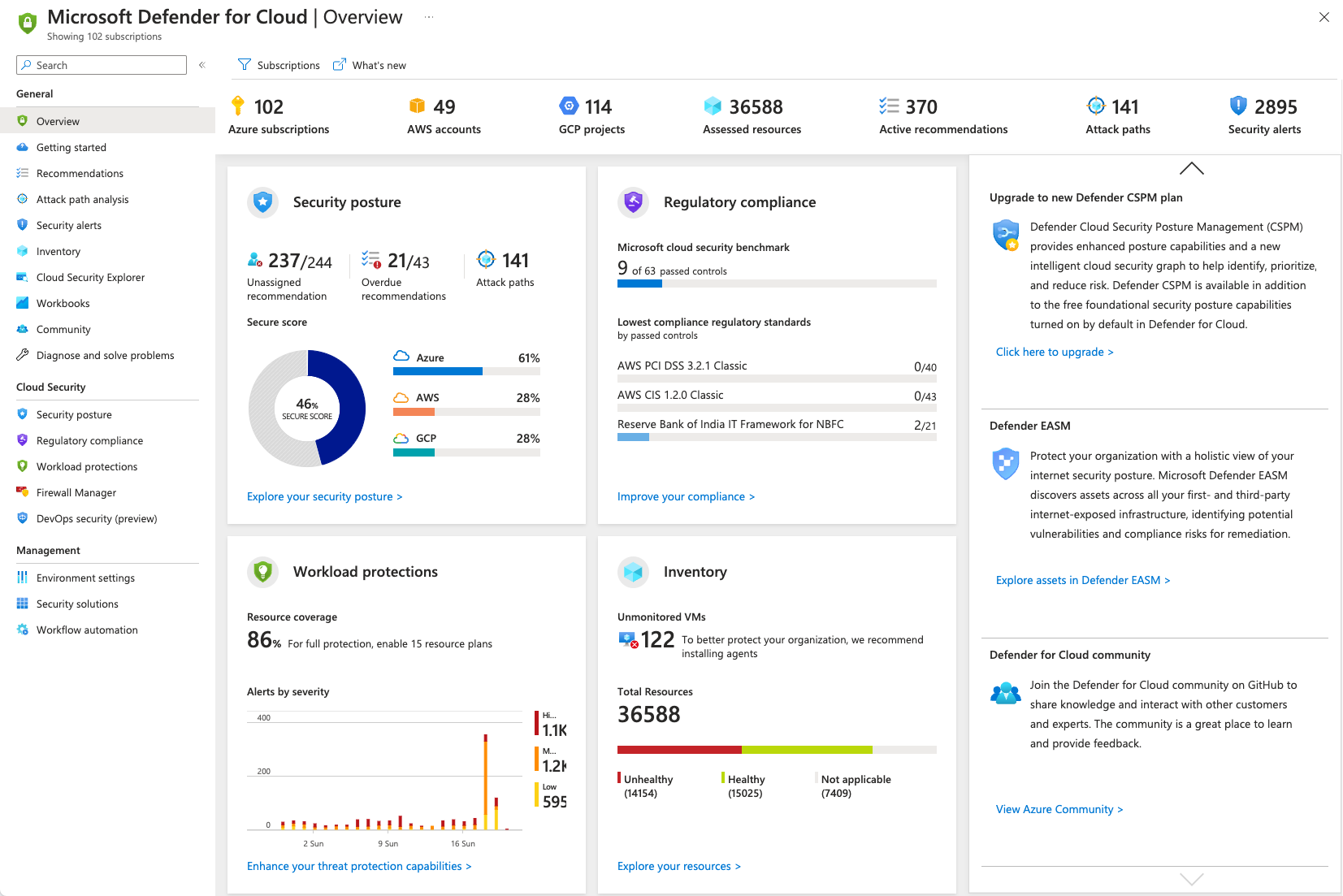
View metrics on the dashboard
The top menu bar offers:
- Subscriptions - View and filter the list of subscriptions by selecting this button. Defender for Cloud adjusts the display to reflect the security posture of the selected subscriptions.
- What's new - Opens the release notes to stay updated with new features, bug fixes, and deprecated functionality.
- High-level numbers for the connected cloud accounts, showing the context of the information in the main tiles, and the number of assessed resources, active recommendations, and security alerts. Select the assessed resources number to access Asset inventory.

Explore the feature tiles
The center of the page shows the feature tiles. Each tile links to a key feature or a dedicated dashboard:
- Security posture - Defender for Cloud continually assesses your resources, subscriptions, and organization for security issues. It aggregates findings into one score so you can quickly evaluate current risk: the higher the score, the lower the identified risk level. For details, see Secure Score and security controls.
- Workload protections - The cloud workload protection platform (CWPP) in Defender for Cloud provides advanced protection for workloads on Azure, on-premises machines, and other cloud providers. Each resource type has a related Microsoft Defender plan. The tile shows coverage for connected resources in selected subscriptions and recent alerts by severity. For plan details, see Defender plans and CWPP coverage.
- Regulatory compliance - Defender for Cloud continuously assesses hybrid and multicloud resources and maps findings to supported compliance standards. This mapping helps you track compliance status against the standards that matter to your organization. For guidance, see Regulatory compliance dashboard.
- Inventory - Asset inventory gives you a unified view of the security posture for connected resources. It includes resources with unresolved recommendations. If you enable integration with Microsoft Defender for Endpoint and Microsoft Defender for Servers, you also get software inventory. The overview tile shows healthy and unhealthy resource counts for selected subscriptions. To explore this view, see Asset inventory in Defender for Cloud.
Review dashboard insights
The Insights pane offers customized items for your environment including:
- Actionable items to enhance your security.
- Tips to handle alerts and recommendations.
- Recommendations on how to upgrade your service to enhance your environment's protections.
- Recent blog posts by Microsoft Defender for Cloud experts.
Next steps
For related tasks and follow-up guidance, see the following articles: