Note
Access to this page requires authorization. You can try signing in or changing directories.
Access to this page requires authorization. You can try changing directories.
This article explains the core concepts and terminology of Azure Event Hubs. For a high-level overview, see What is Event Hubs?
Concepts at a glance
| Concept | Description |
|---|---|
| Namespace | Management container for one or more event hubs. Controls network access and scaling. |
| Event hub | An append-only log that stores events. Equivalent to a Kafka topic. |
| Partition | Ordered sequence of events within an event hub. Enables parallel processing. |
| Producer/Publisher | Application that sends events to an event hub. |
| Consumer | Application that reads events from an event hub. |
| Consumer group | Independent view of the event stream. Multiple groups can read the same data separately. |
| Offset | Position of an event within a partition. Used to track reading progress. |
| Checkpointing | Saving the current offset so consumers can resume from where they left off. |
Architecture
Namespace
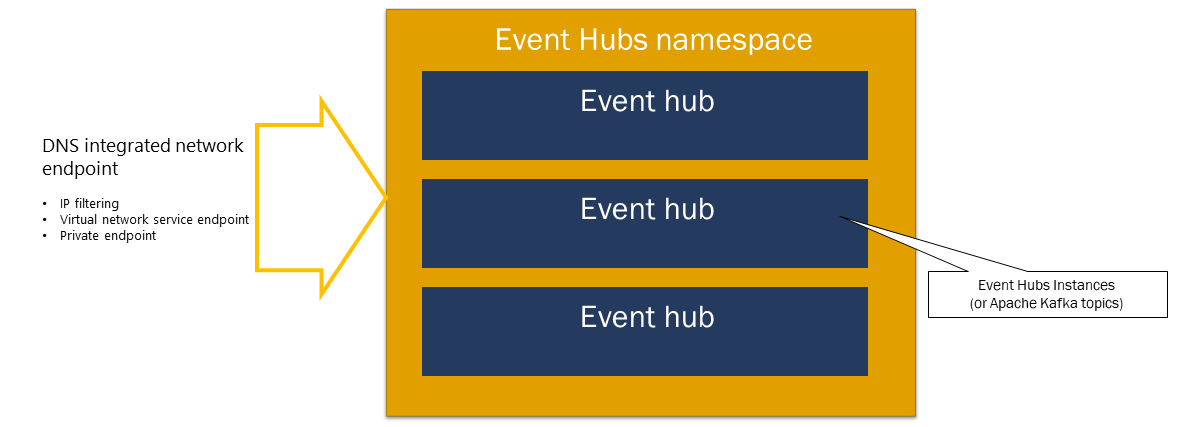
An Event Hubs namespace is a management container for event hubs (or topics, in Kafka parlance). It provides network endpoints and controls access through features like IP filtering, virtual network service endpoints, and Private Link.
Partitions
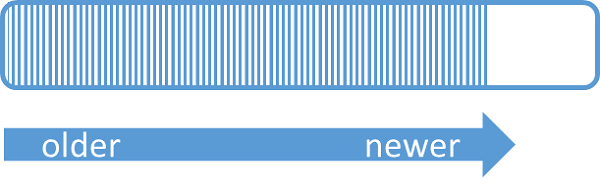
Event Hubs organizes sequences of events sent to an event hub into one or more partitions. As newer events arrive, they're added to the end of this sequence.
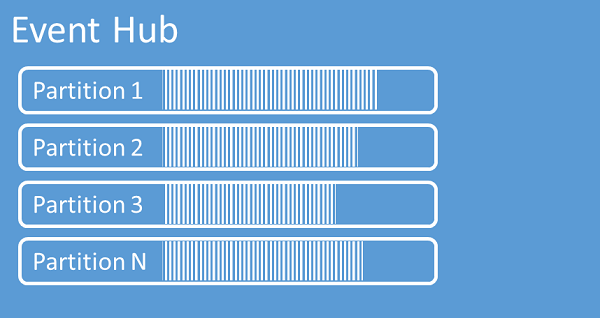
A partition can be thought of as a commit log. Partitions hold event data that contains the following information:
- Body of the event
- User-defined property bag describing the event
- Metadata such as its offset in the partition, its number in the stream sequence
- Service-side timestamp at which it was accepted
Advantages of using partitions
Event Hubs is designed to help with processing of large volumes of events, and partitioning helps with that in two ways:
- Even though Event Hubs is a PaaS service, there's a physical reality underneath. Maintaining a log that preserves the order of events requires that these events are being kept together in the underlying storage and its replicas and that results in a throughput ceiling for such a log. Partitioning allows for multiple parallel logs to be used for the same event hub and therefore multiplying the available raw input-output (IO) throughput capacity.
- Your own applications must be able to keep up with processing the volume of events that are being sent into an event hub. It might be complex and requires substantial, scaled-out, parallel processing capacity. The capacity of a single process to handle events is limited, so you need several processes. Partitions are how your solution feeds those processes and yet ensures that each event has a clear processing owner.
Number of partitions
The number of partitions is specified at the time of creating an event hub. It must be between one and the maximum partition count allowed for each pricing tier. For the partition count limit for each tier, see this article.
We recommend that you choose at least as many partitions as you expect that are required during the peak load of your application for that particular event hub. For tiers other than the premium tiers, you can't change the partition count for an event hub after its creation. For an event hub in a premium tier, you can increase the partition count after its creation, but you can't decrease them. The distribution of streams across partitions will change when it's done as the mapping of partition keys to partitions changes, so you should try hard to avoid such changes if the relative order of events matters in your application.
Setting the number of partitions to the maximum permitted value is tempting, but always keep in mind that your event streams need to be structured such that you can indeed take advantage of multiple partitions. If you need absolute order preservation across all events or only a handful of substreams, you might not be able to take advantage of many partitions. Also, many partitions make the processing side more complex.
It doesn't matter how many partitions are in an event hub when it comes to pricing. It depends on the number of pricing units (throughput units (TUs) for the standard tier, processing units (PUs) for the premium tier cluster. For example, an event hub of the standard tier with 32 partitions or with one partition incur the exact same cost when the namespace is set to one TU capacity.
A partition is a data organization mechanism that enables parallel publishing and consumption. While it supports parallel processing and scaling, total capacity remains limited by the namespace's scaling allocation. Balance scaling units (throughput units for the standard tier, processing units for the premium tier) and partitions to achieve optimal scale.
Start with your workload profile: average payload size, events per second, and sensitivity to throughput drops or latency spikes. Use the per-partition throughput below as a starting point, then validate with load tests:
- Standard tier: ~1 MB/s ingress and ~2 MB/s egress per partition.
- Premium tier: ~1-2 MB/s ingress and ~2-5 MB/s egress per partition.
Estimate partitions by dividing your expected ingress and egress by the applicable per-partition rates and taking the larger result. If observed throughput or latency doesn't meet expectations, increase partitions (Premium tiers only) and retest.
Partitions also set the ceiling for consumer parallelism. How that ceiling works depends on the consumer type:
- Epoch (exclusive) consumers � Used by
EventProcessorClient(.NET, Java) andEventHubConsumerClient(Python, JavaScript), which is the recommended pattern for production AMQP workloads. Only one epoch consumer can own a given partition in a consumer group at a time. If you deploy more processor instances than partitions, the extra instances aren't assigned any partitions and sit idle until an existing owner releases one. If a new epoch consumer connects with a higher owner level, the service disconnects the current owner with aConsumerDisconnectederror, and the new consumer takes over. - Non-epoch consumers � Up to 5 non-epoch receivers can read the same partition concurrently within a consumer group. Each receiver sees the same events (fan-out), so this mode doesn't increase processing throughput per partition. Connecting an epoch consumer to a partition disconnects all non-epoch consumers on that partition.
- Kafka consumers � Kafka consumers use the group coordination protocol (
group.id) instead of AMQP epochs, but the partition-ownership model is equivalent: each partition is assigned to exactly one consumer member within a consumer group at a time. When a new member joins or an existing member leaves, the group rebalances and redistributes partition assignments. If there are more consumer members than partitions, the excess members receive no assignments and remain idle until a future rebalance frees up a partition. To reduce unnecessary rebalancing from transient disconnections, set a uniquegroup.instance.idper consumer instance (static membership).
In practice, the number of partitions equals the maximum number of parallel consumers per consumer group regardless of whether you use AMQP epoch consumers or Kafka consumers. Factor this into your partition count when you plan for scale-out.
If your application has an affinity to a particular partition, increasing the number of partitions isn't beneficial. For more information, see availability and consistency.
Mapping of events to partitions
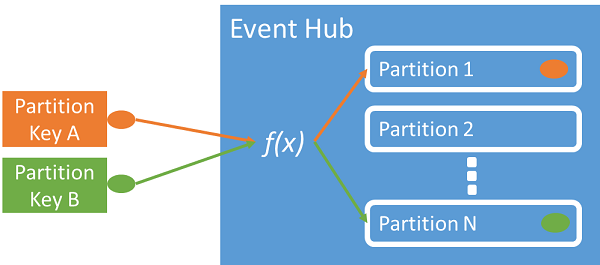
You can use a partition key to map incoming event data into specific partitions for the purpose of data organization. The partition key is a sender-supplied value passed into an event hub. It's processed through a static hashing function, which creates the partition assignment. If you don't specify a partition key when publishing an event, a round-robin assignment is used.
The event publisher is only aware of its partition key, not the partition to which the events are published. This decoupling of key and partition insulates the sender from needing to know too much about the downstream processing. A per-device or user unique identity makes a good partition key, but other attributes such as geography can also be used to group related events into a single partition.
Specifying a partition key enables keeping related events together in the same partition and in the exact order in which they arrived. The partition key is some string that is derived from your application context and identifies the interrelationship of the events. A sequence of events identified by a partition key is a stream. A partition is a multiplexed log store for many such streams.
Note
While you can send events directly to partitions, we don't recommend it, especially when high availability is important to you. It downgrades the availability of an event hub to partition-level. For more information, see Availability and Consistency.
Event producers
A producer (or publisher) is any application that sends events to an event hub.
Publishing options
| Method | Description |
|---|---|
| Azure SDKs | .NET, Java, Python, JavaScript, Go |
| REST API | HTTP POST requests for lightweight clients |
| Kafka clients | Use existing Kafka producers without code changes |
| AMQP 1.0 | Any AMQP client such as Apache Qpid |
Key behaviors
- Batch or individual: Publish events one at a time or in batches. Maximum 1 MB per publish operation.
- Partition keys: Specify a partition key to group related events in the same partition, ensuring ordered delivery.
- Authorization: Use Microsoft Entra ID (OAuth2) or Shared Access Signatures (SAS) for access control.
Publisher policies
Publisher policies enable granular control when you have many independent publishers. Each publisher uses a unique identifier:
//<my namespace>.servicebus.chinacloudapi.cn/<event hub name>/publishers/<my publisher name>
The publisher name must match the SAS token used for authentication. When using publisher policies, the PartitionKey must match the publisher name.
Event consumers
A consumer is any application that reads events from an event hub. Event Hubs uses a pull model—consumers request events rather than having events pushed to them.
Consumer groups
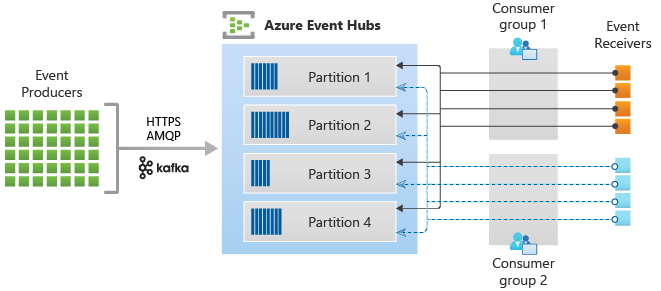
A consumer group is an independent view of the event stream. Multiple consumer groups can read the same event hub simultaneously, each tracking their own position.
| Guideline | Recommendation |
|---|---|
| Readers per partition | One active reader per partition within a consumer group (up to five in special scenarios) |
| Default group | Every event hub has a default consumer group ($Default) |
| Multiple applications | Create separate consumer groups for each application (analytics, archival, alerting) |
//<my namespace>.servicebus.chinacloudapi.cn/<event hub name>/<Consumer Group #1>
//<my namespace>.servicebus.chinacloudapi.cn/<event hub name>/<Consumer Group #2>
Offsets
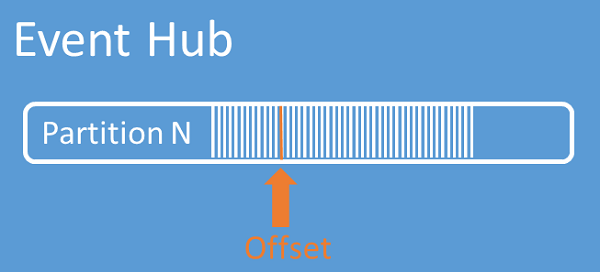
An offset is the position of an event within a partition—think of it as a cursor. Consumers use offsets to specify where to start reading. You can start from:
- A specific offset value
- A timestamp
- The beginning or end of the stream
Checkpointing
Checkpointing is when a consumer saves its current offset. This enables:
- Resumption: If a consumer disconnects, it resumes from the last checkpoint
- Failover: A new consumer instance can take over from where another left off
- Replay: Process historical events by specifying an earlier offset
Important
In AMQP, checkpointing is the consumer's responsibility. The Event Hubs service provides offsets, but consumers must store checkpoints.
Follow these recommendations when you use Azure Blob Storage as a checkpoint store:
- Use a separate container for each consumer group. You can use the same storage account, but use one container per each group.
- Don't use the storage account for anything else.
- Don't use the container for anything else.
- Create the storage account in the same region as the deployed application. If the application is on-premises, try to choose the closest region possible.
On the Storage account page in the Azure portal, in the Blob service section, ensure that the following settings are disabled.
- Hierarchical namespace
- Blob soft delete
- Versioning
Event processor clients
The Azure SDKs provide intelligent consumer clients that handle partition management, load balancing, and checkpointing automatically:
| Language | Client |
|---|---|
| .NET | EventProcessorClient |
| Java | EventProcessorClient |
| Python | EventHubConsumerClient |
| JavaScript | EventHubConsumerClient |
Event data structure
Each event contains:
- Body: The event payload
- Offset: Position in the partition
- Sequence number: Order within the partition
- User properties: Custom metadata
- System properties: Service-assigned metadata (enqueue time, etc.)
Data management
Event retention
Events are automatically removed based on a time-based retention policy.
| Tier | Default | Maximum |
|---|---|---|
| Standard | 1 hour | 7 days |
| Premium | 1 hour | 90 days |
Key points:
- Events can't be explicitly deleted
- Retention changes apply to existing events
- Events become unavailable exactly when the retention period expires
Note
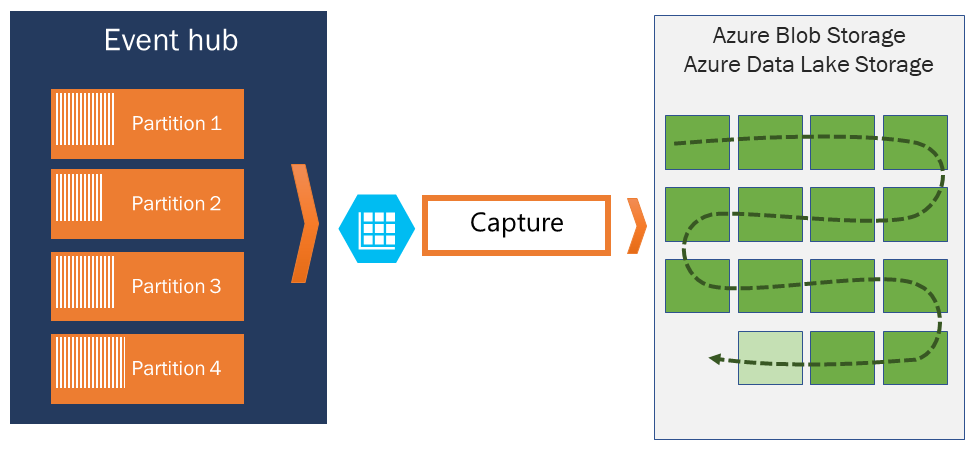
Event Hubs is a real-time streaming engine, not a database. For long-term storage, use Event Hubs Capture to archive events to Azure Storage, Azure Synapse.
Event Hubs Capture
Capture automatically saves streaming data to Azure Blob Storage or Azure Data Lake Storage. Configure a minimum size and time window to control capture frequency.
| Format | Description |
|---|---|
| Avro | Default format for captured data |
| Parquet | Available through the no-code editor in Azure portal |
Log compaction
Log compaction retains only the latest event for each unique key, rather than using time-based retention. Useful for maintaining current state without storing full history.
Protocols
Event Hubs supports multiple protocols for flexibility across different client types.
| Protocol | Send | Receive | Best for |
|---|---|---|---|
| AMQP 1.0 | Yes | Yes | High throughput, low latency, persistent connections |
| Apache Kafka | Yes | Yes | Existing Kafka applications (version 1.0+) |
| HTTPS | Yes | No | Lightweight clients, firewall-restricted environments |
Protocol comparison
- AMQP: Requires persistent bidirectional socket. Higher initial cost, but better performance for frequent operations. Used by Azure SDKs.
- Kafka: Native support means existing Kafka applications work without code changes. Just reconfigure the bootstrap server to point to your Event Hubs namespace.
- HTTPS: Simple HTTP POST for sending. No receiving support. Good for occasional, low-volume publishing.
For Kafka integration details, see Event Hubs for Apache Kafka.
Access control
Microsoft Entra ID
Microsoft Entra ID provides OAuth 2.0 authentication with role-based access control (RBAC). Assign built-in roles to control access:
| Role | Permissions |
|---|---|
| Azure Event Hubs Data Owner | Full access to send and receive events |
| Azure Event Hubs Data Sender | Send events only |
| Azure Event Hubs Data Receiver | Receive events only |
For details, see Authorize access with Microsoft Entra ID.
Shared Access Signatures (SAS)
SAS tokens provide scoped access at the namespace or event hub level. A SAS token is generated from a SAS key and typically grants only send or listen permissions.
For details, see Shared Access Signature authentication.
Application groups
Application groupslet you define resource access policies (like throttling) for collections of client applications that share a security context (SAS policy or Microsoft Entra application ID).
Related content
Get started
Learn more
- Scalability and throughput units
- Availability and consistency
- Event Hubs Capture overview
- Event Hubs for Apache Kafka