Note
Access to this page requires authorization. You can try signing in or changing directories.
Access to this page requires authorization. You can try changing directories.
The soft delete feature for Azure Machine Learning workspace provides a data protection capability that enables you to attempt recovery of workspace data after accidental deletion. Soft delete introduces a two-step approach in deleting a workspace. When you delete a workspace, you first soft delete it. While in soft-deleted state, you can choose to recover or permanently delete a workspace and its data during a data retention period.
Note
Soft-deletion and recovery is not supported when a workspace uses only user-assigned managed identity.
How workspace soft delete works
When you soft delete a workspace, the service soft deletes data and metadata stored service-side, but it hard deletes some configurations. The following table provides an overview of which configurations and objects get soft deleted, and which configurations and objects get hard deleted.
| Data / configuration | Soft deleted | Hard deleted |
|---|---|---|
| Run History | ✓ | |
| Models | ✓ | |
| Data | ✓ | |
| Environments | ✓ | |
| Components | ✓ | |
| Notebooks | ✓ | |
| Pipelines | ✓ | |
| Designer pipelines | ✓ | |
| AutoML jobs | ✓ | |
| Data labeling projects | ✓ | |
| Datastores | ✓ | |
| Queued or running jobs | ✓ | |
| Role assignments | ✓* | |
| Internal cache | ✓ | |
| Compute instance | ✓ | |
| Compute clusters | ✓ | |
| Inference endpoints | ✓ | |
| Linked Databricks workspaces | ✓* |
* Microsoft attempts recreation or reattachment when you recover a workspace. Recovery isn't guaranteed, and the service makes a best effort attempt.
After soft deletion, the service keeps necessary data and metadata during the recovery retention period. When the retention period expires, or if you permanently delete a workspace, the service actively deletes data and metadata.
Soft delete retention period
Deleted workspaces have a default retention period of 14 days. The retention period shows how long workspace data stays available after deletion. The retention period starts as soon as you soft delete a workspace.
During the retention period, you can recover or permanently delete soft deleted workspaces. Any other operations on the workspace, like submitting a training job, fail.
Important
You can't reuse the name of a workspace that you soft deleted until the retention period passes or you permanently delete the workspace. When the retention period ends, a soft deleted workspace is automatically permanently deleted.
Deleting a workspace
The default deletion behavior when deleting a workspace is soft delete. Optionally, you can override the soft delete behavior by permanently deleting your workspace. Permanently deleting a workspace immediately deletes workspace data. Use this option to meet related compliance requirements, or whenever you require a workspace name to be reused immediately after deletion. Overriding the default behavior might be useful in dev/test scenarios where you want to create and later delete a workspace.
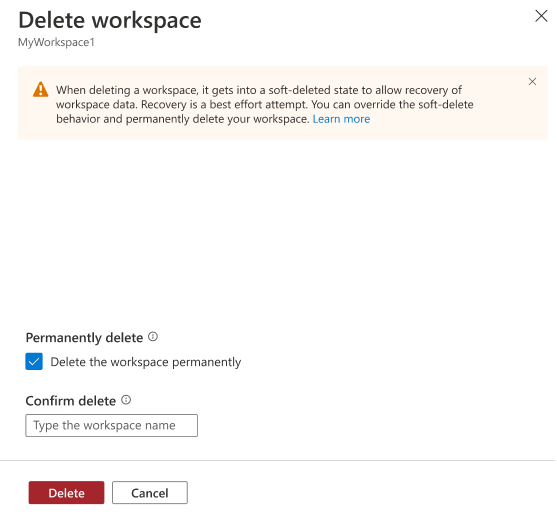
When deleting a workspace from the Azure portal, select Delete the workspace permanently. You can permanently delete only one workspace at a time, and not by using a batch operation.
Tip
The v1 SDK and CLI don't provide functionality to override the default soft-delete behavior. To override the default behavior from SDK or CLI, use the v2 versions. For more information, see the CLI & SDK v2 article or the v2 version of this article.
Important
This article provides information on using the Azure Machine Learning SDK v1. SDK v1 is deprecated as of March 31, 2025. Support for it will end on June 30, 2026. You can install and use SDK v1 until that date. Your existing workflows using SDK v1 will continue to operate after the end-of-support date. However, they could be exposed to security risks or breaking changes in the event of architectural changes in the product.
We recommend that you transition to the SDK v2 before June 30, 2026. For more information on SDK v2, see What is Azure Machine Learning CLI and Python SDK v2? and the SDK v2 reference.
Important
Some of the Azure CLI commands in this article use the azure-cli-ml, or v1, extension for Azure Machine Learning. Support for CLI v1 ended on September 30, 2025. Microsoft will no longer provide technical support or updates for this service. Your existing workflows using CLI v1 will continue to operate after the end-of-support date. However, they could be exposed to security risks or breaking changes in the event of architectural changes in the product.
We recommend that you transition to the ml, or v2, extension as soon as possible. For more information on the v2 extension, see Azure Machine Learning CLI extension and Python SDK v2.
If you're using the Azure Machine Learning SDK or CLI, set the permanently_delete flag.
from azure.ai.ml import MLClient
from azure.identity import DefaultAzureCredential

ml_client = MLClient(
    DefaultAzureCredential(),
    subscription_id="<SUBSCRIPTION_ID>",
    resource_group_name="<RESOURCE_GROUP>"
)

result = ml_client.workspaces.begin_delete(
    name="myworkspace",
    permanently_delete=True,
    delete_dependent_resources=False
).result()

print(result)
Once permanently deleted, you can't recover workspace data. Permanent deletion of workspace data also occurs when the soft delete retention period expires.
Manage soft deleted workspaces
You can manage soft deleted workspaces under the Azure Machine Learning resource provider in the Azure portal. To list soft deleted workspaces, use the following steps:
From the Azure portal, select More services. From the AI + machine learning category, select Azure Machine Learning.
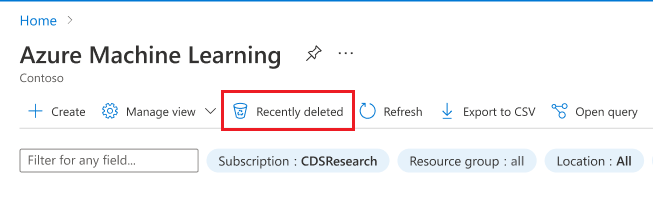
From the top of the page, select Recently deleted to view workspaces that you soft deleted and are still within the retention period.
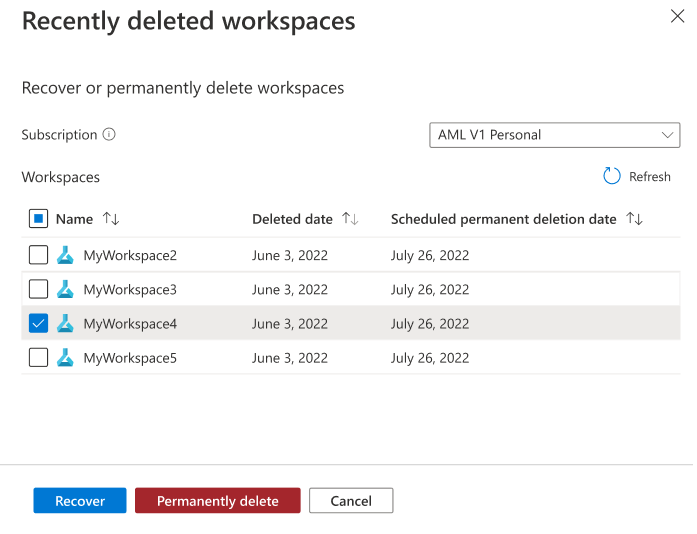
From the recently deleted workspaces view, you can recover or permanently delete a workspace.
Recover a soft deleted workspace
When you select Recover on a soft deleted workspace, it initiates an operation to restore the workspace state. The service attempts recreation or reattachment of a subset of resources, including Azure RBAC role assignments. You must recreate hard deleted resources, including compute clusters.
Azure Machine Learning recovers Azure RBAC role assignments for the workspace identity, but it doesn't recover role assignments you added on the workspace. It might take up to 15 minutes for role assignments to propagate after workspace recovery.
Recovery of a workspace isn't always possible. Azure Machine Learning stores workspace metadata on other Azure resources associated with the workspace. In the event these dependent Azure resources are deleted, it might prevent the workspace from being recovered or correctly restored. You must recover dependencies of the Azure Machine Learning workspace first, before recovering a deleted workspace. The following table outlines recovery options for each dependency of the Azure Machine Learning workspace.
| Dependency | Recovery approach |
|---|---|
| Azure Key Vault | Recover a deleted Azure Key Vault instance |
| Azure Storage | Recover a deleted Azure storage account. |
| Azure Container Registry | Azure Container Registry isn't a hard requirement for workspace recovery. Azure Machine Learning can regenerate images for custom environments. |
| Azure Application Insights | First, recover your log analytics workspace. Then recreate an application insights with the original name. |
Billing implications
When you soft delete a workspace, you can only 'permanently delete' or 'recover' it. All other operations fail. Even though the workspace exists, you can't perform any compute operations, so no usage occurs. When you soft delete a workspace, the service hard deletes any cost-incurring resources, including compute clusters.
Important
Workspaces that use customer-managed keys for encryption store additional service data in your subscription in a managed resource group. When you soft delete a workspace, the managed resource group and resources in it aren't deleted and incur costs until you hard delete the workspace.
Data privacy and regulatory considerations
After soft deletion, the service keeps necessary data and metadata during the recovery retention period. From a regulatory and privacy perspective, a request to delete personal data should be interpreted as a request for permanent deletion of a workspace and not soft delete.
When the retention period expires, or if you permanently delete a workspace, the service actively deletes data and metadata. You can choose to permanently delete a workspace at the time of deletion.
For more information, see Export or delete workspace data.