Note
Access to this page requires authorization. You can try signing in or changing directories.
Access to this page requires authorization. You can try changing directories.
This article describes the key components of a network address translation (NAT) gateway resource that enable it to provide highly secure, scalable, and resilient outbound connectivity. NAT gateway resources are part of the Azure NAT Gateway service.
You can configure a NAT gateway in your subscription through supported clients. These clients include the Azure portal, the Azure CLI, Azure PowerShell, Azure Resource Manager templates, or appropriate alternatives.
Azure NAT Gateway architecture
Azure NAT Gateway uses software-defined networking to operate as a fully managed, distributed service. By design, a NAT gateway spans multiple fault domains, enabling it to withstand multiple failures without any effect to the service.
Azure NAT Gateway provides source network address translation (SNAT) for private instances within the associated subnets of your Azure virtual network. The private IPs of the virtual machines use SNAT for a NAT gateway's static public IP addresses to connect outbound to the internet. Azure NAT Gateway also provides destination network address translation (DNAT) for response packets to an outbound-originated connection only.
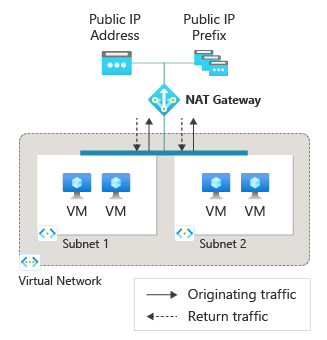
When a NAT gateway is configured to a subnet within a virtual network, it becomes the subnet's default next hop type for all outbound traffic directed to the internet. No extra routing configurations are required. A NAT gateway doesn't provide unsolicited inbound connections from the internet. DNAT is performed only for packets that arrive as a response to an outbound packet.
Subnets
You can attach a NAT gateway to multiple subnets within a virtual network to provide outbound connectivity to the internet. When a NAT gateway is attached to a subnet, it assumes the default route to the internet. The NAT gateway serves as the next hop type for all outbound traffic destined for the internet.
NAT gateways have these limitations for subnet configurations:
Each subnet can't have more than one NAT gateway attached.
You can't attach a NAT gateway to subnets from different virtual networks.
You can't use a NAT gateway with a gateway subnet. A gateway subnet is a designated subnet for a VPN gateway to send encrypted traffic between an Azure virtual network and on-premises location.
Static public IP addresses
A NAT gateway can be associated with static public IP addresses or public IP prefixes. If you assign a public IP prefix, the entire public IP prefix is used. You can use a public IP prefix directly or distribute the public IP addresses of the prefix across multiple NAT gateway resources. The NAT gateway sends all traffic to the range of IP addresses of the prefix.
- NAT Gateway can't be used with IPv6 public IP addresses or prefixes. It supports up to 16 IPv4 public IP addresses.
- NAT Gateway can't be used with basic SKU public IP addresses.
SNAT ports
SNAT port inventory is provided by the public IP addresses, public IP prefixes, or both attached to a NAT gateway. SNAT port inventory is available on demand to all instances within a subnet attached to the NAT gateway. No preallocation of SNAT ports per instance is required.
For more information about SNAT ports and Azure NAT Gateway, see Source Network Address Translation (SNAT) with Azure NAT Gateway.
When multiple subnets within a virtual network are attached to the same NAT gateway resource, the SNAT port inventory that the NAT gateway provides is shared across all subnets.
SNAT ports serve as unique identifiers to distinguish connection flows from one another. The same SNAT port can be used to connect to different destination endpoints at the same time.
Different SNAT ports are used to make connections to the same destination endpoint in order to distinguish connection flows from one another. SNAT ports being reused to connect to the same destination are placed on a reuse cool-down timer before they can be reused.
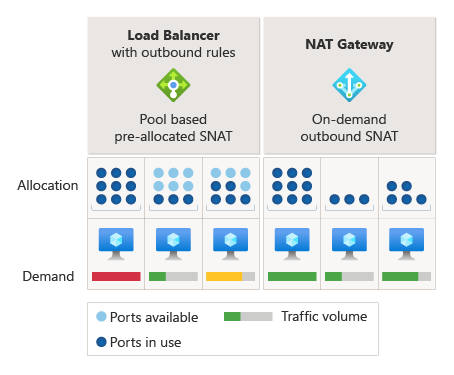
A single NAT gateway can scale by the number of public IP addresses associated with it. Each public IP address for a NAT gateway provides 64,512 SNAT ports to make outbound connections. A NAT gateway can scale up to more than 1 million SNAT ports. TCP and UDP are separate SNAT port inventories and are unrelated to NAT gateways.
Availability zones
A NAT gateway is a zonal resource, which means you can deploy and operate it out of individual availability zones. If the zone that's associated with a NAT gateway goes down, the outage affects outbound connectivity for the subnets associated with the NAT gateway.
For more information about availability zones and Azure NAT Gateway, see Reliability in Azure NAT Gateway.
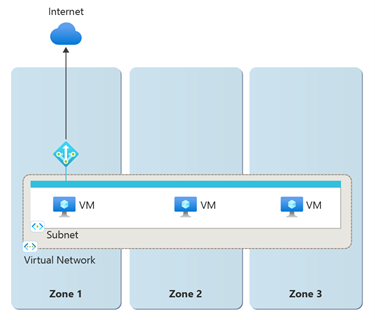
After you deploy a NAT gateway, you can't change the zone selection.
Protocols
A NAT gateway interacts with IP and IP transport headers of UDP and TCP flows. A NAT gateway is agnostic to application-layer payloads. Other IP protocols, such as ICMP, aren't supported.
TCP reset
A TCP reset packet is sent when a NAT gateway detects traffic on a connection flow that doesn't exist. The TCP reset packet indicates to the receiving endpoint that the connection flow was released and any future communication on this same TCP connection will fail. TCP reset is unidirectional for a NAT gateway.
The connection flow might not exist if:
The connection reached the idle timeout after a period of inactivity on the connection flow, and the connection is silently dropped.
The sender, either from the Azure network side or from the public internet side, sent traffic after the connection dropped.
The system sends a TCP reset packet only when it detects traffic on the dropped connection flow. This operation means a TCP reset packet might not be sent right away after a connection flow drops.
The system sends a TCP reset packet in response to detecting traffic on a nonexistent connection flow, regardless of whether the traffic originates from the Azure network side or the public internet side.
TCP idle timeout
A NAT gateway provides a configurable idle timeout range of 4 minutes to 120 minutes for TCP protocols. UDP protocols have a nonconfigurable idle timeout of 4 minutes.
When a connection goes idle, the NAT gateway holds onto the SNAT port until the connection idle times out. Because long idle timeout timers can unnecessarily increase the likelihood of SNAT port exhaustion, we don't recommend that you increase the TCP idle timeout duration to longer than the default time of 4 minutes. The idle timer doesn't affect a flow that never goes idle.
You can use TCP keepalives to provide a pattern of refreshing long idle connections and endpoint liveness detection. For more information, see these .NET examples. TCP keepalives appear as duplicate acknowledgements (ACKs) to the endpoints, are low overhead, and are invisible to the application layer.
UDP idle timeout timers aren't configurable. You should use UDP keepalives to ensure that the connection doesn't reach the idle timeout value, and to maintain the connection. Unlike TCP connections, a UDP keepalive enabled on one side of the connection applies only to traffic flow in one direction. You must enable UDP keepalives on both sides of the traffic flow to keep the traffic flow alive.
Timers
Port reuse timers
Port reuse timers determine the amount of time after a connection closes that a source port is in hold-down before it can be reused for a new connection to go to the same destination endpoint by the NAT gateway.
The following table provides information about when a TCP port becomes available for reuse to the same destination endpoint by the NAT gateway.
| Timer | Description | Value |
|---|---|---|
| TCP FIN | After a TCP FIN packet closes a connection, a 65-second timer holds down the SNAT port. The SNAT port is available for reuse after the timer ends. | 65 seconds |
| TCP RST | After a TCP RST packet (reset) closes a connection, a 16-second timer holds down the SNAT port. When the timer ends, the port is available for reuse. | 16 seconds |
| TCP half open | During connection establishment where one connection endpoint is waiting for acknowledgment from the other endpoint, a 30-second timer begins. If no traffic is detected, the connection closes. After the connection closes, the source port is available for reuse to the same destination endpoint. | 30 seconds |
For UDP traffic, after a connection closes, the port is in hold-down for 65 seconds before it's available for reuse.
Idle timeout timers
| Timer | Description | Value |
|---|---|---|
| TCP idle timeout | TCP connections can go idle when neither endpoint transmits any data for a prolonged period of time. You can configure a timer from 4 minutes (default) to 120 minutes (2 hours) to time out an idle connection. Traffic on the flow resets the idle timeout timer. | Configurable; 4 minutes (default) to 120 minutes |
| UDP idle timeout | UDP connections can go idle when endpoints don't transmit data for a prolonged period of time. UDP idle timeout timers are 4 minutes and are not configurable. Traffic on the flow resets the idle timeout timer. | Not configurable; 4 minutes |
Note
These timer settings are subject to change. The provided values can help with troubleshooting. You shouldn't take a dependency on specific timers at this time.
Bandwidth
A NAT gateway provides 50 Gbps of throughput, which is split between outbound and inbound (response) data. Data throughput is rate limited at 25 Gbps for outbound and 25 Gbps for inbound (response) data per NAT gateway resource.
Performance
A NAT gateway supports up to 50,000 concurrent connections per public IP address to the same destination endpoint over the internet for TCP and UDP traffic.
NAT gateway can support up to 2 million active connections simultaneously. The number of connections on a NAT gateway is counted based on the 5-tuple (source IP address, source port, destination IP address, destination port, and protocol). If NAT gateway exceeds 2 million connections, the data path's availability declines and new connections fail.
NAT gateway can process up to 5 million packets per second.
Limitations
Basic load balancers aren't compatible with NAT gateways. Use Standard load balancers instead.
To upgrade a load balancer from Basic to Standard, see Upgrade an Azure public load balancer.
Basic public IPs aren't compatible with NAT gateways. Use Standard public IPs instead.
To upgrade a public IP address from Basic to Standard, see Upgrade a Basic public IP address to Standard.
Azure NAT Gateway doesn't support ICMP.
IP fragmentation isn't available for Azure NAT Gateway.
Azure NAT Gateway doesn't support public IPs with DDoS protection enabled. For more information, see DDoS limitations.
Azure NAT Gateway isn't supported in a secured virtual hub network (vWAN) architecture.
Related content
- Review the Azure NAT Gateway overview.
- Learn about metrics and alerts for Azure NAT Gateway.
- Learn how to troubleshoot Azure NAT Gateway.