Note
Access to this page requires authorization. You can try signing in or changing directories.
Access to this page requires authorization. You can try changing directories.
Important
Service tag support for network security perimeter is currently in public preview. This preview is provided without a service level agreement, and it isn't recommended for production workloads. Certain features might not be supported or might have constrained capabilities. For more information, see Supplemental Terms of Use for Azure Previews.
In this article, you learn how to configure an inbound access rule that uses an Azure service tag in a network security perimeter profile. A service tag represents a group of IP address prefixes for an Azure service. Azure manages and automatically updates these prefixes as addresses change.
Note
Service tags can include traffic from multiple Microsoft-owned service instances. Evaluate whether service tag-based access meets your security requirements, and use it only where broader service-level trust is acceptable. For stricter network isolation, consider more granular access controls, such as specific IP ranges and subscriptions. Service Tags can represent multitenant workloads and might run third‑party or untrusted code, and might expose your resources to associated risks.
Prerequisites
- An Azure account with an active subscription. If you don't already have an Azure account, create a trial subscription.
- An existing network security perimeter and profile.
- An Azure resource associated with the network security perimeter.
- Permissions to manage inbound access rules for the network security perimeter. See the network security perimeter role-based access control requirements for more information.
Configure an inbound access rule
In the Azure portal, search for and select Network security perimeters.
Select the network security perimeter that you want to configure.
Select Profiles, and then select the profile that you want to configure.
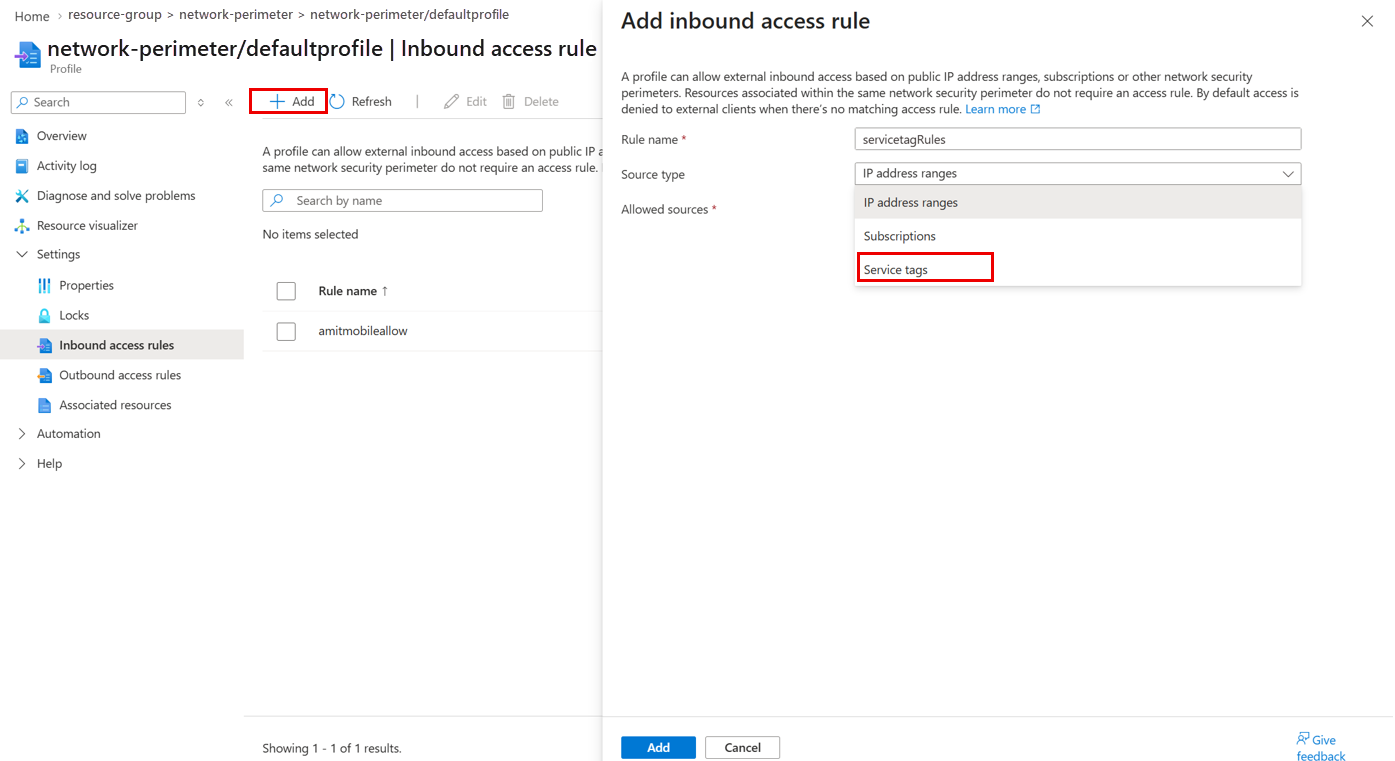
Select Inbound access rules, and then select + Add.
For Source type, select Service Tag.
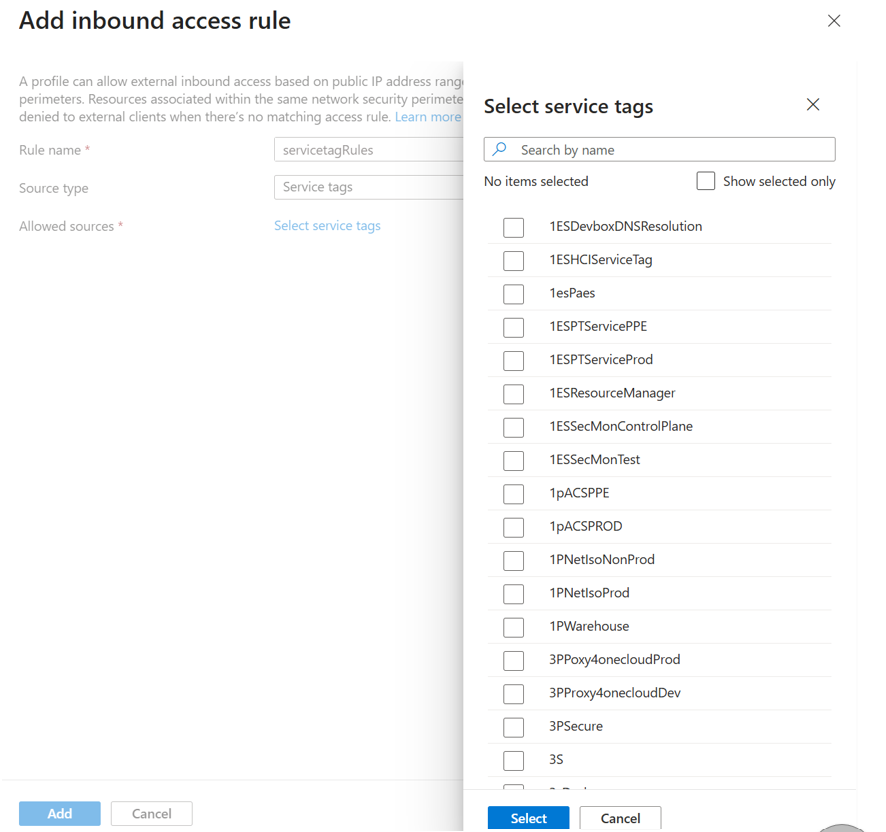
Select a service tag. The list shows only supported, generally available service tags. Examples include:
PowerPlatformAzureMonitorAzureDatabricksStorage.ChinaNorth3
Configure the remaining rule settings. The following table shows an example:
Property Value Rule name Allow-PowerPlatformSource type Service Tag Service tag PowerPlatformInfraAction Allow Profile defaultProfileSelect Add to save the rule.
Verify the inbound access rule
On the profile page, select Inbound access rules and confirm that the new rule appears in the list. Test connectivity from the selected Azure service, and review the network security perimeter access logs to confirm that the expected traffic is allowed.
Best practices
- Use the narrowest service tag that meets your requirements.
- Prefer a regional service tag when one is available.
- Validate connectivity in Transition mode before you use Enforced mode.
- Review network security perimeter access logs after deployment.
- Remove redundant CIDR rules after you validate the service tag-based rule.
Troubleshooting
| Issue | Resolution |
|---|---|
| Traffic is blocked. | Verify that you selected the correct service tag. |
| The rule exists, but connectivity fails. | Confirm that the source IP address belongs to the selected service tag. |
| A service tag doesn't appear in the list. | The service tag might not be supported for network security perimeter inbound access rules. |
| Traffic works in Transition mode but not in Enforced mode. | Review the network security perimeter access logs and add any missing access rules. |
Limitations
- Service tag-based inbound access rules are currently supported for Azure Key Vault and Azure Monitor resources within a network security perimeter. For the complete list of resource providers supported by network security perimeter, see Onboarded private link resources.
- Not all service tags can be used as inbound rules in Network security perimeter. Be careful when using service tags as inbound rules and use the right and applicable tags.
- Azure Storage currently doesn't support service tags as inbound access rules. While some access scenarios might appear to work when using service tag-based rules, other scenarios might fail or behave inconsistently. To avoid unexpected access issues, don't use service tags to control inbound access to Azure Storage resources. Doing so might result in inconsistent behavior and unreliable connectivity.
Frequently asked questions
Do I still need to manage IP addresses?
No. Azure automatically updates the IP address prefixes associated with a service tag.
Can I use regional service tags?
Yes. Use a regional service tag when one is available.
Can I continue to use CIDR rules?
Yes. Service tags complement existing network security perimeter inbound rule capabilities.