Note
Access to this page requires authorization. You can try signing in or changing directories.
Access to this page requires authorization. You can try changing directories.
Part of creating a search service is choosing a pricing tier (or SKU). In the Azure portal, tier is specified in the Select Pricing Tier page when you create the service. In PowerShell or Azure CLI, the tier is specified through the -Sku parameter.
The tier determines the:
- Maximum number of indexes and other objects allowed on the service.
- Size and speed of partitions (physical storage).
- Billable rate as a fixed monthly cost, but also an incremental cost if you add capacity.
- Workload characteristics. Some tiers are optimized for specific workloads.
In a few instances, the tier you choose determines the availability of premium features.
Billing rates are shown in the Azure portal's Select Pricing Tier page. You can check the pricing page for regional rates and review Plan and manage costs to learn more about the billing model.
Dedicated pricing model
The Dedicated pricing model is a provisioned-capacity offering that provides predictable performance and cost by allocating fixed infrastructure to your workload. You configure capacity upfront, allowing the service to handle consistent indexing and query demands with guaranteed resources.
With the Dedicated tiers, you explicitly configure replicas, partitions, and search units (SUs). Replicas provide query throughput and high availability, while partitions define storage and indexing capacity. Together, they determine the total capacity and performance characteristics of your search service.
Billing is based on:
- Service tier: The pre-selected provisioned capacity.
- Search units (SUs): The billing unit for Dedicated services, calculated as replicas � partitions. You pay a fixed hourly rate based on the number of search units and selected service tier.
This model is designed for workloads with steady, predictable demand, where consistent performance, low latency, and controlled scaling are important.
In the Dedicated pricing model, the selected service tier determines:
- Maximum number of indexes and other objects allowed on the service.
- Size and speed of partitions (physical storage).
- Billable rate as a fixed monthly cost, but also an incremental cost if you add capacity.
- Workload characteristics. Some tiers are optimized for specific workloads.
In some cases, the tier also determines the availability of premium features.
Tier descriptions
The most commonly used billable tiers include:
Basic supports production workloads and can meet SLA requirements with up to three replicas.
Standard (S1, S2, S3) is the default tier. It supports scaling partitions and replicas, enabling larger workloads and improved performance.
Some tiers are designed for certain types of work:
Standard 3 High Density (S3 HD) is a hosting mode for S3 optimized for multitenancy. S3 HD has the same per-unit charge as S3, but supports a large number of smaller indexes and uses hardware optimized for fast file reads and high-density storage scenarios.
Storage Optimized (L1, L2) tiers provide lower-cost storage per TB and are designed for large, less frequently updated indexes. These tiers typically have higher query latency.
There is also a free, limited search service tier:
- Free creates a limited search service for small projects, such as tutorials and development. Resources are shared across tenants, and scaling isn't supported. Some premium features are unavailable, and the service might be deleted after periods of inactivity. You can only have one free search service per Azure subscription.
You see billing rates in the Azure portal when you create a new Azure AI Search service in the Select Pricing Tier page.
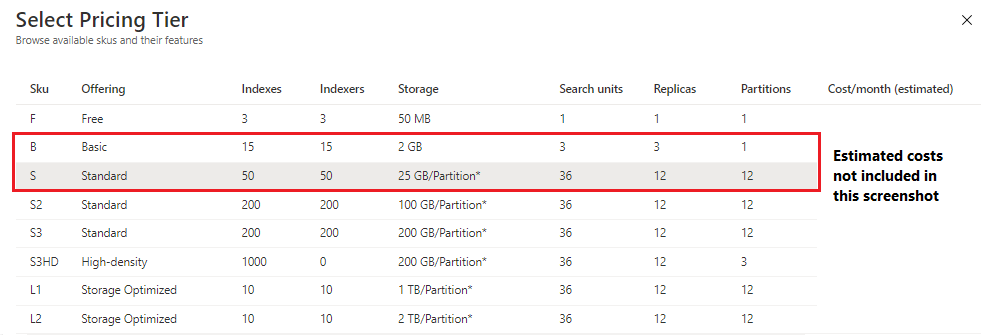
You can check the pricing page for regional rates.
Review Plan and manage costs to learn more about the Dedicated pricing model and how it compares to the Serverless model.
Check Service limits in Azure AI Search or limits on storage, workloads, and object counts by tier.
How to select a tier
In the Azure portal, the service tiers are specified in the Select Pricing Tier page when you create the service.
In PowerShell or Azure CLI, the tier is specified through the -Sku parameter.
Region availability by tier
The regions list provides the locations where Azure AI Search is offered. Some regions might have capacity constraints for certain tiers, which prevents the creation of new search services on those tiers. The list uses footnotes to indicate constrained regions and tiers.
When you create a search service in the Azure portal, unavailable region-tier combinations are automatically excluded.
Feature availability by tier
Most features are available across all tiers. In some cases, feature availability depends on the selected tier:
| Feature | Tier considerations |
|---|---|
| indexers | Indexers aren't available on S3 HD. Indexers have more limitations on the free tier. |
indexer executionEnvironment configuration parameter |
The ability to pin all indexer processing to just the search clusters allocated to your search service requires S2 and higher. |
| AI enrichment | Runs on the Free tier but not recommended for large workloads. |
| Managed or trusted identities for outbound (indexer) access | Not available on the Free tier. |
| Customer-managed encryption keys | Not available on the Free tier. |
| IP firewall access | Not available on the Free tier. |
| Private endpoint (integration with Azure Private Link) | For inbound connections to a search service, not available on the Free tier. For outbound connections by indexers to other Azure resources, not available on Free or S3 HD. For indexers that use skillsets, not available on Free, Basic, S1, or S3 HD. |
| Availability zones | Not available on the Free tier. |
| Semantic ranker | Runs on the Free tier but not recommended for large workloads. |
Resource-intensive features might not work well unless you give it sufficient capacity. For example, AI enrichment has long-running skills that time out on a Free service unless the dataset is small.
Upper limits
Tiers determine the maximum storage of the service itself, plus the maximum number of indexes, indexers, data sources, skillsets, and synonym maps that you can create. For a full break out of all limits, see Service limits in Azure AI Search.
Partition size and speed
Tier pricing includes details about per-partition storage that ranges from 15 GB for Basic, up to 2 TB for Storage Optimized (L2) tiers. Other hardware characteristics, such as speed of operations, latency, and transfer rates, aren't published, but tiers that are designed for specific solution architectures are built on hardware that has the features to support those scenarios. For more information about partitions, see Estimate and manage capacity and Reliability in Azure AI Search.
Note
Higher capacity partitions became available in select regions in April 2024. A second wave of higher capacity partitions was released in May 2024.
Billing rates
Tiers have different billing rates, with higher rates for tiers that run on more expensive hardware or provide more expensive features. The tier billing rate can be found in the Azure pricing pages for Azure AI Search.
After you create a service, the billing rate becomes both a fixed cost of running the service around the clock, and an incremental cost if you choose to add more capacity.
In the Dedicated model, billing is based on Search Units (SUs), which combine partitions (storage) and replicas (query capacity).
- A service starts with one partition and one replica (one SU)
- Adding partitions or replicas increases cost linearly with the number of SUs
For example, adding replicas to improve availability or throughput increases the monthly cost proportionally.
For more information, see Plan and manage costs.
Billing rate example
The following example provides an illustration. Assume a hypothetical billing rate of $100 per month. If you keep the search service at its initial capacity of one partition and one replica, then $100 is what you can expect to pay at the end of the month. However, if you add two more replicas to achieve high availability, the monthly bill increases to $300 ($100 for the first replica-partition pair, followed by $200 for the two replicas).
Tier changes
Note
Existing search services can switch between Basic and Standard (S1, S2, and S3) tiers. Your current service configuration can't exceed the limits of the target tier, and your region can't have capacity constraints on the target tier. For more information, see Change your pricing tier.
To switch to a different tier than those previously listed:
- Create a search service on the new tier.
- Deploy your search content onto the new service. Follow this checklist to ensure you have all the content.
- Delete the old service when you're sure it's no longer needed.
For large indexes that you don't want to rebuild from scratch, use one of the following backup and restore samples:
- Backup and restore sample (C#)
- Backup and restore sample (Python)
- Backup and restore sample for very large indexes (Python)
Next steps
The best way to choose a pricing tier is to start with a least-cost tier, and then allow experience and testing to inform your decision to keep the service or switch to a higher tier.
For next steps, we recommend that you create a search service at a tier that can accommodate the level of testing you propose to do, and then review the following guidance on estimating cost and capacity: