Note
Access to this page requires authorization. You can try signing in or changing directories.
Access to this page requires authorization. You can try changing directories.
To support of the experience of viewing impacted resources, Service Health contains a feature that:
- Displays resources impacted by a security advisory.
- Enables Role-Based Access Control (RBAC) for viewing security advisory impacted resource information.
This article explains what and where you can view information about your impacted resources.
Note
This feature will be rolled out in phases. The rollout will gradually expand to 100 percent of subscription and tenant customers.
Role Based Access (RBAC) For Sensitive Security advisory resource impact and sensitive details
Azure role-based access control (Azure RBAC) helps you manage who has access to Azure resources, what they can do with those resources, and what areas they have access to.
Given the sensitive nature of security advisories, role-based access is used to limit the audience of their impacted resource information.
Along with resource information, Service Health provides the information shown here to users whose resources are impacted from a security advisory:
Users with the authorized roles shown here can view security impacted resource information and sensitive details such as description, summary, and updates:
Subscription level
- Service Health Security reader
- Subscription Owner
- Subscription Admin/Contributor
- Any other Built-in or Custom roles with the following permissions on the subscription level:
Microsoft.ResourceHealth/events/fetchEventDetails/action
Microsoft.ResourceHealth/events/listSecurityAdvisoryImpactedResources/action
Microsoft.ResourceHealth/events/action permissions
Tenant level
- Security Admin
- Global Admin/Tenant Admin
- Any other Built-in or Custom roles with the following permissions on the tenant level:
Microsoft.ResourceHealth/events/fetchEventDetails/action
Microsoft.ResourceHealth/events/listSecurityAdvisoryImpactedResources/action
Microsoft.ResourceHealth/events/action permissions
For more information on Built-in roles, see Azure Built-in roles.
For steps on how to configure subscription or tenant-based access to view Security advisories, see Configure subscriptions for Security Advisories.
Viewing Impacted Resources for security advisories on the Service Health portal
In the Azure portal, the Impacted Resources tab under Service Health > Security Advisories displays resources impacted from a security advisory. Along with resource information, Service Health provides the information shown here to users whose resources are impacted from a security advisory:
| Column | Description |
|---|---|
| Subscription ID | Unique ID for the subscription that contains the impacted resource |
| Subscription Name | Name for the subscription that contains the impacted resource |
| Tenant Name | Name for the tenant that contains the impacted resource |
| Tenant ID | Unique ID for the tenant that contains the impacted resource |
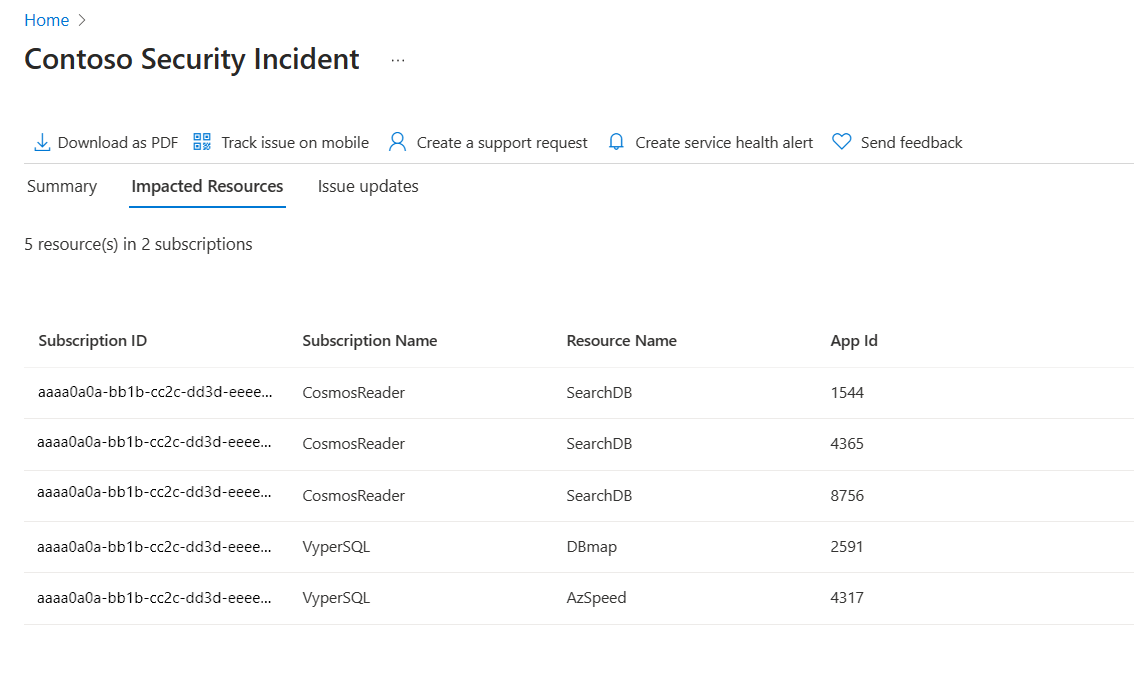
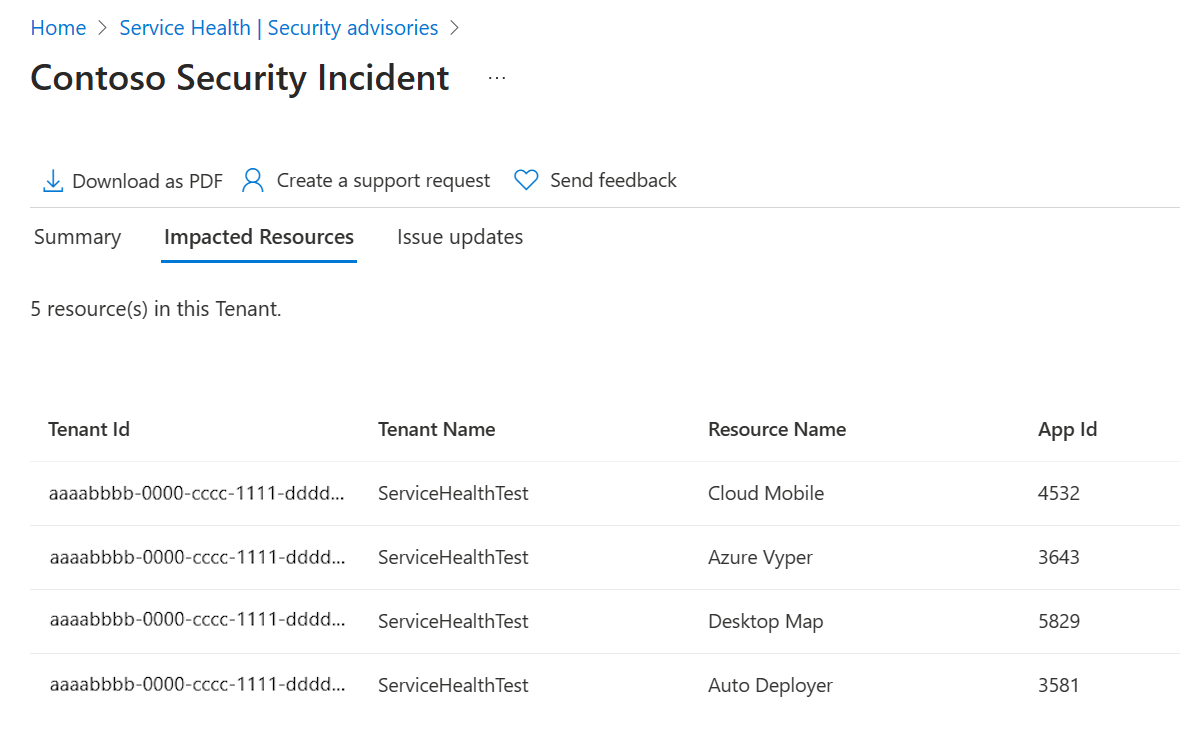
The following examples show a security advisory with impacted resources from the subscription and tenant scope.
Subscription
Tenant
Accessing Impacted Resources programmatically via an API
You can retrieve information about impacted resources for security advisories using the Events API program. Authorized users with the specified roles can access the list of resources impacted by a security advisory using the endpoints provided here. For details on how to access this data, see the API documentation.
Subscription
https://management.chinacloudapi.cn/subscriptions/<Subscription ID>/providers/microsoft.resourcehealth/events/<Tracking ID>/listSecurityAdvisoryImpactedResources?api-version=2025-05-01
Tenant
https://management.chinacloudapi.cn/providers/microsoft.resourcehealth/events/("Tracking ID")/listSecurityAdvisoryImpactedResources?api-version=2025-05-01