Note
Access to this page requires authorization. You can try signing in or changing directories.
Access to this page requires authorization. You can try changing directories.
Azure Site Recovery enables disaster recovery for Azure VMs by replicating VMs to another Azure region. It fails over if an outage occurs, and fails back to the primary region when things are back to normal.
During failover, you might want to keep the IP addressing in the target region identical to the source region:
- By default, when you enable disaster recovery for Azure VMs, Site Recovery creates target resources based on source resource settings. For Azure VMs configured with static IP addresses, Site Recovery tries to provision the same IP address for the target VM, if it's available. For a full explanation of how Site Recovery handles addressing, review this article.
- For simple applications, the default configuration is sufficient. For more complex apps, you might need to provision additional resources to make sure that connectivity works as expected after failover.
This article provides some examples for retaining IP addresses in more complex example scenarios. The examples include:
- Failover for a company with all resources running in Azure
- Failover for a company with a hybrid deployment, and resources running both on-premises and in Azure
Resources in Azure: full failover
Company A runs all its apps in Azure.
Before failover
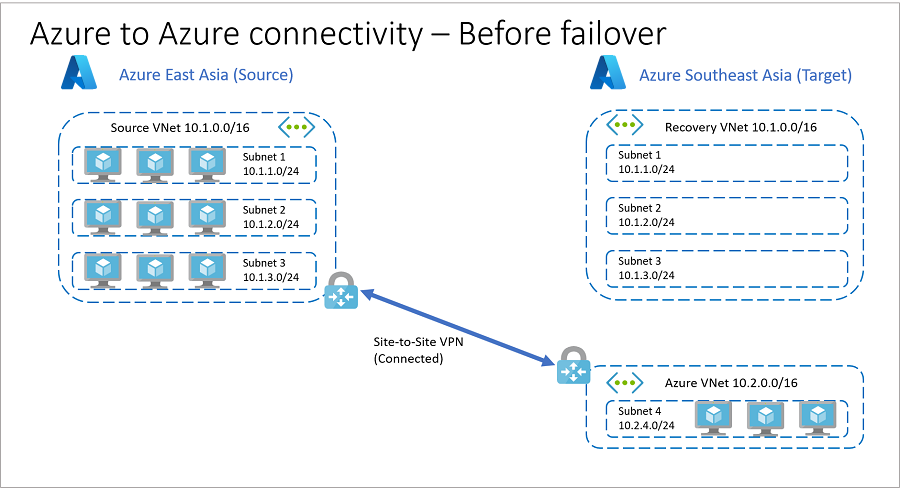
Here's the architecture before failover.
- Company A has identical networks and subnets in source and target Azure regions.
- To reduce recovery time objective (RTO), company uses replica nodes for SQL Server Always On, domain controllers, and other services. These replica nodes are in a different VNet in the target region, so they can establish VPN site-to-site connectivity between the source and target regions. This connectivity isn't possible if the source and target use the same IP address space.
- Before failover, the network architecture is as follows:
Primary region is Azure China East 2
China East 2 has a VNet (Source VNet) with address space 10.1.0.0/16.
China East 2 has workloads split across three subnets in the VNet:
- Subnet 1: 10.1.1.0/24
- Subnet 2: 10.1.2.0/24
- Subnet 3: 10.1.3.0/24
Secondary (target) region is Azure China North 3
- China North 3 has a recovery VNet (Recovery VNet) identical to Source VNet.
- China North 3 has an additional VNet (Azure VNet) with address space 10.2.0.0/16.
- Azure VNet contains a subnet (Subnet 4) with address space 10.2.4.0/24.
- Replica nodes for SQL Server Always On, domain controller, and other services are located in Subnet 4.
Source VNet and Azure VNet are connected by using a VPN site-to-site connection.
Recovery VNet isn't connected to any other virtual network.
Company A assigns and verifies target IP addresses for replicated items. The target IP address is the same as the source IP address for each VM.
After failover
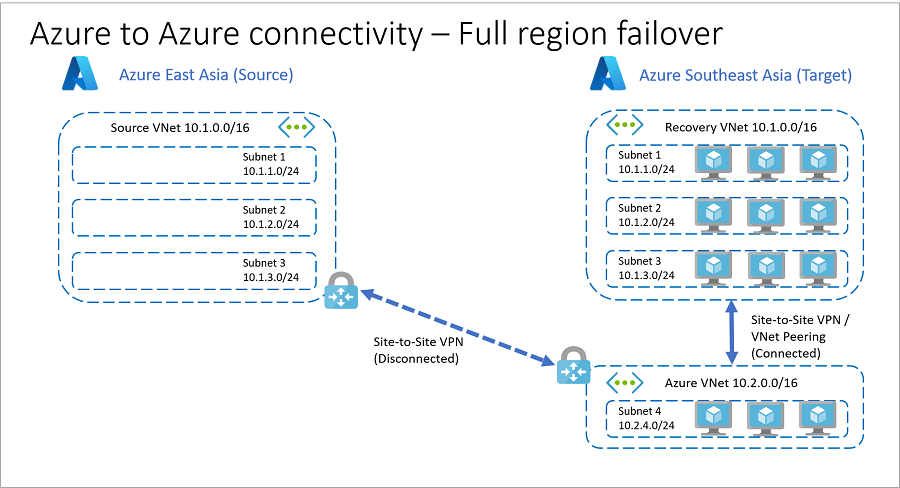
If a source regional outage occurs, Company A can fail over all its resources to the target region.
- By using target IP addresses that are already in place before the failover, Company A can orchestrate failover and automatically establish connections after failover between Recovery VNet and Azure VNet. This process is illustrated in the following diagram.
- Depending on app requirements, you can establish connections between the two VNets (Recovery VNet and Azure VNet) in the target region before, during (as an intermediate step), or after the failover.
Use recovery plans to specify when connections are established.
Connect the VNets by using VNet peering or site-to-site VPN.
- VNet peering doesn't use a VPN gateway and has different constraints.
- VNet peering pricing is calculated differently than VNet-to-VNet VPN Gateway pricing. For failovers, minimize unpredictable network incidents by using the same connectivity method as source networks, including the connection type.
Resources in Azure: isolated app failover
You might need to fail over at the app level. For example, to fail over a specific app or app tier located in a dedicated subnet.
- In this scenario, although you can retain IP addressing, it's not generally advisable since it increases the chance of connectivity inconsistencies. You also lose subnet connectivity to other subnets within the same Azure VNet.
- A better way to do subnet-level app failover is to use different target IP addresses for failover (if you need connectivity to other subnets on source VNet), or to isolate each app in its own dedicated VNet in the source region. With the latter approach you can establish connectivity between networks in the source region, and emulate the same behavior when you fail over to the target region.
In this example, Company A places apps in the source region in dedicated VNets, and establishes connectivity between those VNets. With this design, they can perform isolated app failover, and retain the source private IP addresses in the target network.
Before failover
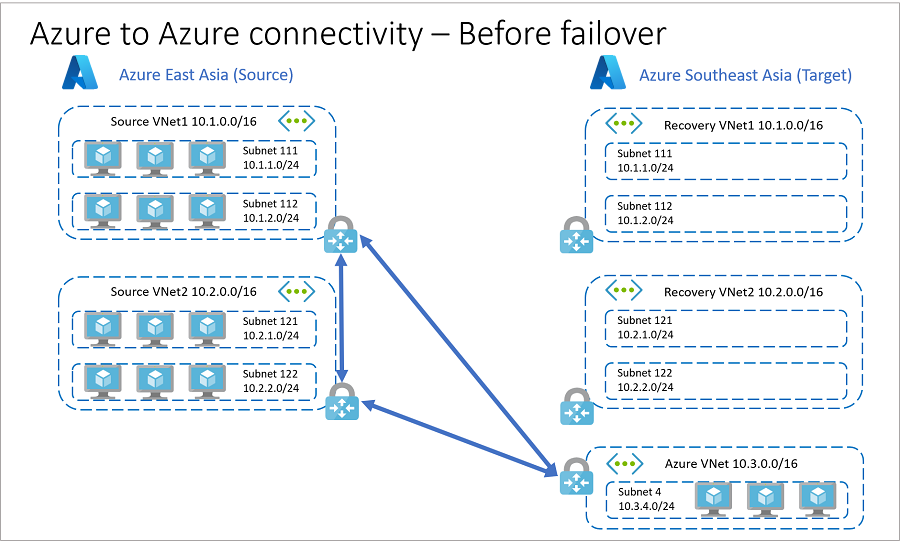
Before failover, the architecture is as follows:
You host application VMs in the primary Azure China East 2 region:
- App1 VMs are located in VNet Source VNet 1: 10.1.0.0/16.
- App2 VMs are located in VNet Source VNet 2: 10.2.0.0/16.
- Source VNet 1 has two subnets.
- Source VNet 2 has two subnets.
You use Azure China North 3 as the secondary (target) region.
- China North 3 has recovery VNets (Recovery VNet 1 and Recovery VNet 2) that are identical to Source VNet 1 and Source VNet 2.
- Recovery VNet 1 and Recovery VNet 2 each have two subnets that match the subnets in Source VNet 1 and Source VNet 2.
- China North 3 has an additional VNet (Azure VNet) with address space 10.3.0.0/16.
- Azure VNet contains a subnet (Subnet 4) with address space 10.3.4.0/24.
- Replica nodes for SQL Server Always On, domain controller, and other services are located in Subnet 4.
- China North 3 has recovery VNets (Recovery VNet 1 and Recovery VNet 2) that are identical to Source VNet 1 and Source VNet 2.
You create a number of site-to-site VPN connections:
- Source VNet 1 and Azure VNet
- Source VNet 2 and Azure VNet
- Source VNet 1 and Source VNet 2 are connected with VPN site-to-site
Recovery VNet 1 and Recovery VNet 2 aren't connected to any other VNets.
Company A configures VPN gateways on Recovery VNet 1 and Recovery VNet 2, to reduce RTO.
To reduce recovery time objective (RTO), configure VPN gateways on Recovery VNet1 and Recovery VNet2 before failover.
After failover
In the event of an outage or issue that affects a single app in Source VNet 2 (in our example), Company A can recover the affected app as follows:
- Disconnect VPN connections between Source VNet1 and Source VNet2, and between Source VNet2 and Azure VNet .
- Establish VPN connections between Source VNet1 and Recovery VNet2, and between Recovery VNet2 and Azure VNet.
- Fail over VMs in Source VNet2 to Recovery VNet2.
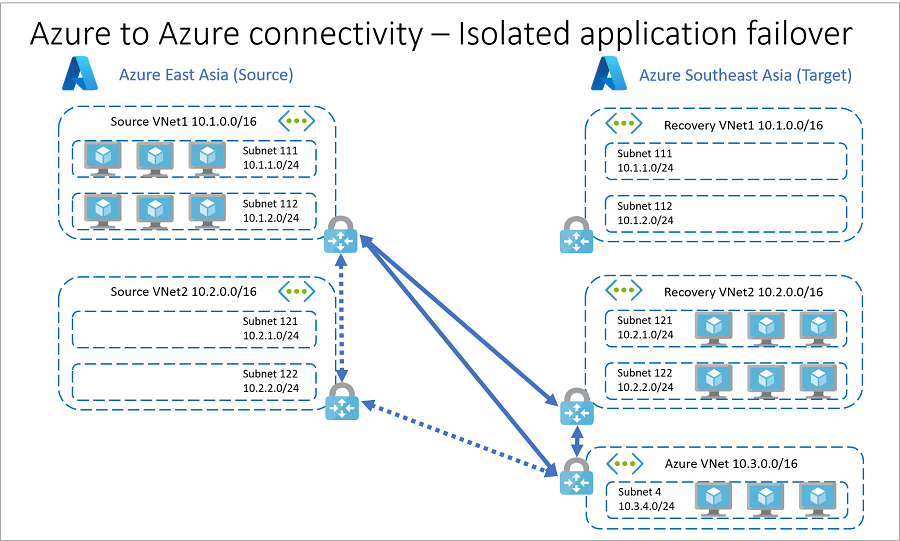
- You can expand this example to include more applications and network connections. Follow a like-like connection model, as far as possible, when failing over from source to target.
- VPN gateways use public IP addresses and gateway hops to establish connections. If you don't want to use public IP addresses, or you want to avoid extra hops, you can use Azure VNet peering to peer virtual networks across supported Azure regions.
Hybrid resources: full failover
In this scenario, Company B runs a hybrid business, with part of the application infrastructure running on Azure, and the remainder running on-premises.
Before failover
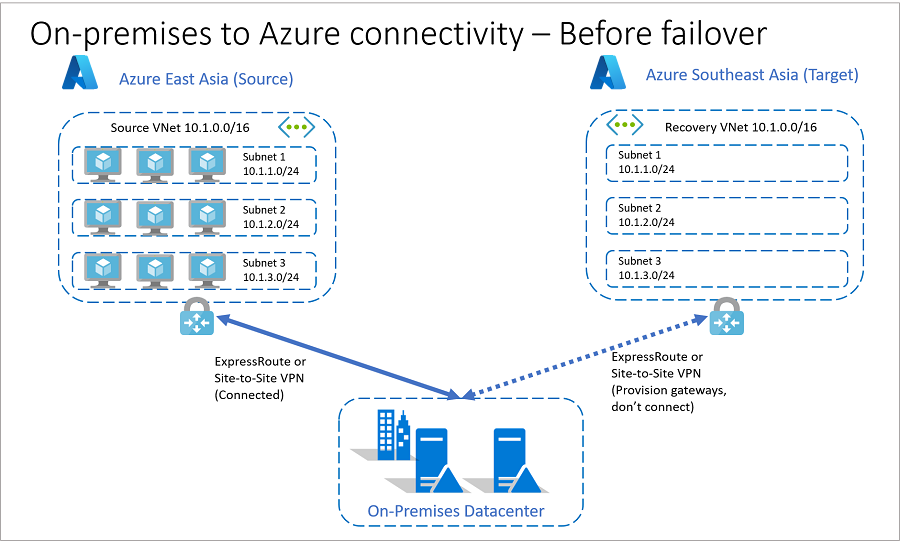
Here's what the network architecture looks like before failover.
You host application VMs in Azure China East 2.
China East 2 has a VNet (Source VNet) with address space 10.1.0.0/16.
- China East 2 has workloads split across three subnets in Source VNet:
- Subnet 1: 10.1.1.0/24
- Subnet 2: 10.1.2.0/24
- Subnet 3: 10.1.3.0/24, utilizing an Azure virtual network with address space 10.1.0.0/16. This virtual network is named Source VNet
- China East 2 has workloads split across three subnets in Source VNet:
The secondary (target) region is Azure China North 3:
- China North 3 has a recovery VNet (Recovery VNet) identical to Source VNet.
You connect VMs in China East 2 to an on-premises datacenter by using Azure ExpressRoute or site-to-site VPN.
To reduce RTO, Company B provisions gateways on Recovery VNet in Azure China North 3 prior to failover.
Company B assigns and verifies target IP addresses for replicated VMs. The target IP address is the same as source IP address for each VM.
After failover
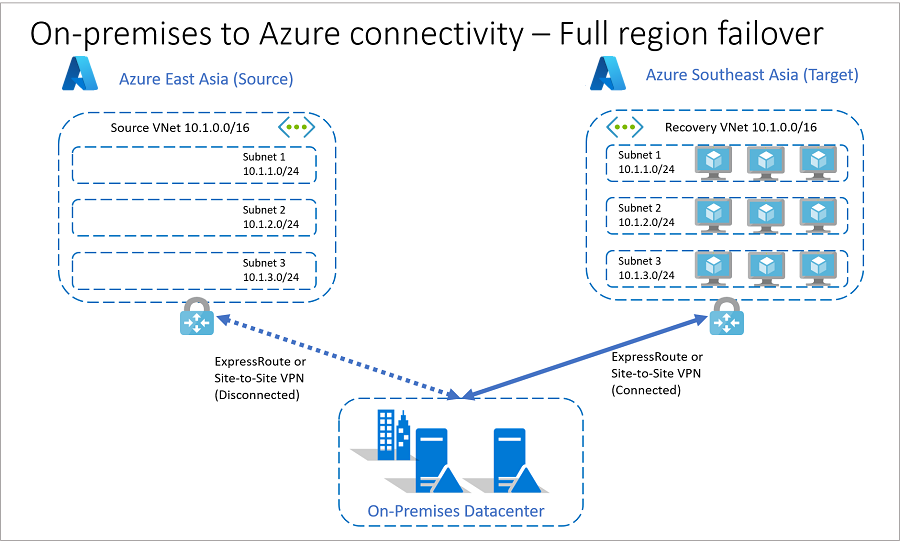
If a source regional outage occurs, Company B can fail over all its resources to the target region.
By using target IP addresses that are already in place before the failover, Company B can orchestrate failover and automatically establish connections after failover between Recovery VNet and Azure VNet.
Depending on app requirements, you can establish connections between the two VNets (Recovery VNet and Azure VNet) in the target region before, during (as an intermediate step), or after the failover. The company can use recovery plans to specify when connections will be established.
Disconnect the original connection between Azure China East 2 and the on-premises datacenter before establishing the connection between Azure China North 3 and on-premises datacenter.
Reconfigure the on-premises routing to point to the target region and gateways post failover.
Hybrid resources: isolated app failover
Company B can't fail over isolated apps at the subnet level. This limitation exists because the address space on source and recovery VNets is the same, and the original source to on-premises connection is active.
- For app resiliency, Company B needs to place each app in its own dedicated Azure VNet.
- By placing each app in a separate VNet, Company B can fail over isolated apps and route source connections to the target region.
Next steps
Learn about recovery plans.