Note
Access to this page requires authorization. You can try signing in or changing directories.
Access to this page requires authorization. You can try changing directories.
There are two options for copying an incremental snapshot across regions. The recommended option is a managed copy, which Azure performs for you. Azure stages a storage account in the target region, removing the maintenance overhead of managing the copy process. Azure copies only the changes since the last snapshot in the target region, which reduces the data footprint and recovery point objective. You can monitor the copy progress to determine when the target snapshot is ready to restore disks. For a managed copy, you're only billed for the bandwidth cost of the cross-region data transfer and the read transactions on the source snapshot. Don't delete your source snapshot while the target snapshot is being copied.
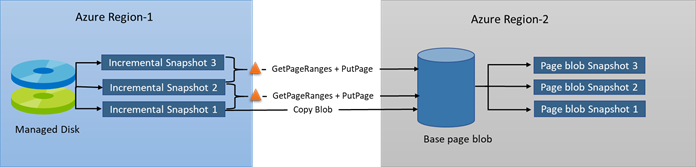
The second option is a manual copy, where you get the changes between two incremental snapshots, down to the block level, and manually copy them from one region to another. Most users should use a managed copy, but if you're interested in improving the copy speed, a manual copy lets you use your compute resources to make the copy faster.
This article covers copying an incremental snapshot from one region to another. See Create an incremental snapshot for managed disks for conceptual details on incremental snapshots.
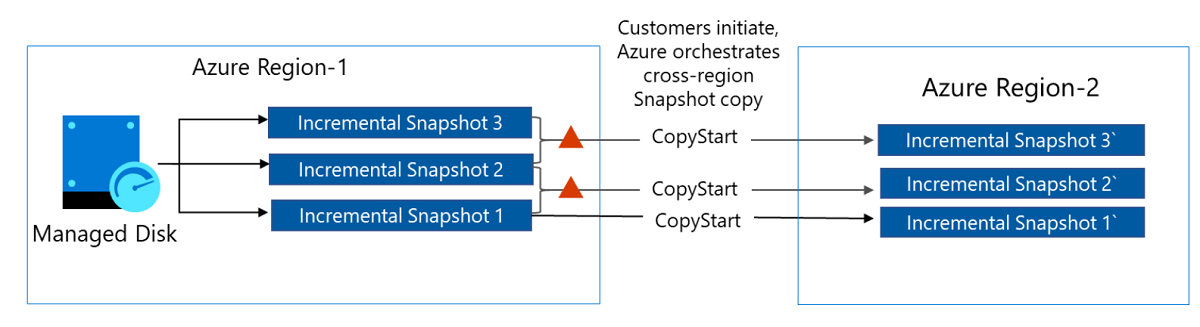
Restrictions
- You can copy 100 incremental snapshots in parallel at the same time per subscription per region.
- If you use the REST API, you must use version 2020-12-01 or newer of the Azure Compute REST API.
- You can only copy one incremental snapshot of a particular disk at a time.
- Snapshots must be copied in the order they were created.
- Only incremental snapshots can be copied across regions. Full snapshots can't be copied across regions.
Managed copy
You can use the Azure CLI to copy an incremental snapshot. You need the latest version of the Azure CLI. See the following articles to learn how to either install or update the Azure CLI.
The following script copies an incremental snapshot from one region to another:
subscriptionId=<yourSubscriptionID>
resourceGroupName=<yourResourceGroupName>
targetSnapshotName=<name>
sourceSnapshotName=<name>
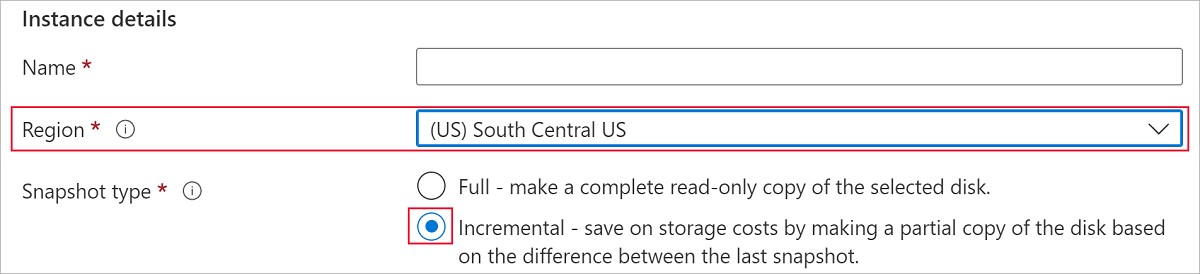
targetRegion=<validRegion>

sourceSnapshotId=$(az snapshot show -n $sourceSnapshotName -g $resourceGroupName --query [id] -o tsv)

az snapshot create -g $resourceGroupName -n $targetSnapshotName -l $targetRegion --source $sourceSnapshotId --incremental --copy-start
Check snapshot copy status with Azure CLI
You can check the status of the target snapshot by checking the CompletionPercent property. The following command checks the target snapshot specified by $targetSnapshotName. The value of the property must be 100 before you can use the snapshot for restoring disk or generate a SAS URI for downloading the underlying data.
az snapshot show -n $targetSnapshotName -g $resourceGroupName --query [completionPercent] -o tsv

Manual copy
Incremental snapshots offer a differential capability. They enable you to get the changes between two incremental snapshots of the same managed disk, down to the block level. You can use this to reduce your data footprint when copying snapshots across regions. For example, you can download the first incremental snapshot as a base blob in another region. For the subsequent incremental snapshots, you can copy only the changes since the last snapshot to the base blob. After copying the changes, you can take snapshots on the base blob that represent your point in time backup of the disk in another region. You can restore your disk either from the base blob or from a snapshot on the base blob in another region.
Next steps
If you'd like to see sample code demonstrating the differential capability of incremental snapshots, using .NET, see Copy Azure managed disks backups to another region with differential capability of incremental snapshots.
If you have questions about snapshots, see the snapshots section of the FAQ.