Note
Access to this page requires authorization. You can try signing in or changing directories.
Access to this page requires authorization. You can try changing directories.
This article helps you understand site-to-site (S2S) VPN gateway connections between your on-premises network and an Azure virtual network that use X.509 certificate-based authentication. Certificate authentication provides stronger security compared to preshared keys (PSK) for VPN connections.
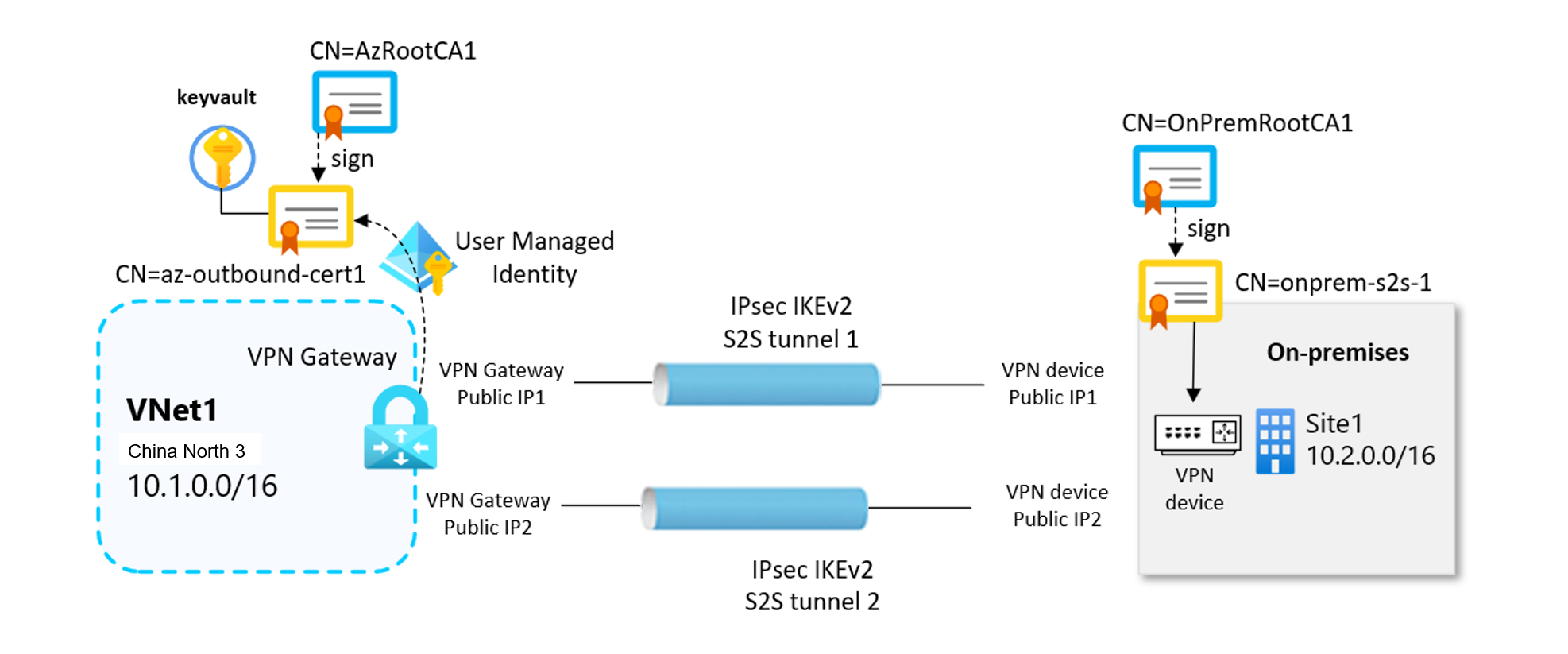
Site-to-site certificate authentication relies on both inbound, and outbound certificates to establish secure VPN tunnels. Certificates are securely stored in Azure Key Vault. Each VPN gateway accesses its certificates through a User-Assigned Managed Identity.
Important
Site-to-site certificate authentication isn't supported on Basic SKU VPN gateways. We recommend using VpnGw1AZ or higher.
Important
Site-to-site certificate authentication is currently in Preview. See the Supplemental Terms of Use for Azure Previews for legal terms that apply to Azure features that are in beta, preview, or otherwise not yet released into general availability.
Certificates
Site-to-site VPN certificate authentication uses X.509 certificates instead of preshared keys. This approach offers several advantages:
Enhanced security: Certificates provide stronger authentication than shared secrets.
Managed identity integration: VPN gateways access certificates securely through Azure Key Vault.
RBAC support: Fine-grained access control using Azure Role-Based Access Control (RBAC).
For this solution, inbound and outbound certificates don't need to be signed from the same root certificate.
Outbound certificates
The outbound certificate is used to verify connections coming from Azure to your on-premises site.
- The certificate is stored in Azure Key Vault. You specify the outbound certificate path identifier when you configure your site-to-site connection.
- You can create a certificate using a certificate authority of your choice, or you can create a self-signed root certificate.
When you generate an outbound certificate, the certificate must adhere to the following guidelines:
- Minimum key length of 2048 bits.
- Must have a private key.
- Must have server and client authentication.
- Must have a subject name.
Inbound certificates
The inbound certificate is used when connecting from your on-premises location to Azure.
- The subject name value is used when you configure your site-to-site connection.
- The certificate chain public key is specified when you configure your site-to-site connection. The certificate chain public key isn't encrypted and in .cer format (Base-64 encoded X.509)
Certificate flow
Site-to-site VPN certificate authentication relies on a digital certificate chain in which each leaf certificate is signed by a trusted Root Certification Authority (Root CA). The VPN tunnel negotiation relies on validating these certificates in both directions.
Outbound certificate flow
The outbound certificate flow is Azure to on-premises.
- The outbound authentication certificate (.pfx, with its private key) is securely stored in Azure Key Vault.
- The Azure VPN gateway retrieves this certificate using its User Assigned Managed Identity.
- During tunnel establishment, the gateway presents the outbound leaf certificate to the on-premises VPN device, allowing the Azure side to authenticate itself to the remote peer.
Inbound certificate flow
The inbound flow is on-premises to Azure.
- The public portion of the inbound certificate chain (.cer files) is uploaded to and configured within the VPN connection settings in Azure.
- The on-premises VPN device presents its own leaf certificate, signed by its corresponding Root CA.
- Azure validates the incoming certificate by checking the full certificate chain against the configured inbound Root CA and intermediate certificates. Azure will only accept the remote device as a trusted peer if the chain is valid.
Next steps
To create a site-to-site VPN connection using certificate authentication, see the following articles: