Nota:
El acceso a esta página requiere autorización. Puede intentar iniciar sesión o cambiar directorios.
El acceso a esta página requiere autorización. Puede intentar cambiar los directorios.
标记架构定义域专家在“审阅”应用中标记现有跟踪时回答的特定问题。 他们设计反馈收集过程,确保为评估您的 GenAI 应用程序提供一致且相关的信息。
仅当使用评审应用标记 现有跟踪时,标记架构才适用。 它们不用于 审核应用聊天 UI 中的氛围评估。
标记架构的工作原理
创建标记会话时,将其与一个或多个标记架构相关联。 每个模式表示附加到轨迹的评估。 评估为Feedback或者Expectation。 有关详细信息,请参阅 开发期间的标签。
架构控制:
- 向审阅者显示的问题。
- 输入法(例如下拉列表或文本框)。
- 验证规则和约束。
- 可选说明和注释。
内置 LLM 法官的标记架构
MLflow 为使用期望值的 内置 LLM 法官 提供预定义的架构名称。 可以使用这些名称创建自定义架构,以确保与内置评估功能兼容。
下表显示了预定义的标记架构及其用法。
| 架构名称 | Usage | 由这些内置判定器使用 |
|---|---|---|
GUIDELINES |
收集 GenAI 应用需要遵循的请求的最佳说明。 | ExpectationGuidelines |
EXPECTED_FACTS |
收集必须包含以正确性为由提供的事实语句。 |
Correctness、RetrievalSufficiency |
EXPECTED_RESPONSE |
收集完整的真实答案。 |
Correctness、RetrievalSufficiency |
内置的LLM法官标记方案示例
有关详细信息,请参阅 API 参考。
import mlflow.genai.label_schemas as schemas
from mlflow.genai.label_schemas import LabelSchemaType, InputTextList, InputText

# Schema for collecting expected facts
expected_facts_schema = schemas.create_label_schema(
    name=schemas.EXPECTED_FACTS,
    type=LabelSchemaType.EXPECTATION,
    title="Expected facts",
    input=InputTextList(max_length_each=1000),
    instruction="Please provide a list of facts that you expect to see in a correct response.",
    overwrite=True
)

# Schema for collecting guidelines
guidelines_schema = schemas.create_label_schema(
    name=schemas.GUIDELINES,
    type=LabelSchemaType.EXPECTATION,
    title="Guidelines",
    input=InputTextList(max_length_each=500),
    instruction="Please provide guidelines that the model's output is expected to adhere to.",
    overwrite=True
)

# Schema for collecting expected response
expected_response_schema = schemas.create_label_schema(
    name=schemas.EXPECTED_RESPONSE,
    type=LabelSchemaType.EXPECTATION,
    title="Expected response",
    input=InputText(),
    instruction="Please provide a correct agent response.",
    overwrite=True
)
创建自定义标记架构
若要更好地控制收集的反馈,请使用 MLflow UI 或 API 创建自定义标记架构。
架构的范围限定为试验,因此架构名称在 MLflow 试验中必须是唯一的。
架构是两种类型之一:
-
feedback:评分、偏好或意见等主观评估。 -
expectation:客观的真相,如正确的答案或预期行为。
有关详细信息,请参阅 开发期间的标签。 有关参数定义,请参阅 API 参考。
使用 UI 创建自定义架构
若要在 MLflow UI 中创建自定义架构,请执行以下作:
在 Databricks 工作区的左侧栏中,单击“ 试验”。
单击实验的名称以打开。
单击边栏中的 标记架构。
如果显示现有标记架构,可以对其进行编辑。 若要创建或添加新的标记架构,请单击“ 添加标签架构”,然后编辑字段。
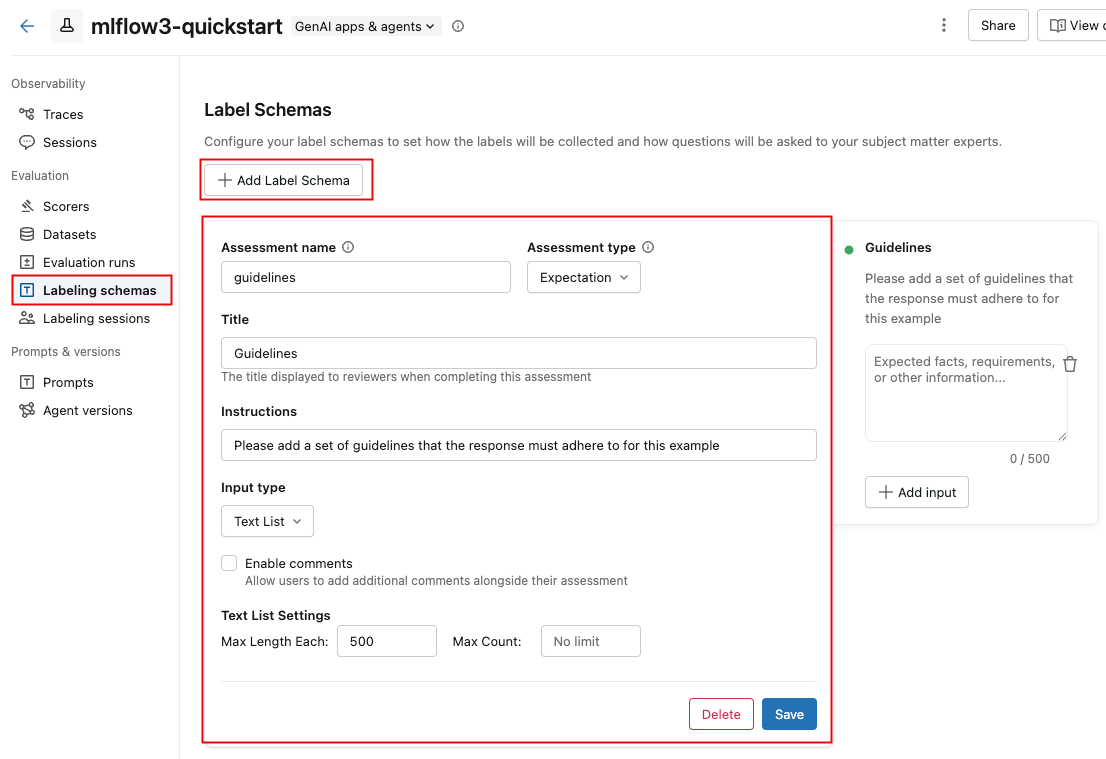
选择 “输入”类型时,下面的字段将更改为指定详细要求,例如文本长度限制、分类选项的选项或数字范围。
在字段中输入信息时,右侧框将更新以反映要创建的架构。
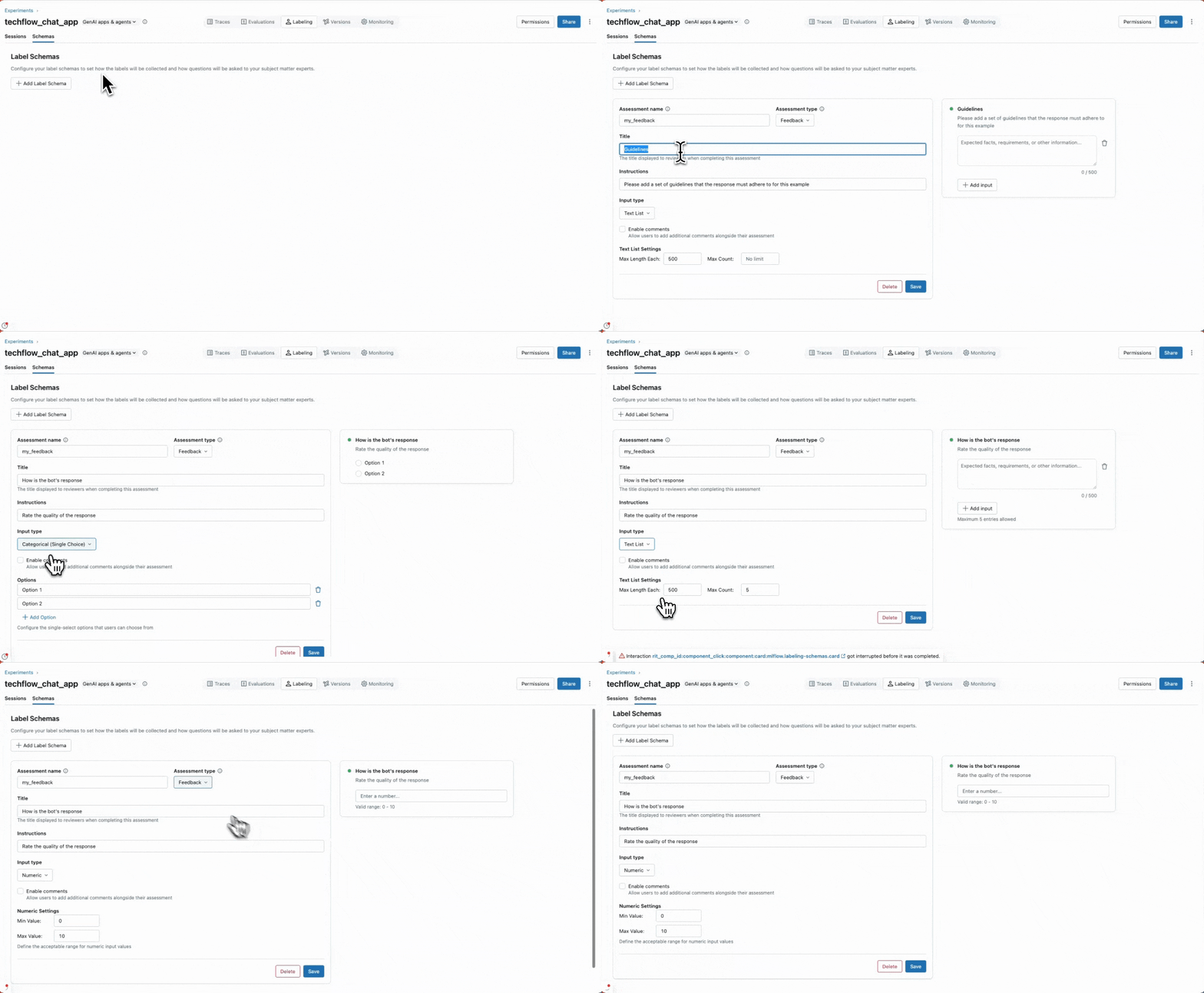
完成后,单击 “保存”。
以下视频显示了该过程。
使用 API 创建自定义架构
您可以使用 mlflow.genai.label_schemas.create_label_schema() 创建模式。 所有架构都需要名称、类型、标题和输入规范。
基本架构示例
import mlflow.genai.label_schemas as schemas
from mlflow.genai.label_schemas import InputCategorical, InputText

# Create a feedback schema for rating response quality
quality_schema = schemas.create_label_schema(
    name="response_quality",
    type="feedback",
    title="How would you rate the overall quality of this response?",
    input=InputCategorical(options=["Poor", "Fair", "Good", "Excellent"]),
    instruction="Consider accuracy, relevance, and helpfulness when rating."
)
自定义架构反馈示例
import mlflow.genai.label_schemas as schemas
from mlflow.genai.label_schemas import InputCategorical, InputTextList

# Feedback schema for subjective assessment
tone_schema = schemas.create_label_schema(
    name="response_tone",
    type="feedback",
    title="Is the response tone appropriate for the context?",
    input=InputCategorical(options=["Too formal", "Just right", "Too casual"]),
    enable_comment=True  # Allow additional comments
)
自定义架构期望示例
# Expectation schema for ground truth
facts_schema = schemas.create_label_schema(
    name="required_facts",
    type="expectation",
    title="What facts must be included in a correct response?",
    input=InputTextList(max_count=5, max_length_each=200),
    instruction="List key facts that any correct response must contain."
)
管理标记架构
使用 API,可以列出、更新和删除标记架构。
列出模式
若要获取有关现有架构的信息,请使用 API get_label_schema。 必须提供架构的名称。 如以下示例所示。 有关详细信息,请参阅 API 参考: get_label_schema
import mlflow.genai.label_schemas as schemas

# Get an existing schema
schema = schemas.get_label_schema("response_quality")
print(f"Schema: {schema.name}")
print(f"Type: {schema.type}")
print(f"Title: {schema.title}")
更新架构
若要更新现有架构,请使用 API create_label_schema 并将参数设置为 overwriteTrue。 有关详细信息,请参阅 API 参考: create_label_schema
import mlflow.genai.label_schemas as schemas
from mlflow.genai.label_schemas import InputCategorical

# Update by recreating with overwrite=True
updated_schema = schemas.create_label_schema(
    name="response_quality",
    type="feedback",
    title="Rate the response quality (updated question)",
    input=InputCategorical(options=["Excellent", "Good", "Fair", "Poor", "Very Poor"]),
    instruction="Updated: Focus on factual accuracy above all else.",
    overwrite=True  # Replace existing schema
)
删除架构
以下示例演示如何删除标记架构。 有关详细信息,请参阅 API 参考: delete_label_schema
import mlflow.genai.label_schemas as schemas

# Remove a schema that's no longer needed
schemas.delete_label_schema("old_schema_name")
自定义架构的输入类型
MLflow 支持表中显示的用于收集不同类型的反馈的输入类型。 以下各节显示了每种类型的示例。
| 输入类型 | 说明和用法 |
|---|---|
InputCategorical |
单选下拉菜单。 用于互斥选项,例如评级或分类。 |
InputCategoricalList |
多选下拉菜单。 可以选择多个选项时使用。 |
InputText |
自由格式文本框。 当响应处于开放状态时使用,例如详细说明或自定义反馈。 |
InputTextList |
多个自由格式文本框。 用于文本项列表,例如事实或要求。 |
InputNumeric |
数值范围。 用于数字分级或分数。 |
InputCategorical
from mlflow.genai.label_schemas import InputCategorical

# Rating scale
rating_input = InputCategorical(
    options=["1 - Poor", "2 - Below Average", "3 - Average", "4 - Good", "5 - Excellent"]
)

# Binary choice
safety_input = InputCategorical(options=["Safe", "Unsafe"])

# Multiple categories
error_type_input = InputCategorical(
    options=["Factual Error", "Logical Error", "Formatting Error", "No Error"]
)
InputCategoricalList
from mlflow.genai.label_schemas import InputCategoricalList

# Multiple error types can be present
errors_input = InputCategoricalList(
    options=[
        "Factual inaccuracy",
        "Missing context",
        "Inappropriate tone",
        "Formatting issues",
        "Off-topic content"
    ]
)

# Multiple content types
content_input = InputCategoricalList(
    options=["Technical details", "Examples", "References", "Code samples"]
)
InputText
from mlflow.genai.label_schemas import InputText

# General feedback
feedback_input = InputText(max_length=500)

# Specific improvement suggestions
improvement_input = InputText(
    max_length=200  # Limit length for focused feedback
)

# Short answers
summary_input = InputText(max_length=100)
InputTextList
from mlflow.genai.label_schemas import InputTextList

# List of factual errors
errors_input = InputTextList(
    max_count=10,        # Maximum 10 errors
    max_length_each=150  # Each error description limited to 150 chars
)

# Missing information
missing_input = InputTextList(
    max_count=5,
    max_length_each=200
)

# Improvement suggestions
suggestions_input = InputTextList(max_count=3)  # No length limit per item
InputNumeric
from mlflow.genai.label_schemas import InputNumeric

# Confidence score
confidence_input = InputNumeric(
    min_value=0.0,
    max_value=1.0
)

# Rating scale
rating_input = InputNumeric(
    min_value=1,
    max_value=10
)

# Cost estimate
cost_input = InputNumeric(min_value=0)  # No maximum limit
完整示例
客户服务评估
下面是用于评估客户服务响应的综合示例:
import mlflow.genai.label_schemas as schemas
from mlflow.genai.label_schemas import (
    InputCategorical,
    InputCategoricalList,
    InputText,
    InputTextList,
    InputNumeric
)

# Overall quality rating
quality_schema = schemas.create_label_schema(
    name="service_quality",
    type="feedback",
    title="Rate the overall quality of this customer service response",
    input=InputCategorical(options=["Excellent", "Good", "Average", "Poor", "Very Poor"]),
    instruction="Consider helpfulness, accuracy, and professionalism.",
    enable_comment=True
)

# Issues identification
issues_schema = schemas.create_label_schema(
    name="response_issues",
    type="feedback",
    title="What issues are present in this response? (Select all that apply)",
    input=InputCategoricalList(options=[
        "Factually incorrect information",
        "Unprofessional tone",
        "Doesn't address the question",
        "Too vague or generic",
        "Contains harmful content",
        "No issues identified"
    ]),
    instruction="Select all issues you identify. Choose 'No issues identified' if the response is problem-free."
)

# Expected resolution steps
resolution_schema = schemas.create_label_schema(
    name="expected_resolution",
    type="expectation",
    title="What steps should be included in the ideal resolution?",
    input=InputTextList(max_count=5, max_length_each=200),
    instruction="List the key steps a customer service rep should take to properly resolve this issue."
)

# Confidence in assessment
confidence_schema = schemas.create_label_schema(
    name="assessment_confidence",
    type="feedback",
    title="How confident are you in your assessment?",
    input=InputNumeric(min_value=1, max_value=10),
    instruction="Rate from 1 (not confident) to 10 (very confident)"
)
医疗信息评审
评估医疗信息响应的示例:
import mlflow.genai.label_schemas as schemas
from mlflow.genai.label_schemas import InputCategorical, InputTextList, InputNumeric

# Safety assessment
safety_schema = schemas.create_label_schema(
    name="medical_safety",
    type="feedback",
    title="Is this medical information safe and appropriate?",
    input=InputCategorical(options=[
        "Safe - appropriate general information",
        "Concerning - may mislead patients",
        "Dangerous - could cause harm if followed"
    ]),
    instruction="Assess whether the information could be safely consumed by patients."
)

# Required disclaimers
disclaimers_schema = schemas.create_label_schema(
    name="required_disclaimers",
    type="expectation",
    title="What medical disclaimers should be included?",
    input=InputTextList(max_count=3, max_length_each=300),
    instruction="List disclaimers that should be present (e.g., 'consult your doctor', 'not professional medical advice')."
)

# Accuracy of medical facts
accuracy_schema = schemas.create_label_schema(
    name="medical_accuracy",
    type="feedback",
    title="Rate the factual accuracy of the medical information",
    input=InputNumeric(min_value=0, max_value=100),
    instruction="Score from 0 (completely inaccurate) to 100 (completely accurate)"
)
与数据标记会话集成
以下示例演示如何在标记会话中使用模式:
import mlflow.genai.label_schemas as schemas

# Schemas are automatically available when creating labeling sessions
# The Review App will present questions based on your schema definitions

# Example: Using schemas in a session (conceptual - actual session creation
# happens through the Review App UI or other APIs)
session_schemas = [
    "service_quality",      # Your custom schema
    "response_issues",      # Your custom schema
    schemas.EXPECTED_FACTS  # Built-in schema
]
最佳做法
架构设计
- 以清晰、具体的提示形式编写问题。
- 提供指导审阅者的上下文。
- 设置文本长度和列表计数的合理限制。
- 对于分类输入,请确保选项是相互排斥和全面的。
架构管理
- 在架构中使用描述性、一致的名称。
- 更新架构时,请考虑对现有会话的影响。
- 删除未使用的架构,使工作区保持井然有序。