Nota:
El acceso a esta página requiere autorización. Puede intentar iniciar sesión o cambiar directorios.
El acceso a esta página requiere autorización. Puede intentar cambiar los directorios.
Azure 事件网格 支持事件驱动架构,通过将事件从源路由到处理器。 本文将向您展示如何配置 Azure 服务总线 队列和主题作为事件网格事件的事件处理程序。 你可以通过使用 Azure 门户、Azure CLI、Azure PowerShell 或 REST API 配置队列或主题来处理企业应用中的事件。
先决条件
- 拥有有效订阅的 Azure 帐户。 创建帐户。
- 一个事件网格主题、系统主题、自定义主题或合作伙伴主题,供订阅。 更多信息请参见 创建事件网格主题或域名。
- 包含用于接收事件的队列或主题的 服务总线 命名空间。 更多信息请参见使用 Azure 门户创建 服务总线 命名空间和队列。
- 具有在源主题上创建事件订阅以及向目标 服务总线 队列或主题发送消息的权限。
服务总线 队列
在事件网格中将事件直接路由到服务总线队列,用于缓冲或企业应用中的命令控制场景。
通过使用 Azure 门户配置 服务总线 队列
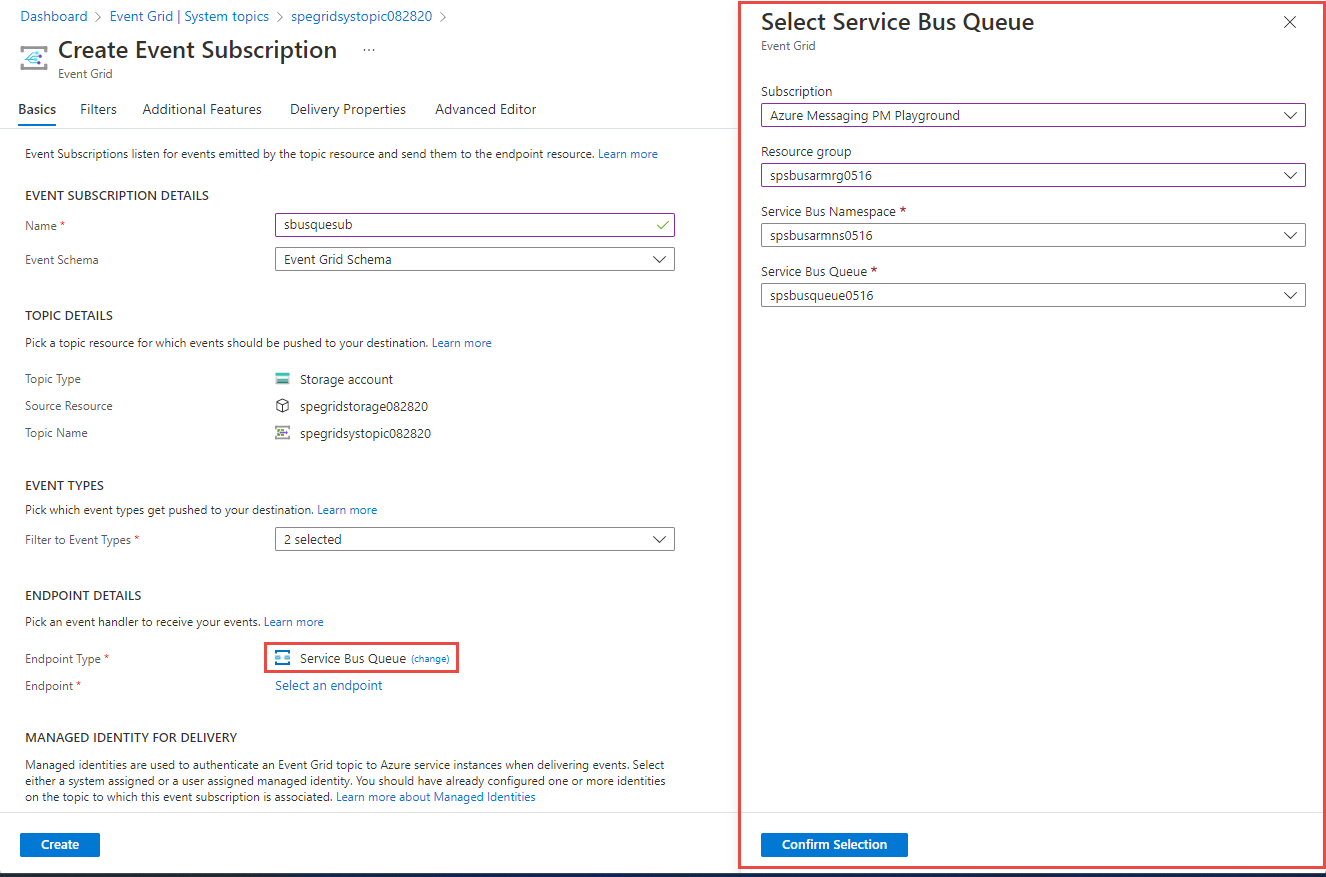
在 Azure 门户中,创建事件订阅时,选择 服务总线 队列 作为终结点类型,然后选择 选择终结点 以选择一个 服务总线 队列。
注意
如果你使用启用了会话的队列或主题订阅作为目标,请使用标头名称为 SessionId 的传递属性来设置事件的会话属性。
使用 Azure CLI 配置 服务总线 队列
使用 az eventgrid event-subscription create 命令,--endpoint-type 设置为 servicebusqueue,--endpoint 设置为 /subscriptions/{AZURE SUBSCRIPTION}/resourceGroups/<RESOURCE GROUP NAME>/providers/Microsoft.ServiceBus/namespaces/<NAMESPACE NAME>/queues/<QUEUE NAME>。 下面是一个示例:
az eventgrid event-subscription create \
    --name <my-event-subscription> \
    --source-resource-id /subscriptions/{SubID}/resourceGroups/{RG}/providers/Microsoft.EventGrid/topics/topic1 \
    --endpoint-type servicebusqueue \
    --endpoint /subscriptions/{SubID}/resourceGroups/TestRG/providers/Microsoft.ServiceBus/namespaces/ns1/queues/queue1
还可以对自定义主题使用 az eventgrid topic event-subscription 命令,对系统主题使用 az eventgrid system-topic event-subscription 命令,对合作伙伴主题使用 az eventgrid partner topic event-subscription create 命令。
使用 Azure PowerShell 配置 服务总线 队列
使用 New-AzEventGridSubscription 命令,将 -EndpointType 设置为 servicebusqueue,-Endpoint 设置为 /subscriptions/{AZURE SUBSCRIPTION}/resourceGroups/<RESOURCE GROUP NAME>/providers/Microsoft.ServiceBus/namespaces/<NAMESPACE NAME>/queues/<QUEUE NAME>。 下面是一个示例:
New-AzEventGridSubscription -ResourceGroup MyResourceGroup `
            -TopicName Topic1 `
            -EndpointType servicebusqueue `
            -Endpoint /subscriptions/{SubID}/resourceGroups/TestRG/providers/Microsoft.ServiceBus/namespaces/ns1/queues/queue1 `
            -EventSubscriptionName EventSubscription1
还可以对系统主题使用 New-AzEventGridSystemTopicEventSubscription 命令,对合作伙伴主题使用 New-AzEventGridPartnerTopicEventSubscription 命令。
服务总线 主题
将事件网格中的事件直接路由到服务总线(服务总线)主题,用于命令和控制消息场景。
使用 Azure 门户配置 服务总线 主题
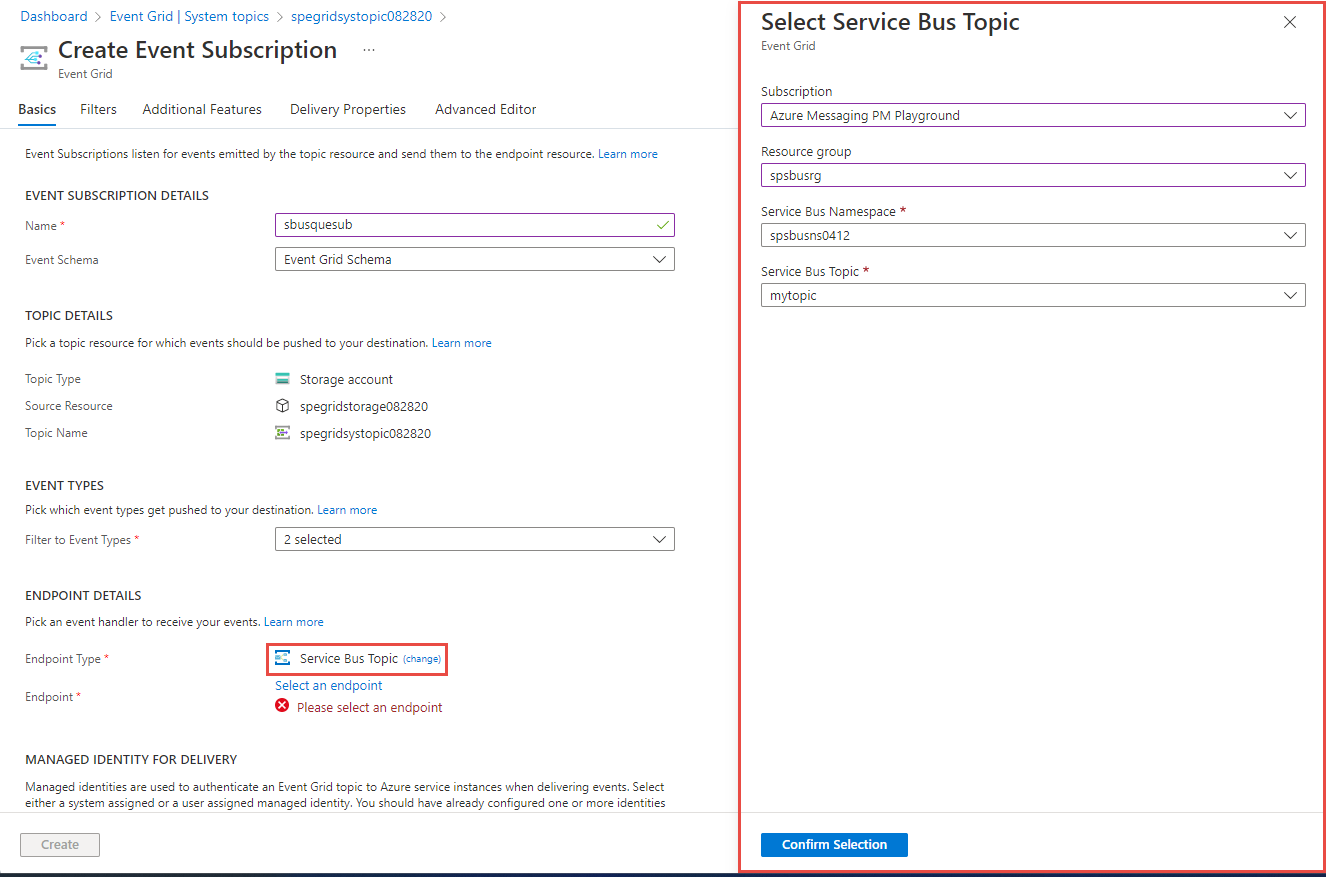
在 Azure 门户中创建事件订阅时,选择 服务总线 主题 作为终结点类型,然后选择 选择终结点 以选择一个 服务总线 主题。
通过使用Azure CLI配置服务总线主题
使用 az eventgrid event-subscription create 命令,--endpoint-type 设置为 servicebustopic,--endpoint 设置为 /subscriptions/{AZURE SUBSCRIPTION}/resourceGroups/<RESOURCE GROUP NAME>/providers/Microsoft.ServiceBus/namespaces/<NAMESPACE NAME>/topics/<TOPIC NAME>。 下面是一个示例:
az eventgrid event-subscription create \
    --name <my-event-subscription> \
    --source-resource-id /subscriptions/{SubID}/resourceGroups/{RG}/providers/Microsoft.EventGrid/topics/topic1 \
    --endpoint-type servicebustopic \
    --endpoint /subscriptions/{SubID}/resourceGroups/TestRG/providers/Microsoft.ServiceBus/namespaces/ns1/topics/topic1
还可以对自定义主题使用 az eventgrid topic event-subscription 命令,对系统主题使用 az eventgrid system-topic event-subscription 命令,对合作伙伴主题使用 az eventgrid partner topic event-subscription create 命令。
使用 Azure PowerShell 配置 服务总线 主题
使用 New-AzEventGridSubscription 命令,将 -EndpointType 设置为 servicebustopic,-Endpoint 设置为 /subscriptions/{AZURE SUBSCRIPTION}/resourceGroups/<RESOURCE GROUP NAME>/providers/Microsoft.ServiceBus/namespaces/<NAMESPACE NAME>/topics/<TOPIC NAME>。 下面是一个示例:
New-AzEventGridSubscription -ResourceGroup MyResourceGroup `
            -TopicName Topic1 `
            -EndpointType servicebustopic `
            -Endpoint /subscriptions/{SubID}/resourceGroups/TestRG/providers/Microsoft.ServiceBus/namespaces/ns1/topics/topic1 `
            -EventSubscriptionName EventSubscription1
还可以对系统主题使用 New-AzEventGridSystemTopicEventSubscription 命令,对合作伙伴主题使用 New-AzEventGridPartnerTopicEventSubscription 命令。
消息标头
以下是在消息标头中接收的属性:
| 属性名称 | 说明 |
|---|---|
| aeg-subscription-name | 事件订阅的名称。 |
| aeg-delivery-count | 针对该事件进行尝试的次数。 |
| aeg-event-type | 事件的类型。 可以为下列值之一:
|
| aeg-metadata-version | 事件的元数据版本。 对于“事件网格事件架构”,此属性表示元数据版本;对于“云事件架构”,此属性表示规范版本。 |
| aeg-data-version | 事件的数据版本号。 对于“事件网格事件架构”,此属性表示数据版本;对于“云事件架构”,此属性不适用。 |
| aeg-output-event-id | 事件网格事件的 ID。 |
将事件作为中转消息发送到服务总线队列或主题时,中转消息的messageid是内部系统 ID。
消息的内部系统ID会在事件重投过程中保持不变,这样你可以通过在服务总线实体上开启重复检测来避免重复送达。 将服务总线实体上的重复检测持续时间设置为事件的存活时间(TTL)或最大重试持续时间,取较长者为准。
交付属性
使用事件订阅时,你可以设置要包含在所传送事件中的 HTTP 标头。 该功能支持设置目标端所需的自定义请求头。 你可以为传递给 Azure 服务总线 队列和主题的事件设置自定义头部。
Azure 服务总线 在发送单条消息时支持以下消息属性。
| 标头名称 | 标头类型 |
|---|---|
MessageId |
动态 |
PartitionKey |
静态或动态 |
SessionId |
静态或动态 |
CorrelationId |
静态或动态 |
Label |
静态或动态 |
ReplyTo |
静态或动态 |
ReplyToSessionId |
静态或动态 |
To |
静态或动态 |
ViaPartitionKey |
静态或动态 |
注意
-
MessageId的默认值是事件网格事件的内部 ID。 你可以替代它。 例如,使用data.field。 - 只能设置
SessionId或MessageId。
有关详细信息,请参阅自定义传送属性。
REST 示例(适用于 PUT)
服务总线队列
{
    "properties":
    {
        "destination":
        {
			"endpointType": "ServiceBusQueue",
            "properties":
            {
				"resourceId": "/subscriptions/<AZURE SUBSCRIPTION ID>/resourceGroups/<RESOURCE GROUP NAME>/providers/Microsoft.ServiceBus/namespaces/<SERVICE BUS NAMESPACE NAME>/queues/<SERVICE BUS QUEUE NAME>"
			}
		},
		"eventDeliverySchema": "EventGridSchema"
	}
}
服务总线队列 - 使用托管标识传送
{
	"properties": {
        "deliveryWithResourceIdentity":
        {
            "identity":
            {
				"type": "SystemAssigned"
			},
            "destination":
            {
				"endpointType": "ServiceBusQueue",
                "properties":
                {
					"resourceId": "/subscriptions/<AZURE SUBSCRIPTION ID>/resourceGroups/<RESOURCE GROUP NAME>/providers/Microsoft.ServiceBus/namespaces/<SERVICE BUS NAMESPACE NAME>/queues/<SERVICE BUS QUEUE NAME>"
				}
			}
		},
		"eventDeliverySchema": "EventGridSchema"
	}
}
服务总线 主题
{
    "properties":
    {
        "destination":
        {
			"endpointType": "ServiceBusTopic",
            "properties":
            {
				"resourceId": "/subscriptions/<AZURE SUBSCRIPTION ID>/resourceGroups/<RESOURCE GROUP NAME>/providers/Microsoft.ServiceBus/namespaces/<SERVICE BUS NAMESPACE NAME>/topics/<SERVICE BUS TOPIC NAME>"
			}
		},
		"eventDeliverySchema": "EventGridSchema"
	}
}
服务总线主题 - 使用托管标识传送
{
    "properties":
    {
        "deliveryWithResourceIdentity":
        {
            "identity":
            {
				"type": "SystemAssigned"
			},
            "destination":
            {
				"endpointType": "ServiceBusTopic",
                "properties":
                {
					"resourceId": "/subscriptions/<AZURE SUBSCRIPTION ID>/resourceGroups/<RESOURCE GROUP NAME>/providers/Microsoft.ServiceBus/namespaces/<SERVICE BUS NAMESPACE NAME>/topics/<SERVICE BUS TOPIC NAME>"
				}
			}
		},
		"eventDeliverySchema": "EventGridSchema"
	}
}
注意
当启用了异地灾难恢复的服务总线命名空间发生故障转移时,次要命名空间不会向 Event Grid 发送事件。 你必须手动为辅助命名空间添加事件网格订阅。
相关内容
有关支持的事件处理程序列表,请参见 事件处理程序 条目。