Nota:
El acceso a esta página requiere autorización. Puede intentar iniciar sesión o cambiar directorios.
El acceso a esta página requiere autorización. Puede intentar cambiar los directorios.
本文介绍如何为 Azure 事件网格系统主题、自定义主题和域启用 托管服务标识 。 它还介绍如何使用托管标识将事件传送到受支持的目标,例如服务总线队列和主题、事件中心和存储帐户。
先决条件
将系统分配的标识或用户分配的标识分配给系统主题、自定义主题或域。
- 有关自定义主题和域,请参阅 为自定义主题和域启用托管标识。
- 有关系统主题,请参阅 为系统主题启用托管标识。
将标识添加到目标上的相应角色(例如服务总线数据发送方),例如服务总线队列。 有关详细步骤,请参阅在目标上将身份标识添加到 Azure 角色中。
创建使用标识的事件订阅
使用托管标识设置事件网格自定义主题、系统主题或域并将标识添加到目标上的相应角色后,即可创建使用该标识的订阅。
使用 Azure 门户
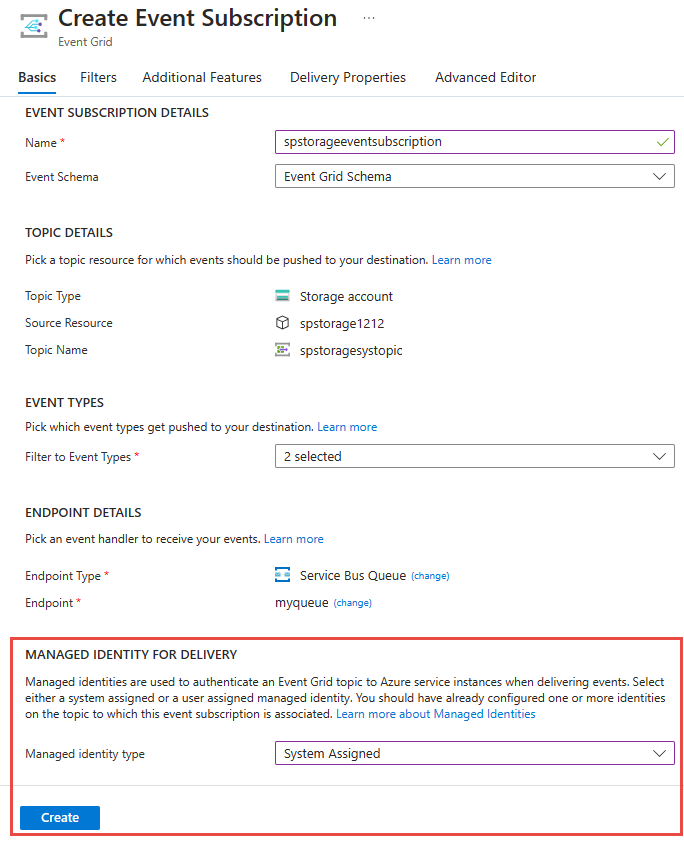
当你创建事件订阅时,你会在 “端点详情 ”部分看到一个选项,可以为某个端点启用系统分配或用户分配的身份。
此示例演示如何在创建事件订阅时启用系统分配的标识,并将服务总线队列作为目标。
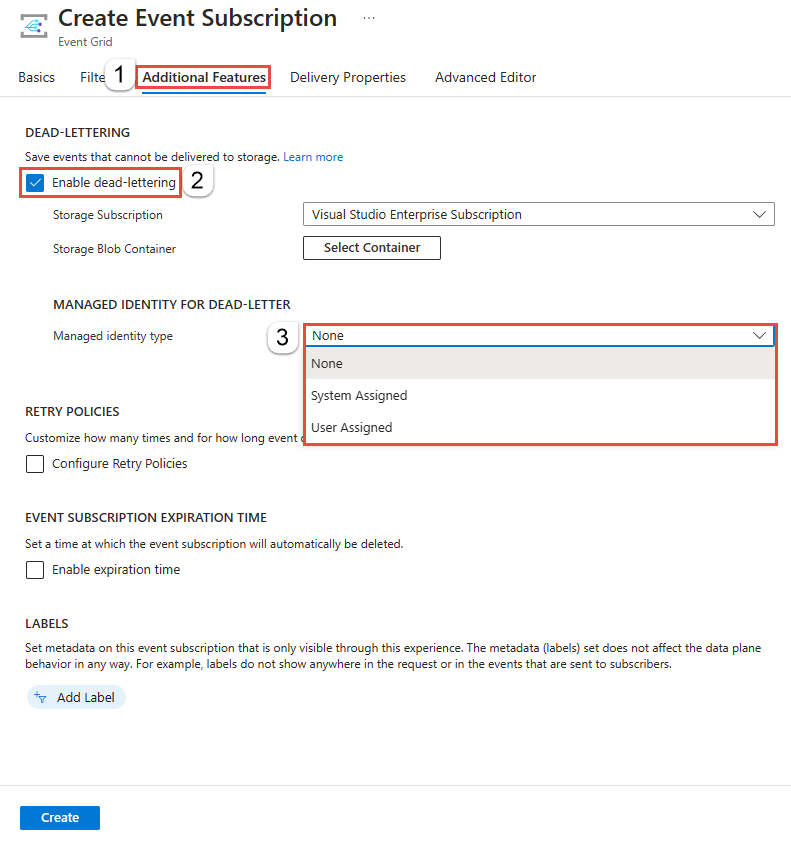
还可以在其他功能选项卡上为系统分配的身份启用死信配置。
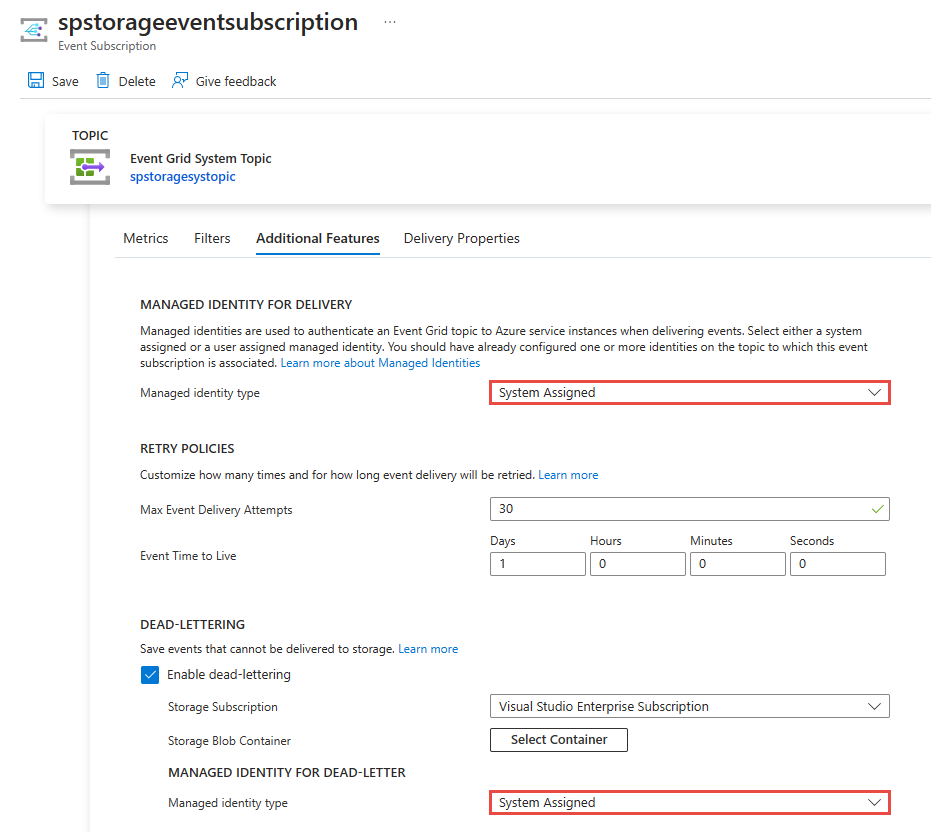
在创建事件订阅后,启用事件订阅上的托管标识。 在 事件订阅的事件订阅 页上,切换到 “其他功能 ”选项卡以查看选项。 还可以在此页上为死信启用标识。
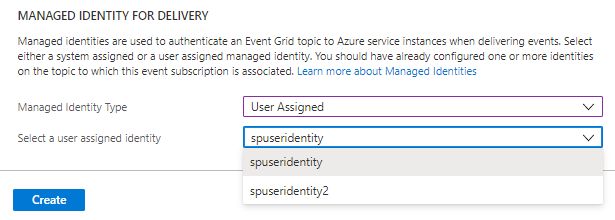
如果您为主题启用了用户分配的标识,那么您将在托管标识类型的下拉列表中看到用户分配的标识选项已启用。 如果为托管标识类型选择用户分配,则可以选择要用于传递事件的用户分配标识。
使用 Azure CLI - 服务总线队列
在本节中,你将学习如何使用 Azure CLI 来启用系统分配的身份,将事件传递到 服务总线 队列。 该标识必须是 Azure 服务总线数据发送方 角色的成员,以及用于死信处理的存储帐户上的 存储 Blob 数据参与者 角色。
定义变量
subid="<AZURE SUBSCRIPTION ID>"
rg="<RESOURCE GROUP of EVENT GRID CUSTOM TOPIC>"
topicname="<EVENT GRID TOPIC NAME>"

# get the service bus queue resource id
queueid=$(az servicebus queue show --namespace-name <SERVICE BUS NAMESPACE NAME> --name <QUEUE NAME> --resource-group <RESOURCE GROUP NAME> --query id --output tsv)
sb_esname="<Specify a name for the event subscription>"
使用托管标识创建用于传送的事件订阅
此命令为事件网格自定义主题创建事件订阅,该主题的终结点类型设置为 服务总线队列。
az eventgrid event-subscription create \
    --source-resource-id /subscriptions/$subid/resourceGroups/$rg/providers/Microsoft.EventGrid/topics/$topicname \
    --delivery-identity-endpoint-type servicebusqueue \
    --delivery-identity systemassigned \
    --delivery-identity-endpoint $queueid \
    -n $sb_esname
使用托管标识创建用于传送和死信的事件订阅
此示例命令为事件网格自定义主题创建事件订阅,该主题的终结点类型设置为 服务总线队列。 它还指定事件网格使用系统分配的托管标识进行死信处理。
storageid=$(az storage account show --name demoStorage --resource-group gridResourceGroup --query id --output tsv)
deadletterendpoint="$storageid/blobServices/default/containers/<BLOB CONTAINER NAME>"

az eventgrid event-subscription create \
    --source-resource-id /subscriptions/$subid/resourceGroups/$rg/providers/Microsoft.EventGrid/topics/$topicname \
    --delivery-identity-endpoint-type servicebusqueue \
    --delivery-identity systemassigned \
    --delivery-identity-endpoint $queueid \
    --deadletter-identity-endpoint $deadletterendpoint \
    --deadletter-identity systemassigned \
    -n $sb_esname
使用 Azure CLI - 事件中心
在本节中,你将学习如何使用 Azure CLI 来启用系统分配的身份,将事件传递到事件中心。 该标识必须是“Azure 事件中心数据发送方”角色的成员。 它还必须是你用于死信处理的存储帐户上的 Storage Blob Data Contributor 角色成员。
定义变量
subid="<AZURE SUBSCRIPTION ID>"
rg="<RESOURCE GROUP of EVENT GRID CUSTOM TOPIC>"
topicname="<EVENT GRID CUSTOM TOPIC NAME>"

hubid=$(az eventhubs eventhub show --name <EVENT HUB NAME> --namespace-name <NAMESPACE NAME> --resource-group <RESOURCE GROUP NAME> --query id --output tsv)
eh_esname="<SPECIFY EVENT SUBSCRIPTION NAME>"
使用托管标识创建用于传送的事件订阅
此示例命令为事件网格自定义主题创建事件订阅,该主题的终结点类型设置为 事件中心。
az eventgrid event-subscription create \
    --source-resource-id /subscriptions/$subid/resourceGroups/$rg/providers/Microsoft.EventGrid/topics/$topicname \
    --delivery-identity-endpoint-type eventhub \
    --delivery-identity systemassigned \
    --delivery-identity-endpoint $hubid \
    -n $eh_esname
使用托管标识创建用于传送和死信的事件订阅
此示例命令为事件网格自定义主题创建事件订阅,该主题的终结点类型设置为 事件中心。 它还规定系统分配的托管身份处理死字母。
storageid=$(az storage account show --name demoStorage --resource-group gridResourceGroup --query id --output tsv)
deadletterendpoint="$storageid/blobServices/default/containers/<BLOB CONTAINER NAME>"

az eventgrid event-subscription create \
    --source-resource-id /subscriptions/$subid/resourceGroups/$rg/providers/Microsoft.EventGrid/topics/$topicname \
    --delivery-identity-endpoint-type eventhub \
    --delivery-identity systemassigned \
    --delivery-identity-endpoint $hubid \
    --deadletter-identity-endpoint $deadletterendpoint \
    --deadletter-identity systemassigned \
    -n $eh_esname
使用 Azure CLI - Azure 存储队列
在本节中,你将学习如何使用 Azure CLI 来启用系统分配的身份,将事件传递到 Azure 存储 队列。 该标识必须是存储帐户上“存储队列数据消息发送方”角色的成员。 它还必须是你用于死信处理的存储帐户上的 Storage Blob Data Contributor 角色成员。
定义变量
subid="<AZURE SUBSCRIPTION ID>"
rg="<RESOURCE GROUP of EVENT GRID CUSTOM TOPIC>"
topicname="<EVENT GRID CUSTOM TOPIC NAME>"

# get the storage account resource id
storageid=$(az storage account show --name <STORAGE ACCOUNT NAME> --resource-group <RESOURCE GROUP NAME> --query id --output tsv)

# build the resource id for the queue
queueid="$storageid/queueservices/default/queues/<QUEUE NAME>"

sa_esname="<SPECIFY EVENT SUBSCRIPTION NAME>"
使用托管标识创建用于传送的事件订阅
az eventgrid event-subscription create \
    --source-resource-id /subscriptions/$subid/resourceGroups/$rg/providers/Microsoft.EventGrid/topics/$topicname \
    --delivery-identity-endpoint-type storagequeue \
    --delivery-identity systemassigned \
    --delivery-identity-endpoint $queueid \
    -n $sa_esname
使用托管标识创建用于传送和死信的事件订阅
storageid=$(az storage account show --name demoStorage --resource-group gridResourceGroup --query id --output tsv)
deadletterendpoint="$storageid/blobServices/default/containers/<BLOB CONTAINER NAME>"

az eventgrid event-subscription create \
    --source-resource-id /subscriptions/$subid/resourceGroups/$rg/providers/Microsoft.EventGrid/topics/$topicname \
    --delivery-identity-endpoint-type storagequeue \
    --delivery-identity systemassigned \
    --delivery-identity-endpoint $queueid \
    --deadletter-identity-endpoint $deadletterendpoint \
    --deadletter-identity systemassigned \
    -n $sa_esname
专用终结点
目前,您无法使用 专用终结点 传递事件。 也就是说,如果你有严格的网络隔离要求,那么在这种情况下不支持,因为你的传递事件流量不能离开专用 IP 空间。
不过,如果你的需求需要通过加密通道和发送方已知身份(此处指事件网格)通过公共IP空间安全发送事件,那么你可以通过Azure 事件网格自定义主题或带有托管身份的域(如本文所示)将事件传递到Event Hubs、服务总线或Azure 存储服务。 然后,可以使用 Azure Functions 中配置的专用链接或部署在虚拟网络上的 Webhook 来拉取事件。 请参阅教程: 使用 Azure Functions 连接到专用终结点。
在这种配置下,流量会通过公共 IP/互联网从 Event Grid 传输到 Event Hubs、服务总线 或 Azure 存储,但你可以对该通道进行加密,并使用 Event Grid 的托管标识。 如果将部署到虚拟网络的 Azure Functions 或 Webhook 配置为通过专用链接使用事件中心、服务总线或 Azure 存储,则流量的该部分将保留在 Azure 中。
相关内容
若要了解托管标识,请参阅 什么是 Azure 资源的托管标识。