文档翻译是 Azure 翻译器 服务的基于云的功能。 可以使用文档翻译 API 以 支持的语言 和各种 文件格式 异步翻译整个文档,同时保留源文档结构和文本格式。 本作指南介绍如何将文档翻译 API 与所选编程语言和 HTTP REST API 配合使用。
Prerequisites
Note
S1 标准服务计划和 C2、C3、C4 和 D3 批量折扣计划支持文档翻译。 请参阅Azure AI 服务定价—翻译器。
若要开始,需要:
一个有效的 Azure 帐户。 如果没有,则可以创建一个试用帐户
一个 Azure Blob 存储帐户。 你还需要在 Azure Blob 存储帐户中为源文件和目标文件创建容器:
- 源容器。 此容器用于上传待翻译的文件(必填)。
- 目标容器。 在此容器中存储已翻译的文件(必需)。
一个译员资源:
按如下所示填写翻译器项目和实例详细信息字段:
订阅。 选择一个可用的 Azure 订阅。
资源组。 你可以创建新的资源组,或将资源添加到现有的具有相同生命周期、权限和策略的资源组。
资源区域。 选择“全球”,除非你的业务或应用程序需要特定区域。 如果打算使用系统分配的托管标识进行身份验证,请选择一个地理区域,如“中国北部”。
名称。 输入您为资源选择的名称。 所选名称在 Azure 中必须唯一。
Note
文档翻译需要自定义域终结点。 在“名称”字段中输入的值是终结点的自定义域名参数。
定价层。 免费层不支持文档翻译。 选择“标准 S1”来试用该服务。
选择 “审阅 + 创建”。
查看服务条款,然后选择“ 创建 ”以部署资源。
成功部署资源后,选择“转到资源”以获取密钥和终结点。
获取密钥和自定义域终结点
- 对 Translator 的请求需要只读密钥和自定义终结点才能对访问进行身份验证。 自定义域终结点是一个 URL,格式为资源名称、主机名和翻译器子目录,可在 Azure 门户中使用。
如果已创建新资源,请在部署该资源后选择“转到资源”。 如果有现有的文档翻译资源,请直接导航到资源页。
在左侧栏的 “资源管理”下,选择 “密钥和终结点”。
将你的
key和document translation endpoint复制并粘贴到方便的位置(例如 Microsoft 记事本)。 进行 API 调用只需要一个密钥。你在代码示例中使用
key和document translation endpoint,以验证对文档翻译服务的请求。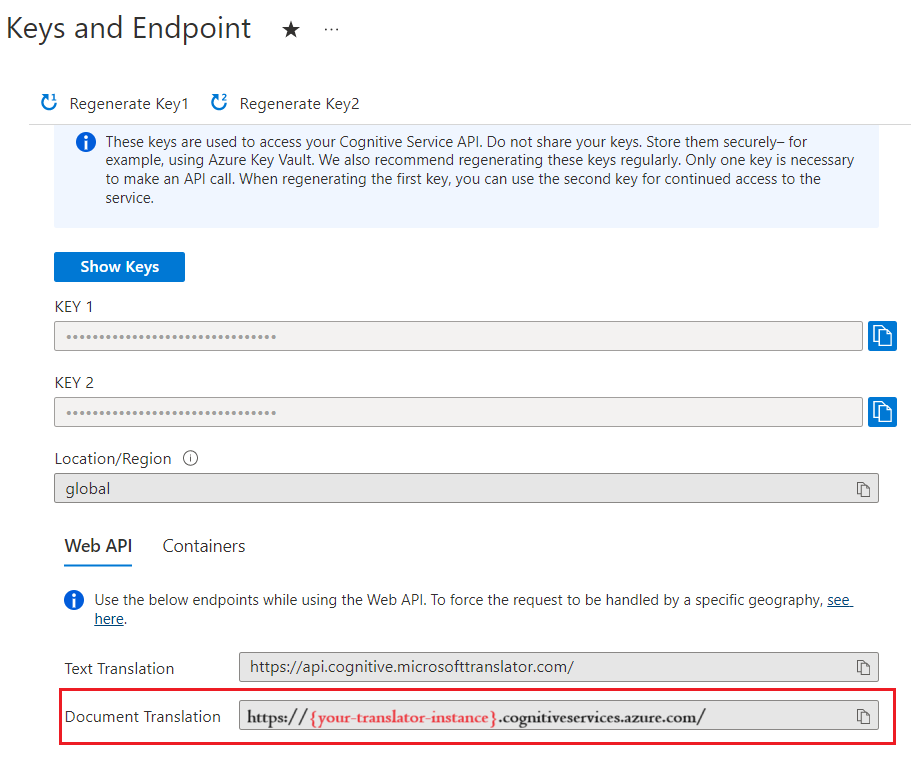
获取你的密钥
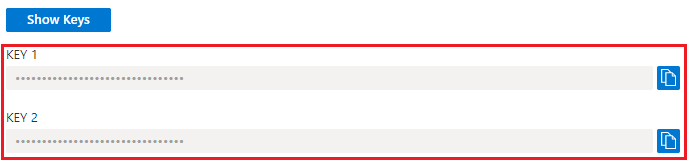
对 Translator 的请求需要只读密钥才能对访问进行身份验证。
- 如果已创建新资源,请在部署该资源后选择“转到资源”。 如果有现有的文档翻译资源,请直接导航到资源页。
- 在左侧栏的 “资源管理”下,选择 “密钥和终结点”。
- 将你的密钥复制并粘贴到方便的位置(例如 Microsoft 记事本)。
- 将其粘贴到代码示例中,对文档翻译服务的请求进行身份验证。
创建 Azure Blob 存储容器
需要在 Azure Blob 存储帐户中为源文件和目标文件创建容器。
- 源容器。 此容器用于上传待翻译的文件(必填)。
- 目标容器。 在此容器中存储已翻译的文件(必需)。
Note
文档翻译支持将术语表作为 blob 存储在目标容器中,而不是单独的术语表容器。 如果要包含自定义术语表,请将其添加到目标容器,并将 glossaryUrl 包含在请求中。 如果术语表中没有出现翻译语言对,则术语表不会被应用。 请参阅使用自定义词汇表翻译文档
创建用于文档翻译的 SAS 访问令牌
sourceUrl、targetUrl 和可选的 glossaryUrl 必须包含作为查询字符串追加的共享访问签名 (SAS) 令牌。 该令牌可以分配给你的容器或特定 Blob 对象。
请参阅创建文档翻译过程的 SAS 令牌。
- 源容器或 Blob 必须指定读取和列表访问权限。
- 目标容器或 Blob 必须指定写入和列出访问权限。
- 词汇表 Blob 必须指定读取和列出访问权限。
Tip
- 如果在一次操作中翻译多个文件(blob),请在容器级别委派 SAS 访问权限。
- 如果在一次操作中对单个文件 (blob) 进行翻译,请在 blob 级别委托 SAS 访问权限。
- 作为 SAS 令牌的替代方法,可以使用系统分配的托管标识来进行身份验证。
HTTP 请求
异步批处理翻译请求通过 POST 请求提交到翻译器终结点。 如果成功,POST 方法将返回 202 Accepted 响应代码,并且服务将创建批处理请求。 已翻译的文档会列在目标容器中。
有关 Azure 翻译器请求限制的详细信息, 请参阅文档翻译请求限制。
HTTP 标头
每个文档翻译 API 请求都包含以下标头:
| HTTP 标头 | 说明 |
|---|---|
| Ocp-Apim-Subscription-Key | 必需:该值是翻译或 Azure AI 服务资源的 Azure 密钥。 |
| Content-Type | 必需:指定有效负载的内容类型。 接受的值为 application/json 或 charset=UTF-8。 |
POST 请求正文属性
- POST 请求 URL 是 POST
https://<NAME-OF-YOUR-RESOURCE>.cognitiveservices.azure.cn/translator/text/batch/v1.1/batches。 - POST 请求正文是名为
inputs的 JSON 对象。 -
inputs对象包含源和目标语言对的sourceURL与targetURL容器地址。 -
prefix和suffix是区分大小写的字符串,用于筛选源路径中的文档以进行翻译。prefix字段通常用于描述要翻译的子文件夹。suffix字段最常用于文件扩展名。 - 翻译文档时将应用
glossaries字段(可选)的值。 - 每个目标语言的
targetUrl必须唯一。
Note
如果目标中已存在同名的文件,作业将失败。
翻译容器中的所有文档
{
    "inputs": [
        {
            "source": {
                "sourceUrl": "{sourceSASUrl}"
            },
            "targets": [
                {
                    "targetUrl": "{targetSASUrl}",
                    "language": "fr"
                }
            ]
        }
    ]
}
在 Blob 存储容器中翻译特定文档
- 指定
"storageType": "File"。 - 如果未使用系统分配的托管标识来进行身份验证,请确保为特定 Blob/文档(而不是为容器)创建了源 URL 和 SAS 令牌。
- 请确保已将目标文件名指定为目标 URL 的一部分,但 SAS 令牌仍适用于容器。
- 此示例请求返回了翻译成两种目标语言的单个文档。
{
    "inputs": [
        {
            "storageType": "File",
            "source": {
                "sourceUrl": "{sourceSASUrl}"
            },
            "targets": [
                {
                    "targetUrl": "{targetSASUrl}",
                    "language": "es"
                },
                {
                    "targetUrl": "{targetSASUrl}",
                    "language": "de"
                }
            ]
        }
    ]
}
翻译Word文档中的图像(.docx)和PowerPoint文件(.pptx)
文档翻译支持Word文档和PowerPoint文件中图像中的文本翻译。 对于 .docx 和 .pptx 文件格式,此功能可用于批量文档翻译 API。
请求配置
在
translateTextWithinImage字段中使用可选的options参数- 数据类型:布尔(
true或false) - 默认布尔设置为
false。 将选项设置为true以启用图像文本翻译。
- 数据类型:布尔(
下面是示例 JSON 请求:
{ "inputs": [ { "source": { "sourceUrl": "<SAS-URL>", "language": "en" }, "targets": [ { "targetUrl": "<SAS-URL>", "language": "ta" } ] } ], "options": { "translateTextWithinImage": true } }响应详情。 启用该功能后,响应中将包含添加的图像处理信息:
totalImageScansSucceeded。 成功翻译的图像扫描件数量totalImageScansFailed。 处理失败的图像扫描数。
下面是一个示例 JSON 响应:
  {
      "id": "1a2b0c23-45d6-789-a123-a456fdaf7890",
      "createdDateTimeUtc": "2024-11-13T22:06:58.2789197Z",
      "lastActionDateTimeUtc": "2024-11-13T22:07:14.1608283Z",
      "status": "Running",
      "summary": {
          "total": 1,
          "failed": 0,
          "success": 0,
          "inProgress": 1,
          "notYetStarted": 0,
          "cancelled": 0,
          "totalCharacterCharged": 1355,
          "totalImageScansSucceeded": 2,
          "totalImageScansFailed": 0
      }
  }
使用自定义词汇表来翻译文档
{
    "inputs": [
        {
            "source": {
                "sourceUrl": "{sourceSASUrl}"
             },
            "targets": [
                {
                    "targetUrl": "{targetSASUrl}",
                    "language": "es",
                    "glossaries": [
                        {
                            "glossaryUrl": "{glossaryUrl/en-es.xlf}",
                            "format": "xliff"
                        }
                    ]
                }
            ]
        }
    ]
}
使用代码提交文档翻译请求
设置编程平台
- 创建新项目。
- 将 Program.cs 替换为 C# 代码示例。
- 在 Program.cs 中设置终结点、密钥和容器 URL 的值。
- 若要处理 JSON 数据,请使用 .NET CLI 添加 Newtonsoft.Json 包。
- 从项目目录运行程序。
Important
对于代码示例,请在指定的位置对共享访问签名 (SAS) URL 进行硬编码。 请记住完成后将 SAS URL 从代码中删除,永远不要公开发布该密钥。 对于生产来说,请使用安全的方式存储和访问凭据,例如 Azure 托管标识。 有关详细信息,请参阅 Azure 存储安全性。
可能需要根据操作更新以下字段:
endpointbasePathkeysourceURLtargetURLglossaryURL-
id(作业标识)
查找 id 值
- 您可以在 POST
id方法响应头start-batch-translation的 URL 值中找到作业Operation-Location。/document/参数后面的字母数字字符串是操作的作业id:
| 响应头 | 响应网址 |
|---|---|
| 操作位置 | {document-translation-endpoint}/translator/document/9dce0aa9-78dc-41ba-8cae-2e2f3c2ff8ec?api-version={date} |
- 还可以使用 get-translations-status 请求来检索翻译作业及其
id的列表。
启动异步批量翻译
    using System;
    using System.Net.Http;
    using System.Threading.Tasks;
    using System.Text;


    class Program
    {

        static readonly string route = "?api-version={date}";

        private static readonly string basePath = "{your-document-translation-endpoint}/translator/document/batches";

        private static readonly string key = "{your-api-key}";

        static readonly string json = ("{\"inputs\": [{\"source\": {\"sourceUrl\": \"https://YOUR-SOURCE-URL-WITH-READ-LIST-ACCESS-SAS\",\"storageSource\": \"AzureBlob\",\"language\": \"en\"}, \"targets\": [{\"targetUrl\": \"https://YOUR-TARGET-URL-WITH-WRITE-LIST-ACCESS-SAS\",\"storageSource\": \"AzureBlob\",\"category\": \"general\",\"language\": \"es\"}]}]}");

        static async Task Main(string[] args)
        {
            using HttpClient client = new HttpClient();
            using HttpRequestMessage request = new HttpRequestMessage();
            {

                StringContent content = new StringContent(json, Encoding.UTF8, "application/json");

                request.Method = HttpMethod.Post;
                request.RequestUri = new Uri(basePath + route);
                request.Headers.Add("Ocp-Apim-Subscription-Key", key);
                request.Content = content;

                HttpResponseMessage  response = await client.SendAsync(request);
                string result = response.Content.ReadAsStringAsync().Result;
                if (response.IsSuccessStatusCode)
                {
                    Console.WriteLine($"Status code: {response.StatusCode}");
                    Console.WriteLine();
                    Console.WriteLine($"Response Headers:");
                    Console.WriteLine(response.Headers);
                }
                else
                    Console.Write("Error");

            }

        }

    }
获取支持的文档格式
检索受支持文件格式的列表。 如果成功,此方法将返回 200 OK 响应代码。
using System;
using System.Net.Http;
using System.Threading.Tasks;


class Program
{


    private static readonly string basePath = "{your-document-translation-endpoint}/translator/document/formats";

    static readonly string route = "?api-version={date}&type=document";

    private static readonly string key = "{your-api-key}";

    static async Task Main(string[] args)
    {

        HttpClient client = new HttpClient();
            using HttpRequestMessage request = new HttpRequestMessage();
            {
                request.Method = HttpMethod.Get;
                request.RequestUri = new Uri(basePath + route);
                request.Headers.Add("Ocp-Apim-Subscription-Key", key);


                HttpResponseMessage response = await client.SendAsync(request);
                string result = response.Content.ReadAsStringAsync().Result;

                Console.WriteLine($"Status code: {response.StatusCode}");
                Console.WriteLine($"Response Headers: {response.Headers}");
                Console.WriteLine();
                Console.WriteLine(result);
            }
}
获取翻译任务状态
获取单个作业的当前状态以及文档翻译请求中所有作业的摘要。 如果成功,此方法将返回 200 OK 响应代码。
using System;
using System.Net.Http;
using System.Threading.Tasks;


class Program
{


    private static readonly string basePath = "{your-document-translation-endpoint}/translator/document/batches/{id}";

    static readonly string route = "?api-version={date}";

    private static readonly string key = "{your-api-key}";

    static async Task Main(string[] args)
    {

        HttpClient client = new HttpClient();
            using HttpRequestMessage request = new HttpRequestMessage();
            {
                request.Method = HttpMethod.Get;
                request.RequestUri = new Uri(basePath + route);
                request.Headers.Add("Ocp-Apim-Subscription-Key", key);


                HttpResponseMessage response = await client.SendAsync(request);
                string result = response.Content.ReadAsStringAsync().Result;

                Console.WriteLine($"Status code: {response.StatusCode}");
                Console.WriteLine($"Response Headers: {response.Headers}");
                Console.WriteLine();
                Console.WriteLine(result);
            }
    }
}
获取特定文档的状态
简要概述
检索文档翻译请求中特定文档的状态。 如果成功,此方法将返回 200 OK 响应代码。
using System;
using System.Net.Http;
using System.Threading.Tasks;


class Program
{


    private static readonly string basePath = "{document-translation-endpoint}/translator/document/batches/{id}/documents/{documentId}";

    static readonly string route = "?api-version={date}";

    private static readonly string key = "{your-api-key}";

    static async Task Main(string[] args)
    {

        HttpClient client = new HttpClient();
            using HttpRequestMessage request = new HttpRequestMessage();
            {
                request.Method = HttpMethod.Get;
                request.RequestUri = new Uri(basePath + route);
                request.Headers.Add("Ocp-Apim-Subscription-Key", key);


                HttpResponseMessage response = await client.SendAsync(request);
                string result = response.Content.ReadAsStringAsync().Result;

                Console.WriteLine($"Status code: {response.StatusCode}");
                Console.WriteLine($"Response Headers: {response.Headers}");
                Console.WriteLine();
                Console.WriteLine(result);
            }
}
删除作业
简要概述
取消当前正在处理或已排队的作业。 只会取消尚未开始翻译的文档。
using System;
using System.Net.Http;
using System.Threading.Tasks;


class Program
{


    private static readonly string basePath = "{your-document-translation-endpoint}/translator/document/batches/{id}";

    static readonly string route = "?api-version={date}";

    private static readonly string key = "{your-api-key}";

    static async Task Main(string[] args)
    {

        HttpClient client = new HttpClient();
            using HttpRequestMessage request = new HttpRequestMessage();
            {
                request.Method = HttpMethod.Delete;
                request.RequestUri = new Uri(basePath + route);
                request.Headers.Add("Ocp-Apim-Subscription-Key", key);


                HttpResponseMessage response = await client.SendAsync(request);
                string result = response.Content.ReadAsStringAsync().Result;

                Console.WriteLine($"Status code: {response.StatusCode}");
                Console.WriteLine($"Response Headers: {response.Headers}");
                Console.WriteLine();
                Console.WriteLine(result);
            }
}
常见的 HTTP 状态代码
| HTTP 状态代码 | 说明 | 可能的原因 |
|---|---|---|
| 200 | 好的 | 请求成功。 |
| 400 | 错误的请求 | 必需参数缺失、为空或为 null。 或者,传递给必需或可选参数的值无效。 常见问题是标头太长。 |
| 401 | Unauthorized | 该请求未经授权。 检查确保你的密钥或令牌有效并且在正确的区域中。 |
| 429 | 请求过多 | 超出了订阅允许的配额或请求速率。 |
| 502 | 错误的网关 | 网络或服务器端问题。 也可能表示标头无效。 |