文本摘要缩短了用户认为读取时间过长的内容。 抽取式和抽象式摘要都是将文章、论文或文档简缩成关键句子。
抽取式摘要:通过提取共同表示原始内容中最重要或相关信息的句子来生成摘要。
抽象式摘要:通过从文档中生成概括主旨的句子来生成摘要。
以查询为中心的摘要:允许在汇总时使用查询。
这些功能中的每一项都可以在指定特定关注项时,围绕这些项进行总结。
该服务提供 API 使用的 AI 模型。 只需发送内容进行分析即可。
为便于导航,下面是指向每个服务相应部分的链接:
Features
提取式摘要 API 使用自然语言处理技术在非结构化文本文档中查找关键句子。 这些句子共同传达了文档的主要想法。
提取摘要将返回排名分数作为系统响应的一部分,以及提取的句子及其在原始文档中的位置。 排名分数指示句子与文档的主理念有多相关。 该模型为每个句子提供 0 到 1(含 0 和 1)之间的分数,并按请求返回分数最高的句子。 例如,如果请求一个包含三个句子的摘要,则该服务将返回分数最高的三个句子。
Azure语言、关键短语提取中的另一个功能可以提取关键信息。 在关键短语提取和提取摘要之间做出决定时,请考虑以下因素:
- 关键短语提取返回短语,而抽取式摘要返回句子。
- 抽取式摘要返回带有排名分数的句子,并根据请求返回排名靠前的句子。
- 抽取式摘要还返回以下位置信息:
- 偏移量:每个所提取句子的起始位置。
- 长度:每个提取的句子的长度。
确定如何处理数据(可选)
提交数据
将文档作为文本字符串提交到 API。 API 在收到请求时执行分析。 因为 API 是异步的,所以在发送 API 请求和接收结果之间可能存在延迟。
使用此功能时,API 结果在引入请求后 24 小时内可用,响应指示此可用性。 在此时间段后,结果将被清除,并且不再可用于检索。
获取文本摘要结果
从语言检测获得结果时,可以将结果流式传输到应用程序或将输出保存到本地系统上的文件中。
以下示例展示了你可能提交用于摘要处理的内容。 该内容摘自 Microsoft 博客文章 A holistic representation toward integrative AI。 本文只是一个示例。 API 可以接受更长的输入文本。 有关详细信息, 请参阅数据和服务限制。
“在 Microsoft,我们致力于推动人工智能技术超越现有水平,采用更全面、以人为本的方法来学习和理解。” 作为 Foundry Tools 的首席技术官,我一直在与一个惊人的科学家和工程师团队合作,将这一追求变成现实。 “在我的角色中,我以独特的视角看待人类认知的三个属性之间的关系:语言文本 (X)、音频或视觉传感器信号(Y) 和多语言 (Z)。” 在所有这三个属性的交点,都有一些神奇之处,如图 1 所示,我们称之为 XYZ 代码,它是一种联合表示,可以创造出更强大的 AI,它能说、听、看和更好地理解人类。 我们相信 XYZ 代码将使我们能够实现长期愿景:跨领域迁移学习、跨越模式和语言。 目标是拥有可以联合学习表示以支持广泛的下游 AI 任务的预训练模型,就像人们现在所做的。 在过去的五年里,我们在对话语音识别、机器翻译、对话式问答、机器阅读理解和图像标题方面实现了人类在基准测试方面的表现。 这五项突破向我们发出了强烈的信号,表明我们更雄心勃勃的愿望,即实现 AI 功能的飞跃,实现多感官和多语言学习,这更符合人类学习和理解的方式。 我相信,只要以外部知识源为基础,联合 XYZ 代码是这一愿景的基础组成部分,特别是在下游 AI 任务中。
收到请求后,通过为 API 后端创建作业来处理文本摘要 API 请求。 如果作业成功,将返回 API 的输出。 输出结果将在24小时内可供检索。 此时间过后,输出将被清除。 由于多语言和表情符号的支持,响应中可能会出现文本位置偏移。 有关详细信息,请参阅如何处理偏移量。
使用前面的示例时,API 可能会返回以下汇总句子:
抽取式摘要:
- “在Microsoft,我们正寻求通过采取更全面、以人为中心的方法来学习和理解来推进 AI 超越现有技术。
- “我们相信 XYZ 代码将使我们能够实现长期愿景:跨领域迁移学习、跨越模式和语言。”
- 目标是拥有可以联合学习表示以支持广泛的下游 AI 任务的预训练模型,就像人们现在所做的。
抽象式摘要:
- “Microsoft正在采取更全面、以人为中心的学习和理解方法。 我们相信 XYZ 代码将使我们能够实现长期愿景:跨领域迁移学习、跨越模式和语言。 在过去的五年里,我们在关键基准测试上达到了人类水平的表现。
可以使用文本抽取式摘要来获取文章、论文或文档的摘要。 若要查看示例,请参阅快速入门文章。
使用 sentenceCount 参数来指导返回的句子数,默认值 3 为默认值。 范围为 1 到 20。
使用 sortby 参数可指定提取的句子按何种顺序返回,可以是 Offset 或 Rank,其中 Offset 为默认值。
| 参数值 |
Description |
| Rank |
根据句子与输入文档的相关性(由服务决定)对句子进行排序。 |
| Offset |
保持句子在输入文档中出现的原始顺序。 |
试用文本抽象式摘要
以下示例演示如何开始使用文本抽象摘要:
- 将以下命令复制到文本编辑器中。 BASH 示例使用
\ 续行符。 如果你的控制台或终端使用不同的续行符,请改用相应符号。
curl -i -X POST https://<your-language-resource-endpoint>/language/analyze-text/jobs?api-version=2023-04-01 \
-H "Content-Type: application/json" \
-H "Ocp-Apim-Subscription-Key: <your-language-resource-key>" \
-d \
'
{
  "displayName": "Text Abstractive Summarization Task Example",
  "analysisInput": {
    "documents": [
      {
        "id": "1",
        "language": "en",
        "text": "At Microsoft, we have been on a quest to advance AI beyond existing techniques, by taking a more holistic, human-centric approach to learning and understanding. As Chief Technology Officer of Foundry Tools, I have been working with a team of amazing scientists and engineers to turn this quest into a reality. In my role, I enjoy a unique perspective in viewing the relationship among three attributes of human cognition: monolingual text (X), audio or visual sensory signals, (Y) and multilingual (Z). At the intersection of all three, there's magic—what we call XYZ-code as illustrated in Figure 1—a joint representation to create more powerful AI that can speak, hear, see, and understand humans better. We believe XYZ-code enables us to fulfill our long-term vision: cross-domain transfer learning, spanning modalities and languages. The goal is to have pretrained models that can jointly learn representations to support a broad range of downstream AI tasks, much in the way humans do today. Over the past five years, we have achieved human performance on benchmarks in conversational speech recognition, machine translation, conversational question answering, machine reading comprehension, and image captioning. These five breakthroughs provided us with strong signals toward our more ambitious aspiration to produce a leap in AI capabilities, achieving multi-sensory and multilingual learning that is closer in line with how humans learn and understand. I believe the joint XYZ-code is a foundational component of this aspiration, if grounded with external knowledge sources in the downstream AI tasks."
      }
    ]
  },
  "tasks": [
    {
      "kind": "AbstractiveSummarization",
      "taskName": "Text Abstractive Summarization Task 1",
    }
  ]
}
'
根据需要在命令中进行以下更改:
- 将值
your-language-resource-key 替换为你的密钥。
- 将请求 URL 的第一部分 (
your-language-resource-endpoint) 替换为你的终结点 URL。
打开命令提示符窗口(例如 BASH)。
将文本编辑器中的命令粘贴到命令提示符窗口,然后运行命令。
从响应标头获取operation-location。 该值类似于以下 URL:
https://<your-language-resource-endpoint>/language/analyze-text/jobs/12345678-1234-1234-1234-12345678?api-version=2022-10-01-preview
- 若要获取请求的结果,请使用以下 cURL 命令。 请务必将
<my-job-id> 替换为从之前的 operation-location 响应头中收到的数值 ID 值:
curl -X GET https://<your-language-resource-endpoint>/language/analyze-text/jobs/<my-job-id>?api-version=2022-10-01-preview \
-H "Content-Type: application/json" \
-H "Ocp-Apim-Subscription-Key: <your-language-resource-key>"
抽象式文本摘要示例 JSON 响应
{
    "jobId": "cd6418fe-db86-4350-aec1-f0d7c91442a6",
    "lastUpdateDateTime": "2022-09-08T16:45:14Z",
    "createdDateTime": "2022-09-08T16:44:53Z",
    "expirationDateTime": "2022-09-09T16:44:53Z",
    "status": "succeeded",
    "errors": [],
    "displayName": "Text Abstractive Summarization Task Example",
    "tasks": {
        "completed": 1,
        "failed": 0,
        "inProgress": 0,
        "total": 1,
        "items": [
            {
                "kind": "AbstractiveSummarizationLROResults",
                "taskName": "Text Abstractive Summarization Task 1",
                "lastUpdateDateTime": "2022-09-08T16:45:14.0717206Z",
                "status": "succeeded",
                "results": {
                    "documents": [
                        {
                            "summaries": [
                                {
                                    "text": "Microsoft is taking a more holistic, human-centric approach to AI. We've developed a joint representation to create more powerful AI that can speak, hear, see, and understand humans better. We've achieved human performance on benchmarks in conversational speech recognition, machine translation, ...... and image captions.",
                                    "contexts": [
                                        {
                                            "offset": 0,
                                            "length": 247
                                        }
                                    ]
                                }
                            ],
                            "id": "1"
                        }
                    ],
                    "errors": [],
                    "modelVersion": "latest"
                }
            }
        ]
    }
}
| 参数 |
Description |
-X POST <endpoint> |
指定用于访问 API 的端点。 |
-H Content-Type: application/json |
用于发送 JSON 数据的内容类型。 |
-H "Ocp-Apim-Subscription-Key:<key> |
指定用于访问 API 的密钥。 |
-d <documents> |
包含要发送的文档的 JSON。 |
以下 cURL 命令从 BASH shell 中执行。 请使用自己的资源名称、资源密钥和 JSON 值编辑这些命令。
基于查询的摘要
基于查询的文本摘要 API 是对现有文本摘要 API 的扩展。
最大的区别是请求正文中的新 query 字段(在 tasks>parameters>query 下面)。
Tip
基于查询的摘要在长度控制的使用方式上会因所采用的具体类型不同而有所差异:
- 基于查询的提取摘要通过指定
sentenceCount支持长度控制。
- 基于查询的抽象摘要不支持长度控制。
下面是一个示例请求:
curl -i -X POST https://<your-language-resource-endpoint>/language/analyze-text/jobs?api-version=2023-11-15-preview \
-H "Content-Type: application/json" \
-H "Ocp-Apim-Subscription-Key: <your-language-resource-key>" \
-d \
'
{
  "displayName": "Text Extractive Summarization Task Example",
  "analysisInput": {
    "documents": [
      {
        "id": "1",
        "language": "en",
        "text": "At Microsoft, we have been on a quest to advance AI beyond existing techniques, by taking a more holistic, human-centric approach to learning and understanding. As Chief Technology Officer of Foundry Tools, I have been working with a team of amazing scientists and engineers to turn this quest into a reality. In my role, I enjoy a unique perspective in viewing the relationship among three attributes of human cognition: monolingual text (X), audio or visual sensory signals, (Y) and multilingual (Z). At the intersection of all three, there's magic—what we call XYZ-code as illustrated in Figure 1—a joint representation to create more powerful AI that can speak, hear, see, and understand humans better. We believe XYZ-code enables us to fulfill our long-term vision: cross-domain transfer learning, spanning modalities and languages. The goal is to have pretrained models that can jointly learn representations to support a broad range of downstream AI tasks, much in the way humans do today. Over the past five years, we have achieved human performance on benchmarks in conversational speech recognition, machine translation, conversational question answering, machine reading comprehension, and image captioning. These five breakthroughs provided us with strong signals toward our more ambitious aspiration to produce a leap in AI capabilities, achieving multi-sensory and multilingual learning that is closer in line with how humans learn and understand. I believe the joint XYZ-code is a foundational component of this aspiration, if grounded with external knowledge sources in the downstream AI tasks."
      }
    ]
  },
"tasks": [
    {
      "kind": "AbstractiveSummarization",
      "taskName": "Query-based Abstractive Summarization",
      "parameters": {
          "query": "XYZ-code",
          "summaryLength": "short"
      }
    },    {
      "kind": "ExtractiveSummarization",
      "taskName": "Query_based Extractive Summarization",
      "parameters": {
          "query": "XYZ-code"
      }
    }
  ]
}
'
摘要长度控制
在抽象摘要中使用 summaryLength 参数
如果未指定 summaryLength,则模型将确定摘要长度。
对于 summaryLength 参数,接受三个值:
-
oneSentence:生成最多一个句子的摘要,其中包含大约 80 个标记。
-
short:生成最多两到三个句子的摘要,其中包含大约 120 个标记。
-
medium:生成最多 4 到 6 个句子的摘要,其中包含大约 170 个标记。
-
long:生成最多超过 7 个句子的摘要,其中包含大约 210 个标记。
下面是一个示例请求:
curl -i -X POST https://<your-language-resource-endpoint>/language/analyze-text/jobs?api-version=2023-04-01 \
-H "Content-Type: application/json" \
-H "Ocp-Apim-Subscription-Key: <your-language-resource-key>" \
-d \
'
{
  "displayName": "Text Abstractive Summarization Task Example",
  "analysisInput": {
    "documents": [
      {
        "id": "1",
        "language": "en",
        "text": "At Microsoft, we have been on a quest to advance AI beyond existing techniques, by taking a more holistic, human-centric approach to learning and understanding. As Chief Technology Officer of Foundry Tools, I have been working with a team of amazing scientists and engineers to turn this quest into a reality. In my role, I enjoy a unique perspective in viewing the relationship among three attributes of human cognition: monolingual text (X), audio or visual sensory signals, (Y) and multilingual (Z). At the intersection of all three, there's magic—what we call XYZ-code as illustrated in Figure 1—a joint representation to create more powerful AI that can speak, hear, see, and understand humans better. We believe XYZ-code enables us to fulfill our long-term vision: cross-domain transfer learning, spanning modalities and languages. The goal is to have pretrained models that can jointly learn representations to support a broad range of downstream AI tasks, much in the way humans do today. Over the past five years, we have achieved human performance on benchmarks in conversational speech recognition, machine translation, conversational question answering, machine reading comprehension, and image captioning. These five breakthroughs provided us with strong signals toward our more ambitious aspiration to produce a leap in AI capabilities, achieving multi-sensory and multilingual learning that is closer in line with how humans learn and understand. I believe the joint XYZ-code is a foundational component of this aspiration, if grounded with external knowledge sources in the downstream AI tasks."
      }
    ]
  },
  "tasks": [
    {
      "kind": "AbstractiveSummarization",
      "taskName": "Length controlled Abstractive Summarization",
          "parameters": {
          "summaryLength": "short"
      }
    }
  ]
}
'
sentenceCount对于参数,输入一个介于 1 到 20 的值,以指示所需的输出句子数。
下面是一个示例请求:
curl -i -X POST https://<your-language-resource-endpoint>/language/analyze-text/jobs?api-version=2023-11-15-preview \
-H "Content-Type: application/json" \
-H "Ocp-Apim-Subscription-Key: <your-language-resource-key>" \
-d \
'
{
  "displayName": "Text Extractive Summarization Task Example",
  "analysisInput": {
    "documents": [
      {
        "id": "1",
        "language": "en",
        "text": "At Microsoft, we have been on a quest to advance AI beyond existing techniques, by taking a more holistic, human-centric approach to learning and understanding. As Chief Technology Officer of Foundry Tools, I have been working with a team of amazing scientists and engineers to turn this quest into a reality. In my role, I enjoy a unique perspective in viewing the relationship among three attributes of human cognition: monolingual text (X), audio or visual sensory signals, (Y) and multilingual (Z). At the intersection of all three, there's magic—what we call XYZ-code as illustrated in Figure 1—a joint representation to create more powerful AI that can speak, hear, see, and understand humans better. We believe XYZ-code enables us to fulfill our long-term vision: cross-domain transfer learning, spanning modalities and languages. The goal is to have pretrained models that can jointly learn representations to support a broad range of downstream AI tasks, much in the way humans do today. Over the past five years, we have achieved human performance on benchmarks in conversational speech recognition, machine translation, conversational question answering, machine reading comprehension, and image captioning. These five breakthroughs provided us with strong signals toward our more ambitious aspiration to produce a leap in AI capabilities, achieving multi-sensory and multilingual learning that is closer in line with how humans learn and understand. I believe the joint XYZ-code is a foundational component of this aspiration, if grounded with external knowledge sources in the downstream AI tasks."
      }
    ]
  },
"tasks": [
    {
      "kind": "ExtractiveSummarization",
      "taskName": "Length controlled Extractive Summarization",
      "parameters": {
          "sentenceCount": "5"
      }
    }
  ]
}
'
服务和数据限制
有关每分钟和每秒可以发送的请求大小和数量信息,请参阅服务限制一文。
对话摘要生成方面
章节标题和叙述(常规对话) 将对话总结为章节标题和对话内容的摘要。 此摘要特性适用于与任意数量的参与方展开的对话。
问题和解决方法(以呼叫中心为中心的) 汇总了客户与客户服务代理之间的文本聊天日志。 此功能提供这些日志中记录的双方之间出现的问题及其解决方案。
叙述 总结了对话的叙述。
回顾一下 ,将冗长的会议或对话精简为简明的一段摘要,以提供快速概述。
后续任务 汇总了会议期间发生的操作项和任务。
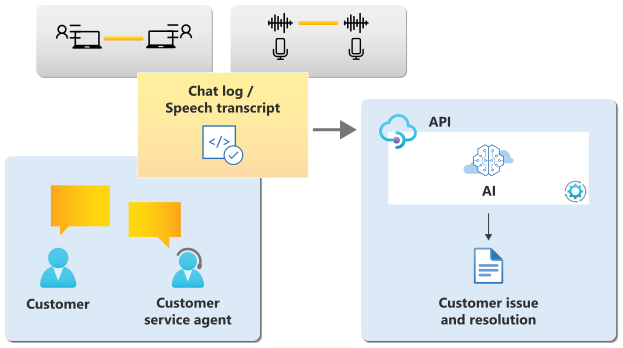
该服务提供 API 使用的 AI 模型。 只需发送内容进行分析即可。
为便于导航,下面是指向每个服务相应部分的链接:
Features
对于每个请求,对话摘要 API 会使用自然语言处理技术将对话汇总为较短的摘要。 对话摘要可以汇总双方对话中讨论的问题和解决方法,或者将长对话汇总为章节和每个章节的简短叙述。
Azure语言命名文本摘要中的另一个功能更适合将文档汇总为简明摘要。 在决定是使用文本摘要还是使用对话摘要时,请考虑以下几点:
- 输入格式:对话摘要可以同时对聊天文本和语音脚本进行操作,这两者包含说话人及其言语。 文本摘要可使用简单文本、Word、PDF 或 PowerPoint 格式进行操作。
- 摘要目的:例如,
conversation issue and resolution summarization 返回客户与客户服务代理之间的聊天原因和解决方法。
提交数据
将文档作为文本字符串提交到 API。 API 在收到请求时执行分析。 因为 API 是异步的,所以在发送 API 请求和接收结果之间可能存在延迟。 有关每分钟和每秒可以发送的请求的大小和数量的信息,请参阅以下数据限制。
使用此功能时,API 结果在引入请求时的 24 小时内可用,并在响应中指示。 在此时间段后,结果将被清除,并且不再可用于检索。
将数据提交到对话摘要时,我们建议在每个请求中发送一个聊天日志,以改善延迟。
从文本聊天中获取摘要
可以根据需要使用对话问题和解决方法摘要来获取摘要。 若要查看使用文本聊天的示例,请参阅快速入门文章。
从语音听录获取摘要
此外, conversation issue and resolution summarization 还可以使用语音 服务的语音转文本功能从语音脚本中获取摘要。 以下示例演示了一个简短的对话,你可以将该对话包括在 API 请求中。
"conversations":[
   {
      "id":"abcdefgh-1234-1234-1234-1234abcdefgh",
      "language":"en",
      "modality":"transcript",
      "conversationItems":[
         {
            "modality":"transcript",
            "participantId":"speaker",
            "id":"12345678-abcd-efgh-1234-abcd123456",
            "content":{
               "text":"Hi.",
               "lexical":"hi",
               "itn":"hi",
               "maskedItn":"hi",
               "audioTimings":[
                  {
                     "word":"hi",
                     "offset":4500000,
                     "duration":2800000
                  }
               ]
            }
         }
      ]
   }
]
获取章节标题
使用对话章节标题摘要可以从输入对话中获取章节标题。 引导示例方案如下:
- 将以下命令复制到文本编辑器中。 BASH 示例使用
\ 续行符。 如果你的控制台或终端使用不同的行继续符,请使用该字符。
curl -i -X POST https://<your-language-resource-endpoint>/language/analyze-conversations/jobs?api-version=2023-11-15-preview \
-H "Content-Type: application/json" \
-H "Ocp-Apim-Subscription-Key: <your-language-resource-key>" \
-d \
'
{
  "displayName": "Conversation Task Example",
  "analysisInput": {
    "conversations": [
      {
        "conversationItems": [
          {
            "text": "Hello, you're chatting with Rene. How may I help you?",
            "id": "1",
            "role": "Agent",
            "participantId": "Agent_1"
          },
          {
            "text": "Hi, I tried to set up wifi connection for Smart Brew 300 espresso machine, but it didn't work.",
            "id": "2",
            "role": "Customer",
            "participantId": "Customer_1"
          },
          {
            "text": "I'm sorry to hear that. Let's see what we can do to fix this issue. Could you please try the following steps for me? First, could you push the wifi connection button, hold for 3 seconds, then let me know if the power light is slowly blinking on and off every second?",
            "id": "3",
            "role": "Agent",
            "participantId": "Agent_1"
          },
          {
            "text": "Yes, I pushed the wifi connection button, and now the power light is slowly blinking.",
            "id": "4",
            "role": "Customer",
            "participantId": "Customer_1"
          },
          {
            "text": "Great. Thank you! Now, please check in your Contoso Coffee app. Does it prompt to ask you to connect with the machine? ",
            "id": "5",
            "role": "Agent",
            "participantId": "Agent_1"
          },
          {
            "text": "No. Nothing happened.",
            "id": "6",
            "role": "Customer",
            "participantId": "Customer_1"
          },
          {
            "text": "I'm very sorry to hear that. Let me see if there's another way to fix the issue. Please hold on for a minute.",
            "id": "7",
            "role": "Agent",
            "participantId": "Agent_1"
          }
        ],
        "modality": "text",
        "id": "conversation1",
        "language": "en"
      }
    ]
  },
  "tasks": [
    {
      "taskName": "Conversation Task 1",
      "kind": "ConversationalSummarizationTask",
      "parameters": {
        "summaryAspects": [
          "chapterTitle"
        ]
      }
    }
  ]
}
'
根据需要在命令中进行以下更改:
- 将值
your-value-language-key 替换为你的密钥。
- 将请求 URL 的第一部分 (
your-language-resource-endpoint) 替换为你的终结点 URL。
打开命令提示符窗口(例如 BASH)。
将文本编辑器中的命令粘贴到命令提示符窗口,然后运行该命令。
从响应标头获取operation-location。 该值类似于以下 URL:
https://<your-language-resource-endpoint>/language/analyze-conversations/jobs/12345678-1234-1234-1234-12345678?api-version=2023-11-15-preview
- 若要获取请求的结果,请使用以下 cURL 命令。 请务必将
<my-job-id> 替换为从之前的 operation-location 响应头中收到的 GUID 值:
curl -X GET https://<your-language-resource-endpoint>/language/analyze-conversations/jobs/<my-job-id>?api-version=2023-11-15-preview \
-H "Content-Type: application/json" \
-H "Ocp-Apim-Subscription-Key: <your-language-resource-key>"
章节标题摘要 JSON 响应示例:
{
    "jobId": "b01af3b7-1870-460a-9e36-09af28d360a1",
    "lastUpdatedDateTime": "2023-11-15T18:24:26Z",
    "createdDateTime": "2023-11-15T18:24:23Z",
    "expirationDateTime": "2023-11-16T18:24:23Z",
    "status": "succeeded",
    "errors": [],
    "displayName": "Conversation Task Example",
    "tasks": {
        "completed": 1,
        "failed": 0,
        "inProgress": 0,
        "total": 1,
        "items": [
            {
                "kind": "conversationalSummarizationResults",
                "taskName": "Conversation Task 1",
                "lastUpdateDateTime": "2023-11-15T18:24:26.3433677Z",
                "status": "succeeded",
                "results": {
                    "conversations": [
                        {
                            "summaries": [
                                {
                                    "aspect": "chapterTitle",
                                    "text": "\"Discussing the Problem of Smart Blend 300 Espresso Machine's Wi-Fi Connectivity\"",
                                    "contexts": [
                                        {
                                            "conversationItemId": "1",
                                            "offset": 0,
                                            "length": 53
                                        },
                                        {
                                            "conversationItemId": "2",
                                            "offset": 0,
                                            "length": 94
                                        },
                                        {
                                            "conversationItemId": "3",
                                            "offset": 0,
                                            "length": 266
                                        },
                                        {
                                            "conversationItemId": "4",
                                            "offset": 0,
                                            "length": 85
                                        },
                                        {
                                            "conversationItemId": "5",
                                            "offset": 0,
                                            "length": 119
                                        },
                                        {
                                            "conversationItemId": "6",
                                            "offset": 0,
                                            "length": 21
                                        },
                                        {
                                            "conversationItemId": "7",
                                            "offset": 0,
                                            "length": 109
                                        }
                                    ]
                                }
                            ],
                            "id": "conversation1",
                            "warnings": []
                        }
                    ],
                    "errors": [],
                    "modelVersion": "latest"
                }
            }
        ]
    }
}
对于长对话,模型可能会将其分段成多个内聚性的部分,并汇总每个段。 每个摘要还有一个冗长的 contexts 字段,它告诉我们从哪个输入对话范围生成了摘要。
获取叙述摘要
使用对话摘要还可以从输入对话中获取叙述摘要。 提供了引导性示例场景:
- 将以下命令复制到文本编辑器中。 BASH 示例使用
\ 续行符。 如果你的控制台或终端使用不同的行继续符,请使用该字符。
curl -i -X POST https://<your-language-resource-endpoint>/language/analyze-conversations/jobs?api-version=2023-11-15-preview \
-H "Content-Type: application/json" \
-H "Ocp-Apim-Subscription-Key: <your-language-resource-key>" \
-d \
'
{
  "displayName": "Conversation Task Example",
  "analysisInput": {
    "conversations": [
      {
        "conversationItems": [
          {
            "text": "Hello, you're chatting with Rene. How may I help you?",
            "id": "1",
            "role": "Agent",
            "participantId": "Agent_1"
          },
          {
            "text": "Hi, I tried to set up wifi connection for Smart Brew 300 espresso machine, but it didn't work.",
            "id": "2",
            "role": "Customer",
            "participantId": "Customer_1"
          },
          {
            "text": "I'm sorry to hear that. Let's see what we can do to fix this issue. Could you please try the following steps for me? First, could you push the wifi connection button, hold for 3 seconds, then let me know if the power light is slowly blinking on and off every second?",
            "id": "3",
            "role": "Agent",
            "participantId": "Agent_1"
          },
          {
            "text": "Yes, I pushed the wifi connection button, and now the power light is slowly blinking.",
            "id": "4",
            "role": "Customer",
            "participantId": "Customer_1"
          },
          {
            "text": "Great. Thank you! Now, please check in your Contoso Coffee app. Does it prompt to ask you to connect with the machine? ",
            "id": "5",
            "role": "Agent",
            "participantId": "Agent_1"
          },
          {
            "text": "No. Nothing happened.",
            "id": "6",
            "role": "Customer",
            "participantId": "Customer_1"
          },
          {
            "text": "I'm very sorry to hear that. Let me see if there's another way to fix the issue. Please hold on for a minute.",
            "id": "7",
            "role": "Agent",
            "participantId": "Agent_1"
          }
        ],
        "modality": "text",
        "id": "conversation1",
        "language": "en"
      }
    ]
  },
  "tasks": [
    {
      "taskName": "Conversation Task 1",
      "kind": "ConversationalSummarizationTask",
      "parameters": {
        "summaryAspects": [
          "narrative"
        ]
      }
    }
  ]
}
'
根据需要在命令中进行以下更改:
- 将值
your-language-resource-key 替换为你的密钥。
- 将请求 URL 的第一部分 (
your-language-resource-endpoint) 替换为你的终结点 URL。
打开命令提示符窗口(例如 BASH)。
将文本编辑器中的命令粘贴到命令提示符窗口,然后运行该命令。
从响应标头获取operation-location。 该值类似于以下 URL:
https://<your-language-resource-endpoint>/language/analyze-conversations/jobs/12345678-1234-1234-1234-12345678?api-version=2023-11-15-preview
- 若要获取请求的结果,请使用以下 cURL 命令。 请务必将
<my-job-id> 替换为从之前的 operation-location 响应头中收到的 GUID 值:
curl -X GET https://<your-language-resource-endpoint>/language/analyze-conversations/jobs/<my-job-id>?api-version=2023-11-15-preview \
-H "Content-Type: application/json" \
-H "Ocp-Apim-Subscription-Key: <your-language-resource-key>"
叙事摘要 JSON 响应示例:
{
  "jobId": "d874a98c-bf31-4ac5-8b94-5c236f786754",
  "lastUpdatedDateTime": "2022-09-29T17:36:42Z",
  "createdDateTime": "2022-09-29T17:36:39Z",
  "expirationDateTime": "2022-09-30T17:36:39Z",
  "status": "succeeded",
  "errors": [],
  "displayName": "Conversation Task Example",
  "tasks": {
    "completed": 1,
    "failed": 0,
    "inProgress": 0,
    "total": 1,
    "items": [
      {
        "kind": "conversationalSummarizationResults",
        "taskName": "Conversation Task 1",
        "lastUpdateDateTime": "2022-09-29T17:36:42.895694Z",
        "status": "succeeded",
        "results": {
          "conversations": [
            {
              "summaries": [
                {
                  "aspect": "narrative",
                  "text": "Agent_1 helps customer to set up wifi connection for Smart Brew 300 espresso machine.",
                  "contexts": [
                    { "conversationItemId": "1", "offset": 0, "length": 53 },
                    { "conversationItemId": "2", "offset": 0, "length": 94 },
                    { "conversationItemId": "3", "offset": 0, "length": 266 },
                    { "conversationItemId": "4", "offset": 0, "length": 85 },
                    { "conversationItemId": "5", "offset": 0, "length": 119 },
                    { "conversationItemId": "6", "offset": 0, "length": 21 },
                    { "conversationItemId": "7", "offset": 0, "length": 109 }
                  ]
                }
              ],
              "id": "conversation1",
              "warnings": []
            }
          ],
          "errors": [],
          "modelVersion": "latest"
        }
      }
    ]
  }
}
对于长对话,模型可能会将其分段成多个内聚性的部分,并汇总每个段。 每个摘要还有一个冗长的 contexts 字段,它告诉我们从哪个输入对话范围生成了摘要。
获取概况回顾和后续任务摘要
通过对话摘要,还可以从输入对话中获取概况回顾和后续任务。 提供了引导性示例场景:
- 将以下命令复制到文本编辑器中。 BASH 示例使用
\ 续行符。 如果你的控制台或终端使用不同的行继续符,请使用该字符。
curl -i -X POST https://<your-language-resource-endpoint>/language/analyze-conversations/jobs?api-version=2023-11-15-preview \
-H "Content-Type: application/json" \
-H "Ocp-Apim-Subscription-Key: <your-language-resource-key>" \
-d \
'
{
  "displayName": "Conversation Task Example",
  "analysisInput": {
    "conversations": [
      {
        "conversationItems": [
          {
            "text": "Hello, you're chatting with Rene. How may I help you?",
            "id": "1",
            "role": "Agent",
            "participantId": "Agent_1"
          },
          {
            "text": "Hi, I tried to set up wifi connection for Smart Brew 300 espresso machine, but it didn't work.",
            "id": "2",
            "role": "Customer",
            "participantId": "Customer_1"
          },
          {
            "text": "I'm sorry to hear that. Let's see what we can do to fix this issue. Could you please try the following steps for me? First, could you push the wifi connection button, hold for 3 seconds, then let me know if the power light is slowly blinking on and off every second?",
            "id": "3",
            "role": "Agent",
            "participantId": "Agent_1"
          },
          {
            "text": "Yes, I pushed the wifi connection button, and now the power light is slowly blinking.",
            "id": "4",
            "role": "Customer",
            "participantId": "Customer_1"
          },
          {
            "text": "Great. Thank you! Now, please check in your Contoso Coffee app. Does it prompt to ask you to connect with the machine? ",
            "id": "5",
            "role": "Agent",
            "participantId": "Agent_1"
          },
          {
            "text": "No. Nothing happened.",
            "id": "6",
            "role": "Customer",
            "participantId": "Customer_1"
          },
          {
            "text": "I'm very sorry to hear that. Let me see if there's another way to fix the issue. Please hold on for a minute.",
            "id": "7",
            "role": "Agent",
            "participantId": "Agent_1"
          }
        ],
        "modality": "text",
        "id": "conversation1",
        "language": "en"
      }
    ]
  },
  "tasks": [
    {
      "taskName": "Conversation Task 1",
      "kind": "ConversationalSummarizationTask",
      "parameters": {
        "summaryAspects": [
          "recap",
          "follow-up tasks"
        ]
      }
    }
  ]
}
'
根据需要在命令中进行以下更改:
- 将值
your-language-resource-key 替换为你的密钥。
- 将请求 URL 的第一部分 (
your-language-resource-endpoint) 替换为你的终结点 URL。
打开命令提示符窗口(例如 BASH)。
将文本编辑器中的命令粘贴到命令提示符窗口,然后运行该命令。
从响应标头获取operation-location。 该值类似于以下 URL:
https://<your-language-resource-endpoint>/language/analyze-conversations/jobs/12345678-1234-1234-1234-12345678?api-version=2023-11-15-preview
- 若要获取请求的结果,请使用以下 cURL 命令。 请务必将
<my-job-id> 替换为从之前的 operation-location 响应头中收到的 GUID 值:
curl -X GET https://<your-language-resource-endpoint>/language/analyze-conversations/jobs/<my-job-id>?api-version=2023-11-15-preview \
-H "Content-Type: application/json" \
-H "Ocp-Apim-Subscription-Key: <your-language-resource-key>"
示例回顾和后续汇总 JSON 响应:
{
    "jobId": "e585d097-c19a-466e-8f99-a9646e55b1f5",
    "lastUpdatedDateTime": "2023-11-15T18:19:56Z",
    "createdDateTime": "2023-11-15T18:19:53Z",
    "expirationDateTime": "2023-11-16T18:19:53Z",
    "status": "succeeded",
    "errors": [],
    "displayName": "Conversation Task Example",
    "tasks": {
        "completed": 1,
        "failed": 0,
        "inProgress": 0,
        "total": 1,
        "items": [
            {
                "kind": "conversationalSummarizationResults",
                "taskName": "Conversation Task 1",
                "lastUpdateDateTime": "2023-11-15T18:19:56.1801785Z",
                "status": "succeeded",
                "results": {
                    "conversations": [
                        {
                            "summaries": [
                                {
                                    "aspect": "recap",
                                    "text": "The customer contacted the service agent, Rene, regarding an issue with setting up a wifi connection for their Smart Brew 300 espresso machine. The agent guided the customer through several steps, including pushing the wifi connection button and checking if the power light was blinking. However, the customer reported that no prompts were received in the Contoso Coffee app to connect with the machine. The agent then decided to look for another solution.",
                                    "contexts": [
                                        {
                                            "conversationItemId": "1",
                                            "offset": 0,
                                            "length": 53
                                        },
                                        {
                                            "conversationItemId": "2",
                                            "offset": 0,
                                            "length": 94
                                        },
                                        {
                                            "conversationItemId": "3",
                                            "offset": 0,
                                            "length": 266
                                        },
                                        {
                                            "conversationItemId": "4",
                                            "offset": 0,
                                            "length": 85
                                        },
                                        {
                                            "conversationItemId": "5",
                                            "offset": 0,
                                            "length": 119
                                        },
                                        {
                                            "conversationItemId": "6",
                                            "offset": 0,
                                            "length": 21
                                        },
                                        {
                                            "conversationItemId": "7",
                                            "offset": 0,
                                            "length": 109
                                        }
                                    ]
                                },
                                {
                                    "aspect": "Follow-Up Tasks",
                                    "text": "@Agent_1 will ask the customer to push the wifi connection button, hold for 3 seconds, then check if the power light is slowly blinking on and off every second."
                                },
                                {
                                    "aspect": "Follow-Up Tasks",
                                    "text": "@Agent_1 will ask the customer to check in the Contoso Coffee app if it prompts to connect with the machine."
                                },
                                {
                                    "aspect": "Follow-Up Tasks",
                                    "text": "@Agent_1 will investigate another way to fix the issue."
                                }
                            ],
                            "id": "conversation1",
                            "warnings": []
                        }
                    ],
                    "errors": [],
                    "modelVersion": "latest"
                }
            }
        ]
    }
}
对于长对话,模型可能会将其分段成多个内聚性的部分,并汇总每个段。 每个摘要还有一个冗长的 contexts 字段,它告诉我们从哪个输入对话范围生成了摘要。
获取对话问题和解决方法摘要结果
以下文本是你可能为对话问题和解决方法摘要提交的内容示例。 这只是一个示例。 API 可以接受更长的输入文本。 有关详细信息, 请参阅数据限制。
代理:“您好,有什么可以帮您的吗?”
客户:“如何升级我的 Contoso 订阅?我已尝试了一整天。”
代理:“请按升级按钮,然后登录并按照说明进行操作”。
在收到请求后,会通过为 API 后端创建一个作业来执行摘要生成。 如果作业成功,将返回 API 的输出。 输出结果将在24小时内可供检索。 此时间过后,输出将被清除。 由于多语言和表情符号的支持,响应中可能会出现文本位置偏移。 有关详细信息,请参阅如何处理偏移量。
在前面的示例中,API 可能会返回此汇总的句子输出:
| 总结的文本 |
方面 |
| “客户想要升级其订阅。 客户不知道如何做。“ |
问题 |
| “客户需要按升级按钮,然后登录。” |
分辨率 |
Important
- Azure 语言公共预览版提供对当前开发中的功能的早期访问。
- 根据用户反馈,在正式发布(正式版)之前,功能、方法和流程可能会发生变化。
语言是一种基于云的服务,它向基于文本的数据应用自然语言处理(NLP)功能。 文档摘要使用自然语言处理为文档生成提取(突出句子提取)或抽象(上下文单词提取)摘要。
AbstractiveSummarization 和 ExtractiveSummarization 两个 API 都支持本机文档处理。 原生文档是指用于创建原始文档的文件格式,例如 Microsoft Word (docx) 或可移植文档文件 (pdf)。 原生文档支持消除了使用语言资源功能前对文本进行预处理的需求。 通过本地文档支持功能,您可以使用 HTTP POST 请求正文异步发送 API 请求,以便传输数据,并通过 HTTP GET 请求查询字符串检索状态结果。 已处理的文档位于 Azure Blob 存储目标容器中。
应用程序使用本机文件格式创建、保存或打开本机文档。 目前,PII 和文档摘要功能支持以下本机文档格式:
| 文件类型 |
文件扩展名 |
Description |
| 文本 |
.txt |
未格式化的文本文档。 |
| Adobe PDF |
.pdf |
可移植文档文件格式的文档。 |
| Microsoft Word |
.docx |
Microsoft Word 文档文件。 |
支持的文件格式
| 类型 |
支持和限制 |
|
PDF |
不支持完全扫描的 PDF。 |
|
图像中的文本 |
不支持带有嵌入文本的数字图像。 |
|
数字表 |
不支持扫描文档中的表。 |
文档大小
| Attribute |
输入限制 |
|
每个请求的文档总数 |
≤ 20 |
|
每个请求的内容总大小 |
≤ 10 MB |
在 HTTP 请求中包含本地文档
让我们开始吧:
对于此项目,我们使用 cURL 命令行工具进行 REST API 调用。
注释
大多数 Windows 10 和 Windows 11 以及大多数 macOS 和 Linux 发行版都预安装了 cURL 包。 可以使用以下命令检查包版本:Windows:curl.exe -V macOS:curl -V Linux:curl --version
一个有效的 Azure 帐户。 如果没有,可以创建一个试用帐户。
一个 Azure Blob 存储帐户。 你还需要在 Azure Blob 存储帐户中为源文件和目标文件创建容器:
-
源容器。 此容器用于上传原始文件以进行分析(必需)。
-
目标容器。 此容器用于存储已分析的文件(必需)。
单服务语言资源(而不是多服务 AI 服务资源):
填写 Azure 语言资源项目和实例详细信息字段,如下所示:
订阅。 选择一个可用的 Azure 订阅。
资源组。 你可以创建新的资源组,或将资源添加到预先存在的具有相同生命周期、权限和策略的资源组。
资源区域。 选择“全球”,除非你的业务或应用程序需要特定区域。 如果打算使用系统分配的托管标识进行身份验证,请选择一个地理区域,如“中国北部”。
名称。 输入您为资源选择的名称。 所选名称在 Azure 中必须唯一。
定价层。 可以使用免费定价层 (Free F0) 试用该服务,然后再升级到付费层进行生产。
选择 “审阅 + 创建”。
查看服务条款,然后选择“ 创建 ”以部署资源。
成功部署资源后,选择“ 转到资源”。
检索密钥和语言终结点
对 Azure 语言的请求需要只读密钥和自定义终结点才能对访问进行身份验证。
如果已创建新资源,请在部署该资源后选择“转到资源”。 如果有现有的语言资源,请直接导航到资源页。
在左侧栏的 “资源管理”下,选择 “密钥和终结点”。
可以将您的key和Language instance endpoint复制并粘贴到代码示例中,以验证对 Azure 语言服务的请求。 进行 API 调用只需要一个密钥。
创建 Azure Blob 存储容器
在你的 Azure Blob 存储帐户中为源文件和目标文件创建容器。
-
源容器。 此容器用于上传原始文件以进行分析(必需)。
-
目标容器。 此容器用于存储已分析的文件(必需)。
身份验证
在语言资源可以创建、读取或删除 blob 之前,需要授予其对您的存储帐户的访问权限。 有两种主要方法可用于授予对存储数据的访问权限:
对于此项目,我们通过在查询字符串中追加共享访问签名 (SAS) 令牌来对 source location 和 target location URL 的访问进行身份验证。 每个令牌都分配给特定的 Blob(文件)。

-
源容器或 Blob 必须指定读取和列表访问权限。
- 目标容器或 Blob 必须指定写入和列出访问权限。
提取式摘要 API 使用自然语言处理技术在非结构化文本文档中查找关键句子。 这些句子共同传达了文档的主要想法。
提取式摘要返回排名分数作为系统响应的一部分,并返回提取的句子及其在原始文档中的位置。 排名分数是指确定句子相对于文档主要理念的相关程度的指标。 该模型为每个句子提供 0 到 1(含 0 和 1)之间的分数,并按请求返回分数最高的句子。 例如,如果请求一个包含三个句子的摘要,则该服务将返回分数最高的三个句子。
在语言中,有另一项功能关键短语提取,可以提取关键信息。 若要在关键短语提取和提取摘要之间进行决定,以下是有用的注意事项:
- 关键短语提取返回短语,而抽取式摘要返回句子。
- 抽取式摘要返回带有排名分数的句子,并根据请求返回排名靠前的句子。
- 抽取式摘要还返回以下位置信息:
- 偏移量:每个所提取句子的起始位置。
- 长度:每个提取的句子的长度。
确定如何处理数据(可选)
提交数据
你将文档作为文本字符串提交到 API。 在收到请求时执行分析。 因为 API 是异步的,所以在发送 API 请求和接收结果之间可能存在延迟。
使用此功能时,API 结果在引入请求时的 24 小时内可用,并在响应中指示。 在此时间段后,结果将被清除,并且不再可用于检索。
获取文本摘要结果
从语言检测获得结果时,可以将结果流式传输到应用程序或将输出保存到本地系统上的文件中。
下面是可以提交以进行汇总的内容示例,它是使用 Microsoft 博客文章(集成式 AI 的整体表示形式)提取的。 本文只是一个示例。 API 可以接受更长的输入文本。 有关详细信息, 请参阅数据和服务限制。
“在 Microsoft,我们致力于推动人工智能技术超越现有水平,采用更全面、以人为本的方法来学习和理解。” 作为 Foundry Tools 的首席技术官,我一直在与一个惊人的科学家和工程师团队合作,将这一追求变成现实。 “在我的角色中,我以独特的视角看待人类认知的三个属性之间的关系:语言文本 (X)、音频或视觉传感器信号(Y) 和多语言 (Z)。” 在所有这三个属性的交点,都有一些神奇之处,如图 1 所示,我们称之为 XYZ 代码,它是一种联合表示,可以创造出更强大的 AI,它能说、听、看和更好地理解人类。 我们相信 XYZ 代码将使我们能够实现长期愿景:跨领域迁移学习、跨越模式和语言。 目标是拥有可以联合学习表示以支持广泛的下游 AI 任务的预训练模型,就像人们现在所做的。 在过去的五年里,我们在对话语音识别、机器翻译、对话式问答、机器阅读理解和图像标题方面实现了人类在基准测试方面的表现。 这五项突破为我们提供了强烈的信号,让我们朝着更雄心勃勃的愿望实现人工智能能力的飞跃,实现更接近人类学习和理解方式的多感官和多语言学习。 我相信,只要以外部知识源为基础,联合 XYZ 代码是这一愿景的基础组成部分,特别是在下游 AI 任务中。
收到请求后,通过为 API 后端创建作业来处理文本摘要 API 请求。 如果作业成功,将返回 API 的输出。 输出结果将在24小时内可供检索。 此时间过后,输出将被清除。 由于多语言和表情符号的支持,响应中可能会出现文本位置偏移。 有关详细信息,请参阅如何处理偏移量。
使用前面的示例时,API 可能会返回以下汇总句子:
抽取式摘要:
- 在 Microsoft,我们寻求通过采用一种更全面且以人为本的方法来学习和理解,推动 AI 超越现有技术。
- “我们相信 XYZ 代码将使我们能够实现长期愿景:跨领域迁移学习、跨越模式和语言。”
- 目标是拥有可以联合学习表示以支持广泛的下游 AI 任务的预训练模型,就像人们现在所做的。
抽象式摘要:
- “Microsoft正在采取更全面、以人为中心的学习和理解方法。 我们相信 XYZ 代码将使我们能够实现长期愿景:跨领域迁移学习、跨越模式和语言。 在过去的五年里,我们在基准测试中达到了人类的表现水平。”
可以使用文本抽取式摘要来获取文章、论文或文档的摘要。 若要查看示例,请参阅快速入门文章。
你可以使用 sentenceCount 参数指定返回的句子数量,默认值为 3。 范围为 1 到 20。
你还可以使用 sortby 参数指定提取的句子的返回顺序(Offset 或 Rank),默认值为 Offset。
| 参数值 |
Description |
| Rank |
根据句子与输入文档的相关性(由服务决定)对句子进行排序。 |
| Offset |
保持句子在输入文档中出现的原始顺序。 |
试用文本抽象式摘要
以下示例将帮助你开始使用文本抽象式摘要:
- 将以下命令复制到文本编辑器中。 BASH 示例使用
\ 续行符。 如果你的控制台或终端使用不同的续行符,请改用相应符号。
curl -i -X POST https://<your-language-resource-endpoint>/language/analyze-text/jobs?api-version=2023-04-01 \
-H "Content-Type: application/json" \
-H "Ocp-Apim-Subscription-Key: <your-language-resource-key>" \
-d \
'
{
  "displayName": "Text Abstractive Summarization Task Example",
  "analysisInput": {
    "documents": [
      {
        "id": "1",
        "language": "en",
        "text": "At Microsoft, we have been on a quest to advance AI beyond existing techniques, by taking a more holistic, human-centric approach to learning and understanding. As Chief Technology Officer of Foundry Tools, I have been working with a team of amazing scientists and engineers to turn this quest into a reality. In my role, I enjoy a unique perspective in viewing the relationship among three attributes of human cognition: monolingual text (X), audio or visual sensory signals, (Y) and multilingual (Z). At the intersection of all three, there's magic—what we call XYZ-code as illustrated in Figure 1—a joint representation to create more powerful AI that can speak, hear, see, and understand humans better. We believe XYZ-code enables us to fulfill our long-term vision: cross-domain transfer learning, spanning modalities and languages. The goal is to have pretrained models that can jointly learn representations to support a broad range of downstream AI tasks, much in the way humans do today. Over the past five years, we have achieved human performance on benchmarks in conversational speech recognition, machine translation, conversational question answering, machine reading comprehension, and image captioning. These five breakthroughs provided us with strong signals toward our more ambitious aspiration to produce a leap in AI capabilities, achieving multi-sensory and multilingual learning that is closer in line with how humans learn and understand. I believe the joint XYZ-code is a foundational component of this aspiration, if grounded with external knowledge sources in the downstream AI tasks."
      }
    ]
  },
  "tasks": [
    {
      "kind": "AbstractiveSummarization",
      "taskName": "Text Abstractive Summarization Task 1",
    }
  ]
}
'
根据需要在命令中进行以下更改:
- 将值
your-language-resource-key 替换为你的密钥。
- 将请求 URL 的第一部分 (
your-language-resource-endpoint) 替换为你的终结点 URL。
打开命令提示符窗口(例如 BASH)。
将文本编辑器中的命令粘贴到命令提示符窗口,然后运行该命令。
从响应标头获取operation-location。 该值类似于以下 URL:
https://<your-language-resource-endpoint>/language/analyze-text/jobs/12345678-1234-1234-1234-12345678?api-version=2022-10-01-preview
- 若要获取请求的结果,请使用以下 cURL 命令。 请务必将
<my-job-id> 替换为从之前的 operation-location 响应头中收到的数值 ID 值:
curl -X GET https://<your-language-resource-endpoint>/language/analyze-text/jobs/<my-job-id>?api-version=2022-10-01-preview \
-H "Content-Type: application/json" \
-H "Ocp-Apim-Subscription-Key: <your-language-resource-key>"
抽象式文本摘要示例 JSON 响应
{
    "jobId": "cd6418fe-db86-4350-aec1-f0d7c91442a6",
    "lastUpdateDateTime": "2022-09-08T16:45:14Z",
    "createdDateTime": "2022-09-08T16:44:53Z",
    "expirationDateTime": "2022-09-09T16:44:53Z",
    "status": "succeeded",
    "errors": [],
    "displayName": "Text Abstractive Summarization Task Example",
    "tasks": {
        "completed": 1,
        "failed": 0,
        "inProgress": 0,
        "total": 1,
        "items": [
            {
                "kind": "AbstractiveSummarizationLROResults",
                "taskName": "Text Abstractive Summarization Task 1",
                "lastUpdateDateTime": "2022-09-08T16:45:14.0717206Z",
                "status": "succeeded",
                "results": {
                    "documents": [
                        {
                            "summaries": [
                                {
                                    "text": "Microsoft is taking a more holistic, human-centric approach to AI. We've developed a joint representation to create more powerful AI that can speak, hear, see, and understand humans better. We've achieved human performance on benchmarks in conversational speech recognition, machine translation, ...... and image captions.",
                                    "contexts": [
                                        {
                                            "offset": 0,
                                            "length": 247
                                        }
                                    ]
                                }
                            ],
                            "id": "1"
                        }
                    ],
                    "errors": [],
                    "modelVersion": "latest"
                }
            }
        ]
    }
}
| 参数 |
Description |
-X POST <endpoint> |
指定用于访问 API 的语言资源终结点。 |
--header Content-Type: application/json |
用于发送 JSON 数据的内容类型。 |
--header "Ocp-Apim-Subscription-Key:<key> |
指定 Azure 语言资源密钥用于访问 API。 |
-data |
包含要随请求传递的数据的 JSON 文件。 |
以下 cURL 命令从 BASH shell 中执行。 请使用自己的资源名称、资源密钥和 JSON 值编辑这些命令。 尝试通过选择 Personally Identifiable Information (PII) 或 Document Summarization 代码示例项目来分析本地文档:
摘要示例文档
对于此项目,你需要将源文档上传到源容器。 可下载本快速入门的 Microsoft Word 示例文档或 Adobe PDF。 源语言为英语。
生成 POST 请求
使用您偏好的编辑器或 IDE,为您的应用创建一个名为 native-document 的新目录。
在 native-document 目录中创建名为 document-summarization.json 的新 json 文件。
将文档摘要请求示例复制粘贴到你的 document-summarization.json 文件中。 使用 Azure 门户存储帐户容器实例中的值替换 {your-source-container-SAS-URL} 和 {your-target-container-SAS-URL}:
请求示例
  {
  "tasks": [
    {
      "kind": "ExtractiveSummarization",
      "parameters": {
        "sentenceCount": 6
      }
    }
  ],
  "analysisInput": {
    "documents": [
      {
        "source": {
          "location": "{your-source-blob-SAS-URL}"
        },
        "targets": {
          "location": "{your-target-container-SAS-URL}"
        }
      }
    ]
  }
}
运行 POST 请求
在运行 POST 请求之前,将 {your-language-resource-endpoint} 和 {your-key} 替换为你的 Azure 门户语言资源实例中的终结点值。
Important
完成后,请记住将密钥从代码中删除,并且永远不要公开发布该密钥。 在生产中,请使用安全的方式存储和访问凭据,例如 Azure 密钥保管库。
PowerShell
cmd /c curl "{your-language-resource-endpoint}/language/analyze-documents/jobs?api-version=2024-11-15-preview" -i -X POST --header "Content-Type: application/json" --header "Ocp-Apim-Subscription-Key: {your-key}" --data "@document-summarization.json"
命令提示符/终端
curl -v -X POST "{your-language-resource-endpoint}/language/analyze-documents/jobs?api-version=2024-11-15-preview" --header "Content-Type: application/json" --header "Ocp-Apim-Subscription-Key: {your-key}" --data "@document-summarization.json"
示例响应:
HTTP/1.1 202 Accepted
Content-Length: 0
operation-location: https://{your-language-resource-endpoint}/language/analyze-documents/jobs/f1cc29ff-9738-42ea-afa5-98d2d3cabf94?api-version=2024-11-15-preview
apim-request-id: e7d6fa0c-0efd-416a-8b1e-1cd9287f5f81
x-ms-region: China North 2
Date: Thu, 25 Jan 2024 15:12:32 GMT
POST 响应 (jobId)
你会收到一个202(成功)响应,其中包含一个只读的 Operation-Location 标头。 此标头的值包含一个 jobId,可以查询它以获取异步操作的状态,并使用 GET 请求检索结果:

获取分析结果(GET 请求)
成功 POST 请求后,轮询 POST 请求中返回的操作位置标头以查看已处理的数据。
下面是 GET 请求的结构:
GET {cognitive-service-endpoint}/language/analyze-documents/jobs/{jobId}?api-version=2024-11-15-preview
运行该命令之前,请进行以下更改:
Get 请求
cmd /c curl "{your-language-resource-endpoint}/language/analyze-documents/jobs/{jobId}?api-version=2024-11-15-preview" -i -X GET --header "Content-Type: application/json" --header "Ocp-Apim-Subscription-Key: {your-key}"
curl -v -X GET "{your-language-resource-endpoint}/language/analyze-documents/jobs/{jobId}?api-version=2024-11-15-preview" --header "Content-Type: application/json" --header "Ocp-Apim-Subscription-Key: {your-key}"
检查响应
您收到一个代码为 200(成功)的响应,其中包含 JSON 输出。
status 字段指示操作的结果。 如果操作未完成,status 的值为 "running" 或 "notStarted",你应当采用手动方式或通过脚本再次调用该 API。 我们建议两次调用之间的间隔至少为一秒钟。
示例响应
{
  "jobId": "f1cc29ff-9738-42ea-afa5-98d2d3cabf94",
  "lastUpdatedDateTime": "2024-01-24T13:17:58Z",
  "createdDateTime": "2024-01-24T13:17:47Z",
  "expirationDateTime": "2024-01-25T13:17:47Z",
  "status": "succeeded",
  "errors": [],
  "tasks": {
    "completed": 1,
    "failed": 0,
    "inProgress": 0,
    "total": 1,
    "items": [
      {
        "kind": "ExtractiveSummarizationLROResults",
        "lastUpdateDateTime": "2024-01-24T13:17:58.33934Z",
        "status": "succeeded",
        "results": {
          "documents": [
            {
              "id": "doc_0",
              "source": {
                "kind": "AzureBlob",
                "location": "https://myaccount.blob.core.chinacloudapi.cn/sample-input/input.pdf"
              },
              "targets": [
                {
                  "kind": "AzureBlob",
                  "location": "https://myaccount.blob.core.chinacloudapi.cn/sample-output/df6611a3-fe74-44f8-b8d4-58ac7491cb13/ExtractiveSummarization-0001/input.result.json"
                }
              ],
              "warnings": []
            }
          ],
          "errors": [],
          "modelVersion": "2023-02-01-preview"
        }
      }
    ]
  }
}
成功完成后:
- 可以在你的目标容器中找到已分析的文档。
- 成功的 POST 方法返回
202 Accepted 响应代码,指示服务创建了批处理请求。
- POST 请求还返回了包含
Operation-Location 的响应标头,它提供了在后续 GET 请求中使用的值。
清理资源
若要清理和删除 Azure AI 资源,可以删除单个资源或整个资源组。 如果删除资源组,也会删除包含的所有资源。