注释
有关此处使用的术语的详细信息,请参阅 关键概念 文章。
客户端 SDK 旨在加快开发人员的工作流;更具体地说,
- 简化客户端连接的管理
- 简化在客户端之间发送消息
- 在客户端连接意外中断后自动重试
- 从连接中断恢复后,可靠地按照数量和顺序传递消息
如图所示,客户端与 Web PubSub 资源建立 WebSocket 连接。

入门
先决条件
- Python 3.8+
- Azure 订阅服务
- Web PubSub 资源
1.安装 azure-messaging-webpubsubclient 包
pip install azure-messaging-webpubsubclient
2.连接到 Web PubSub 资源
客户端使用一个 Client Access URL 连接和身份验证服务,该服务遵循以下模式 wss://<service_name>.webpubsub.azure.cn/client/hubs/<hub_name>?access_token=<token>。 客户端可以通过几种方法来获取 。Client Access URL 对于本快速入门,可以从显示的Azure门户复制并粘贴一个。
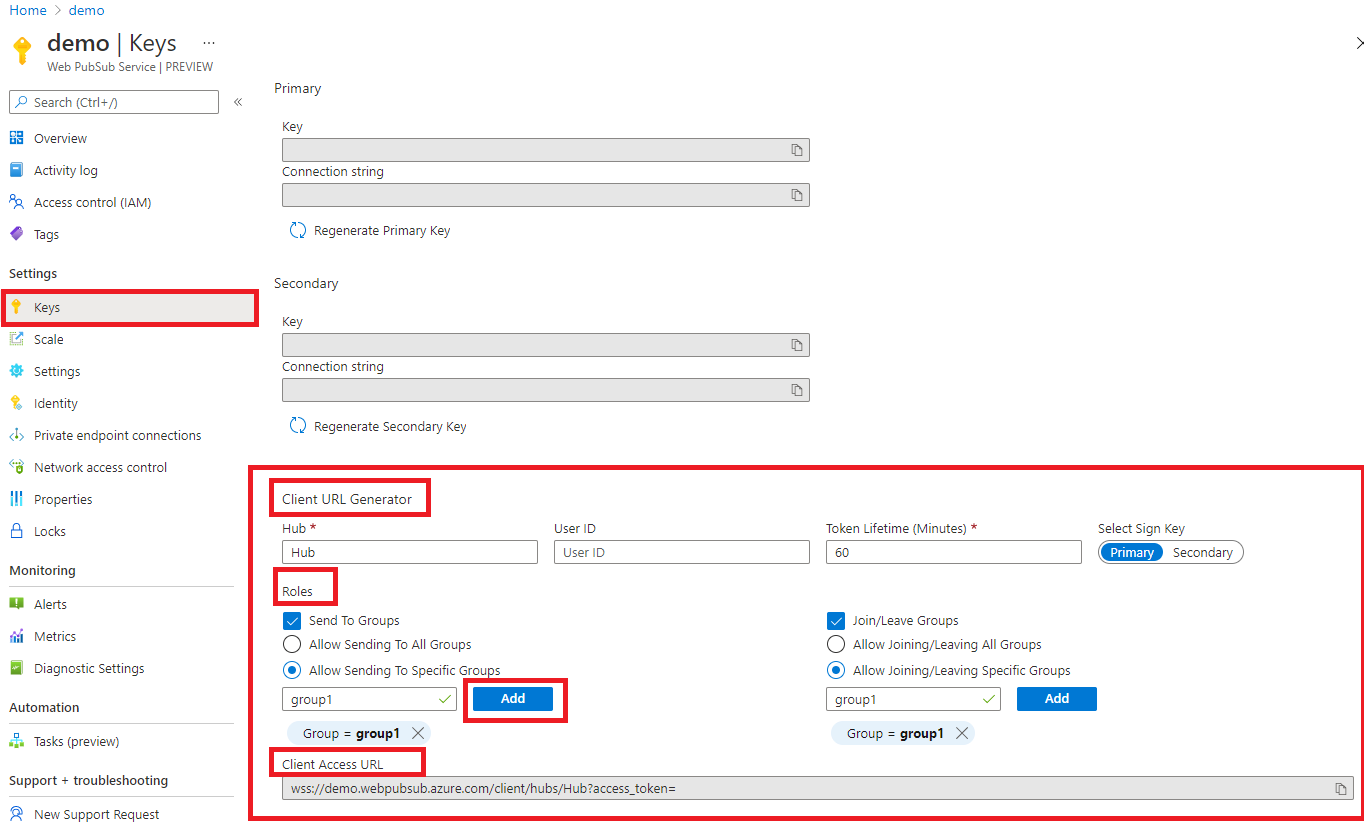
如图所示,客户端有权将消息发送到名为 group1 的特定组并加入其中。
from azure.messaging.webpubsubclient import WebPubSubClient

client = WebPubSubClient("<<client-access-url>>")
with client:
    # The client can join/leave groups, send/receive messages to and from those groups all in real-time
    ...
3. 加入组
客户端只能从已加入的组接收消息,并且需要添加回调以在接收消息时指定逻辑。
from azure.messaging.webpubsubclient.models import CallbackType

# ...continues the code snippet from above

# Registers a listener for the event 'group-message' early before joining a group to not miss messages
group_name = "group1";
client.subscribe(CallbackType.GROUP_MESSAGE, lambda e: print(f"Received message: {e.data}"));

# A client needs to join the group it wishes to receive messages from
client.join_group(groupName);
4.将消息发送到组
# ...continues the code snippet from above

# Send a message to a joined group
client.send_to_group(group_name, "hello world", "text");

# In the Console tab of your developer tools found in your browser, you should see the message printed there.
示例
为和stopped事件添加回调 disconnectedconnected
当客户端成功连接到 Web PubSub 资源时,将触发
connected事件。from azure.messaging.webpubsubclient.models import CallbackType client.subscribe(CallbackType.CONNECTED, lambda e: print(f"Connection {e.connection_id} is connected"))当客户端断开连接且无法恢复连接时,将触发
disconnected事件。from azure.messaging.webpubsubclient.models import CallbackType client.subscribe(CallbackType.DISCONNECTED, lambda e: print(f"Connection disconnected: {e.message}"))当客户端断开连接
stopped且停止尝试重新连接时,将触发 事件。 调用client.stop()或禁用auto_reconnect或尝试重新连接达到指定限制后,通常会发生这种情况。 如果要重启客户端,可以在停止的事件中调用client.start()。from azure.messaging.webpubsubclient.models import CallbackType client.subscribe(CallbackType.STOPPED, lambda : print("Client has stopped"))
客户端使用来自应用程序服务器或已加入组的消息
客户端可以添加回调,以使用来自应用程序服务器或组的消息。 请注意,对于 group-message 事件,客户端 只能 接收已加入的组消息。
from azure.messaging.webpubsubclient.models import CallbackType

# Registers a listener for the "server-message". The callback is invoked when your application server sends message to the connectionID, to or broadcast to all connections.
client.subscribe(CallbackType.CONNECTED, lambda e: print(f"Received message {e.data}"))

# Registers a listener for the "group-message". The callback is invoked when the client receives a message from the groups it has joined.
client.subscribe(CallbackType.GROUP_MESSAGE, lambda e: print(f"Received message from {e.group}: {e.data}"))
处理重新加入失败
当客户端断开连接且无法恢复时,将在 Web PubSub 资源中清理所有组上下文。 这意味着客户端重新连接时,需要重新加入组。 默认情况下,客户端已启用 auto_rejoin_groups 选项。
但是,应注意 auto_rejoin_groups的限制。
- 客户端只能重新加入最初 由客户端代码 而不是 服务器端代码联接的组。
- “重新加入组”操作可能由于各种原因而失败,例如,客户端没有加入组的权限。 在这种情况下,需要添加回调来处理此故障。
from azure.messaging.webpubsubclient.models import CallbackType

# By default auto_rejoin_groups=True. You can disable it by setting to False.
client = WebPubSubClient("<client-access-url>", auto_rejoin_groups=True);

# Registers a listener to handle "rejoin-group-failed" event
client.subscribe(CallbackType.REJOIN_GROUP_FAILED, lambda e: print(f"Rejoin group {e.group} failed: {e.error}"))
操作和重试
默认情况下,作(如 client.join_group()、client.leave_group()、client.send_to_group())client.send_event() 有三次重试。 可以通过关键字参数进行配置。 如果所有重试都失败,则会引发错误。 可以通过传入与之前重试相同的 ack_id 来继续重试,以便 Web PubSub 服务可以重复删除作。
try:
    client.join_group(group_name)
except SendMessageError as e:
    client.join_group(group_name, ack_id=e.ack_id)
故障排除
启用日志
可以使用此库设置以下环境变量来获取调试日志。
export AZURE_LOG_LEVEL=verbose
有关如何启用日志的更详细说明,可以查看 @azure/记录器包文档。
实时跟踪
使用 Azure 门户中的 实时跟踪工具 通过 Web PubSub 资源检查实时消息流量。