适用于:SDK v4
可以使用对话库来创建复杂的聊天流。
本文介绍如何管理可分支和循环的复杂聊天,以及如何在对话的不同部分之间传递参数。
重要
Bot Framework SDK 和 Bot Framework Emulator 已在 GitHub 上存档。 项目不再更新或维护。 自 2025 年 12 月 31 日起,Bot Framework SDK 的支持票证将不再提供服务。
若要使用所选的 AI 服务、业务流程和知识生成代理,请考虑使用 Microsoft 365 代理 SDK。 代理 SDK 对 C#、JavaScript 或 Python 具有语言支持。 可以在 aka.ms/agents 了解有关代理 SDK 的详细信息。
如果现有的机器人是使用 Bot Framework SDK 生成的,则可以将机器人更新到代理 SDK。 查看 Bot Framework SDK 到代理 SDK 迁移指南的核心更改和更新。
如果要构建设计为在 Microsoft Teams 中工作的协作代理,请考虑使用 Teams SDK。 它为在 Teams 环境中运行的代理提供 Teams 特定的 API、自适应卡支持和内置 AI 协同调度功能。 可以在 Teams SDK(Teams AI 库)中了解详细信息。
如果要查找基于 SaaS 的代理平台,请考虑 Microsoft Copilot Studio。
先决条件
关于此示例
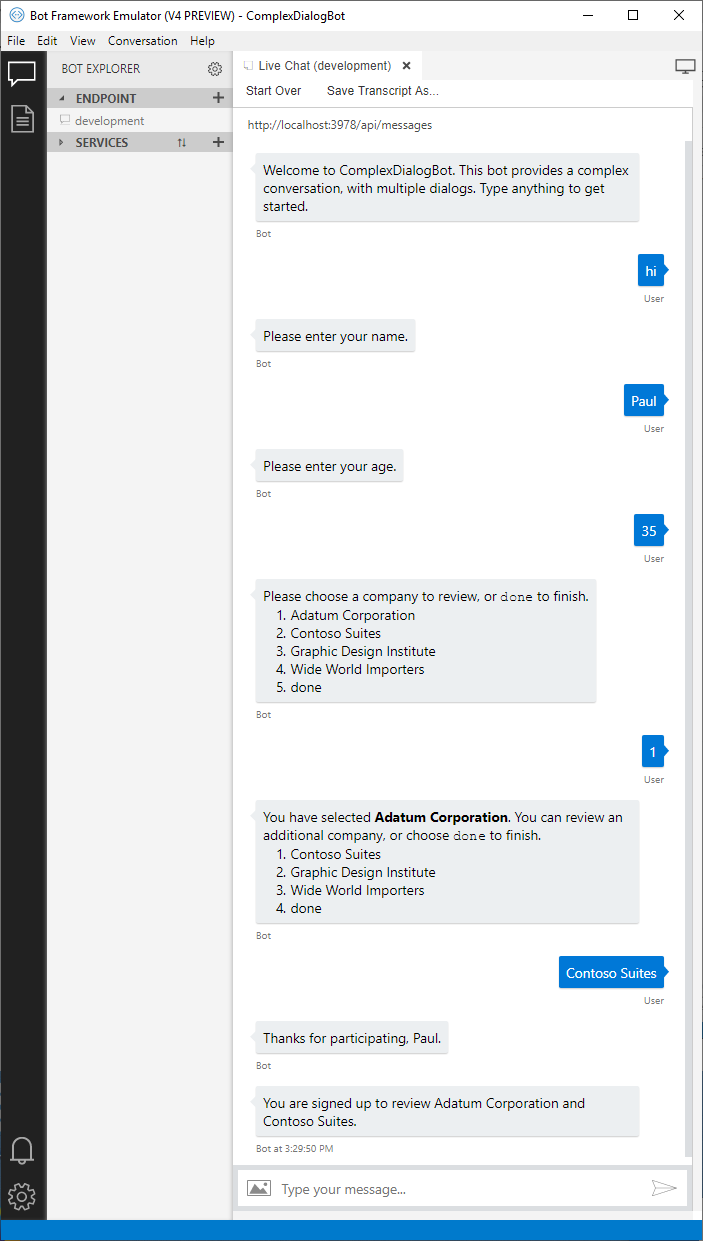
本示例演示一个可以注册用户,让其针对列表中的最多两家公司发表评论的机器人。
该机器人使用 3 个组件对话来管理对话流。
每个组件对话都包含一个瀑布对话,以及用于收集用户输入的所需提示。
这些对话在以下部分详述。
它使用聊天状态管理其对话,并使用用户状态来保存有关用户及其所要评论的公司的信息。
该机器人派生自活动处理程序。 与许多示例机器人一样,它会欢迎用户,使用对话处理来自用户的消息,并在该轮聊天结束之前保存用户和聊天状态。
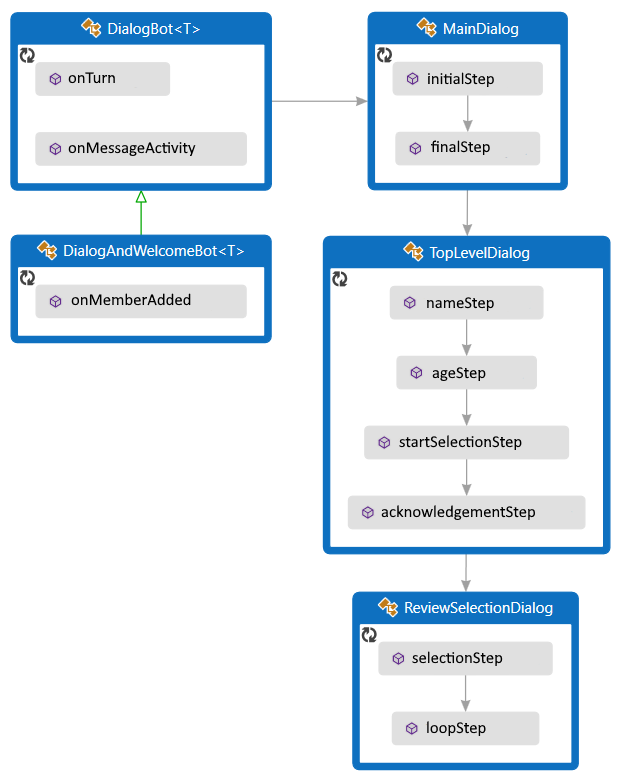
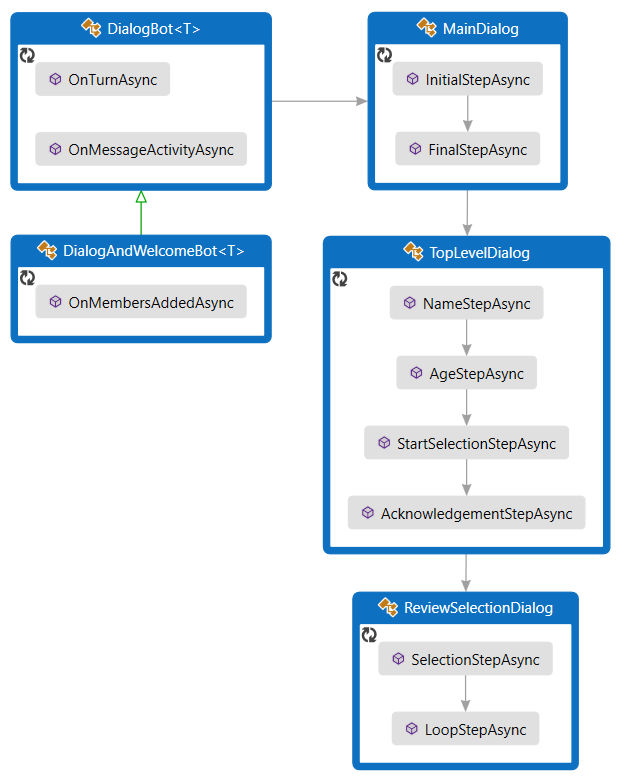
若要使用对话,请安装 Microsoft.Bot.Builder.Dialogs NuGet 包。
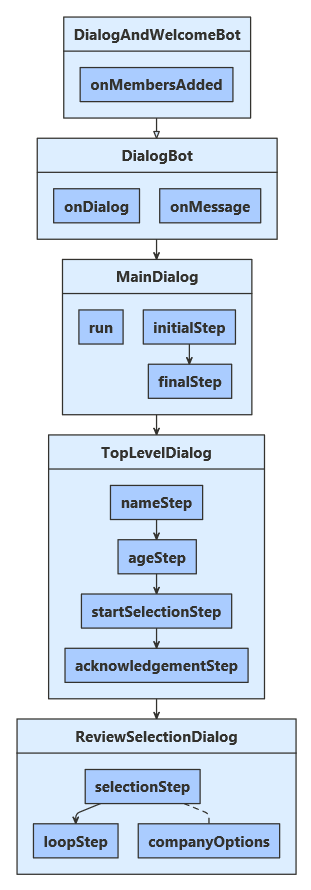
若要使用对话,项目需要安装 botbuilder-dialogs npm 包。
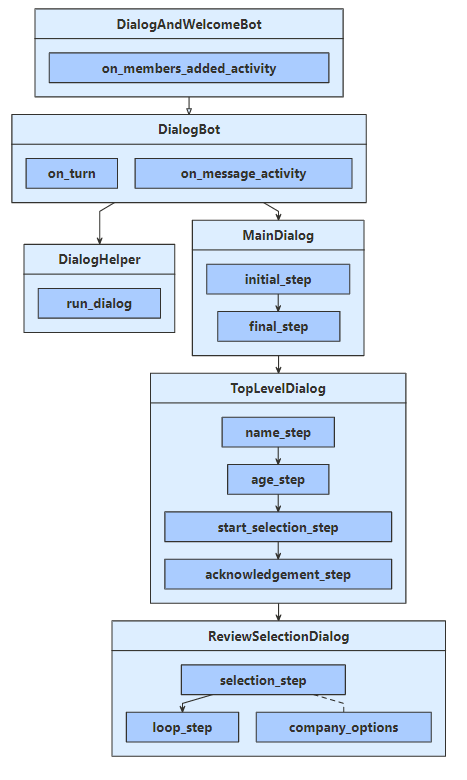
若要使用对话功能,项目需要通过运行 pip install botbuilder-dialogs 安装 botbuilder-dialogs PyPI 包。
定义用户资料
用户配置文件会包含通过对话收集的信息、用户的姓名、年龄,以及选择要评论的公司。
UserProfile.cs
/// <summary>Contains information about a user.</summary>
public class UserProfile
{
    public string Name { get; set; }

    public int Age { get; set; }

    // The list of companies the user wants to review.
    public List<string> CompaniesToReview { get; set; } = new List<string>();
userProfile.js
// @ts-check

class UserProfile {
    constructor(name, age) {
        this.name = name;
        this.age = age;

        // The list of companies the user wants to review.
        this.companiesToReview = [];
UserProfile.java
/**
 * Contains information about a user.
 */
public class UserProfile {
    private String name;
    private Integer age;

    // The list of companies the user wants to review.
    private List<String> companiesToReview = new ArrayList<>();

    /**
     * Gets the name of the user
     * @return Name of the user
     */
    public String getName() {
        return name;
    }

    /**
     * Sets the name of the user
     * @param name Name of the user
     */
    public void setName(String name) {
        this.name = name;
    }

    /**
     * Gets the age of the user
     * @return Age of the user
     */
    public Integer getAge() {
        return age;
    }

    /**
     * Sets the age of the user
     * @param age Age of the user
     */
    public void setAge(Integer age) {
        this.age = age;
    }

    /**
     * Gets the list of companies
     * @return A list of companies
     */
    public List<String> getCompaniesToReview() {
        return companiesToReview;
    }

    /**
     * Sets a list of companies
     * @param companiesToReview A list of companies
     */
    public void setCompaniesToReview(List<String> companiesToReview) {
        this.companiesToReview = companiesToReview;
    }
}
data_models/user_profile.py
class UserProfile:
    def __init__(
        self, name: str = None, age: int = 0, companies_to_review: List[str] = None
    ):
        self.name: str = name
        self.age: int = age
        self.companies_to_review: List[str] = companies_to_review
创建对话
此机器人包含 3 个对话:
- 主对话会启动整个进程,并汇总收集的信息。
- 顶级对话根据用户的年龄收集用户信息并包括分支逻辑。
- 用户可以通过“评论-选择”对话以迭代方式选择要评论的公司。 它使用循环逻辑来这样做。
主对话
主对话有 2 个步骤:
启动顶层对话框。
检索并汇总顶层对话收集的用户资料,将该信息保存到用户状态中,然后指示主对话结束。
Dialogs\MainDialog.cs
private async Task<DialogTurnResult> InitialStepAsync(WaterfallStepContext stepContext, CancellationToken cancellationToken)
{
    return await stepContext.BeginDialogAsync(nameof(TopLevelDialog), null, cancellationToken);
}

private async Task<DialogTurnResult> FinalStepAsync(WaterfallStepContext stepContext, CancellationToken cancellationToken)
{
    var userInfo = (UserProfile)stepContext.Result;

    string status = "You are signed up to review "
        + (userInfo.CompaniesToReview.Count is 0 ? "no companies" : string.Join(" and ", userInfo.CompaniesToReview))
        + ".";

    await stepContext.Context.SendActivityAsync(status);

    var accessor = _userState.CreateProperty<UserProfile>(nameof(UserProfile));
    await accessor.SetAsync(stepContext.Context, userInfo, cancellationToken);

    return await stepContext.EndDialogAsync(null, cancellationToken);
}
dialogs/mainDialog.js
}

async initialStep(stepContext) {
    return await stepContext.beginDialog(TOP_LEVEL_DIALOG);
}

async finalStep(stepContext) {
    const userInfo = stepContext.result;

    const status = 'You are signed up to review ' +
        (userInfo.companiesToReview.length === 0 ? 'no companies' : userInfo.companiesToReview.join(' and ')) + '.';
    await stepContext.context.sendActivity(status);
    await this.userProfileAccessor.set(stepContext.context, userInfo);
MainDialog.java
private CompletableFuture<DialogTurnResult> initialStep(WaterfallStepContext stepContext) {
    return stepContext.beginDialog("TopLevelDialog");
}

private CompletableFuture<DialogTurnResult> finalStep(WaterfallStepContext stepContext) {
    UserProfile userInfo = (UserProfile) stepContext.getResult();

    String status = String.format("You are signed up to review %s.",
        userInfo.getCompaniesToReview().size() == 0
            ? "no companies"
            : String.join(" and ", userInfo.getCompaniesToReview()));

    return stepContext.getContext().sendActivity(status)
        .thenCompose(resourceResponse -> {
            StatePropertyAccessor<UserProfile> userProfileAccessor = userState.createProperty("UserProfile");
            return userProfileAccessor.set(stepContext.getContext(), userInfo);
        })
        .thenCompose(setResult -> stepContext.endDialog());
}
dialogs\main_dialog.py
async def initial_step(
    self, step_context: WaterfallStepContext
) -> DialogTurnResult:
    return await step_context.begin_dialog(TopLevelDialog.__name__)

async def final_step(self, step_context: WaterfallStepContext) -> DialogTurnResult:
    user_info: UserProfile = step_context.result

    companies = (
        "no companies"
        if len(user_info.companies_to_review) == 0
        else " and ".join(user_info.companies_to_review)
    )
    status = f"You are signed up to review {companies}."

    await step_context.context.send_activity(MessageFactory.text(status))

    # store the UserProfile
    accessor = self.user_state.create_property("UserProfile")
    await accessor.set(step_context.context, user_info)

    return await step_context.end_dialog()
顶层对话框
顶级对话有 4 个步骤:
询问用户的姓名。
询问用户的年龄。
根据用户的年龄,启动“评论-选择”对话或转到下一步。
最后,感谢用户参与并返回收集的信息。
第一步会在对话状态中创建一个空的用户资料。 该对话框从一个空白配置文件开始,并随着其进行将信息添加到该配置文件中。 结束时,最后一步会返回收集的信息。
在第三(开始选择)步中,会根据用户的年龄将聊天流分支。
Dialogs\TopLevelDialog.cs
            stepContext.Values[UserInfo] = new UserProfile();

            var promptOptions = new PromptOptions { Prompt = MessageFactory.Text("Please enter your name.") };

            // Ask the user to enter their name.
            return await stepContext.PromptAsync(nameof(TextPrompt), promptOptions, cancellationToken);
        }

        private async Task<DialogTurnResult> AgeStepAsync(WaterfallStepContext stepContext, CancellationToken cancellationToken)
        {
            // Set the user's name to what they entered in response to the name prompt.
            var userProfile = (UserProfile)stepContext.Values[UserInfo];
            userProfile.Name = (string)stepContext.Result;

            var promptOptions = new PromptOptions { Prompt = MessageFactory.Text("Please enter your age.") };

            // Ask the user to enter their age.
            return await stepContext.PromptAsync(nameof(NumberPrompt<int>), promptOptions, cancellationToken);
        }

        private async Task<DialogTurnResult> StartSelectionStepAsync(WaterfallStepContext stepContext, CancellationToken cancellationToken)
        {
            // Set the user's age to what they entered in response to the age prompt.
            var userProfile = (UserProfile)stepContext.Values[UserInfo];
            userProfile.Age = (int)stepContext.Result;

            if (userProfile.Age < 25)
            {
                // If they are too young, skip the review selection dialog, and pass an empty list to the next step.
                await stepContext.Context.SendActivityAsync(
                    MessageFactory.Text("You must be 25 or older to participate."),
                    cancellationToken);
                return await stepContext.NextAsync(new List<string>(), cancellationToken);
            }
            else
            {
                // Otherwise, start the review selection dialog.
                return await stepContext.BeginDialogAsync(nameof(ReviewSelectionDialog), null, cancellationToken);
            }
        }

        private async Task<DialogTurnResult> AcknowledgementStepAsync(WaterfallStepContext stepContext, CancellationToken cancellationToken)
        {
            // Set the user's company selection to what they entered in the review-selection dialog.
            var userProfile = (UserProfile)stepContext.Values[UserInfo];
            userProfile.CompaniesToReview = stepContext.Result as List<string> ?? new List<string>();

            // Thank them for participating.
            await stepContext.Context.SendActivityAsync(
                MessageFactory.Text($"Thanks for participating, {((UserProfile)stepContext.Values[UserInfo]).Name}."),
                cancellationToken);

            // Exit the dialog, returning the collected user information.
            return await stepContext.EndDialogAsync(stepContext.Values[UserInfo], cancellationToken);
        }
    }
}
dialogs/topLevelDialog.js
}

async nameStep(stepContext) {
    // Create an object in which to collect the user's information within the dialog.
    stepContext.values.userInfo = new UserProfile();

    const promptOptions = { prompt: 'Please enter your name.' };

    // Ask the user to enter their name.
    return await stepContext.prompt(TEXT_PROMPT, promptOptions);
}

async ageStep(stepContext) {
    // Set the user's name to what they entered in response to the name prompt.
    stepContext.values.userInfo.name = stepContext.result;

    const promptOptions = { prompt: 'Please enter your age.' };

    // Ask the user to enter their age.
    return await stepContext.prompt(NUMBER_PROMPT, promptOptions);
}

async startSelectionStep(stepContext) {
    // Set the user's age to what they entered in response to the age prompt.
    stepContext.values.userInfo.age = stepContext.result;

    if (stepContext.result < 25) {
        // If they are too young, skip the review selection dialog, and pass an empty list to the next step.
        await stepContext.context.sendActivity('You must be 25 or older to participate.');

        return await stepContext.next();
    } else {
        // Otherwise, start the review selection dialog.
        return await stepContext.beginDialog(REVIEW_SELECTION_DIALOG);
    }
}

async acknowledgementStep(stepContext) {
    // Set the user's company selection to what they entered in the review-selection dialog.
    const userProfile = stepContext.values.userInfo;
    userProfile.companiesToReview = stepContext.result || [];

    await stepContext.context.sendActivity(`Thanks for participating ${ userProfile.name }`);

    // Exit the dialog, returning the collected user information.
    return await stepContext.endDialog(userProfile);
}
TopLevelDialog.java
private CompletableFuture<DialogTurnResult> nameStep(WaterfallStepContext stepContext) {
    // Create an object in which to collect the user's information within the dialog.
    stepContext.getValues().put(USER_INFO, new UserProfile());

    // Ask the user to enter their name.
    PromptOptions promptOptions = new PromptOptions();
    promptOptions.setPrompt(MessageFactory.text("Please enter your name."));
    return stepContext.prompt("TextPrompt", promptOptions);
}

private CompletableFuture<DialogTurnResult> ageStep(WaterfallStepContext stepContext) {
    // Set the user's name to what they entered in response to the name prompt.
    UserProfile userProfile = (UserProfile) stepContext.getValues().get(USER_INFO);
    userProfile.setName((String) stepContext.getResult());

    // Ask the user to enter their age.
    PromptOptions promptOptions = new PromptOptions();
    promptOptions.setPrompt(MessageFactory.text("Please enter your age."));
    return stepContext.prompt("NumberPrompt", promptOptions);
}

private CompletableFuture<DialogTurnResult> startSelectionStep(WaterfallStepContext stepContext) {
    // Set the user's age to what they entered in response to the age prompt.
    UserProfile userProfile = (UserProfile) stepContext.getValues().get(USER_INFO);
    userProfile.setAge((Integer) stepContext.getResult());

    // If they are too young, skip the review selection dialog, and pass an empty list to the next step.
    if (userProfile.getAge() < 25) {
        return stepContext.getContext().sendActivity(MessageFactory.text("You must be 25 or older to participate."))
            .thenCompose(resourceResponse -> stepContext.next(new ArrayList<String>()));
    }

    // Otherwise, start the review selection dialog.
    return stepContext.beginDialog("ReviewSelectionDialog");
}

private CompletableFuture<DialogTurnResult> acknowledgementStep(WaterfallStepContext stepContext) {
    // Set the user's company selection to what they entered in the review-selection dialog.
    UserProfile userProfile = (UserProfile) stepContext.getValues().get(USER_INFO);
    userProfile.setCompaniesToReview(stepContext.getResult() instanceof List
        ? (List<String>) stepContext.getResult()
        : new ArrayList<>());

    // Thank them for participating.
    return stepContext.getContext()
        .sendActivity(MessageFactory.text(String.format("Thanks for participating, %s.", userProfile.getName())))
        .thenCompose(resourceResponse -> stepContext.endDialog(stepContext.getValues().get(USER_INFO)));
}
dialogs\top_level_dialog.py
async def name_step(self, step_context: WaterfallStepContext) -> DialogTurnResult:
    # Create an object in which to collect the user's information within the dialog.
    step_context.values[self.USER_INFO] = UserProfile()

    # Ask the user to enter their name.
    prompt_options = PromptOptions(
        prompt=MessageFactory.text("Please enter your name.")
    )
    return await step_context.prompt(TextPrompt.__name__, prompt_options)

async def age_step(self, step_context: WaterfallStepContext) -> DialogTurnResult:
    # Set the user's name to what they entered in response to the name prompt.
    user_profile = step_context.values[self.USER_INFO]
    user_profile.name = step_context.result

    # Ask the user to enter their age.
    prompt_options = PromptOptions(
        prompt=MessageFactory.text("Please enter your age.")
    )
    return await step_context.prompt(NumberPrompt.__name__, prompt_options)

async def start_selection_step(
    self, step_context: WaterfallStepContext
) -> DialogTurnResult:
    # Set the user's age to what they entered in response to the age prompt.
    user_profile: UserProfile = step_context.values[self.USER_INFO]
    user_profile.age = step_context.result

    if user_profile.age < 25:
        # If they are too young, skip the review selection dialog, and pass an empty list to the next step.
        await step_context.context.send_activity(
            MessageFactory.text("You must be 25 or older to participate.")
        )

        return await step_context.next([])

    # Otherwise, start the review selection dialog.
    return await step_context.begin_dialog(ReviewSelectionDialog.__name__)

async def acknowledgement_step(
    self, step_context: WaterfallStepContext
) -> DialogTurnResult:
    # Set the user's company selection to what they entered in the review-selection dialog.
    user_profile: UserProfile = step_context.values[self.USER_INFO]
    user_profile.companies_to_review = step_context.result

    # Thank them for participating.
    await step_context.context.send_activity(
        MessageFactory.text(f"Thanks for participating, {user_profile.name}.")
    )

    # Exit the dialog, returning the collected user information.
    return await step_context.end_dialog(user_profile)
审阅选择对话框
“审核选择”对话框分为两个步骤:
请求用户选择要评论的公司,或选择 done 以完成操作。
- 如果对话是使用任何初始信息启动的,则可通过瀑布步骤上下文的 options 属性获取该信息。 “评论-选择”对话可以自行重启,并使用它来允许用户选择多个要评论的公司。
- 如果用户已选择要评论的公司,则会从可用的选项中删除该公司。
- 添加了
done 选项,允许用户早退出循环。
根据情况重复此对话或退出。
- 如果用户选择了要评论的公司,请将其添加到列表中。
- 如果用户选择了 2 个公司或选择了退出,请结束对话并返回收集的列表。
- 否则,请重新启动该对话框,并用其列表中的内容对其进行初始化。
Dialogs\ReviewSelectionDialog.cs
private async Task<DialogTurnResult> SelectionStepAsync(
    WaterfallStepContext stepContext,
    CancellationToken cancellationToken)
{
    // Continue using the same selection list, if any, from the previous iteration of this dialog.
    var list = stepContext.Options as List<string> ?? new List<string>();
    stepContext.Values[CompaniesSelected] = list;

    // Create a prompt message.
    string message;
    if (list.Count is 0)
    {
        message = $"Please choose a company to review, or `{DoneOption}` to finish.";
    }
    else
    {
        message = $"You have selected **{list[0]}**. You can review an additional company, " +
            $"or choose `{DoneOption}` to finish.";
    }

    // Create the list of options to choose from.
    var options = _companyOptions.ToList();
    options.Add(DoneOption);
    if (list.Count > 0)
    {
        options.Remove(list[0]);
    }

    var promptOptions = new PromptOptions
    {
        Prompt = MessageFactory.Text(message),
        RetryPrompt = MessageFactory.Text("Please choose an option from the list."),
        Choices = ChoiceFactory.ToChoices(options),
    };

    // Prompt the user for a choice.
    return await stepContext.PromptAsync(nameof(ChoicePrompt), promptOptions, cancellationToken);
}

private async Task<DialogTurnResult> LoopStepAsync(
    WaterfallStepContext stepContext,
    CancellationToken cancellationToken)
{
    // Retrieve their selection list, the choice they made, and whether they chose to finish.
    var list = stepContext.Values[CompaniesSelected] as List<string>;
    var choice = (FoundChoice)stepContext.Result;
    var done = choice.Value == DoneOption;

    if (!done)
    {
        // If they chose a company, add it to the list.
        list.Add(choice.Value);
    }

    if (done || list.Count >= 2)
    {
        // If they're done, exit and return their list.
        return await stepContext.EndDialogAsync(list, cancellationToken);
    }
    else
    {
        // Otherwise, repeat this dialog, passing in the list from this iteration.
        return await stepContext.ReplaceDialogAsync(InitialDialogId, list, cancellationToken);
    }
}
dialogs/reviewSelectionDialog.js
}

async selectionStep(stepContext) {
    // Continue using the same selection list, if any, from the previous iteration of this dialog.
    const list = Array.isArray(stepContext.options) ? stepContext.options : [];
    stepContext.values[this.companiesSelected] = list;

    // Create a prompt message.
    let message = '';
    if (list.length === 0) {
        message = `Please choose a company to review, or \`${ this.doneOption }\` to finish.`;
    } else {
        message = `You have selected **${ list[0] }**. You can review an additional company, or choose \`${ this.doneOption }\` to finish.`;
    }

    // Create the list of options to choose from.
    const options = list.length > 0
        ? this.companyOptions.filter(function(item) { return item !== list[0]; })
        : this.companyOptions.slice();
    options.push(this.doneOption);

    // Prompt the user for a choice.
    return await stepContext.prompt(CHOICE_PROMPT, {
        prompt: message,
        retryPrompt: 'Please choose an option from the list.',
        choices: options
    });
}

async loopStep(stepContext) {
    // Retrieve their selection list, the choice they made, and whether they chose to finish.
    const list = stepContext.values[this.companiesSelected];
    const choice = stepContext.result;
    const done = choice.value === this.doneOption;

    if (!done) {
        // If they chose a company, add it to the list.
        list.push(choice.value);
    }

    if (done || list.length > 1) {
        // If they're done, exit and return their list.
        return await stepContext.endDialog(list);
    } else {
        // Otherwise, repeat this dialog, passing in the list from this iteration.
        return await stepContext.replaceDialog(this.initialDialogId, list);
    }
}
ReviewSelectionDialog.java
private CompletableFuture<DialogTurnResult> selectionStep(WaterfallStepContext stepContext) {
    // Continue using the same selection list, if any, from the previous iteration of this dialog.
    List<String> list = stepContext.getOptions() instanceof List
        ? (List<String>) stepContext.getOptions()
        : new ArrayList<>();
    stepContext.getValues().put(COMPANIES_SELECTED, list);

    // Create a prompt message.
    String message;
    if (list.size() == 0) {
        message = String.format("Please choose a company to review, or `%s` to finish.", DONE_OPTION);
    } else {
        message = String.format("You have selected **%s**. You can review an additional company, or choose `%s` to finish.",
            list.get(0),
            DONE_OPTION);
    }

    // Create the list of options to choose from.
    List<String> options = new ArrayList<>(companiesOptions);
    options.add(DONE_OPTION);
    if (list.size() > 0) {
        options.remove(list.get(0));
    }

    PromptOptions promptOptions = new PromptOptions();
    promptOptions.setPrompt(MessageFactory.text(message));
    promptOptions.setRetryPrompt(MessageFactory.text("Please choose an option from the list."));
    promptOptions.setChoices(ChoiceFactory.toChoices(options));

    // Prompt the user for a choice.
    return stepContext.prompt("ChoicePrompt", promptOptions);
}

private CompletableFuture<DialogTurnResult> loopStep(WaterfallStepContext stepContext) {
    // Retrieve their selection list, the choice they made, and whether they chose to finish.
    List<String> list = (List<String>) stepContext.getValues().get(COMPANIES_SELECTED);
    FoundChoice choice = (FoundChoice) stepContext.getResult();
    boolean done = StringUtils.equals(choice.getValue(), DONE_OPTION);

    // If they chose a company, add it to the list.
    if (!done) {
        list.add(choice.getValue());
    }

    // If they're done, exit and return their list.
    if (done || list.size() >= 2) {
        return stepContext.endDialog(list);
    }

    // Otherwise, repeat this dialog, passing in the list from this iteration.
    return stepContext.replaceDialog(getId(), list);
}
dialogs/review_selection_dialog.py
async def selection_step(
    self, step_context: WaterfallStepContext
) -> DialogTurnResult:
    # step_context.options will contains the value passed in begin_dialog or replace_dialog.
    # if this value wasn't provided then start with an emtpy selection list.  This list will
    # eventually be returned to the parent via end_dialog.
    selected: [
        str
    ] = step_context.options if step_context.options is not None else []
    step_context.values[self.COMPANIES_SELECTED] = selected

    if len(selected) == 0:
        message = (
            f"Please choose a company to review, or `{self.DONE_OPTION}` to finish."
        )
    else:
        message = (
            f"You have selected **{selected[0]}**. You can review an additional company, "
            f"or choose `{self.DONE_OPTION}` to finish. "
        )

    # create a list of options to choose, with already selected items removed.
    options = self.company_options.copy()
    options.append(self.DONE_OPTION)
    if len(selected) > 0:
        options.remove(selected[0])

    # prompt with the list of choices
    prompt_options = PromptOptions(
        prompt=MessageFactory.text(message),
        retry_prompt=MessageFactory.text("Please choose an option from the list."),
        choices=self._to_choices(options),
    )
    return await step_context.prompt(ChoicePrompt.__name__, prompt_options)

def _to_choices(self, choices: [str]) -> List[Choice]:
    choice_list: List[Choice] = []
    for choice in choices:
        choice_list.append(Choice(value=choice))
    return choice_list

async def loop_step(self, step_context: WaterfallStepContext) -> DialogTurnResult:
    selected: List[str] = step_context.values[self.COMPANIES_SELECTED]
    choice: FoundChoice = step_context.result
    done = choice.value == self.DONE_OPTION

    # If they chose a company, add it to the list.
    if not done:
        selected.append(choice.value)

    # If they're done, exit and return their list.
    if done or len(selected) >= 2:
        return await step_context.end_dialog(selected)

    # Otherwise, repeat this dialog, passing in the selections from this iteration.
    return await step_context.replace_dialog(
        self.initial_dialog_id, selected
    )
运行对话
“对话机器人” 类扩展了活动处理程序,包含用于运行对话的逻辑。
对话和欢迎机器人类扩展了对话机器人类,还会在用户加入对话时欢迎该用户。
机器人的轮次处理程序会重复执行由这三个对话定义的会话流程。
当它收到来自用户的消息时:
它运行主对话。
- 如果对话堆栈为空,这将启动主对话。
- 否则,对话仍处于中间进程,这将继续活动对话。
它会保存状态,以持久保存对用户、聊天和对话状态所做的任何更新。
Bots\DialogBot.cs
public override async Task OnTurnAsync(ITurnContext turnContext, CancellationToken cancellationToken = default(CancellationToken))
{
    await base.OnTurnAsync(turnContext, cancellationToken);

    // Save any state changes that might have occurred during the turn.
    await ConversationState.SaveChangesAsync(turnContext, false, cancellationToken);
    await UserState.SaveChangesAsync(turnContext, false, cancellationToken);
}

protected override async Task OnMessageActivityAsync(ITurnContext<IMessageActivity> turnContext, CancellationToken cancellationToken)
{
    Logger.LogInformation("Running dialog with Message Activity.");

    // Run the Dialog with the new message Activity.
    await Dialog.RunAsync(turnContext, ConversationState.CreateProperty<DialogState>(nameof(DialogState)), cancellationToken);
}
bots/dialogBot.js
this.conversationState = conversationState;
this.userState = userState;
this.dialog = dialog;
this.dialogState = this.conversationState.createProperty('DialogState');

this.onMessage(async (context, next) => {
    console.log('Running dialog with Message Activity.');

    // Run the Dialog with the new message Activity.
        // By calling next() you ensure that the next BotHandler is run.
        await next();
    });
}

/**
 * Override the ActivityHandler.run() method to save state changes after the bot logic completes.
 */
async run(context) {
    await super.run(context);
DialogBot.java
@Override
public CompletableFuture<Void> onTurn(
    TurnContext turnContext
) {
    return super.onTurn(turnContext)
        // Save any state changes that might have occurred during the turn.
        .thenCompose(result -> conversationState.saveChanges(turnContext))
        .thenCompose(result -> userState.saveChanges(turnContext));
}

@Override
protected CompletableFuture<Void> onMessageActivity(
    TurnContext turnContext
) {
    LoggerFactory.getLogger(DialogBot.class).info("Running dialog with Message Activity.");

    // Run the Dialog with the new message Activity.
    return Dialog.run(dialog, turnContext, conversationState.createProperty("DialogState"));
}
bots/dialog_bot.py
async def on_turn(self, turn_context: TurnContext):
    await super().on_turn(turn_context)

    # Save any state changes that might have occurred during the turn.
    await self.conversation_state.save_changes(turn_context, False)
    await self.user_state.save_changes(turn_context, False)

async def on_message_activity(self, turn_context: TurnContext):
    await DialogHelper.run_dialog(
        self.dialog,
        turn_context,
        self.conversation_state.create_property("DialogState"),
    )
为机器人注册服务
根据需要创建并注册服务:
- 机器人的基本服务:适配器和机器人实现。
- 用于管理状态的服务:存储、用户状态和聊天状态。
- 机器人将使用的根对话。
Startup.cs
// This method gets called by the runtime. Use this method to add services to the container.
public void ConfigureServices(IServiceCollection services)
{
    services.AddHttpClient().AddControllers().AddNewtonsoftJson(options =>
    {
        options.SerializerSettings.MaxDepth = HttpHelper.BotMessageSerializerSettings.MaxDepth;
    });

    // Create the Bot Framework Authentication to be used with the Bot Adapter.
    services.AddSingleton<BotFrameworkAuthentication, ConfigurationBotFrameworkAuthentication>();

    // Create the Bot Adapter with error handling enabled.
    services.AddSingleton<IBotFrameworkHttpAdapter, AdapterWithErrorHandler>();

    // Create the storage we'll be using for User and Conversation state. (Memory is great for testing purposes.)
    services.AddSingleton<IStorage, MemoryStorage>();

    // Create the User state. (Used in this bot's Dialog implementation.)
    services.AddSingleton<UserState>();
index.js
const memoryStorage = new MemoryStorage();

// Create user and conversation state with in-memory storage provider.
const userState = new UserState(memoryStorage);
const conversationState = new ConversationState(memoryStorage);

// Create the main dialog.
const dialog = new MainDialog(userState);
const bot = new DialogAndWelcomeBot(conversationState, userState, dialog);

// Catch-all for errors.
adapter.onTurnError = async (context, error) => {
    // This check writes out errors to console log .vs. app insights.
    // NOTE: In production environment, you should consider logging this to Azure
    //       application insights. See https://aka.ms/bottelemetry for telemetry
    //       configuration instructions.
    console.error(`\n [onTurnError] unhandled error: ${ error }`);
Application.java
@Bean
public Bot getBot(
    ConversationState conversationState,
    UserState userState,
    Dialog dialog
) {
    return new DialogAndWelcome<>(conversationState, userState, dialog);
}
app.py
# See https://aka.ms/about-bot-adapter to learn more about how bots work.
ADAPTER = CloudAdapter(ConfigurationBotFrameworkAuthentication(CONFIG))

# Catch-all for errors.
CONVERSATION_STATE = ConversationState(MEMORY)

# Create Dialog and Bot
DIALOG = MainDialog(USER_STATE)
BOT = DialogAndWelcomeBot(CONVERSATION_STATE, USER_STATE, DIALOG)

# Listen for incoming requests on /api/messages.
注意
内存存储仅用于测试,不用于生产。
请务必对生产用机器人使用持久型存储。
测试机器人
安装 Bot Framework Emulator(如果尚未安装)。
在计算机本地运行示例。
按如下所示启动 Emulator,连接到机器人,然后发送消息。
其他资源
有关如何实现对话的介绍,请参阅实现有序的对话流,其中使用了单个瀑布对话和一些提示来向用户提出一系列问题。
Dialogs 库包含对提示进行基本验证的功能。 你也可以添加自定义验证。 有关详细信息,请参阅使用对话提示收集用户输入。
若要简化对话代码并将其重复用于多个机器人,可将对话集的某些部分定义为单独的类。
有关详细信息,请参阅重复使用对话。
后续步骤