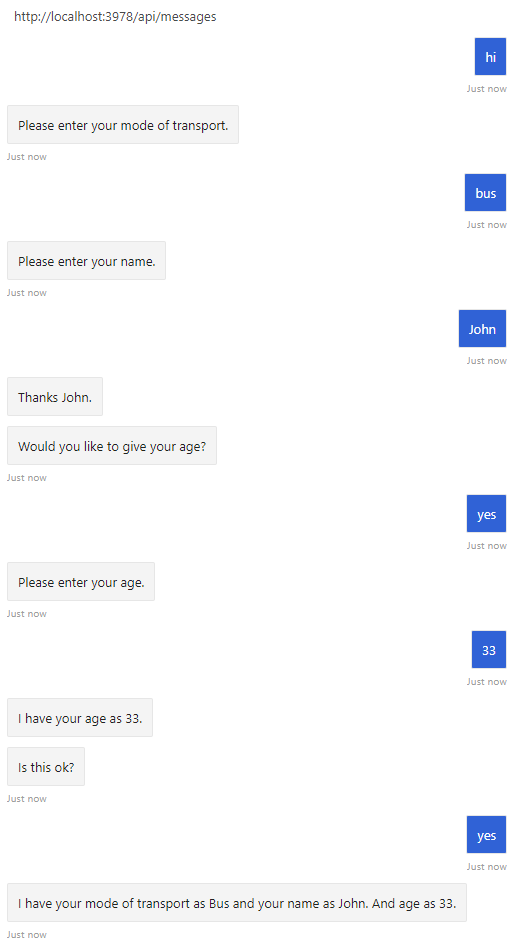
通过发布问题来收集信息是机器人与用户交互的主要方式之一。 对话库提供有用的内置功能(如 prompt 类),以轻松提问和验证答复,从而确保它与特定数据类型匹配或符合自定义验证规则 。
若要使用对话,请安装 Microsoft.Bot.Builder.Dialogs NuGet 包。
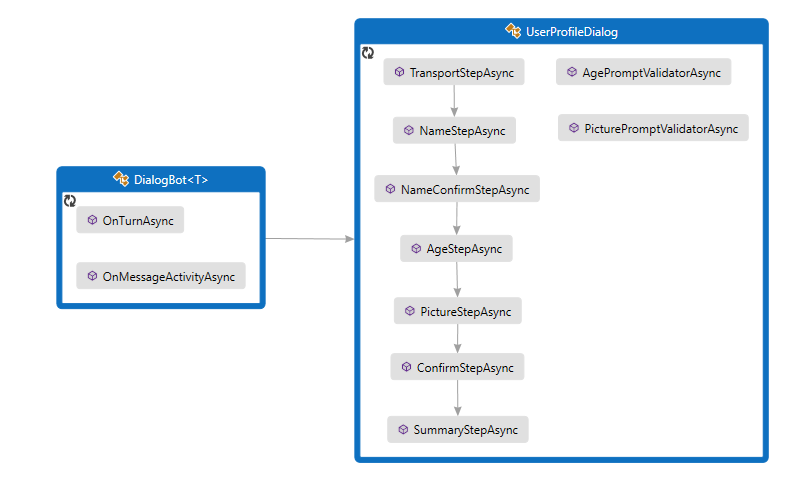
机器人通过 UserProfileDialog 来与用户交互。 创建机器人的 DialogBot 类时,UserProfileDialog 将设置为其主对话。 然后,机器人使用 Run 帮助器方法来访问该对话。
Dialogs\UserProfileDialog.cs
首先创建派生自 UserProfileDialog 类的 ComponentDialog,这包括 7 个步骤。
在 UserProfileDialog 构造函数中创建瀑布步骤、提示和瀑布对话,然后将其添加到对话集。 这些提示需要处于使用它们的同一对话集中。
public UserProfileDialog(UserState userState)
    : base(nameof(UserProfileDialog))
{
    _userProfileAccessor = userState.CreateProperty<UserProfile>("UserProfile");

    // This array defines how the Waterfall will execute.
    var waterfallSteps = new WaterfallStep[]
    {
        TransportStepAsync,
        NameStepAsync,
        NameConfirmStepAsync,
        AgeStepAsync,
        PictureStepAsync,
        SummaryStepAsync,
        ConfirmStepAsync,
    };

    // Add named dialogs to the DialogSet. These names are saved in the dialog state.
    AddDialog(new WaterfallDialog(nameof(WaterfallDialog), waterfallSteps));
    AddDialog(new TextPrompt(nameof(TextPrompt)));
    AddDialog(new NumberPrompt<int>(nameof(NumberPrompt<int>), AgePromptValidatorAsync));
    AddDialog(new ChoicePrompt(nameof(ChoicePrompt)));
    AddDialog(new ConfirmPrompt(nameof(ConfirmPrompt)));
    AddDialog(new AttachmentPrompt(nameof(AttachmentPrompt), PicturePromptValidatorAsync));

    // The initial child Dialog to run.
    InitialDialogId = nameof(WaterfallDialog);
}
接下来,添加对话框用来提示用户输入的步骤。 若要使用提示,请从对话中的某个步骤调用它,然后使用 stepContext.Result 检索下一步骤中的提示结果。 在幕后,提示是由两个步骤组成的对话。 首先,提示要求提供输入。 然后它返回有效值,或者使用重新提示从头开始,直到收到有效的输入为止。
应始终在瀑布步骤中返回非空的 DialogTurnResult。 否则,对话可能不按设计意图运行。 下面显示了瀑布对话中 NameStepAsync 的实现。
private static async Task<DialogTurnResult> NameStepAsync(WaterfallStepContext stepContext, CancellationToken cancellationToken)
{
    stepContext.Values["transport"] = ((FoundChoice)stepContext.Result).Value;

    return await stepContext.PromptAsync(nameof(TextPrompt), new PromptOptions { Prompt = MessageFactory.Text("Please enter your name.") }, cancellationToken);
}
在 AgeStepAsync 中,指定当用户输入采用的是提示无法分析的格式,或者不符合验证条件,因而无法验证时,要使用的重试提示。 在这种情况下,如果未提供重试提示,则提示将使用初始提示文本来重新提示用户输入。
private async Task<DialogTurnResult> AgeStepAsync(WaterfallStepContext stepContext, CancellationToken cancellationToken)
{
    if ((bool)stepContext.Result)
    {
        // User said "yes" so we will be prompting for the age.
        // WaterfallStep always finishes with the end of the Waterfall or with another dialog; here it is a Prompt Dialog.
        var promptOptions = new PromptOptions
        {
            Prompt = MessageFactory.Text("Please enter your age."),
            RetryPrompt = MessageFactory.Text("The value entered must be greater than 0 and less than 150."),
        };

        return await stepContext.PromptAsync(nameof(NumberPrompt<int>), promptOptions, cancellationToken);
    }
    else
    {
        // User said "no" so we will skip the next step. Give -1 as the age.
        return await stepContext.NextAsync(-1, cancellationToken);
    }
}
UserProfile.cs
用户的交通方式、姓名和年龄将保存在 UserProfile 类的实例中。
public class UserProfile
{
    public string Transport { get; set; }

    public string Name { get; set; }

    public int Age { get; set; }

    public Attachment Picture { get; set; }
}
Dialogs\UserProfileDialog.cs
在最后一步,检查上一个瀑布步骤中调用的对话框所返回的 stepContext.Result。 如果返回值为 true,则个人资料访问器将获取并更新用户个人资料。 若要获取用户个人资料,请调用 GetAsync,然后设置 userProfile.Transport、userProfile.Name、userProfile.Age 和 userProfile.Picture 属性的值。 最后,在调用用于结束对话的 EndDialogAsync 之前汇总用户的信息。 结束该对话会将其从对话堆栈中弹出,并向其父对话返回一个可选结果。 父级是启动了刚刚结束的对话的对话或方法。
    else
    {
        msg += $" Your profile will not be kept.";
    }

    await stepContext.Context.SendActivityAsync(MessageFactory.Text(msg), cancellationToken);

    // WaterfallStep always finishes with the end of the Waterfall or with another dialog; here it is the end.
    return await stepContext.EndDialogAsync(cancellationToken: cancellationToken);
}

private async Task<DialogTurnResult> SummaryStepAsync(WaterfallStepContext stepContext, CancellationToken cancellationToken)
{
    stepContext.Values["picture"] = ((IList<Attachment>)stepContext.Result)?.FirstOrDefault();

    // Get the current profile object from user state.
    var userProfile = await _userProfileAccessor.GetAsync(stepContext.Context, () => new UserProfile(), cancellationToken);

    userProfile.Transport = (string)stepContext.Values["transport"];
    userProfile.Name = (string)stepContext.Values["name"];
    userProfile.Age = (int)stepContext.Values["age"];
    userProfile.Picture = (Attachment)stepContext.Values["picture"];

    var msg = $"I have your mode of transport as {userProfile.Transport} and your name as {userProfile.Name}";

    if (userProfile.Age != -1)
    {
        msg += $" and your age as {userProfile.Age}";
    }

    msg += ".";

    await stepContext.Context.SendActivityAsync(MessageFactory.Text(msg), cancellationToken);

    if (userProfile.Picture != null)
    {
        try
        {
            await stepContext.Context.SendActivityAsync(MessageFactory.Attachment(userProfile.Picture, "This is your profile picture."), cancellationToken);
        }
        catch
        {
            await stepContext.Context.SendActivityAsync(MessageFactory.Text("A profile picture was saved but could not be displayed here."), cancellationToken);
若要使用对话,项目需要安装 botbuilder-dialogs npm 包。
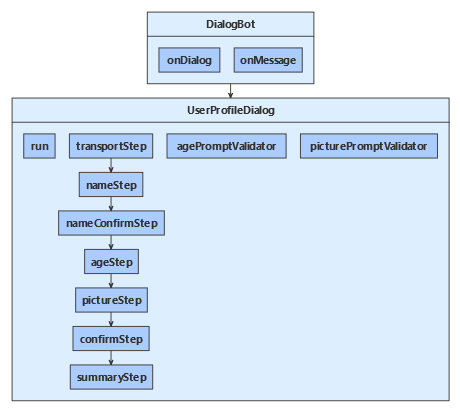
机器人通过 UserProfileDialog 与用户交互。 创建机器人的 DialogBot 时,UserProfileDialog 将设置为其主对话。 然后,机器人使用 run 帮助器方法来访问该对话。
dialogs/userProfileDialog.js
首先创建派生自 UserProfileDialog 类的 ComponentDialog,这包括 7 个步骤。
在 UserProfileDialog 构造函数中创建瀑布步骤、提示和瀑布对话,然后将其添加到对话集。 这些提示需要处于使用它们的同一对话集中。
class UserProfileDialog extends ComponentDialog {
    constructor(userState) {
        super('userProfileDialog');

        this.userProfile = userState.createProperty(USER_PROFILE);

        this.addDialog(new TextPrompt(NAME_PROMPT));
        this.addDialog(new ChoicePrompt(CHOICE_PROMPT));
        this.addDialog(new ConfirmPrompt(CONFIRM_PROMPT));
        this.addDialog(new NumberPrompt(NUMBER_PROMPT, this.agePromptValidator));
        this.addDialog(new AttachmentPrompt(ATTACHMENT_PROMPT, this.picturePromptValidator));

        this.addDialog(new WaterfallDialog(WATERFALL_DIALOG, [
            this.transportStep.bind(this),
            this.nameStep.bind(this),
            this.nameConfirmStep.bind(this),
            this.ageStep.bind(this),
            this.pictureStep.bind(this),
            this.summaryStep.bind(this),
            this.confirmStep.bind(this)
        ]));
接下来,添加对话框用来提示用户输入的步骤。 若要使用提示,请从对话中的某个步骤调用它,然后从步骤上下文检索下一步骤中的提示结果(本例使用 step.result)。 在幕后,提示是由两个步骤组成的对话。 首先,提示要求提供输入。 然后它返回有效值,或者使用重新提示从头开始,直到收到有效的输入为止。
应始终从瀑布步骤返回非 null 的 DialogTurnResult。 否则,对话可能不按设计意图运行。 下面显示了瀑布对话中 nameStep 的实现。
}

async nameStep(step) {
    step.values.transport = step.result.value;
    return await step.prompt(NAME_PROMPT, 'Please enter your name.');
}
在 ageStep 中,指定在用户输入未能通过验证时使用的重试提示;这可能是因为其格式导致提示无法解析,或者输入未满足上述构造函数中指定的验证条件。 在这种情况下,如果未提供重试提示,则提示将使用初始提示文本来重新提示用户输入。
}

async ageStep(step) {
    if (step.result) {
        // User said "yes" so we will be prompting for the age.
        // WaterfallStep always finishes with the end of the Waterfall or with another dialog; here it is a Prompt Dialog.
        const promptOptions = { prompt: 'Please enter your age.', retryPrompt: 'The value entered must be greater than 0 and less than 150.' };

        return await step.prompt(NUMBER_PROMPT, promptOptions);
    } else {
        // User said "no" so we will skip the next step. Give -1 as the age.
        return await step.next(-1);
    }
}
userProfile.js
用户的交通方式、姓名和年龄将保存在 UserProfile 类的实例中。
// @ts-check

class UserProfile {
    constructor(transport, name, age, picture) {
        this.transport = transport;
        this.name = name;
        this.age = age;
        this.picture = picture;
    }
}
dialogs/userProfileDialog.js
在最后一步,检查在上一个瀑布步骤中调用的对话框返回的 step.result。 如果返回值为 true,则个人资料访问器将获取并更新用户个人资料。 若要获取用户个人资料,请调用 get,然后设置 userProfile.transport、userProfile.name、userProfile.age 和 userProfile.picture 属性的值。 最后,在调用用于结束对话的 endDialog 之前汇总用户的信息。 结束对话会将该对话从对话堆栈中弹出,并将可选结果返回给父对话框。 父级是启动了刚刚结束的对话的对话或方法。
        msg += ' Your profile will not be kept.';
    }

    await step.context.sendActivity(msg);

    // WaterfallStep always finishes with the end of the Waterfall or with another dialog; here it is a Prompt Dialog.
    return await step.endDialog();
}

async summaryStep(step) {
    step.values.picture = step.result && step.result[0];

    // Get the current profile object from user state.
    const userProfile = await this.userProfile.get(step.context, new UserProfile());

    userProfile.transport = step.values.transport;
    userProfile.name = step.values.name;
    userProfile.age = step.values.age;
    userProfile.picture = step.values.picture;

    let msg = `I have your mode of transport as ${ userProfile.transport } and your name as ${ userProfile.name }`;
    if (userProfile.age !== -1) {
        msg += ` and your age as ${ userProfile.age }`;
    }

    msg += '.';
    await step.context.sendActivity(msg);
    if (userProfile.picture) {
        try {
            await step.context.sendActivity(MessageFactory.attachment(userProfile.picture, 'This is your profile picture.'));
        } catch {
            await step.context.sendActivity('A profile picture was saved but could not be displayed here.');
        }
创建用于运行瀑布对话的扩展方法
在 run 中定义的 userProfileDialog 帮助器方法用于创建和访问对话上下文。 这里,accessor 是对话状态属性的访问器,this 是用户资料组件对话框。 由于组件对话定义内部对话集,因此我们必须创建可让消息处理程序代码看到的外部对话集,并使用它来创建对话上下文。
对话上下文是通过调用 createContext 方法创建的,用于从机器人轮次处理程序内部来与对话集交互。 对话上下文包含当前轮次上下文、父对话和对话状态。对话状态提供一种方法用于在对话中保留信息。
通过对话上下文,您可以使用字符串 ID 启动对话,或继续当前对话(例如具有多个步骤的瀑布式对话)。 对话上下文将传递到机器人的所有对话和瀑布步骤。
 * @param {*} accessor
 */
async run(turnContext, accessor) {
    const dialogSet = new DialogSet(accessor);
    dialogSet.add(this);

    const dialogContext = await dialogSet.createContext(turnContext);
    const results = await dialogContext.continueDialog();
    if (results.status === DialogTurnStatus.empty) {
        await dialogContext.beginDialog(this.id);
    }
}
机器人通过 UserProfileDialog 来与用户交互。 创建机器人的 DialogBot 类时,UserProfileDialog 将设置为其主对话。 然后,机器人使用 Run 帮助器方法来访问该对话。
UserProfileDialog.java
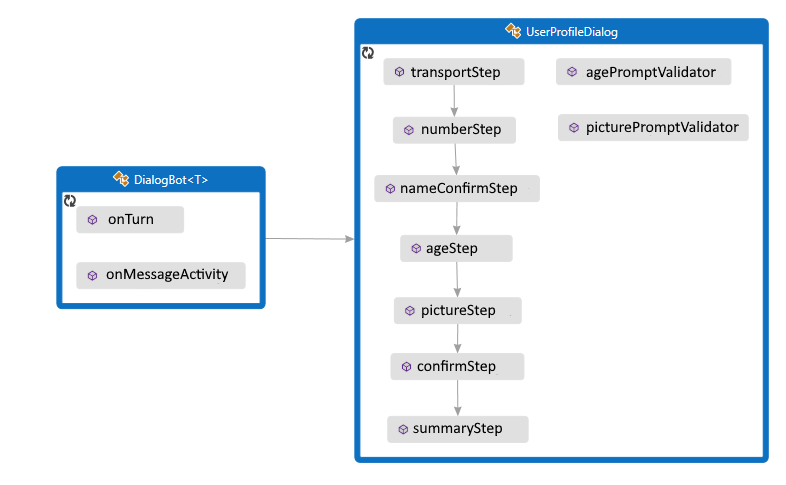
首先创建派生自 UserProfileDialog 类的 ComponentDialog,这包括 7 个步骤。
在 UserProfileDialog 构造函数中创建瀑布步骤、提示和瀑布对话,然后将其添加到对话集。 这些提示需要处于使用它们的同一对话集中。
public UserProfileDialog(UserState withUserState) {
    super("UserProfileDialog");

    userProfileAccessor = withUserState.createProperty("UserProfile");

    WaterfallStep[] waterfallSteps = {
        UserProfileDialog::transportStep,
        UserProfileDialog::nameStep,
        this::nameConfirmStep,
        this::ageStep,
        UserProfileDialog::pictureStep,
        this::confirmStep,
        this::summaryStep
    };

    // Add named dialogs to the DialogSet. These names are saved in the dialog state.
    addDialog(new WaterfallDialog("WaterfallDialog", Arrays.asList(waterfallSteps)));
    addDialog(new TextPrompt("TextPrompt"));
    addDialog(new NumberPrompt<Integer>("NumberPrompt", UserProfileDialog::agePromptValidator, Integer.class));
    addDialog(new ChoicePrompt("ChoicePrompt"));
    addDialog(new ConfirmPrompt("ConfirmPrompt"));
    addDialog(new AttachmentPrompt("AttachmentPrompt", UserProfileDialog::picturePromptValidator));

    // The initial child Dialog to run.
    setInitialDialogId("WaterfallDialog");
}
接下来,添加对话框用来提示用户输入的步骤。 若要使用提示,请从对话中的某个步骤调用它,然后使用 stepContext.getResult() 检索下一步骤中的提示结果。 在幕后,提示是由两个步骤组成的对话。 首先,提示要求提供输入。 然后它返回有效值,或者使用重新提示从头开始,直到收到有效的输入为止。
应始终在瀑布步骤中返回非空的 DialogTurnResult。 否则,对话可能不按设计意图运行。 下面显示了瀑布对话中 nameStep 的实现。
private static CompletableFuture<DialogTurnResult> nameStep(WaterfallStepContext stepContext) {
    stepContext.getValues().put("transport", ((FoundChoice) stepContext.getResult()).getValue());

    PromptOptions promptOptions = new PromptOptions();
    promptOptions.setPrompt(MessageFactory.text("Please enter your name."));
    return stepContext.prompt("TextPrompt", promptOptions);
}
在 ageStep 中,指定当用户输入采用的是提示无法分析的格式,或者不符合验证条件,因而无法验证时,要使用的重试提示。 在这种情况下,如果未提供重试提示,则提示将使用初始提示文本来重新提示用户输入。
private CompletableFuture<DialogTurnResult> ageStep(WaterfallStepContext stepContext) {
    if ((Boolean)stepContext.getResult()) {
        // User said "yes" so we will be prompting for the age.
        // WaterfallStep always finishes with the end of the Waterfall or with another dialog; here it is a Prompt Dialog.
        PromptOptions promptOptions = new PromptOptions();
        promptOptions.setPrompt(MessageFactory.text("Please enter your age."));
        promptOptions.setRetryPrompt(MessageFactory.text("The value entered must be greater than 0 and less than 150."));

        return stepContext.prompt("NumberPrompt", promptOptions);
    }

    // User said "no" so we will skip the next step. Give -1 as the age.
    return stepContext.next(-1);
}
UserProfile.java
用户的交通方式、姓名和年龄将保存在 UserProfile 类的实例中。
// Copyright (c) Microsoft Corporation. All rights reserved.
// Licensed under the MIT License.

package com.microsoft.bot.sample.multiturnprompt;

import com.microsoft.bot.schema.Attachment;

/**
 * This is our application state.
 */
public class UserProfile {
    public String transport;
    public String name;
    public Integer age;
    public Attachment picture;
}
UserProfileDialog.java
在最后一步,检查在上一个瀑布步骤中调用的对话框所返回的 stepContext.Result。 如果返回值为 true,则个人资料访问器将获取并更新用户个人资料。 若要获取用户个人资料,请调用 get,然后设置 userProfile.Transport、userProfile.Name、userProfile.Age 和 userProfile.Picture 属性的值。 最后,在调用用于结束对话的 endDialog 之前汇总用户的信息。 结束该对话会将其从对话堆栈中弹出,并将一个可选结果返回给该对话的父对话。 父级是启动刚刚结束的该对话框的对话框或方法。
// Copyright (c) Microsoft Corporation. All rights reserved.
// Licensed under the MIT License.

package com.microsoft.bot.sample.multiturnprompt;

import com.microsoft.bot.builder.MessageFactory;
import com.microsoft.bot.builder.StatePropertyAccessor;
import com.microsoft.bot.builder.UserState;
import com.microsoft.bot.connector.Channels;
import com.microsoft.bot.dialogs.ComponentDialog;
import com.microsoft.bot.dialogs.DialogTurnResult;
import com.microsoft.bot.dialogs.WaterfallDialog;
import com.microsoft.bot.dialogs.WaterfallStep;
import com.microsoft.bot.dialogs.WaterfallStepContext;
import com.microsoft.bot.dialogs.choices.ChoiceFactory;
import com.microsoft.bot.dialogs.choices.FoundChoice;
import com.microsoft.bot.dialogs.prompts.AttachmentPrompt;
import com.microsoft.bot.dialogs.prompts.ChoicePrompt;
import com.microsoft.bot.dialogs.prompts.ConfirmPrompt;
import com.microsoft.bot.dialogs.prompts.NumberPrompt;
import com.microsoft.bot.dialogs.prompts.PromptOptions;
import com.microsoft.bot.dialogs.prompts.PromptValidatorContext;
import com.microsoft.bot.dialogs.prompts.TextPrompt;
import com.microsoft.bot.schema.Attachment;
import java.util.ArrayList;
import java.util.Arrays;
import java.util.List;
import java.util.concurrent.CompletableFuture;
import org.apache.commons.lang3.StringUtils;

public class UserProfileDialog extends ComponentDialog {
    private final StatePropertyAccessor<UserProfile> userProfileAccessor;

    public UserProfileDialog(UserState withUserState) {
        super("UserProfileDialog");

        userProfileAccessor = withUserState.createProperty("UserProfile");

        WaterfallStep[] waterfallSteps = {
            UserProfileDialog::transportStep,
            UserProfileDialog::nameStep,
            this::nameConfirmStep,
            this::ageStep,
            UserProfileDialog::pictureStep,
            this::confirmStep,
            this::summaryStep
        };

        // Add named dialogs to the DialogSet. These names are saved in the dialog state.
        addDialog(new WaterfallDialog("WaterfallDialog", Arrays.asList(waterfallSteps)));
        addDialog(new TextPrompt("TextPrompt"));
        addDialog(new NumberPrompt<Integer>("NumberPrompt", UserProfileDialog::agePromptValidator, Integer.class));
        addDialog(new ChoicePrompt("ChoicePrompt"));
        addDialog(new ConfirmPrompt("ConfirmPrompt"));
        addDialog(new AttachmentPrompt("AttachmentPrompt", UserProfileDialog::picturePromptValidator));

        // The initial child Dialog to run.
        setInitialDialogId("WaterfallDialog");
    }

    private static CompletableFuture<DialogTurnResult> transportStep(WaterfallStepContext stepContext) {
        // WaterfallStep always finishes with the end of the Waterfall or with another dialog; here it is a Prompt Dialog.
        // Running a prompt here means the next WaterfallStep will be run when the user's response is received.
        PromptOptions promptOptions = new PromptOptions();
        promptOptions.setPrompt(MessageFactory.text("Please enter your mode of transport."));
        promptOptions.setChoices(ChoiceFactory.toChoices("Car", "Bus", "Bicycle"));

        return stepContext.prompt("ChoicePrompt", promptOptions);
    }

    private static CompletableFuture<DialogTurnResult> nameStep(WaterfallStepContext stepContext) {
        stepContext.getValues().put("transport", ((FoundChoice) stepContext.getResult()).getValue());

        PromptOptions promptOptions = new PromptOptions();
        promptOptions.setPrompt(MessageFactory.text("Please enter your name."));
        return stepContext.prompt("TextPrompt", promptOptions);
    }

    private CompletableFuture<DialogTurnResult> nameConfirmStep(WaterfallStepContext stepContext) {
        stepContext.getValues().put("name", stepContext.getResult());

        // We can send messages to the user at any point in the WaterfallStep.
        return stepContext.getContext().sendActivity(MessageFactory.text(String.format("Thanks %s.", stepContext.getResult())))
            .thenCompose(resourceResponse -> {
                // WaterfallStep always finishes with the end of the Waterfall or with another dialog; here it is a Prompt Dialog.
                PromptOptions promptOptions = new PromptOptions();
                promptOptions.setPrompt(MessageFactory.text("Would you like to give your age?"));
                return stepContext.prompt("ConfirmPrompt", promptOptions);
            });
    }

    private CompletableFuture<DialogTurnResult> ageStep(WaterfallStepContext stepContext) {
        if ((Boolean)stepContext.getResult()) {
            // User said "yes" so we will be prompting for the age.
            // WaterfallStep always finishes with the end of the Waterfall or with another dialog; here it is a Prompt Dialog.
            PromptOptions promptOptions = new PromptOptions();
            promptOptions.setPrompt(MessageFactory.text("Please enter your age."));
            promptOptions.setRetryPrompt(MessageFactory.text("The value entered must be greater than 0 and less than 150."));

            return stepContext.prompt("NumberPrompt", promptOptions);
        }

        // User said "no" so we will skip the next step. Give -1 as the age.
        return stepContext.next(-1);
    }

    private static CompletableFuture<DialogTurnResult> pictureStep(WaterfallStepContext stepContext) {
        stepContext.getValues().put("age", (Integer) stepContext.getResult());

        String msg = (Integer)stepContext.getValues().get("age") == -1
            ? "No age given."
            : String.format("I have your age as %d.", (Integer)stepContext.getValues().get("age"));

        // We can send messages to the user at any point in the WaterfallStep.
        return stepContext.getContext().sendActivity(MessageFactory.text(msg))
            .thenCompose(resourceResponse -> {
                if (StringUtils.equals(stepContext.getContext().getActivity().getChannelId(), Channels.MSTEAMS)) {
                    // This attachment prompt example is not designed to work for Teams attachments, so skip it in this case
                    return stepContext.getContext().sendActivity(MessageFactory.text("Skipping attachment prompt in Teams channel..."))
                        .thenCompose(resourceResponse1 -> stepContext.next(null));
                }

                // WaterfallStep always finishes with the end of the Waterfall or with another dialog; here it is a Prompt Dialog.
                PromptOptions promptOptions = new PromptOptions();
                promptOptions.setPrompt(MessageFactory.text("Please attach a profile picture (or type any message to skip)."));
                promptOptions.setRetryPrompt(MessageFactory.text("The attachment must be a jpeg/png image file."));

                return stepContext.prompt("AttachmentPrompt", promptOptions);
            });
    }

    private CompletableFuture<DialogTurnResult> confirmStep(WaterfallStepContext stepContext) {
        List<Attachment> attachments = (List<Attachment>)stepContext.getResult();
        stepContext.getValues().put("picture", attachments == null ? null : attachments.get(0));

        // WaterfallStep always finishes with the end of the Waterfall or with another dialog; here it is a Prompt Dialog.
        PromptOptions promptOptions = new PromptOptions();
        promptOptions.setPrompt(MessageFactory.text("Is this ok?"));
        return stepContext.prompt("ConfirmPrompt", promptOptions);
    }

    private CompletableFuture<DialogTurnResult> summaryStep(WaterfallStepContext stepContext) {
        if ((Boolean)stepContext.getResult()) {
            // Get the current profile object from user state.
            return userProfileAccessor.get(stepContext.getContext(), () -> new UserProfile())
                .thenCompose(userProfile -> {
                    userProfile.transport = (String) stepContext.getValues().get("transport");
                    userProfile.name = (String) stepContext.getValues().get("name");
                    userProfile.age = (Integer) stepContext.getValues().get("age");
                    userProfile.picture = (Attachment) stepContext.getValues().get("picture");

                    String msg = String.format(
                        "I have your mode of transport as %s and your name as %s",
                        userProfile.transport, userProfile.name
                    );

                    if (userProfile.age != -1) {
                        msg += String.format(" and your age as %s", userProfile.age);
                    }

                    msg += ".";

                    return stepContext.getContext().sendActivity(MessageFactory.text(msg))
                        .thenApply(resourceResponse -> userProfile);
                })
                .thenCompose(userProfile -> {
                    if (userProfile.picture != null) {
                        try {
                            return stepContext.getContext().sendActivity(
                                    MessageFactory.attachment(userProfile.picture,
                                            "This is your profile picture."
                                    ));
                        } catch(Exception ex) {
                            return stepContext.getContext().sendActivity(
                                    MessageFactory.text(
                                            "A profile picture was saved but could not be displayed here."
                                    ));
                        }
                    }

                    return stepContext.getContext().sendActivity(
                        MessageFactory.text("A profile picture wasn't attached.")
                    );
                })
                .thenCompose(resourceResponse -> stepContext.endDialog());
        }

        // WaterfallStep always finishes with the end of the Waterfall or with another dialog; here it is the end.
        return stepContext.getContext().sendActivity(MessageFactory.text("Thanks. Your profile will not be kept."))
            .thenCompose(resourceResponse -> stepContext.endDialog());
    }

    private static CompletableFuture<Boolean> agePromptValidator(
            PromptValidatorContext<Integer> promptContext
    ) {
        // This condition is our validation rule. You can also change the value at this point.
        return CompletableFuture.completedFuture(
                promptContext.getRecognized().getSucceeded()
                        && promptContext.getRecognized().getValue() > 0
                        && promptContext.getRecognized().getValue() < 150);
    }

    private static CompletableFuture<Boolean> picturePromptValidator(
        PromptValidatorContext<List<Attachment>> promptContext
    ) {
        if (promptContext.getRecognized().getSucceeded()) {
            List<Attachment> attachments = promptContext.getRecognized().getValue();
            List<Attachment> validImages = new ArrayList<>();

            for (Attachment attachment : attachments) {
                if (StringUtils.equals(
                    attachment.getContentType(), "image/jpeg") || StringUtils.equals(attachment.getContentType(), "image/png")
                ) {
                    validImages.add(attachment);
                }
            }

            promptContext.getRecognized().setValue(validImages);

            // If none of the attachments are valid images, the retry prompt should be sent.
            return CompletableFuture.completedFuture(!validImages.isEmpty());
        }
        else {
            // We can return true from a validator function even if Recognized.Succeeded is false.
            return promptContext.getContext().sendActivity("No attachments received. Proceeding without a profile picture...")
                .thenApply(resourceResponse -> true);
        }
    }
}
若要使用对话功能,请在终端中运行 pip install botbuilder-dialogs 和 pip install botbuilder-ai,安装 botbuilder-dialogs 和 botbuilder-ai PyPI 包。
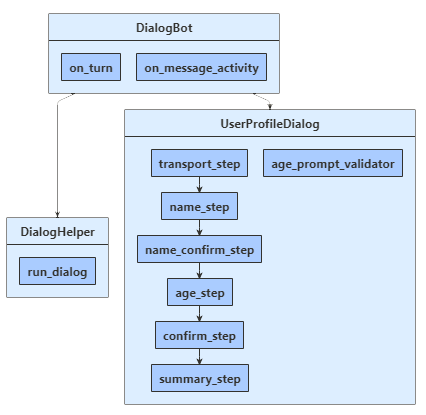
机器人通过 UserProfileDialog 来与用户交互。 创建机器人的 DialogBot 类时,UserProfileDialog 将设置为机器人的主对话。 然后,机器人使用 run_dialog 帮助器方法来访问该对话。
dialogs\user_profile_dialog.py
首先创建派生自 UserProfileDialog 类的 ComponentDialog,这包括 7 个步骤。
在 UserProfileDialog 构造函数中创建瀑布步骤、提示和瀑布对话,然后将其添加到对话集。 这些提示需要处于使用它们的同一对话集中。
def __init__(self, user_state: UserState):
    super(UserProfileDialog, self).__init__(UserProfileDialog.__name__)

    self.user_profile_accessor = user_state.create_property("UserProfile")

    self.add_dialog(
        WaterfallDialog(
            WaterfallDialog.__name__,
            [
                self.transport_step,
                self.name_step,
                self.name_confirm_step,
                self.age_step,
                self.picture_step,
                self.summary_step,
                self.confirm_step,
            ],
        )
    )
    self.add_dialog(TextPrompt(TextPrompt.__name__))
    self.add_dialog(
        NumberPrompt(NumberPrompt.__name__, UserProfileDialog.age_prompt_validator)
    )
    self.add_dialog(ChoicePrompt(ChoicePrompt.__name__))
    self.add_dialog(ConfirmPrompt(ConfirmPrompt.__name__))
    self.add_dialog(
        AttachmentPrompt(
            AttachmentPrompt.__name__, UserProfileDialog.picture_prompt_validator
        )
    )

    self.initial_dialog_id = WaterfallDialog.__name__
接下来,添加对话框用来提示用户输入的步骤。 若要使用提示,请从对话中的某个步骤调用它,然后使用 step_context.result 检索下一步骤中的提示结果。 在幕后,提示是由两个步骤组成的对话。 首先,提示要求提供输入。 然后它返回有效值,或者使用重新提示从头开始,直到收到有效的输入为止。
应始终从瀑布步骤返回非 null 的 DialogTurnResult。 否则,对话可能不按设计意图运行。 在此处可以看到瀑布对话中 name_step 的实现。
async def name_step(self, step_context: WaterfallStepContext) -> DialogTurnResult:
    step_context.values["transport"] = step_context.result.value

    return await step_context.prompt(
        TextPrompt.__name__,
        PromptOptions(prompt=MessageFactory.text("Please enter your name.")),
    )
在 age_step 中,指定当用户输入未能通过验证时显示的重试提示语;这可能是因为输入格式是该提示无法解析的格式,或者输入未满足上述构造函数中指定的验证条件。 在这种情况下,如果未提供重试提示,则该提示将使用初始提示文本再次提示用户进行输入
async def age_step(self, step_context: WaterfallStepContext) -> DialogTurnResult:
    if step_context.result:
        # User said "yes" so we will be prompting for the age.
        # WaterfallStep always finishes with the end of the Waterfall or with another dialog,
        # here it is a Prompt Dialog.
        return await step_context.prompt(
            NumberPrompt.__name__,
            PromptOptions(
                prompt=MessageFactory.text("Please enter your age."),
                retry_prompt=MessageFactory.text(
                    "The value entered must be greater than 0 and less than 150."
                ),
            ),
        )

    # User said "no" so we will skip the next step. Give -1 as the age.
    return await step_context.next(-1)
data_models\user_profile.py
用户的交通方式、姓名和年龄将保存在 UserProfile 类的实例中。
class UserProfile:
    """
      This is our application state. Just a regular serializable Python class.
    """

    def __init__(self, name: str = None, transport: str = None, age: int = 0, picture: Attachment = None):
        self.name = name
        self.transport = transport
        self.age = age
        self.picture = picture
dialogs\user_profile_dialog.py
在最后一步,检查在上一个瀑布步骤中调用的对话框所返回的 step_context.result。 如果返回值为 true,则个人资料访问器将获取并更新用户个人资料。 若要获取用户个人资料,请调用 get,然后设置 user_profile.transport、user_profile.name 和 user_profile.age 属性的值。 最后,在调用用于结束对话的 end_dialog 之前汇总用户的信息。 结束该对话会将其从对话堆栈中弹出,并将一个可选结果返回给该对话的父对话。 父级是启动刚刚结束的该对话框的对话框或方法。
async def summary_step(
    self, step_context: WaterfallStepContext
) -> DialogTurnResult:
    step_context.values["picture"] = (
        None if not step_context.result else step_context.result[0]
    )
    # Get the current profile object from user state.  Changes to it
    # will saved during Bot.on_turn.
    user_profile = await self.user_profile_accessor.get(
        step_context.context, UserProfile
    )

    user_profile.transport = step_context.values["transport"]
    user_profile.name = step_context.values["name"]
    user_profile.age = step_context.values["age"]
    user_profile.picture = step_context.values["picture"]

    msg = f"I have your mode of transport as {user_profile.transport} and your name as {user_profile.name}."
    if user_profile.age != -1:
        msg += f" And age as {user_profile.age}."

    await step_context.context.send_activity(MessageFactory.text(msg))

    if user_profile.picture:
        await step_context.context.send_activity(
            MessageFactory.attachment(
                user_profile.picture, "This is your profile picture."
            )
        )
    else:
        await step_context.context.send_activity(
            "A profile picture was saved but could not be displayed here."
        )

    # WaterfallStep always finishes with the end of the Waterfall or with another
    # dialog, here it is the end.
    return await step_context.prompt(
        ConfirmPrompt.__name__,
创建用于运行瀑布对话的扩展方法
run_dialog() 帮助器方法在 helpers\dialog_helper.py 中定义,用于创建和访问对话上下文。 这里,accessor 是对话状态属性的属性访问器,dialog 是用户个人资料组件对话框。 由于组件对话定义内部对话集,因此我们必须创建可让消息处理程序代码看到的外部对话集,并使用它来创建对话上下文。
通过调用 create_context 创建对话上下文,用于从机器人轮次处理程序内部来与对话集交互。 对话上下文包含当前轮次上下文、父对话和对话状态。对话状态提供一种方法用于在对话中保留信息。
借助对话上下文可以使用对话的字符串 ID 来启动该对话,或继续当前的对话(例如,包含多个步骤的瀑布对话)。 对话上下文将传递到机器人的所有对话和瀑布步骤。
class DialogHelper:
    @staticmethod
    async def run_dialog(
        dialog: Dialog, turn_context: TurnContext, accessor: StatePropertyAccessor
    ):
        dialog_set = DialogSet(accessor)
        dialog_set.add(dialog)

        dialog_context = await dialog_set.create_context(turn_context)
        results = await dialog_context.continue_dialog()
        if results.status == DialogTurnStatus.Empty:
            await dialog_context.begin_dialog(dialog.id)