默认情况下,Azure Cosmos DB 跨所有物理分区均匀分布预配的吞吐量。 但是,如果工作负荷偏斜(例如,某些分区由于热键或流量不均衡而持续需要更多吞吐量),则可以重新分发吞吐量以优化性能。 还可以将分区上的 RU/秒增加到最大 10,000 RU/秒。 在热分区达到最大 RU/秒限制的情况下,还可以拆分分区。 此功能适用于使用预配吞吐量(手动或自动缩放)的数据库和容器,可以使用 Azure Cosmos DB PowerShell 或 Azure CLI 命令进行管理。
例如,如果在零售应用程序中对 StoreId 数据进行分区,则某些商店的活动可能高于其他商店。 如果注意到这些繁忙的存储频繁地遭遇速率限制(即429错误),那么重新分配吞吐量使您能够将更多资源分配给热分区,从而提高性能。 可以使用或不增加整体吞吐量来执行此作。
注释
拆分具有单个热分区键的热分区不会提高性能。 即使在拆分后,具有相同分区键的所有数据也会位于同一物理分区上。 因此,可以为其配置的最大 RU/秒仍为 10,000 RU/秒。 请参阅此查询以确定物理分区中是否存在单个热分区键。
注释
目前,默认情况下,吞吐量策略设置为“等于”。使用此功能重新分发吞吐量或将自定义吞吐量分配给物理分区后,策略现在将设置为“自定义”。这意味着只能使用此 API 更改吞吐量(RU/s)设置。 阻止在容器或共享吞吐量数据库级别更改吞吐量。 此限制是经过精心设计,以确保保留每个分区的自定义每秒请求单位 (RU/s)。 若要重新启用更改容器或共享吞吐量数据库级别的功能,请将吞吐量策略更改回“等于”。
先决条件
- 现有的 Azure Cosmos DB 帐户
最新版本的 Azure CLI
cosmosdb-preview已安装扩展az extension add --name cosmosdb-preview
最新版本的 Azure PowerShell
Az.CosmosDB启用了预发行版功能的模块$parameters = @{ Name = "Az.CosmosDB" AllowPrerelease = $true Force = $true } Install-Module @parameters
使用 Azure Monitor 指标识别热分区
若要使用 Azure Monitor 指标识别 Azure Cosmos DB 中的热分区,请检查每个物理分区的规范化 RU 消耗,以查找使用率不成比例的分区。
登录到 Azure 门户 (https://portal.azure.cn)。
在 Azure 门户中导航到 Azure Cosmos DB 帐户的 “见解 ”部分。
选择 “吞吐量”。
打开按 PartitionKeyRangeID 划分的规范化 RU 消耗量 (%)。
筛选到特定数据库和容器。
查看每个
PartitionKeyRangeId映射到物理分区的图表。确定任何
PartitionKeyRangeId一直显示规范化 RU 消耗量比其他高的情况。 例如,如果一个值始终为 100%,而其他值则为 30% 或更少,则此模式表示热分区。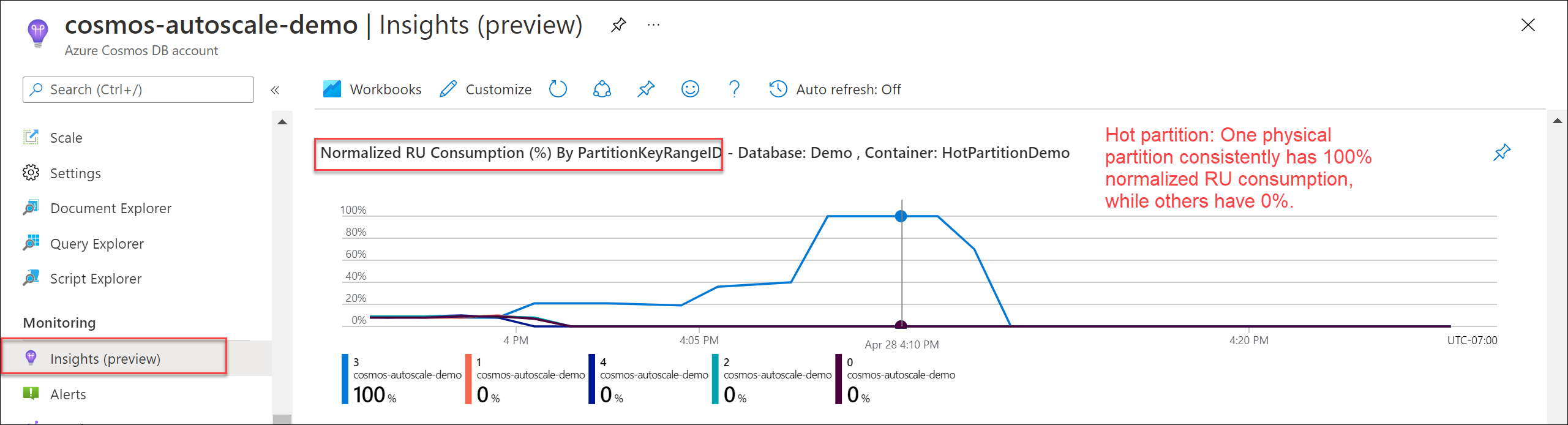
使用诊断日志识别热分区
使用帐户的诊断日志和/或工作簿中的 CDBPartitionKeyRUConsumption 信息,了解哪些逻辑分区键和物理分区在秒级粒度下消耗了最多的 RU/s。 若要使用此功能,请确保已启用PartitionKeyRUConsumption。
转到 Azure Cosmos DB 帐户的 Diagnostic Logs 部分,或 Workbooks | PartitionInfo 选项卡,然后选择数据库和容器。
查找随着时间推移使用此查询消耗最多 RU/秒的物理分区(
PartitionKeyRangeId)。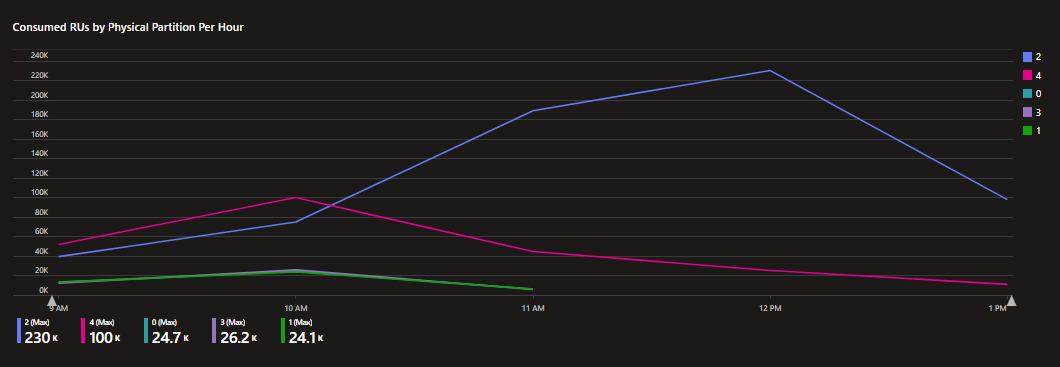
标题为“每小时每个物理分区已消耗的 RU”的折线图,Y 轴范围为 0K 到 240K RU/秒,X 轴跨度约为上午 9 点至下午 1 点。 五个物理分区绘制为彩色线条。 分区2(蓝色)在上午9点时接近30K,到中午12点急剧升至约220K,然后在下午1点略降至约200K,最大值为230K。 分区4(洋红色)从接近5万开始,在上午10点左右达到约9.5万的峰值,随后稳步下降,到下午1点时接近0,最大值为10万。 分区 0(蓝绿色)、3(紫色)和 1(绿色)在整个过程中始终保持相对平稳且处于较低水平,最大值分别为 24.7K、26.2K 和 24.1K。 与所有其他分区相比,图表清楚地将分区 2 标识为消耗不成比例的高 RU/秒的热分区。
let databaseName = "MyDB" // Replace with database name
let collectionName = "MyCollection" // Replace with collection name
CDBPartitionKeyRUConsumption
| where TimeGenerated >= ago(24hr)
| where DatabaseName == databaseName and CollectionName == collectionName
| where isnotempty(PartitionKey) and isnotempty(PartitionKeyRangeId)
| summarize sum(RequestCharge) by bin(TimeGenerated, 1s), PartitionKeyRangeId
| render timechart
对于物理分区,请查找使用此查询每小时消耗最多 RU/秒的顶级逻辑分区键。
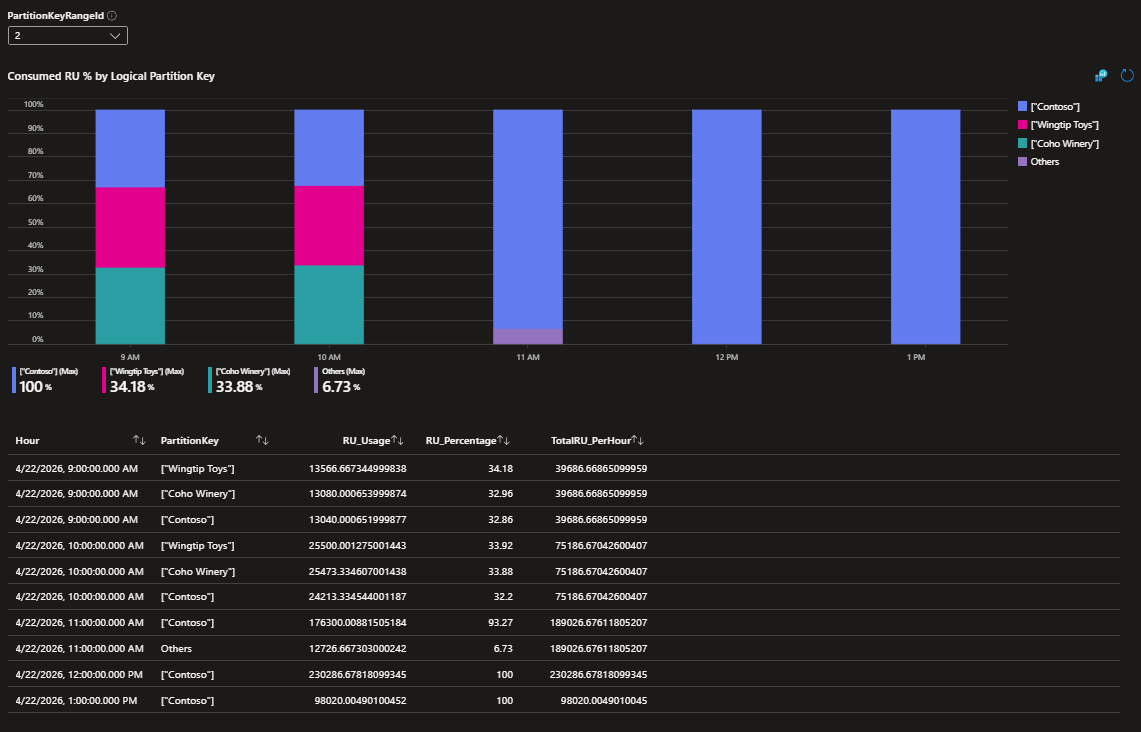
图表下方是一个包含 Hour、PartitionKey、RU_Usage、RU_Percentage 和 TotalRU_PerHour 列的数据表。 值得注意的项包括:上午 9 点,在总计 39,686 RU/s 中,Wingtip Toys 使用了 13,566 RU/s(34.18%),Coho Winery 使用了 13,080 RU/s(32.96%),Contoso 使用了 13,040 RU/s(32.86%)。 上午 10 点时,每个键大约消耗了 25,000 RU/s,而总量为 75,186 RU/s。 上午 11 点,Contoso 在 189,026 RU/秒(93.27%)中使用了 176,300 RU/秒。 下午12时,Contoso 使用了 230,286 RU/秒(100%),下午 1 点,Contoso 使用了 98,020 RU/秒(100%)。 这些数据证实,Contoso 逻辑分区键是导致物理分区 2 资源高消耗的唯一热键。
let databaseName = "MyDB"; // Replace with database name
let collectionName = "MyCollection"; // Replace with collection name
let partitionKeyRangeId = 0; // Replace with your PartitionKeyRangeId
CDBPartitionKeyRUConsumption
| where TimeGenerated >= ago(24hour)
| where DatabaseName == databaseName and CollectionName == collectionName
| where isnotempty(PartitionKey) and isnotempty(PartitionKeyRangeId)
| where PartitionKeyRangeId == partitionKeyRangeId
| summarize RU_Usage = sum(RequestCharge) by bin(TimeGenerated, 1h), PartitionKey
| join kind=inner (
CDBPartitionKeyRUConsumption
| where TimeGenerated >= ago(24hour)
| where DatabaseName == databaseName and CollectionName == collectionName
| where isnotempty(PartitionKey) and isnotempty(PartitionKeyRangeId)
| where PartitionKeyRangeId == partitionKeyRangeId
| summarize TotalRU_PerHour = sum(RequestCharge) by bin(TimeGenerated, 1h)
) on TimeGenerated
| extend RU_Percentage = round(RU_Usage * 100.00 / TotalRU_PerHour, 2)
| project Hour = TimeGenerated, PartitionKey, RU_Usage, TotalRU_PerHour, RU_Percentage
| order by Hour asc, RU_Percentage desc
这些示例查询使用 24 小时进行说明,但最好使用至少七天的历史记录来查看使用模式。
注释
如果某个物理分区过热是由单个热点逻辑分区键导致的(如“Contoso”所示),则不建议拆分该物理分区。 这是因为,即使拆分物理分区,该单个热点逻辑分区键仍会位于某个子分区中,并且仍会遭到限流。
确定每个物理分区的当前吞吐量
若要检查每个物理分区的当前 RU/s,请使用 Azure Monitor 指标 PhysicalPartitionThroughput 并按 PhysicalPartitionId 拆分。 如果每个分区的吞吐量从未更改,则通过将总 RU/秒除以物理分区数来估计每个分区的 RU/秒。
使用 az cosmosdb sql container retrieve-partition-throughput 读取每个物理分区上的当前 RU/s。 此 CLI 命令没有等效的共享吞吐量。
// Container with dedicated RU/s - some partitions
az cosmosdb sql container retrieve-partition-throughput \
    --resource-group "<resource-group-name>" \
    --account-name "<cosmos-account-name>" \
    --database-name "<cosmos-database-name>" \
    --name "<cosmos-container-name>" \
    --physical-partition-ids "<space-separated-list-of-physical-partition-ids>"

// Container with dedicated RU/s - all partitions
az cosmosdb sql container retrieve-partition-throughput \
    --resource-group "<resource-group-name>" \
    --account-name "<cosmos-account-name>" \
    --database-name "<cosmos-database-name>" \
    --name "<cosmos-container-name>"
    --all-partitions
请使用Get-AzCosmosDBSqlContainerPerPartitionThroughput或Get-AzCosmosDBSqlDatabasePerPartitionThroughput命令,读取每个物理分区上的当前 RU/秒。
# Container with dedicated RU/s - some partitions
$containerParams = @{
    ResourceGroupName = "<resource-group-name>"
    AccountName = "<cosmos-account-name>"
    DatabaseName = "<cosmos-database-name>"
    Name = "<cosmos-container-name>"
    PhysicalPartitionIds = @("<PartitionId>", "<PartitionId>")
}
$somePartitionsDedicatedRUContainer = Get-AzCosmosDBSqlContainerPerPartitionThroughput @containerParams

# Container with dedicated RU/s - all partitions
$containerAllParams = @{
    ResourceGroupName = "<resource-group-name>"
    AccountName = "<cosmos-account-name>"
    DatabaseName = "<cosmos-database-name>"
    Name = "<cosmos-container-name>"
    AllPartitions = $true
}
$allPartitionsDedicatedRUContainer = Get-AzCosmosDBSqlContainerPerPartitionThroughput @containerAllParams

# Database with shared RU/s - some partitions
$databaseParams = @{
    ResourceGroupName = "<resource-group-name>"
    AccountName = "<cosmos-account-name>"
    DatabaseName = "<cosmos-database-name>"
    PhysicalPartitionIds = @("<PartitionId>", "<PartitionId>")
}
$somePartitionsSharedThroughputDatabase = Get-AzCosmosDBSqlDatabasePerPartitionThroughput @databaseParams

# Database with shared RU/s - all partitions
$databaseAllParams = @{
    ResourceGroupName = "<resource-group-name>"
    AccountName = "<cosmos-account-name>"
    DatabaseName = "<cosmos-database-name>"
    AllPartitions = $true
}
$allPartitionsSharedThroughputDatabase = Get-AzCosmosDBSqlDatabasePerPartitionThroughput @databaseAllParams
注释
有关查找分区数的详细信息,请参阅 缩放预配吞吐量(RU/s)的最佳做法。
计算目标分区的吞吐量
接下来,让我们确定要为最热的物理分区分配多少 RU/s(请求单位每秒)。 调用此设置目标分区。
在设置目标分区的吞吐量之前,请记住以下几点:
可以减少或增加分区上的吞吐量。
物理分区最多只能包含 10,000RU/秒。
用户可以将目标分区的吞吐量设置为最大值 20,000RU/秒。
- 将分区设置为大于 10,000 RU/秒的吞吐量值会导致分区拆分,这可能需要一些时间。
如果将分区的 RU/秒设置高于 10,000,它会先获得 10,000 RU/秒。 然后,Azure Cosmos DB 会自动拆分分区,并在新分区之间均匀分配指定的吞吐量。
- 如果物理分区使用 5,000 RU/秒,并且将其吞吐量设置为 15,000 RU/秒,则 Azure Cosmos DB 首先将 10,000 RU/秒分配给原始分区。 然后它会自动将分区拆分为两个分区,每个分区的吞吐量为每秒 7,500 RU。
如果所有分区的总吞吐量不等于所有分区的当前吞吐量总和,则此作会相应地更新总吞吐量设置。
- 例如,假设容器有 10,000 RU/s 和两个物理分区 P1 和 P2,每个分区为 5000 RU/秒。 如果将 20,000 RU/秒分配给 P1,则容器的新总吞吐量为 25,000 RU/秒。
方法正确与否取决于工作负载要求。 常见方法包括:
按百分比增加 RU/秒,测量 429 响应的速率,并重复,直到达到所需的吞吐量。
如果你不确定正确的百分比,可以从 10% 开始以保持保守。
如果知道此物理分区需要大部分吞吐量,请首先调整 RU/秒。 将 RU/s 加倍,或将其增加到最大 10,000 RU/秒,以较低者为准。 如果 10,000 RU/s 不够,而且分区中不只有一个热键,可以将设置提升到 20,000 RU/s 来拆分分区。
将 RU/秒增加到
Total consumed RU/s of the physical partition + (Number of 429 responses per second * Average RU charge per request to the partition)。- 此方法估计如果请求没有速率限制,则“实际”RU/秒消耗量会是什么。
以编程方式更改跨分区的吞吐量
让我们看一个示例:一个容器具有 6,000 RU/秒,总计(无论是手动 6,000 RU/秒还是自动缩放至 6,000 RU/秒),并且有两个物理分区。 在此示例中,我们需要以下吞吐量分布:
| 物理分区 | 当前 RU/秒 | 目标 RU/秒 |
|---|---|---|
| 0 | 3,000 | 5,000 |
| 1 | 3,000 | 20,000 |
重新分发后,所有分区的总吞吐量将从 6,000 RU/秒更新为 25,000 RU/秒,吞吐量分布:
| 物理分区 | 当前 RU/秒 |
|---|---|
| 0 | 5,000 |
| 2 | 10,000 |
| 3 | 10,000 |
使用 az cosmosdb sql container redistribute-partition-throughput 更新每个物理分区上的 RU/s。 此 CLI 命令没有等效的共享吞吐量。
az cosmosdb sql container redistribute-partition-throughput \
    --resource-group "<resource-group-name>" \
    --account-name "<cosmos-account-name>" \
    --database-name "<cosmos-database-name>" \
    --name "<cosmos-container-name>" \
    --target-partition-info "<0=5000 1=20000...>"
使用 Update-AzCosmosDBSqlContainerPerPartitionThroughput 适用于具有专用 RU/s 的容器,使用 Update-AzCosmosDBSqlDatabasePerPartitionThroughput 命令适用于具有共享 RU/s 的数据库,以便在物理分区之间重新分配吞吐量。 在共享吞吐量数据库中,GUID 字符串表示物理分区的唯一标识符。
$TargetPhysicalPartitionObjects =  @()
$TargetPhysicalPartitionObjects += New-AzCosmosDBPhysicalPartitionThroughputObject -Id "0" -Throughput 5000
$TargetPhysicalPartitionObjects += New-AzCosmosDBPhysicalPartitionThroughputObject -Id "1" -Throughput 20000

# Container with dedicated RU/s
$containerParams = @{
    ResourceGroupName = "<resource-group-name>"
    AccountName = "<cosmos-account-name>"
    DatabaseName = "<cosmos-database-name>"
    Name = "<cosmos-container-name>"
    TargetPhysicalPartitionThroughputObject = $TargetPhysicalPartitionObjects
}
Update-AzCosmosDBSqlContainerPerPartitionThroughput @containerParams

# Shared Database RU/s
$dbParams = @{
    ResourceGroupName = "<resource-group-name>"
    AccountName = "<cosmos-account-name>"
    DatabaseName = "<cosmos-database-name>"
    TargetPhysicalPartitionThroughputObject = $TargetPhysicalPartitionObjects
}
Update-AzCosmosDBSqlDatabasePerPartitionThroughput @dbParams
重新分发后检查吞吐量
完成重新分发吞吐量后,请检查 Azure Monitor 中的 PhysicalPartitionThroughput 指标。 按 PhysicalPartitionId 维度拆分,以查看每个物理分区有多少 RU/s。 如果需要,请重置每个物理分区的 RU/秒,以均匀分布所有物理分区的吞吐量。
重要
重新分发吞吐量后,只能使用相同的重新分发命令更改吞吐量设置。 若要在所有分区之间均匀分配吞吐量,请使用 az cosmosdb sql container redistribute-partition-throughput 命令。
使用 az cosmosdb sql container redistribute-partition-throughput 和参数 --evenly-distribute 更新每个物理分区上的 RU/s。 此 CLI 命令没有等效的共享吞吐量。
az cosmosdb sql container redistribute-partition-throughput \
    --resource-group "<resource-group-name>" \
    --account-name "<cosmos-account-name>" \
    --database-name "<cosmos-database-name>" \
    --name "<cosmos-container-name>" \
    --evenly-distribute
将 Update-AzCosmosDBSqlContainerPerPartitionThroughput 命令用于具有专用 RU/s 的容器,或使用 Update-AzCosmosDBSqlDatabasePerPartitionThroughput 命令结合参数 -EqualDistributionPolicy 在具有共享 RU/s 的数据库中,以在所有物理分区间均匀分配 RU/s。
# Container with dedicated RU/s
$containerParams = @{
    ResourceGroupName = "<resource-group-name>"
    AccountName = "<cosmos-account-name>"
    DatabaseName = "<cosmos-database-name>"
    Name = "<cosmos-container-name>"
    EqualDistributionPolicy = $true
}
$resetPartitionsDedicatedRUContainer = Update-AzCosmosDBSqlContainerPerPartitionThroughput @containerParams

# Database with dedicated RU/s
$databaseParams = @{
    ResourceGroupName = "<resource-group-name>"
    AccountName = "<cosmos-account-name>"
    DatabaseName = "<cosmos-database-name>"
    EqualDistributionPolicy = $true
}
$resetPartitionsSharedThroughputDatabase = Update-AzCosmosDBSqlDatabasePerPartitionThroughput @databaseParams
验证和监视吞吐量消耗
完成重新分发吞吐量后,请验证并监视 RU/s 消耗,以确保最佳性能。 执行以下步骤:
在 Azure 门户中导航到 Azure Cosmos DB 帐户的 “指标 ”部分。
检查 Azure Monitor 中的 PhysicalPartitionThroughput 指标。 按 PhysicalPartitionId 维度拆分,以查看分配给每个物理分区的 RU/s。
监视 429 响应的总速率和 RU/秒的消耗。
查看每个分区的 规范化 RU 消耗 量。
注释
重新分发后,预期更高的规范化 RU 消耗量,因为 RU/s 分配得更接近每个分区的需求。 有关详细信息,请参阅 标准化的 RU 消耗。
确认 429 异常情况的总发生率已降低。 热分区现在应该有更多的 RU/秒,降低速率限制并提高性能。
局限性
若要使用此预览功能,Azure Cosmos DB 帐户必须满足以下所有条件:
必须具有 Azure Cosmos DB for NoSQL 或 Azure Cosmos DB for MongoDB 帐户。
如果使用 API for MongoDB,版本必须大于或等于 3.6。
Azure Cosmos DB 帐户使用预配置的吞吐量(手动或自动缩放)。 跨分区的吞吐量分布不适用于无服务器帐户。