基于优先级的执行允许用户指定发送到Azure Cosmos DB的请求的优先级。 如果请求数超过可在配置的每秒请求单位(RU/s)内处理的容量,则Azure Cosmos DB限制低优先级请求,以优先执行高优先级请求。
借助此功能,在高负载情况下,当容器的总消耗量超过配置的 RU/s 时,用户能够执行关键任务,同时通过首先对低优先级请求实施限制措施来延迟不太重要的任务。 使用 SDK 的任何客户端应用程序会根据配置的重试策略重试低优先级请求。
注意
基于优先级的执行功能不保证始终限制低优先级请求,以支持高优先级请求。 此服务仅尽力提供,且没有与该功能性能相关的 SLA(服务水平协议)。
用例
当应用程序对在同一容器上运行的工作负载具有不同的优先级时,可以使用基于优先级的执行。 例如,
- 确定读取、写入或查询操作的优先级。
- 确定用户操作与后台操作(例如数据引入或迁移)的优先级。
入门
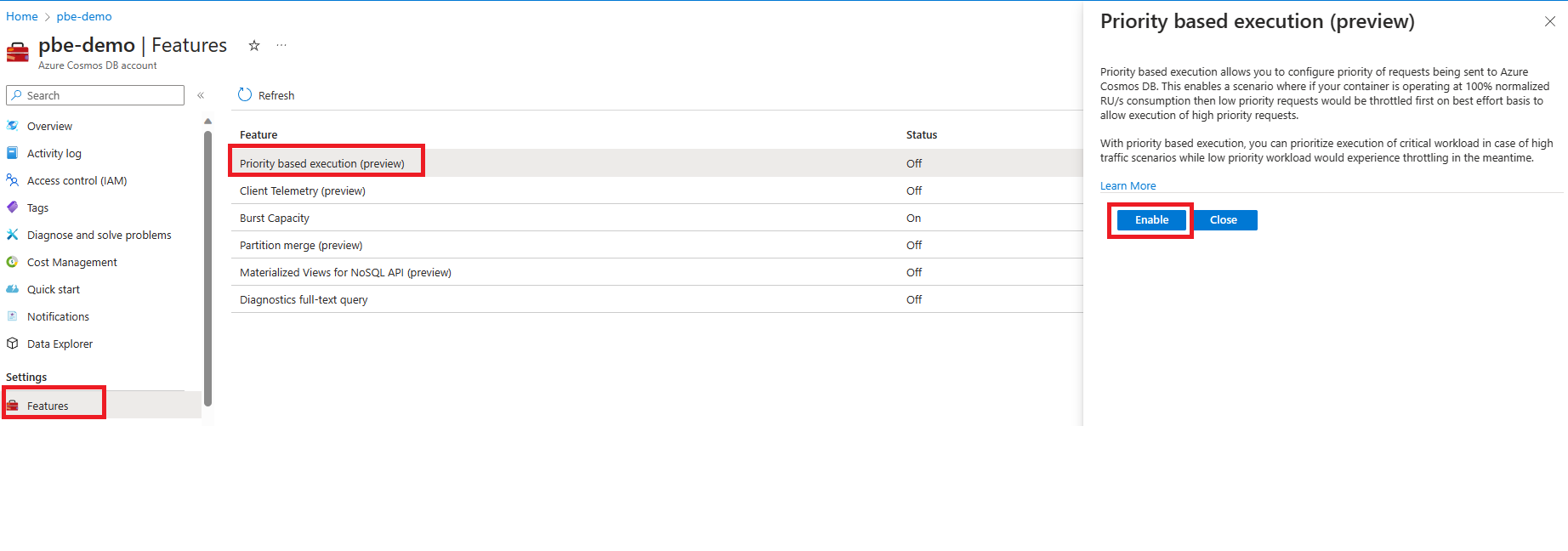
若要开始使用基于优先级的执行,请导航到位于 Azure Cosmos DB 帐户中的 Features 页。 选择并启用 基于优先级的执行 功能。
SDK 要求
- .NET v3:v3.38.0 或更高版本
- Java v4:v4.45.0 或更高版本
- Spark 3.2:v4.19.0 或更高版本
- JavaScript v4:v4.0.0 或更高版本
- Python:v4.14.2 或更高版本。
代码示例
- .NET SDK v3
- Java SDK v4
- Python SDK
using Microsoft.Azure.Cosmos;

//update products catalog with low priority
RequestOptions catalogRequestOptions = new ItemRequestOptions{PriorityLevel = PriorityLevel.Low};

PartitionKey pk = new PartitionKey(“productId1”);
ItemResponse<Product> catalogResponse = await this.container.CreateItemAsync<Product>(product1, pk, requestOptions);

//Display product information to user with high priority
RequestOptions getProductRequestOptions = new ItemRequestOptions{PriorityLevel = PriorityLevel.High};

string id = “productId2”;
PartitionKey pk = new PartitionKey(id);

ItemResponse<Product> productResponse = await this.container.ReadItemAsync< Product>(id, pk, getProductRequestOptions);
监视基于优先级的执行
可以在Azure门户中使用Azure Monitor指标监视优先级低和高优先级的请求的行为。 若要了解有关指标的详细信息,请参阅 Azure Monitor 指标。
更改 Cosmos DB 帐户的默认优先级
如果启用了基于优先级的执行,并且用户没有为请求指定优先级级别,则所有此类请求都以高优先级执行。 可以使用 Azure CLI更改 Cosmos DB 帐户中的默认请求优先级。
Azure CLI
安装 Azure CLI 2.81.0 或更高版本
# set subscription context
az account set -s $SubscriptionId

# Enable priority-based execution
az cosmosdb update `
  -g <resource-group> `
  -n <account-name> `
  --enable-priority-based-execution true

# change default priority level
az cosmosdb update `
  -g <resource-group> `
  -n <account-name> `
  --default-priority-level low
Azure PowerShell
# Install module Az.CosmosDB 1.19.0 or later

Install-Module -Name Az.CosmosDB -Force

# Login and Set Subscription

Connect-AzAccount -Environment AzureChinaCloud
Set-AzContext -Subscription <subscription-id>

# Enable Priority Based Execution

Update-AzCosmosDBAccount `
  -ResourceGroupName "<resource-group>" `
  -Name "<account-name>" `
  -EnablePriorityBasedExecution $true

# Set Default Priority Level

Update-AzCosmosDBAccount `
  -ResourceGroupName "<resource-group>" `
  -Name "<account-name>" `
  -DefaultPriorityLevel "Low"
数据资源管理器优先级
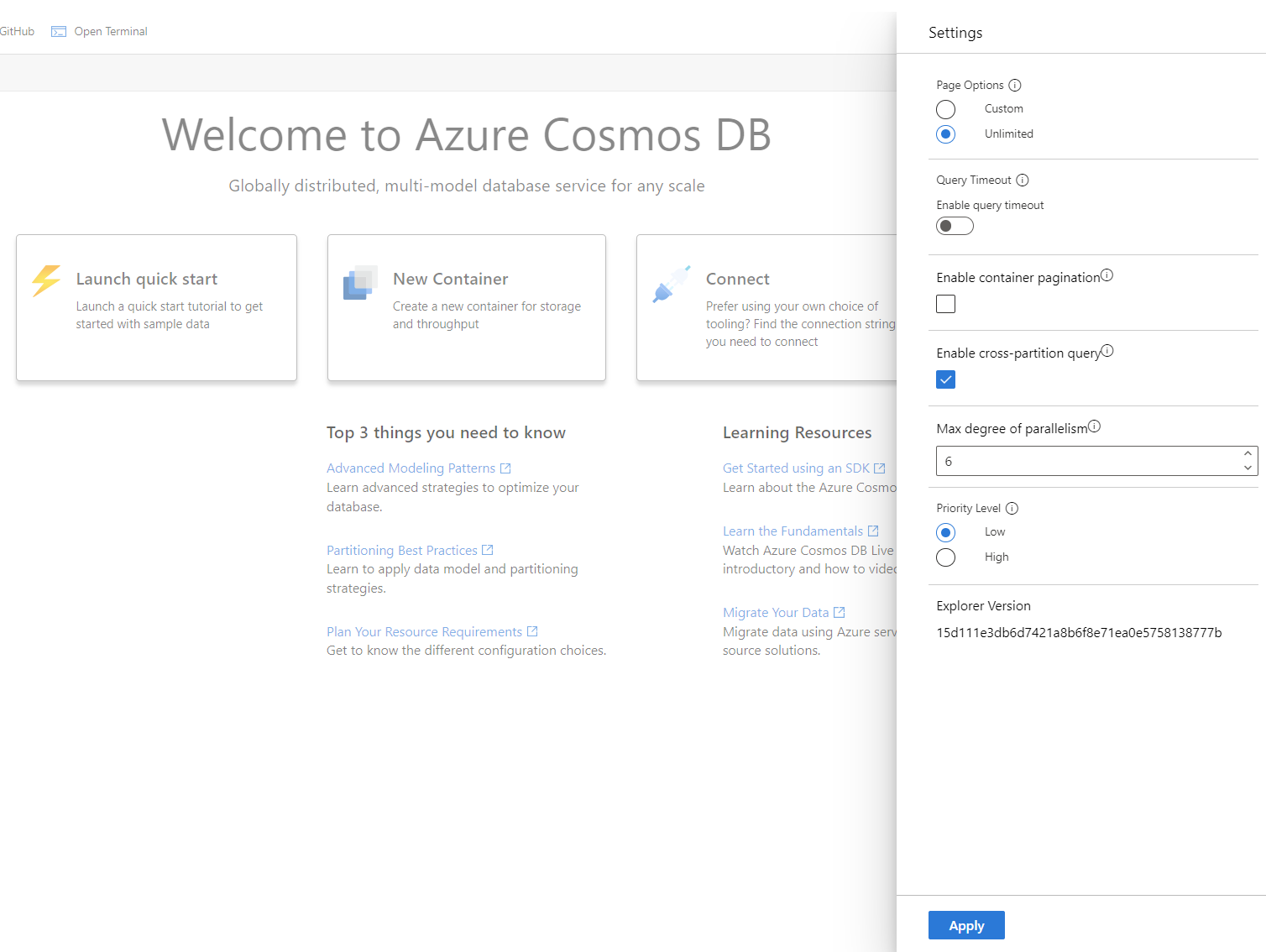
为 Cosmos DB 帐户启用基于优先级的执行时,Azure 门户数据资源管理器中的所有请求都以 low 优先级执行。 可以通过更改数据资源管理器的 Settings 菜单中的优先级设置来调整此设置。
注意
此客户端配置仅适用于相关用户的数据资源管理器视图,不会影响其他用户的数据资源管理器优先级或 Cosmos DB 帐户的默认优先级级别。
限制
- 无服务器数据库账户目前不支持基于优先级的执行。
- 基于优先级的执行功能的行为对于共享吞吐量数据库容器来说是不确定的。
- 对于强和有限过期一致性级别,不管高优先级读取流量如何,读取请求优先顺序可能无法有效允许低优先级写入请求执行。
后续步骤
- 请参阅有关基于优先级的执行的常见问题解答