Important
此系统表处于 Beta 版中。
本文是系统表的 pipeline_events 参考,该表记录帐户中管道的 Lakeflow 管道 事件日志条目。 每一行都是管道事件日志中的不可变事件,捕获生命周期转换、流进度、数据质量指标、错误、群集资源以及区域内所有管道和工作区的其他操作数据。
Requirements
要访问该系统表,用户必须以下之一:
既是元存储管理员,也是帐户管理员,或者
对系统架构具有
USE和SELECT权限。 请参阅 授予对系统表的访问权限。
管道事件仪表盘
预建仪表盘可视该系统表中的流水线健康状况、吞吐量、积压、数据质量和错误。
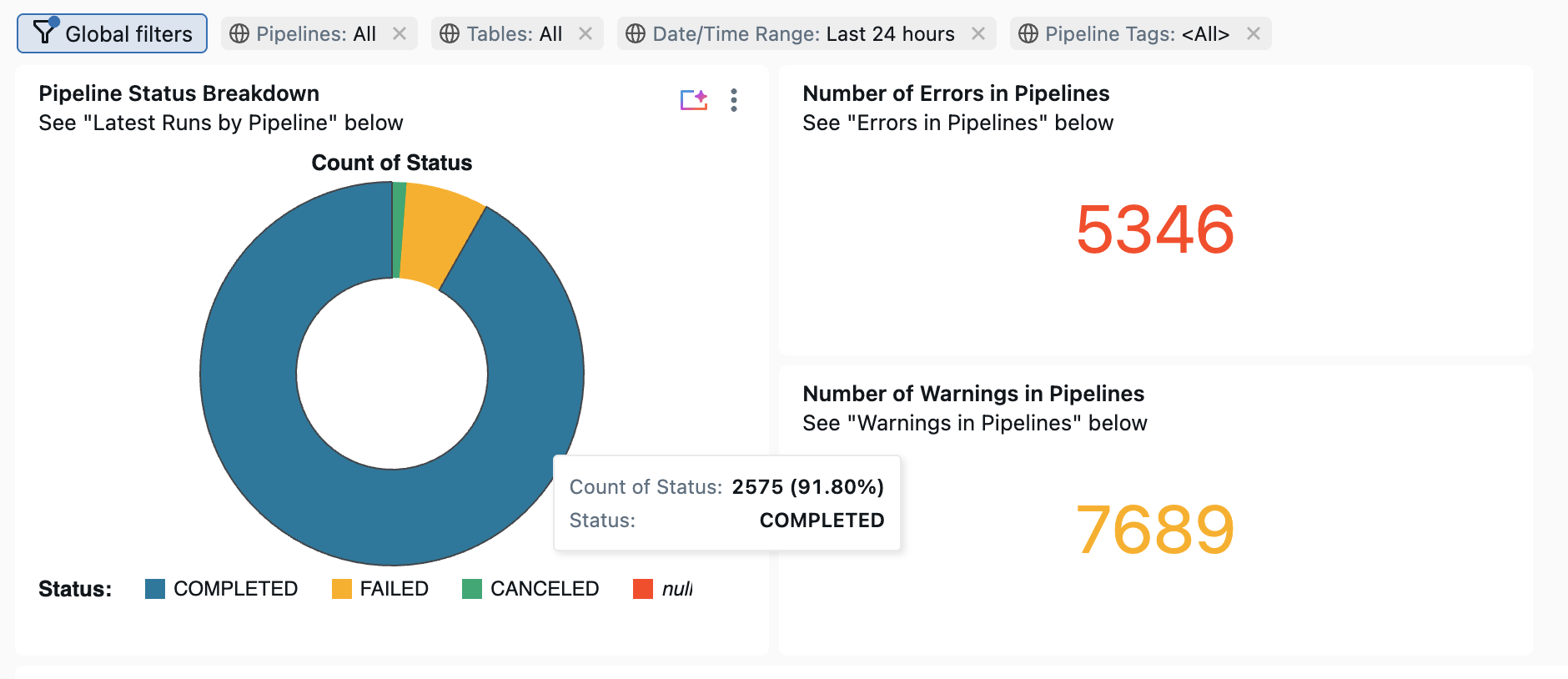
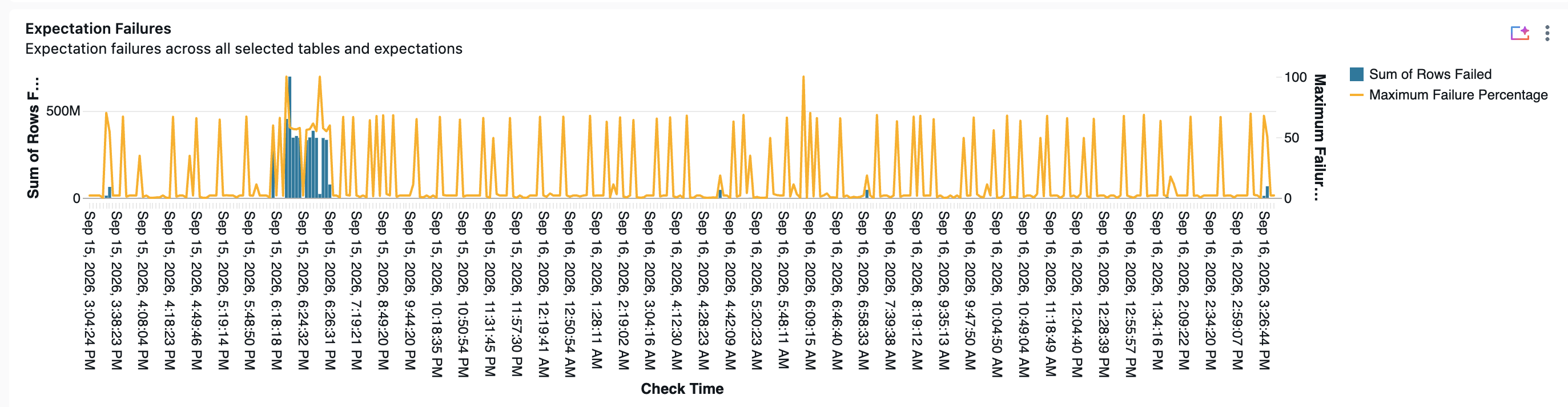
可用的管道事件表
| Table | 说明 | 支持流式处理 | 免费保留期 | 包括全局或区域数据 |
|---|---|---|---|---|
| pipeline_events (测试版) | 记录管道运行发出的管道事件日志条目 | Yes | 13 个月 | Regional |
Note
该图式是在 lakeflow_pipeline_events_preview 测试阶段。 在正式可用时,表会迁移到 lakeflow 模式(最终表路径为 system.lakeflow.pipeline_events)。 目前,方案的细节也可能有所调整。 针对Beta模式编写的查询必须在表格移动时更新。
详细架构参考
管道事件表架构
管道事件表仅追加。 每行记录在发出管道更新时发出的单个事件,并且永远不会就地修改或删除行。
行上填充的字段取决于事件类型。
error和 update_id许多 origin.* 子字段仅在应用它们的事件上设置,并且字段的结构 details 也有所不同 event_type。
使用此表可查询历史管道活动、生成有关管道故障的警报,以及将管道行为与其他 Lakeflow 系统表相关联。
表路径: system.lakeflow_pipeline_events_preview.pipeline_events
主键: (account_id, pipeline_event_id)
| 列名称 | 数据类型 | 说明 | 注释 |
|---|---|---|---|
account_id |
字符串 | 此管道事件所属的帐户的 ID | |
workspace_id |
字符串 | 此管道事件所属的工作区的 ID | |
pipeline_id |
字符串 | 发出事件的管道的 ID | |
update_id |
字符串 | 发出事件的管道更新的 ID | |
pipeline_event_id |
字符串 | 事件的全局唯一标识符 | |
event_type |
字符串 | 事件类型(例如, flow_progress, update_progress, create_update) |
完整的事件类型值集合请参见 事件类型值 。 |
origin |
结构 | 有关事件来源的上下文元数据,例如云提供程序、区域、管道类型、表或流名称和其他标识符 | 参见 Origin结构字段。 |
message |
字符串 | 事件的可读说明 | 对于某些事件,可能为空。 |
level |
字符串 | 事件的严重性级别 |
INFO, WARN, ERROR, METRICS之一。 参见 等级值。 |
maturity_level |
字符串 | 事件架构的稳定性 | 其中STABLE一个,EVOLVING,。 DEPRECATED 参见 成熟度等级值。 |
error |
结构 | 错误详细信息。 仅针对携带错误信息的事件填充 | 参见 错误结构字段。 |
details |
变体 | 特定于事件的有效负载。 包含的字段取决于 event_type |
详见 详情字段。 |
event_time |
时间戳 | 管道发出事件的时间 | 记录为 +00:00 (UTC) 的时区。 |
源结构字段
| 子字段 | 数据类型 | 说明 |
|---|---|---|
cloud |
字符串 | 云提供商(例如) AZURE |
region |
字符串 | 云提供商区域 |
org_id |
bigint | 工作区组织 ID |
pipeline_type |
字符串 | 管道的类型 |
pipeline_name |
字符串 | 管道的用户提供名称 |
cluster_id |
字符串 | 支持管道更新的计算群集 ID |
maintenance_id |
字符串 | 如果事件来自维护运行,则维护更新的 ID |
dataset_name |
字符串 | 事件引用的数据集(表或视图)的名称 |
sink_name |
字符串 | 事件引用的接收器的名称 |
catalog_name |
字符串 | Unity 目录目录名称 |
schema_name |
字符串 | Unity 目录架构名称 |
flow_id |
字符串 | 事件引用的流 ID |
flow_name |
字符串 | 事件引用的流的名称 |
batch_id |
bigint | 流式处理流的微批处理 ID。
bigint 用于兼容性 |
request_id |
字符串 | 启动操作的请求 ID |
materialization_name |
字符串 | 具体化名称 |
operation_id |
字符串 | 操作 ID |
source_name |
字符串 | 数据源的名称 |
uc_table_id |
字符串 | Unity 目录表 ID |
ingestion_source_type |
字符串 | 引入源的类型(例如, SQL_SERVERSALESFORCE) |
ingestion_source_connection_name |
字符串 | 引入源的连接名称 |
ingestion_source_catalog_name |
字符串 | 上游系统中的源目录名称 |
ingestion_source_schema_name |
字符串 | 上游系统中的源架构名称 |
ingestion_source_table_name |
字符串 | 上游系统中的源表名称 |
ingestion_source_table_version |
字符串 | 源表版本(如果适用) |
错误结构字段
| 子字段 | 数据类型 | 说明 |
|---|---|---|
fatal |
boolean | 错误是否导致更新终止 |
exceptions |
数组<结构> | 与错误关联的异常链(最后一个根本原因) |
exceptions[].sql_state |
字符串 | SQLSTATE 代码(如果可用) |
exceptions[].error_class |
字符串 | Databricks 错误类(如果可用) |
详细信息字段
列 details 是一个 VARIANT,它包含的字段取决于该 event_type列。 有关每个事件类型下可用的字段,请参阅 管道事件日志架构。 使用 variant_get 函数或点语法读取嵌套值。 有关典型访问模式,请参阅以下示例查询。
event_type钥匙包裹着有效载荷。 例如,事件 flow_progress 的度量是 , $.flow_progress.metrics而非 $.metrics。 在每条路径中包含事件类型密钥。
-- Using variant_get (lets you cast to a specific type)
SELECT
  pipeline_id,
  event_time,
  variant_get(details, '$.flow_progress.status', 'STRING')                       AS flow_status,
  variant_get(details, '$.flow_progress.metrics.num_output_rows', 'BIGINT')      AS rows_written,
  variant_get(details, '$.flow_progress.metrics.backlog_bytes', 'BIGINT')        AS backlog_bytes
FROM
  system.lakeflow_pipeline_events_preview.pipeline_events
WHERE
  event_type = 'flow_progress'
  AND event_time >= current_timestamp() - INTERVAL 1 HOUR
-- Using dot syntax (returns VARIANT, cast when needed)
SELECT
  pipeline_id,
  event_time,
  details:flow_progress.status::STRING               AS flow_status,
  details:flow_progress.metrics.num_output_rows::BIGINT AS rows_written
FROM
  system.lakeflow_pipeline_events_preview.pipeline_events
WHERE
  event_type = 'flow_progress'
  AND event_time >= current_timestamp() - INTERVAL 1 HOUR
大型活动
当事件太大无法完整存储时,表会存储其 details简化的副本。 缩短事件在事件类型键旁边有一个 truncation 字段 $.truncation。 其 truncated_fields 数组将每个缩短字段列为 field_name,例如 details。 其他项目没有场 truncation 地。
| 事件类型 | 简短内容 |
|---|---|
flow_definition、dataset_definition |
schema 保留前2500列。 |
flow_progress |
data_quality.expectations 保持1000个预期,从那些未曾打破纪录的预期开始。 |
示例查询
-- Flow throughput for a specific pipeline
SELECT
  origin.flow_name,
  date_trunc('HOUR', event_time) AS hour,
  SUM(variant_get(details, '$.flow_progress.metrics.num_output_rows', 'BIGINT')) AS rows_written
FROM
  system.lakeflow_pipeline_events_preview.pipeline_events
WHERE
  pipeline_id = '<your-pipeline-id>'
  AND event_type = 'flow_progress'
  AND event_time >= current_timestamp() - INTERVAL 7 DAYS
GROUP BY
  origin.flow_name,
  date_trunc('HOUR', event_time)
ORDER BY
  hour DESC,
  rows_written DESC
-- The latest error for each pipeline that has errored in the last 7 days, with the outermost exception.
-- The exception chain is ordered with the root cause last, so read element -1 for the root cause.
-- On many errors only the first element carries error_class and sql_state.
SELECT
  workspace_id,
  pipeline_id,
  event_time,
  event_type,
  message,
  error.exceptions[0].error_class AS exception_error_class,
  error.exceptions[0].sql_state   AS exception_sql_state
FROM
  system.lakeflow_pipeline_events_preview.pipeline_events
WHERE
  level = 'ERROR'
  AND event_time >= current_timestamp() - INTERVAL 7 DAYS
QUALIFY
  ROW_NUMBER() OVER (PARTITION BY workspace_id, pipeline_id ORDER BY event_time DESC) = 1
ORDER BY
  event_time DESC
-- Data quality: failed expectations by dataset, per update, in the last 1 day
SELECT
  pipeline_id,
  update_id,
  origin.dataset_name,
  expectation.name AS expectation_name,
  SUM(expectation.failed_records) AS failed_records
FROM
  system.lakeflow_pipeline_events_preview.pipeline_events
  LATERAL VIEW explode(variant_get(details, '$.flow_progress.data_quality.expectations', 'ARRAY<STRUCT<name:STRING,dataset:STRING,passed_records:BIGINT,failed_records:BIGINT>>')) AS expectation
WHERE
  event_type = 'flow_progress'
  AND event_time >= current_timestamp() - INTERVAL 1 DAY
GROUP BY
  pipeline_id,
  update_id,
  origin.dataset_name,
  expectation.name
HAVING
  SUM(expectation.failed_records) > 0
ORDER BY
  failed_records DESC
常见联接模式
与 pipelines 表联接以按管道名称进行筛选
表 pipelines 是渐变维度(SCD2)。 在加入之前,请获取每个管道的最新版本。
WITH latest_pipelines AS (
  SELECT *
  FROM system.lakeflow.pipelines
  QUALIFY ROW_NUMBER() OVER (PARTITION BY workspace_id, pipeline_id ORDER BY change_time DESC) = 1
)
SELECT
  p.name AS pipeline_name,
  e.event_time,
  e.event_type,
  e.level,
  e.message
FROM
  system.lakeflow_pipeline_events_preview.pipeline_events e
JOIN
  latest_pipelines p
  ON e.workspace_id = p.workspace_id
  AND e.pipeline_id = p.pipeline_id
WHERE
  e.level = 'ERROR'
  AND e.event_time >= current_timestamp() - INTERVAL 24 HOURS
ORDER BY
  e.event_time DESC
与 on 联接pipeline_update_timelineupdate_id
WITH updates AS (
  SELECT
    workspace_id,
    pipeline_id,
    update_id,
    MIN(period_start_time) AS update_start,
    MAX(CASE WHEN result_state IS NOT NULL THEN period_end_time END) AS update_end
  FROM
    system.lakeflow.pipeline_update_timeline
  WHERE
    pipeline_id = '<your-pipeline-id>'
  GROUP BY
    workspace_id,
    pipeline_id,
    update_id
)
SELECT
  u.update_start,
  u.update_end,
  e.event_time,
  e.event_type,
  e.level,
  e.message
FROM
  updates u
JOIN
  system.lakeflow_pipeline_events_preview.pipeline_events e
  ON e.workspace_id = u.workspace_id
  AND e.update_id = u.update_id
ORDER BY
  u.update_start DESC,
  e.event_time ASC
设置警报
可以使用 pipeline_events。 针对 pipeline_events (可选)与其他 Lakeflow 系统表一起编写 SQL 查询,在 SQL 仓库上计划它,并配置通知目标(电子邮件、Slack、webhook、PagerDuty)。
几个有用的起点:
当过去N分钟内没有运行中的管道事件时发出警报
使用此方法可以检测停滞或无提示失败的管道。
-- Returns one row per pipeline with a currently-running update that has emitted no event
-- in the last 30 minutes. The alert can trigger when this query returns any rows.
WITH running_pipelines AS (
  SELECT
    workspace_id,
    pipeline_id
  FROM
    system.lakeflow.pipeline_update_timeline
  QUALIFY
    ROW_NUMBER() OVER (PARTITION BY workspace_id, pipeline_id ORDER BY period_end_time DESC) = 1
    AND result_state IS NULL
),
last_event AS (
  SELECT
    workspace_id,
    pipeline_id,
    MAX(event_time) AS last_event_time
  FROM
    system.lakeflow_pipeline_events_preview.pipeline_events
  GROUP BY
    workspace_id,
    pipeline_id
)
SELECT
  r.workspace_id,
  r.pipeline_id,
  le.last_event_time
FROM
  running_pipelines r
  LEFT JOIN last_event le USING (workspace_id, pipeline_id)
WHERE
  le.last_event_time IS NULL
  OR le.last_event_time < current_timestamp() - INTERVAL 30 MINUTES
当特定流的积压工作过高时发出警报
事件的积压记录为 flow_progressbacklog_bytes,文件源也以 报告为 backlog_files。 当最近的读数超过阈值时触发(例如,100 MB未处理的工作)。 并非每个来源都报告所有指标,所以要筛选你数据来源的指标。
-- Returns the most recent backlog reading per flow for a given pipeline.
-- The alert can trigger when backlog_bytes exceeds the threshold for any flow.
WITH latest_flow_progress AS (
  SELECT
    workspace_id,
    pipeline_id,
    origin.flow_name,
    event_time,
    CASE
      WHEN variant_get(details, '$.flow_progress.status', 'STRING') = 'COMPLETED' THEN 0
      ELSE variant_get(details, '$.flow_progress.metrics.backlog_bytes', 'BIGINT')
    END AS backlog_bytes
  FROM
    system.lakeflow_pipeline_events_preview.pipeline_events
  WHERE
    pipeline_id = '<your-pipeline-id>'
    AND event_type = 'flow_progress'
    AND event_time >= current_timestamp() - INTERVAL 1 HOUR
    AND (
      variant_get(details, '$.flow_progress.metrics.backlog_bytes', 'BIGINT') IS NOT NULL
      OR variant_get(details, '$.flow_progress.status', 'STRING') = 'COMPLETED'
    )
  QUALIFY
    ROW_NUMBER() OVER (PARTITION BY workspace_id, pipeline_id, origin.flow_name ORDER BY event_time DESC) = 1
)
SELECT *
FROM latest_flow_progress
WHERE backlog_bytes > 100000000
要判断哪个源落后 $.flow_progress.metrics.source_metrics ,需要一组每个源的读数,每个读数旁边都有 source_name 该源的 backlog_bytes, backlog_records 或 backlog_files。
管道中数据质量下降警报
每个 flow_progress 事件报告预期丢弃 EXPECT … DROP 的行数。 在更新窗口内将每个数据集的这些数据相加,当总数超过阈值时发出警报。
-- Returns datasets where more than 100 rows were dropped by expectations, per update, in the last hour.
SELECT
  pipeline_id,
  update_id,
  origin.dataset_name,
  SUM(variant_get(details, '$.flow_progress.data_quality.dropped_records', 'BIGINT')) AS dropped_records
FROM
  system.lakeflow_pipeline_events_preview.pipeline_events
WHERE
  event_type = 'flow_progress'
  AND event_time >= current_timestamp() - INTERVAL 1 HOUR
GROUP BY
  pipeline_id,
  update_id,
  origin.dataset_name
HAVING
  SUM(variant_get(details, '$.flow_progress.data_quality.dropped_records', 'BIGINT')) > 100
当流程处理过少行时发出警报
flow_progress 事件以每微批次计数报告 metrics.num_output_rows ,因此在窗口中将事件相加,即可得到该窗口上写入的行。 当吞吐量低于预期下限时,创建一个提醒。 例如,一个通常每小时写数千行但几乎为零的流,可能表明源配置错误。
该查询只报告窗口 flow_progress 中发出事件且行计数的流。 完全停滞的流不会发出任何事件,因此请将此警报与上述缺失事件警报配合使用。
-- Returns active flows (latest status not terminal) that wrote fewer than 100 rows in the last hour.
-- The alert can trigger when this query returns any rows.
WITH flow_state AS (
  SELECT
    pipeline_id,
    origin.flow_name,
    event_time,
    variant_get(details, '$.flow_progress.status', 'STRING') AS status,
    variant_get(details, '$.flow_progress.metrics.num_output_rows', 'BIGINT') AS num_output_rows,
    ROW_NUMBER() OVER (PARTITION BY pipeline_id, origin.flow_name ORDER BY event_time DESC) AS rn
  FROM
    system.lakeflow_pipeline_events_preview.pipeline_events
  WHERE
    pipeline_id = '<your-pipeline-id>'
    AND event_type = 'flow_progress'
    AND event_time >= current_timestamp() - INTERVAL 1 HOUR
),
active_flows AS (
  SELECT
    pipeline_id,
    flow_name
  FROM
    flow_state
  WHERE
    rn = 1
    AND status NOT IN ('COMPLETED', 'FAILED', 'SKIPPED', 'STOPPED', 'EXCLUDED')
)
SELECT
  f.pipeline_id,
  f.flow_name,
  SUM(f.num_output_rows) AS rows_written_last_hour
FROM
  flow_state f
  JOIN active_flows a USING (pipeline_id, flow_name)
WHERE
  f.num_output_rows IS NOT NULL
GROUP BY
  f.pipeline_id,
  f.flow_name
HAVING
  SUM(f.num_output_rows) < 100
有关生产警报的提示
按
pipeline_id(以及workspace_id是否维护每个工作区的警报)进行筛选,以便每个警报以特定范围而不是整个帐户为目标。选择与警报的敏感度匹配的评估节奏。 使用短间隔(例如每 5 分钟)快速故障信号,使用更长的间隔(例如每小时),获取积压工作和数据质量趋势。 “查询返回 0 多行时触发”条件适用于大多数情况。
引用值
级别值
| Value | 说明 |
|---|---|
INFO |
正常管道活动(流进度、更新生命周期转换、配置更改)。 |
WARN |
管道从中恢复或可能需要注意的非致命问题。 |
ERROR |
阻止管道在流或更新上取得进展的失败。 |
METRICS |
在执行期间发出的定量度量(行计数、吞吐量、延迟)。 |
成熟度级别值
| Value | 说明 |
|---|---|
STABLE |
事件架构稳定。 不需要中断性变更。 安全生成生产查询和警报。 |
EVOLVING |
事件架构可能会在将来的版本中更改。 小心使用。 |
DEPRECATED |
事件类型或架构已弃用,将在将来的版本中删除。 将其从中迁移。 |
事件类型值
该 event_type 字段是一个枚举。 完整的值集:
| Value | 说明 |
|---|---|
create_update |
请求新的管道更新。 |
update_progress |
通过生命周期状态转换的管道更新。 |
flow_progress |
更新中的流(数据集)通过状态转换。 |
flow_definition |
有关流的静态元数据。 |
dataset_definition |
有关数据集的静态元数据。 |
sink_definition |
有关输出接收器的静态元数据。 |
deprecation |
管道使用了已弃用的功能。 |
autoscale |
群集自动缩放决策。 |
unsupported_operation |
当前配置不支持的操作。 |
cluster_resources |
支持计算的任务槽和自动缩放指标。 |
planning_information |
更新的规划阶段信息。 |
gc_pressure |
对驱动程序或执行程序施加垃圾回收压力。 |
abnormal_termination |
更新异常终止。 |
disk_space |
群集上的磁盘空间压力。 |
hook_progress |
管道挂钩的生命周期进度。 |
dataset_life_cycle |
数据集生命周期事件。 |
background_operation |
通过状态转换的后台操作。 |
remote_api_usage |
管道发出出站 API 调用。 |
operation_progress |
泛型操作的进度。 |
stream_progress |
支持流的流式处理查询的进度。 |
advisory |
来自引擎的公告消息。 |
runtime_details |
详细的运行时配置。 |
resource_info |
资源信息(群集、实例类型等)。 |
file_notification_set_up |
文件通知设置状态(适用于云文件源)。 |
behavior_change_in_spark_connect |
Spark Connect 下的行为更改通知。 |
user_action |
针对管道的用户发起的操作。 |
user_code_context |
关于与事件相关的用户代码的背景信息。 |