Python 对声明性自动化捆绑包的支持增强了 Declarative Automation Bundles 的功能,并在捆绑包部署期间应用额外能力,使您可以:
在Python代码中定义资源。 这些定义可以与 YAML 中定义的资源共存。
使用元数据在捆绑部署期间动态创建资源。 请参阅 使用元数据创建资源。
在捆绑部署期间修改 YAML 或 Python 中定义的资源。 请参阅 修改在 YAML 或 Python 中定义的资源。
小窍门
还可以使用 任务的 if/else condition_task 或 for_each_task 等功能在运行时修改资源包。
提供了对声明性自动化捆绑包https://databricks.github.io/cli/python/的Python支持参考文档。
要求
若要对声明性自动化捆绑包使用Python支持,必须先:
安装 Databricks CLI 版本 0.275.0 或更高版本。 请参阅安装或更新 Databricks CLI。
如果尚未这样做,请向 Databricks 工作区进行身份验证:
databricks configure安装 uv。 请参阅 安装 uv。 声明性自动化捆绑包的Python使用 uv 来创建虚拟环境并安装所需的依赖项。 或者,可以使用其他工具(如 venv)配置Python环境。
从模板创建项目
要为声明性自动化捆绑项目创建新的 Python 支持,可以使用 pydabs 模板初始化一个捆绑包:
databricks bundle init pydabs
出现提示时,请为项目命名,例如 my_pydabs_project,并接受包含笔记本和Python包。
现在,在新的项目文件夹中创建新的虚拟环境:
cd my_pydabs_project
uv sync
默认情况下,模板包含一个在 resources/my_pydabs_project_job.py 文件中定义为Python的作业示例:
from databricks.bundles.jobs import Job

my_pydabs_project_job = Job.from_dict(
    {
        "name": "my_pydabs_project_job",
        "tasks": [
            {
                "task_key": "notebook_task",
                "notebook_task": {
                    "notebook_path": "src/notebook.ipynb",
                },
            },
        ],
    },
)
Job.from_dict 函数接受与 YAML 相同的格式的Python字典。 还可以使用数据类语法构造资源:
from databricks.bundles.jobs import Job, Task, NotebookTask

my_pydabs_project_job = Job(
    name="my_pydabs_project_job",
    tasks=[
        Task(
            task_key="notebook_task",
            notebook_task=NotebookTask(
                notebook_path="src/notebook.ipynb",
            ),
        ),
    ],
)
Python文件通过python中databricks.yml部分指定的入口点加载:
python:
  # Activate the virtual environment before loading resources defined in
  # Python. If disabled, it defaults to using the Python interpreter
  # available in the current shell.
  venv_path: .venv
  # Functions called to load resources defined in Python.
  # See resources/__init__.py
  resources:
    - 'resources:load_resources'
默认情况下,resources/__init__.py包含加载资源包中所有Python文件的函数。
from databricks.bundles.core import (
    Bundle,
    Resources,
    load_resources_from_current_package_module,
)

def load_resources(bundle: Bundle) -> Resources:
    """
    'load_resources' function is referenced in databricks.yml and is responsible for loading
    bundle resources defined in Python code. This function is called by Databricks CLI during
    bundle deployment. After deployment, this function is not used.
    """

    # the default implementation loads all Python files in 'resources' directory
    return load_resources_from_current_package_module()
部署并运行作业或管道
若要将捆绑包部署到开发目标,请使用捆绑包项目根目录中的 捆绑部署命令 :
databricks bundle deploy --target dev
此命令部署为捆绑项目定义的所有内容。 例如,使用默认模板创建的项目会将名为[dev yourname] my_pydabs_project_job的作业部署到工作区。 可以通过导航到 Databricks 工作区中的作业和管道来找到该作业。
部署捆绑包后,可以使用 捆绑包摘要命令 查看已部署的所有内容:
databricks bundle summary --target dev
最后,若要运行作业或管道,请使用 捆绑包运行命令:
databricks bundle run my_pydabs_project_job
更新现有捆绑包
若要更新现有捆绑包,请 根据模板创建项目中所述,为项目模板结构建模。 可以通过在 python 中添加 databricks.yml 节,更新现有的使用 YAML 的捆绑包,以包含以 Python 代码形式定义的资源。
python:
  # Activate the virtual environment before loading resources defined in
  # Python. If disabled, it defaults to using the Python interpreter
  # available in the current shell.
  venv_path: .venv
  # Functions called to load resources defined in Python.
  # See resources/__init__.py
  resources:
    - 'resources:load_resources'
指定的 虚拟环境 必须包含已安装 的 databricks-bundles PyPi 包。
pip install databricks-bundles==0.275.0
资源文件夹必须包含 __init__.py 文件:
from databricks.bundles.core import (
    Bundle,
    Resources,
    load_resources_from_current_package_module,
)

def load_resources(bundle: Bundle) -> Resources:
    """
    'load_resources' function is referenced in databricks.yml and
    is responsible for loading bundle resources defined in Python code.
    This function is called by Databricks CLI during bundle deployment.
    After deployment, this function is not used.
    """

    # default implementation loads all Python files in 'resources' folder
    return load_resources_from_current_package_module()
将现有作业转换为Python
若要将现有作业转换为Python,可以使用 View 作为代码功能。 请参阅以代码形式查看作业。
在 Databricks 工作区中打开该现有作业的页面。
单击
 ,在“立即运行”按钮的左侧,然后单击“查看为代码”。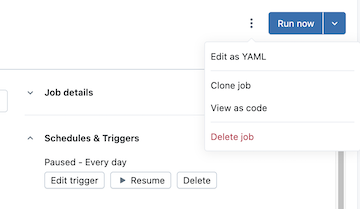
选择 Python,然后选择 Declarative Automation Bundles
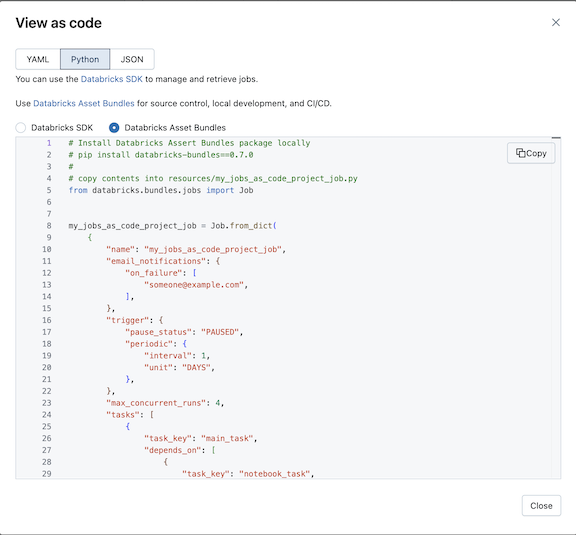
单击Copy并将生成的Python另存为捆绑项目的资源文件夹中的Python文件。
小窍门
你还可以查看和复制现有作业和管道的 YAML 配置,然后直接粘贴到捆绑包配置 YAML 文件中。
使用元数据创建资源
load_resources 函数的默认实现将加载 resources 包中的Python文件。 可以使用Python以编程方式创建资源。 例如,可以加载配置文件并在循环中创建作业:
from databricks.bundles.core import (
    Bundle,
    Resources,
    load_resources_from_current_package_module,
)

from databricks.bundles.jobs import Job

def create_job(country: str):
    my_notebook = {
        "task_key": "my_notebook",
        "notebook_task": {
            "notebook_path": "files/my_notebook.py",
        },
    }

    return Job.from_dict(
        {
            "name": f"my_job_{country}",
            "tasks": [my_notebook],
        }
    )

def load_resources(bundle: Bundle) -> Resources:
    resources = load_resources_from_current_package_module()

    for country in ["US", "NL"]:
        resources.add_resource(f"my_job_{country}", create_job(country))

    return resources
访问捆绑包变量
捆绑包替换和自定义变量允许动态检索值,以便在部署捆绑包并在目标上运行时确定设置。 有关捆绑变量的信息,请参阅 自定义变量。
在Python中,定义变量,然后使用 bundle 参数访问它们。 请参阅@variables修饰器、变量、捆绑包和资源。
from databricks.bundles.core import Bundle, Resources, Variable, variables

@variables
class Variables:
    # Define a variable
    warehouse_id: Variable[str]

def load_resources(bundle: Bundle) -> Resources:
    # Resolve the variable
    warehouse_id = bundle.resolve_variable(Variables.warehouse_id)

    ...
也可以使用 ubstitutions 在Python中访问变量。
sample_job = Job.from_dict(
    {
        "name": "sample_job",
        "tasks": [
            {
                "task_key": "my_sql_query_task",
                "sql_task": {
                    "warehouse_id": "${var.warehouse_id}",
                    "query": {
                        "query_id": "11111111-1111-1111-1111-111111111111",
                    },
    ...
使用 目标替代 为不同的部署目标设置变量值。
修改 YAML 或 Python 中定义的资源
若要修改资源,可以引用变量函数, databricks.yml类似于加载资源的函数。 此功能可以在不依赖于 Python 中定义的资源加载的情况下使用,并且可以修改 YAML 和 Python 中定义的资源。
首先,在捆绑根目录中创建mutators.py,并添加以下内容:
from dataclasses import replace

from databricks.bundles.core import Bundle, job_mutator
from databricks.bundles.jobs import Job, JobEmailNotifications

@job_mutator
def add_email_notifications(bundle: Bundle, job: Job) -> Job:
    if job.email_notifications:
        return job

    email_notifications = JobEmailNotifications.from_dict(
        {
            "on_failure": ["${workspace.current_user.userName}"],
        }
    )

    return replace(job, email_notifications=email_notifications)
现在,使用以下配置在捆绑部署期间执行 add_email_notifications 函数。 此操作会更新捆绑包中定义的每个作业,还会发送电子邮件通知(如果没有)。 必须在 databricks.yml 中指定 Mutator 函数,并按指定的顺序执行。 作业可变器针对捆绑包中定义的每个作业执行,并且可以返回更新的副本或未修改的输入。 可变器还可用于其他字段,例如配置默认作业群集或 SQL 仓库。
python:
  mutators:
    - 'mutators:add_email_notifications'
如果在可变器执行期间函数引发异常,捆绑部署将中止。
小窍门
若要为目标配置预设(例如,为目标取消暂停计划 prod ),请使用部署模式和预设。 请参阅自定义预设。