重要
此功能在 Beta 版中。 工作区管理员可以从 预览 页控制对此功能的访问。 请参阅 Manage Azure Databricks 预览版。
声明性特征工程 API
Feature 构造函数和 register_feature()
建议的方法是在本地构造对象 Feature ,并将其 register_feature 保存到 Unity 目录。 通过此双重工作流,可以在注册功能之前试用功能(包括 create_training_set)。
Feature(
    source: DataSource,                                    # Required: DeltaTableSource or RequestSource
    function: Union[AggregationFunction, ColumnSelection], # Required: Aggregation or column selection
    entity: Optional[List[str]] = None,                    # Required for aggregation: entity columns
    timeseries_column: Optional[str] = None,               # Required for aggregation: timestamp column
    name: Optional[str] = None,                            # Optional: Feature name (auto-generated if omitted)
    description: Optional[str] = None,                     # Optional: Feature description
)
FeatureEngineeringClient.register_feature() 注册在 Unity 目录中构造的 Feature 本地构造。
FeatureEngineeringClient.register_feature(
    feature: Feature,       # Required: A Feature instance (not already registered)
    catalog_name: str,      # Required: UC catalog name
    schema_name: str,       # Required: UC schema name
) -> Feature
from databricks.feature_engineering.entities import Feature, DeltaTableSource, AggregationFunction, Sum, RollingWindow
from datetime import timedelta

# Step 1: Construct the feature locally
feature = Feature(
    source=DeltaTableSource(catalog_name="main", schema_name="store", table_name="transactions"),
    entity=["user_id"],
    timeseries_column="transaction_time",
    function=AggregationFunction(Sum(input="amount"), RollingWindow(window_duration=timedelta(days=7))),
)

# Step 2: Register in Unity Catalog
fe = FeatureEngineeringClient()
registered_feature = fe.register_feature(
    feature=feature,
    catalog_name="main",
    schema_name="store",
)
create_feature()
FeatureEngineeringClient.create_feature() 在单个步骤中验证、构造并立即在 Unity 目录中注册功能。 如果不需要先在本地试验该功能,请使用此功能。
FeatureEngineeringClient.create_feature(
    source: DataSource,                                    # Required: DeltaTableSource or RequestSource
    function: Union[AggregationFunction, ColumnSelection], # Required: Aggregation or column selection
    catalog_name: str,                                     # Required: The catalog name for the feature
    schema_name: str,                                      # Required: The schema name for the feature
    entity: Optional[List[str]] = None,                    # Required for aggregation: entity columns
    timeseries_column: Optional[str] = None,               # Required for aggregation: timestamp column
    name: Optional[str] = None,                            # Optional: Feature name (auto-generated if omitted)
    description: Optional[str] = None,                     # Optional: Feature description
) -> Feature
参数:
-
source:特征计算中使用的数据源(DeltaTableSource或RequestSource)。 -
function:将AggregationFunction运算符(例如,Sum(input="amount")输入列和时间窗口)捆绑在一起。 或者ColumnSelection("column_name")用于直通功能。 -
catalog_name:该功能的 Unity 目录目录名称。 -
schema_name:该功能的 Unity 目录架构名称。 -
entity:定义聚合级别的列名称列表(主键)。 聚合功能是必需的。 例如,["user_id"]每个用户聚合。 -
timeseries_column:用于时间窗口聚合的时间戳列。 聚合功能是必需的。 -
name:可选功能名称。 如果省略,则从输入列、函数和窗口(例如,amount_avg_rolling_7d)自动生成。 -
description:功能的可选说明。
返回: 已验证的功能实例
抛出: 如果任何验证失败,则引发 ValueError
delete_feature()
通过 Unity 目录的完全限定名称删除某个功能。
FeatureEngineeringClient.delete_feature(
    full_name: str,  # Required: '<catalog>.<schema>.<feature_name>'
) -> None
fe.delete_feature(full_name="main.store.amount_sum_rolling_7d")
在删除功能之前,请删除或更新引用该功能的任何模型或功能规格。 如果特征已具体化,请先删除具体化特征。 请参阅 如何删除具体化功能。
自动生成的名称
省略时 name ,将自动生成名称。 生成的名称遵循模式: {column}_{function}_{window}. 例如:
-
price_avg_rolling_1h(1小时平均价格) -
transaction_count_rolling_30d_1d(30 天事务计数,事件时间戳延迟 1d)
支持的函数
聚合函数
注释
聚合函数与时间窗口一起包装 AggregationFunction ,如 时间窗口中所述。 每个函数采用一个 input 参数来指定要聚合的源列。
| 功能 | Description | 示例用例 |
|---|---|---|
Sum(input="column") |
数值总和 | 每用户每日应用使用情况(以分钟为单位) |
Avg(input="column") |
值的平均值 | 平均交易金额 |
Count(input="column") |
记录数 | 每个用户的登录次数 |
Min(input="column") |
最小值 | 可穿戴设备记录的最低心率 |
Max(input="column") |
最大值 | 每个会话的最大事务量 |
StddevPop(input="column") |
总体标准偏差 | 所有客户的每日交易金额可变性 |
StddevSamp(input="column") |
样本标准偏差 | 广告市场点击率的可变性 |
VarPop(input="column") |
总体方差 | 工厂中 IoT 设备的传感器读数分布 |
VarSamp(input="column") |
样本方差 | 电影收视率在采样组的分布 |
ApproxCountDistinct(input="column", relativeSD=0.05) |
近似唯一计数 | 购买项目的去重计数 |
ApproxPercentile(input="column", percentile=0.95, accuracy=100) |
近似百分位数 | p95 响应延迟 |
First(input="column") |
第一个值 | 第一个登录时间戳 |
Last(input="column") |
最后一个值 | 最新购买金额 |
ColumnSelection (直通)
ColumnSelection 从源中选择单个列而不应用任何聚合。 它直接包装在参数中 function (不在内部 AggregationFunction)。 从源架构推断返回类型。
| 功能 | Description | 示例用例 |
|---|---|---|
ColumnSelection("col") |
列的最新值(无聚合) | 最新的供应商类别,请求字段的传递 |
ColumnSelection 可与任何数据源一起使用:
-
DeltaTableSource:通过时间点联接(无回退窗口聚合)返回每个实体键的最新值。 -
RequestSource:在推理时传递提供的值(或在训练时从标记的数据帧中提取)。
from databricks.feature_engineering.entities import (
    ColumnSelection, DeltaTableSource, Feature, FieldDefinition,
    RequestSource, ScalarDataType,
)

delta_source = DeltaTableSource(
    catalog_name="main", schema_name="feature_store", table_name="transactions",
)

request_source = RequestSource(
    schema=[
        FieldDefinition(name="session_duration", data_type=ScalarDataType.DOUBLE),
    ]
)

# ColumnSelection from a Delta table
latest_amount = Feature(
    source=delta_source,
    function=ColumnSelection("amount"),
    entity=["user_id"],
    timeseries_column="transaction_time",
    name="latest_transaction_amount",
)

# ColumnSelection from a RequestSource
session_feature = Feature(
    source=request_source,
    function=ColumnSelection("session_duration"),
    name="session_duration",
)
示例:聚合和列选择功能
以下示例显示了在同一数据源上定义的功能。
from databricks.feature_engineering.entities import (
    AggregationFunction, Feature, Sum, Avg, ApproxCountDistinct,
    ColumnSelection, RollingWindow,
)
from datetime import timedelta

window = RollingWindow(window_duration=timedelta(days=7))

sum_feature = Feature(
    source=source,
    entity=["user_id"],
    timeseries_column="event_time",
    function=AggregationFunction(Sum(input="amount"), window),
)

avg_feature = Feature(
    source=source,
    entity=["user_id"],
    timeseries_column="event_time",
    function=AggregationFunction(Avg(input="amount"), window),
)

distinct_count = Feature(
    source=source,
    entity=["user_id"],
    timeseries_column="event_time",
    function=AggregationFunction(ApproxCountDistinct(input="product_id", relativeSD=0.01), window),
)

# Column selection (no aggregation, no time window)
latest_amount = Feature(
    source=source,
    function=ColumnSelection("amount"),
    entity=["user_id"],
    timeseries_column="event_time",
    name="latest_amount",
)
具有筛选条件的功能
该 filter_condition 参数允许在计算聚合 之前 筛选源表中的行。 此函数充当在对数据进行分组和聚合之前应用的 SQL WHERE 子句。
注释
filter_condition筛选聚合前的行,例如以前WHERE应用的 SQL GROUP BY 子句。 它不会更改始终在 entity 功能定义上定义的粒度。
使用包含特征计算所需的超集数据的大型源表时,筛选器非常有用,并最大程度地减少在这些表之上创建单独的视图的需求。
from databricks.feature_engineering.entities import AggregationFunction, Sum, Count, RollingWindow, DeltaTableSource
from datetime import timedelta

# Source with filter applied at the source level
high_value_transactions = DeltaTableSource(
    catalog_name="main",
    schema_name="ecommerce",
    table_name="transactions",
    filter_condition="amount > 100",  # Only transactions over $100
)

high_value_sales = Feature(
    source=high_value_transactions,
    entity=["user_id"],
    timeseries_column="transaction_time",
    function=AggregationFunction(Sum(input="amount"), RollingWindow(window_duration=timedelta(days=30))),
)

# Multiple conditions
completed_orders_source = DeltaTableSource(
    catalog_name="main",
    schema_name="ecommerce",
    table_name="orders",
    filter_condition="status = 'completed' AND payment_method = 'credit_card'",
)

completed_orders = Feature(
    source=completed_orders_source,
    entity=["user_id"],
    timeseries_column="order_time",
    function=AggregationFunction(Count(input="order_id"), RollingWindow(window_duration=timedelta(days=7))),
)
数据源
DeltaTableSource
DeltaTableSource 是一个临时Python对象,用于定义如何从源表计算特征。 它不会创建新表 , 它指定用于读取数据和聚合功能的配置。
DeltaTableSource(
    catalog_name: str,                              # Required: Catalog name
    schema_name: str,                               # Required: Schema name
    table_name: str,                                # Required: Table name
    filter_condition: Optional[str] = None,         # Optional: SQL WHERE clause to filter source data
    transformation_sql: Optional[str] = None,       # Optional: SQL SELECT expression for column transformations
    schema_json: Optional[str] = None,              # Required if transformation_sql is set: schema of the resulting DataFrame
)
参数:
-
catalog_name,,schema_name:table_name标识 Unity 目录中的源 Delta 表。 -
filter_condition:聚合之前应用的 SQLWHERE子句。 示例:"status = 'completed'"。 -
transformation_sql:应用于源表的 SQLSELECT表达式。 使用此函数在聚合之前重命名列、强制转换类型或计算派生列。 如果省略,则选择所有列(*)。 示例:"user_id, CAST(amount AS DOUBLE) AS amount, event_time"。 -
schema_json:转换后生成的 DataFrame 的架构,采用 Spark 结构类型 JSON 格式(来自df.schema.json())。 如果transformation_sql提供 ,则为 必需。 这会告知系统转换产生的列名和类型。
当同时 filter_condition 设置和 transformation_sql 设置时,生成的查询为: SELECT {transformation_sql} FROM {table} WHERE {filter_condition}。
注释
timeseries_column (在功能定义上指定,而不是启用DeltaTableSource)的类型或TimestampTypeDateType。 整数类型可以正常工作,但会导致时间窗口聚合的精度损失。
示例:用于 transformation_sql 列转换
source = DeltaTableSource(
    catalog_name="main",
    schema_name="analytics",
    table_name="raw_events",
    transformation_sql="user_id, CAST(price_cents AS DOUBLE) / 100 AS price, event_time",
    filter_condition="event_type = 'purchase'",
    schema_json=spark.sql(
        "SELECT user_id, CAST(price_cents AS DOUBLE) / 100 AS price, event_time FROM main.analytics.raw_events LIMIT 0"
    ).schema.json(),
)
示例:派生 transformation_sql 和 schema_json 从 PySpark 数据帧
可以将转换编写为 PySpark 查询,然后从生成的 DataFrame 中提取架构:
df = spark.sql(f"""
  SELECT user_id, CAST(amount AS DOUBLE) / 100 AS amount_dollars, event_time
  FROM main.analytics.events
  WHERE event_date >= date_sub(current_date(), 7)
  LIMIT 0
""")

# Use df.schema.json() as the schema_json
source = DeltaTableSource(
    catalog_name="main",
    schema_name="analytics",
    table_name="events",
    transformation_sql="user_id, CAST(amount AS DOUBLE) / 100 AS amount_dollars, event_time",
    filter_condition="event_date >= date_sub(current_date(), 7)",
    schema_json=df.schema.json(),
)
注释
transformation_sql 仅支持行式表达式(列重命名、强制转换、算术)。 聚合函数(如 COUNT(*) 或 SUM() 不受支持)-请改用 AggregationFunction 功能定义。
DeltaTableSource.from_sql()
为方便起见,可以从 SQL 查询创建。DeltaTableSource 该方法分析查询以自动提取表名, transformation_sql以及 filter_condition。
DeltaTableSource.from_sql(
    sql: str,                           # Required: SQL SELECT query
    spark_client,                       # Required: Spark client (for schema inference)
) -> DeltaTableSource
仅支持简单的 SELECT ... FROM ... [WHERE ...] 查询。 复杂的 SQL(JOIN、子查询、CTE、UNION)被拒绝。 对于复杂查询, DeltaTableSource 请直接使用 transformation_sql 和 filter_condition.
from databricks.feature_engineering.entities import (
    AggregationFunction,
    DeltaTableSource,
    Feature,
    Sum,
    TumblingWindow,
)
from databricks.ml_features._spark_client._spark_client import SparkClient

spark_client = SparkClient()
source = DeltaTableSource.from_sql(
    spark_client=spark_client,
    sql=f"SELECT customer_id, event_ts, amount * 2 AS doubled_amount, amount FROM {CATALOG}.{SCHEMA}.{TABLE}",
)

feature = Feature(
    source=source,
    function=AggregationFunction(Sum(input="doubled_amount"), time_window=TumblingWindow(window_duration=timedelta(days=7))),
    entity=["customer_id"], timeseries_column="event_ts",
)
循环访问 to_dataframe()
用于 source.to_dataframe() 预览将用于特征计算的数据。 这对于循环访问 filter_condition 以及 transformation_sql 直到生成预期结果很有用。
source = DeltaTableSource(
    catalog_name="main",
    schema_name="analytics",
    table_name="events",
    filter_condition="event_type = 'purchase'",
)

# Preview the filtered source data
source.to_dataframe().display()
了解实体
实体列定义特征的聚合级别。 它们在定义上指定,而不是在定义中FeatureDeltaTableSource指定。 实体确定:
-
数据分组方式:按实体值的唯一组合聚合功能(类似于
GROUP BYSQL 中) - 主键结构:每个唯一实体组合会导致一行计算特征
示例:客户级功能
以下代码聚合客户级别的功能(每个客户一行):
from databricks.feature_engineering.entities import DeltaTableSource

source = DeltaTableSource(
    catalog_name="main",
    schema_name="analytics",
    table_name="user_events",
)

Feature(
    source=source,
    entity=["user_id"],                # Features aggregated per user
    timeseries_column="event_time",    # Timestamp for time windows
    function=AggregationFunction(Sum(input="amount"), RollingWindow(window_duration=timedelta(days=7))),
)
示例:Customer-Store 级别功能
若要在更详细的级别聚合特征(每个客户存储组合一行),请使用多个实体列:
source = DeltaTableSource(
    catalog_name="main",
    schema_name="retail",
    table_name="transactions",
)

Feature(
    source=source,
    entity=["user_id", "store_id"],  # Features aggregated per user-store pair
    timeseries_column="transaction_time",
    function=AggregationFunction(Sum(input="amount"), RollingWindow(window_duration=timedelta(days=7))),
)
如果需要不同级别的聚合功能(例如客户级别和客户存储级别),请在功能定义中使用不同的 entity 值。 可以在具有不同实体配置的功能之间共享相同 DeltaTableSource 。
RequestSource
RequestSource 为请求有效负载中的推理时间提供的数据定义架构,而不是从预先具体化的表查找数据。 在训练期间,这些列是从传递给的带标签的数据帧中提取的 create_training_set。 在模型服务期间,调用方必须在 HTTP 请求有效负载中包含它们。
RequestSource 用于 ColumnSelection (直接传递值)。 它不支持聚合函数或时间窗口。
定义架构
将架构定义为对象列表 FieldDefinition ,每个对象都指定列名和 ScalarDataType:
from databricks.feature_engineering.entities import (
    FieldDefinition, RequestSource, ScalarDataType,
)

request_source = RequestSource(
    schema=[
        FieldDefinition(name="transaction_amount", data_type=ScalarDataType.DOUBLE),
        FieldDefinition(name="vendor_id", data_type=ScalarDataType.STRING),
        FieldDefinition(name="transaction_id", data_type=ScalarDataType.STRING),
        FieldDefinition(name="transaction_time", data_type=ScalarDataType.DATE),
    ]
)
支持的数据类型
RequestSource支持在 ScalarDataType:INTEGER、、、FLOATBOOLEAN、STRING、DOUBLE、LONG、TIMESTAMP、、 、、 DATE中SHORT定义的标量类型。 不支持数组、映射和结构等复杂类型。
请求数据如何冻结
| 背景 | Behavior |
|---|---|
培训 (create_training_set) |
列是从标记的数据帧中提取的。 根据声明的模式规范对类型进行验证——当出现不匹配时,会引发错误(无隐式强制转换)。 |
| 服务 (模型终结点) | 从 HTTP 请求或 dataframe_records HTTP 请求中拉取dataframe_split列。 JSON 值被强制转换为声明的类型(例如 JSON 数字→ DOUBLE)。 |
模型签名
使用包含log_model特征的训练集记录RequestSource模型时,这些RequestSource列将作为所需的输入添加到 MLflow 模型签名中。 这意味着服务终结点的 API 架构反映了调用方在推理时必须提供的字段。
训练和推理 API
create_training_set()
使用时间点正确的特征计算创建训练数据集。 有关详细信息,请参阅 使用声明性功能训练模型。
FeatureEngineeringClient.create_training_set(
    df: DataFrame,                                # DataFrame with training data
    features: Optional[List[Feature]],            # List of Feature objects
    label: Union[str, List[str], None],           # Label column name(s)
    exclude_columns: Optional[List[str]] = None,  # Optional: columns to exclude
) -> TrainingSet
log_model()
在推理期间,使用特征元数据记录一个模型,用于世系跟踪和自动特征查找。 有关详细信息,请参阅 使用声明性功能训练模型。
FeatureEngineeringClient.log_model(
    model,                                    # Trained model object
    artifact_path: str,                       # Path to store model artifact
    flavor: ModuleType,                       # MLflow flavor module (e.g., mlflow.sklearn)
    training_set: TrainingSet,                # TrainingSet used for training
    registered_model_name: Optional[str],     # Optional: register model in Unity Catalog
)
score_batch()
使用自动功能查找执行脱机批处理推理。 使用与模型一起存储的功能元数据来计算时间点正确的特征,确保与训练保持一致。
FeatureEngineeringClient.score_batch(
    model_uri: str,                           # URI of logged model (e.g., "models:/catalog.schema.model/1")
    df: DataFrame,                            # DataFrame with entity keys and timestamps
) -> DataFrame
输入数据帧必须包含训练期间使用的实体列和时间序列列。 从源数据自动计算特征。
fe = FeatureEngineeringClient()

# Batch scoring with automatic feature lookup
predictions = fe.score_batch(
    model_uri="models:/main.ecommerce.fraud_model/1",
    df=inference_df,
)
predictions.display()
时间范围
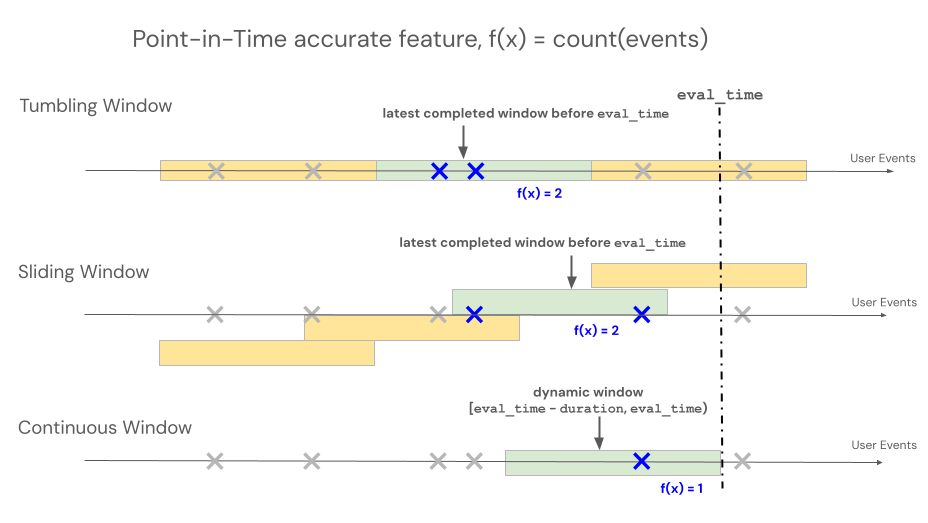
声明性特征工程 API 支持三种不同的窗口类型来控制基于时间窗口的聚合的回溯行为:滚动、翻转和滑动。
- 滚动窗口从事件时间回溯。 显式定义了持续时间和延迟。
- 翻转窗口是固定的、不重叠的时间窗口。 每个数据点只属于一个窗口。
- 滑动窗口是重叠的、连续滚动的时间窗口,具有可配置的滑动间隔。
下图显示了它们的工作原理。
滚动窗口
注释
RollingWindow 以前命名过 ContinuousWindow。 如果要从早期 SDK 版本迁移,请相应地更新导入。
滚动窗口 up-to-date 和实时聚合,通常用于流数据。 在流式处理管道中,滚动窗口仅在固定长度窗口的内容发生更改时(例如事件进入或离开时)发出新行。 在训练管道中使用滚动窗口功能时,将使用紧邻特定事件的时间戳之前的固定长度窗口持续时间对源数据执行准确的时间点特征计算。 这有助于防止联机与脱机数据不一致或数据泄露。 在时间 T 时,以 [T - 持续时间, T) 区间的聚合事件为特征。
class RollingWindow(TimeWindow):
    window_duration: datetime.timedelta
    delay: Optional[datetime.timedelta] = None
下表列出了滚动窗口的参数。 窗口开始和结束时间基于以下参数:
- 开始时间:
evaluation_time - window_duration - delay(含) - 结束时间:
evaluation_time - delay(独占)
| 参数 | 限制条件 |
|---|---|
delay(可选) |
必须≥ 0(将窗口从评估时间戳向后移动)。 用于 delay 考虑创建事件的时间与事件时间戳之间的任何系统延迟,以防止将来的事件泄漏到训练数据集中。 例如,如果在创建事件的时间之间有一分钟的延迟,并且这些事件最终会降落到源表中,其中分配了时间戳,则延迟将是 timedelta(minutes=1)。 |
window_duration |
必须为 > 0 |
from databricks.feature_engineering.entities import RollingWindow
from datetime import timedelta

# Look back 7 days from evaluation time
window = RollingWindow(window_duration=timedelta(days=7))
使用以下代码定义延迟滚动窗口。
# Look back 7 days, offset by 1 minute to account for data ingestion delay
window = RollingWindow(
    window_duration=timedelta(days=7),
    delay=timedelta(minutes=1)
)
滚动窗口示例
window_duration=timedelta(days=7):这将创建一个以当前评估时间结束的 7 天回溯窗口。 对于第 7 天下午 2:00 的活动,这包括从第 0 天下午 2:00 到第 7 天下午 2:00 之前的所有活动。window_duration=timedelta(hours=1), delay=timedelta(minutes=30):这将在评估时间的30分钟前创建一个持续1小时的回溯窗口。 对于下午 3:00 的事件,这包括从下午 1:30 到(但不包括)下午 2:30 的所有事件。 这可用于考虑数据引入延迟。
滑动窗口
对于使用滚动窗口定义的特性,聚合是通过预先确定的固定长度窗口计算的,该窗口按滑动间隔推进,生成完全划分时间的非重叠窗口。 因此,源中的每个事件都只贡献一个窗口。 在时间 t 的功能会聚合从时间窗口结束于或早于(但不包括)t 的数据。 Windows 从 Unix 时代开始。
class TumblingWindow(TimeWindow):
    window_duration: datetime.timedelta
下表列出了翻转窗口的参数。
| 参数 | 限制条件 |
|---|---|
window_duration |
必须为 > 0 |
from databricks.feature_engineering.entities import TumblingWindow
from datetime import timedelta

window = TumblingWindow(
    window_duration=timedelta(days=7)
)
滚动窗口示例
-
window_duration=timedelta(days=5):这会创建预先确定的固定长度窗口,每个窗口为 5 天。 示例:窗口 #1 跨越第 0 天到第 4 天、窗口 #2 跨越第 5 天到第 9 天、窗口 #3 跨越第 10 天到第 14 天等。 具体而言,Window #1 包括所有在第 0 天从00:00:00.00开始且早于第 5 天00:00:00.00时间戳的事件(不包括第 5 天的事件)。 每个事件只属于一个窗口。
滑动窗口
对于使用滑动窗口定义的功能,聚合是通过预先确定的固定长度窗口计算的,该窗口按幻灯片间隔前进,生成重叠窗口。 源中的每个事件都可以为多个窗口的功能聚合做出贡献。 在时间 t 的功能会聚合从时间窗口结束于或早于(但不包括)t 的数据。 Windows 从 Unix 时代开始。
class SlidingWindow(TimeWindow):
    window_duration: datetime.timedelta
    slide_duration: datetime.timedelta
下表列出了滑动窗口的参数。
| 参数 | 限制条件 |
|---|---|
window_duration |
必须为 > 0 |
slide_duration |
必须为 > 0 且 <window_duration |
from databricks.feature_engineering.entities import SlidingWindow
from datetime import timedelta

window = SlidingWindow(
    window_duration=timedelta(days=7),
    slide_duration=timedelta(days=1)
)
滑动窗口示例
-
window_duration=timedelta(days=5), slide_duration=timedelta(days=1):这将创建重叠的 5 天窗口,每次向前推进 1 天。 示例:窗口 #1 跨越第 0 天到第 4 天,窗口 #2 跨越第 1 天到第 5 天,窗口 #3 跨越第 2 天到第 6 天,依依如此。 每个窗口包括从00:00:00.00开始日到(但不包括)结束日00:00:00.00的事件。 由于窗口重叠,单个事件可以属于多个窗口(在此示例中,每个事件最多属于 5 个不同的窗口)。
具体化触发器
触发具体化管道运行时的控制。 触发器类型取决于功能类型。
CronSchedule
用于 CronSchedule 聚合功能(AggregationFunction)。 管道按由Tzon cron 表达式定义的固定计划运行。
from databricks.feature_engineering.entities import CronSchedule
from databricks.sdk.service.ml import MaterializedFeaturePipelineScheduleState

trigger = CronSchedule(
    quartz_cron_expression="0 0 * * * ?",  # Hourly
    timezone_id="UTC",
    pipeline_schedule_state=MaterializedFeaturePipelineScheduleState.ACTIVE,
)
TableTrigger
用于TableTriggerColumnSelection支持的功能DeltaTableSource。 每当上游 Delta 表收到新提交时,管道将运行。
from databricks.feature_engineering.entities import TableTrigger

trigger = TableTrigger()
选择触发器
| 功能类型 | Trigger | 运行时 |
|---|---|---|
聚合 (AggregationFunction) |
CronSchedule |
固定 cron 计划 |
ColumnSelection (发件人 DeltaTableSource) |
TableTrigger |
在每个源表提交时 |
不能在单个ColumnSelection调用中混合materialize_features和聚合功能,因为它们需要不同的触发器类型。 改为发出单独的调用,而不是合并调用。