创建代理标识蓝图后,下一步是创建一个或多个代理 标识 来表示租户中的 AI 代理。 预配新的 AI 代理时,通常会执行代理标识创建。
可以通过两种方式创建代理标识:
-
Microsoft Entra 管理中心 - 使用管理中心向导快速创建单个标识。
-
Microsoft 图形 API — 构建一个以编程方式创建代理标识的 Web 服务,这对于大规模自动预配非常有用。
若要快速创建代理标识以进行测试,请考虑 使用此Microsoft Entra PowerShell 模块来创建和使用代理标识。
先决条件
若要创建代理标识,需要:
-
代理标识蓝图。 从创建过程记录代理标识蓝图应用 ID。
- 托管代理标识创建逻辑的 Web 服务或应用程序(在本地运行或部署到Azure)。 仅当以编程方式创建代理标识时,此先决条件才适用。
使用Microsoft Entra管理中心
可以通过选择现有蓝图并分配所有者和发起人,直接在Microsoft Entra 管理中心中创建代理标识。
登录到 Microsoft Entra 管理中心。
浏览到 Entra ID>代理人>代理身份。
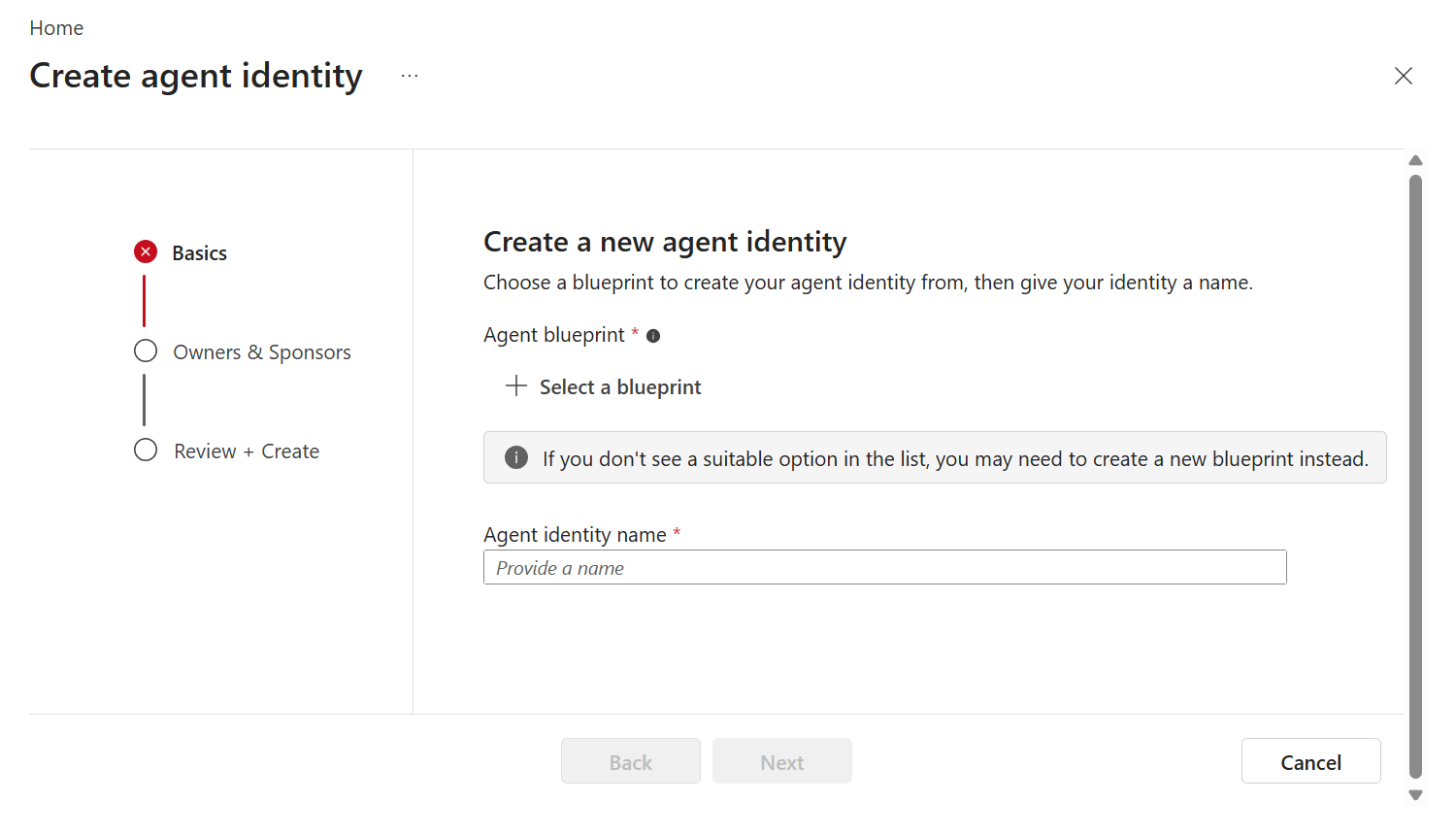
选择“新建代理标识”(预览版)。
在“基本信息”选项卡上:
在所有者和发起人选项卡上,可以选择性地添加与该身份相关的所有者和发起人:
- 选择 “所有者 ”字段旁边的铅笔图标,更改或添加可管理此代理标识的用户。
- 选择 “发起人 ”字段旁边的铅笔图标,更改或添加可以赞助此代理标识的用户。
注释
发起人可以是用户、动态成员组、或 Microsoft 365 组。 不支持安全组和具备角色分配功能的组作为发起人。
选择“下一步”。
查看设置,然后选择“ 创建”。
选择 “完成 ”退出向导或 转到代理标识 以查看标识的详细信息页或配置更多设置。
在以下步骤中,你将学习如何使用Microsoft 图形 API和Microsoft.Identity.Web以编程方式创建代理身份。 首先获取访问令牌,然后调用创建 API。
使用代理标识蓝图获取访问令牌
使用代理标识蓝图创建每个代理标识。 使用代理标识模板从 Microsoft Entra 请求访问令牌:
使用托管标识作为凭据时,必须先使用托管标识获取访问令牌。 可以从计算环境中本地公开的 IP 地址请求托管标识令牌。 有关详细信息,请参阅 托管标识文档。
GET http://169.254.169.254/metadata/identity/oauth2/token?api-version=2019-08-01&resource=api://AzureADTokenExchange/.default
Metadata: True
获取托管标识的令牌后,请请求代理身份蓝图的令牌:
POST https://login.partner.microsoftonline.cn/<your-tenant-id>/oauth2/v2.0/token
Content-Type: application/x-www-form-urlencoded

client_id=<agent-blueprint-id>
scope=https://microsoftgraph.chinacloudapi.cn/.default
client_assertion_type=urn:ietf:params:oauth:client-assertion-type:jwt-bearer
client_assertion=<msi-token>
grant_type=client_credentials
也可以在本地开发中使用客户端密码时,使用client_secret参数来替代client_assertion 和client_assertion_type。
安装 Microsoft.Identity.Web:
dotnet add package Microsoft.Identity.Web
Microsoft.Identity.Web 包含一个接口,该接口会自动请求访问令牌并将其附加到出站 HTTP 请求中。 使用 Microsoft.Identity.Web 时,可以跳到下一步。
创建代理标识
使用在上一步中获取的访问令牌,现在可以在租户中创建代理标识。 代理标识创建可能是为了响应许多不同的事件或触发器,例如用户选择用于创建新代理的按钮。 建议为每个代理创建一个代理标识,但可以根据需求选择不同的方法。
使用 @odata.type时始终包含 OData-Version 标头。
POST https://microsoftgraph.chinacloudapi.cn/beta/serviceprincipals/Microsoft.Graph.AgentIdentity
OData-Version: 4.0
Content-Type: application/json
Authorization: Bearer <token>
{
	"displayName": "My Agent Identity",
	"agentIdentityBlueprintId": "<my-agent-blueprint-id>",
	"sponsors@odata.bind": [
		"https://microsoftgraph.chinacloudapi.cn/v1.0/users/<id>",
		"https://microsoftgraph.chinacloudapi.cn/v1.0/groups/<group-id>"
	]
}
注释
将组指定为发起人时,仅接受 受支持的组类型 。 群组不能作为所有者。
若要使用 Microsoft.Identity.Web 执行 Microsoft 图形 API 请求以创建代理标识,请添加以下 MISE 配置文件:
Warning
由于安全风险,客户端机密不应在生产环境中用作代理标识蓝图的客户端凭据。 而是使用更安全的身份验证方法 ,例如将联合标识凭据(FIC)与托管标识 或客户端证书配合使用。 这些方法通过消除直接在应用程序配置中存储敏感机密的需要,从而提供增强的安全性。
{
  "AzureAd": {
	"Instance": "https://login.partner.microsoftonline.cn/",
	"TenantId": "<your-tenant-id>",
	"ClientId": "<my-agent-blueprint-id>",
	"Scopes": "access_agent",
	"ClientCredentials": [
		{
			"SourceType": "ClientSecret",
			"ClientSecret": "your-client-secret"
		}
	]
  },

  "DownstreamApis": {
	"agent-identity": {
	  "BaseUrl": "https://microsoftgraph.chinacloudapi.cn",
	  "RelativePath": "/beta/serviceprincipals/Microsoft.Graph.AgentIdentity",
	  "Scopes": ["00000003-0000-0000-c000-000000000000/.default"],
	  "RequestAppToken": true
	}
  }
}
ASP.NET Core应用(Program.cs)的代码如下:
using System.Text.Json.Serialization;
using Microsoft.Identity.Abstractions;
using Microsoft.Identity.Web;
using Microsoft.Identity.Web.Resource;
using Microsoft.IdentityModel.S2S.Extensions.AspNetCore;

var builder = WebApplication.CreateBuilder(args);

// Add services to the container.
builder.Services.AddMicrosoftIdentityWebApiAuthentication(builder.Configuration)
    .EnableTokenAcquisitionToCallDownstreamApi();
builder.Services.AddInMemoryTokenCaches();
var app = builder.Build();

app.UseHttpsRedirection();
app.UseAuthentication();
app.UseAuthorization();

// Create an Agent identity
app.MapGet("/create-agent-identity", async (HttpContext httpContext) =>
{
    try
    {
        // Get the service to call the downstream API (preconfigured in the appsettings.json file)
        IDownstreamApi downstreamApi = httpContext.RequestServices.GetRequiredService<IDownstreamApi>();

        // Call the downstream API with a POST request to create an Agent Identity
        var jsonResult = await downstreamApi.PostForAppAsync<AgentIdentity, AgentIdentity>(
            "agent-identity",
            new AgentIdentity
            {
                displayName = "My agent identity",
                agentIdentityBlueprintId = "<my-agent-blueprint-id>",
                sponsorsOdataBind = new[] { "https://microsoftgraph.chinacloudapi.cn/v1.0/users/<id>" }
            });
        return jsonResult?.id;
    }
    catch (Exception ex)
    {
        return ex.Message;
    }
});

app.Run();

// Type declarations must follow the top-level statements.
public class AgentIdentity
{
    [JsonPropertyName("@odata.type")]
    public string @odata_type { get; set; } = "#Microsoft.Graph.AgentIdentity";

    [JsonPropertyName("displayName")]
    public string? displayName { get; set; }

    [JsonPropertyName("agentIdentityBlueprintId")]
    public string? agentIdentityBlueprintId { get; set; }

    [JsonPropertyName("id")]
    public string? id { get; set; }

    [JsonPropertyName("sponsors@odata.bind")]
    public string[]? sponsorsOdataBind { get; set; }

    [JsonPropertyName("owners@odata.bind")]
    public string[]? ownersOdataBind { get; set; }
}
删除代理标识
当代理被解除分配或销毁时,您的服务还应删除关联的代理身份。
DELETE https://microsoftgraph.chinacloudapi.cn/beta/serviceprincipals/<agent-identity-id>
OData-Version: 4.0
Content-Type: application/json
Authorization: Bearer <token>
// Delete an Agent identity
app.MapGet("/delete-agent-identity", async (HttpContext httpContext, string id) =>
{
	// Get the service to call the downstream API (preconfigured in the appsettings.json file)
	IDownstreamApi downstreamApi = httpContext.RequestServices.GetRequiredService<IDownstreamApi>();

	// Call the downstream API with a DELETE request to remove an Agent Identity
	var jsonResult = await downstreamApi.DeleteForAppAsync<string, string>(
		"agent-identity",
		null!,
		options =>
		{
			options.RelativePath += $"/{id}"; // Specify the ID of the agent identity to delete
		});
	return jsonResult;
});
相关内容