Note
Access to this page requires authorization. You can try signing in or changing directories.
Access to this page requires authorization. You can try changing directories.
Azure CNI Overlay is a networking model for Azure Kubernetes Service (AKS) that provides efficient IP address management and high-performance pod communication. This article provides an overview of Azure CNI Overlay, including its architecture, IP address planning, and differences from the traditional kubenet networking model.
How Azure CNI Overlay networking works
The flat Azure Container Networking Interface (CNI) model assigns a virtual network IP address to every pod. Azure CNI Pod Subnet assigns pod IPs from a separate subnet reserved for pods. Azure CNI Node Subnet (legacy) assigns pod IPs from the node subnet. These flat networking options require virtual network IP address planning and might lead to address exhaustion, which introduces difficulties scaling your clusters as your application demands grow.
In overlay networking, only the Kubernetes cluster nodes are assigned IPs from subnets. Pods receive IPs from a private Classless Inter-Domain Routing (CIDR) range provided at the time of cluster creation. Each node is assigned a /24 address space carved out from the same CIDR. Extra nodes created when you scale out a cluster automatically receive /24 address spaces from the same CIDR. Azure CNI assigns IPs to pods from this /24 space.
A separate routing domain is created in the Azure networking stack for the pod's private CIDR space. This domain creates an overlay network for direct communication between pods. There's no need to provision custom routes on the cluster subnet or use an encapsulation method to tunnel traffic between pods, which provides connectivity performance between pods on par with virtual machines (VMs) in a virtual network. Workloads running within the pods aren't even aware that network address manipulation is happening.
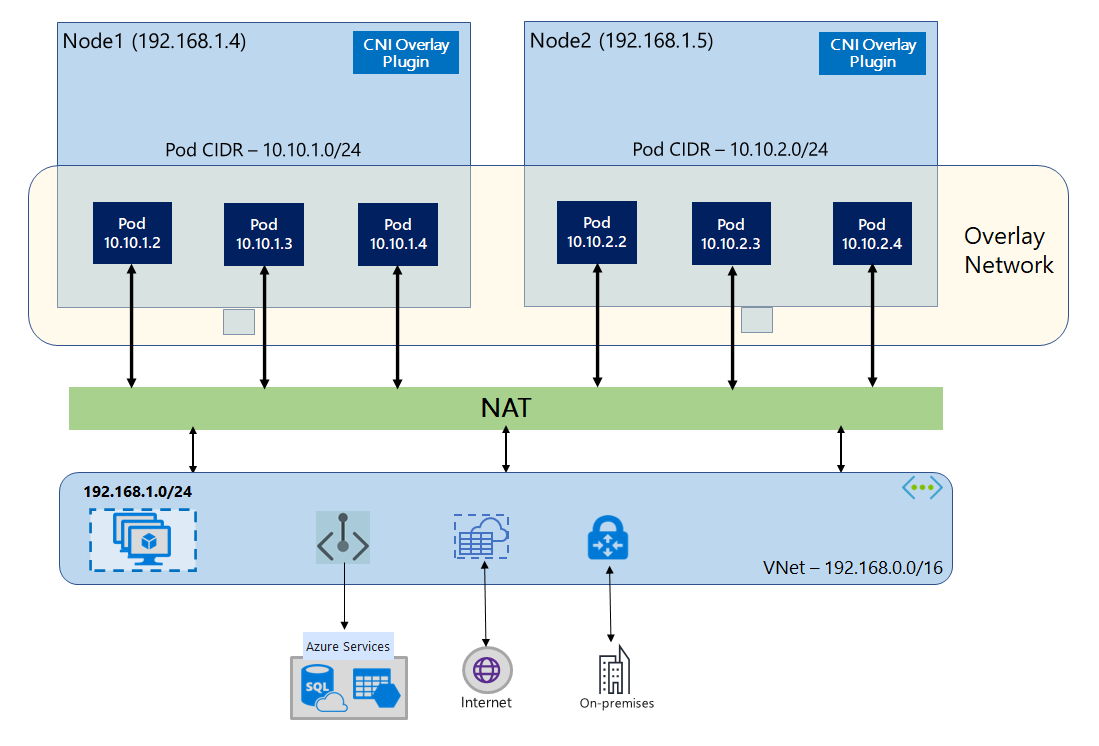
Communication with endpoints outside the cluster, such as on-premises and peered virtual networks, uses the node IP through network address translation (NAT). Azure CNI translates the source IP (overlay IP of the pod) of the traffic to the primary IP address of the node VM. This translation enables the Azure networking stack to route the traffic to the destination.
Endpoints outside the cluster can't connect to a pod directly. To make an application reachable, expose it through a Kubernetes service or application-routing layer, such as a LoadBalancer service or an ingress controller. For more information, see Plan application networking for AKS.
You can provide outbound (egress) connectivity to the internet for overlay pods by using a standard load balancer or managed NAT gateway. You can also control egress traffic by directing it to a firewall via user-defined routes on the cluster subnet.
You can configure ingress connectivity to the cluster by using an ingress controller, such as Application Gateway for Containers, NGINX, or the application routing add-on.
Differences between kubenet and Azure CNI Overlay
Like Azure CNI Overlay, kubenet assigns IP addresses to pods from an address space that's logically different from the virtual network, but it has scaling and other limitations. The following table provides a detailed comparison between kubenet and Azure CNI Overlay:
Important
Starting on March 31, 2028, Azure Kubernetes Service (AKS) no longer supports kubenet networking. To avoid service disruptions, upgrade to Azure Container Networking Interface (CNI) Overlay networking before the end-of-support date. For more information on this retirement, see the Retirement GitHub issue and the Azure Updates retirement announcement. To stay informed on announcements and updates, follow the AKS release notes.
| Area | Azure CNI Overlay | kubenet (legacy) |
|---|---|---|
| Maximum nodes per cluster | 5,000 nodes | 400 nodes |
| Maximum pods per node | 250 pods (110 maximum recommended for Windows Server containers) | 250 pods |
| Network configuration | Simple - no extra configurations required for pod networking | Complex - requires route tables and user-defined routes on the cluster subnet for pod networking |
| Pod connectivity performance | Performance on par with VMs in a virtual network | Extra hop adds latency |
| Kubernetes network policies | Azure CNI Powered by Cilium (recommended), or the Azure iptables data plane with Calico or Azure Network Policy Manager (NPM) | Calico |
| OS platforms supported | Linux, Windows Server 2025, Windows Server 2022 | Linux only |
The maximum node and per-node pod values are independent limits. Don't multiply them to determine the supported aggregate pod capacity of a cluster. When you plan cluster scale, review the AKS service quotas and limits and large-cluster scalability guidance. Control plane tier, workload behavior, and other service limits affect achievable scale.
Azure CNI Powered by Cilium provides an eBPF data plane with built-in Cilium network policy enforcement. With the Azure iptables data plane, you can use Calico or Azure NPM, but Azure NPM is no longer supported on Windows nodes as of September 30, 2026, and support on Linux nodes ends on September 30, 2028. For current recommendations and migration guidance, see Network policy options in AKS.
Note
If you don't want to assign virtual network IP addresses to pods due to IP shortage, we recommend using Azure CNI Overlay.
IP address planning
The following sections provide guidance on how to plan your IP address space for Azure CNI Overlay.
Cluster nodes
When you set up your Azure CNI Overlay AKS cluster, make sure that your virtual network subnets have enough room to grow for future scaling. You can assign each node pool to a dedicated subnet. A /24 subnet contains 256 IP addresses. Azure reserves the first four and last IP addresses, leaving 251 usable addresses. When you size the subnet, also reserve address space for upgrade and scale operations and other resources in the subnet.
Pods
The /24 size that Azure CNI Overlay assigns is fixed and can't be increased or decreased. You can run up to 250 pods on a node. When you plan the pod address space, ensure that the private CIDR is large enough to provide /24 address spaces for new nodes to support future cluster expansion.
When you plan IP address space for pods, consider the following factors:
- You can use the same pod CIDR space on multiple independent AKS clusters in the same virtual network.
- Pod CIDR space must not overlap with the cluster subnet range.
- Pod CIDR space must not overlap with directly connected networks, like virtual network peering, Azure ExpressRoute, or VPN. If external traffic has source IPs in the pod CIDR range, it needs translation to a non-overlapping IP via Source Network Address Translation (SNAT) to communicate with the cluster.
- On Azure CNI Overlay clusters with Linux nodes only, you can expand the pod CIDR to a larger contiguous superset that contains the original range. Shrinking or replacing the range isn't supported. Expansion also isn't supported for Windows or hybrid node scenarios, IPv6 pod CIDRs, or multiple pod CIDR blocks.
Kubernetes service address range
The size of the service address CIDR depends on the number of cluster services that you plan to create. It must be smaller than /12. This range shouldn't overlap with the pod CIDR range, cluster subnet range, and IP range used in peered virtual networks and on-premises networks.
Note
Starting with Kubernetes 1.33, you can extend the service IP range after cluster creation using the ServiceCIDR Kubernetes resource. For more information, see Extend Service IP Ranges in the Kubernetes documentation.
Kubernetes service IP address for DNS
The IP address for DNS is within the Kubernetes service address range that cluster service discovery uses. Don't use the first IP address in your address range, because this address is used for the kubernetes.default.svc.cluster.local address.
Important
Supported pod CIDRs can use RFC 1918 private-use address space or RFC 6598 shared address space. Although Azure doesn't block the use of public IP ranges, they're outside Microsoft's support scope. Use a nonpublic, nonoverlapping range for the pod CIDR.
When you use Azure CNI in overlay mode, ensure that the pod CIDR doesn't overlap with any external IP addresses or networks (such as on-premises networks, peered virtual networks, or ExpressRoute). If an external host uses an IP within the pod CIDR, packets destined for that host from the pod might be redirected into the overlay network and SNAT'd by the node. This situation causes the external endpoint to become unreachable.
Network security groups
Pod-to-pod traffic with Azure CNI Overlay isn't encapsulated, and subnet network security group (NSG) rules are applied. If the subnet NSG contains deny rules that would affect the pod CIDR traffic, make sure that the following rules are in place to ensure proper cluster functionality (in addition to all AKS egress requirements):
| Source | Destination | Ports and protocols | Purpose |
|---|---|---|---|
| Node CIDR | Node CIDR | All ports and protocols | Node-to-node communication |
| Node CIDR | Pod CIDR | All ports and protocols | Service traffic routing |
| Pod CIDR | Pod CIDR | All ports and protocols | Pod-to-pod and pod-to-service traffic, including DNS |
Traffic from a pod to any destination outside the pod CIDR block uses SNAT to set the source IP to the IP of the node where the pod runs.
If you want to restrict traffic between workloads in the cluster, we recommend using network policies.
Maximum pods per node
You can configure the maximum number of pods per node when you create the cluster or add a new node pool.
| Setting | Value |
|---|---|
| Default | 250 |
| Maximum | 250 |
| Minimum | 10 |
The value for maximum pods per node that you configure during creation of a node pool applies to the nodes in that node pool only.
For Windows Server containers, the maximum recommended value is 110 pods per node. This recommended operating value is lower than the configurable Azure CNI Overlay maximum of 250 pods per node. For more information, see AKS service quotas and limits.
Choosing a network model
Use overlay networking when:
- You want to scale to a large number of pods but are limited by IP address space in your virtual network.
- Most of the pod communication is within the cluster.
- You don't need advanced AKS features, such as virtual nodes.
Use flat networking when:
- You have available IP address space.
- Most of the pod communication is to resources outside the cluster.
- Resources outside the cluster need to reach pods directly.
- You need AKS advanced features, such as virtual nodes.
Azure CNI provides Azure CNI Overlay for overlay networking and Azure CNI Pod Subnet or Azure CNI Node Subnet (legacy) for flat networking. For a detailed comparison of these IP address management options, see Plan pod networking for AKS.
Limitations with Azure CNI Overlay
Azure CNI Overlay has the following limitations:
- VM availability sets aren't supported.
- If you're using your own subnet to deploy the cluster, the names of the subnet, the virtual network, and the resource group that contains the virtual network must be 63 characters or fewer. These names are used as labels in AKS worker nodes, so they're subject to Kubernetes syntax rules for labels.
Related content
To get started with Azure CNI Overlay in AKS, see the following articles: