Note
Access to this page requires authorization. You can try signing in or changing directories.
Access to this page requires authorization. You can try changing directories.
This article shows you how to estimate plan costs for the legacy Consumption plan.
Choose the hosting option that best supports the feature, performance, and cost requirements for your function executions. For more information, see Azure Functions scale and hosting.
This article focuses on the two consumption plans because billing in these plans depends on active periods of executions inside each instance.
Provides dynamic scale and serverless hosting when your app must run on Windows, on version 1.x of the Functions runtime, on the full .NET Framework, or with full support for PowerShell. Use the Flex Consumption plan for hosting new apps, unless your app requires these specialized hosting conditions. For more information, see Azure Functions Consumption plan hosting.
Durable Functions can also run in both of these plans. For more information about the cost considerations when using Durable Functions, see Durable Functions billing.
Consumption-based costs
The way that consumption-based costs are calculated, including free grants, depends on the specific plan. For the most current cost and grant information, see the Azure Functions pricing page.
The execution cost of a single function execution is measured in GB-seconds. Execution cost is calculated by combining memory usage with execution time. A function that runs longer costs more, as does a function that consumes more memory.
Consider a case where the amount of memory used by the function stays constant. In this case, calculating the cost is simple multiplication. For example, if your function consumes 0.5 GB for 3 seconds, the execution cost is 0.5GB * 3s = 1.5 GB-seconds.
Because memory usage changes over time, the calculation is essentially the integral of memory usage over time. The system performs this calculation by sampling the memory usage of the process (along with child processes) at regular intervals. As mentioned on the pricing page, memory usage is rounded up to the nearest 128-MB bucket. When your process uses 160 MB, you pay for 256 MB. The calculation takes into account concurrency, which is multiple concurrent function executions in the same process.
Note
While CPU usage isn't directly considered in execution cost, it can affect the cost when it influences the execution time of the function.
For an HTTP-triggered function, when an error occurs before your function code begins to execute, you aren't charged for an execution. This means that 401 responses from the platform due to API key validation or the App Service Authentication / Authorization feature don't count against your execution cost. Similarly, 5xx status code responses aren't counted when they occur in the platform before your function processes the request. A 5xx response generated by the platform after your function code starts to execute is still counted as an execution, even when the error isn't raised from your function code.
Behaviors affecting execution time
The following behaviors of your functions can affect the execution time:
Triggers and bindings: The time taken to read input from and write output to your function bindings counts as execution time. For example, when your function uses an output binding to write a message to an Azure storage queue, your execution time includes the time taken to write the message to the queue, which is included in the calculation of the function cost.
Asynchronous execution: The time that your function waits for the results of an async request (
awaitin C#) counts as execution time. The GB-second calculation is based on the start and end time of the function and the memory usage over that period. What happens over that time in terms of CPU activity isn't factored into the calculation. You might be able to reduce costs during asynchronous operations by using Durable Functions. You're not billed for time spent at awaits in orchestrator functions.
Viewing and estimating costs from metrics
In your invoice, you can view the cost-related data along with the actual billed costs. However, this invoice data is a monthly aggregate for a past invoice period.
This section shows you how to use metrics, both app-level and function executions, to estimate costs for running your function apps.
Function app-level metrics
Use Azure Monitor metrics explorer to view cost-related data for your Consumption plan function apps in a graphical format.
In the Azure portal, go to your function app.
In the left panel, scroll down to Monitoring and select Metrics.
From Metric, select Function Execution Count and Sum for Aggregation. This selection adds the sum of the execution counts during the chosen period to the chart.
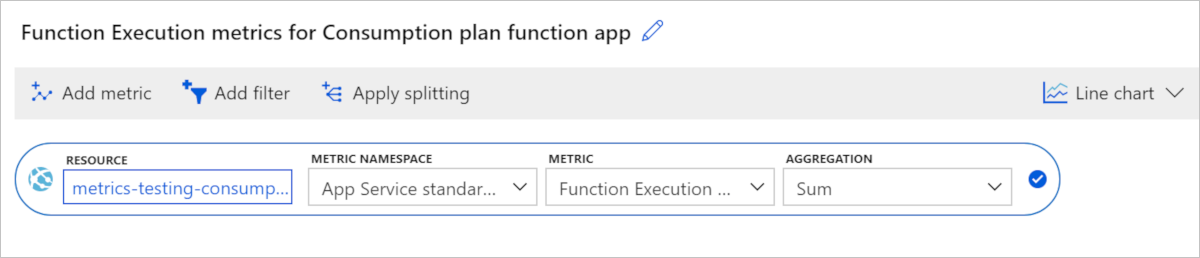
Select Add metric and repeat steps 2-4 to add Function Execution Units to the chart.
The resulting chart contains the totals for both execution metrics in the chosen time range, which in this case is two hours.
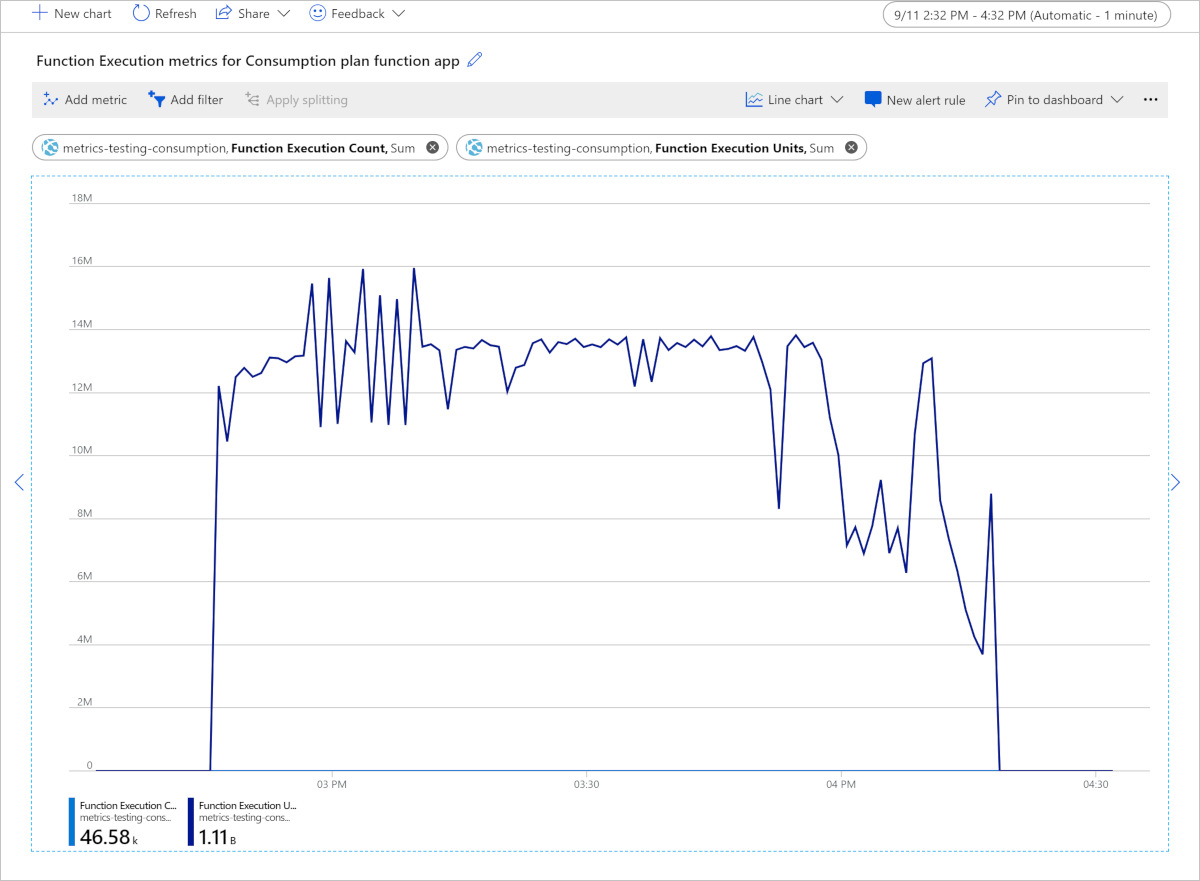
Because the number of execution units is much greater than the execution count, the chart shows only execution units.
This chart shows a total of 1.11 billion Function Execution Units consumed in a two-hour period, measured in MB-milliseconds. To convert to GB-seconds, divide by 1,024,000. In this example, the function app consumed 1,110,000,000 / 1,024,000 = 1,083.98 GB-seconds. Multiply this value by the current price of execution time on the Functions pricing page, which gives you the cost of these two hours, assuming you already used any free grants of execution time.
Function-level metrics
Memory usage is important when estimating costs of your function executions. However, the way memory usage impacts your costs depends on the specific plan type:
In the Consumption plan, billing is based on function execution units that combine execution time and memory usage. For more information, see Billing.
Memory data isn't a metric currently available through Azure Monitor. However, if you want to model or optimize the memory usage of your app, you can use the performance counter data collected by Application Insights.
If you haven't already done so, enable Application Insights in your function app. With this integration enabled, you can query this telemetry data in the portal.
You can use either Azure Monitor metrics explorer in the Azure portal or REST APIs to get Monitor Metrics data.
Determine memory usage
Under Monitoring, select Logs (Analytics), then copy the following telemetry query and paste it into the query window and select Run. This query returns the total memory usage at each sampled time.
performanceCounters
| where name == "Private Bytes"
| project timestamp, name, value
The results look like the following example:
| timestamp [UTC] | name | value |
|---|---|---|
| 9/12/2019, 1:05:14.947 AM | Private Bytes | 209,932,288 |
| 9/12/2019, 1:06:14.994 AM | Private Bytes | 212,189,184 |
| 9/12/2019, 1:06:30.010 AM | Private Bytes | 231,714,816 |
| 9/12/2019, 1:07:15.040 AM | Private Bytes | 210,591,744 |
| 9/12/2019, 1:12:16.285 AM | Private Bytes | 216,285,184 |
| 9/12/2019, 1:12:31.376 AM | Private Bytes | 235,806,720 |
Determine duration
Azure Monitor tracks metrics at the resource level, which for Functions is the function app. Application Insights integration emits metrics on a per-function basis. Here's an example analytics query to get the average duration of a function:
customMetrics
| where name contains "Duration"
| extend averageDuration = valueSum / valueCount
| summarize averageDurationMilliseconds=avg(averageDuration) by name
| name | averageDurationMilliseconds |
|---|---|
| QueueTrigger AvgDurationMs | 16.087 |
| QueueTrigger MaxDurationMs | 90.249 |
| QueueTrigger MinDurationMs | 8.522 |
Other related costs
When estimating the overall cost of running your functions in any plan, remember that the Functions runtime uses several other Azure services, which are each billed separately. When you estimate pricing for function apps, any triggers and bindings you have that integrate with other Azure services require you to create and pay for those other services.
For functions running in a Consumption plan, the total cost is the execution cost of your functions, plus the cost of bandwidth and other services.
When estimating the overall costs of your function app and related services, use the Azure pricing calculator.
| Related cost | Description |
|---|---|
| Storage account | Each function app requires that you have an associated General Purpose Azure Storage account, which is billed separately. This account is used internally by the Functions runtime, but you can also use it for Storage triggers and bindings. If you don't have a storage account, one is created for you when the function app is created. To learn more, see Storage account requirements. |
| Application Insights | Functions relies on Application Insights to provide a high-performance monitoring experience for your function apps. While not required, you should enable Application Insights integration. A free grant of telemetry data is included every month. To learn more, see the Azure Monitor pricing page. |
| Network bandwidth | You can incur costs for data transfer depending on the direction and scenario of the data movement. To learn more, see Bandwidth pricing details. |