Note
Access to this page requires authorization. You can try signing in or changing directories.
Access to this page requires authorization. You can try changing directories.
This article describes the JSON structure of DCRs for those cases where you need to work directly with their definition.
- For details about working with the JSON described in this article, see Create and edit DCRs.
- For samples of different scenarios, see Sample DCRs in Azure Monitor.
Properties
The resource-level kind property identifies the DCR's data collection scenario. It's defined at the resource level, outside the properties object. Other settings, including dataSources, dataFlows, and transformations, are nested under properties.
The following table describes general DCR properties. Except for kind, these properties are nested under properties. The DCR data flow overview later in this article describes the data collection and processing settings.
| Property | Description |
|---|---|
description |
Optional description of the data collection rule defined by the user. |
dataCollectionEndpointId |
Resource ID of the data collection endpoint (DCE) used by the DCR if you provide one when creating the DCR. This property isn't present in DCRs that don't use a DCE. |
endpoints1 |
Contains the logsIngestion and metricsIngestion URL of the endpoints for the DCR. This section and its properties are automatically created when the DCR is created only if the kind attribute in the DCR is Direct. |
immutableId |
A unique identifier for the data collection rule. This property and its value are automatically created when the DCR is created. |
kind |
Specifies the data collection scenario the DCR is used for. This parameter is further described in the following section. |
1 DCRs created before March 31, 2024, don't have the endpoints property. They require a separate data collection endpoint (DCE), specified through dataCollectionEndpointId. To use DCR ingestion endpoints instead, create a new DCR with kind set to Direct.
Kind
The kind property specifies the data collection scenario, not an individual data source type. The scenario determines which settings the DCR uses.
The following table lists the different kinds of DCRs and their details.
| Kind | Description |
|---|---|
Direct |
Direct ingestion using the Log Ingestion API. Endpoints are created for the DCR only if this kind value is used. |
AgentSettings |
Configure Azure Monitor Agent settings, such as local cache size and OTLP listener ports, through properties.agentSettings. |
Linux |
Collect events and performance data from Linux machines. |
PlatformTelemetry |
Export platform metrics. |
Windows |
Collect events and performance data from Windows machines. |
WorkspaceTransforms |
Apply workspace transformations to supported tables. This DCR routes standard input streams without defining how to collect them. |
Overview of DCR data flow
The basic flow of a DCR is shown in the following diagram. Each of the components is described in the following sections.
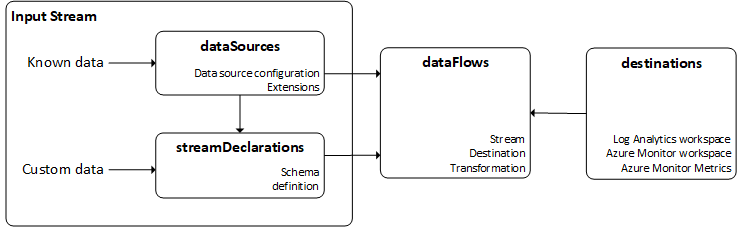
For collection scenarios, data moves from Data sources through Input streams and Data flows to Destinations. Not every DCR uses every component. The following table describes each property's role and uses. All properties in this table are nested under properties.
| Property | Role and scenario |
|---|---|
dataSources |
Configure collection from sources such as Windows events, Syslog, and performance counters for Azure Monitor Agent (AMA). Linux and Windows DCRs use these collection settings. |
directDataSources |
Configure direct OpenTelemetry logs, metrics, and traces through otelLogs, otelMetrics, and otelTraces. |
streamDeclarations |
Define the schema of custom input streams for data with a customer-defined schema, including data sent through the Log Ingestion API or collected by AMA. Multi-stage processing of Syslog or Windows events can also produce custom streams that require declarations. Standard schemas don't need a custom declaration. |
dataFlows |
Route input streams to destinations and specify ingestion-time transformations. Workspace transformation DCRs route standard input streams without defining how to collect them. |
destinations |
Define named destinations referenced by data flows. A workspace transformation DCR can only send data to the workspace it's associated with. |
transformations |
Define named processor pipelines for multi-stage transformations (preview). A data source or data flow selects a pipeline through transform. This property is separate from inline dataFlows[].transformKql. |
references |
Define resources used by other DCR sections, such as Application Insights references for OpenTelemetry enrichment and enrichment data referenced by data flows. |
agentSettings |
Configure agent behavior on a host, including local cache size and OTLP listener ports. |
The ARM template reference describes the resource format and property types for a selected API version. Its resource format is a property inventory, not a working example that requires every field to be populated. Use the configuration for your collection scenario. Multi-stage transformations require API version 2025-05-11 or later, as described in Multi-stage DCR considerations.
Data inputs
A DCR's data input configuration specifies how data reaches Azure Monitor and the schema of its input streams. Collection settings and schema declarations serve different purposes, as shown in the following table. Some scenarios require both, for example, text log collection with AMA.
| Purpose | Property | Description |
|---|---|---|
| Collection configuration | dataSources |
Configure how AMA collects data, such as Windows events, Syslog, performance counters, and log files. |
| Collection configuration | directDataSources |
Configure direct OpenTelemetry logs, metrics, and traces. See Direct data sources. |
| Ingestion endpoints | endpoints |
Provide the DCR's generated ingestion endpoint URLs for clients that send data directly to Azure Monitor. |
| Schema declaration | streamDeclarations |
Define the schema of each custom input stream, whether the data arrives through an ingestion API or from an agent. |
Note
Workspace transformation DCRs don't define input collection. They route standard input streams to their associated workspace.
Data sent through the Log Ingestion API uses streamDeclarations to define the schema of the incoming data.
Text log collection with AMA uses dataSources to configure file collection and streamDeclarations to define the incoming data's schema. Custom streams produced by multi-stage processing also require stream declarations.
Data sources
Data sources are unique sources of monitoring data, each with its own format and method for exposing data. Each data source type has a unique set of parameters that you must configure for each data source. The data source typically returns a known data type, so you don't need to define the schema in the DCR.
For example, events and performance data collected from a VM by using the Azure Monitor agent (AMA) use data sources such as windowsEventLogs and performanceCounters. You specify criteria for the events and performance counters that you want to collect, but you don't need to define the structure of the data itself since this schema is known for potential incoming data.
Common data source parameters
The following parameters describe data source naming, streams, and transformations. The transform property is available only for data sources supported by multi-stage transformations.
| Parameter | Description |
|---|---|
name |
Name to identify the data source in the DCR. |
streams |
List of streams that the data source collects. If this stream is a standard data type such as a Windows event, the stream appears as Microsoft-<TableName>. If it's a custom type, the stream appears as Custom-<TableName>. |
transform |
(Preview) Name of a transformation from the transformations section to apply client-side. Use this property for multi-stage transformations. |
Valid data source types
The following table describes common data source types. For additional types and their properties, see the ARM template reference.
| Data source type | Description | Streams | Parameters |
|---|---|---|---|
eventHub |
Data from Azure Event Hubs. | Custom1 | consumerGroup - Consumer group of event hub to collect from. |
iisLogs |
IIS logs from Windows machines | Microsoft-W3CIISLog |
logDirectories - Directory where IIS logs are stored on the client. |
logFiles |
Text or JSON log on a virtual machine | Custom1 | filePatterns - Folder and file pattern for log files to collect from client.format - json or text |
performanceCounters |
Performance counters for both Windows and Linux virtual machines | Microsoft-PerfMicrosoft-InsightsMetrics |
samplingFrequencyInSeconds - Frequency that performance data should be sampled.counterSpecifiers - Objects and counters that should be collected. |
prometheusForwarder |
Prometheus data collected from Kubernetes cluster. | Microsoft-PrometheusMetrics |
streams - Streams to collectlabelIncludeFilter - List of label inclusion filters as name-value pairs. Currently only microsoft_metrics_include_label supported. |
syslog |
Syslog events on Linux virtual machines Events in Common Event Format on security appliances |
Microsoft-SyslogMicrosoft-CommonSecurityLog for CEF |
facilityNames - Facilities to collectlogLevels - Log levels to collect |
windowsEventLogs |
Windows event log on virtual machines | Microsoft-Event |
xPathQueries - XPaths specifying the criteria for the events that should be collected. |
extension |
Extension-based data source used by Azure Monitor agent. | Varies by extension | extensionName - Name of the extensionextensionSettings - Values for each setting required by the extension |
1 These data sources use both a data source and a stream declaration since the schema of the data they collect can vary. The stream used in the data source should be the custom stream defined in the stream declaration.
Direct data sources
The directDataSources object contains otelLogs, otelMetrics, and otelTraces collections for OpenTelemetry data. Each entry includes a name and streams, with additional properties for enrichment. For the property definitions, see DataCollectionRuleDirectDataSources.
The ARM reference also lists OpenTelemetry logs, metrics, and traces under dataSources. These are separate collections in the resource format. The inventory alone doesn't establish an agent requirement or a requirement to duplicate entries across the two collections.
Stream declarations
Declare the different types of data you send into the Log Analytics workspace. Each stream is an object whose key represents the stream name, which must begin with Custom-. The stream contains a full list of top-level properties that are contained in the JSON data you send. The shape of the data you send to the endpoint doesn't need to match that of the destination table. Instead, the output of the transform that's applied on top of the input data needs to match the destination shape.
Data types
Assign the following data types to the properties:
stringintlongrealbooleandynamicdatetime
The guid type isn't available in stream declarations. If your source data includes GUID values, declare those columns as string. The Tables API supports the guid type, but the values are actually stored and queried as strings. For more information, see Column data types in Azure Monitor Logs.
References
The references object defines resources used by other sections of the DCR. It doesn't route data to a destination.
applicationInsightsdefines named Application Insights resource references for OpenTelemetry enrichment. OpenTelemetry data source entries useenrichWithReferenceto select a reference.enrichmentDatadefines enrichment data sources referenced by data flows, including storage blobs.
For the supported fields, see DataCollectionRuleReferences.
Agent settings
The agentSettings object configures agent behavior on a host, including local cache size and OTLP listener ports. Its logs and metrics collections contain named settings and values for AMA. For supported settings and configuration instructions, see Azure Monitor Agent settings. For the resource structure, see DataCollectionRuleAgentSettings.
Destinations
Include an entry for each destination where you send the data in the destinations section. Match these destinations with input streams in the dataFlows section.
Common destination parameters
| Parameters | Description |
|---|---|
name |
Name used to reference the destination in the dataSources section. |
Valid destinations
The following table lists the available destinations.
| Destination | Description | Required parameters |
|---|---|---|
azureDataExplorer |
Azure Data Explorer | resourceId - Resource ID of the ADX clusterdatabaseName - Name of the database in the ADX clusteringestionUri - Ingestion URI of the cluster |
azureMonitorMetrics |
Azure Monitor metrics | No configuration is required since there's only a single metrics store for the subscription. |
logAnalytics |
Log Analytics workspace | workspaceResourceId - Resource ID of the workspace.workspaceID - ID of the workspaceThis parameter only specifies the workspace, not the table where the data is sent. If it's a known destination, then you don't need to specify a table. For custom tables, specify the table in the data source. |
Important
One stream can only send to one Log Analytics workspace in a DCR. You can have multiple dataFlow entries for a single stream if they're using different tables in the same workspace. If you need to send data to multiple Log Analytics workspaces from a single stream, create a separate DCR for each workspace.
Data flows
Data flows match streams with destinations. Each data flow can optionally specify an ingestion-time transformation and, in some cases, a specific table in the Log Analytics workspace.
Data flow properties
| Section | Description |
|---|---|
streams |
One or more standard input streams or custom streams defined in streamDeclarations. Include multiple streams in a single data flow if you want to send multiple data sources to the same destination. Only use a single stream if the data flow includes a transformation. Use one stream for multiple data flows when you want to send a particular data source to multiple tables in the same Log Analytics workspace. |
destinations |
One or more destinations from the destinations section above. Multiple destinations are allowed for multi-homing scenarios. |
transform |
(Preview) Name of a transformation from the transformations section to apply at ingestion time. Mutually exclusive with transformKql. |
transformKql |
Optional transformation applied to the incoming stream. The transformation must understand the schema of the incoming data and output data in the schema of the target table. If you use a transformation, the data flow should only use a single stream. Mutually exclusive with transform. |
outputStream |
Describes which table in the workspace specified under the destination property the data will be sent to. The value of outputStream has the format Microsoft-[tableName] when data is being ingested into a standard table, or Custom-[tableName] when ingesting data into a custom table. Only one destination is allowed per stream.This property isn't used for known data sources from Azure Monitor such as events and performance data since these are sent to predefined tables. |
Transformations
Important
Multi-stage transformations are currently in public preview. This section requires API version 2025-05-11 or later. See the Supplemental Terms of Use for Azure Previews for legal terms that apply to Azure features that are in beta, preview, or otherwise not yet released into general availability.
The transformations section defines reusable named transformations referenced by dataSources and dataFlows. Each transformation defines a pipeline of processors that are applied sequentially to the data. See Multi-stage transformations for conceptual details.
Assign a named transformation to a processing stage through the transform property: use dataSources for client-side processing or dataFlows for ingestion-time processing. A data flow supports either an inline KQL query in transformKql or a reference to a named multi-stage pipeline in transform, but not both.
"transformations": [
    {
        "name": "my_transform",
        "headerProcessor": {
            "processor": "header.Syslog",
            "configuration": { }
        },
        "processors": [
            {
                "processor": "filter.Basic",
                "configuration": {
                    "any": [
                        {
                            "all": [
                                {
                                    "columnName": "Facility",
                                    "operator": "==",
                                    "value": "auth"
                                }
                            ]
                        }
                    ]
                }
            }
        ]
    }
]
Transformation object properties
| Property | Type | Required | Description |
|---|---|---|---|
name |
string | Yes | Unique name for this transformation. Referenced by dataSources[].transform and dataFlows[].transform. |
headerProcessor |
object | Yes | Header processor that establishes the starting schema. Must be the first element. See Header processors. |
processors |
array | No | Ordered sequence of transformation processors applied after the header. See Processor types. |
Processor object
Each processor is a declarative building block that describes a specific data transformation operation.
{
    "processor": "{family}.{Name}",
    "configuration": { }
}
| Property | Type | Required | Description |
|---|---|---|---|
processor |
string | Yes | Processor name in the format {family}.{Name}. Case-sensitive. For example, filter.Basic. |
configuration |
object | Yes | Processor-specific configuration. See individual processor sections. |
Processor types
The following table shows which processors are available on the client side and the ingestion side.
- Client-side header processors are used for client-side transformations assigned to data sources. They require no configuration since the schema of the incoming data is known.
- Ingestion-side header processors are used for ingestion-side transformations assigned to data flows.
| Processor name | Family | Client-side | Ingestion-side |
|---|---|---|---|
header.Syslog |
Header | Yes | No |
header.WindowsEvents |
Header | Yes | No |
header.WindowsPerformanceCounters |
Header | Yes | No |
header.LinuxPerformanceCounters |
Header | Yes | No |
header.TextLog |
Header | Yes | No |
header.IISLog |
Header | Yes | No |
header.WindowsFirewallLog |
Header | Yes | No |
header.StandardStream |
Header | No | Yes |
header.CustomStream |
Header | No | Yes |
filter.Basic |
Filter | Yes | Yes |
map.Rename |
Map | Yes | Yes |
map.Drop |
Map | Yes | Yes |
parse.JsonPath |
Parse | Yes | Yes |
parse.XmlPath |
Parse | Yes | Yes |
parse.CEFAttribute |
Parse | Yes | Yes |
aggregate.Basic |
Aggregate | Yes | Yes |
enrich.DNSLookup |
Enrich | Yes | Yes |
transform.KQL |
Transform | No | Yes |
Header processors
Header processors receive raw data and convert it into a known schematized tabular format. A header processor must be the first processor in any transformation.
header.Syslog
Client side header for syslog data sources.
Output schema:
| Column | Type |
|---|---|
| TimeGenerated | datetime |
| Facility | string |
| SeverityNumber | int |
| EventTime | datetime |
| HostIP | string |
| Message | string |
| ProcessId | string |
| Severity | string |
| Host | string |
| Ident | string |
| Timestamp | datetime |
header.WindowsEvents
Client side header for Windows event log data sources.
Output schema:
| Column | Type |
|---|---|
| TimeGenerated | datetime |
| TimeCreated | datetime |
| PublisherId | string |
| PublisherName | string |
| Channel | string |
| LoggingComputer | string |
| EventNumber | int |
| EventCategory | int |
| EventLevel | string |
| UserName | string |
| RawXml | string |
| EventDescription | string |
| RenderingInfo | string |
| EventRecordId | int |
header.WindowsPerformanceCounters
Client side header for Windows performance counter data sources.
Output schema:
| Column | Type |
|---|---|
| TimeGenerated | datetime |
| CounterName | string |
| CounterValue | real |
| SampleRate | int |
| Counter | string |
| Instance | string |
header.LinuxPerformanceCounters
Client side header for Linux performance counter data sources.
Output schema:
| Column | Type |
|---|---|
| TimeGenerated | datetime |
| Timestamp | datetime |
| CounterName | string |
| ObjectName | string |
| InstanceName | string |
| Value | int |
| Host | string |
header.TextLog
Client side header for custom text log files.
Output schema:
| Column | Type |
|---|---|
| TimeGenerated | datetime |
| FilePath | string |
| RawData | string |
| Computer | string |
header.IISLog
Client side header for IIS log data sources.
Output schema:
| Column | Type |
|---|---|
| TimeGenerated | datetime |
| s_sitename | string |
| s_computername | string |
| s_ip | string |
| cs_method | string |
| cs_uri_stem | string |
| cs_uri_query | string |
| s_port | int |
| cs_username | string |
| c_ip | string |
| cs_version | string |
| cs_User_Agent_ | string |
| cs_Cookie_ | string |
| cs_Referer_ | string |
| cs_host | string |
| sc_status | int |
| sc_substatus | int |
| sc_win32_status | int |
| sc_bytes | int |
| cs_bytes | int |
| time_taken | int |
header.WindowsFirewallLog
Client side header for Windows Firewall log data sources.
Output schema:
| Column | Type |
|---|---|
| TimeGenerated | datetime |
| date | string |
| time | string |
| action | string |
| protocol | string |
| src_ip | string |
| dst_ip | string |
| src_port | string |
| dst_port | string |
| size | string |
| tcpflags | string |
| tcpsyn | string |
| tcpack | string |
| tcpwin | string |
| icmptype | string |
| icmpcode | string |
| info | string |
| path | string |
| pid | string |
header.StandardStream
Used when the input is a standard stream such as Microsoft-Syslog or Microsoft-Event.
{
    "processor": "header.StandardStream",
    "configuration": {
        "streamId": "Microsoft-Syslog"
    }
}
| Property | Type | Required | Description |
|---|---|---|---|
streamId |
string | Yes | Identifier of the standard stream, such as Microsoft-Syslog. |
Output Schema: Same as the corresponding standard Log Analytics table schema. See Log Analytics table reference for schemas by resource type.
header.CustomStream
Used when the input is a custom stream defined in streamDeclarations.
{
    "processor": "header.CustomStream",
    "configuration": {
        "streamId": "Custom-MyStream"
    }
}
| Property | Type | Required | Description |
|---|---|---|---|
streamId |
string | Yes | Identifier of the custom stream. Must match a stream defined in streamDeclarations. |
After header processors
These processors run after the header processor in a transformation pipeline. Not all processors are available on both stages. Refer to the processor applicability table to determine which processors are supported on the client side, the ingestion side, or both.
filter.Basic
Drops entire records based on condition evaluation. Conditions are structured as OR groups of AND groups.
{
    "processor": "filter.Basic",
    "configuration": {
        "any": [
            {
                "all": [
                    {
                        "columnName": "Facility",
                        "operator": "==",
                        "value": "auth"
                    }
                ]
            }
        ]
    }
}
| Property | Type | Required | Description |
|---|---|---|---|
any |
array of AND groups | Yes | Top-level OR group. A record is kept if any AND group evaluates to true. |
Each AND group has an all property containing an array of condition objects:
| Property | Type | Required | Description |
|---|---|---|---|
columnName |
string | Yes | Column to evaluate. |
operator |
string | Yes | Comparison operator. String: ==, !=, contains, !contains. Numeric: ==, !=, >, <, >=, <=. |
value |
string, number, or boolean | Yes | Reference value to compare against. |
Output schema: Same as input. Records are dropped, not columns.
map.Rename
Renames a column and optionally changes its type.
{
    "processor": "map.Rename",
    "configuration": {
        "all": [
            {
                "columnName": "OldName",
                "nameAs": "NewName",
                "typeAs": "string"
            }
        ]
    }
}
| Property | Type | Required | Description |
|---|---|---|---|
columnName |
string | Yes | Existing column to rename or typecast. |
nameAs |
string | No | New column name. If omitted, column keeps its name. |
typeAs |
string | No | Target type: string, int, long, real, bool, datetime. If casting fails, null is returned. |
Output schema: Same as input, except for renamed columns and columns with changed types.
map.Drop
Drops one or more columns from the data.
{
    "processor": "map.Drop",
    "configuration": {
        "columnNames": ["Column1", "Column2"]
    }
}
| Property | Type | Required | Description |
|---|---|---|---|
columnNames |
array of string | Yes | Columns to drop. |
Output schema: Same as input, except for dropped columns.
parse.JsonPath
Parses a JSON-formatted string in a column and extracts specified keys into new columns.
{
    "processor": "parse.JsonPath",
    "configuration": {
        "columnName": "EventData",
        "all": [
            {
                "path": "$.user.name",
                "nameAs": "UserName",
                "typeAs": "string"
            }
        ]
    }
}
| Property | Type | Required | Description |
|---|---|---|---|
columnName |
string | Yes | Column containing the JSON string. |
all |
array of extraction objects | Yes | Keys to extract. |
Extraction object properties:
| Property | Type | Required | Description |
|---|---|---|---|
path |
string | Yes | JSON path to the key, such as $.key or $.nested.key. |
nameAs |
string | Yes | New output column name. |
typeAs |
string | No | Target type. If casting fails, null is returned. |
Output schema: Same as input, plus new columns for each extracted key.
parse.XmlPath
Parses an XML-formatted string in a column and extracts specified elements into new columns.
{
    "processor": "parse.XmlPath",
    "configuration": {
        "columnName": "RawXml",
        "all": [
            {
                "path": "/Event/System/EventID",
                "nameAs": "EventID",
                "typeAs": "int"
            }
        ]
    }
}
Configuration properties match parse.JsonPath, except path uses XPath syntax (for example, /Event/System/EventID or /Event/EventData/Data[@Name='SubjectUserName']).
Output schema: Same as input, plus new columns for each extracted element.
Note
Valid XPath syntax is governed by the parser library at each stage. Advanced XPath expressions might only be supported in specific execution locations.
parse.CEFAttribute
Parses CEF (Common Event Format) data in a column and extracts specified fields into new columns.
{
    "processor": "parse.CEFAttribute",
    "configuration": {
        "columnName": "Message",
        "all": [
            {
                "path": "deviceAction",
                "nameAs": "Action",
                "typeAs": "string"
            }
        ]
    }
}
Configuration properties match parse.JsonPath, except path specifies the CEF key name.
Output schema: Same as input, plus new columns for each extracted field.
aggregate.Basic
Summarizes records using aggregation operators with grouping dimensions.
{
    "processor": "aggregate.Basic",
    "configuration": {
        "batchingSettings": {
            "timeWindow": "5m",
            "maxBatchRows": 1000
        },
        "aggregates": [
            {
                "columnName": "CounterValue",
                "operator": "avg",
                "nameAs": "AvgValue"
            },
            {
                "operator": "count",
                "nameAs": "RecordCount"
            }
        ],
        "dimensionColumns": ["Host", "CounterName"]
    }
}
| Property | Type | Required | Description |
|---|---|---|---|
batchingSettings.timeWindow |
string | Yes | Timespan per aggregation batch, such as 5m or 1h. |
batchingSettings.maxBatchRows |
int | Yes | Maximum rows per aggregation batch. |
aggregates |
array | Yes | Aggregation definitions. |
dimensionColumns |
array of string | Yes | Columns to group by. Only string type is supported. |
Aggregate entry properties:
| Property | Type | Required | Description |
|---|---|---|---|
columnName |
string | No | Column to aggregate. Not required for the count operator. |
operator |
string | Yes | Aggregation function: sum, avg, min, max, count. |
nameAs |
string | Yes | Output column name for the aggregated value. |
Output schema: Aggregation changes the output schema entirely. The output contains only the aggregate columns and dimension columns. Route aggregated data to a separate custom table.
enrich.DNSLookup
Looks up an IP address in a column and adds a DNS name column.
{
    "processor": "enrich.DNSLookup",
    "configuration": {
        "columnName": "IPAddress",
        "nameAs": "DNSName"
    }
}
| Property | Type | Required | Description |
|---|---|---|---|
columnName |
string | Yes | Column containing the IP address to look up. |
nameAs |
string | Yes | New output column name for the resolved DNS name. |
Output schema: Same as input, plus new column for the resolved DNS name. DNS resolution is best-effort. If the lookup fails, the output column contains null.
transform.KQL
Applies a custom KQL expression for advanced scenarios. This processor is ingestion-side only and provides limited validation of the KQL. Existing DCRs that use transformKql in data flows have a straightforward migration path with this processor.
{
    "processor": "transform.KQL",
    "configuration": {
        "expression": "source | where SeverityNumber >= 4 | extend EnrichedMsg = strcat(Host, ': ', Message)"
    }
}
| Property | Type | Required | Description |
|---|---|---|---|
expression |
string | Yes | KQL query string applied to the input data. |
Output schema: Defined by the KQL and can't be statically validated.