Note
Access to this page requires authorization. You can try signing in or changing directories.
Access to this page requires authorization. You can try changing directories.
Azure Private Link allows you to securely link Azure data platform as a service (PaaS) resources to your virtual network (VNet) by using private endpoints. This article describes how to use private link with Azure Monitor resources.
Benefits
Azure Monitor shares the same benefits from private link as other services as described in Key benefits of Private Link.
- Connect privately to Azure Monitor resources, including Log Analytics workspaces and Azure Monitor workspaces, without allowing public network access. Ensure your monitoring data is only accessed through authorized private networks.
- Prevent data exfiltration from your private networks by defining specific Azure Monitor resources that connect through your private endpoint.
- Securely connect to Azure Monitor from on-premises networks that connect to the VNet using VPN or ExpressRoutes with private-peering.
- Keep all monitoring traffic inside the Azure backbone network.
Basic concepts
Private links for Azure Monitor are structured differently from private links for other services. Instead of creating a private link for each resource, the VNet connects to, Azure Monitor uses a single private link connection using a private endpoint from the virtual network to an Azure Monitor Private Link Scope (AMPLS). The AMPLS is a set of Azure Monitor resources that define the boundaries of your monitoring network.
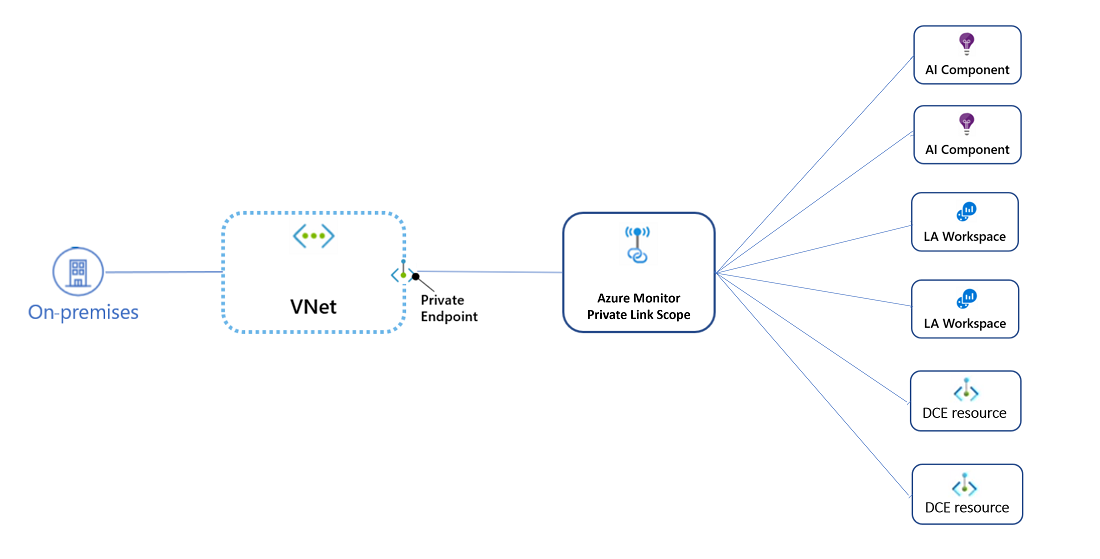
The private endpoint uses a separate IP address within the VNet address space allowing AMPLS resources to be accessed privately from the VNet without using public IPs. Traffic from the clients on the VNet to Azure Monitor resources traverse the Azure backbone eliminating exposure to the public internet. Applications in the VNet can connect to resources in the AMPLS over the private endpoint seamlessly, using the same connection strings and authorization mechanisms that they would use otherwise.
Shared global and regional endpoints
When you create an AMPLS, your DNS zones map Azure Monitor endpoints to private IPs to send traffic through the private link. Some Azure Monitor resources use resource-specific endpoints while others use shared endpoints. A resource may also use resource-specific endpoint for one function but shared endpoints for another function. You need to understand the difference between each and how each Azure Monitor resource uses them to properly configure your private link and the resources in your AMPLS.
Resource-specific endpoints
Resource-specific endpoints are unique to a specific resource and must be configured individually. Adding a resource-specific endpoint to the AMPLS only allows private link access to that specific resource.
- Log Analytics workspace ingestion
- Data collection endpoints
Shared endpoints
Shared endpoints are shared across multiple resources of the same type. Adding a single resource to the AMPLS uses shared endpoints will change the DNS configuration that affects traffic to all resources that uses shared endpoints.
- Log Analytics workspace queries
- Application insights ingestion
For example, Log Analytics workspaces use shared endpoints for log queries. When you add a single Log Analytics workspace to an AMPLS, the DNS for that VNet is updated to access that shared endpoint over private link. Since all Log Analytics workspaces share that endpoint, queries to all Log Analytics workspaces from that VNet will use the private IPs.
You should use a single AMPLS for all networks that share the same DNS. Creating multiple AMPLS resources will cause Azure Monitor DNS zones to override each other and break existing environments. See Plan by network topology for further details and examples.
AMPLS Resources
The resources in the following table can be added to an AMPLS.
| Resource | Description |
|---|---|
| Log Analytics workspaces | Support ingestion of log data and queries using KQL. Add Log Analytics workspaces to the AMPLS to enable ingestion and queries. Ingestion uses a resource-specific endpoint while queries use a shared endpoint. |
| Data collection endpoints (DCE) | Azure resources that define a unique set of endpoints related to data collection, configuration, and ingestion in Azure Monitor. DCEs use resource-specific ingestion. Configuring a DCE for a set of clients doesn't affect ingestion of telemetry of other clients in the same VNet. Add DCEs to the AMPLS to support the following: - Data ingestion for Azure Monitor workspaces. - Retrieve configuration for clients that use Azure Monitor agent (AMA) such as virtual machines and Kubernetes clusters. |
| Application insights | Ingestion of data from monitored applications including live metrics, the .NET Profiler, and the debugger. Endpoints handling ingestion for Application insights are global. |
Note
Azure Monitor workspaces
Azure Monitor workspaces support ingestion of metric data and queries using PromQL. While Azure Monitor workspaces can be accessed with private link, they aren't added to the AMPLS. When an Azure Monitor workspace is created, a DCE is automatically created for it. This DCE needs to be added to the AMPLS to support data ingestion for the workspace. To support queries, a managed private endpoint needs to be created for the workspace and added to the AMPLS.
Access modes
Access modes for the AMPLS control how private links affect your network traffic. Each AMPLS has a separate access mode for ingestion and queries, and you can choose different access modes for each VNet connected to the same AMPLS:
- Open mode lets the connected VNet reach both private link resources and resources outside the AMPLS. It supports gradual onboarding but doesn't prevent data exfiltration.
- Private Only mode lets the connected VNet reach only private link resources in the AMPLS. It's the most secure option and prevents data exfiltration.
For full descriptions, diagrams, and guidance on choosing and overriding access modes, see Design Azure Monitor private link configuration.
Pricing
For pricing details, see Azure Private Link pricing.
Next steps
- Design your Azure Private Link setup.
- Learn how to configure your private link.