Note
Access to this page requires authorization. You can try signing in or changing directories.
Access to this page requires authorization. You can try changing directories.
This article provides early guidance so customers can understand migration impact, confirm readiness, and prepare the required billing configuration for a smooth transition to the Microsoft Customer Agreement (MCA).
Overview
Before migrating from an Enterprise Agreement (EA), Microsoft Customer Agreement (MCA), or pay-as-you-go subscriptions to a Microsoft Customer Agreement (MCA), review this checklist and follow the required steps to ensure a smooth transition. This checklist helps you:
- Validate readiness and dependencies
- Minimize post-migration issues
- Align stakeholders on required actions
- Top customer actions with MCA.
Validate contract and roles
Confirm access to both the source and the destination MCA as a Billing Account Owner.
- EA → MCA: Ensure EA Admin and MCA Billing Account Owner roles are assigned.
- PAYG → MCA: Ensure a Global Admin for the PAYG subscription and MCA Billing Account Owner role.
- MCA → MCA: Confirm Billing Account Owner roles exist in both source and destination MCA billing accounts.Learn More
No service downtime
Azure services in your subscription keep running without any interruption. We only transition the billing relationship for your Azure subscriptions. There are no changes to existing resources, resource groups, or management groups.
Note
Marketplace Private Offers are market specific. Subscriptions that are associated with Marketplace Private Offers may be blocked from transfer during a region change. This happens when the Private Offer is published for a specific market and isn't available in the destination market (EA–Sweden to MCA–United States). This mismatch results in a validation failure. The independent software vendor (ISV) defines market eligibility for a Private Offer at the time of offer publishing, and it can't be modified after the offer is accepted. To proceed with the subscription transfer to MCA, the existing Private Offer must be canceled and repurchased, if available in the target market.
Download historical data
- Export historical cost and usage data before migration. Historical data doesn't transfer to MCA. We recommend that you save invoices and customer reports for compliance. View and download Azure usage and charges - Microsoft Cost Management | Microsoft Learn
- You can continue to view historical charges in the Azure portal under the source billing scope, depending on your billing roles:
- EA → MCA: Historical charges remain visible in Cost Analysis after migration if you're an Enterprise Administrator or Department Administrator on the EA enrollment. Subscription ownership alone doesn't provide access to EA historical charges because subscription roles don't grant access to the EA billing scope.
- MCA → MCA: Billing Account Owners and Billing Profile Owners/Contributors can continue to view all historical MCA charges in the Azure portal under the source MCA billing scope. Subscription owners without MCA billing roles can't access historical billing data because they don't have permissions to the MCA billing scope.
- PAYG → MCA: Subscription owners must download all historical invoices and usage data before the transfer, as this information is no longer accessible once the subscription is migrated.
Review billing hierarchy changes
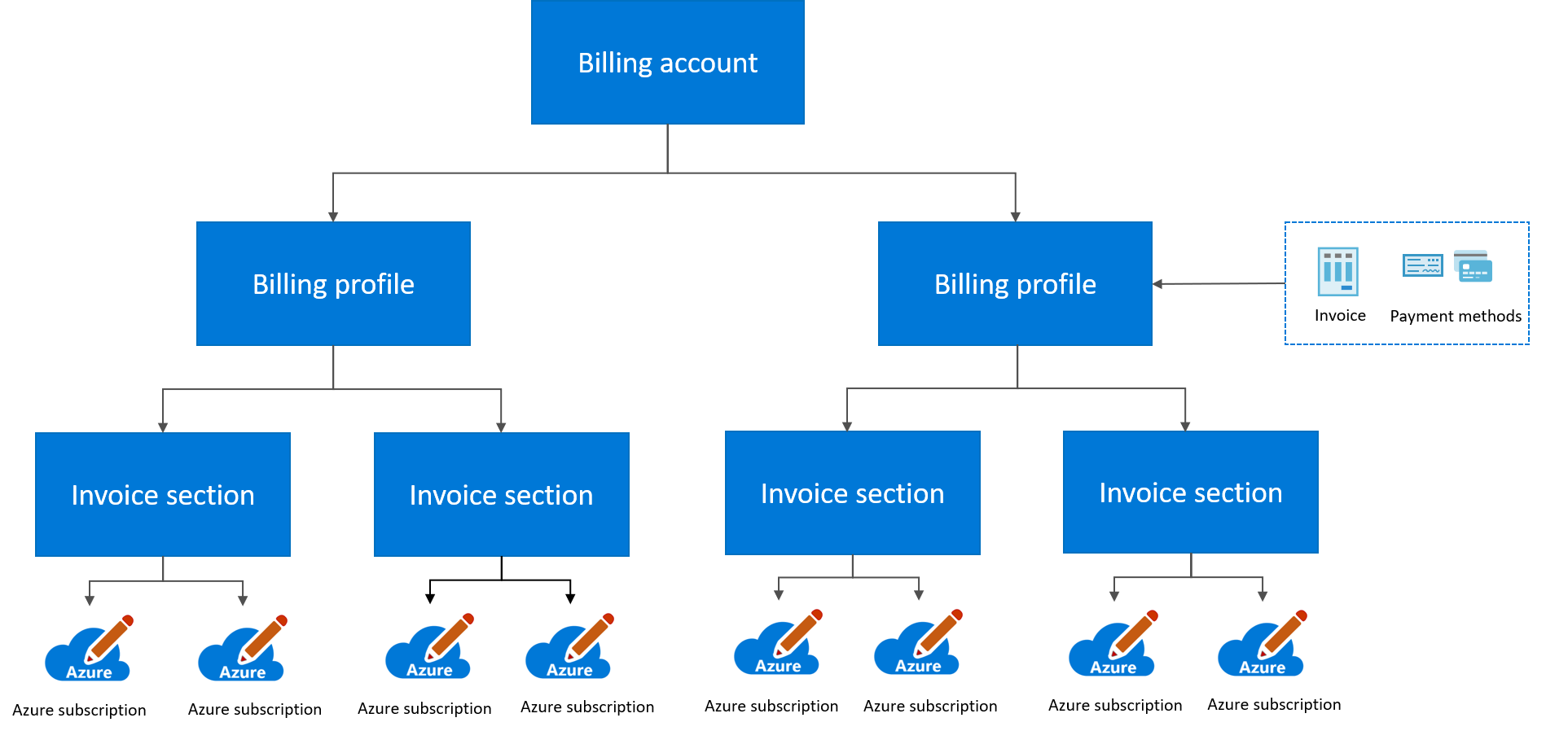
You use the billing account to manage billing for your Microsoft customer agreement.
- Understand the MCA structure: Billing Account → Billing Profile → Invoice Section → Subscription.
- Each billing profile generates a separate monthly invoice. For example, three billing profiles result in three monthly invoices.
- Map existing departments or subscriptions to MCA invoice sections.
- EA → MCA: You use an invoice section to organize your costs based on your needs, similar to departments in your Enterprise Agreement enrollment. Department becomes invoice sections and department administrators become owners of the respective invoice sections. Enterprise administrators become owners of the billing account and billing profile. Learn More
Identify changes related to Savings Plans and Reservations
Azure Savings Plan
Non-USD currency savings plans:
- Savings Plans from the source don't transfer.
- They're canceled in the source and automatically repurchased in USD in the destination billing account.
Important details for repurchased Savings Plans:
- Each new Savings Plan is billed monthly, regardless of the original billing frequency.
- Each new Savings Plan is priced as the USD equivalent of the original plan. Learn More
- Each new Savings Plan has a one year term, even if the original was three years.
- If the original plan was one year, savings benefits remain the same.
- If moving from three years to one year, expect reduced savings benefits due to discount differences.
- To maintain previous savings levels, work with your Microsoft Account Team to purchase another one year Savings Plan. Recommendations for this new one year plan may take up to two days to appear in the Azure portal.
- Customers with three year plans who want to retain discounts should immediately after transfer contact Azure Support to purchase new three year plans in the destination billing account.
For more details, please review: Azure product transfer hub - Microsoft Cost Management | Microsoft Learn
Reservations
Self-service reservation transfers: Supported when there's no currency change or if the reservation is paid upfront. Learn More
- Currency change scenario:
- If there's a currency change during or after enrollment transfer, monthly paid reservations are canceled for the source.
- Cancellation occurs at the time of the next monthly payment for each individual reservation.
- This cancellation is intentional and only affects monthly reservation purchases.
Cost management & reporting
- Recreate the following aspects under MCA:
- Budgets Learn More
- Alerts Learn More
- Exports Learn More
- Cost Allocation rules Learn More
- Cost Management Custom/shared views
- Partner ID associations aren't copied over to the MCA during the billing transition. You must readd any partner ID associations manually after the transition. Learn More
- Update Power BI connect:
- Use Billing Profile ID instead of EA enrollment number. Learn More
- Management groups: Subscriptions in management groups under a Microsoft Customer Agreement aren’t supported in Cost Management. Cost Management + Billing is managed with APIs, automation scripts, and Azure portal functionality. Learn More
- Cost Views: Rebuild dashboards and reports using the Billing Account ID, Billing Profile ID, or Invoice Sections ID instead of Management Group scope.
- APIs: Update endpoints to align with MCA's billing structure.
- Automation: Modify scripts that rely on Management Group-level scoping.
API & automation updates
Replace legacy APIs with MCA APIs and updated billing properties. APIs & Automation need to be recreated in MCA.
- Update automation scripts for:
- Update any programming code to replace EA API calls with MCA API calls. Learn More
- Subscription vending
- Automatic purchases
- Third-party cost tools (Terraform, Azure Resource Manager, Bicep)
Note
EA and MCA API schemas differ. Learn More
Technical dependencies
- After you migrate to MCA, the transition is an evolutionary process involving both contractual and technical changes. As billing property IDs are updated, ensure all workloads are aligned with the new Billing Account ID, Billing Profile ID, and Invoice Section ID to maintain billing accuracy and business continuity.
- Check compatibility of dashboards (for example, Emissions Impact Dashboard) and update references to MCA billing scope.
Invoice setup
- Changes in billing constructs
- Getting started with MCA billing Learn More
- Organizing your invoice based on your business needs Learn More
Payment setup
- MCA remit-to information differs from EA or PAYG. Learn More
- Notify your accounts payable team.
- Create separate records for EA and MCA invoices.
- Expect a final invoice from the source and new monthly MCA invoices.
- For bank detail verification letters, e-invoicing, and third-party invoicing requirements, contact your Microsoft Account team.
Pricing calculator role changes
After you transition to an MCA, access to negotiated pricing in the Azure Pricing Calculator is restricted to users with specific billing roles, and the permissions required differ from the permissions under an EA.
Under MCA, users must have permissions at the billing profile level to view negotiated pricing.
- Supported roles include:
- Billing Profile Owner
- Billing Profile Contributor
- Billing Profile Reader
- Invoice Manager
Important
Users without these roles see retail pricing only in the Azure Pricing Calculator.
Tax and compliance
- Tax exemption certificates: If your account has a tax exemption certificate, create an Azure support request to associate it with your MCA account.
- Billing profile alignment and currency usage: The billing profile's sold-to and bill-to region must correspond to the MCA market region.
Support plan
- Support plans don't transfer to MCA. You need to repurchase a Support Plan on your MCA.
- Cancel existing plans per contract terms, otherwise you continue to be billed until the end of your contract terms.
- Migration may affect Unified Support subscriptions. Contact your Microsoft Account Team.