Note
Access to this page requires authorization. You can try signing in or changing directories.
Access to this page requires authorization. You can try changing directories.
Unsponsored guests—guest users without a valid sponsor assigned—represent a security and compliance risk in your organization. Lifecycle Workflows help you automate the management and removal of unsponsored guests. Microsoft Entra ID Governance includes a built-in Unsponsored guest cleanup (Preview) workflow template that automates the detection and management of unsponsored guests.
This article walks you through managing unsponsored guests using the Unsponsored guest cleanup (Preview) workflow template.
Prerequisites
Using this feature requires Microsoft Entra ID Governance or Microsoft Entra Suite licenses. To find the right license for your requirements, see Microsoft Entra ID Governance licensing fundamentals.
Important
This functionality is subject to the guest billing model. For details, see Microsoft Entra ID Governance licensing for guest users.
Manage unsponsored guests using the Microsoft Entra admin center
To create a workflow for managing unsponsored guests:
Sign in to the Microsoft Entra admin center as at least a Lifecycle Workflows Administrator.
Browse to ID Governance > Lifecycle workflows > Workflows.
On the workflow screen, select Create new workflow.
On the template selection screen, find and select the Unsponsored guest cleanup (Preview) workflow template.
Note
This template is specifically designed for leaver workflows.
Enter basic details for your workflow:
- Display name: A descriptive name for your workflow
- Description: Information about the workflow's purpose
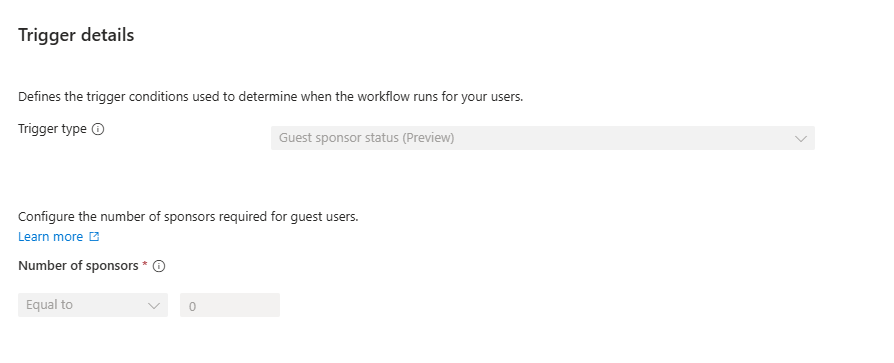
Configure the workflow execution conditions. The trigger type is set to Guest sponsor status (Preview) by the template and can't be changed.
Note
The Number of sponsors condition is set to Equal to 0 and is not currently configurable. This workflow targets users with no sponsors assigned.
Configure the workflow tasks based on your organization's requirements.
Select Review + Create to finalize and enable the workflow.
Add email notifications for unsponsored guest removal (optional)
The Unsponsored guest cleanup (Preview) template includes the Delete User Account task by default. You can optionally add the Send email about unsponsored guest removal (Preview) task to notify specified recipients when unsponsored guests are being removed from your organization.
Note
For detailed information about adding and configuring the email task, including recipient options, email customization, and dynamic attributes, see Lifecycle Workflow tasks and definitions - Send email about unsponsored guest removal (Preview).