Note
Access to this page requires authorization. You can try signing in or changing directories.
Access to this page requires authorization. You can try changing directories.
Applies to: ✔️ Front Door Standard ✔️ Front Door Premium
Azure Front Door supports end-to-end TLS encryption. When you add a custom domain to Azure Front Door, you must use HTTPS and define a TLS policy. A TLS policy controls the TLS protocol version that Azure Front Door uses during the TLS handshake. Azure Front Door supports TLS 1.2 and TLS 1.3, and it also supports mutual TLS (mTLS) authentication. For more information, see Mutual TLS authentication in Azure Front Door.
Azure Front Door Standard and Premium provide predefined and custom TLS policies. If you use Azure Front Door (classic) or Microsoft CDN (classic), you continue to use the minimum TLS 1.2 version.
During the TLS handshake, Azure Front Door negotiates the protocol version with the client. For a minimum TLS version of 1.2, it first attempts to establish TLS 1.3 and then TLS 1.2.
When Azure Front Door initiates TLS traffic to the origin, it attempts to negotiate the best TLS version that the origin can reliably and consistently accept. Front Door supports TLS 1.2 and TLS 1.3 for origin connections.
Note
Clients with TLS 1.3 enabled must support one of the Microsoft Security Development Lifecycle (SDL) compliant elliptic (EC) curves, including secp384r1, secp256r1, and secp521r1. Use one of these curves as the preferred curve during requests to avoid increased TLS handshake latency caused by multiple round trips to negotiate a supported EC curve.
Choose a TLS policy
Select a predefined policy for a Azure-managed security configuration, or select a custom policy when you need control over the minimum TLS protocol version.
Predefined TLS policies
The Microsoft Security team configures predefined policies based on security best practices and recommendations. Use the newest TLS policy to get the most current TLS security configuration.
Policy names identify their minimum TLS version and the year in which they were configured. By default, Azure Front Door selects TLSv1.2_2023. TLSv1.2_2022 maps to the minimum TLS 1.2 version in the previous design.
The following table lists the minimum protocol version for each predefined policy. The cipher suite order determines the priority order during TLS negotiation.
| OpenSSL | TLSv1.2_2023 | TLSv1.2_2022 |
|---|---|---|
| Minimum protocol version | 1.2 | 1.2 |
| Supported protocol | 1.3/1.2 | 1.3./1.2 |
| TLS_AES_256_GCM_SHA384 | Yes | Yes |
| TLS_AES_128_GCM_SHA256 | Yes | Yes |
| ECDHE-RSA-AES256-GCM-SHA384 | Yes | Yes |
| ECDHE-RSA-AES128-GCM-SHA256 | Yes | Yes |
| ECDHE-RSA-AES256-SHA384 | Yes | |
| ECDHE-RSA-AES128-SHA256 | Yes |
Custom TLS policies
A custom TLS policy gives you control over the minimum TLS protocol version.
Note
TLS 1.3 is always enabled regardless of the minimum TLS version that you select.
Prerequisites
- An Azure Front Door profile. For more information, see Create an Azure Front Door.
- A custom domain. If you don't have one, purchase a domain from a domain provider. For more information, see Buy a custom domain name.
- If you use Azure DNS to host your domain, delegate the domain provider's domain name system (DNS) to Azure DNS. For more information, see Delegate a domain to Azure DNS.
Configure a TLS policy
In the Azure portal, go to the Azure Front Door profile that you want to configure.
Under Settings, select Domains, and then select + Add.
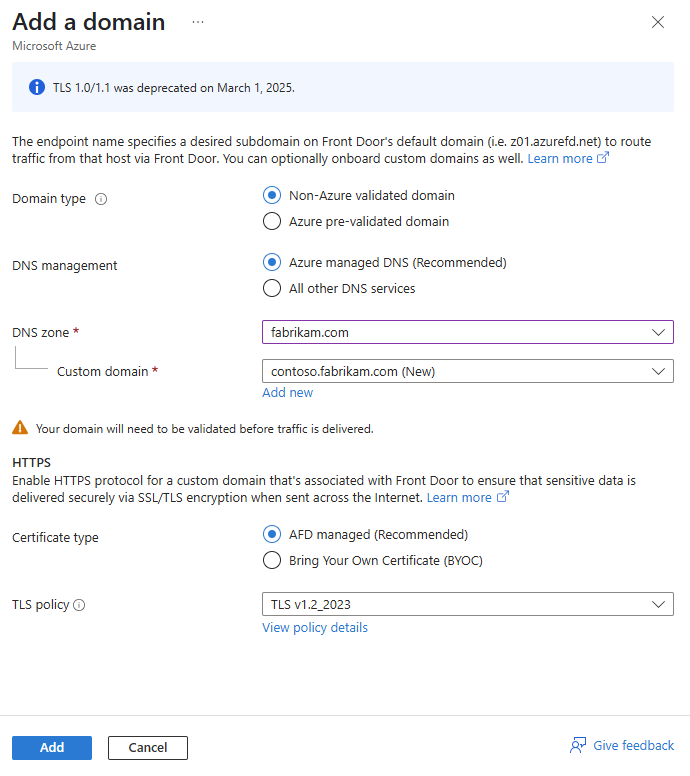
On Add a domain, follow the instructions in Configure a custom domain on Azure Front Door and Configure HTTPS on an Azure Front Door custom domain to configure the domain.
For TLS policy, select a predefined policy from the dropdown list.
Note
To reuse a custom TLS policy configuration from another domain, select the domain in Reuse setting from other domain.
- After you configure the TLS policy, select Add to add the domain.