Note
Access to this page requires authorization. You can try signing in or changing directories.
Access to this page requires authorization. You can try changing directories.
Note
Azure AI Search is available through the Azure portal, REST APIs, and Azure SDKs.
If you're using built-in skills for AI enrichment in Azure AI Search, you can enrich a small number of documents for free, up to 20 transactions per index per day. For larger or more frequent workloads, you should attach a billable Azure AI services resource to your skillset.
Azure AI Search uses dedicated, internally hosted resources to execute built-in skills backed by Azure AI services and requires a Azure AI services resource solely for billing purposes. The exception is the Azure Content Understanding skill, which uses your resource for both billing and processing.
A Azure AI services resource provides access to multiple services within Azure AI services. When you specify it in a skillset, Microsoft is able to charge you for using the following services:
- Azure Vision in Azure AI services for image analysis, optical character recognition (OCR), and multimodal embeddings.
- Azure Language in Azure AI services for language detection, entity recognition, sentiment analysis, and key phrase extraction.
- Azure Translator in Azure AI services for machine text translation.
Skillset processing is billed to the underlying service of each skill. Azure AI Search consolidates charges for Azure AI services into a single Azure AI services resource. For example, if you use the Image Analysis and Language Detection skills, charges for Azure Vision and Azure Language appear on the same bill for your Azure AI services resource. All other resources are billed independently.
To attach a Azure AI services resource, provide connection information in the skillset. You can use a key-based or keyless approach.
Prerequisites
Connectivity over a public endpoint, unless your search service meets the creation date, tier, and region requirements for private connections to a Azure AI services resource.
A AI service resource with the
AIServicesAPI kind. You can verify the API kind on the resource's Overview page in the Azure portal: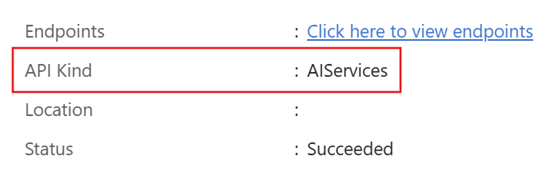
Note
If your Azure AI services resource is configured to use a private endpoint, Azure AI Search can connect using a shared private link. For more information, see Shared private link resource limits.
Starting with the 2025-11-01-preview, skillsets support the
AIServicesAPI kind. The previousCognitiveServicesand classic Azure AI multi-service accounts continue to work, but for new skillsets, we recommend that you useAIServices.
Bill through a keyless connection
You can use a managed identity and permissions to attach a Azure AI services resource. The advantage of this approach is that billing is keyless and doesn't have region requirements.
As with keys, the details you provide about the resource are used for billing, not connections. All API requests made by Azure AI Search to Azure AI services for built-in skills processing remain internal and managed by Azure.
To bill through a keyless connection:
On your Azure AI Search service, configure a managed identity. Both system-assigned and user-assigned identities are supported.
On your AI service resource, assign the Cognitive Services User role to the managed identity of your search service.
Configure a skillset to use the managed identity. You can use the Azure portal, the latest stable version of Skillsets - Create Or Update (REST API), or an Azure SDK package that provides the syntax.
@odata.typeis always#Microsoft.Azure.Search.AIServicesByIdentity.subdomainUrlis the endpoint of your AI service resource. You can use thehttps://<resource-name>.cognitiveservices.azure.cnformat, both of which are available on the Keys and Endpoint page in the Azure portal.Other properties are specific to the type of managed identity, as shown in the following REST API examples.
Here's a sample skillset configuration for a system-assigned managed identity. In this scenario, you must set
identitytonull.POST https://[service-name].search.azure.cn/skillsets/[skillset-name]?api-version=2026-04-01 api-key: [admin-key] Content-Type: application/json { "name": "my-skillset", "skills": [ // Skills definition goes here ], "cognitiveServices": { "@odata.type": "#Microsoft.Azure.Search.AIServicesByIdentity", "description": "A sample configuration for a system-assigned managed identity.", "identity": null } }
Bill through a resource key
By default, Azure AI Search charges for transactions using the key of a Azure AI services resource. This approach is generally available. You can use the Azure portal, a stable REST API version, or an equivalent Azure SDK to add the key to a skillset.
There are two supported key types:
#Microsoft.Azure.Search.CognitiveServicesByKeycalls the regional endpoint.#Microsoft.Azure.Search.AIServicesByKeycalls the subdomain. We recommend this type because it supports shared private links and doesn't have regional requirements relative to the search service.
Your Azure AI services resource must be in the same region as your search service. Choose an Azure AI Search region that provides Azure AI services integration, which is indicated by the AI enrichment column. For more information about the same-region requirement, see How the key is used.
If you don't specify the cognitiveServices property, your search service attempts to use the free enrichments available to your indexer each day. Execution of billable skills stops at 20 transactions per indexer invocation, and a "Time Out" message appears in the indexer execution history.
Sign in to the Azure portal.
Create a Azure AI services resource in the same region as your search service.
From the left pane, select Resource Management > Keys and Endpoint.
Copy one of the keys.
Add the key to a skillset definition.
If you're using the Import data wizard, select the Azure AI services resource. The wizard adds the resource key to your skillset definition.
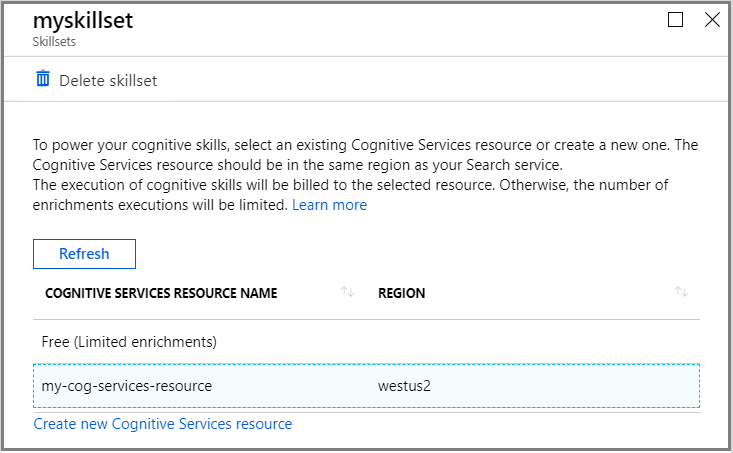
For a new or existing skillset, provide the key in skillset definition.
Note
The portal automatically attaches the key of type #Microsoft.Azure.Search.CognitiveServicesByKey.
Remove the key
Enrichments are billable operations. If you no longer need to call Azure AI services, follow these instructions to remove the key and prevent use of the Azure AI services resource.
Without the key, the skillset reverts to the default allocation of 20 free transactions per indexer per day. Execution of billable skills stops at 20 transactions, and a "Time Out" message appears in the indexer execution history when the allocation is used.
Go to your search service in the Azure portal.
Under Search management > Skillsets, select a skillset from the list.
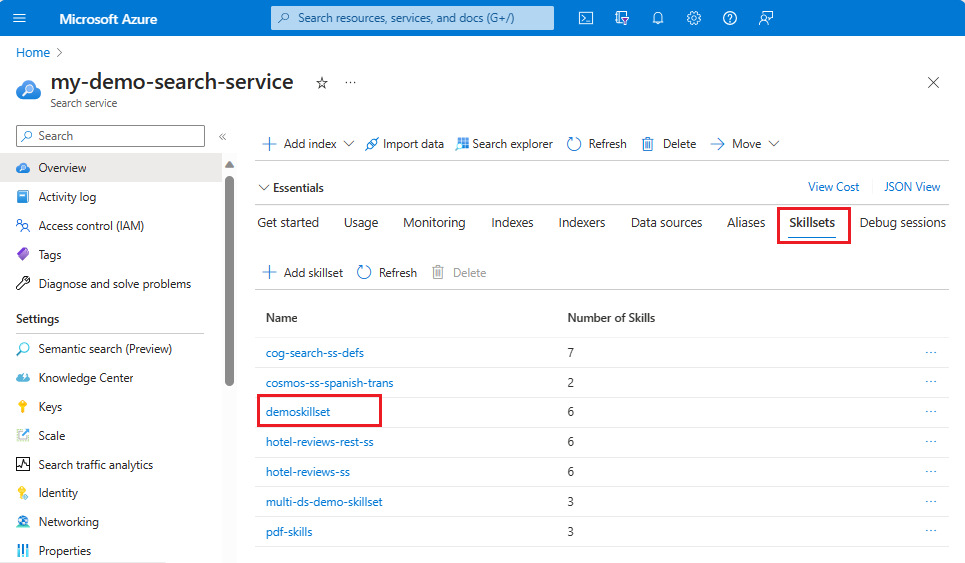
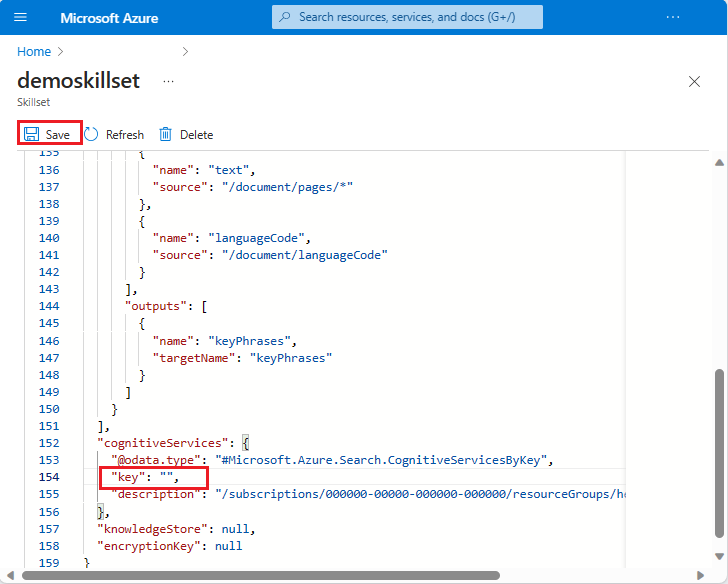
Scroll to the
"cognitiveServices"section in the file.Delete the key value from the JSON.
Save the skillset.
How the key is used
Billing goes into effect when API calls to a Azure AI services resource exceed 20 API calls per indexer per day. You can reset the indexer to reset the API count.
Keyless and key-based connections are used for billing, but not for connections related to enrichment operations.
For key-based connections, a search service connects over the internal network to a Azure AI services resource located in the same physical region. Most regions that offer Azure AI Search also offer other Azure services. If you attempt AI enrichment in a region that doesn't have both services, you see this message: "Provided key isn't a valid CognitiveServices type key for the region of your search service."
For keyless connections, a search service authenticates using its identity and role assignment and targets a Azure AI services resource. The resource is specified as a fully qualified URI, and the URI includes a unique subdomain.
Indexers can be configured to run in a private execution environment for dedicated processing using just the search nodes of your own search service. Even if you're using a private execution environment, Azure AI Search still uses its internally provisioned resources to perform all skill enrichments.
Note
Some built-in skills, such as the Text Translation skill, are based on non-regional Azure AI services services. If you use a non-regional skill, your request might be serviced in a different region than the Azure AI Search region. For more information about non-regional services, see the product availability by region page.
Public connection requirements
Depending on when your search service was created, its pricing tier, and its region, billing for built-in skills can require a public connection from Azure AI Search to your Azure AI services resource. Disabling public network access breaks billing in some scenarios. Review the requirements for connections through a shared private link to determine whether your search service requires a public connection.
If you can't use the public network, you can configure a Custom Web API skill implemented with an Azure Function that supports private endpoints and add your AI service resource to the same VNET. In this scenario, you can call your AI service resource directly from the custom skill using private endpoints.
Key requirements special cases
Custom Entity Lookup is metered by Azure AI Search, but it requires a Azure AI services resource key to unlock transactions beyond 20 per indexer per day. For this skill only, the resource key unblocks the number of transactions but is unrelated to billing.
Free enrichments
AI enrichment offers a small quantity of free processing of billable enrichments so that you can complete short exercises without having to attach an external resource. Free enrichments are 20 documents per indexer per day. You can reset the indexer to reset the counter if you want to repeat an exercise.
Some enrichments are always free:
Utility skills that don't call Azure AI services (namely the Conditional, Document Extraction, Shaper, Text Merge skills) aren't billable.
Text extraction from PDF documents and other application files is nonbillable. Text extraction, which occurs during document cracking, isn't an AI enrichment, but it occurs during AI enrichment and is thus noted here.
Billable enrichments
During AI enrichment, Azure AI Search calls APIs for built-in skills that are based on Azure Vision, Azure Language, and Azure Translator.
Billable built-in skills that make backend calls to external services include:
- Entity Linking
- Entity Recognition
- Image Analysis
- Key Phrase Extraction
- Language Detection
- OCR
- Personally Identifiable Information (PII) Detection
- Sentiment
- Text Translation
- Azure Vision multimodal embeddings
A query-time vectorizer backed by the Azure Vision multimodal embedding model is also a billable enrichment.
Image extraction is an Azure AI Search operation that occurs when documents are cracked prior to enrichment. Image extraction is billable on all pricing tiers, except for 20 free daily extractions on the free tier. Image extraction costs apply to image files inside blobs, embedded images in other files (PDF and other app files), and images extracted using Document Extraction. For image extraction pricing, see the Azure AI Search pricing page.
Tip
To lower the cost of skillset processing, enable incremental enrichment to cache and reuse any enrichments that are unaffected by changes made to a skillset. Caching requires Azure Storage (see pricing), but the cumulative cost of skillset execution is lower if existing enrichments can be reused, especially for skillsets that use image extraction and analysis.
Example: Estimate costs
The prices shown in this section are hypothetical and used to illustrate the estimation process. Your costs could be lower. For the actual price of transactions, see Azure AI services pricing.
To estimate the costs associated with Azure AI Search indexing, start with an idea of what an average document looks like so you can run some numbers. For example, you might approximate:
- 1,000 PDFs
- Six pages each
- One image per page (6,000 images)
- 3,000 characters per page
Assume a pipeline that consists of document cracking of each PDF, image and text extraction, OCR of images, and entity recognition of organizations.
For document cracking with text and image content, text extraction is currently free. For 6,000 images, assume $1 for every 1,000 images extracted. That's a cost of $6.00 for this step.
For OCR of 6,000 images in English, the OCR cognitive skill uses the best algorithm (DescribeText). Assuming a cost of $2.50 per 1,000 images to be analyzed, you would pay $15.00 for this step.
For entity extraction, you'd have a total of three text records per page. Each record is 1,000 characters. Three text records per page multiplied by 6,000 pages equal 18,000 text records. Assuming $2.00 per 1,000 text records, this step would cost $36.00.
Putting it all together, you'd pay about $57.00 to ingest 1,000 PDF documents of this type with the described skillset.