Note
Access to this page requires authorization. You can try signing in or changing directories.
Access to this page requires authorization. You can try changing directories.
Point-in-time restore protects against accidental deletion or corruption by enabling you to restore block blob data to an earlier state. This feature is useful in scenarios where a user or application accidentally deletes data or where an application error corrupts data. Point-in-time restore also enables testing scenarios that require reverting a data set to a known state before running further tests.
Point-in-time restore supports general-purpose v2 storage accounts in the standard performance tier only. You can restore only data in the hot and cool access tiers by using point-in-time restore. Point-in-time restore isn't currently supported in accounts that have a hierarchical namespace.
To learn how to enable point-in-time restore for a storage account, see Perform a point-in-time restore on block blob data.
Recommended data protection configuration
Point-in-time restore is part of a comprehensive data protection strategy and builds on three other features that you must enable first: blob soft delete, blob versioning, and change feed. Point-in-time restore adds container-level recovery on top of these features, so you can revert a set of block blobs to an earlier state rather than restoring objects one at a time.
Point-in-time restore protects against data corruption and accidental blob deletion, but it doesn't protect against the deletion of a container or storage account. For protection against container deletion, enable Container Level Soft Delete. For account-level protection, enable Azure Backup. To learn more about Azure's recommendations for data protection, see Data Protection Overview.
How point-in-time restore works
To enable point-in-time restore, create a management policy for the storage account and specify a retention period. During the retention period, you can restore block blobs from the present state to a state at a previous point in time.
To initiate a point-in-time restore, call the Restore Blob Ranges operation and specify a restore point in UTC time. You can specify lexicographical ranges of container and blob names to restore, or omit the range to restore all containers in the storage account. Each restore operation supports up to 10 lexicographical ranges.
Azure Storage analyzes all changes that are made to the specified blobs between the requested restore point, specified in UTC time, and the present moment. The restore operation is atomic, so it either succeeds completely in restoring all changes, or it fails. If there are any blobs that can't be restored, the operation fails, and read and write operations to the affected containers resume.
The following diagram shows how point-in-time restore works. One or more containers or blob ranges is restored to its state n days ago, where n is less than or equal to the retention period defined for point-in-time restore. The effect is to revert write and delete operations that happened during the retention period.
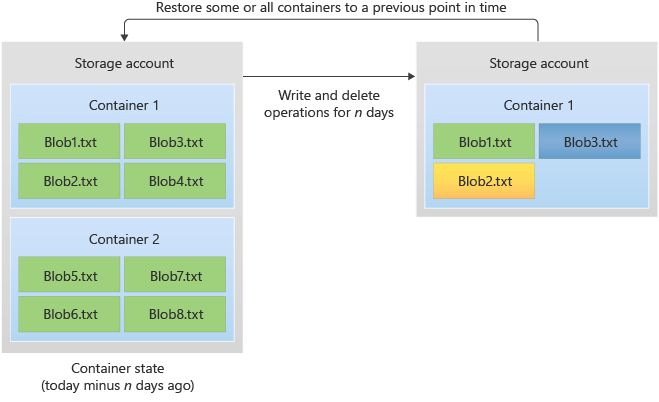
You can run only one restore operation on a storage account at a time. You can't cancel a restore operation once it's in progress, but you can perform a second restore operation to undo the first operation.
The Restore Blob Ranges operation returns a restore ID that uniquely identifies the operation. To check the status of a point-in-time restore, call the Get Restore Status operation with the restore ID returned from the Restore Blob Ranges operation.
Important
When you perform a restore operation, Azure Storage blocks data operations on the blobs in the ranges being restored for the duration of the operation. Read, write, and delete operations are blocked in the primary location. For this reason, operations such as listing containers in the Azure portal might not perform as expected while the restore operation is underway.
If the storage account is geo-replicated, read operations from the secondary location can proceed during the restore operation.
Caution
Point-in-time restore supports restoring against operations that acted on block blobs only. You can't restore operations that acted on containers. For example, if you delete a container from the storage account by calling the Delete Container operation, you can't restore that container by using a point-in-time restore operation. Rather than deleting an entire container, delete individual blobs if you might want to restore them later.
Prerequisites and configuration
To use point-in-time restore, enable the following Azure Storage features before you enable point-in-time restore:
To learn more about Azure's recommendations for data protection, see Data protection overview.
Caution
After you enable blob versioning for a storage account, every write operation to a blob in that account creates a new version. For this reason, enabling blob versioning might result in extra costs. To minimize costs, use a lifecycle management policy to automatically delete old versions. For more information about lifecycle management, see Optimize costs by automating Azure Blob Storage access tiers.
Retention period for point-in-time restore
When you enable point-in-time restore for a storage account, specify a retention period. You can restore block blobs in your storage account during the retention period.
The retention period starts a few minutes after you enable point-in-time restore. You can't restore blobs to a state before the start of the retention period. For example, if you enabled point-in-time restore on May 1 with a retention of 30 days, then on May 15 you can restore to a maximum of 15 days. On June 1, you can restore data from between 1 and 30 days.
The retention period for point-in-time restore must be at least one day less than the retention period specified for soft delete. For example, if the soft delete retention period is set to seven days, then the point-in-time restore retention period can be between 1 and 6 days.
Note
The retention period that you specify for point-in-time restore has no effect on the retention of blob versions. Blob versions are retained until they are explicitly deleted. To optimize costs by deleting or tiering older versions, create a lifecycle management policy. For more information, see Optimize costs by automatically managing the data lifecycle.
The time that it takes to restore a set of data is based on the number of write and delete operations made during the restore period. For example, an account with 1 million blobs with 3,000 blobs added per day and 1,000 blobs deleted per day requires about two hours to restore to a point 30 days in the past. A retention period and restoration more than 90 days in the past isn't recommended for an account with this rate of change.
Permissions for point-in-time restore
To start a restore operation, a client must have write permissions to all containers in the storage account. To grant permissions to authorize a restore operation by using Microsoft Entra ID, assign the Storage Account Contributor role to the security principal at the level of the storage account, resource group, or subscription.
Feature support
Support for this feature might be impacted by enabling Data Lake Storage Gen2, Network File System (NFS) 3.0 protocol, or the SSH File Transfer Protocol (SFTP). If you've enabled any of these capabilities, see Blob Storage feature support in Azure Storage accounts to assess support for this feature.
Feature interactions
Point-in-time restore depends on several other data protection features and interacts with them in ways that can complicate a restore. Review the following information before enabling point-in-time restore.
Blob versioning, soft delete, and change feed (required prerequisites): You must enable all three features before you can turn on point-in-time restore. This requirement has downstream effects: every write operation creates a new blob version, which can increase storage costs because versioned blobs persist until you explicitly delete them. The point-in-time restore retention period must be set to at least one day less than the soft delete and change feed retention periods. Billing for a restore is based on the amount of change feed data processed.
Immutability policies: You can initiate a restore on an account with immutability policies, but the restore operation doesn't modify blobs protected by a policy. As a result, the restored data might not reflect a consistent state for the requested point in time.
Snapshots: A restore operation doesn't create or delete snapshots. Only the base blob (current version) is restored to its previous state.
Customer-managed failover: Performing a customer-managed failover resets the earliest possible restore point for the storage account. After a failover, you can't restore to a point before the failover occurred. For more details, see Point-in-time restore inconsistencies.
Known limitations
Point-in-time restore for block blobs has the following limitations and known issues:
You can only restore block blobs in a standard general-purpose v2 storage account as part of a point-in-time restore operation. You can't restore append blobs, page blobs, or premium block blobs.
If you delete a container during the retention period, the point-in-time restore operation doesn't restore that container. If you attempt to restore a range of blobs that includes blobs in a deleted container, the point-in-time restore operation fails. To learn about protecting containers from deletion, see Soft delete for containers.
If a blob moves between the hot and cool tiers in the period between the present moment and the restore point, the restore operation restores the blob to its previous tier.
Restoring block blobs in the archive tier isn't supported. For example, if a blob in the hot tier was moved to the archive tier two days ago, and a restore operation restores to a point three days ago, the blob isn't restored to the hot tier. To restore an archived blob, first move it out of the archive tier. For more information, see Overview of blob rehydration from the archive tier.
Partial restore operations aren't supported. Therefore, if a container has archived blobs in it, the entire restore operation fails because restoring block blobs in the archive tier isn't supported.
A block that you upload by using Put Block or Put Block from URL, but don't commit by using Put Block List, isn't part of a blob and so isn't restored as part of a restore operation.
If you include a blob with an active lease in the range to restore, and if the current version of the leased blob is different from the previous version at the timestamp provided for PITR, the restore operation fails atomically. Break any active leases before initiating the restore operation.
Point-in-time restore isn't supported for hierarchical namespaces or operations via Azure Data Lake Storage.
Point-in-time restore isn't supported when the storage account's AllowedCopyScope property is set to restrict copy scope to the same Microsoft Entra tenant or virtual network. For more information, see About Permitted scope for copy operations (preview).
Point-in-time restore isn't supported when version-level immutability is enabled on a storage account or a container in an account. For more information on version-level immutability, see Configure immutability policies for blob versions.
Troubleshooting and monitoring
I can't enable PITR: PITR requires prerequisites of soft delete for blobs, blob versioning, and change feed. Check to see these prerequisites are enabled.
I can't restore to my target time: PITR requires the target timestamp to be within the configured retention window. Check to see the restore time is within retention.
My PITR restore is taking too long: PITR duration depends on data volume and restore scope. Check to see the scope is correct (container or object set). There's currently no way to monitor PITR restoration progress. If a restore appears stalled or takes longer than you expect, open a support request in the Azure portal.
PITR completed but my data is still missing: PITR restores to a selected point in time and scope. Check to see you selected the correct account, container, path, and timestamp.
My storage cost increased after enabling PITR: PITR with versioning and retention increases stored data over time. Check to see lifecycle rules and retention settings are optimized.
Important
If you restore block blobs to a point that is earlier than September 22, 2020, preview limitations for point-in-time restore are in effect. Azure recommends that you choose a restore point that is equal to or later than September 22, 2020 to take advantage of the generally available point-in-time restore feature.
Pricing and billing
There's no charge to enable point-in-time restore. However, enabling point-in-time restore also enables blob versioning, soft delete, and change feed, each of which might result in extra charges.
Billing for point-in-time restore operations is based on the amount of change feed data processed for the restore. You also pay for any storage transactions involved in the restore process.
For more information about pricing for point-in-time restore, see Block blob pricing.